Unlock seamless data-capturing with QR codes
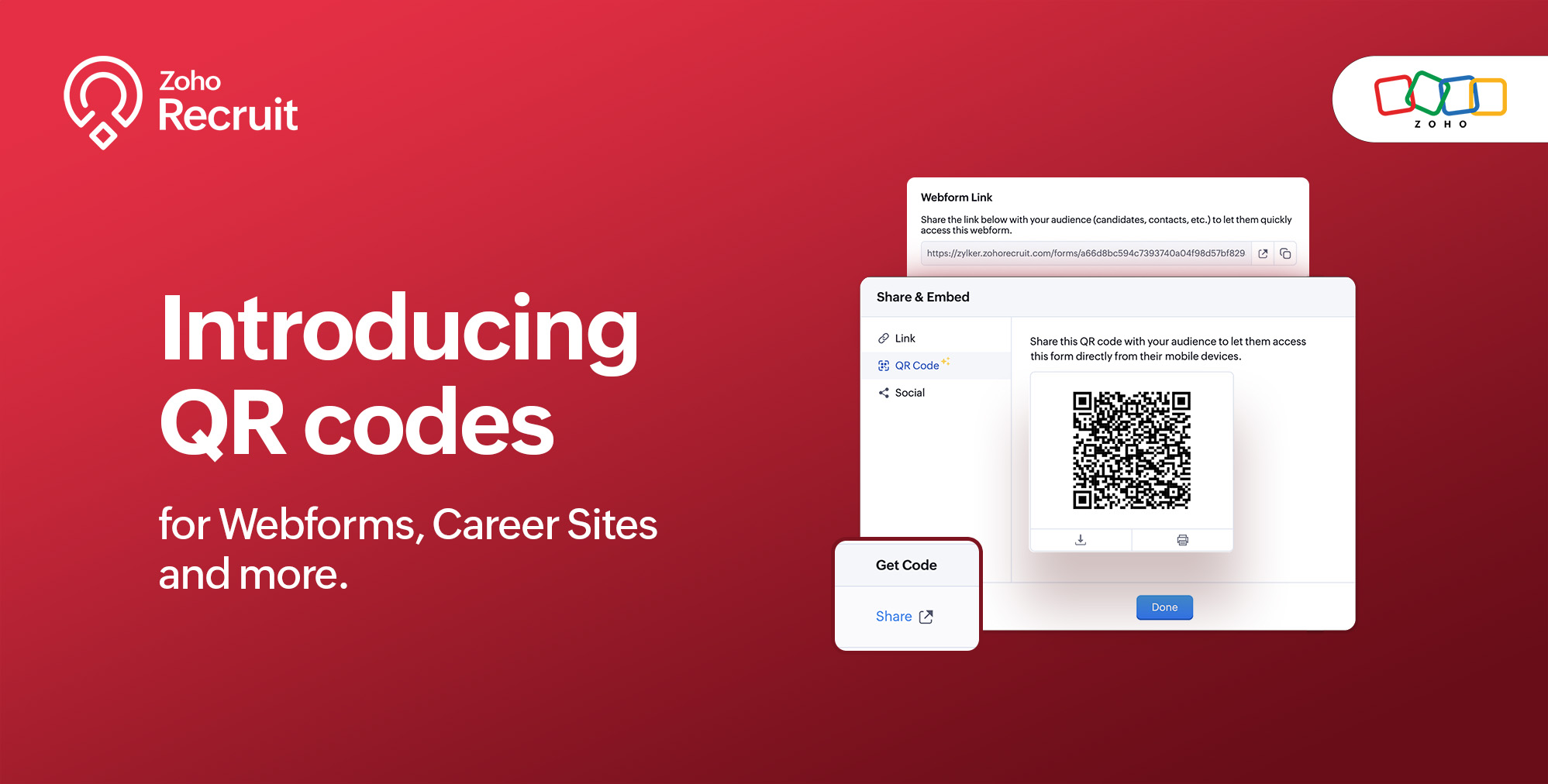
We're thrilled to share a groundbreaking enhancement that will reshape the way you connect with candidates. In our continuous efforts to enhance your recruiting experience, we proudly present the QR Code feature for Webforms, Career Sites and more. This exciting addition aims to simplify and amplify the way you engage with potential hires, promising a more efficient and seamless process.
Benefits
Unleash the full spectrum of advantages that QR Codes bring to your recruitment toolkit.
Effortless Sharing
Simplify the distribution of application forms and job listings by sharing QR codes effortlessly. Whether you're networking at an event, collaborating with partners, or reaching out through various channels, the QR codes make the process seamless. Recruiters can now disseminate vital information with just a scan, facilitating quicker connections with potential candidates.
Enhanced Candidate Experience
Elevate the candidate journey by providing swift and hassle-free access to application forms. The convenience of scanning a QR code enables candidates to engage with your opportunities instantly, reducing friction in the application process. This enhancement aims to leave a positive and lasting impression on candidates, reflecting your commitment to a user-centric recruitment experience.
Time-saving Recruitment
Say goodbye to manual data entry woes. The QR Code feature significantly reduces the time and effort invested in data collection. Candidates can efficiently fill out forms, and recruiters can focus on analyzing and selecting the best-fit talent. This time-saving aspect not only boosts overall productivity but also allows recruiters to invest more energy in strategic aspects of the recruitment process.
Streamlined Data Collection
Embrace a new era of streamlined data collection. With QR codes seamlessly linking candidates to your forms, you eliminate the need for manual information input. This not only reduces the risk of errors but also ensures that your database is populated with accurate and relevant candidate information. Streamlining data collection is a pivotal step towards creating a more efficient and error-free recruitment process.
Use Cases
Explore the various ways in which QR Codes can be seamlessly integrated into your recruitment strategy, catering to diverse scenarios and enhancing your overall outreach.
Event Recruiting
Picture a bustling career fair or industry conference where capturing candidates' attention is crucial. Utilizing QR codes to provide instant access to your Webforms and Career Sites, turns casual interactions with candidates into potential job applications. This empowers recruiters to make a lasting impression at events, fostering a bridge between in-person engagement and online application processes.
Printed Materials
Enrich your printed marketing materials, such as brochures, posters, or promotional handouts, with QR codes. Instead of directing candidates to lengthy URLs, a quick scan seamlessly guides them to relevant application forms or job listings. This not only simplifies the candidate's journey but also transforms your print materials into interactive gateways, blending the physical and digital realms for a more engaging experience.
Onboarding Efficiency
Beyond the recruitment phase, leverage QR codes to streamline the onboarding process for new hires. Include QR codes in onboarding materials, facilitating quick access to essential forms, training materials, and relevant documentation. This enhances the efficiency of the onboarding journey, ensuring a smooth transition for new employees and reinforcing a positive impression from the start.
Cross-Platform Consistency
Achieve cross-platform consistency by incorporating QR codes across various channels. Whether engaging candidates at events, through printed materials, or in the digital landscape, the QR Code feature ensures a unified application experience. This consistency not only reinforces your brand identity but also simplifies the candidate journey, making it seamless and accessible, regardless of the engagement platform.
How to get started?
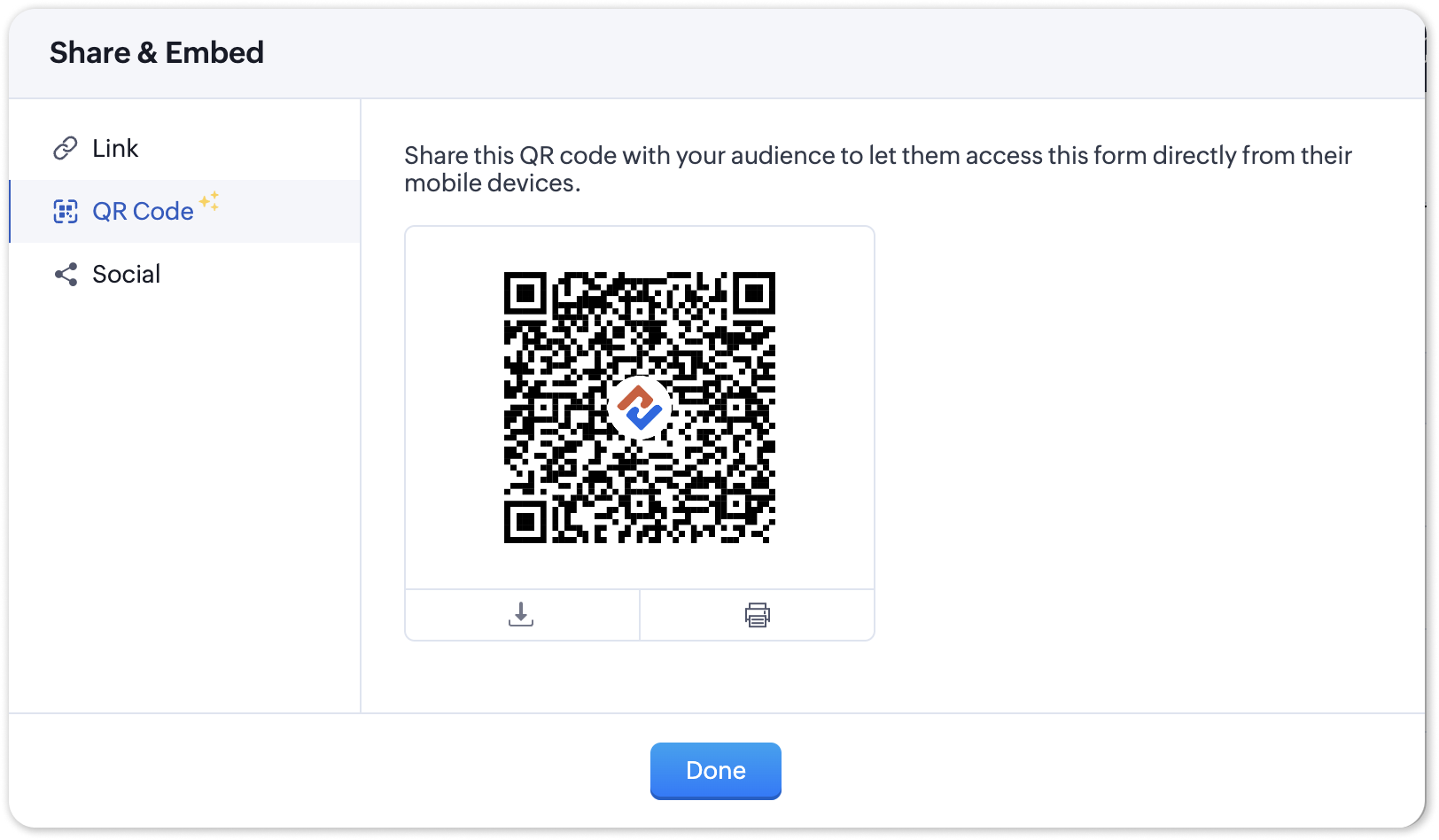
Zoho Recruit automatically generates QR codes for your Webforms and Career Sites, which you can directly print or download with a click of a button. Given below are step-by-step instructions on how to find the generated QR codes.
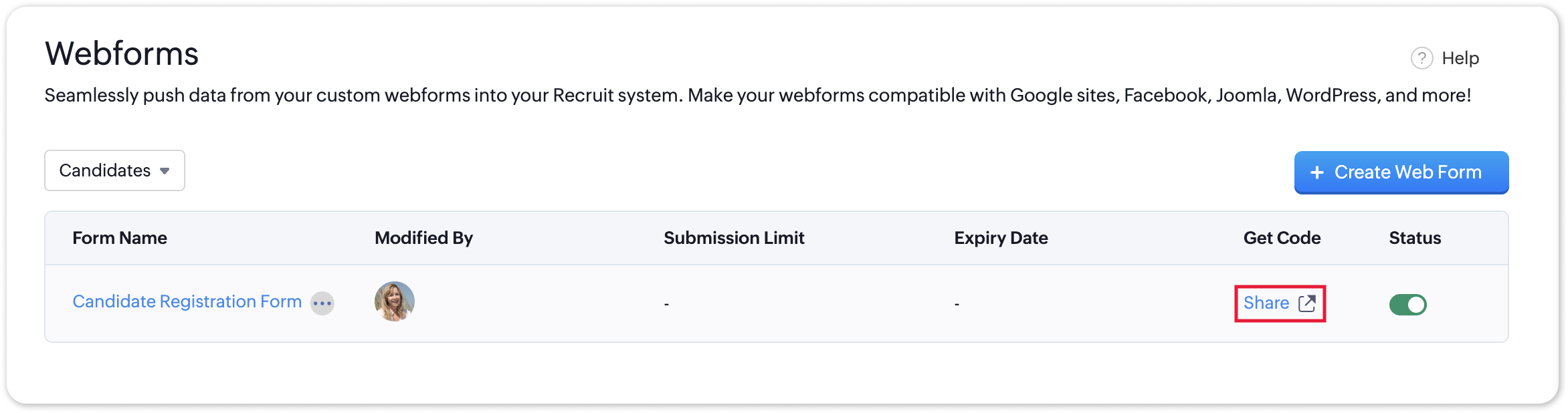
To access the QR code of a webform;
- Navigate to Setup > Career Website > Webforms and click the Share button for the webform of your choosing.
- In the Share & Embed pop-up, select the QR section.
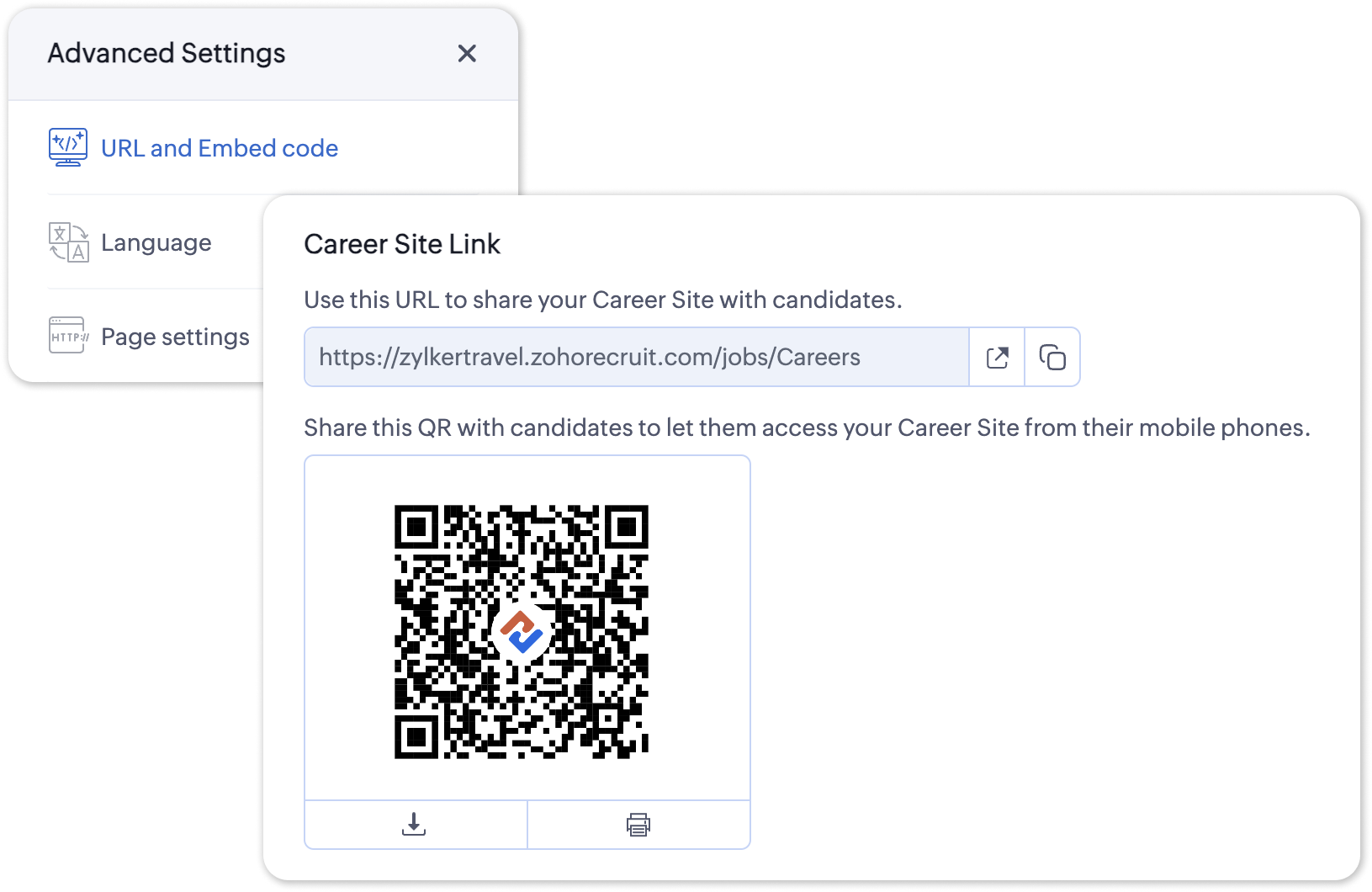
To access the QR code for your Career Site;
- Navigate to Setup > Career Website > Career Site and Customize a career site of your choosing.
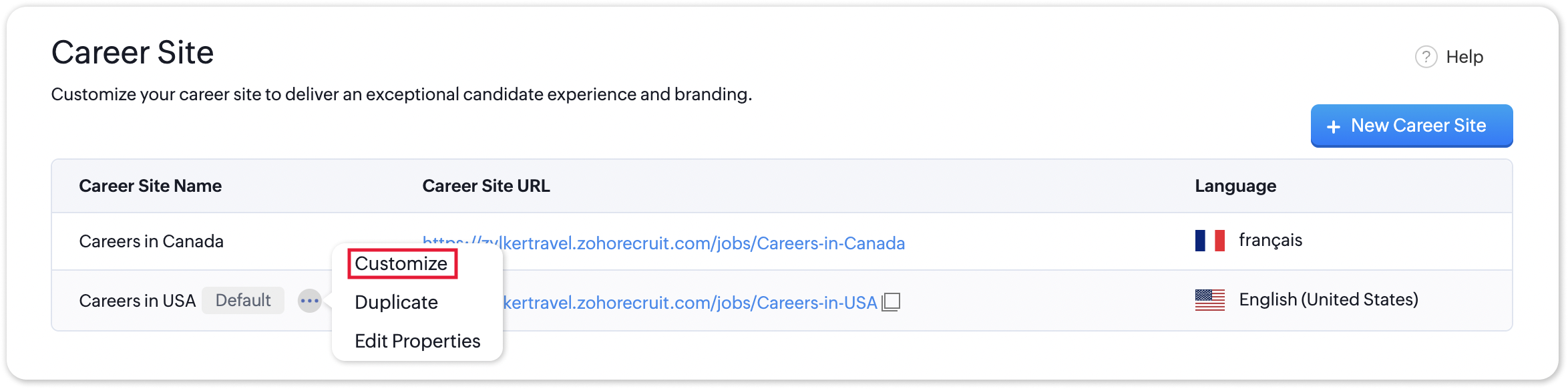
- Under the Advanced Settings section, select URL and Embed Code. The QR code for the selected career site will be displayed here.
Additional Details
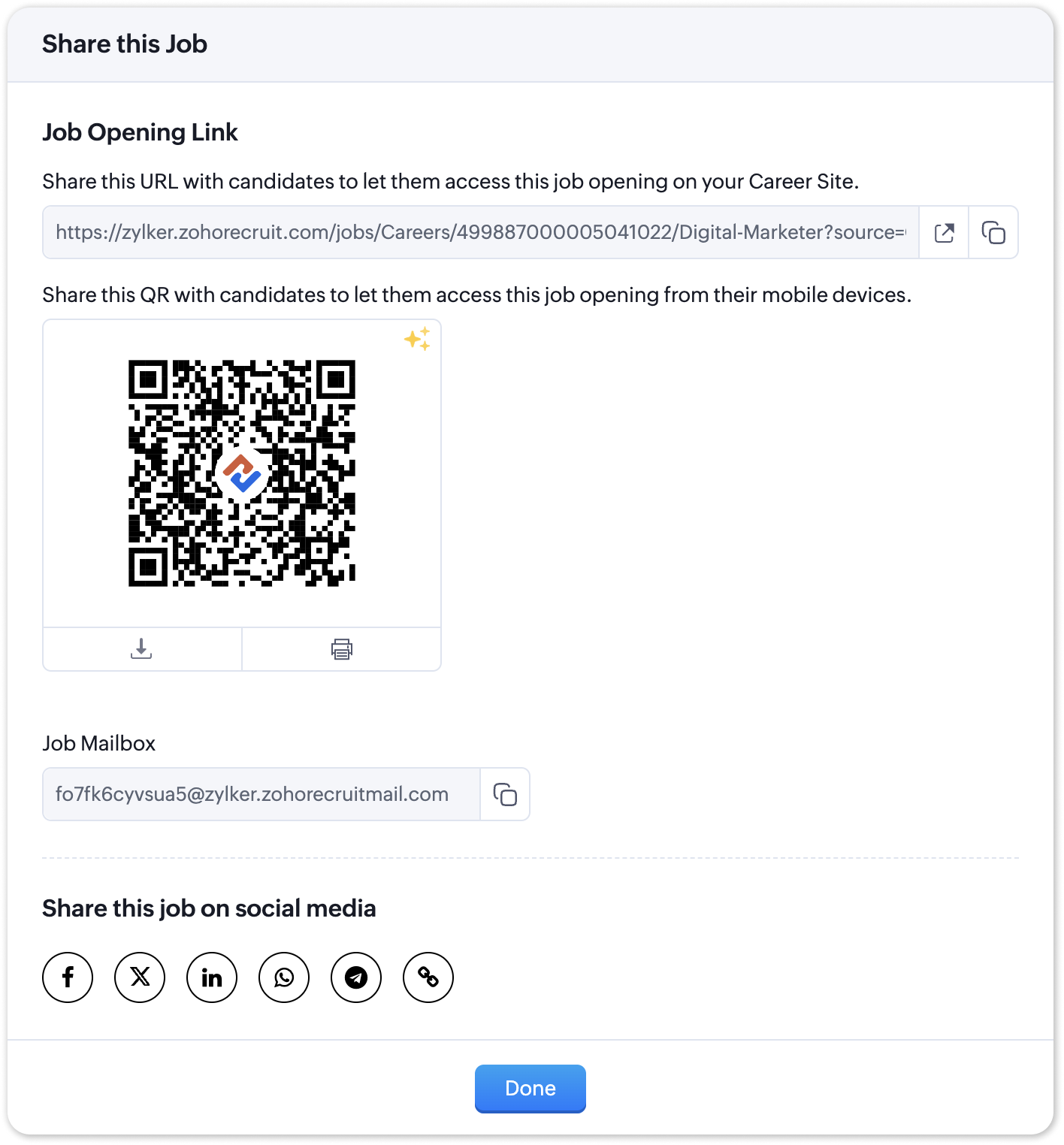
Zoho Recruit generates QR codes for every individual job listing added to your Career Site. Follow the steps given below to access the generated QR code for a published job opening.
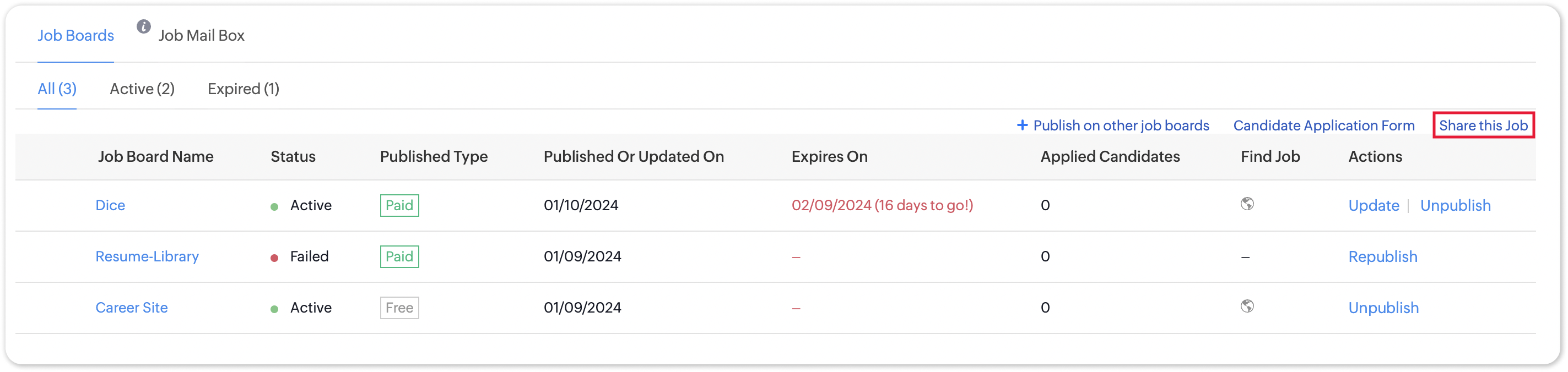
To access the QR code for a specific Career Site job listing;
- Navigate to the published job opening and click Sourcing Summary from the Quick Access panel on the left. In the sourcing summary section, click Share this Job.
- In the pop-up that is displayed, you will be able to access the QR code for the job's Career Site listing and other key information.

Note:
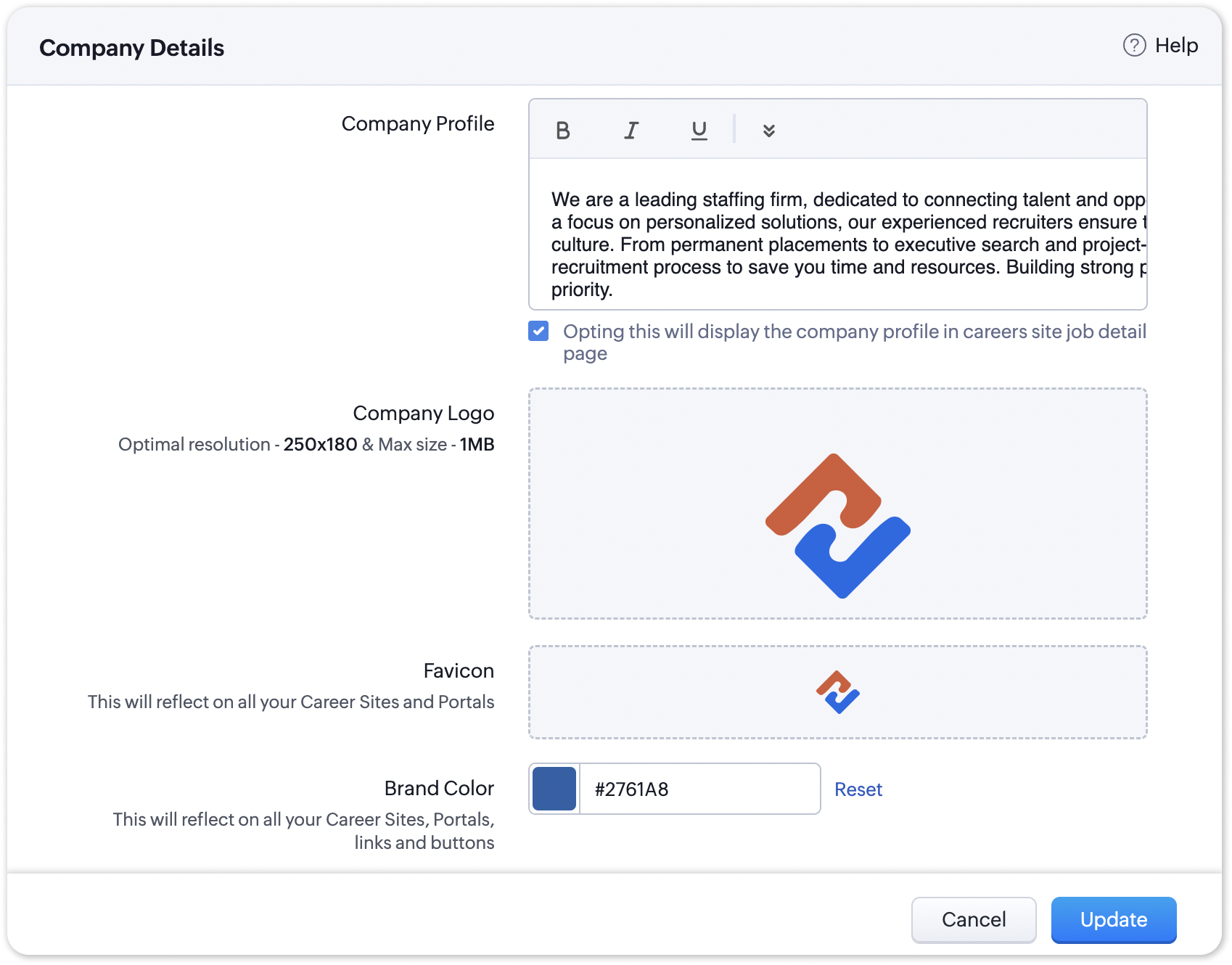
The favicon you upload during the Company Profile Verification stage will be added to your generated QR codes.
Join us in transforming recruitment into a streamlined, dynamic experience—where QR codes open doors, candidates find their path, and your team discovers a new era of efficiency.
Questions? Suggestions? Leave a comment below or reach out to our customer support team at support@zohorecruit.com.
Regards,
Team Zoho Recruit
Team Zoho Recruit
Topic Participants
Pradyumn K
Sticky Posts
Zoho Recruit Community Meet-up - India (Venues Finalised)
Zoho Recruit Community Meet-up - India (Venues Finalised) Namaste, India. 🙏🏼 The Zoho Recruit team is hitting the road—and we're absolutely excited behind the scenes. Join us for the Zoho Recruit India Meet-up 2026, a morning designed to make your recruitingZoho Recruit Community Meetup - London 🇬🇧 (Venue Finalised)
Hello Recruiters! We’re excited to announce that the Zoho Recruit team is coming to the UK for an in-person Zoho User Group (ZUG) Meetup in London! This is your chance to connect with fellow Zoho users, learn from experts, and walk away with actionableAn update to improve email delivery | Email Authentication & Relay
Update Rollout Latest Update: Enterprise users (8th July, 2025) This update is now live for Enterprise plan users in all regions. This includes People Plus, but not Zoho One, which will be covered in an upcoming update. Professional users (31st May 2025)Zoho Recruit User Group Meet-up | INDIA 2025 (Venue Finalised)
Hello Zoho Recruit users from India, We’re pleased and excited to announce our 2025 edition of Zoho user group meet-up in India in five cities! In this meet-up, our team of experts will help you understand the intricate nuances to use Zoho Recruit better,Zoho Recruit is coming to the UK | Zoho Community Learning Series
Customers from the United Kingdom, Exciting news: We will be in London for the Zoho Recruit user meet up. Our team will help you better understand the intricate nuances of Zoho Recruit to help you hire faster, inform about new and upcoming features, and
Recent Topics
[Important announcement] Zoho Writer will mandate DKIM configuration for automation users
Hi all, Effective Dec. 31, 2024, configuring DKIM for From addresses will be mandatory to send emails via Zoho Writer. DKIM configuration allows recipient email servers to identify your emails as valid and not spam. Emails sent from domains without DKIMShowing the map along with mileage expense
When you use the GPS to track mileage, it shows you the map of the actual path travelled. It would be very useful and practical to save that map with the mileage expense, so that when the report is created, it provides a map of each mileage expense associatedLink Purchase Order to Deal
Zoho Books directly syncs with contacts, vendors and products in Zoho CRM including field mapping. Is there any way to associate vendor purchase orders with deals, so that we can calculate our profit margin for each deal with connected sales invoicesExtend the Image Choice Field
Hi, The New Yes/No field is great for what it does, and the Image Choice Field is good but could be better with some functions from the Yes/No field. Take an example, rather than just Yes/No you want Yes/No/Maybe (Or more than 3 choices), but unlike theZoho Desk: Macro to assign Ticket to self
Hello, We are using macros in Zoho Desk to set some fields and send a response. I would also like to assign the ticket to myself (or whoever applies the macro). I can only set a fixed agent in the macro, so I would have to create one for every agent.Turn off Knowlege Base Follow options and Follower lists
Is there a way to hide or turn off the option in the Knowledge Base for users to follow specific departments/categories/sections/articles? If not, is there a way to turn off the public list of followers for each of those things? Otherwise, customer namesNew Feature: Audit Log in Zoho Bookings
Greetings from the Zoho Bookings team! We’re excited to introduce Audit Log, a new feature designed to help you track all key actions related to your appointments. With Audit Log, you can maintain transparency, strengthen security, and ensure accountability.Automated Task reminder
First question: If a task does not have a reminder set, will it still send an email notification that the task is due today? If not, how can I set up an automated reminder to send the task owner an email that it is due on a certain date?Zoho Support - contract notifications
Hi, I have a few questions about using Zoho support. Is there a way to add custom contract notifications like (90 days before expiry send notification e-mail to agent and customer, then another 60 days before expiry and another 30 days.). And is it possibleKaizen #230 - Smart Discount-Based Quote Approvals Using CRM Functions and Approval Process
Hello everyone! Welcome back to the Kaizen series! Discount approvals are a standard part of sales governance. Most organizations need something like this: Discount % Required Action < 10% Auto-approve 10–19.99% Sales Manager approval ≥ 20% VP Sales approvalHow to create a new Batch and update Stock via Inventory?
Hi everyone, We are building an automation where a user enters batch details (Batch Number, Mfg Date, Expiry, and Quantity) into a Custom Module. I need this to trigger an API call to Zoho Inventory to: Create the new batch for the item. Increase theOAuth2 Scope Error - Incorrectly defaulting to CRM instead of Analytics.
Hello Zoho Team, I am trying to connect n8n to Zoho Analytics API V2 for a simple automation project. Despite using the correct Analytics-specific scopes, my OAuth handshake is failing with a CRM-related error. The Problem: The authorization screen shows:Archive Option in Conversation View
Hello, I have a suggestion\request to add an "Archive Thread" button in conversation view of Zoho Mail. The best suggestion I have is to put an "Archive Thread" button next to the "Label Entire Thread" button in conversation view. Most users don't justIs it possible to create a meeting in Zoho Crm which automatically creates a Google Meet link?
We are using Google's own "Zoho CRM for Google" integration and also Zoho's "Google Apps Sync" tools, but none of them provide us with the ability to create a meeting in Zoho CRM that then adds a Google Meet link into the meeting. Is this something thatTrigger a Workflow Function if an Attachment (Related List) has been added
Hello, I have a Case Module with a related list which is Attachment. I want to trigger a workflow if I added an attachment. I've seen some topics about this in zoho community that was posted few months ago and based on the answers, there is no triggerEmail Field Validation Incorrectly Rejects RFC-Compliant Addresses (Forward Slashes)
I've encountered a validation issue with Zoho Creator's Email field that rejects RFC-compliant email addresses containing forward slashes, and I'm hoping the Zoho team can address this in a future update. The Issue When entering an email address containingCall result pop up on call when call ends
I’d like to be able to create a pop up that appears after a call has finished that allows me to select the Call Result. I'm using RingCentral. I have seen from a previous, now locked, thread on Zoho Cares that this capability has been implemented, butZOHO.CRM.UI.Record.open not working properly
I have a Zoho CRM Widget and in it I have a block where it will open the blocks Meeting like below block.addEventListener("click", () => { ZOHO.CRM.UI.Record.open({ Entity: "Events", RecordID: meeting.id }).catch(err => { console.error("Open record failed:",Payment system for donations management
I manage an organization where we receive donations from payers. Hence, there is no need to first create invoices and then create payments received against the invoices. What are the recommended best practices to do this in ZohoBooks?Recording the deducted TDS on advance received from Customer (Zoho Books India)
Hi, How can we record the tds that has been deducted by my customer for the advance that he has paid to me. 1) My customer has paid Rs 10000 to me as advance (Rs 9800 as cash and deducted Rs 200 as TDS). I am not able to record the tds that has been deductedChanging Account Type in Chart of Accounts
Does anyone know how to change/edit the account type for an Account name in Chart of Accounts. Zoho will not let me do this for some reasonBulk bank rule creatioin
Hi team, I am exploring Option to create a multiple bank rule. Could please suggest the option to implement this?Zoho books aide
Bonjour, je rencontre un problème avec Zoho Books. J’ai effectué une demande de support via l’interface prévue à cet effet, mais je n’ai jamais de retour. Je ne reçois ni email de confirmation, ni information concernant la prise en charge de ma demande,Smart Data, Smarter Contracts — Ensuring Consistency Between Metadata and Documents
In contract management, data accuracy is not just a nice-to-have—it is essential. A single mismatch between what your system shows and what is written in the contract can ripple into approval delays, compliance risks, and broken trust in your data. ImagineJoin Zoho Meeting only via Web browser and not with Zoho Meeting App
Dear Zoho team, according to the documentation [1], Zoho Meeting only offers web view for Chrome and Firefox on a desktop. For other browsers and devices, participants can only join a Zoho Meaning with the Zoho Meeting App installed. This is a big hurdleManage control over Microsoft Office 365 integrations with profile-based sync permissions
Greetings all, Previously, all users in Zoho CRM had access to enable Microsoft integrations (Calendar, Contacts, and Tasks) in their accounts, regardless of their profile type. Users with administrator profiles can now manage profile-based permissionsAnalytics & Reporting Improvements + Export Bug
Hello, I would like to raise several important product suggestions and issues regarding Zoho Expense: 1. Filter in Admin View → Analytics → Expense Details → Receipt Is it possible to add a filter that allows us to prioritize or sort reports that haveAI Search and Record Retrieval Inside Zoho Creator – Is This Possible?
Is it possible to integrate an AI assistant into Zoho Creator that can intelligently search, retrieve, and analyze records within the application’s forms and reports? Can AI access and query existing Creator data securely using Deluge or APIs to provideI have a requirement to integrate Zoho Books with Zoho Projects at both project and task levels.
Currently, when i create transactions in Zoho Books (Expenses, Invoices, Bills), we can only map them at the project level. However, our requirement is to: Map records at both project and task levels Sync these transactions back to Zoho Projects underScheduled AU Data Center Database Version Upgrade for Zoho Forms
Dear Zoho Forms' users, We would like to update you on a scheduled AU Data Center database version upgrade for Zoho Forms. Find the schedule below: Migration window: Sunday, 22nd February 2026 12.00 AM to 12.30 AM AEDT This migration is a part of ourCannot get code to work with v2.mergeAndStore!
Please can someone help me pass subform items into a repeating mail merge table row using v2.mergeAndStore? I have a mail merge template created in Writer and stored in Workdrive. This template is referenced by a custom CRM function which merges all ofHotmail is blocking the zoho mail IP
Greetings, Since last Tuesday (5 days ago today) I wrote to Zoho support and I still haven't received a single response (Ticket ID: 2056917). Is this how you treat people who pay for your email service? I am making this public so that those who want toZoho Bookings and Survey Integration through Flow
I am trying to set up flows where once an appointment is marked as completed in Zoho Bookings, the applicable survey form would be sent to the customer. Problem is, I cannot customise flows wherein if Consultation A is completed, Survey Form A would beZoho CRM Community Digest - December 2025 | Part 2
Hello Everyone! During the final weeks of December, Zoho CRM introduced updates that not only enhanced product capabilities but also offered deeper guidance through Kaizen posts. This section highlights what was released and shared in the last two weeksCRUD actions for Resources via API
Hello, is it possible to perform CRUD actions through the API for Resources? We want to create a sync from Zoho CRM Car record to Bookings resources to create availabilities for Car bookings. For Test drives, not only the sales person needs to be available,Kaizen #186 : Client Script Support for Subforms
Hello everyone! Welcome back to another exciting Kaizen post on Client Script! In this edition, we’re taking a closer look at Client Script Support for Subforms with the help of the following scenario. " Zylker, a manufacturing company, uses the "Orders"オンライン勉強会のお知らせ Zoho ワークアウト (2/19 参加無料)
ユーザーの皆さま、こんにちは。コミュニティチームの中野です。 2月開催のZoho ワークアウトについてお知らせします。 今回はZoomにて、オンライン開催します。 ▶︎参加登録はこちら(無料) https://us02web.zoom.us/meeting/register/6AyVUxp6QDmMQiDGXGkxPA ━━━━━━━━━━━━━━━━━━━━━━━━ Zoho ワークアウトとは? Zoho ユーザー同士で交流しながら、サービスに関する疑問や不明点の解消を目指すイベント「Zohodoubts about customer happiness in zoho desk
Good afternoon, Desk community. The reason for my message is that I have a question regarding the customer satisfaction surveys we can ask our clients to rate our service. I know that in Desk, you can activate Customer Happiness to send a survey to theCOQL API in JS Widget only pulling 200 records
Hello! We've been building a custom homepage widget using the Zoho JS SDK, and it seems that this https://help.zwidgets.com/help/latest/ZOHO.CRM.API.html#.coql only allows 200 records. I thought the limit was 2000 for COQL queries, but am I mistaken?Standard Description Field - Can I change label or add dd tooltip
Is there a way fo you guys to allow the customer to change the label name for the description field in the customer portal when submitting tickets. Or at least allow us to add a tooltip to clarify what description we need from them. I know I can create my own separate multi line description field but if I do that, it doesn't have the nice toolbar with Bold, Italic, Underline, color, font, indent, etc. Can you please allow us to add a tooltip to the zoho standard description field?Next Page