Zoho CRM Plus in 2023: Let's rewind

Zoho CRM Plus in 2023: Let's rewind

Hey everyone,
 
There's something about December that makes us want to sit back and remember all the wonderful moments, as we get ready for the New Year, 2024!
 
(Psst! We are also turning 10—yay!)
 
This year, CRM Plus had a lot of wonderful updates, taking more steps to make the customer experience easy for your business. Let's review them, shall we?

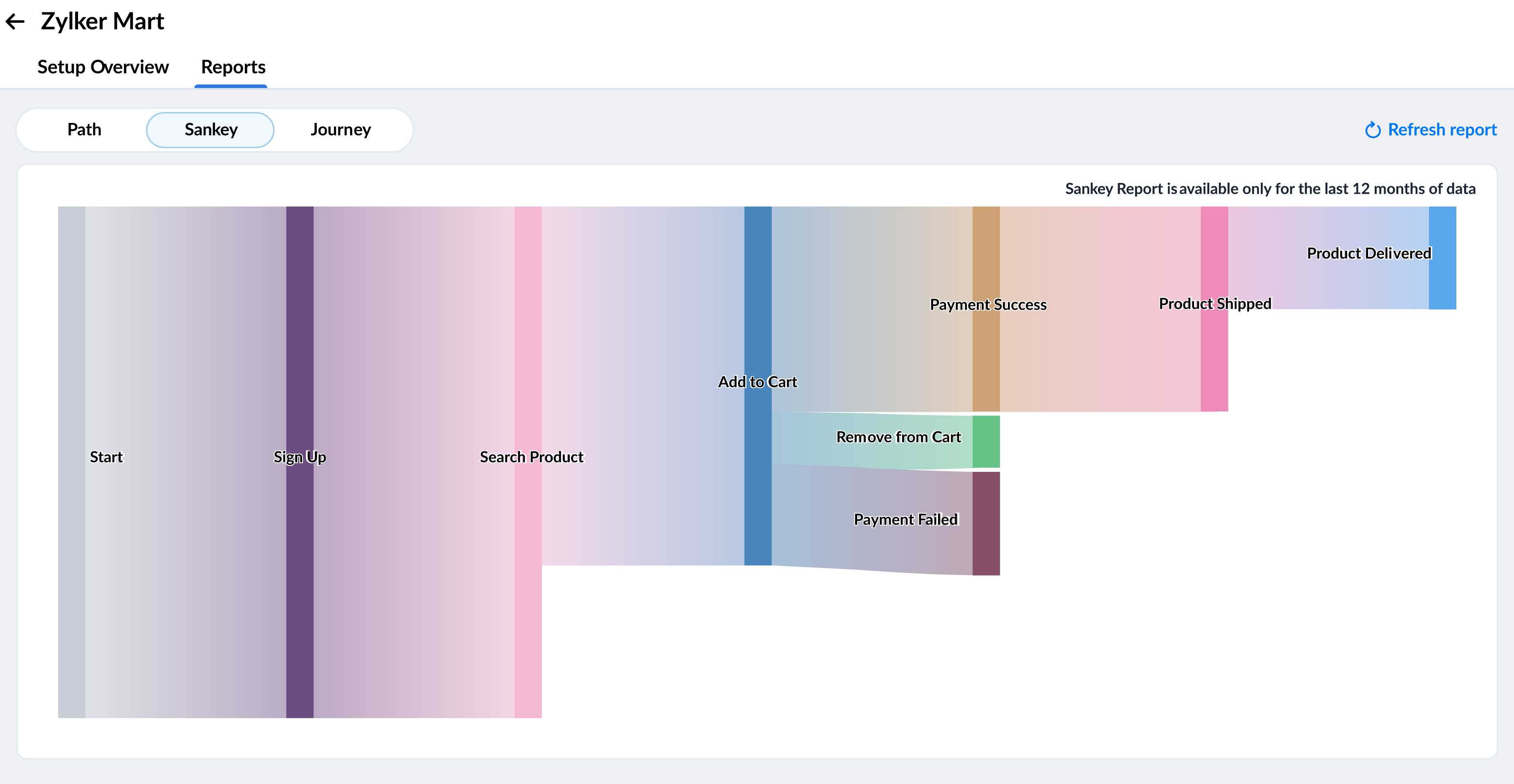
Understanding the customer journey with Path Finder

Path Finder in CRM helps you understand the various customer touchpoints in your business. This gives you a fair idea of how customers approach your business, and how they complete the entire journey. With this insight, businesses can modify their various processes, ensuring a positive customer experience and reduce customer churn.
Read more: Path Finder - An overview

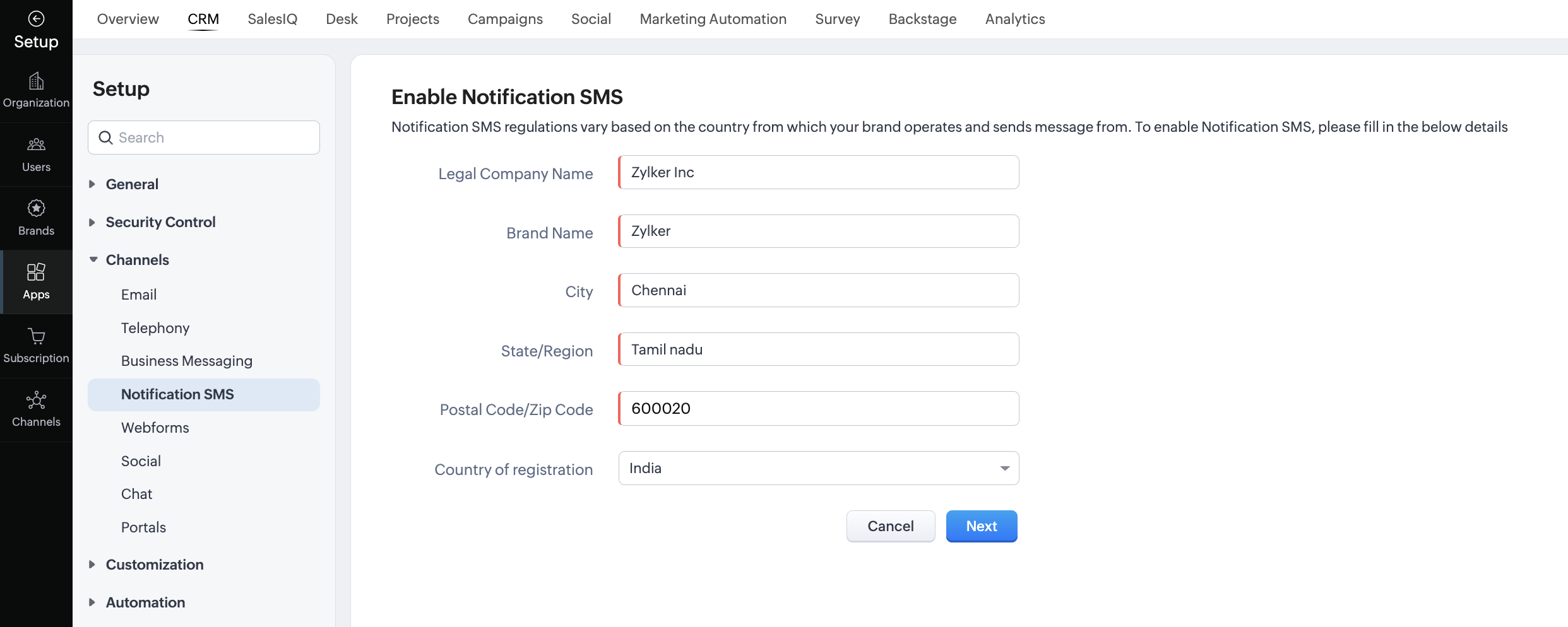
Send SMS notifications to your customers

Your CRM now comes with a built-in option to send out SMS notifications to your customers. There are various scenarios where notifying customers comes in handy. It could be about an event, when an item is purchased, reminders about payment due dates, and so on.
Read more: SMS notifications in CRM

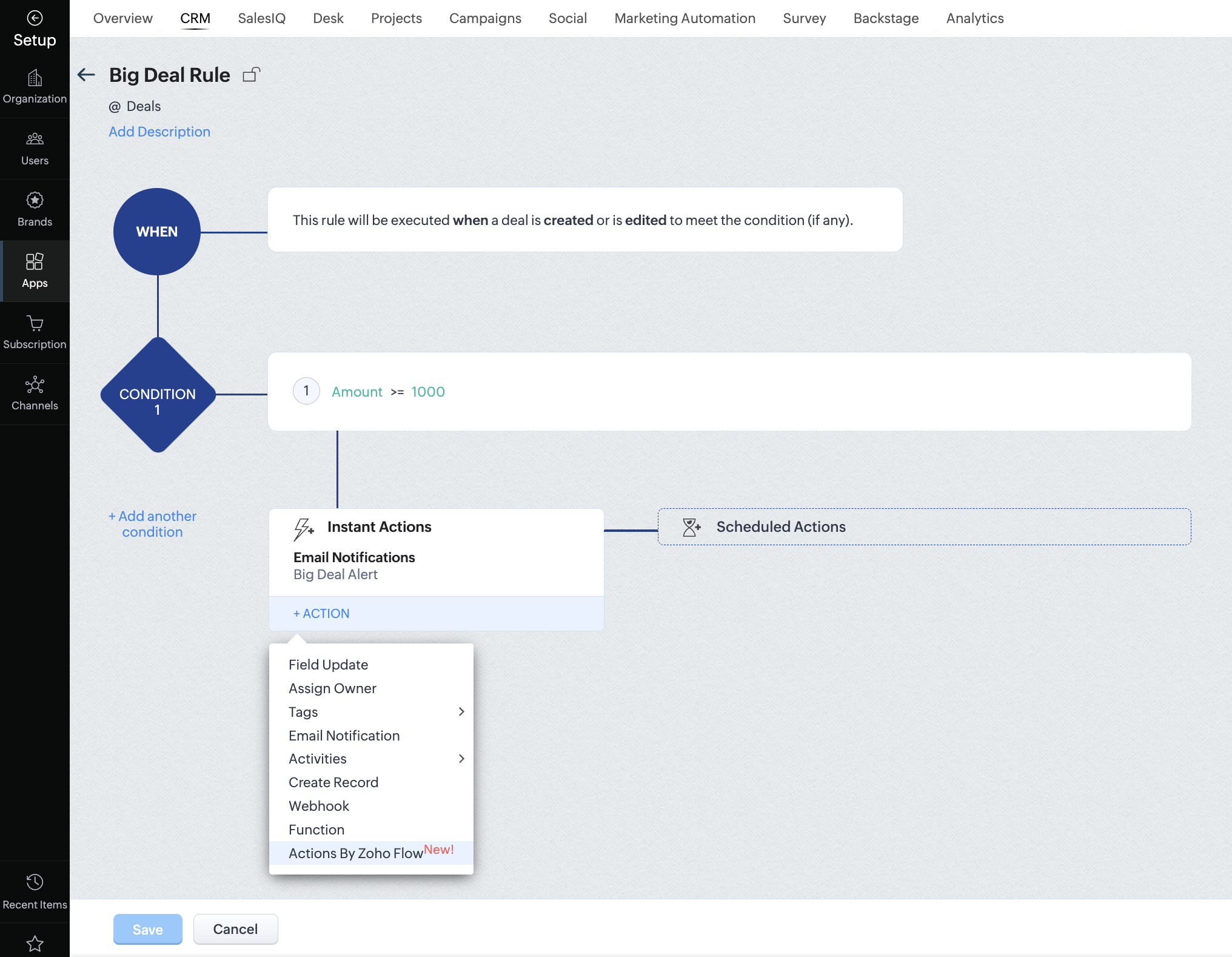
Automate using Actions by Zoho Flow

In workflow rules, any action that has to be done outside the CRM ideally involves setting up a custom integration. With Actions by Zoho Flow, you can set up any action to be executed automatically with Zoho and other third-party applications that can be integrated using Zoho Flow.


Use Campaigns's SMS gateway to send SMS campaigns

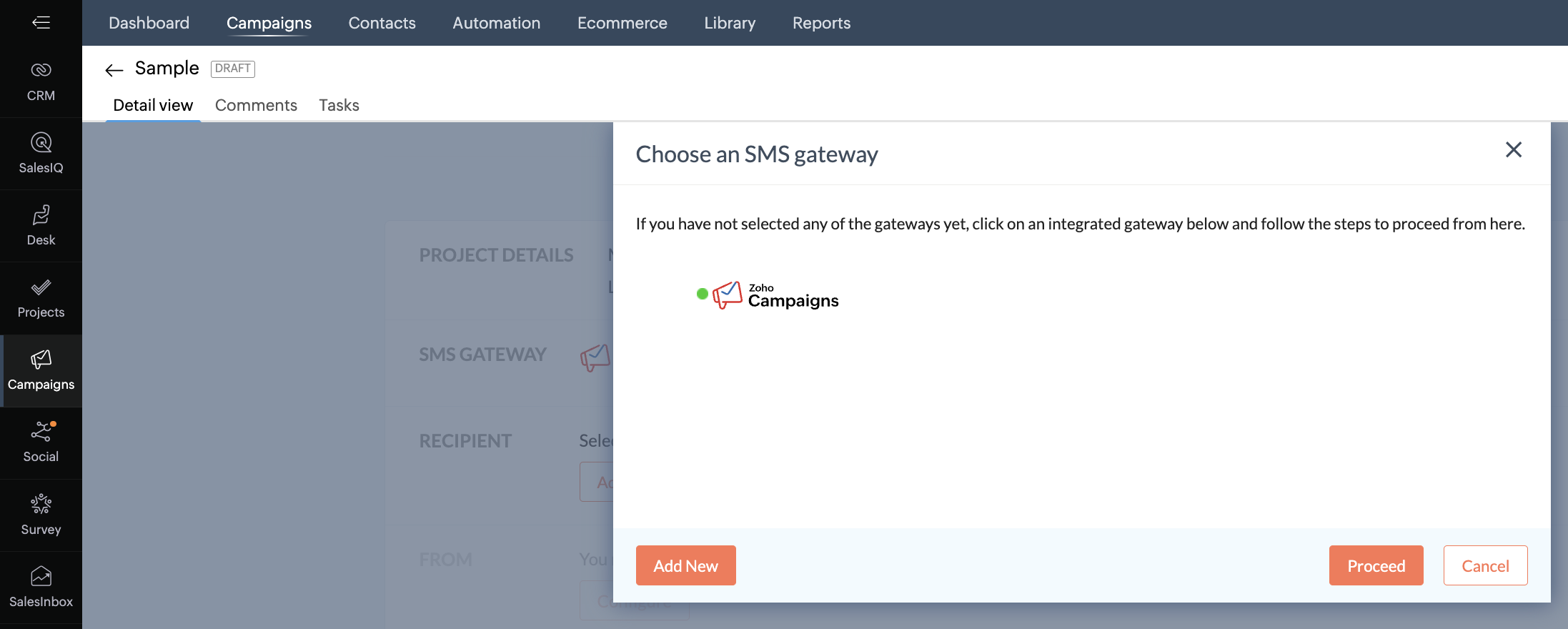
The Campaigns module in CRM Plus comes with our in-house SMS gateway which lets you send SMS campaigns in India, the USA, and Canada. This makes it easy to manage email and SMS campaigns in the same module.

Read more: SMS Campaigns


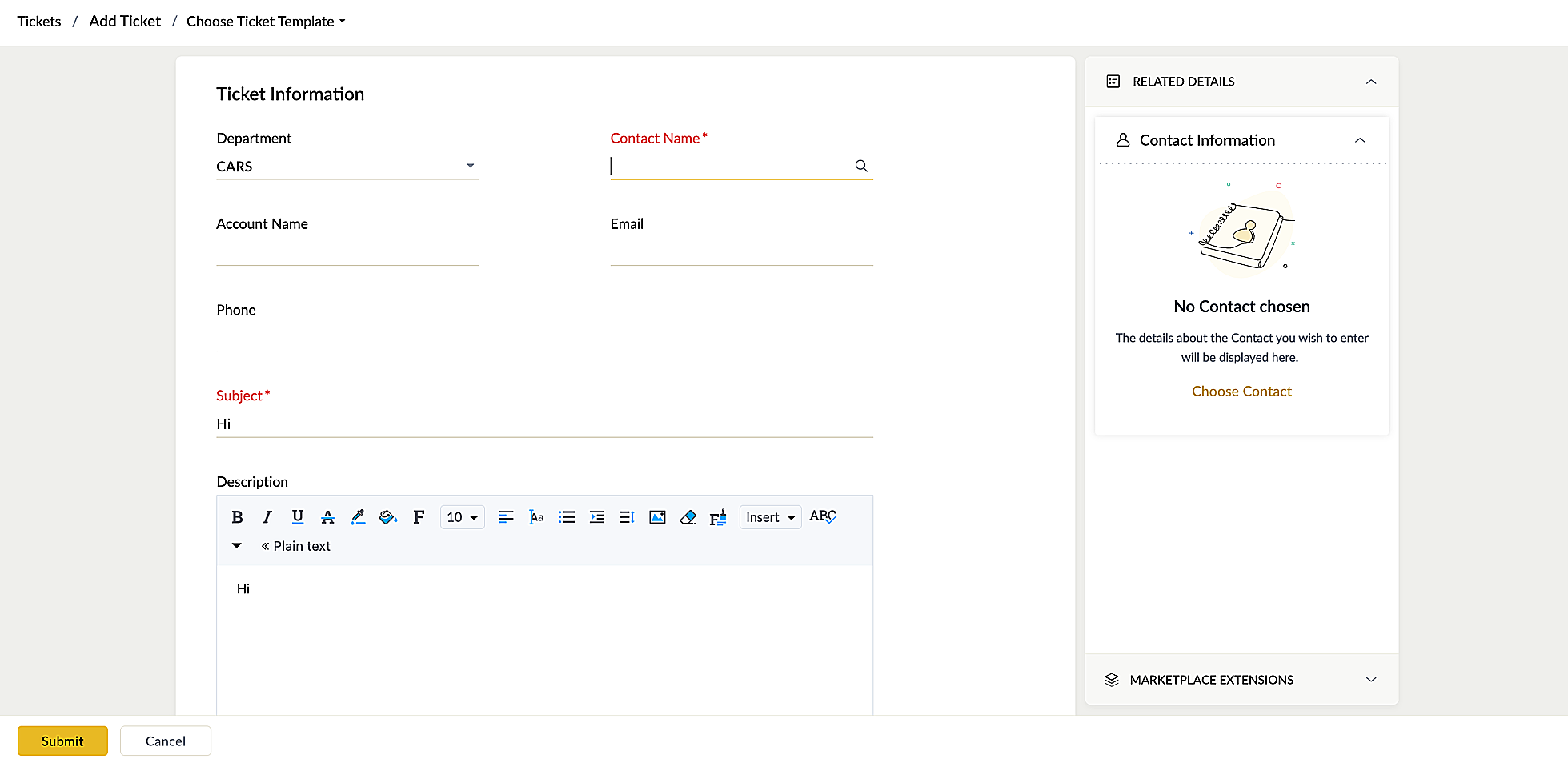
Convert messages into tickets

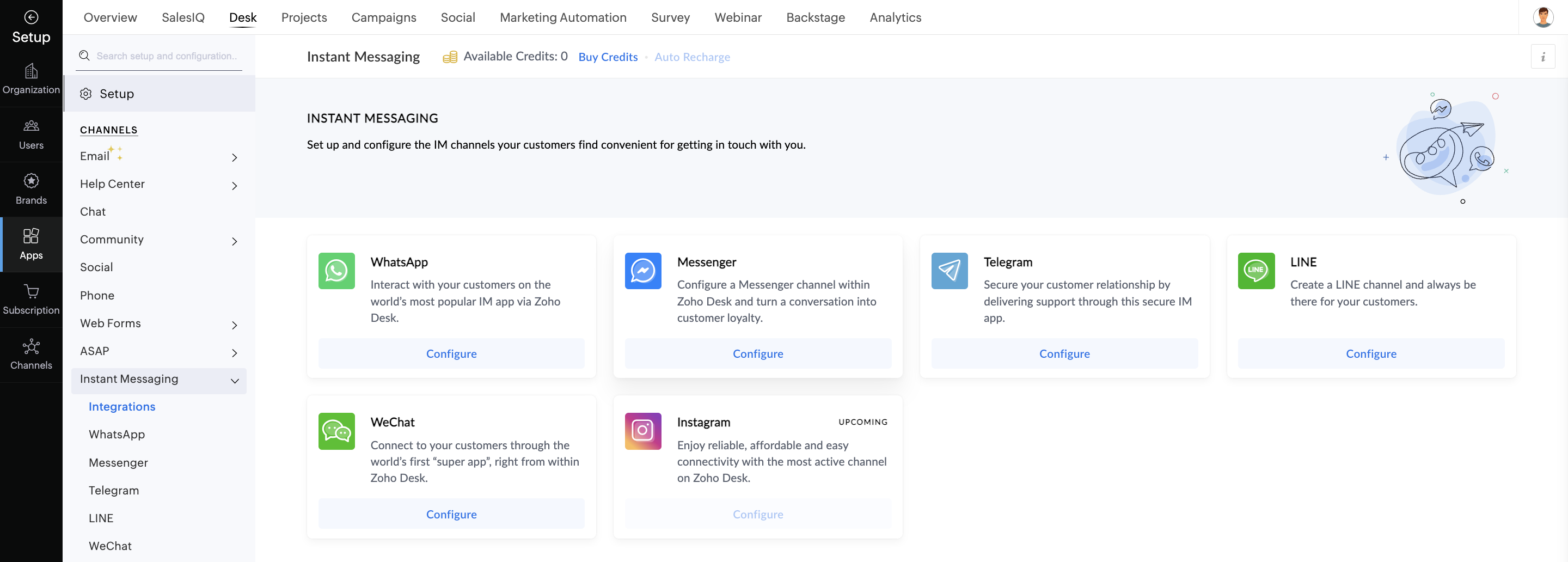
Prospects and customers reach out to your business through various messaging platforms like Messenger, WhatsApp, Line, Telegram, and so on. This form of communication is also one of the most popular channels customers use to share their issues, hoping for a swift resolution. With the Instant Messaging module in Desk, agents in your business can easily converse with customers and convert their messages to tickets to address the issues in detail.


Send outbound messages via WhatsApp

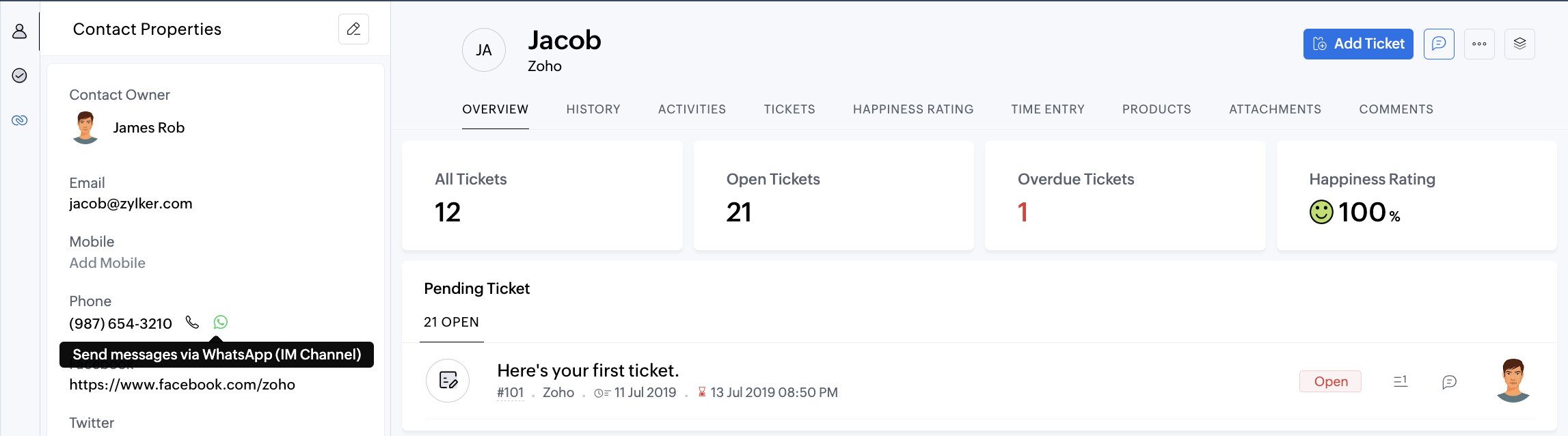
Desk in CRM Plus lets you create HSM (Highly Structured Message) template messages to send to your contacts via WhatsApp. This lets you proactively reach out and engage your audience with ease.
Interact via Facebook Messenger

The Instant Messaging module lets you connect your Facebook profile and continue your conversations with a Facebook user right from Desk in CRM Plus.


Inbox in Social: One place for all interactions

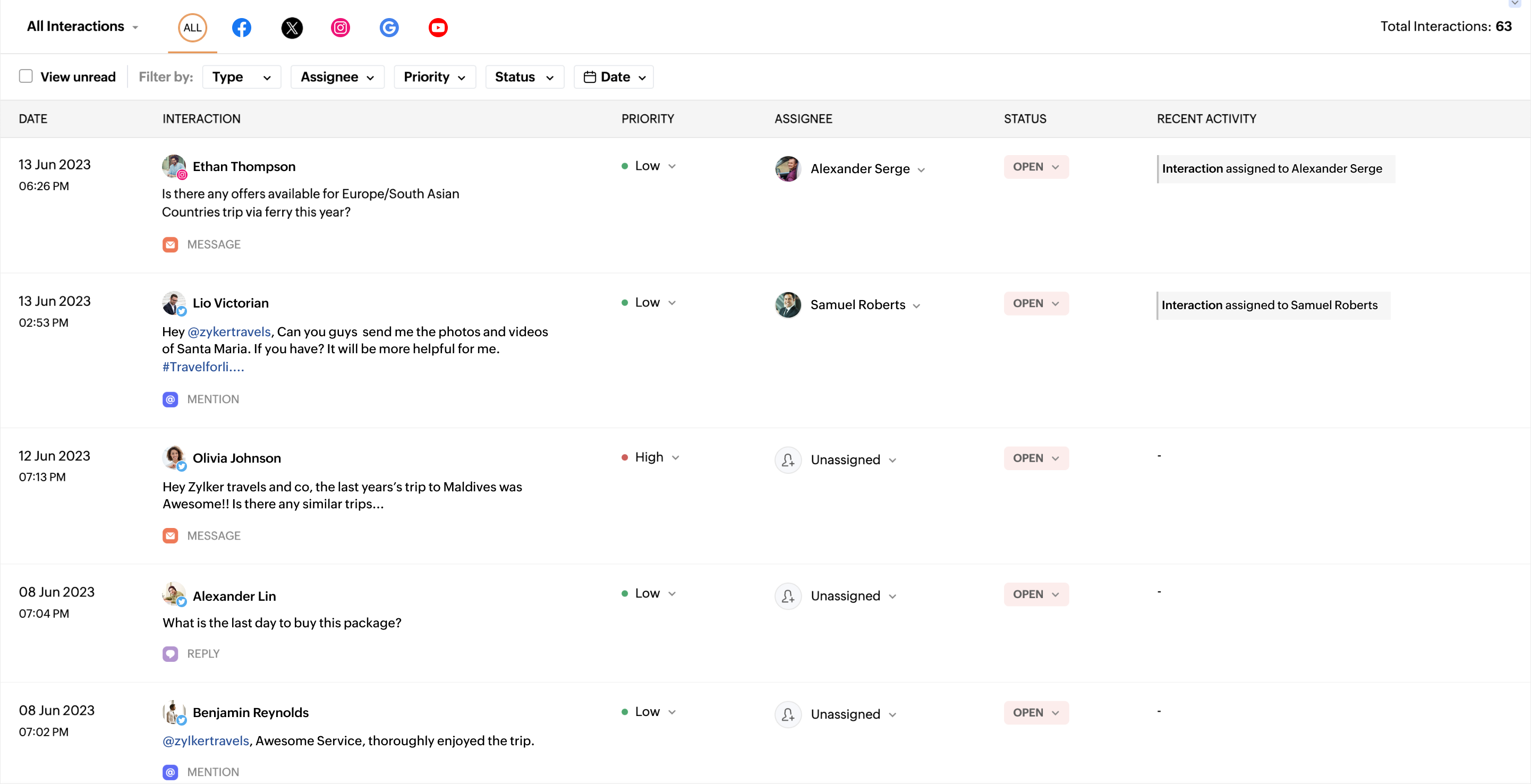
Inbox lets you manage all your social media interactions, such as comments, replies, reviews, messages, questions, dark comments, and so on across various social media channels. You can track and assign them to your team members manually or automatically from Social.
Read more: Inbox in Social

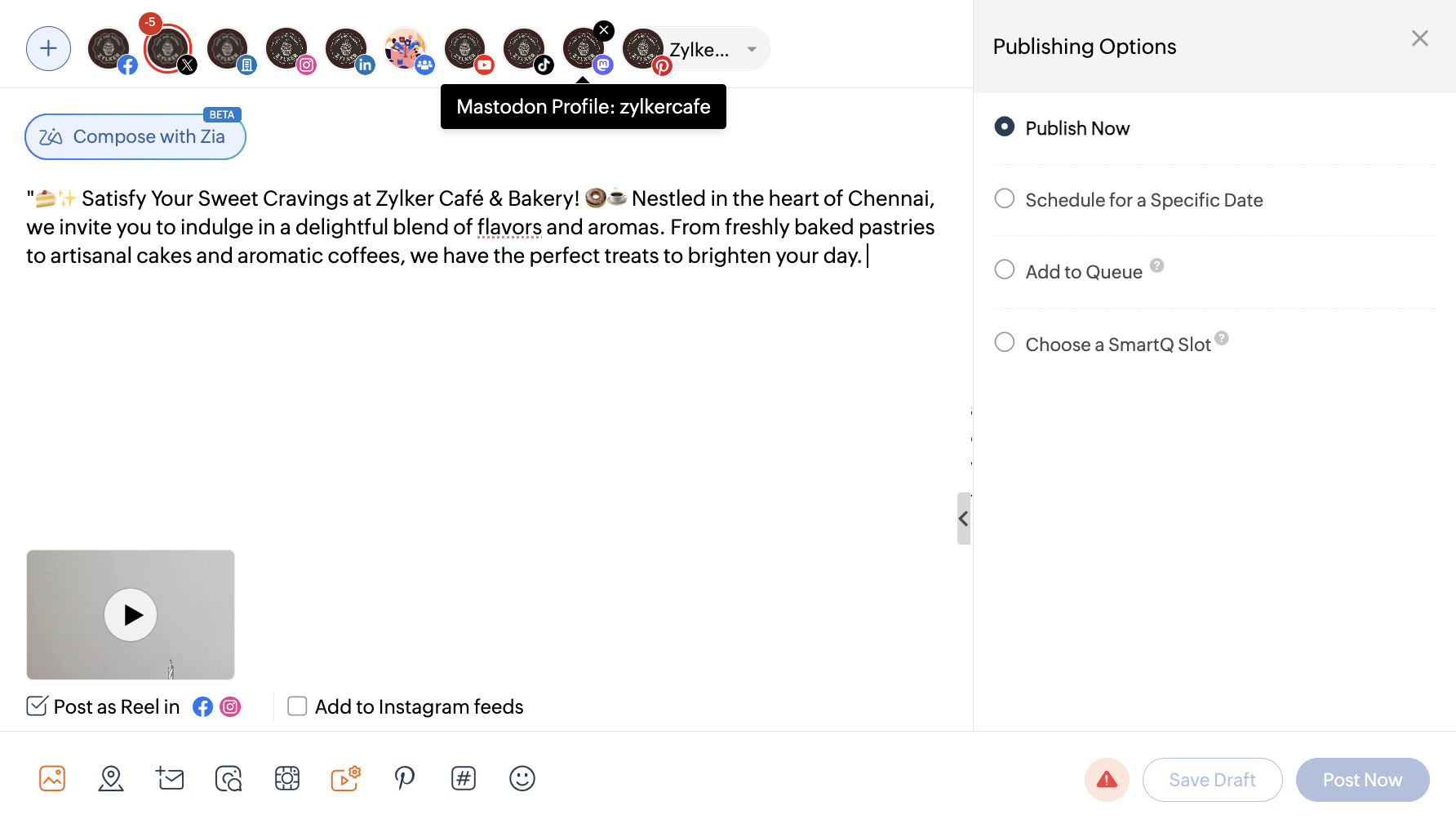
Create Facebook reels, Instagram stories, and posts on Mastodon

Social in CRM Plus extended support to publishing reels on Facebook, stories on Instagram, and posts directly on Mastodon. You can also get in-depth analytics on the performance of these posts across all channels.
Read more: Facebook reels, Instagram Stories, and posts on Mastodon

Updates to Zia

Our AI assistant, Zia, has a lot of features to help make things easy for your business.

Zia can suggest the best users to assign to a particular lead and intelligently score the lead to help your sales team prioritize tasks. She can also suggest the next best experience for your lead or contact, understand the sentiment, or suggest a suitable subject line for emails.
 
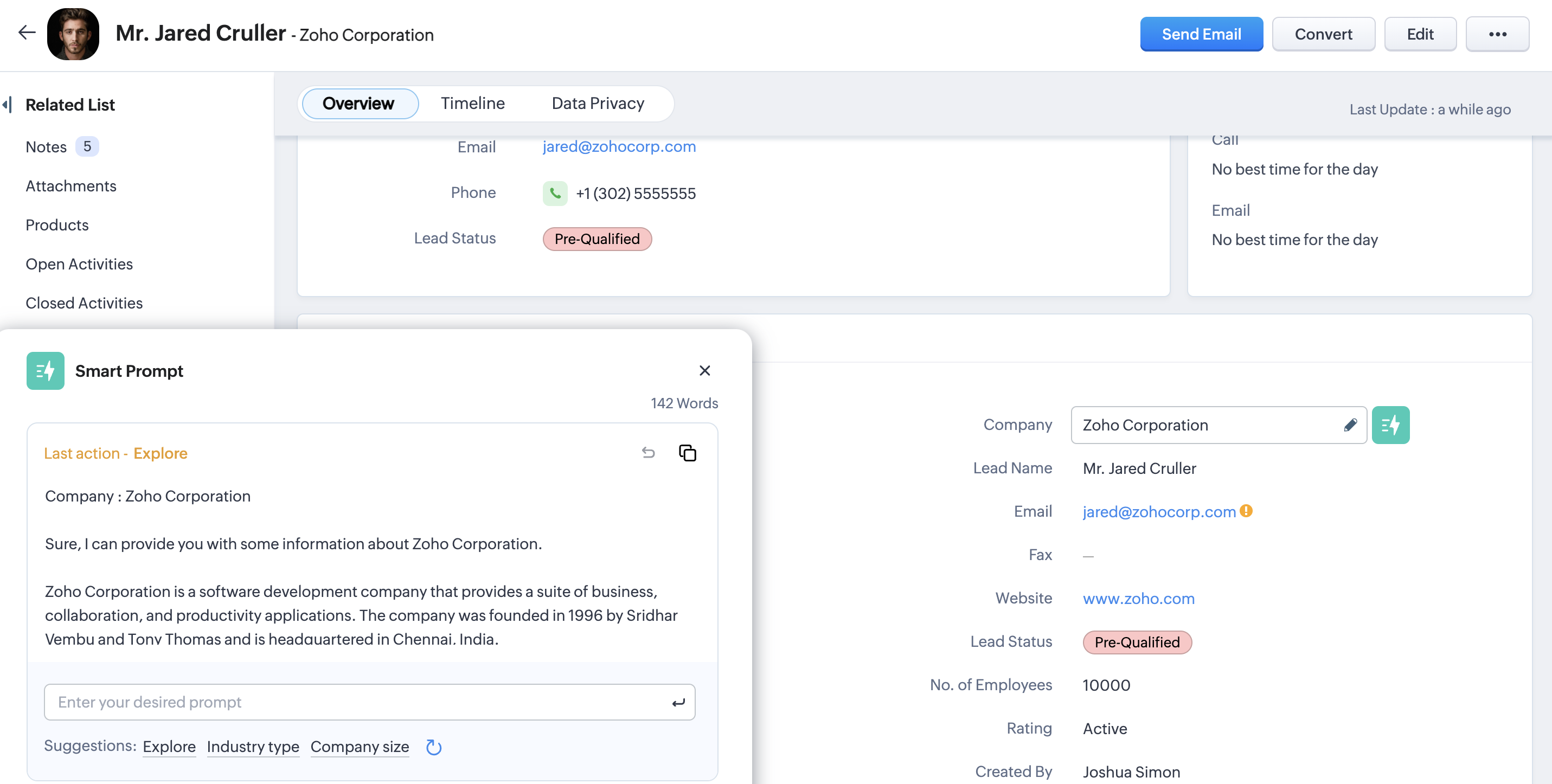
With Zia's generative AI capabilities powered by OpenAI, she can help you draft emails in CRM, explore more about a field, draft support tickets, generate a summary of a live interaction, compose posts on social media, and more.

 
Apart from these, we made other new enhancements and updates for CRM Plus. We have a lot more planned for 2024, too!
 
We would love to hear your thoughts on these updates. Feel free to share your stories on how CRM Plus made things simple for your business.
 
Cheers to a blessed and happy 2024!

    • Sticky Posts

    • Zoho CRM Plus in 2023: Let's rewind

      Hey everyone, There's something about December that makes us want to sit back and remember all the wonderful moments, as we get ready for the New Year, 2024! (Psst! We are also turning 10—yay!) This year, CRM Plus had a lot of wonderful updates, taking
    • The CX Workshops are back in 2023!

      Hello, can you see my screen? Can you hear me? This is a phrase we've all been saying more often than "good morning" over the last couple of years. Well, now it's time to re-connect in person. We're excited to invite you all to the CX Workshops we've
    • Refer Zoho CRM Plus to your friends and earn rewards!

      Hey everyone,   We'd like to thank you from the bottom of our hearts for continuing to be our esteemed customers. Now you have the opportunity to refer Zoho CRM Plus to your friends or family members who are looking for a suitable solution to enhance
    • Social in CRM Plus now supports TikTok, Instagram Stories and Reels, and YouTube Shorts

      Hey everyone,   We are excited to inform you that Social in CRM Plus now allows you to publish on TikTok! We've also updated it to let you create Instagram Stories and Reels, as well as YouTube Shorts. Here's a brief about the updates.  Publishing on
    • Unified telephony in Zoho CRM Plus

      In any business, managing calls with the prospects or customers is an integral part of a salesperson or a support agent's daily life. They have access to information about the customers within Zoho CRM, and they also use a suitable PBX service to communicate
      • Recent Topics

      • Text snippet

        There is a nice feature in Zoho Desk called Text Snippet. It allows you to insert a bit of text anywhere in a reply that you are typing. That would be nice to have that option in Zoho CRM as well when we compose an email. Moderation Update: We agree that
      • Meet Canvas' Grid component: Your easiest way to build responsive record templates

        Visual design can be exciting—until you're knee-deep in the details. Whether it's aligning text boxes to prevent overlaps, fixing negative space, or simply making sure the right data stands out, just ironing out inconsistencies takes a lot of moving parts.
      • issue with deluge script

        i used chat gpt to build this script and I am getting 2 errors which I cannot figure out how to fix: void monthly_sales_order_generation() { try { // ---------------- CONFIG ------------------- analytics_url_1 = "https://analytics.zoho.com/api/<workspaceID>/report/<reportID1>/data";
      • Zoho Books "Update" Trigger for Zapier?

        Hi Zoho Team, I've been in talks with Zapier about using their services to connect my Zoho Books account to various apps, but I require an additional trigger beyond the "New" trigger. I require an "Update" trigger, which will allow me to filter and create Zaps only when certain conditions are fulfilled on the Zoho Books end before I automate a separate app. Specifically this will help me create invoices in QuickBooks Online only when payments are recorded in Zoho Books, rather than when a new invoice
      • Service One. Bill Another. Zero Hassle.

        In field service operations, one challenge often comes up: the person who needs the service isn’t always the one who pays for it. Think about tenants vs. property managers, corporate offices vs. their finance departments, or school buildings vs. central
      • Presenting ABM for Zoho CRM: Expand and retain your customers with precision

        Picture this scenario: You're a growing SaaS company ready to launch a powerful business suite, and are looking to gain traction and momentum. But as a business with a tight budget, you know acquiring new customers is slow, expensive, and often delivers
      • Zoho CRM for Everyone's NextGen UI Gets an Upgrade

        Hello Everyone We've made improvements to Zoho CRM for Everyone's Nextgen UI. These changes are the result of valuable feedback from you where we’ve focused on improving usability, providing wider screen space, and making navigation smoother so everything
      • Can we do Image swatches for color variants?

        We want to do something like the attached screenshot on our new zoho store. We need image swatches instead of normal text selection. We want to user to select an image as color option. Is this doable? I don't see any option on zoho backend. Please h
      • Can Zoho Flows repeat Actions more than once?

        I'm attempting to make an intentional Zoho Flow loop using the below layout. However, when "WithinLimit" condition is met, the program fails to execute the action "Get & Add Request Co..." again. Is this by design? Is Zoho Flows unable to repeat actions
      • Video interviews not compatible on mobile

        Hi Zoho,  The 2-way video interview feature you have added to Recruit would be great if the candidate was able to use the link to the video on a mobile phone, it doesn't work on Samsung browser, it doesn't work on chrome/firefox mobile version of browser,
      • From Zoho CRM to Paper : Design & Print Data Directly using Canvas Print View

        Hello Everyone, We are excited to announce a new addition to your Canvas in Zoho CRM - Print View. Canvas print view helps you transform your custom CRM layouts into print-ready documents, so you can bring your digital data to the physical world with
      • Converting Sales Order to Purchase Order

        Hi All, Firstly, this code works to convert a sales order(SO) to a purchase order (PO) via a button, however I am running into an issue when I convert the SO where the values from the line items are not pulled across from the SO to the PO. The ones in
      • What is the difference between Zoho Campaigns and marketing hub?

        Zoho Campaigns is a permission-based email marketing tool for sending marketing emails and mass emails. Marketing Automation is a multichannel marketing automation tool that caters to organizations looking for tools to engage their users across multiple
      • Can I use a Standalone CRM Function as the Callback URL For Async Export Data API?

        I am creating an export job using this API https://www.zoho.com/analytics/api/v2/bulk-api/export-data-async/create-export/view-id.html There is a "callbackUrl" key in the CONFIG object. I tried copying the URL for a standalone function in CRM which can
      • Zoho Desk View Open Tickets and Open Shared Tickets

        Hi, I would like to create a custom view so that an agent can view all the open tickets he has access to, including the shared tickets created by a different department. Currently my team has to swich between two views (Open Tickets and Shared Open Tickets).
      • Future Orders - Due Date

        Hi In my role, I can receive tickets where the work required is requested months in advance. Using a Future Orders option, which I believe was setup under the On Hold status type, hides the Due Date, in all views/ticket etc. Whilst I understand the reasoning
      • Sorting Descending in a lookup

        I have a case number lookup on multiple forms. I need the most recent added to appear at the top of the lookup or as the list of cases grom it's too much to scroll. Is there a way to have a look up sort descending?
      • Unable to sort as Descending order

        Trying to change the sort order for a lookup field (checkboxes) from Ascending to Descending and keep getting an error in Deluge that the order must be Ascending Did anyone ran into this? Thanks Eyal
      • Change of Blog Author

        Hi, I am creating the blog post on behalf of my colleague. When I publish the post, it is showing my name as author of the post which is not intended and needs to be changed to my colleague's name. How can I change the name of the author in the blogs?? Thanks, Ramanan
      • Consultant-Only Booking Page

        Zoho Bookings does not allow for Meeting Type OR Workspace-Wide booking pages to be turned off. This is detrimental to organizations that have territory-based or assigned accounts, because if prospects can go to these booking pages and either select the
      • Zoho Desk API - Influence which layout is used

        Hello, how can the ticket layout be changed using the API? I would like to choose the layout directly when creating the ticket. If this is not possible, my question would be how can I change it afterwards? Best regards, Sven
      • Auto-Invite Users to Portals in Zoho CRM based on Conditions

        Hello Everyone, You can now automate portal invitations in Zoho CRM with the new Auto-Invite users feature in Portal management. No more manually enabling portal access one by one. With this enhancement, you can automatically send invites for users to
      • Ticket Status email

        Good day, This was discussed in the past, but it would be helpful if we could have the system assign a custom response to a status. We have various statuses for tickets, e.g. "closed due to no response", or "Pending Status", it would be helpful for the
      • Has CSS Changed for Common Elements?

        I noticed today that the standard title headings on my Forms and Reports display smaller in size than before. Google Dev Tools (attached), seems to confirm my suspicion. Something appears to be overriding the 1.375rem to 1.125rem. The font size on the
      • Text field alignment

        Is it possible to align text in the text field? Or even better, is there a possibility to have a field which accepts only numbers?
      • email moderation issue when email is sent in the name of a mail group

        Symptom: an email that is sent by a mail group moderator in the name of a moderated mail group is held back for approval. Reproduction: Create a moderated mail group with members and moderators. Allow that mails can be sent in the name of the group (extended
      • Pipeline in Custom Modules

        I love the way the Sales Pipeline looks and functions with reports. I would like to add the save pipeline features and visualization to a custom module, however, I only see that these pipelines are only available for the Deals module. Is there a way to add pipelines to custom modules?
      • Duplicate customers being created in Desk

        Hi I've trying to work out why I've getting duplicated customers being created in my desk. I have an external booking system that generates an email when I get a customer booking a job. A booking email gets sent to Desk where I manage the booking and
      • Turn off Knowlege Base Follow options and Follower lists

        Is there a way to hide or turn off the option in the Knowledge Base for users to follow specific departments/categories/sections/articles? If not, is there a way to turn off the public list of followers for each of those things? Otherwise, customer names
      • Tip #53- Remote Billing: Your End-to-End Billing Solution in Zoho Assist- 'Insider Insights'

        Manual invoicing, after every remote support session, can be time-consuming and often error-prone. As an MSP, IT admin, or even a freelance support technician, it may become overwhelming to keep track of session time, service rates, and client invoices.
      • Record history and ticket interaction tab in contacts and accounts

        Hello everyone! We have improved the History tab to help users trace updates in the interaction activity logs of the Contacts and Accounts detail pages in the Customer Module. This enhancement make it easier to get clear details about who made each update,
      • sync views to sheet

        Im looking to sync my views aka reports in analytics to zoho sheets, when data is updated in analytics it also should be updated in sheets, till now zoho sheets only offer raw data connection and it is not enough as these reports are difficult to re-do
      • Is there an API to "File a Ticket" in Desk

        Hi, Is there an API to "File a Ticket" in Desk to zoho projects?
      • Keyboard UX for Assemblies

        The new Assembly module has a counter-intuitive behavior that ought to be corrected. When an Assembly is ready to be entered, there are two options given, the blue-highlighted "Assemble" and the gray "Save as Draft". This correctly implies that the normal
      • Mapping a new Ticket in Zoho Desk to an Account or Deal in Zoho CRM manually

        Is there any way for me to map an existing ticket in Zoho desk to an account or Deal within Zoho CRM? Sometimes people use different email to put in a ticket than the one that we have in the CRM, but it's still the same person. We would like to be able
      • Cliq iOS can't see shared screen

        Hello, I had this morning a video call with a colleague. She is using Cliq Desktop MacOS and wanted to share her screen with me. I'm on iPad. I noticed, while she shared her screen, I could only see her video, but not the shared screen... Does Cliq iOS is able to display shared screen, or is it somewhere else to be found ? Regards
      • How to Move Behavior, Acquisition, Polls & Forms Data from Zoho PageSense to Zoho Analytics?

        Hi Zoho Community, I'm looking for a way to transfer data from Zoho PageSense to Zoho Analytics, specifically: Behavioral data (clicks, scrolls, heatmaps, etc.) Acquisition data (traffic sources, campaigns, etc.) Polls and forms data As far as I can tell:
      • Why can't I see images uploaded by other users in the Library for Campaigns

        We are several users of zoho Campaign. I have uploaded visuals of our company, but my team members can't see them.
      • zoho sheet stuck

        I Need help. ZOHO sheets stuck on the loading screen. I've already deleted the system cache and cookies of my browser (google chrome) but it's still not opening. 
      • Tip of the Week #78 – Cut response time with multichannel shared inboxes

        If you’ve ever felt your team juggling between multiple email accounts, social pages, and chat apps just to reply to customers, you’re not alone. Managing conversations in multiple channels can quickly turn messy. Important messages across inboxes, replies
      • Next Page