A/B Testing Idea #1: Place irresistible and clear CTA buttons
Are you wasting much of your time and effort A/B testing every single idea that pops into your head, yet you're not generating sufficient traffic to your website? Don't worry—we've got you.
We'd like to introduce you to the A/B Testing Ideas learning series, a collection of easy-to-use design tips to A/B test your website pages. This series will include techniques to effectively optimize various elements on your website and boost conversion rates in a short time. These ideas can also give you a strong framework to start your conversion rate optimization and discover what design changes work best for your website. Do Follow the page and post your comments about the content shared in the comment box below.
So, here is our first post in the series: Place irresistible and clear CTA buttons
As we know, the basic intention of any website is to make somebody do something—for example, getting visitors to fill in a form, download a PDF, or purchase an item. And, of course, the best way to make visitors perform these actions is through the simple CTA (call-to-action) buttons placed on your web page, such as "Buy now", "Learn more", or "Sign up" links.
However, at times you might notice that your website is getting a good traffic but the conversions obtained on your CTA are poor. This is exactly when you need to A/B test your CTA buttons. In today’s post, we'll learn a few simple, yet powerful, CTA testing ideas to maximize conversions and recover those lost leads on your site.
So how do you create and test a persuasive CTA?
There are three parts to look at: the text, the position, and the graphical presentation of the CTA on your web page.
As we know, the basic intention of any website is to make somebody do something—for example, getting visitors to fill in a form, download a PDF, or purchase an item. And, of course, the best way to make visitors perform these actions is through the simple CTA (call-to-action) buttons placed on your web page, such as "Buy now", "Learn more", or "Sign up" links.
However, at times you might notice that your website is getting a good traffic but the conversions obtained on your CTA are poor. This is exactly when you need to A/B test your CTA buttons. In today’s post, we'll learn a few simple, yet powerful, CTA testing ideas to maximize conversions and recover those lost leads on your site.
So how do you create and test a persuasive CTA?
There are three parts to look at: the text, the position, and the graphical presentation of the CTA on your web page.
Testing the CTA words
Good CTA copy is more than just text. In general, CTA copy that speaks directly to your visitor outperforms generalized CTA copy. Here are a few points to consider while crafting your CTA copy:
Good CTA copy is more than just text. In general, CTA copy that speaks directly to your visitor outperforms generalized CTA copy. Here are a few points to consider while crafting your CTA copy:
- Decide what action you want your audience to take and describe what will happen next—for example, use text like “Subscribe to our blog " or "Request a product demo" and not "Subscribe" or "Register here." This will tell visitors what to expect by clicking on the CTA.
- Start with action-oriented words in your CTA like "read," "download," "call," and more. This can make your button stand out from the rest of the page content and convince visitors to click it instantly.
- Create a sense of urgency with words like “today,” “now,” or “in the next 24 hours” in your CTAs to garner those extra clicks with less effort.
Focusing on the above tips can help you kindle your audience’s emotion towards your products/services, build a sense of trust in your business, and eventually achieve your website goal.
A few examples of good CTA copy you can test out include:
A few examples of good CTA copy you can test out include:
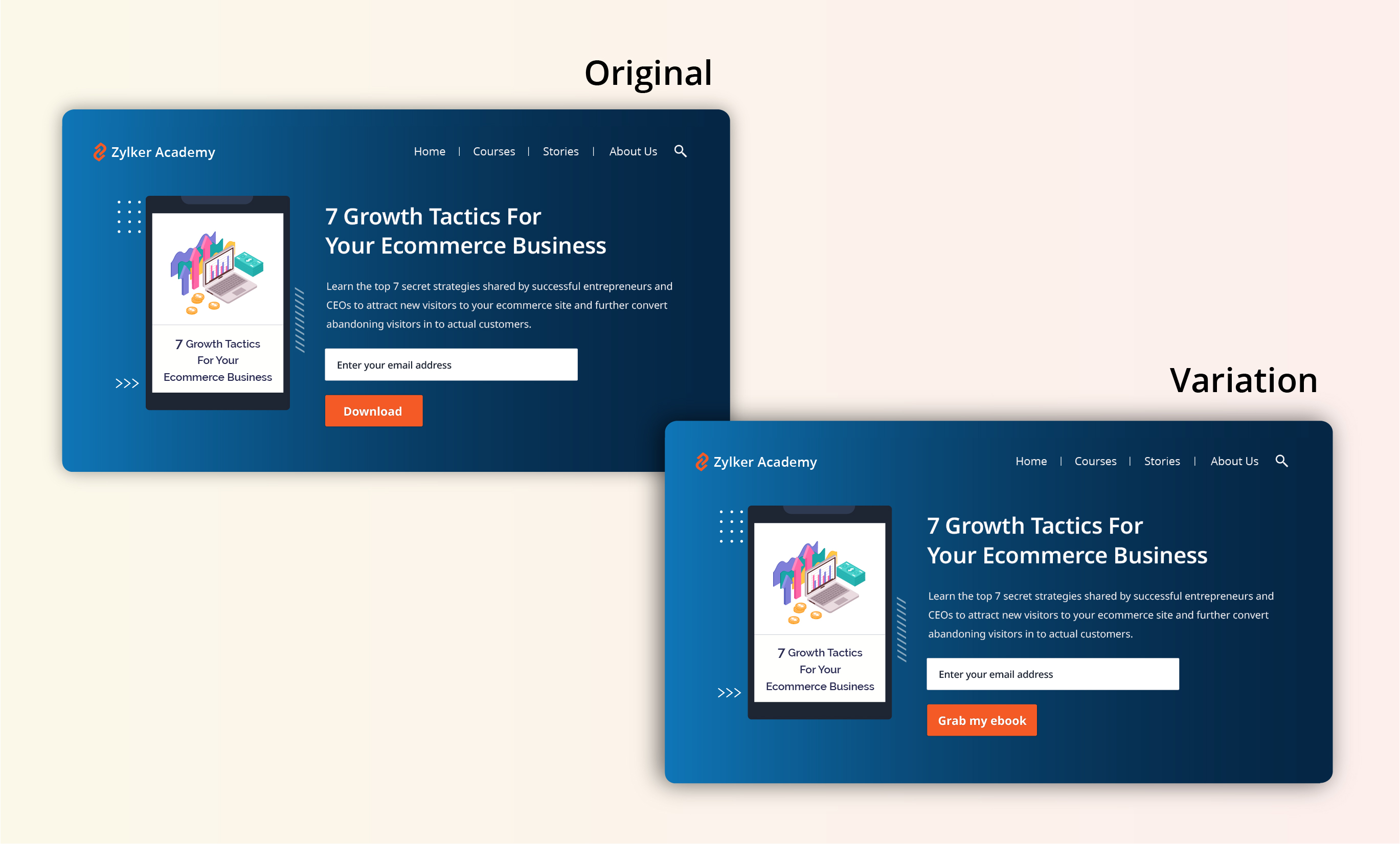
- Using a "Grab my ebook" CTA on the web page instead of a CTA that just instructs visitors to “Download.” This will create a more personal touch and draw interest towards the button.
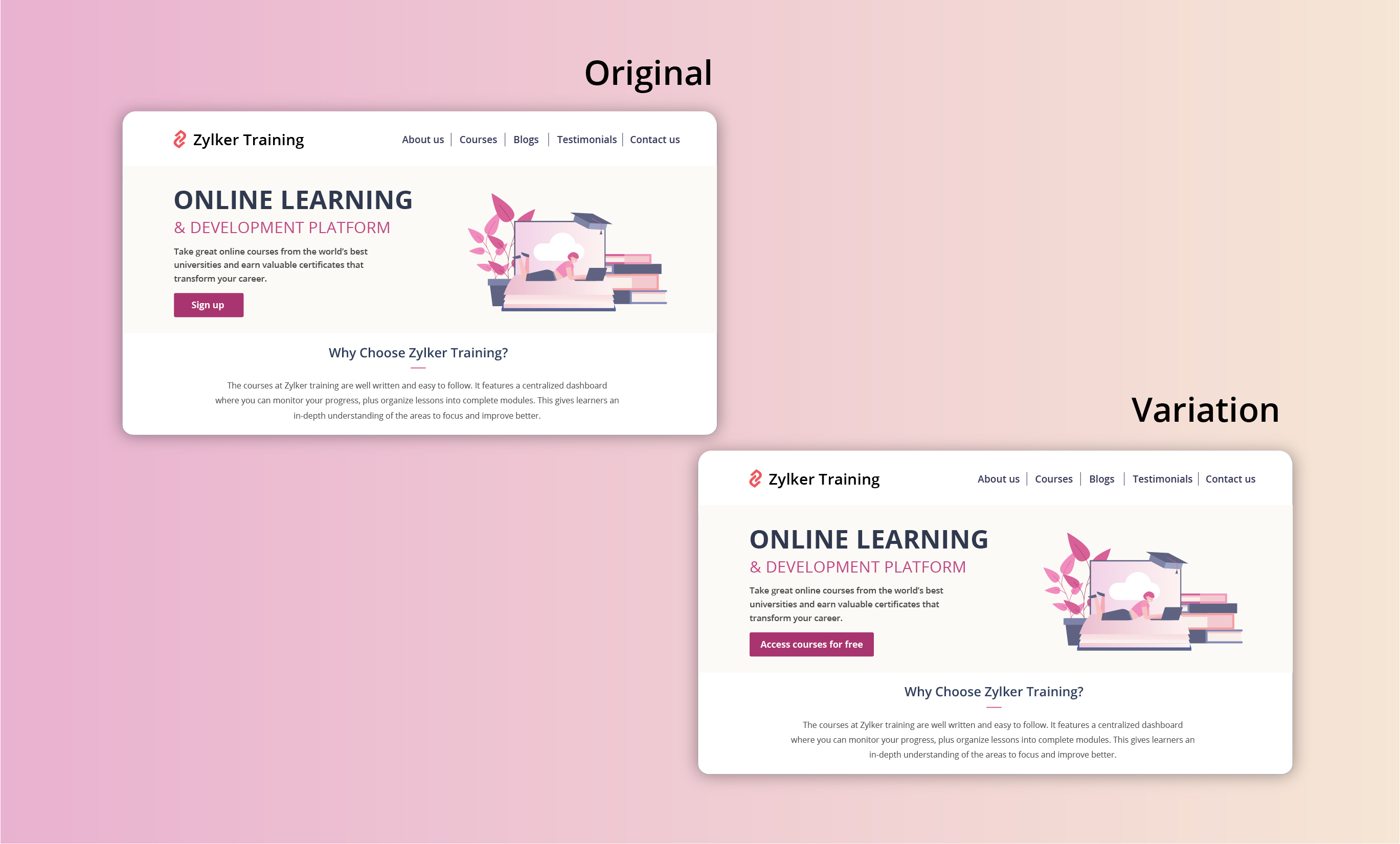
- Using a "Access courses for free" CTA instead of an overused "Sign up" button to build connections and boost sign ups on your newly developed elearning website.
Extra tip: Your CTA buttons should always have a healthy chunk of white space surrounding them. White space helps instantly grab your visitors' attention and adds focus to your button.
Testing the CTA position
Strive to achieve CTA placement that is noticeable but not disruptive to your audience. If you place your CTA button in a spot where your users don’t naturally look, you’re going to lose conversions. There are generally two points to look at while testing CTA position:
- Identify and utilize smart button placement based on your visitors' natural reading flow (top to bottom and left to right or right to left) and behavior on your website. This includes the path users follow on your website to complete a process, the design elements they click on, and the barriers that prevent them from achieving their goal.
Tip: You can use Session Recordings in PageSense to see how and why users are interacting with your CTAs the way they are. - Place the CTA button above or below the average fold of your page depending on the length and complexity of the content. This could also be determined by how far down the page your visitors scroll on an average. However, adding your CTA above the fold is the most common placement choice used on homepage/landing page designs.
Tip: You can set up heatmaps, scroll maps, and attention maps in PageSense to determine whether people are responding to—or even seeing—your CTAs.
A few examples of good CTA placement you can test out include:
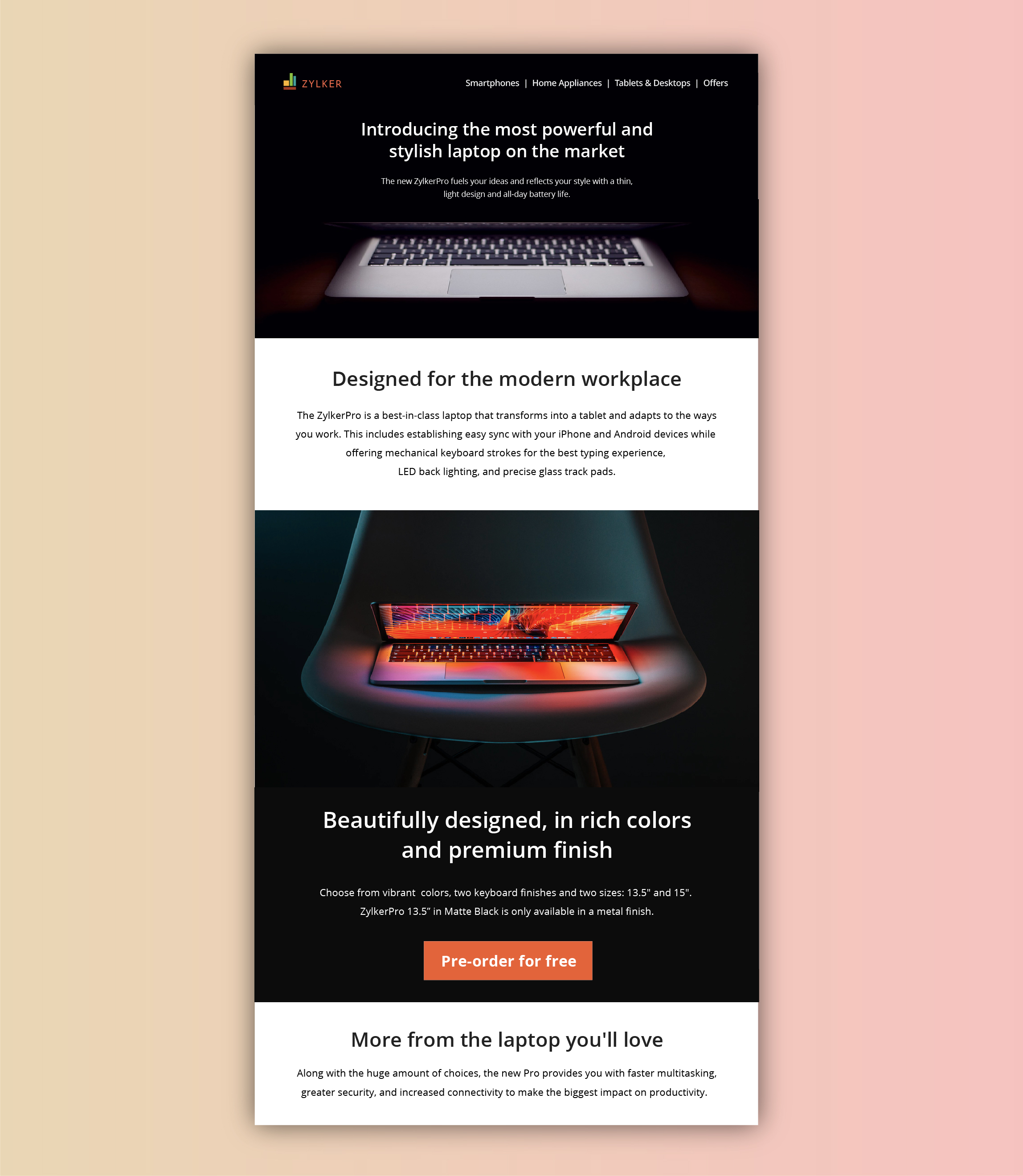
- Showing a glimpse of soon-to-be-released products with feature highlights, and then at the end placing "Pre-order for free" CTA on your digital store. This uses the below-the-fold area of your web page to catch the attention of the visitors first, even before redirecting visitors to the preferred page(s).
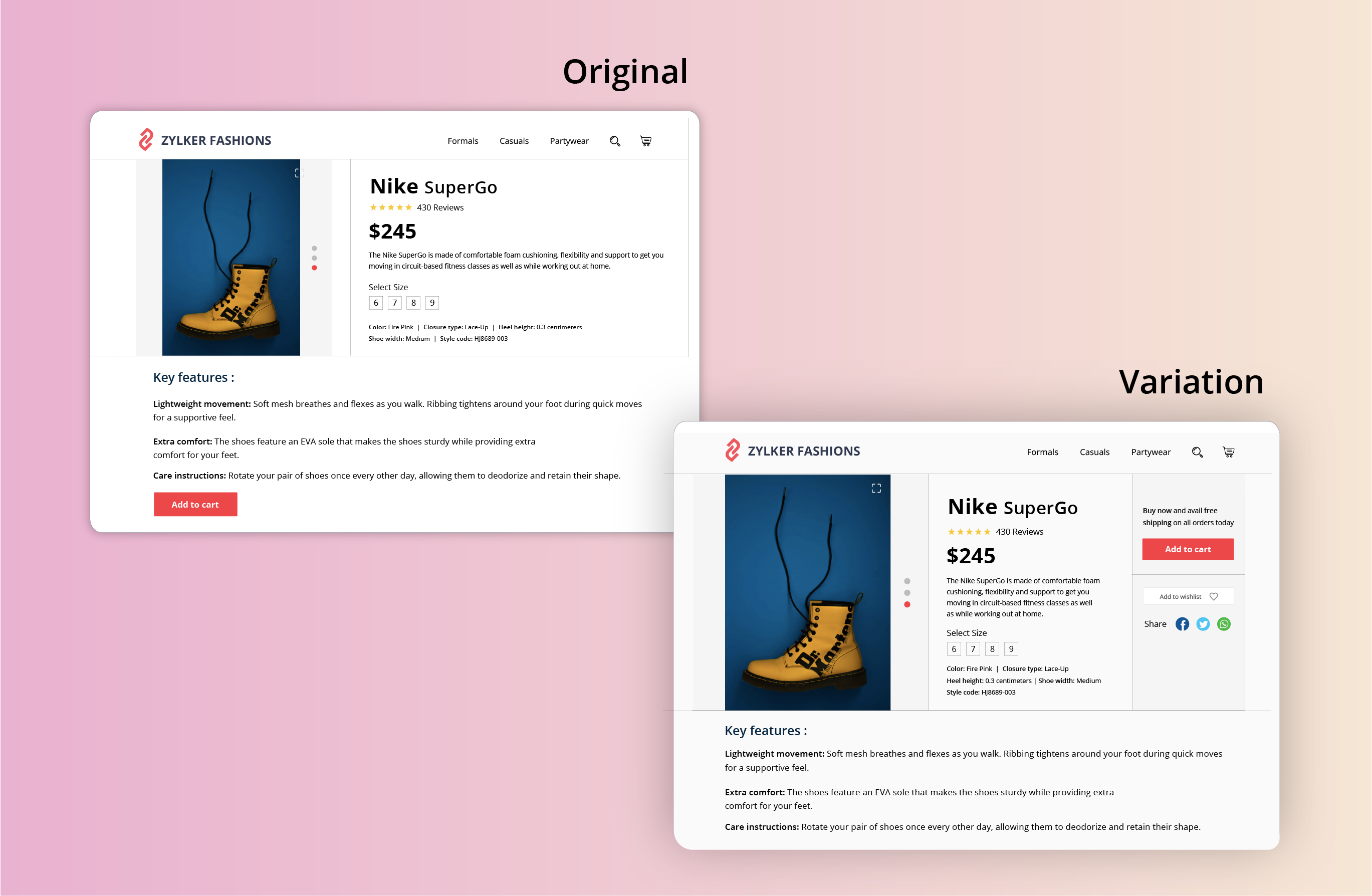
- Adding a “Buy Now” or "Add to Cart" button at the top-right section of the product page where a user would immediately click to buy after viewing your product offers page on the ecommerce site. This type of CTA placement adds visitors to your sales pipeline quickly by canceling extra steps like add to cart and check out.
Testing the CTA appearance
The color and appearance of your CTA button are the most important aspects while testing and optimizing your website. As humans, we always have a greater tendency to stick to information that looks bigger and brighter. Below are some practical tips on designing and testing an appealing CTA button:
- Add a bold, bright, and contrasting background color to CTAs. Give more important CTA buttons a brighter color and the less important functions a lighter color or simple text links.
- Have your CTA appear more clickable. This could be done by adding some visual effects such as a slight gradient or a small shadow to create that real push-button effect. However, if you think none of the effects will suit the chosen style of your website, add emphasis by applying rounded edges to the button.
- Size of the button is another crucial factor in designing an effective CTA button. Larger CTAs have a higher chance of being noticed and clicked by readers. It’s also common to arrange UI components according to their importance.
A few examples of good CTA appearance you can test out include:
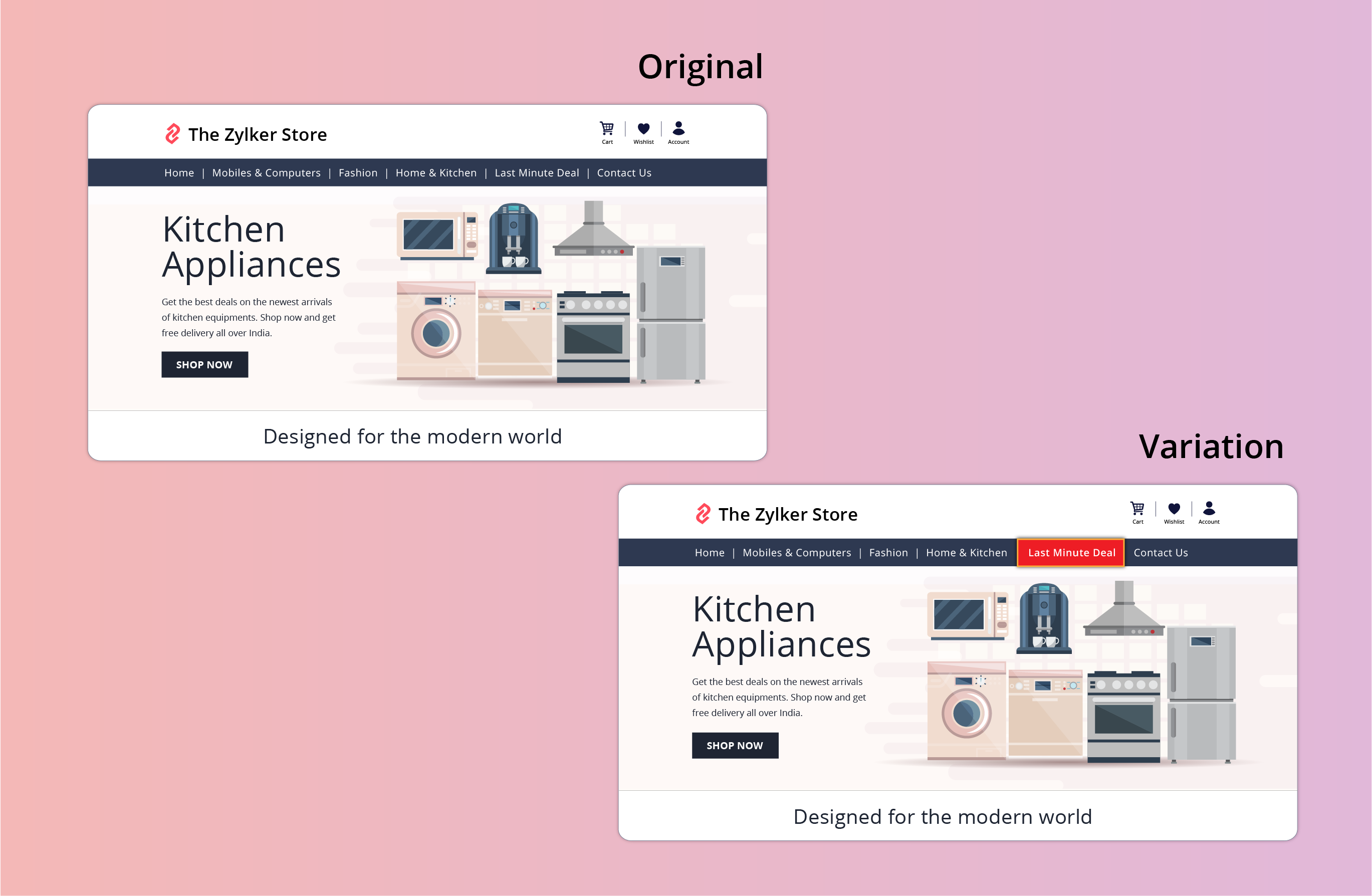
- Adding an attractive 3D or shadow effect to the "last minute deal" CTA button on your ecommerce site. This effect can spotlight the CTA, making it bright and prominent in comparison to other features like wish lists, view cart, or check out buttons.
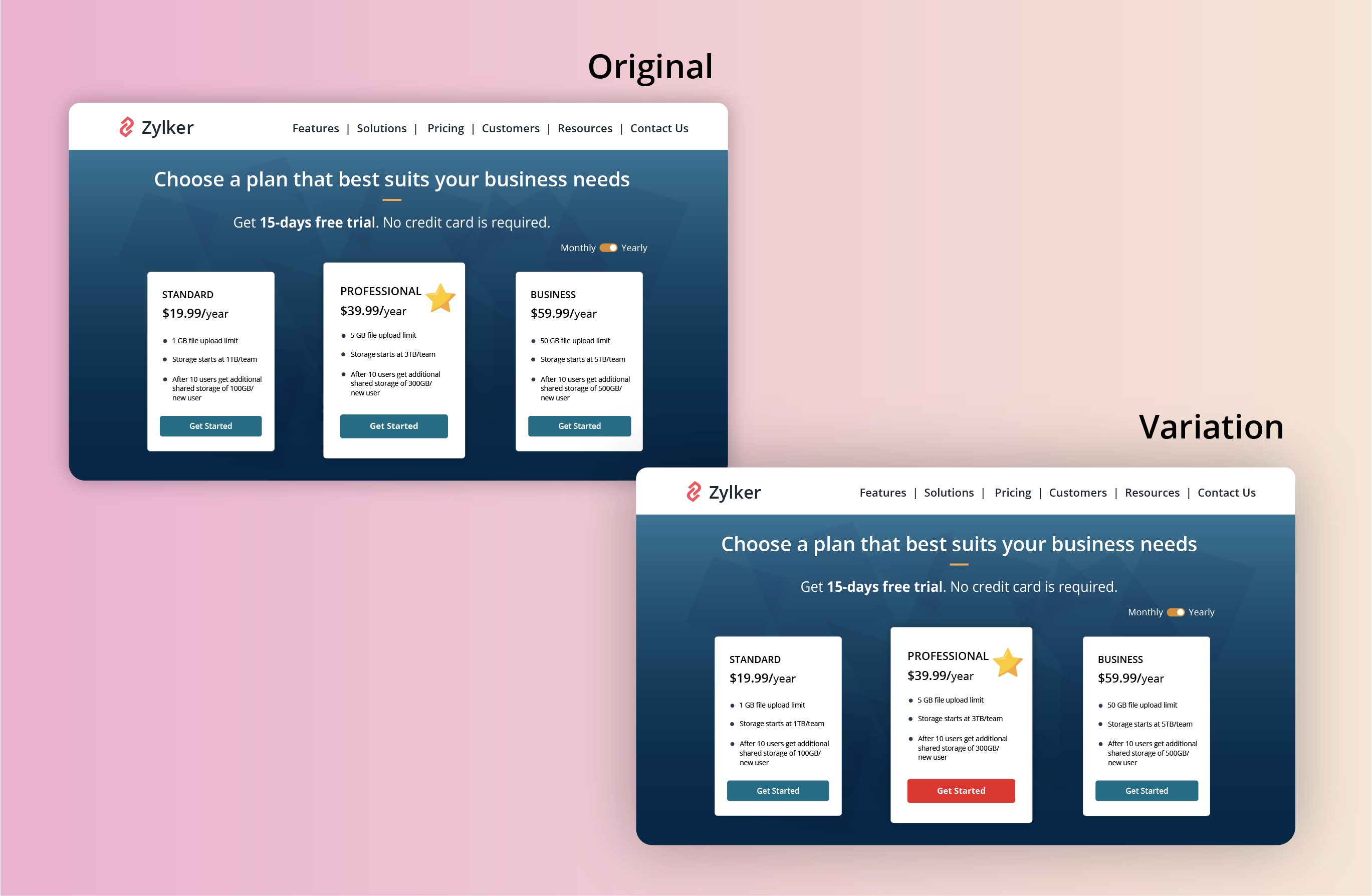
- Applying a bright color to the most recommended plan on your pricing page that you think will be a good fit for the majority of visitors. This might help highlight the best features in your product and avoid confusing buyers.
Found this useful? We would love to know what you think about this post. And, do you have any favorite A/B testing tricks or preferred approaches that you experiment on your website CTAs? Let us know in the comments below!
Happy testing. Happy converting!
Happy testing. Happy converting!
Topic Participants
Balarohini Paulraj
Sticky Posts
[Live Webinar] How to maximize your conversions using existing website traffic
Hello all, Did you know that on an average only 0.1% of your traffic converts? The rest are either heading towards your competitors or dropping off without being able to find what they came for. When you want to increase your conversions, it's naturalA/B Testing Idea #2: Make your headlines sound super cool.
Hello everyone, We're back with our second post in the CRO testing idea series. If you missed the first post, please check it out here: "Place irresistible and clear CTAs." In today's post, we'll look at how to effectively A/B test your headline content.A/B Testing Idea #1: Place irresistible and clear CTA buttons
Are you wasting much of your time and effort A/B testing every single idea that pops into your head, yet you're not generating sufficient traffic to your website? Don't worry—we've got you. We'd like to introduce you to the A/B Testing Ideas learningDid you know?#3: How to target and run your experiment based on custom audience segments in PageSense
Whatever kind of online business you're running, defining your target audience is the key factor to delivering relevant messages and further positioning your brand in the industry. Most marketing efforts revolve around this basic strategy of segmentingDid you know?#2: How to filter your report by custom date range in PageSense
Do you want to quickly view your experiment analysis or responses over different time periods? Want to effortlessly compare the performance of your website by specific weeks, months, or years? Also, see whether your new marketing strategies or efforts
Recent Topics
Automation#17: Auto-Create Tasks in Zoho Projects Upon Ticket Creation in Zoho Desk
Hello Everyone, This edition delivers the solution to automatically create a task in Zoho Projects when a ticket is created in Zoho Desk. Zylker Resorts uses Zoho Desk for bookings and handling guest requests. Zylker resorts outsources cab bookings toAutomation#20 : Auto-Add Ticket Tags based on Keywords
Hello Everyone! Welcome to unveiling custom functions on our Community series. This week's post lets you add tags to your tickets automatically based on the keywords in the ticket subject and the ticket thread. Discover how this custom function helpsAutomation#21: Track Ticket Transfers Across Departments
Hello Everyone! With Halloween just around the corner, we'd like to let you know the Zoho Desk team is always there to sweep away your customer service troubles! This week, we’re excited to introduce a custom function that tracks tickets moved betweenEmail Integration - Zoho CRM - OAuth and IMAP
Hello, We are attempting to integrate our Microsoft 365 email with Zoho CRM. We are using the documentation at Email Configuration for IMAP and POP3 (zoho.com) We use Microsoft 365 and per their recommendations (and requirements) for secure email we haveHomepage not assignable to group
MS Teams for daily call operations
Hello all, Our most anticipated and crucial update is finally here! Organizations using Microsoft Teams phone system can now integrate it effectively with Zoho CRM for tasks like dialling numbers and logging calls. We are enhancing our MS Teams functionalityAutomation#22 Track Ticket Duration at Specific Status
Hello Everyone! Welcome back to the Community Learning Series! Today, we explore how Zylker Techfix, a gadget servicing firm, boosted productivity by tracking the time spent at a particular ticket status in Zoho Desk. Zylker Techfix customized Zoho Desk’sAutomation#23: Automate Guided Conversations in Zoho Desk with Business Hours
Hello Everyone, This week's edition introduces a custom function designed to automate Guided Conversations in Zoho Desk, based on your business hours. With this feature, you can align the bot's behavior with your business schedule, ensuring a smooth andAddress changes in quote form
When entering a quote, the first piece of information required is the Account, which properly populates the billing and shipping address fields. Then I use the lookup function to select a contact, and when I do, the billing and shipping addresses areAutomation#24: Auto-Update custom field from Accounts to Tickets
Hello Everyone! Welcome back to the Community Learning Series! This episode dives into how Zylker Techfix streamlines account-related ticket references. Previously, employees had to manually check account details to retrieve specific customer information,Kaizen #227 : Client Script Support for List Page (Canvas)
Hello everyone! Welcome to another week of Kaizen. In today's post lets see how Client Script can be used in Canvas List Page to mask sensitive information from specific roles and add colors to Canvas List Page records based on custom criteria.This useImplement Date-Time-Based Triggers in Zoho Desk
Dear Zoho Desk Support Team, We are writing to request a new feature that would allow for the creation of workflows triggered by specific date-time conditions. Currently, Zoho Desk does not provide native support for date-time-based triggers, limitingAutomation#25: Move Tickets to Unassigned When the Owner Is Offline
Hello Everyone, Welcome to this week's Community Series! 'Tis the holiday season—a time when work often takes a brief pause. The holiday spirit is in full swing at Zylker Techfix too, with employees taking some well-deserved time off. During this period,Automation#27: Retain Ticket Owner on Moved Tickets
Hello Everyone! This week, we present to you a custom function that retains the ticket owner when a ticket is moved from one department to another. Here’s more to help you understand the custom function: At Zylker Techfix, Alex, the Support Engineer managesAutomation#28 Notify Agents on Article Expiry
Hello Everyone! This week, we’re bringing you a feature that notifies your team when articles in the Knowledge Base are set to expire to keep your content relevant and helpful for customers. The Zoho Desk's Knowledge Base is an asset for customers toAutomation#29 Retain ticket status on moved tickets
Hello Everyone, Hear out Zylker Techfix’s Success Story on Smoother Ticket Transitions! Zylker Techfix, a gadget servicing firm committed to quick repairs and timely deliveries, faced a challenge when ticket statuses changed automatically while movingAutomation#32:Auto Add New Portal Users to the Help Center User Groups
Hello Everyone, Introducing a custom function that automates the process of adding new portal users to Help Center user groups, making user management effortless! By default, Zoho Desk allows you to assign new portal users to groups manually. But withAutomation#34 : Automate Email threading for Ticket notification
Hello Everyone, It's been a while since we've presented an automation. However, our community has been buzzing with ideas, use cases, and discussions with our community experts and Ask the Experts session. So, here we are again, presenting an automationAutomation#35 : Auto-Add Comments under the Owner's Name in Tickets via Macros
Hello Everyone, This week's custom function provides simple steps to configure a Macro for adding comments to tickets with the name of the Comment owner. When managing tickets, you can use the Comment feature to communicate internally with your team andAutomation#36: Auto-create time-entry after performing the Blueprint transition
Hello Everyone, This week’s edition focuses on configuring a custom function within Zoho Desk to streamline time tracking within the Blueprint. In this case, we create a custom field, and request the agent to enter the spending time within the singleAutomation#33: Automate Splitting Names for Existing Contact Records
An organized directory – who doesn't love one? Previously, we explored how to split contact names into First Name and Last Name for new contacts in Zoho Desk. But what about existing contacts already in your database? This week, we bring you a customWorkqueue
I really like the idea of the Workqueue generally - it will be really useful. What it seems to lack however, is the ability to customise it properly. I want to be able to show a custom view rather than just "My Leads" and "Leads Assigned in Last 3 hours".Webform & spam
Hi, We set up 2 webform on our website, fowarding the content to Zoho CRM. Since it has been opened up, we are getting lot of spam message (for now about 20 a day). To lower the amount of false new leads we added the captcha field and new enquieries areZoho CRM Web form page URL
Hi there, I am getting quite a bit of spam through my Zoho CRM Web form and want to restrict the URLs it is submittable from. I can see that I can add Location URLs but I need to be able to just add a domain so can I enter mydomain.com/* to cover allReceiving too many Spam Leads. Why?
I am receiving so many junk leads from web forms created by zoho's platform. The junk queries are increasing day by day and are affecting our business. I am continuously following up with zoho team from the past one year but not getting any satisfactoryMail Merge is not working properly as far as the AUTOMATE section is concerned
Hi there, I created a Mail Merge template for the Deal module. I would like Deal owners to mail merge their Deal records, download the Mail Merge document as a Word doc and make a few changes before sending it to the customer. Thing is, neither the "MergeCanvas Detail View Related List Sorting
Hello, I am having an issue finding a way to sort a related list within a canvas detail view. I have sorted the related list on the page layout associated with the canvas view, but that does not transfer to the canvas view. What am I missing?project name field issue- n8n
Hey guys, I have a question. I want to create a new product using the workflow. The problem is with the product name field; I don't know how to fill it in. The workflow starts with retrieving information from the leads table, retrieving links to scrapeFunction #20: Custom calculation in item table of invoices
When you create an invoice in Zoho Books, the 'Amount' of a line item is typically calculated as the product of the "Quantity" and the "Rate" of the item. For instance, if an item has a sales rate of $50 and a quantity of 5 is sold, then the amount wouldCritical:- Eneble TDS filing for 26Q from the zoho book
We currently extract TDS data from Zoho Books and manually input it into a separate TDS software to generate the FUV file and file returns. Previously, while using Tally, we benefited from an integrated feature that seamlessly recorded transactions andHow to track repeat customers?
I own a food business and every order is entered into Zoho with: a unique Customer ID total order amount date of order With this information, I want to be able to see a list of my "best" customers. In other words, descending lists arranged according to:Zoho Books - Breaking A Working App
We've been using Zoho for many years now. Across all apps, entering phone numbers in standard formats was enabled in all apps. These formats are: xxx.yyy.zzzz xxx-yyy-zzzz (xxx) yyy-zzzz and we were able also to add extension numbers in these formats:Build data protection into your support
At Zoho, privacy is our principle. Every Zoho product is built with privacy as the foundation and the finishing touch, guiding every decision we make. Security, privacy, and compliance are woven into the software development lifecycle, starting from howConditional formatting: before/after "today" not available
When setting conditional formatting, it only allows me to set a specific calendar date when choosing "Before" or "After" conditions. Typing "today" returns the error "Value must be of type date". Is there a workaround? Thanks for any help!Display Client Name in Zoho Creator Client Portal Dashboard
Hello Zoho Creator Team, We hope you are doing well. Zoho Creator recently introduced the option to set a client’s display name in the Client Portal settings, which is very helpful for providing a personalized portal experience. However, there is currentlyCustomizable UI components in pages | Theme builder
Anyone know when these roadmap items are scheduled for release? They were originally scheduled for Q4 2025. https://www.zoho.com/creator/product-roadmap.htmlAmazon.in FBA multiple warehouse integration with Zoho Inventory
My organisation subscribed to Zoho One looking at the opportunity to integrate Amazon.in with Inventory. But during the configuration, we understood the integration has severe limitations when it involves multiple warehouses in the same Organisation.Feature Request - Set Default Values for Meetings
Hi Zoho CRM Team, It would be very useful if we could set default values for meeting parameters. For example, if you always wanted Reminder 1 Day before. Currently you need to remember to choose it for every meeting. Also being able to use merge tagsWindows Desktop App - request to add minimization/startup options
Support Team, Can you submit the following request to your development team? Here is what would be optimal in my opinion from UX perspective: 1) In the "Application Menu", add a menu item to Exit the app, as well as an alt-key shortcut for these menusAbility for admin to access or make changes in zoho form without asking for ownership
Currently in zoho form only form owner can make the changes in the form and if someone else has to make changes then we have to transfer the ownership to them and even admin also cant access it . So i think admin must have the ability or option to accessNext Page