All new Address Field in Zoho CRM: maintain structured and accurate address inputs
 The address field will be available exclusively for IN DC users. We'll keep you updated on the DC-specific rollout soon.
It's currently available for all new sign-ups and for existing Zoho CRM orgs which are in the Professional edition.

Why the new address field?
- You could create separate fields—one for street, one for city, one for state, one for country, and so on. But if you wanted states to change based on the country selected, you'd have to enter all the country and state values yourself manually and then set up dependency rules.
- Or you could create a single multiline text field for the whole address. That avoided the setup work, but it came at the cost of functionality; you couldn't filter by country or state, and you couldn't use the data for quick reporting or territory-based analysis.
The new address field eliminates all of this headache by enabling you to capture all the necessary components in one structured field while still being able to view, filter, and report on them individually.
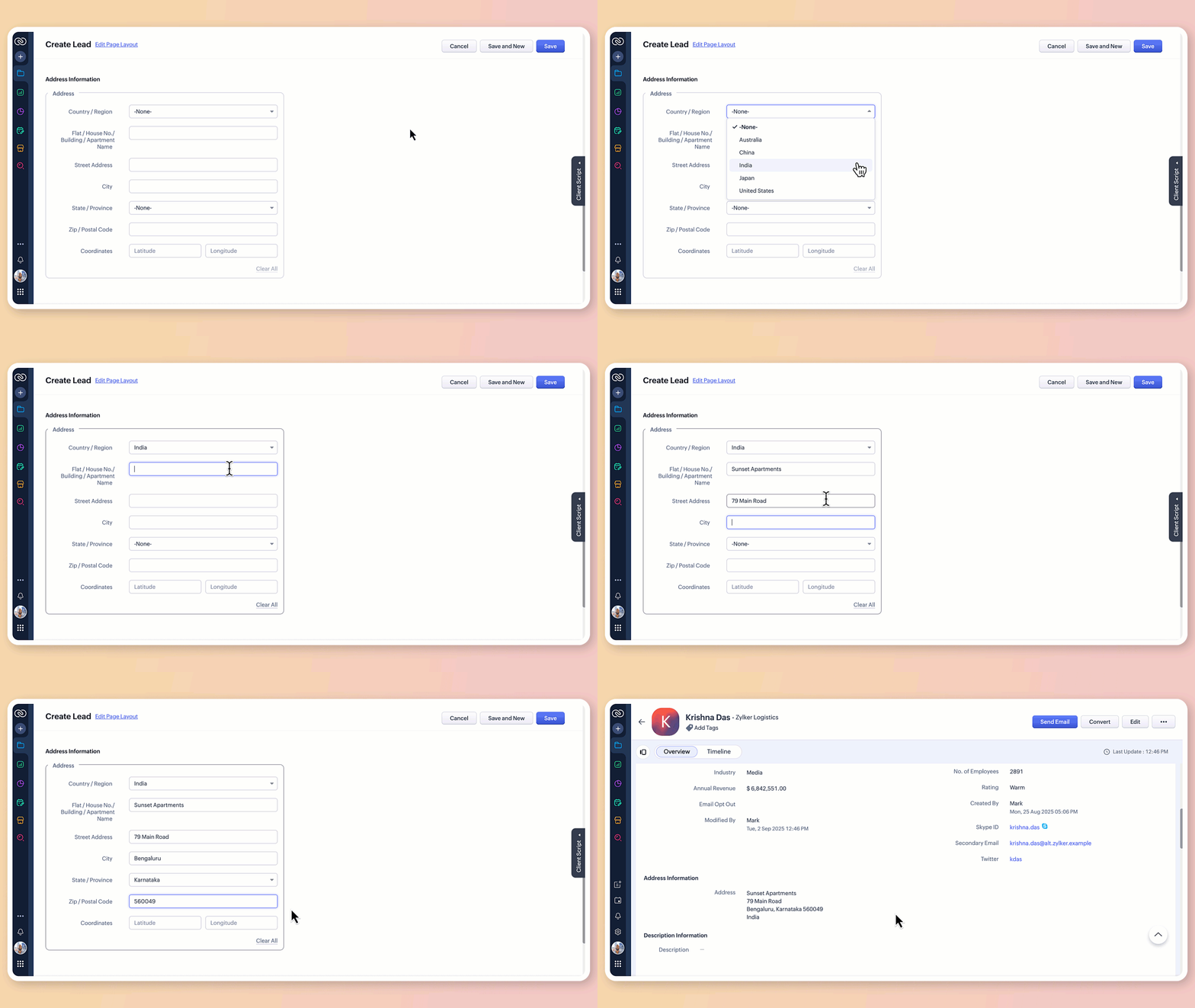
What does the new address field offer?
1. Structured address input
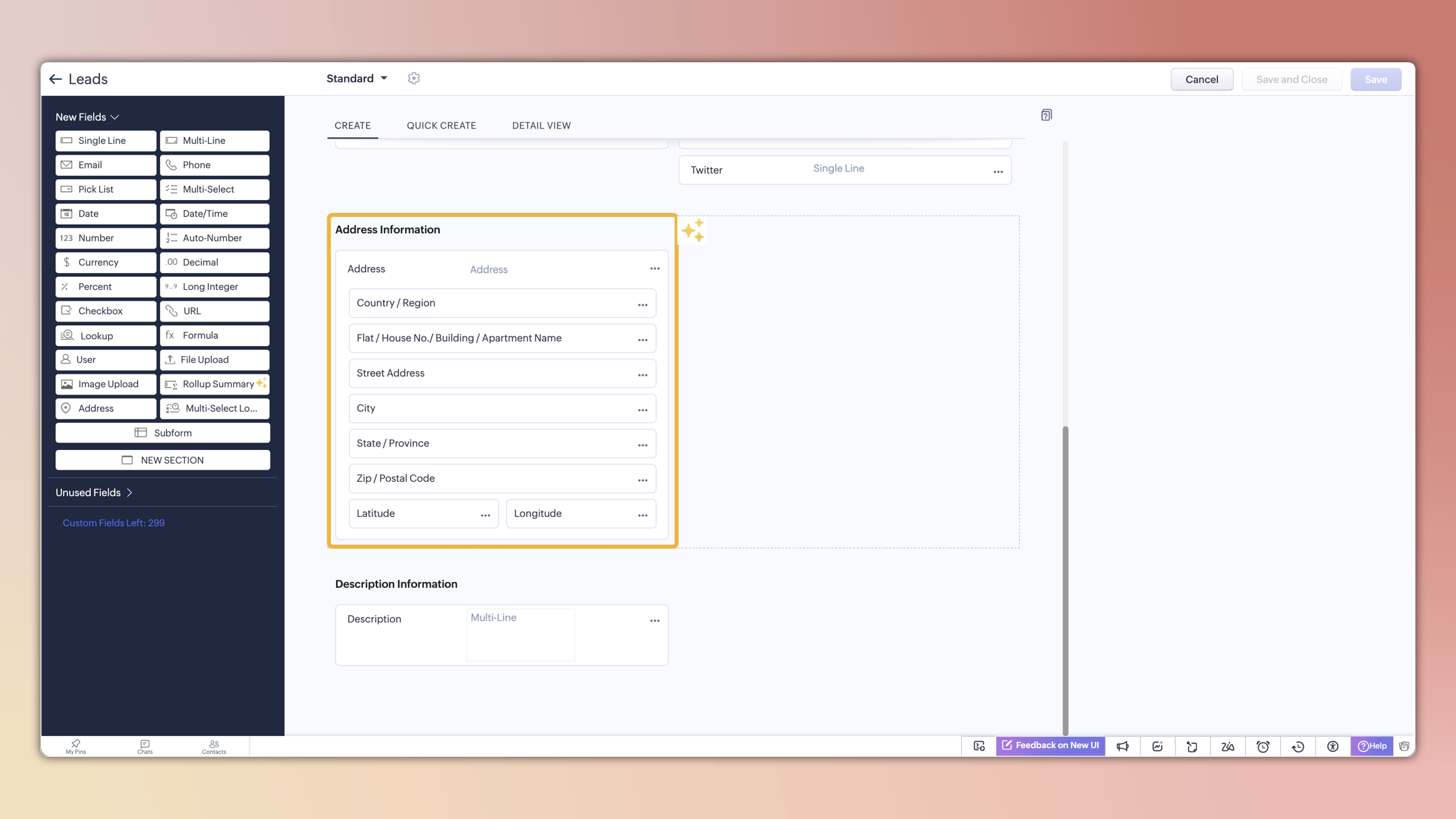
The all-new address field breaks down location details into clearly defined components:
Country/region
Flat/house number/building/apartment name
Street address
City
State/province
Zip/postal code
Precise geographic coordinates in latitude and longitude
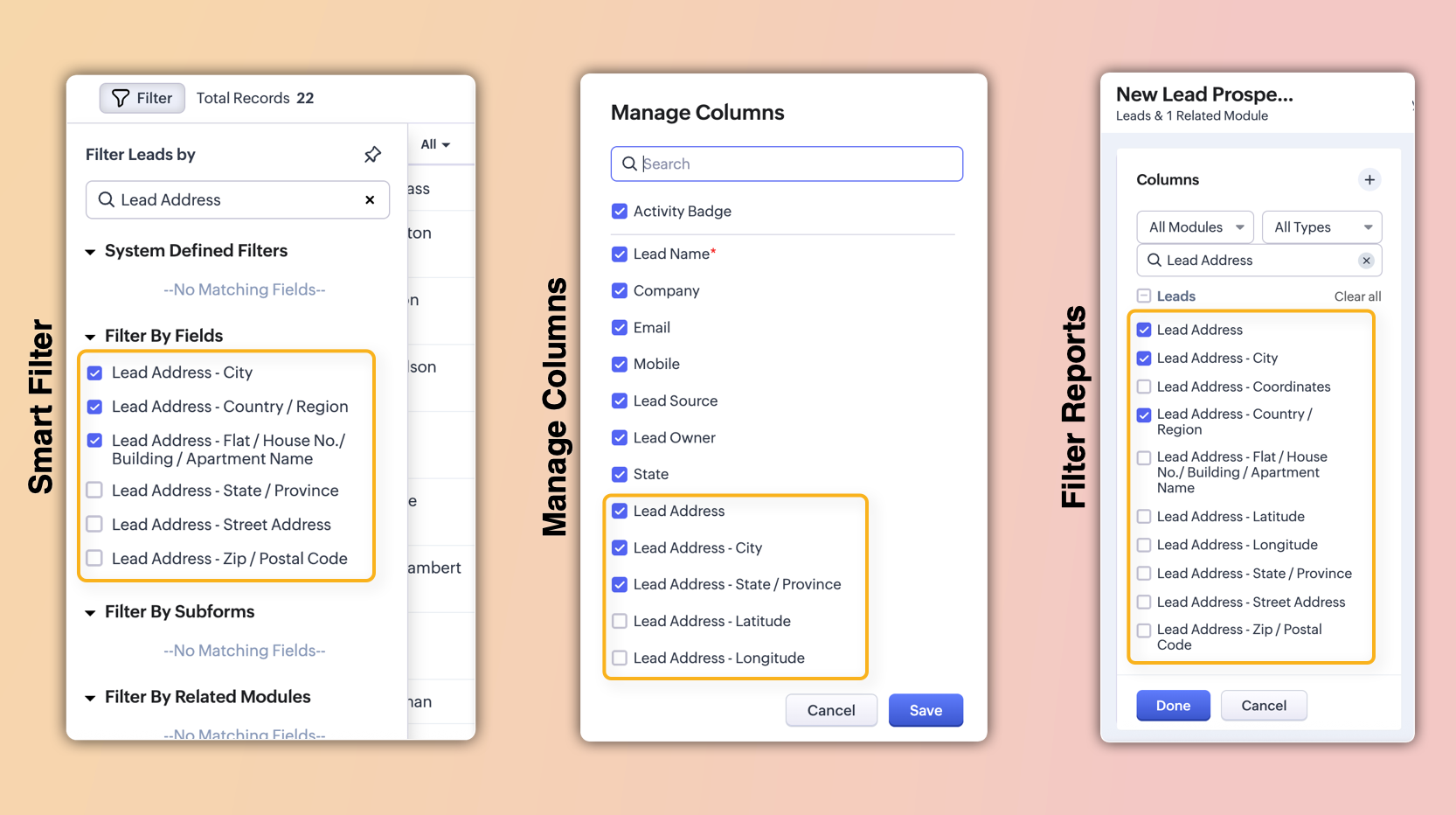
These sub-fields will also be individually available for viewing, filtering, and applying criteria. This enables users to configure, search, and report on address data with greater precision and flexibility.
2. Global sets for countries and states
The new address field comes pre-loaded with standardized lists of countries and their respective states/provinces.
Selecting a country instantly filters the available states, so you don't have to set up dependencies manually or type them in.
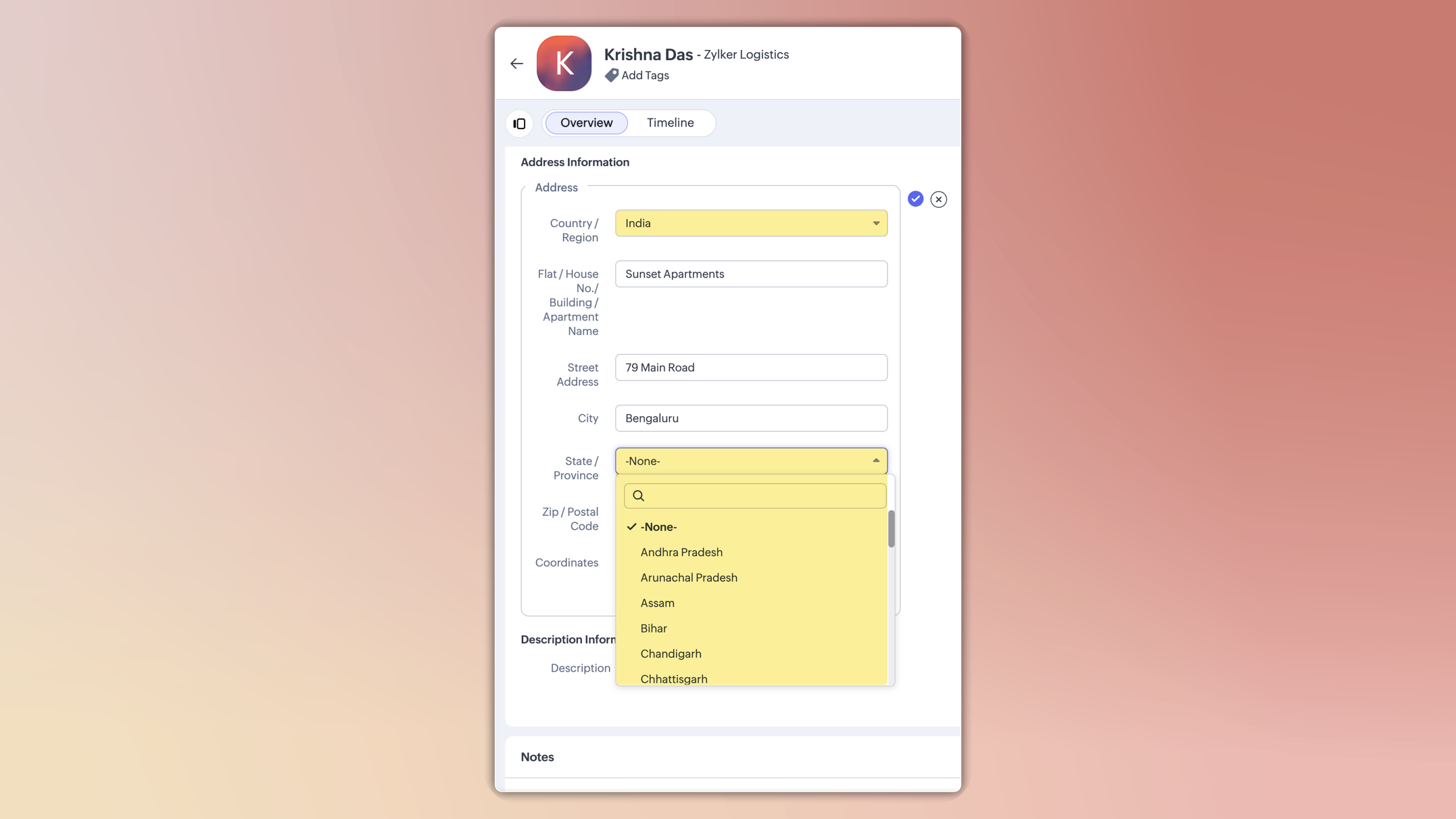
This ensures consistent spelling, eliminates typos, and keeps reporting clean.
You can also customize these lists in the Global Sets page by adding or removing values based on your business needs.
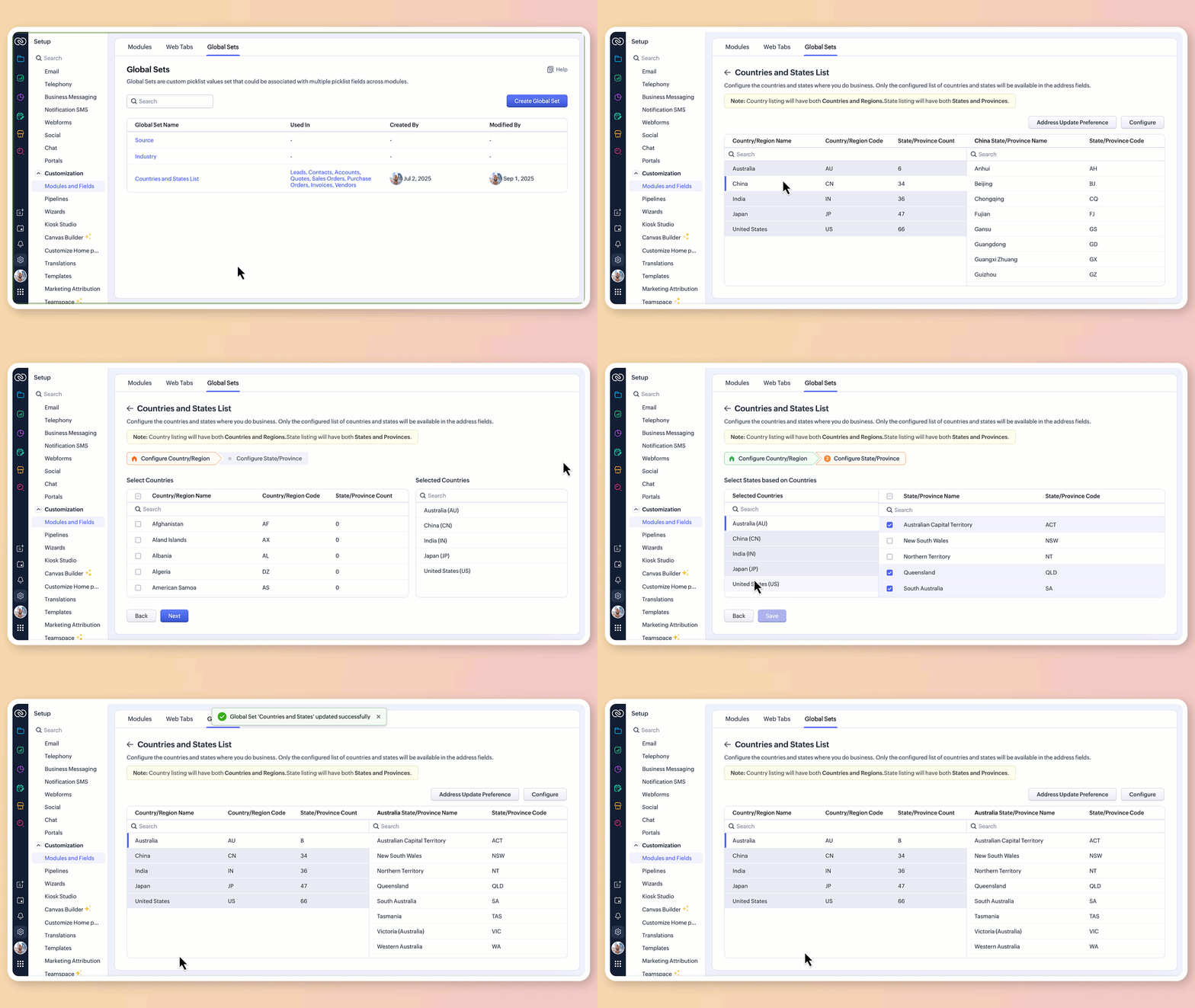
3.Maintain accuracy with address update preferences
To avoid mismatched or invalid country and state data, you can now set address update preferences in your org.
Choose to allow only configured country and state values in records, irrespective of the update source.
Choose how invalid entries are handled:
You can either skip the country/state update alone and proceed with the record creation or update, or stop the entire record creation or update altogether if an invalid value is detected.

Feature availability and limits
Editions supported: Professional, Enterprise, and Ultimate
Modules supported: All modules except user modules, linking modules, and Tasks, Calls, and Meetings modules
Limits: Up to two custom address fields per module
Points to be noted:
For new signups: The system-defined address fields will be available in the new address format for: Leads, Contacts, Accounts, Vendors, Quotes, Invoices, Sales Orders, and Purchase Orders modules.Additionally, admins can configure custom address fields for these modules if required.
Existing orgs: Admins can incorporate the new address field into their modules manually by adding it via the layout editor. The address field will be available as a custom field in the field tray.
Address field is not supported in Webforms, Field updates in Automation and Process management, Zia Enrichment. (The support for the same is in progress and will be updated shortly.)
Please share your feedback in the comments below.
Thanks,
Nizamuddin
Topic Participants
Nizamuddin Sohel SK
Andres
Haiku Technical Support
Toca Travel
Ishwarya SG
Sticky Posts
Presenting ABM for Zoho CRM: Expand and retain your customers with precision
Picture this scenario: You're a growing SaaS company ready to launch a powerful business suite, and are looking to gain traction and momentum. But as a business with a tight budget, you know acquiring new customers is slow, expensive, and often deliversGood news! Calendar in Zoho CRM gets a face lift
Dear Customers, We are delighted to unveil the revamped calendar UI in Zoho CRM. With a complete visual overhaul aligned with CRM for Everyone, the calendar now offers a more intuitive and flexible scheduling experience. What’s new? Distinguish activitiesCreate and populate a record in an instant: Introducing zero-shot field prompting to Zia's ICR
A couple of months ago, we upgraded our in-house AI image detection and validation tool, Zia Vision, with intelligent character recognition (ICR). By training Zia with sample images, you could create and enrich CRM records with data extracted from standardIn-person ZUG Meetups for Real Estate Professionals - US Q1 2026
The Real Estate Zoho User Group is going on a multi-city, in-person meetup tour across the US, and we’d love to see you there! These meetups are a great opportunity to: Connect with fellow real estate professionals using Zoho Share challenges and discoverNimble enhancements to WhatsApp for Business integration in Zoho CRM: Enjoy context and clarity in business messaging
Dear Customers, We hope you're well! WhatsApp for business is a renowned business messaging platform that takes your business closer to your customers; it gives your business the power of personalized outreach. Using the WhatsApp for Business integration
Recent Topics
Important update: Changes in email sender policies
Hello, This is to announce important changes to email sender policies from Google that may impact your use of Zoho Meeting. Restriction on public domains Effective February 1, 2024, Google is implementing policies that will affect the configuration ofCamera access
My picture doesn't appear in a group discussion. (The audio is fine.) The guide says "Click the lock icon on address bar," but I can't find it. Advise, pleaseChat for webinar session, schedule meeting session for 24 hours - Zoho Meeting iOS app update
Hello, everyone! In the most recent iOS version of the Zoho Meeting app, we have introduced the chat functionality for the webinar session. To access this feature, the Organizer should have the 'Public chat' option enabled on the Zoho Meeting desktopInvoice Copy 2005116990189
Please provide the invoice for the trancaction 2005116990189Darshan Hiranandani About
Hi, I’m Darshan Hiranandani, a dedicated software developer with a strong passion for creating efficient and user-friendly applications. With a degree in Computer Science and several years of experience in the tech industry, I specialize in full-stackLatest update in Zoho Meeting | On-demand webinars
Hello everyone, We’re excited to introduce our new on-demand webinar feature, you can now provide pre-recorded sessions that your audience can access immediately, no need to wait for scheduled sessions. Benefits of On-demand webinars : Scheduling flexibilityZoho Meeting iOS app update - Join breakout rooms, access polls, paste links and join sessions, in session host controls
Hello, everyone! In the latest iOS version(v1.7) of the Zoho Meeting app, we have brought in support for the following features: Polls in meeting session Join Breakout rooms Paste link in join meeting screen Foreign time zone in the meeting details screen.Zoho Meeting app update.
Hello, everyone! In the latest Android (v2.3.7) and iOS (v1.7.1) versions of the Zoho Meeting app, we have brought in support for the following features: Report Abuse option. WorkDrive integration. Report Abuse option You can now report to us any deceptiveZoho Meeting Android app update - v2.4.0
Hello everyone! We are excited to announce that we have brought in support for the following features in the latest version of the Zoho Meeting Android app(v2.4.0): 1. Start Personal Meeting Rooms 2. Revamp of the schedule meeting screen and meeting detailsIntroducing Zoho Desk integration and a few minor enhancements
Zoho Desk Integration We've now introduced an integration between Zoho Meeting and Zoho Desk to efficiently manage meeting-related customer inquiries. With this integration, you can track, respond to, and resolve meeting-related tickets directly fromZoho Meeting iOS app update: Hearing aid, bluetooth car audio and AirPlay audio support.
Hello everyone! We are excited to announce the below new features in the latest iOS update(v1.7.4) of the Zoho Meeting app: 1. Hearing aid support: Hearing aid support has been integrated into the application. 2. Bluetooth car Audio, AirPlay audio support:Zoho Meeting Android app update: Breakout rooms, noise cancellation
Hello everyone! In the latest version(v2.6.1) of the Zoho Meeting app update, we have brought in support for the following features: 1. Join Breakout rooms. 2. Noise cancellation Join Breakout rooms. Breakout Rooms are virtual rooms created within a meetingiOS 12 update: Introducing autofill passwords and Siri Shortcuts in Zoho Vault
With this iOS 12 release, Zoho Vault users can now autofill usernames and passwords on Safari and other third-party apps. Users can enjoy a seamless login experience to their everyday apps without compromising security and also access passwords stored in Zoho vault with Siri Shortcuts by adding personalized phrases. How to enable autofill password on your iOS device? First, you need to update your device to iOS 12. Apple recommends you to take a backup before you update your device to the latestZoho Vault: A look at what's new for iOS, iPadOS, and macOS
Hi everyone, At Zoho Vault, we constantly aim to improve your security experience. Based on both internal and external feedback, we have recently rolled out updates across our iOS, iPadOS, and support for macOS platforms. Introducing the desktop app forBiometric Access Support on Zoho Vault Desktop App
Is there any plans to add biometric authentication (fingerprint, face recognition) for Vault desktop apps (Windows/macOS) to enhance security and ease of access. I would love to hear other members view on thisFree webinar: Learn the benefits of migrating to Zoho Vault's new interface
With remote work becoming more and more common across the globe, productivity and time management are now pivotal concerns for every organization. With the number of business applications employed by companies constantly increasing, a password manager like Zoho Vault saves a lot of productive hours for your team. Vault's new interface has been carefully designed to address these pressing needs, helping users increase their productivity while improving their overall online experience. This July,Free Webinar: An exclusive live Q&A session with the Zoho Vault team
As 2020 draws to an end, we're closing out a year that has seen drastic changes all around the world. Many businesses have adopted cloud solutions and a remote work culture for the first time, and this has given rise to newer cyber risks and threats thatWhy passwordless authentication should be your top security project for 2021
Hello users! We know that nobody likes to remember passwords, yet they form an indispensable part of our lives. Many of us working with any kind of technology today manage numerous passwords for personal and business accounts. With the widespread adoptionFree Webinar: See why Zoho Vault is the best alternative to LastPass
When LastPass was acquired by LogMeIn in Oct 2015, we expressed our genuine concern about how this would change the LastPass business model and how customer trust would transfer from one company to another. As we suspected, LastPass doubled their pricingManaging cyber threats when working remotely | A Customer Survey Report
The nearly universal adoption of remote work has changed the way businesses function. Globally, enterprises continue to work to find new ways to make life easier for employees working remotely. However, a commonly cited concern has been the lack of cybersecurityWorld Password Day: 5 interesting facts about passwords
It's World Password Day: that time of the year when we talk about password hygiene and the importance of safe password management. World Password Day is observed on the first Thursday of every May, and this year, we'd like to talk about some of the mostFree Webinar: Go passwordless in 2022 with Zoho Vault
Passwords have long been the preferred authentication method, largely due to their universal appeal. While they're easy for people to use and implement, they're also convenient for hackers to exploit. Reports from 2021 state that weak and stolen passwordsMyki has announced EOL for its services | Learn why Zoho Vault password manager is the best alternative
Hello Myki users, Myki has announced end-of-life for its Teams, MSP, and GUARD services, after being acquired by JumpCloud. In their recent announcement, Myki stated that they will be removing their apps and extensions from the respective stores, turningJoin our exclusive meetup with Zoho's Real Estate community
Hey there, The Zoho Vault team is conducting a meetup for all real-estate users from Zoho. During this session, we will be discussing the need for secure password management and how Vault can help you and your clients safely protect passwords and otherFree webinar: A quick walkthrough of Zoho Vault and major updates in 2023
Managing passwords is crucial for all businesses. You can securely store, share, and manage passwords effectively from anywhere with Zoho Vault. We have introduced several new features in 2023 to offer the best online experience for our users. Join ourFree webinar: Why a password manager is a “must-have” for everyone in 2024
In the past decade, we've witnessed numerous cybersecurity breaches globally, with a significant portion resulting from the "it won't happen to me" mindset. Shockingly, in 2023, 86% of breaches involved weak and stolen passwords. Password hygiene is crucialZoho Vault - Webinars 2023 - Video Recordings and Slide Decks
Hello, We wanted to offer a consolidated list of Zoho Vault webinar resources from 2023. Therefore, we're putting together a list that includes links to our webinar recordings and slide decks for easy access. Webinar Video recording Slide deck GettingFree webinar: Focal point: Building a financial ecosystem with Zoho Vault and Zoho Workplace
Hi everyone! Cyber threats against the financial sector are escalating. In the last two decades, nearly one-fifth of reported incidents targeted financial institutions, causing $12 billion in direct losses. Cybercriminals are becoming more sophisticated,New features in Zoho Vault
We’re thrilled to introduce a wave of powerful updates in Zoho Vault, designed to enhance security, streamline workflows, and improve your overall experience. Let’s dive into what’s new! Folder creation restrictions Limit who can create folders in yourJoin our World Password and Passkey Day expert Q&A 2025
Hey everyone! World Password and Passkey Day is almost here, and there's no better time to talk about something we all rely on daily—secure authentication. Did you know that a staggering 60% of hacking-related breaches are tied to weak or stolen passwords?Dashlane discontinued its free plan: Here's why Zoho Vault's free plan is worth the switch
Hey everyone, Dashlane password manager has officially announced that its free plan will be discontinued starting September 16, 2025. This change means that current free users will need to either upgrade to a paid subscription or export their data andIntroducing SecureForms in Zoho Vault
Hey everyone, Let’s face it—asking someone to send over a password or other sensitive data is rarely straightforward. You wait. You nudge. You follow up once, twice—maybe more. And when the information finally arrives, it shows up in the worst possibleClickjacking: Zoho Vault's Response
Issue: Password manager browser extensions are found to be vulnerable to clickjacking security vulnerabilities that could allow attackers to steal account credentials, TFA codes, and card details under certain conditions. Reported by: Marek Toth, IndependentFree webinar: Security that works: Building resilience for the AI-powered workforce
Hello there, Did you know that more than 51% of organizations worldwide have experienced one or more security breaches, each costing over $1 million in losses or incident response? In today’s threat landscape, simply playing defense is no longer enough.Free webinar—Redefining workforce security with Zoho Vault: Passwords, passkeys, and multi-factor authentication
Hi everyone! Did you know that in Q2 alone, 94 million data records were leaked globally? Behind every breach is a combination of poor password habits, phishing attacks, privilege misuse, and simple human error. The fallout—including reputational damage,Fill Colors
Hello, Just curious, is it possible to manage the Used and standard colors in the fill drop down menu ? I would like to change/edit them is possible to colors I frequently use. Thanks for you reply, BruceClient scripts for Zoho Books ?
Good day everyone, I am looking for a way to be able to interact with the Quotes and Invoices as they are being created. Think of it like Zoho client script in Zoho CRM. But for the life of me I dont see a way to do this. The issue with having functionFillable template with dynamic tables?
Is there a way to build a fillable template so that users can add rows to a table? To describe what I'm trying to accomplish the table has 3 sections; a header row, some number of rows with custom information, and a summary row with totals. I can't figureInvoicing multiple expense items as a single line item
My client would like me to invoice them for multiple expense items on a single line item on an invoice. Can this be done? I know I can import billable expenses to an invoice, but I don't know how to show them as a single line item or have themTables improvement ideas / features
Heya, I've been using Zoho Tables for a few months now and wanted to post some features that I think will be greatly beneficial for the tool: 1. Ability to delete a record in automation or move a record in automation. - Usecase: I move a record from oneNext Page