All Zoho Survey tables explained

Introduction
Hey everyone! Sometimes, deciphering the structure and meaning of data in Zoho
Analytics, especially when Zoho’s native syncs and integrations are
activated, can be quite challenging. That’s why I’ve put together an
overview, not only to aid myself but also to assist others in navigating
through these complexities.
Collectors
The table plays an important role in the administration of surveys, especially when using the multi-collector feature. This feature makes it possible to distribute a survey to different groups and then filter the results by group.
What is a collector?
A collector is basically a way to distribute a single survey in different ways. Normally a survey is shared via a single link, but with this feature separate links can be created for different groups. This makes it easier to filter and analyze responses by group. In addition, numerous settings such as restrictions, quotas, visibility and hash URLs can be set separately for each collector.
A practical example illustrates this: Suppose you are organizing a workshop for many different customers from different companies and want to get feedback from the participants. Instead of creating separate surveys per company, you can create a single survey and send it to each participant using multi-collectors. This way, all incoming responses are already automatically segmented by company without participants having to provide information manually.
The Collectors table therefore makes it easier for you to organize survey activities.
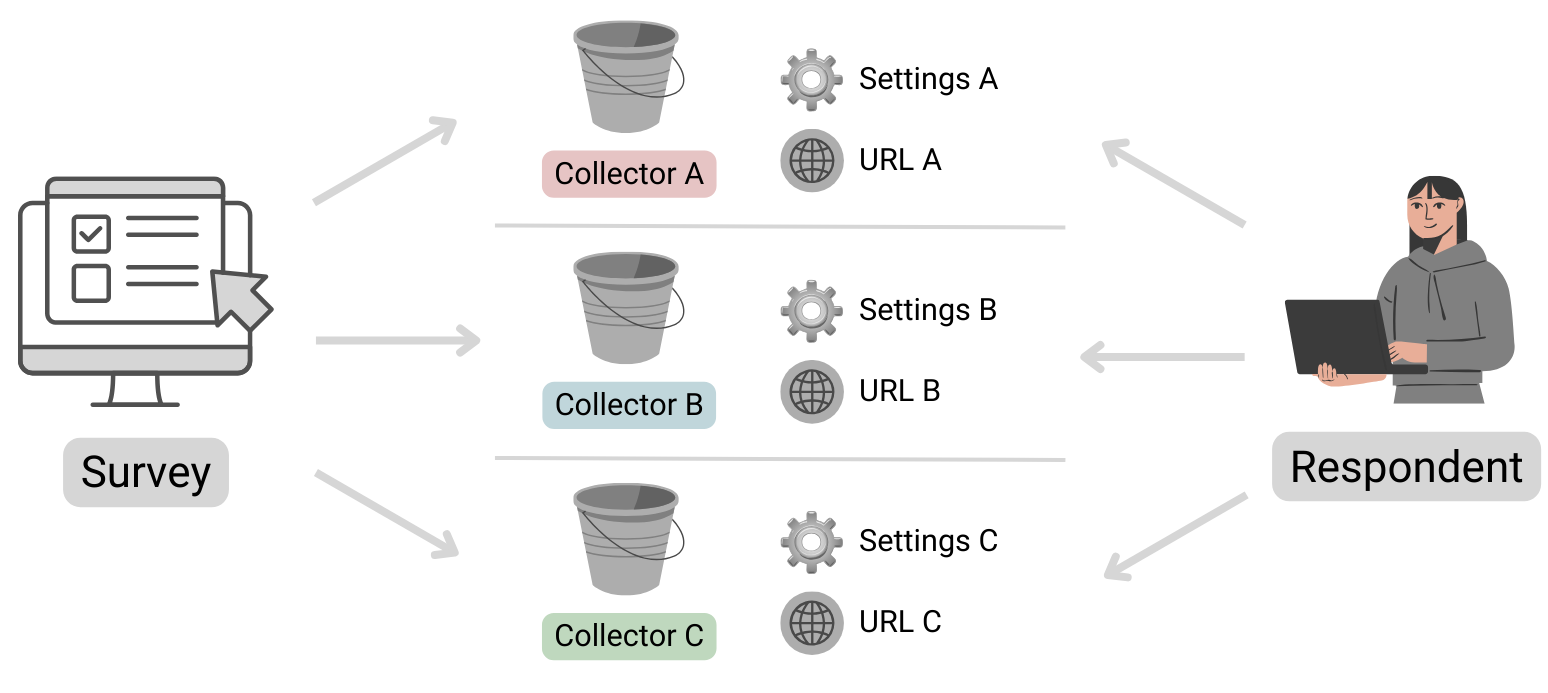
Table structure
| Column name | Data type | Explanation | Table relationships | Values |
|---|---|---|---|---|
| ID | Number | Primary key | Respondents.Collector ID | |
| Name | Text | Name of the collector | ||
| Unique URL | Text | The public URL where the survey can be accessed | ||
| Survey ID | Text | Reference to the survey to which this collector belongs | Surveys.ID | |
| Status | Text | Indicates whether the collector is still accepting submissions or is already closed. | open, closed | |
| Type | Text | Specifies whether the collector is public or private. If a survey is set as private, it can only be opened by logged-in Zoho users. | public, private | |
| Offline URL | Text | Zoho Survey offers the option of completing surveys offline. This
means that responses can be received even without an Internet connection
and can be viewed and uploaded after authentication. Further
information can be found here: https://help.zoho.com/portal/en/kb/survey/launch/offline-survey/articles/offline-surveys
Attention: Even if this function is deactivated, a URL is displayed here. If this is opened, a corresponding message appears stating that it cannot be accessed. |
||
| Offline Enabled | Boolean (DecisionBox) | Indicates whether the offline feature is activated or not. |
|
|
| Published Date | Date + Time | Time at which the Collector was published. | ||
| Cut Off Date | Date | Time at which the collector should be closed (this is the deadline specified in the settings).If a collector was closed manually, the date is not entered here (unfortunately this cannot be found anywhere else). | ||
| Multiple Response | Text | This column is always empty, even the support team couldn’t help me here. It looks as if information on restrictions is stored here (Editor 🡆 Publish 🡆 Restrictions 🡆 Response Restriction). |
Surveys
This table stores basic information about a survey.
Table structure
| Column name | Data type | Explanation | Table relationships | Values |
|---|---|---|---|---|
| ID | Number | Primary key | Responses.Survey IDQuestions.Survey IDVariables.Survey IDResponse Variables.Survey IDCollectors.Survey IDPages.Survey ID | |
| Language | Text | Identification of the standard language selected for the survey | Set 1 of the ISO 639 language codes | |
| Created Date | Date + Time | Date on which the survey was created (the publication date can be found in the Collectors table!) | ||
| Modified Date | Date + Time | Time of the last editing of the survey | ||
| Page Count | Positive number | Indicates the total number of pages in the survey. | ||
| Title | Text | A different title can be configured in the settings if the name of the survey (table column ‘Name’) is not to be used. | ||
| Submit Button | Text | The text stored in the settings for the button to send the survey | ||
| Back Button | Text | The text stored in the settings for the button to go back to the previous page has been changed. | ||
| Enable Back | Text | Indicates whether the respondent can return to the previous page or whether the button is not displayed. | true, false (Attention! Zoho uses the text true and false here and not the data type Desicion Box, this inconsistency is confusing and must be taken into account). | |
| Next Button | Text | The text that was defined in the settings for the button to go to the next page | ||
| Group ID | Number | Reference to the department in which the survey was created | Departments.ID | |
| Name | Text | Survey name | ||
| Type | Text | As a rule, the value “survey” is available here. However, if scores
have been configured under Editor 🡆 Advanced settings, the value scoring is available instead. |
survey, scoring |
Automatically import new surveys is selected, there should normally be no missing data!Pages
The table contains all the information about the pages in the survey. Normally, this table should not play a major role in evaluations, unless you want to use the page title for segmentation.
Table structure
| Column name | Data type | Explanation | Table relationships |
|---|---|---|---|
| ID | Number | Primary key | Responses.Page ID
Questions.Page ID |
| Title | Text | Title of the page | |
| Description | Text | Description text | |
| Question Count | Positive number | Indicates the total number of questions on the corresponding page | |
| Survey ID | Number | Reference to the survey in which this page exists | Surveys.ID |
Questions
All data relating to the individual questions is stored here.
Table structure
| Column name | Data type | Explanation | Table relationships | Values |
|---|---|---|---|---|
| ID | Number | Primary key | Responses.Question ID | |
| Type | Text | Indicates the type of question | ||
| Text | Text | Question text | ||
| Page ID | Number | Reference to the page on which the question is located | Pages.ID | |
| Trashed | Boolean (DecisionBox) | Indicates whether the question is visible or whether it has been deleted |
|
|
| Mandatory Enabled | Boolean (DecisionBox) | Indicates whether the question is defined as a mandatory fieldThis column can contain the value NULL! Further information on the supported question types can be found below. |
|
|
| Random Enabled | Boolean (DecisionBox) | Indicates whether a random order of answer options is activated for the questionThis column can contain the value NULL! Further information on the supported question types can be found below. |
|
|
| Hint Enabled | Boolean (DecisionBox) | Indicates whether a hint text is stored for the questionThis column can contain the value NULL! Further information on the supported question types can be found below. |
|
|
| Other Option | Boolean (DecisionBox) | An optional “Other” field can be activated for certain questions. This column indicates whether this setting is active. Please note that the “Other” field cannot be used for all question types. Therefore, this column may contain the value NULL. Further information on the supported question types can be found below. |
|
|
| Hint | Text | If configured, the information text is stored here | ||
| No. Of Stars | Positive number | Maximum number of stars to be awardedThis column can contain the value NULL! Further information on the supported question types can be found below. |
Question types
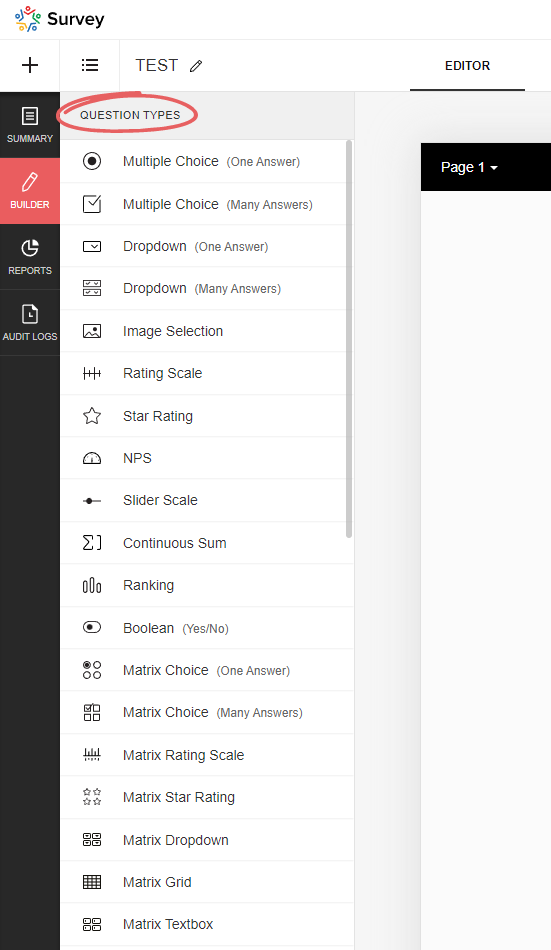
Zoho Survey offers a variety of question types, and depending on which type you select, certain options may not be available, resulting in the corresponding Boolean (DecisionBox) fields having the value NULL. In the table below you will find an overview of all available question types.
| Type | Field name (on the UI) | Note | Mandatory Enabled | Random Enabled | Hint Enabled | Other Option | No. Of Stars |
|---|---|---|---|---|---|---|---|
| full_name | Full name | NULL | NULL | Yes/No | NULL | NULL | |
| demographic | Contact details | NULL | NULL | Yes/No | NULL | NULL | |
| heading_descriptive | Heading and description | This is not a question! This element is only used to display text | NULL | NULL | NULL | NULL | NULL |
| single_drop_down | Dropdown field (one answer) | Yes/No | Yes/No | Yes/No | Yes/No | NULL | |
| multi_select_dropdown | Dropdown field (many answers) | Yes/No | Yes/No | Yes/No | Yes/No | NULL | |
| likert_rating | Rating Scale | The following setting is selected: Likert scale (can be selected when initially added) | Yes/No | NULL | Yes/No | NULL | NULL |
| image_star_rating | Image Selection | The following setting is selected: Star rating | Yes/No | NULL | Yes/No | NULL | Positive number |
| image_single_choice | Image Selection | The following setting is selected: Multiple selection (one answer) | Yes/No | Yes/No | Yes/No | NULL | NULL |
| image_multiple_choice | Image Selection | The following setting is selected: Multiple selection (multiple answers) | Yes/No | Yes/No | Yes/No | NULL | NULL |
| boolean_choice | Boolean | Yes/No | NULL | Yes/No | NULL | NULL | |
| combined_file_upload | File Upload | Yes/No | NULL | Yes/No | NULL | NULL | |
| calendar_box | Date/Time | Yes/No | NULL | Yes/No | NULL | NULL | |
| email_textbox | Yes/No | NULL | Yes/No | NULL | NULL | ||
| single_textbox | Short Answer | Yes/No | NULL | Yes/No | NULL | NULL | |
| textarea | Long Answer | Yes/No | NULL | Yes/No | NULL | NULL | |
| continuous_sum | Continuous Sum | Yes/No | NULL | Yes/No | NULL | NULL | |
| matrix_text_box | Matrix Textbox | Yes/No | NULL | Yes/No | NULL | NULL | |
| matrix_radio_box | Matrix Choice (One Answer) | Yes/No | NULL | Yes/No | Yes/No | NULL | |
| matrix_check_box | Matrix Choice (Many Answers) | Yes/No | NULL | Yes/No | Yes/No | NULL | |
| matrix_likert_rating | Matrix Rating Scale | The following setting is selected: Likert scale (can be selected when initially added) | Yes/No | NULL | Yes/No | NULL | NULL |
| matrix_grid | Matrix Grid | Yes/No | NULL | Yes/No | NULL | NULL | |
| matrix_drop_down | Matrix Dropdown | Yes/No | NULL | Yes/No | Yes/No | NULL | |
| matrix_star_rating | Matrix Star Rating | Yes/No | NULL | Yes/No | NULL | Positive number | |
| multiple_textbox | Multiple Textboxes | Yes/No | NULL | Yes/No | NULL | NULL | |
| single_choice | Multiple Choice (One Answer) | Yes/No | Yes/No | Yes/No | Yes/No | NULL | |
| multiple_choice | Multiple Choice (Many Answers) | Yes/No | Yes/No | Yes/No | Yes/No | NULL | |
| nps | NPS | Yes/No | NULL | Yes/No | NULL | NULL | |
| ranking | Ranking | Yes/No | NULL | Yes/No | NULL | NULL | |
| slider | Slider Scale | Yes/No | NULL | Yes/No | NULL | NULL | |
| signature | Signature | Yes/No | NULL | Yes/No | NULL | NULL | |
| star_rating | Star Rating | Yes/No | NULL | Yes/No | NULL | Positive number | |
| numeric_textbox | Number | Yes/No | NULL | Yes/No | NULL | NULL | |
| matrix_weightage | Matrix Rating Scale | The following setting is selected: Weighted selection (can be selected during initial addition) | Yes/No | NULL | Yes/No | NULL | NULL |
| choice_weightage | Rating Scale | The following setting is selected: Weighted selection (can be selected during initial addition) | Yes/No | NULL | Yes/No | NULL | NULL |
Respondents
This table stores data on the specific completion of the survey, including information on who completed it and when, and to which collector it belongs.
Table structure
| Column name | Data type | Explanation | Table relationships | Values |
|---|---|---|---|---|
| ID | Number | Primary key | Responses.Respondent IDResponse Variables.Respondent ID | |
| Start Date | Date + Time | Time at which the respondent opened the survey | ||
| End Date | Date + Time | Time at which the respondent submitted/completed the survey. If the survey has not yet been completed, this value is of course empty | ||
| IP Address | Text | IP address of the respondent; whether this data is saved or not depends on the setting in the collector (under general restrictions) | ||
| Status | Text | Indicates whether or not the survey has already been completed or submitted by the user | completed, partial | |
| Collector ID | Number | Reference to the collector through which the survey data was collected | Collectors.ID | |
| Survey ID | Number | Reference to the survey | Surveys.ID | |
| Time Taken in Minutes | Decimal number | Time difference between start and end time in minutes | ||
| Time Taken | Number | Time difference between start and end time in seconds | ||
| Survey Modified Time | Date + Time | Time at which the survey was last edited |
partial). Please take this into account when evaluating the data, as these should generally be excluded…Response Variables
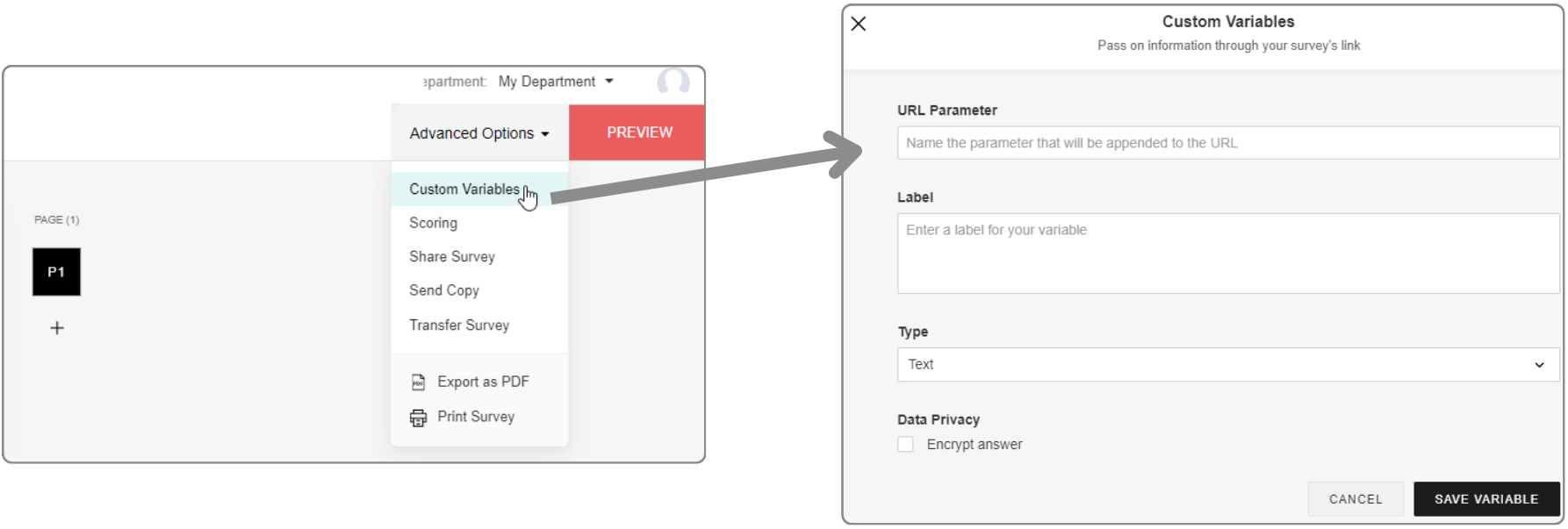
URL parameters can be configured in the editor under Advanced settings. If data has been transferred in a survey link and a response has been submitted, this data is saved here.
In addition, URL parameters can also be used as response restrictions, whereby these can be set per collector. This means that only one submission is permitted per unique URL parameter value.
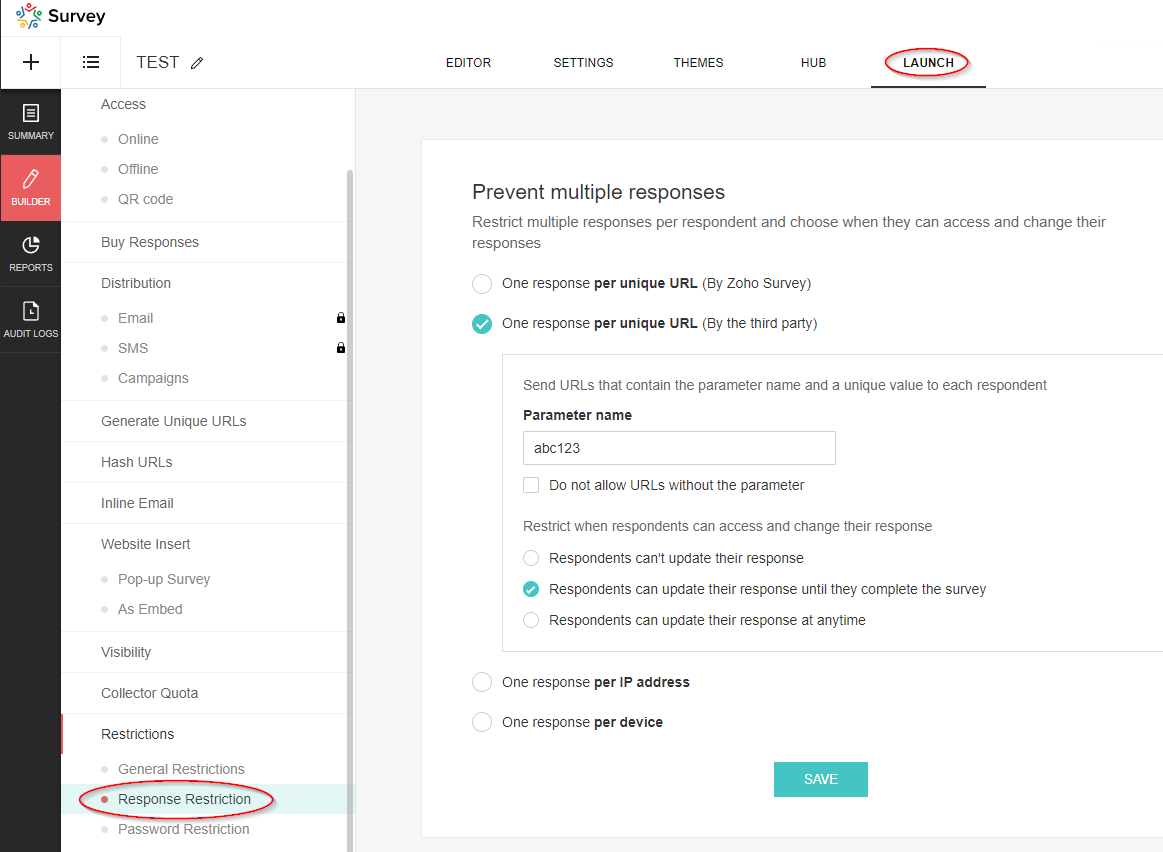
These parameters are not visible in the editor under Advanced settings, but are also saved in this table.
Table structure
| Column name | Data type | Explanation | Table relationships | Values |
|---|---|---|---|---|
| Respondent ID | Number | Reference to the data set of the respondent | Respondents.ID | |
| Variable ID | Number | Reference to the variable | Variables.ID | |
| Variable Label | Text | Description | ||
| Variable Value | Text | Value of the variable | ||
| Skipped By Logic | Boolean (DecisionBox) | ? |
|
|
| Survey ID | Number | Reference to the survey | Surveys.ID |
Variables
This table contains the basic data of the variables (URL parameters).
Table structure
| Column name | Data type | Explanation | Table relationships | Values |
|---|---|---|---|---|
| ID | Number | Primary key | Response Variables.Variable ID | |
| Name | Text | Name of the parameter, i.e. the exact string used in the URL | ||
| Label | Text | Description of the parameter | ||
| Type | Text | Data type |
|
|
| Unique Order | Text | Order in which the parameters were added (in the advanced settings) | Capital letters (A, B, C, etc.) | |
| Trashed | Boolean (DecisionBox) | Indicator whether the parameter has been deleted |
|
|
| Respondent / Custom | Text | If the parameter is used for the response restriction, the value is Respondent, otherwise it is Custom. |
|
|
| Survey ID | Number | Reference to the survey | Surveys.ID |
Responses
This table is of particular interest as it contains the answers to the questions that were submitted.
Table structure
| Column name | Data type | Explanation | Table relationships | Values |
|---|---|---|---|---|
| Respondent ID | Number | Reference to the respondent’s data record | Respondents.ID | |
| Question ID | Number | Reference to the question | Questions.ID | |
| Option ID | Number | Reference to the option: “Option” refers to the selected value in a drop-down field or the selected answer in a multiple choice question. Image selection questions also refer to an option. However, it should be noted that this does not currently contain any information about the image, so it is unfortunately useless. For further details, please see the section on the corresponding table! | Options.ID | |
| Text | Text | Answer to the question. This field is empty if it is a dropdown field or a multiple choice question (then the answer is the selected option) | ||
| Row ID | Number | Reference to the row | Rows.ID | |
| Column ID | Number | Reference to the column | Columns.ID | |
| Row | Text | The name of the row (this is simply a lookup, unfortunately the value at the time of the evaluation is not saved) | Rows.Text | |
| Column | Text | The name of the column (this is simply a lookup, unfortunately the value at the time of the evaluation is not saved) | Columns.Text | |
| Option | Text | The name of the option (this is simply a lookup, unfortunately the value at the time of evaluation is not saved) | ||
| Survey ID | Number | Reference to the survey | Surveys.ID | |
| Field ID | Number | Reference to the field if it is a text field or a number field. Further information can be found in the section on the corresponding table! | Fields.ID | |
| Not Applicable Enabled | Boolean (DecisionBox) | For certain questions, you can add the option “Not applicable”. If this option was selected by the respondent, this flag is set. The option can be activated for the following question types: ranking, image_star_rating, matrix_star_rating, matrix_likert_rating | Yes, No | |
| Others | Text | For certain questions, it is possible to activate the “Other” option. You can find more information on this in the section on question types! If this option is activated and the respondent has used it, the answer is not recorded in the “Text” field, but in this field. | ||
| Page ID | Number | Reference to the page on which the answered question is located. | Pages.ID | |
| Field | Text | The name of the field (this is simply a lookup, unfortunately the value at the time of the evaluation is not saved) | Fields.Text |
Rows
The row information for multi-line questions, such as those that occur in a matrix, is recorded in this table. The data in this table relates to the following question types (Questions.Type):
- matrix_likert_rating
- matrix_grid
- matrix_check_box
- matrix_star_rating
- matrix_radio_box
- matrix_text_box
- matrix_weightage
- ranking
- matrix_drop_down
- image_star_rating
Table structure
| Column name | Data type | Explanation | Table relationships | Values |
|---|---|---|---|---|
| ID | Number | Primary key | Responses.Row ID | |
| Question ID | Number | Reference to the question | Questions.ID | |
| Text | Text | Name of the row | ||
| Survey ID | Number | Reference to the survey | Surveys.ID | |
| Unique Order | Text | Specifies the sequence |
Columns
The column information for questions with multiple columns that only occur in a matrix is recorded in this table. The entries in this table refer to the following question types (Questions.Type):
- matrix_grid
- matrix_text_box
- matrix_radio_box
- matrix_drop_down
- matrix_check_box
- matrix_weightage
Table structure
| Column name | Data type | Explanation | Table relationships | Values |
|---|---|---|---|---|
| ID | Number | Primary key | Responses.Column ID | |
| Text | Text | Name of the column | ||
| Question ID | Number | Reference to the question | Questions.ID | |
| Survey ID | Number | Reference to the survey | Surveys.ID |
Fields
This table contains information on group input fields that are used to enable multiple entries per question. This also includes the file upload field and the Boolean (DecisionBox) field, as multiple fields can also be configured here as an option.
In the table, the fields of the following question types (Questions.Type) are listed:
- continuous_sum
- demographic
- Boolean (DecisionBox)_choice
- multiple_textbox
- full_name
- combined_file_upload
Table structure
| Column name | Data type | Explanation | Table relationships | Values |
|---|---|---|---|---|
| ID | Number | Primary key | Responses.Field ID | |
| Text | Text | Name - Attention! If there is only a single switch, “Boolean (DecisionBox)” is displayed here. Otherwise, the corresponding values for the labels will of course appear. | ||
| Type | Text | Indicates the type of input field. | single_textbox, numeric_textbox, email_textbox, file_upload, single_choice | |
| Unique Order | Text | Specifies the order. | ||
| Sequence No | Number | Specifies the order. | ||
| Question ID | Number | Reference to the question | Questions.ID | |
| Survey ID | Number | Reference to the survey | Surveys.ID | |
| Mandatory Enabled | Boolean (DecisionBox) | Indicates whether the field is defined as a mandatory field or not. | Yes, No |
Options
The selectable values that are available in drop-down fields or for multiple-choice questions are saved here. There is also an option for image selection questions. However, it should be noted that this option currently contains no information on the image and is therefore unfortunately useless. In addition, this table is also important for weighted rating scales, as the weightings are saved here. A look at this table is therefore essential for evaluations with this type of scale.
Options are saved for the following question types (Questions.Type):
- matrix_drop_down
- single_choice
- single_drop_down
- image_single_choice
- multi_select_dropdown
- multi_select_dropdown
- multiple_choice
- matrix_weightage
- choice_weightage
Table structure
| Column name | Data type | Explanation | Table relationships | Values |
|---|---|---|---|---|
| ID | Number | Primary key | Responses.Option ID | |
| Text | Text | Name of the option/answer | ||
| Question ID | Number | Reference to the question | Questions.ID | |
| Survey ID | Number | Reference to the survey | Surveys.ID | |
| Column ID | Number | Reference to the column | Columns.ID | |
| Weightage | Number | For questions of the rating scale type and the Weighted selection option set, the respective weighting is displayed here. |
Topic Participants
Sven
Sticky Posts
What's New in Zoho Analytics - February 2026
Hello Users! We're back with another round of updates for Zoho Analytics. This month's release focuses on giving you greater flexibility in how you visualize, manage, and act on your data - with new features like custom visualizations, remote MCP server,What's New in Zoho Analytics - January 2026
Hello Users! We are starting the year with a strong lineup of updates, marking the beginning of many improvements planned to enhance your analytics experience. Explore the latest improvements built to boost performance, simplify analysis, and help youWhat's New in Zoho Analytics - November 2025
We're thrilled to announce a significant update focused on expanding your data connectivity, enhancing visualization capabilities, and delivering a more powerful, intuitive, and performant analytics experience. Here’s a look at what’s new. Explore What'sWhat's New in Zoho Analytics - October 2025
Hello Users! We're are back with a fresh set of updates and enhancements to make data analysis faster and more insightful. Take a quick look at what’s new and see how these updates can power up your reports and dashboards. Explore What's New! ExtremeWhat’s New in Zoho Analytics – September 2025
Hello Users!! In this month’s update, we’re raising the bar across multiple touchpoints, from how you bring in data, plan and track projects to how you design and brand your dashboards. We’ve added the all-new Gantt chart for project visualization, expanded
Recent Topics
Is Zoho Sites still actively being developed?
Hello, Is Zoho Sites still actively being developed as part of the Zoho ecosystem? I noticed that the What's New page (https://www.zoho.com/sites/whats-new.html) does not show any updates since Q1 2025. We were considering migrating our website from SquarespaceZoho CRM WooCommerce Integrtation
Looking for a solution for my 50 client to show detailed analytics on source of traffic that led to events, leads, conversions. Hi all, I have not been able to find a workable guide or solution to how exactly step by step integrate the Zoho CRM with WooCommerceweb to lead
Can anyone help me how to create web to lead from zoho marketing automationIntroducing Workqueue: your all-in-one view to manage daily work
Hello all, We’re excited to introduce a major productivity boost to your CRM experience: Workqueue, a dynamic, all-in-one workspace that brings every important sales activity, approval, and follow-up right to your fingertips. What is Workqueue? SalesUI issue with Organize Tabs
When looking at the organize Tabs window (bellow) you can see that some tabs are grayed out. there is also a "Add Module/Web Tab" button. When looking at this screen it's clear that the grayed out tabs can not be removed from the portal user's screenI created a signup form in Zoho Marketing Automation with the correct field mapping, but the data is not being reflected under Leads in Zoho CRM.
web to lead from zoho marketing automationPasted Images not being embedded in custom mail
Hi, I'm making a custom report by email based on commentaries. I have the email ready, all working great except for images that are being pasted in the commentaries. Zoho deals with them as temp images and so it requires authentication to view them, somethingKaizen #232 - Building a Ticket Escalation Mechanism from Zoho CRM
Howdy, Tech Wizards! Picking up the thread from last week, we will continue our Zoho CRM and Zoho Desk integration. In Kaizen #231 - Embedding Zoho Desk Tickets in Zoho CRM, we built a Related List widget that displays open Zoho Desk tickets within theInactive License for free account.
I recently upgraded my Cliq subscription not my team (on the free version), are unable to login to their accounts. The error message received is Inactive License Looks like you have not been covered under the current free plan of users. Please contactIs there a way to show contact emails in the Account?
I know I can see the emails I have sent and received on a Contact detail view, but I want to be able to see all the emails that have been sent and received between all an Accounts Contacts on the Account Detail view. That way when I see the Account detailDeluge scripts
Why is there not a search function to make it easier to find the script of interest when modifications are required.Zoho Sheet for Desktop
Does Zoho plans to develop a Desktop version of Sheet that installs on the computer like was done with Writer?Zoho Books (and other Finance Suite Apps) - Clickable Item Name on Invoices and Reports
Hi Zoho Books team, It would be really helpful if the Item Name on Reports were clicable to take me to the item. The same on Invoices, often I am looking at an invoice and I want to look at the deails of a product. A link here would be helpful to jumpZoho Books - Payment Gateway - Revolut
Hi Books Team, My feature request if to include the popular platform Revolut as a payment collection option on invoices in Zoho Books. Please upvote if you are also looking for this option.Searching for an item from within an invoice should show any item containing the string, not just those that begin with the string.
Hello, I've found myself becoming increasingly frustrated with the limited line-item seach when adding new items to an invoice. The problem is that the characters being typed are only being matched from the beginning of the item name. This might be usableHow to Rank Tables by Row Count in Descending Order
I am trying to understand the consume of lines that grow up so fast in the last week. Is there any way to create a pivot table or query to get TABLE NAME LINES in descending order?Dealing With One-Time Customers on Zoho Books
Hello there! I am trying to figure out a way to handle One-Time customers without having to create multiple accounts for every single one on Zoho Books. I understand that I can create a placeholder account called "Walk-In Customer", for example, but IMarking a meeting 'done'.
I would like to somehow mark a meeting 'done' and placed under the contact's page rather than deleting it and having no record of it. Am I missing a button that does this?Feature Request: Render Markdown (.md) files in Zoho Cliq
Hi, We regularly share Markdown (.md) files in Zoho Cliq. However, when we open these files in Cliq, the content does not render as Markdown—it displays as plain text. This forces us to copy/paste the content into an external Markdown viewer to read itCRM Percent custom fields: When will it show the % symbol and behave like %?
1. Actually Percent custom fields fail to show the % symbol. 2. When in formulas Percent fields work like number: 100 x 5% = 5 ideal world 100 x 5% = 500 what happens actually 3. When importing Percent fields the % symbol has to be removed and the dataSubforms and automation
If a user updates a field how do we create an automation etc. We have a field for returned parts and i want to get an email when that field is ticked. How please as Zoho tells me no automation on subforms. The Reason- Why having waited for ever for FSMXero Billing Data (22 instances) - Zoho (CRM) - Single Source of Truth For Client Data & Notes
Hi - I’m trying to build out a CRM for a Single Source of Truth Currently I have 22 Instances of Xero (for legal entity purposes - can’t consolidate to one) How would I be best placed to do this? Is it possible to have all the Xero instances (22) → ConsolidatedSelect CRM Custom Module in Zoho Creator
I have a custom module added in Zoho CRM that I would like to link in Zoho creator. When I add the Zoho CRM field it does not show the new module. Is this possible? Do i need to change something in CRM to make it accesible in Creator?New 2026 Application Themes
Love the new themes - shame you can't get a little more granular with the colours, ie 3 different colours so one for the dropdown menu background. Also, I did have our logo above the application name but it appears you can't change logo placement positionZoho Expense - Bi-Weekly Report Automation
Hi Zoho Expense Team, My feature request is to please include an option to automate creation of reports bi-weekly (every 2 weeks)PDF Generator Upgrade
Hi Team, What will happen if I don't make any changes for existing template. Zoho just ask us upgrade but haven't tell the benefit. Zoho Corporation500 internal server error on opening an iframe through a deluge script
Hi Team I am trying to open an external url in an iframe through my deluge script which is associated to a custom button . By doing this i am getting an "Internal Server Error" . Please can you help me with this.Zoho CRM Quotes – Subform and PDF/Writer Limitations
Hello, I am encountering the following limitations in Zoho CRM Quotes: Custom product images cannot be uploaded in the subform – the image upload field cannot be added; only the file upload field is available. File upload placeholders cannot be used inStrange behavior in CRM Number Field – Characters allowed but not "e"?
Hi everyone, Has anyone faced this strange issue in Zoho CRM? In a Number field, it is possible to type some characters, but the character "e" cannot be entered. This was really surprising to me. Normally, a number field should restrict all charactersNo background for video recordings, no playback speed, can't even playback longer recordings - have to download…
Hi. We utilize heavily video messages on Slack, but wanted to migrate to Cliq with Zoho One, however very basic yet very frequently used feature is missing: backgrounds for video recordings and playback speed. We were not happy with Slack's 5 minute limitsSupport inefficiency
We have been asking for support for a minor adjustment for 12 days now and we haven't got a single viable resolution from support team despite there are 19 emails going between our HR team and various support emails from Zoho. 1. they do not understandCan I export to PDF in Zoho Learn
I have seen help pages where export to pdf options are available but I do not see that option available from the application. I see that exprt is available in my free trial version but that is only to html pages. I need to be able to export my manualsKaizen #225 - Making Query-based Custom Related Lists Actionable with Lookups and Links
Hello everyone! Welcome back to another post in the Kaizen series! This week, we will discuss an exciting enhancement in Queries in Zoho CRM. In Kaizen #190, we discussed how Queries bridge gaps where native related lists fall short and power custom relatedZia capabilities now available in the Professional edition announcement
Hello all! The Professional edition now supports a broader set of Zia capabilities, enabling teams to bring AI into more of their everyday CRM work. From writing assistance and summaries to setup support, predictions, and recommendations, Zia can nowWhere Do I set 24h time format in Cliq?
Where Do I set 24h time format? ThanksThis will be long, Please bear with me - Next Gen Layout - Search
In general, I think that Zoho are going in the right direction with the Next Gen UI. The latest update brings some nice improvements and all-in-all from a user's perspective I think the improvements are generally very good. However, there are some areasSelecting all notes in a notebook
In Windows11, I select a notebook and I get a list of notes, but only 30 notes. If I scroll down to the end, I get an additional 30 notes (and at the top it now shows 60 notes). I can keep doing this to eventually see all my notes but this is a real pain.Update latitude & longitude address field API
How do I update the coordinates of an address field from a widget? I can't modify the latitude and longitude of the address field. I think the problem is how I'm writing formdata variable. zoho_init.then(function (data) { var queryParams = ZOHO.CREATOR.UTIL.getQueryParams();Filter Records in CRM API
Hi Team, I’m currently working on a task to retrieve expired deals from the CRM. By “expired deals,” I mean deals where the closing date has already passed and the stage is not “Closed Won” or “Closed Lost” (i.e., all other stages). I tried using bothUser Name in Zoho Cliq Not Updating Across Apps?
We updated the name of a user in Zoho. (From Sue to Taylor) Her name has not been updated in Cliq on all apps. When in Zoho One, if I go to Cliq directly, it is correct, but if I am in another app, and the Cliq bar pops up on the bottom, it will be theNext Page