Automation#34 : Automate Email threading for Ticket notification

Hello Everyone,
It's been a while since we've presented an automation. However, our community has been buzzing with ideas, use cases, and discussions with our community experts and Ask the Experts session.
So, here we are again, presenting an automation focused on threading ticket notification emails.
Let's see how this automation helped our folks at Zylker Techfix.
Zylker Techfix, a gadget service company, has grown significantly and now serves a large customer base. The support team receives tickets from various customers, some of whom send multiple emails regarding servicing multiple gadgets. With their expanding customer base, Zylker Techfix wanted to effectively track notification emails sent to customers for each respective ticket.
Additionally, Zylker Techfix aimed to inform customers about the engineer assigned to support them with their submitted gadget, helping establish a stronger connection with their customers.
In this post, let's explore how we can adopt Zylker Techfix's customization.
Notify Customers when a ticket is created
The notification rule has an option to notify your customers when a ticket is created.
You can add the details of the ticket owner within the Email template so customers will know the support executive who will be handling the ticket.
How to include Ticket Owner details within the Email template?
You could create a New Email template or use the Existing email template.
Create an Email template
You can either create a New Email template or edit an existing Email template.
To Add a New Template : Go to Setup (S) >> Customization >> Email Templates >> Select the required Department >> Click on Add >> New Template >> Select the Tickets module >> Enter Name > Select Folder, From Address, Enter Reply to address if required, Add Subject and desired description.
To add Ticket owner's name, insert the placeholders First Name and Last Name (if required) ${Case Owner.First Name}${Case Owner.Last Name}, under Ticket Owner.
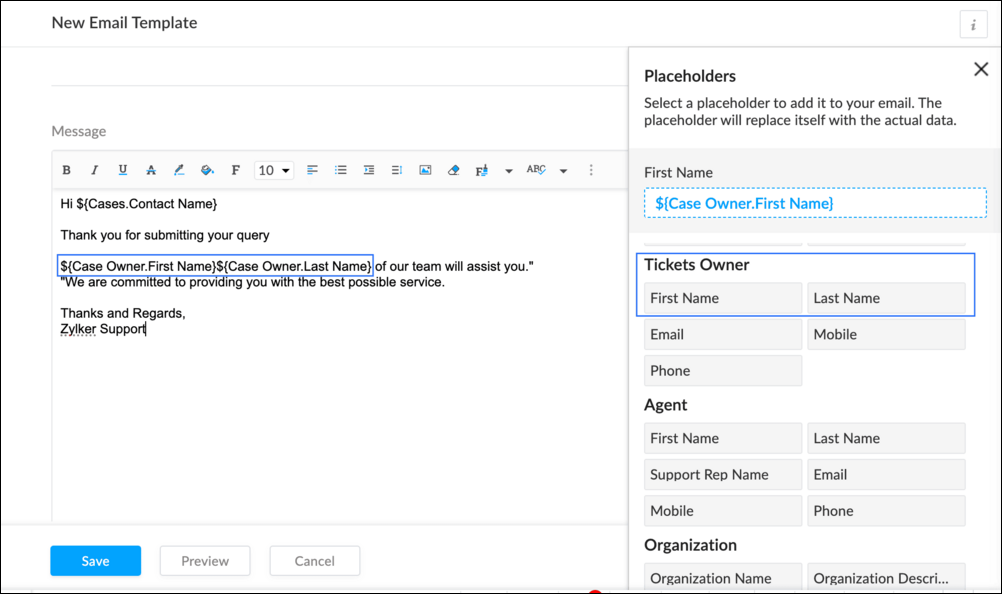
To Edit an Existing Email
To edit an existing Email, Go to Setup (S) >> Customization >> Email Templates >> Select the required Department >> Click on the Edit icon for the existing template or select the existing Template >> Edit description. To insert Ticket owner's name, insert the placeholders for first name and last name (if required) ${Case Owner.First Name}${Case Owner.Last Name}, under Ticket Owner.
Create a connection
1.1 Go to Setup(S) and choose Connections under Developer Space.
1.2 Click Create Connection.
1.3 Select Zoho Desk under Default Services.
1.4 Set the connection name as zohodeskconnection.
1.5 Under Choose Scopes, choose the below scope values:
1.5 Under Choose Scopes, choose the below scope values:
Desk.settings.ALLDesk.tickets.UPDATE
1.6 Click Create and Connect.
1.7 Click Connect.
1.8 Choose the Desk's organization to connect with Deluge, and click Submit.
1.9 Click Accept.
Connection is created successfully.
Configure Custom Function within the Workflow Rule
1. Go to Setup, choose Workflows under Automation.
2. Under Workflows, click Create Rule.
3. Under Basic Information, choose Tickets under Module, give a Rule Name and Description.
4. Click on the Active checkbox to activate the rule once created. Click Next.
5. Under Execute on, select Create.
6. Add Criteria, if required.
7. Under Actions, click on the drop-down in the + icon and select Custom Functions >> New.
7.1 Under Basic Information, enter Name and Description. Choose Tickets under Module.
7.2 Under Argument Mapping, give a desired Method Name. Map the arguments as below:
7.2.1 In the Argument Name field, type ticketId and select Ticket Id in the Tickets Section.
7.2.2 In the Argument Name field, type contactEmail and select Email in the Contacts Section.
7.2.3 In the Argument Name field, type fromEmailAddress, click on Specify Custom Value and type the verified From Address of your department.

7.3 In the script window, insert the Custom Function given below:
- //<<<< User Inputs Section >>>>----
- // Replace ".com" with appropriate domain extension based on customer's location/DC
- deskURL = "https://desk.zoho.com";
- templateId = "xxxxxxtemplateIdxxxxx";
- //<<<< Initial Configs >>>>----
- logs = Map();
- template = invokeurl
- [
- url :deskURL + "/api/v1/templates/" + templateId + "/render?entityId=" + ticketId
- type :POST
- connection:"deskconnection"
- ];
- if(template != null && template.containsKey("body"))
- {
- logs.put("template",template);
- emailContent = template.get("body");
- emailReplyParams = {"channel":"EMAIL","to":contactEmail,"fromEmailAddress":fromEmailAddress,"content":emailContent,"contentType":"html"};
- logs.put("emailReplyParams",emailReplyParams);
- sendReply = invokeurl
- [
- url :deskURL + "/api/v1/tickets/" + ticketId + "/sendReply"
- type :POST
- parameters:emailReplyParams + ""
- connection:"deskconnection"
- ];
- logs.put("sendReply",sendReply);
- }
- info logs;

Note
a. In Line 3, replace .com in the address with .in/.eu/.ca based on your DC.
b.In Line 4, enter the template id within " " of the Email template you created or edited.
To fetch Template id, go to Setup (S) >> select Email Templates under Customization >> click on the Email template and on the Address bar, copy the numeric value at the end of the URL.
8. Click Save to save the custom function.
9. Click Save again to save the workflow.
Now, along with your ticket conversations, you can also track the emails sent as notifications within your ticket conversations.
Until the next post,
Lydia | Zoho Desk
Topic Participants
Lydia | Zoho Desk
Sticky Posts
Register for Zoho Desk Beta Community
With the start of the year, we have decided to take a small step in making the life of our customers a little easier. We now have easy access to all our upcoming features and a faster way to request for beta access. We open betas for some of our featuresShare your Zoho Desk story with us!
Tell us how you use Zoho Desk for your business and inspire others with your story. Be it a simple workflow rule that helps you navigate complex processes or a macro that saves your team a lot of time; share it here and help the community learn and grow with shared knowledge.Tip #1: Learn to pick the right channels
Mail, live chat, telephony, social media, web forms—there are so many support channels out there. Trying to pick the right channels to offer your customers can get pretty confusing. Emails are most useful when the customer wants to put things on record. However, escalated or complicated issues should not be resolved over email because it's slow and impersonal. When you need immediate responses, live chat is more suitable. It's also quick and convenient, so it's the go-to channel for small issues.Welcome to Zoho Desk Community - Say hello here!
Hello everyone! Though we have been here for a while, it’s time to formally establish the Zoho Desk Community; we’re really happy to have you all here! This can be the place where you take a moment to introduce yourself to the rest of the community. We’d love to hear all about you, what you do, what company or industry you work for, how you use Zoho Desk and anything else that you will like to share! Here’s a little about me. I am Chinmayee. I have been associated with Zoho since 2014. I joined hereWebinar 1: Blueprint for Customer Service
With the launch of a host of new features in Zoho Desk, we thought it’ll be great to have a few webinars to help our customers make the most of them. We’re starting off with our most talked about feature, Blueprint in Zoho Desk. You can register for the Blueprint webinar here: The webinar will be delivered by our in-house product experts. This is a good opportunity to ask questions to our experts and understand how Blueprint can help you automate your service processes. We look forward to seeing
Recent Topics
Remove or hide default views
I'm looking to only have the views pertinent to my organization. Is there a way to show only my custom views (or separate them to a different area or something)? If not, this should be a feature as switching from Zendesk we had this option...Wie kann ich einen Nutzer löschen?
Wir haben Zoho one. Es handelt sich um einen ehemaligen Mitarbeiter.Function #46: Auto generate list of lapsed customers using Custom Button
Hello everyone, and welcome back to our series! Customer retention is one of the key factors that impact the long-term success and sustainability of a business. High customer retention rates indicate satisfied customers, quality products or services,Before Going To The Qc stage , site ready ness file upload mandtoty how to achive this in the blue print transition
Before Going To The Qc stage , site ready ness file upload mandtoty how to achive this in the blue print transition Is it possible on click of the predelivery Transition show the alert message if site ready ness file upload empty also not move the stageAnnouncing new features in Trident for Windows (v.1.28.5.0)
Hello Community, Trident for Windows is here with exciting new features to help you stay productive and make collaboration simpler. Let’s dive into what’s new! Slash commands are now supported in the Cliq module. You can now use slash commands from theConvert time to string and remove second
Hello everyone, I have a question that I can't figure out on my own. How to convert time into string (singleline) and remove second. Like HH:mm. If I convert it as below, the result becomes null. Thank you very much. input.Time.tostring("HH:mm") result:Has anyone imported items and included the storage bin?
We have a large amount of Inventory Items. We would like to import these into Zoho Inventory but while we can import the majority of data, the storage bin refuses to map. Has anyone successfully imported the data and mapped the bin?Terms & Conditions add a rule.
Hi I'd like to format my T&C's to auto format a Deposit amount based on the Total. "Quotation is valid for 7 days from the date of issue. A 75% deposit ( R .00 )is required to confirm the booking. The remaining balance ( R .00)is due upon project completion.Zoho Inventory Feature Roadmap Visible To All
Hello, please consider making your feature roadmap visible to us users so that we know what to expect in future. This may appease current users who are seeking clarification on feature implementation dates, so that they can make an informed decision whethersend file to ftp or another external service
i'v created a zoho creator application for take a picture and rename it by phone. Now i need to send Each renamed pictures to my ftp or to specific folder on google drive...then, delete it from creator. (every picture recived it will processed by another program and stored on my Erp) HOW CAN I DO ??Feature Request - Improved booking layouts, specifically for individual booking links
I would like to see more layout options and specifically to have the meeting description beside the calendar booking function, when sharing booking links to specific consultations/meetings. Below is a screenshot from Calendly. I love this layout and itSet Conditional and Dependent Rules for Issues in Zoho Projects
An Issue Layout is a customizable form to add and update information about a specific issue. The fields in the issue layout can be changed dynamically based on user requirement using the issue layout rules. Consider a scenario where an electrical fluctuationAccounting on the Go Series-56: e-Way Bill Module in the Mobile App – A Handy Solution for Indian Businesses
Hello everyone, Managing e-Way bills just got more convenient with the Zoho Books mobile app! For businesses operating under the GST regime, e-Way bills are essential for tracking the movement of goods. Previously, you had to log in to the web app toCopying records from a Custom Module into Deals
Hello, I recently created a custom module to handle a particular type of order/transaction in our business. Having got this up and running I've realised that it would be much better to use the Deals module with a different layout instead. We've enteredCreator App on Mobile - Workflow "On Create / Edit - On Load" not triggered ?
Hi Everyone, I built an application to track assets, which is used both at the office (desktop) an in the field by technicians (mobile app). In the field, technicians open an existing form and add rows to a subform at some point. One field they have toHOW TO VIEW INDIVIDUAL COST OF NEWLY PURCHASED GOODS AFTER ALLOCATING LANDED COSTS
Hello, I have been able to allocate landed costs to the purchase cost of the new products. however, what i need to see now is the actual cost price (original cost plus landed cost), of only my newly purchased products to enable me set a selling priceCustom Function to get custom field of lookup type in Books
Hi, Here's the situation. In Purchase Order, there is a custom field (lookup) to SO. The requirement is to update to the related SO if PO get updated Right now facing challenge to get the id of custom field (lookup) in PO. Please find below the sampleCustom From Address is now Organizational Email
We're introducing a small yet meaningful change in Zoho Recruit, one that sets the foundation for bigger improvements coming your way. What’s changed? We’ve renamed the Custom From Address to Organizational Email. The new name was chosen to better reflectWhat's New in Zoho Billing Q2 2025
Hello everyone, We are excited to share the latest set of updates and enhancements made to Zoho Billing in Q2 2025, ranging from image custom fields to support for new languages. Keep reading to learn more. Upload Images From Your Desktop to Email NotificationsMap dependency on Multiselect picklist
I need help in Zoho CRM. I have 2 multi-select picklists. For example, Picklist A has country names. Picklist B has state names. Now I want to show states on the basis of the selected country from Picklist A. Both are multi-select fields, so the standardTip of the Week #63 – Keep personal emails out of team view.
Shared inboxes are great for teamwork—they let everyone stay on the same page, respond faster, and avoid duplicate replies. But not every message needs to be shared with the entire team. Think about those one-on-one chats with a manager, a quick internalEpisode III : Powering Automation: Custom Functions in Action
Hello Everyone, In our previous episodes, we explored custom functions and the Deluge programming language. If you’ve been wondering why the Episode series have been quiet, here’s the reveal! On our community, we've been showcasing custom functions integratedNarrative 2 - Understanding Organizational Departments
Behind the scenes of a successful ticketing system - BTS Series Narrative 2 - Understanding Organizational Departments A ticketing system's departments are essential because they provide an organized and practical framework for handling and addressingZoho Projects Plus for the healthcare industry
The global healthcare industry is complex and diverse; from patient record maintenance, healthcare supply chain, to manufacturing complex medical equipment, the industry functions on many layers. Managing all these layers requires tested out techniquesMissing Outlook calendar option in Calendar
Hi all I don't have an Outlook Calendar option in the Settings > Synchronise settings of Calendar. Any ideas why not?Whats App Automation
It would be nice to be able to send out an automated whats app message template on moving stages or creation of a ticket (same as you can do for automated emails). Currently only automated emails can be sent. Also, if whats app could be used more effectivelyZoho Projects Android app update: Enhanced Documents module within the projects.
Hello everyone! In the latest Android version(v3.9.35) of the Zoho Projects app update, we have enhanced the documents module within the projects. Now, you can view all the attachments that you have added across the project in tasks, bugs, comments, etc,Lead Source Disappears
When adding a new lead and saving the page, the page refreshes itself and the lead source field becomes blank. We set the "Lead source" as a required field to see if it would help, but the problem persists and we always have to re-enter the lead souInquiry Regarding Monitoring ZOHO CRM API Credit Usage
Hello ZOHO Community, I hope this message finds you well. I have a question regarding monitoring the usage and remaining credits of the ZOHO CRM API. I recently discovered that within ZOHO CRM, by navigating to Settings ⇒ Developer Hub ⇒ APIs & SDKs,Payment Gateways - A unified hub to manage all your payment integrations in Zoho Creator
Hello everyone, We're thrilled to announce that we've completely reimagined the way payment gateways are handled in Creator. The result is a centralized Payment Gateways section that provides a clean, user-friendly interface to configure and manage allCommunity Digest Julio 2025 - Todas las novedades en Español Zoho Community
¡Hola, Español Zoho Community! Ha pasado un tiempo desde el último Digest pero, ¡ya estamos de vuelta con las novedades más relevantes en las aplicaciones de Zoho y su universo! Si no te quieres perder ninguna de las novedades que vamos publicando, teTip #35- How to use Notifications in Zoho Assist to stay on top of session activities- 'Insider Insights'
Hello Zoho Assist Community! This week, we’re exploring Zoho Assist’s built-in notification system for improved visibility and accountability. Keeping track of session activity is crucial, especially when you're managing multiple remote devices and technicians.Assistance with Exporting Specific Data from Zoho CRM
Hi, Could you please guide me on how to export specific information, such as the model number and serial number, from the Accounts module in Zoho CRM? Thank you in advance for your assistance.Coming Soon in Zoho Invoice: Send Invoices Instantly via WhatsApp
We're working on bringing a new level of convenience to your invoicing experience. Introducing a much-requested feature in Zoho Invoice: You can now share invoices directly to your customers via WhatsApp! With this new option, you can: Share invoicesfield update from the value of another field
Hello, I need to do a field update from the value of another field, but i don´t know how can i do it. In the mass update option it is not possible... I need to put the last name value form the leads module to other custom field that i have created. thanks for your helpWhat is a realistic turnaround time for account review for ZeptoMail?
On signing up it said 2-3 business days. I am on business-day 6 and have had zero contact of any kind. No follow-up questions, no approval or decline. Attempts to "leave a message" or use the "Contact Us" form have just vanished without a trace. It stillIs there any way to prevent the row cloning feature(on edit page)
My initial requirement is to prevent some users from adding new rows in the subform. For that, I have implemented the client script, and the script is working fine. But users are able to clone the row and make changes. For that, I was unable to find anyHow Do I Change Business Location
Ive just shifted my business to a new country and would like to update my address and Business location in the "Organisation Profile" page but it is locked in the previous country. How do I unlock it / change it? ThanksVerify details pop-up windows
Hi, Is it possible to turn-off the anoying "Verify details" window that ask for closing date, "Reason for Lost" or other concepts. If I would like the user to enter such data, I will implement a rule .... How can I turn-off such pop-up? it's not necessaryMonthly overtime wrong after adding/changing attendance time for past month
Hi there, as I understand it, the montly overtime overview under attendance is calculated at the end of each month. If someone was not able to enter his attendance in time but entered it in the new month, this time will not be considered in the overview.Next Page