Payment Gateways - A unified hub to manage all your payment integrations in Zoho Creator

Payment Gateways - A unified hub to manage all your payment integrations in Zoho Creator

Hello everyone,

We're thrilled to announce that we've completely reimagined the way payment gateways are handled in Creator. The result is a centralized Payment Gateways section that provides a clean, user-friendly interface to configure and manage all your payment integrations in one place.

Why it matters  
The all-new Payment Gateways section offers you a centralized way to manage payment configurations by replacing the earlier approach, which used connections. 

This brings several key advantages:

  • Centralized control: Manage all your payment gateways from one place.

  • Quick setup: Connect gateways without complex configurations.

  • Region-specific gateways: See only the gateways available in your region.

  • Extend functionality: Add payment gateway extensions (powered by Zoho Checkout) via Zoho Marketplace.

  • Flexible payments: Link multiple payment gateways to offer users a wider range of payment choices.

  • Easy access control: Admins can manage gateway access directly from both the live and edit modes of each application.

  • Diverse payment options: Choose from the entire suite of Zoho Checkout-supported gateways.

 Where to find it? 

  • C6: Go to Operations -> Payment Gateways.

  • C5: Go to Account Setup -> Payment Gateways. 

How does it work?
The Payment Gateways feature is powered by Zoho Checkout, our in-house payment processing solution. This integration brings the full capabilities of Zoho Checkout into Zoho Creator, giving you instant access to all supported payment gateways, including popular options like PayPal, Stripe, Razorpay, and more. Any new gateway added to Checkout becomes instantly usable here in Creator.  

  • The first time you visit Payment Gateways (before configuring Zoho Checkout within System Integrations), you'll be prompted to complete a one-time setup.

  • Choose your country, state, and currency. This ensures you see only the relevant gateways available in your region.

  • After setup, you'll be taken to the Payment Gateways landing page. 
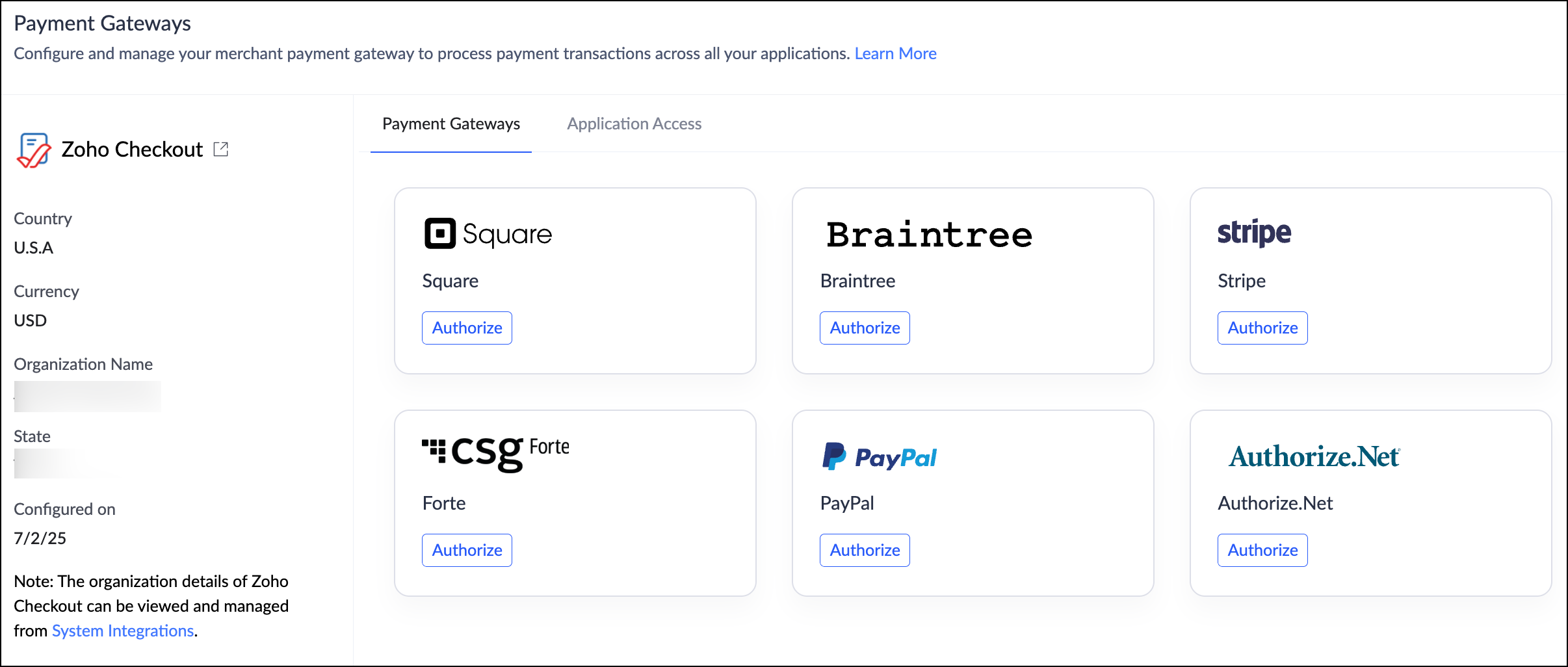

Managing payment gateways
For ease of use, this landing page has been divided into two sections:
  • Supported Gateways
    View, authorize, and manage your payment gateways. Click Authorize next to a provider and follow the guided steps to link it to your app.

  • Application Access
    Control which Creator apps can use authorized payment gateways.
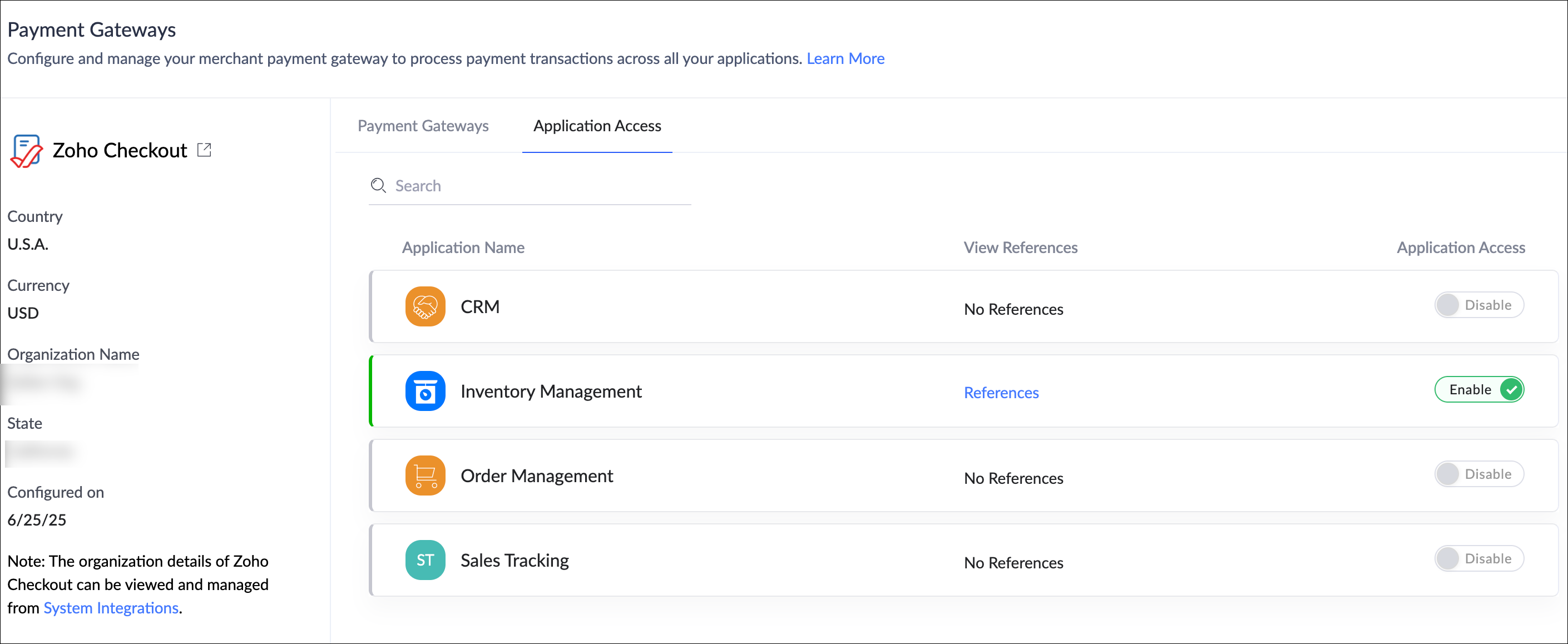
 
What you need to do 

  • Nothing is required on your end.

  • If you've already added PGs as connections in your applications, they will be automatically migrated to the new centralized location under Operations. 

Help documentation: Understanding Payment Gateways

Availability

  • This feature is available for both C5 and C6 users.

  • The availability of specific payment gateways may vary based on your data center and supported countries.

  • A detailed list of all supported gateways and regions is documented in the link provided above.


Release
The revamped Payment Gateways has been rolled out to all users starting June 26, 2025.

We're confident that this feature will significantly enhance your experience with Zoho Creator—and we'd love to hear your thoughts on this new feature!

If you need any assistance or have questions, please don't hesitate to reach out to us.

Sincerely,
The Zoho Creator Team

      • Sticky Posts

      • Introducing Zoho Creator's 2025 Release Projection 2

        Hello Creators! I'm Prakash, from the Creator product management team, and today I'm delighted to unveil our next set of features as part of Release Projection 2 for 2025. With thoughtful analysis and planning, we've curated powerful new capabilities
      • Zoho Creator - 2023 Release Projection 1

        Hello everyone! A very Happy New Year to you and your family. Hope you're all good and having a great time using Zoho Creator to make your lives easier and your businesses prosper. 2022 was an action-packed year for us at Creator, and we hope to continue
      • Zoho Creator User Group meetups in a city near you! - Oct - Nov, 2023

        Greetings from the Zoho Creator team! We're hosting a series of Zoho Creator meetups in various cities across the globe, and we'd love to meet you there! Our meetups are a great opportunity to network with industry peers, exchange ideas and best practices,
      • Zoho Creator - 2023 Release Projection 2

        Hello everyone! Time truly flies when you're having an incredible journey, and today we mark the completion of an eventful and action-packed six months. It feels like just yesterday when we embarked on this adventure together with the launch of our new
      • Upcoming Updates - August 2022

        Hi all, Greetings from the Zoho Creator team! Today we've got news for you on some exciting updates. And rest assured— there’s more to come! In this post, we'll be going over the upcoming features and improvements for this month as mentioned below. A

        • Recent Topics

        • text length in list report mobile/tablet

          Is there a way to make the full text of a text field appear in the list report on mobile and tablet? With custom layouts, the text is always truncated after a certain number of characters.
        • Automation #4 - Auto Delete Tickets based on Rules

          This is a monthly series in which we pick some common use cases that have been either discussed or most asked about in our community and explain how they can be achieved using one of the automation capabilities in Zoho Desk. Unwanted tickets spamming
        • Automation #3 - Auto-sync email attachments to tickets

          This is a monthly series where we pick some common use cases that have been either discussed or most asked about in our community and explain how they can be achieved using one of the automation capabilities in Zoho Desk. Most of our customers use email
        • Automation #11 - Auto Update Custom Fields with Values from Emails

          This is a monthly series designed to help you get the best out of Desk. We take our cue from what's being discussed or asked about the most in our community. Then we find the right use cases that specifically highlight solutions, ideas and tips to optimize
        • Automation #13 - Auto assign tickets based on agent shift time

          This is a monthly series designed to help you get the best out of Desk. We take our cue from what's being discussed or asked about the most in our community. Then we find the right use cases that specifically highlight solutions, ideas and tips to optimize
        • Automation #14: Capture Jira Issue Key/ID in a Ticket Custom Field

          Hello Everyone! This month's edition brings you a custom function to consolidate your records associated with Jira integration. Jira integration enables support engineers and R&D units to collaborate seamlessly on feature development, product improvement,
        • Automation #16: Automate Ticket Reopening on Scheduled Timestamp

          Hello Everyone! This edition uncovers the option to schedule reopening a ticket automatically. Zylker Finance tracks insurance policyholder activities through Zoho Desk. For policyholders who pay monthly premiums, tickets are closed upon payment completion.
        • Automation#19:Auto-Close Tickets Upon Task Completion

          Hello Everyone! We’re excited to bring you another custom function this week. In this edition, we’ll show you how to automatically close tickets when all associated tasks are marked as completed. Let’s see how ZylkaPure, a leading water filter company,
        • Automation #15: Automatically Adding Static Secondary Contacts

          Rockel is a top-tier client of Zylker traders. Marcus handles communications with Rockel and would like to add Terence, the CTO of Zylker traders to the email conversations. In this case, the emails coming from user address rockel.com should have Terence
        • How to apply customized Zoho Crm Home Page to all users?

          I have tried to study manuals and play with Zoho CRM but haven't found a way how to apply customized Zoho CRM Home Page as a (default) home page for other CRM users.. How that can be done, if possible? - kipi Moderation Update: Currently, each user has
        • Introducing Workqueue: your all-in-one view to manage daily work

          Hello all, We’re excited to introduce a major productivity boost to your CRM experience: Workqueue, a dynamic, all-in-one workspace that brings every important sales activity, approval, and follow-up right to your fingertips. What is Workqueue? Sales
        • City field suggestion in Zoho Books

          Hi team, We are using Customers module in Zoho Books. In the Address section, we want to understand whether the City field can show suggestions while typing using any API or built-in feature. For example, if a user types “Mum”, can the system suggest
        • Improved UX design for Projects CRM integration

          The current integration embeds the entier projects inteface into the CRM this is confusing and allows users to get lost. For example as a user i navigate to an account and go down to the related projects list and want to get information about a specific
        • Link Purchase Order to Deal

          Zoho Books directly syncs with contacts, vendors and products in Zoho CRM including field mapping. Is there any way to associate vendor purchase orders with deals, so that we can calculate our profit margin for each deal with connected sales invoices
        • Transformer vos stocks en décisions intelligentes avec Zoho Inventory et Zoho Analytics

          Zoho Inventory permet de suivre facilement les niveaux de stock et d’anticiper les restockages. Pour de nombreuses entreprises, cela suffit à gérer les opérations au quotidien. Mais à mesure que l’activité se développe, cette clarté peut commencer à montrer
        • WorkDrive Download Issue

          My client has been sending me files via WorkDrive, which generally has worked fine. Recently files won't download at all. If you try and individually select and download a file, a popup will appear in the bottom right saying it's preparing and then it
        • Zoho Commerce - Poor Features Set for Blogging

          Hi Zoho Commerce team, I'm sure you will have noticed that I have been asking many questions about the Blogs feature in Commerce. I thought that it would be useful if I share my feedback in a constructive way, to highlight the areas which I feel need
        • Security Enhancements | Migrate to the Updated Policies

          Hello everyone, Zoho Directory's security policies have been updated and reorganized into three new policies with features that enhance the overall organization security. These policies provide a stronger and more secure sign-in methods and improve the
        • Bring Zoho Shifts Capabilities into Zoho People Shift Module

          Hello Zoho People Product Team, After a deep review of the Zoho People Shift module and a direct comparison with Zoho Shifts, we would like to raise a feature request and serious concern regarding the current state of shift management in Zoho People.
        • Zoho Commerce - How To Change Blog Published Date and Author

          Hi Commerce Team, I'm discussing a project with a client who wants to move from Woo Commerce / Wordpress to Zoho Commerce. They have around 620 blog posts which will need to be migrated. I am now aware of the blog import feature and I have run some tests.
        • Don't Allow Customer to Edit Values After Submitting Ticket

          After a customer submits a ticket through the customer portal, they can go into the ticket and see some of the values from the questions they answered in the sidebar. Currently, a customer can edit these values even after they submitted them. This makes no sense. We ask very specific questions that we don't want customers to later change! Please disable the ability for customers to edit the values to their submission questions in the portal. Screenshot attached.
        • using the client script based on the look up filed i wnat to fetch the record details like service number , service rate

          based on selected service look up field iwant to fetch the service serial number in the serice form how i achive using client script also how i get the current date in the date field in the on load of the form
        • Quick Create needs Client Script support

          As per the title. We need client scripts to apply at a Quick Create level. We enforce logic on the form to ensure data quality, automate field values, etc. However, all this is lost when a user attempts a "Quick Create". It is disappointing because, from
        • How to block a WhatsApp user for sending spam

          Is there a way to block those whatsapp users that just come to play and annoy our service, they also spam us. We have a waba service with sales iq
        • Inquiry regarding auto-save behavior for Zoho Sign Embedded Sending

          Dear Zoho Support Team, I am currently integrating Zoho Sign's Embedded Sending functionality using iframes on my website. I would like to know if there is a way to ensure that the document state (including any added fields) is automatically saved as
        • Introducing Connected Records to bring business context to every aspect of your work in Zoho CRM for Everyone

          Hello Everyone, We are excited to unveil phase one of a powerful enhancement to CRM for Everyone - Connected Records, available only in CRM's Nextgen UI. With CRM for Everyone, businesses can onboard all customer-facing teams onto the CRM platform to
        • Automation#17: Auto-Create Tasks in Zoho Projects Upon Ticket Creation in Zoho Desk

          Hello Everyone, This edition delivers the solution to automatically create a task in Zoho Projects when a ticket is created in Zoho Desk. Zylker Resorts uses Zoho Desk for bookings and handling guest requests. Zylker resorts outsources cab bookings to
        • Automation#20 : Auto-Add Ticket Tags based on Keywords

          Hello Everyone! Welcome to unveiling custom functions on our Community series. This week's post lets you add tags to your tickets automatically based on the keywords in the ticket subject and the ticket thread. Discover how this custom function helps
        • Automation#21: Track Ticket Transfers Across Departments

          Hello Everyone! With Halloween just around the corner, we'd like to let you know the Zoho Desk team is always there to sweep away your customer service troubles! This week, we’re excited to introduce a custom function that tracks tickets moved between
        • Automate attendance tracking with Zoho Cliq Developer Platform

          I wish remote work were permanently mandated so we could join work calls from a movie theatre or even while skydiving! But wait, it's time to wake up! The alarm has snoozed twice, and your team has already logged on for the day. Keeping tabs on attendance
        • Reusable Custom Functions Across Department Workflows

          Dear Zoho Desk Team, We appreciate the powerful workflow automation capabilities in Zoho Desk, particularly the ability to create and use custom functions within workflows. However, we have encountered a limitation that impacts efficiency and maintainability.
        • Email Integration - Zoho CRM - OAuth and IMAP

          Hello, We are attempting to integrate our Microsoft 365 email with Zoho CRM. We are using the documentation at Email Configuration for IMAP and POP3 (zoho.com) We use Microsoft 365 and per their recommendations (and requirements) for secure email we have
        • Uplifted homepage experience

          Hello everyone, Creating your homepage is now much easier, more visual, and more impactful. Until now, your homepage allowed you to display custom views, widgets, analytic components, and Kiosk. With the following improvements, the homepage is now a smarter,
        • Homepage not assignable to group

        • MS Teams for daily call operations

          Hello all, Our most anticipated and crucial update is finally here! Organizations using Microsoft Teams phone system can now integrate it effectively with Zoho CRM for tasks like dialling numbers and logging calls. We are enhancing our MS Teams functionality
        • Automation#22 Track Ticket Duration at Specific Status

          Hello Everyone! Welcome back to the Community Learning Series! Today, we explore how Zylker Techfix, a gadget servicing firm, boosted productivity by tracking the time spent at a particular ticket status in Zoho Desk. Zylker Techfix customized Zoho Desk’s
        • Automation#23: Automate Guided Conversations in Zoho Desk with Business Hours

          Hello Everyone, This week's edition introduces a custom function designed to automate Guided Conversations in Zoho Desk, based on your business hours. With this feature, you can align the bot's behavior with your business schedule, ensuring a smooth and
        • Address changes in quote form

          When entering a quote, the first piece of information required is the Account, which properly populates the billing and shipping address fields. Then I use the lookup function to select a contact, and when I do, the billing and shipping addresses are
        • Automation#24: Auto-Update custom field from Accounts to Tickets

          Hello Everyone! Welcome back to the Community Learning Series! This episode dives into how Zylker Techfix streamlines account-related ticket references. Previously, employees had to manually check account details to retrieve specific customer information,
        • Automation#31: Automate Splitting Names for New Contact Records

          Hello Everyone, This week, we present to you a custom function, which allows you to split the first and last names from the user's email ID based on the separator used in the ID. Having grown into a large firm, Zylker Techfix aims to optimize its processes,
        • Next Page