ChatGPT in Zoho Cliq!
Hello everyone!
We are excited to announce that we've released a new extension for Zoho Cliq we think you're going to love - ChatGPT! This extension leverages the power of GPT-3.5 and GPT-3 architecture to provide you with instant answers to your questions and help you complete tasks faster than ever before.
If you're not familiar with ChatGPT, it's a state-of-the-art natural language processing model that can understand and generate human-like language with remarkable accuracy. You can ask it any question, and it will provide you with the most relevant answer in real-time.
What's even better is that ChatGPT is deeply integrated with Zoho Cliq, so you can use it directly from within your chats. Simply type in your question, and ChatGPT will respond with the answer—no need to switch between apps or search through endless pages of documentation.
The extension includes:
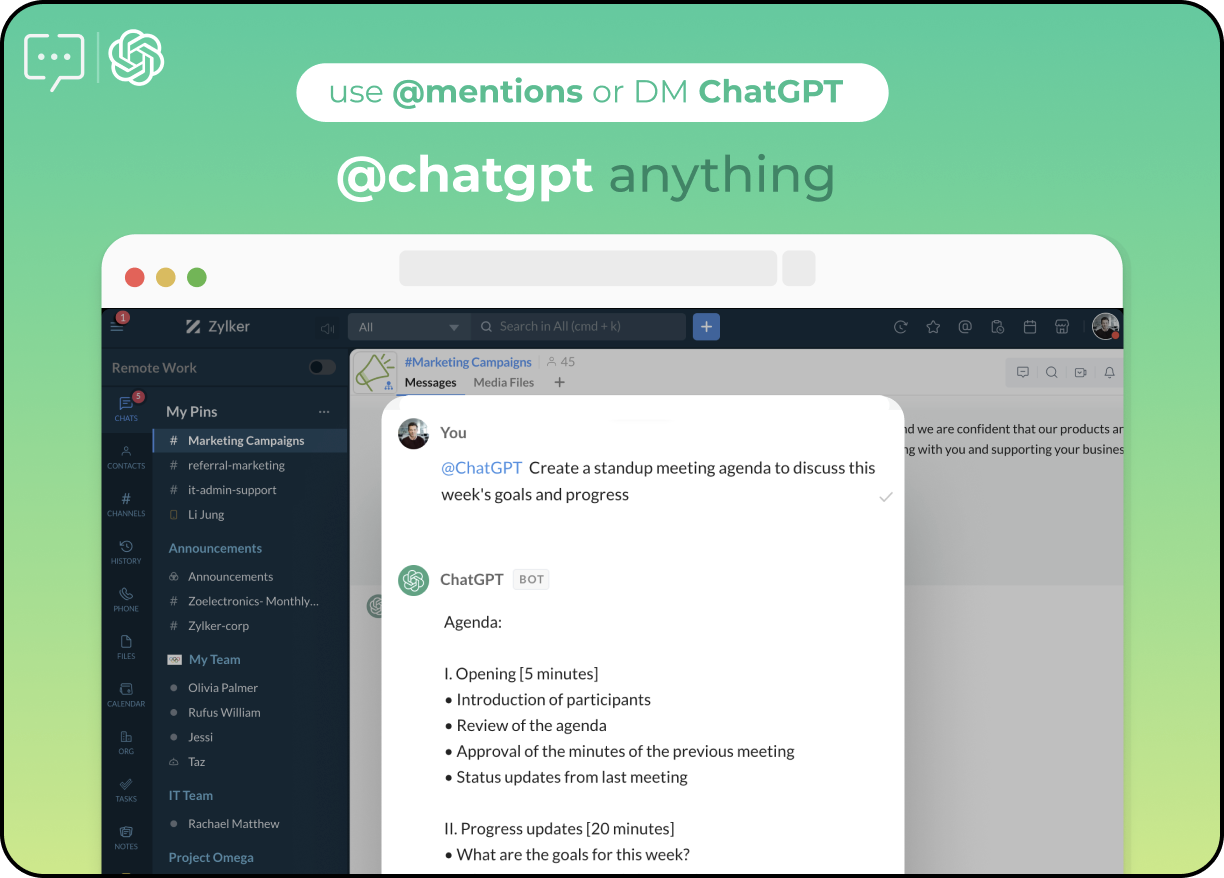
- Bot: The ChatGPT extension includes a bot that can answer any of your questions and hold a conversation with you. This means that you can interact with the bot as if you were talking to a human, and it can provide you with information or assistance in real-time. The bot is powered by OpenAI's GPT-3.5 architecture, which enables it to understand natural language and respond in a way that feels human-like.
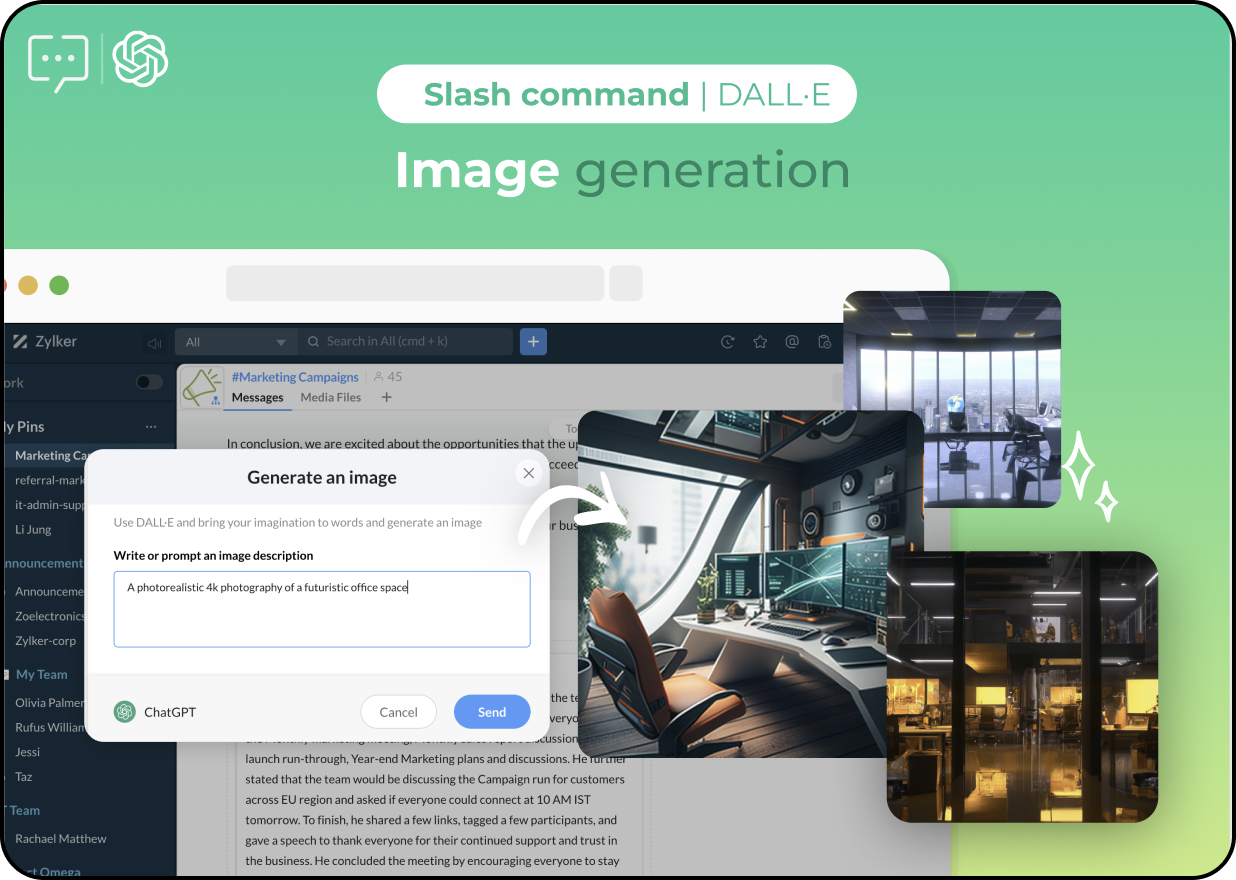
- Slash commands: The ChatGPT extension also includes multiple slash commands that can be used to summarize conversations, generate images and text, and perform other actions. For example, you could use a slash command to generate an image of a futuristic office space during a discussion about office renovation.
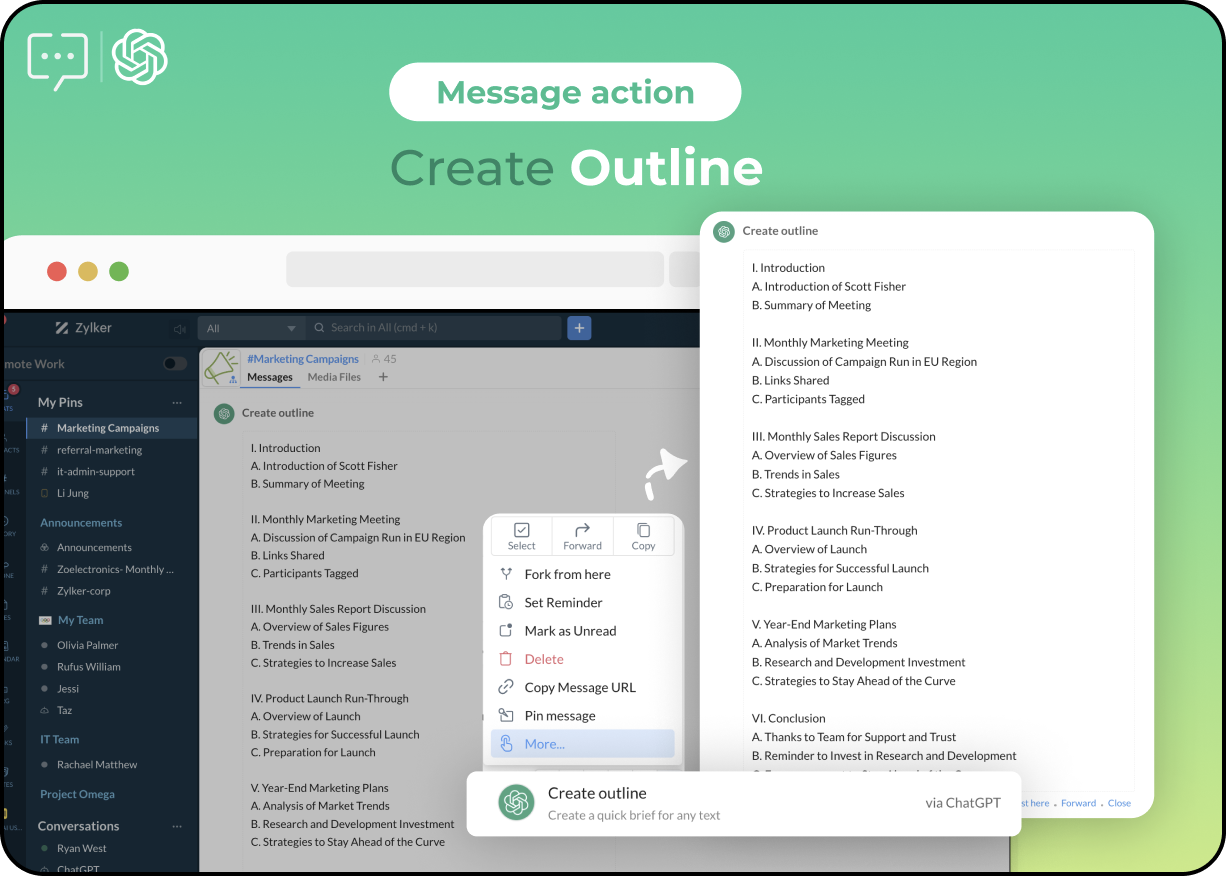
- Message actions: In addition to slash commands, the ChatGPT extension also includes message actions that can be used to summarize a long message or create outlines for shared ideas and decisions. For example, you could use a message action to create an outline of a brainstorming session or summarize the key points of a long email.
To set up the ChatGPT extension, you can refer to this help doc. This will provide you with step-by-step instructions on how to install and configure the extension within your messaging platform. Once the extension is set up, you can start using the bot, slash commands, and message actions to enhance your conversations and increase your productivity.
Whether you're looking to streamline your workflow, improve communication, or simply get more done in less time, ChatGPT is an invaluable resource that can help you achieve your goals. So why not give it a try and see for yourself?
We're excited to hear your feedback and thoughts on this new extension, so please feel free to share your experience in the comments below.
Topic Participants
Poorvik Palanikumar
Sticky Posts
Communicate, collaborate, and drive projects to success with the Zoho Cliq - Zoho Projects integration
Context switching between apps is a problem you shouldn't have to deal with. Let's say you find a new project issue or want to add a task in Zoho Projects. You should be able to do both of these tasks right from where you're already collaborating. Thanks to Zoho Cliq's new integration with Zoho Projects, you can now manage your project issues, tasks, and milestones from right inside your chat window. Steps to install the extension The Zoho Projects for Zoho Cliq integration is available for installation
Recent Topics
DMARC reports for mail I didn't send: how to deal with?
I know the enthusiastic amateur's bare minimum about e-mail; am able to set up a Thunderbird account and know the basic acronyms. I have a Zoho Mail account connected to my domain, and have set up SPF, DMARC and DKIM successfully according to Zoho's instructionms
Email set up for communicationWorkDrive issues with Windows Explorer Not Responding
We are using WorkDrive to collaborate on editing video content. We have a lot of files and quite a few are a few gigs. Recently anytime I try and work with the files Explorer freezes for a couple minutes whether it's dragging the files into Premiere orFix the speed
It takes ages to load on every step even though my dataset is quite small.Capture Bank Charges for Invoice Payments
We've added the Bank Charges field in the "Add Payments" page both in Zoho Invoice & Zoho Books. So all you need to do is to enter the bank charges when you record a payment for the invoices. This bank charge will be included to the amount paid for that invoice. Steps to add the bank charges while you record the payment: 1. Click the "Invoices" sub-tab under the "Money-In" tab. 2. Click the 'add payment' link for the invoice that you wish to record the payment for. 3. On the addConditional Layouts On Multi Select Field
How we can use Conditional Layouts On Multi Select Field field? Please help.Fill Mail Merge document up with subform fields of an Inventory module record being in the Related List
Hi, I try to insert subform fields from an inventory module record being on the Related List of another inventory module record into a Mail Merge template without success. For example: we use ratecards in licensing and this ratecard items are availableHow can we add products using a Wizard?
We want to create a Wizard to add products. Why is there no possibility to use the products module when creating a wizard?Image field in custom module
Hi guy, Is there any hope of adding a custom image field in the custom module? We created a custom module to keep track of assets, and it would be helpful if we could attach an image to the record. Thanks RudyDeluge Function to Update Custom Field
I'm trying to get a Deluge function (which will run as part of a Schedule in Desk) that retrieves all tickets with the status "Recurring" and updates the custom field checkbox "cf_recurring" to "true". Here's what I have, which doesn't work: searchValue"View ticket" link is broken
The "View ticket" link in our Zoho ticketing system confirmation emails is broken (please see attached). Impacts ability to update/review details, and, refresh recollection at a later date. Any help would be much appreciated.import data from Apollo.ai into zoho crm via zoho flow
I might be asking this question in the wrong forum. We use Apollo.ai to find potential new leads for our business, there are around 10000 leads that we have initially found. We have an Apollo.ai account but just to do searches, we dont use it as a crm.Woocommerce Line Item Information
I'd like to add each line item from a Woocommerce order to a zoho creator form record. The line items are found within the line items array, but I'm not sure how to get each item out of the array? Any help would be much appreciated.Synching changes to Stripe when changes are made in Zoho Billing
We have a situation where we have merged customers in Zoho BIlling and then found out later that the payment in Stripe was not updated and still associated with the old customer record. The card gets updated and billed, but that payment is still associatedHow do I fix this? Unable to send message; Reason:554 5.1.8 Email Outgoing Blocked.
How do I fix this? Unable to send message; Reason:554 5.1.8 Email Outgoing Blocked.Disable Smart Filters By Default
The smart filters "feature" is causing confusion for Zoho Mail users. New emails should be delivered to the inbox unless they have specifically opted to redirect them somewhere else. People don't understand that new emails might be waiting in a randomME SALE ESTE ERROR: No fue posible enviar el mensaje;Motivo:554 5.1.8 Email Outgoing Blocked
Ayuda!! Me sale este error al intentar enviar mensajes desde mi correo electronico de Zoho! Tampoco recibo correos pues cuando me envia rebotan. Ayuda, Me urge enviar unos correo importantes!! Quedo atenta MAGDA HERNANDEZ +5731120888408Client Script | Update - Client Script Support For Custom Buttons
Hello everyone! We are excited to announce one of the most requested features - Client Script support for Custom Buttons. This enhancement lets you run custom logic on button actions, giving you greater flexibility and control over your user interactions.Zoho Mail not working
Zoho Mail not workingProduct line search in quotes
Is there a way to change the search setting when you add a product line to a quote. We have created a field in products called 'Part Number' and I would like when I'm adding a product line to the quote that I can search on that field. At the moment it only searches on product description. In products I can search on the 'Part Number' field Any help welcome.CRM x WorkDrive: File storage for new CRM signups is now powered by WorkDrive
Availability Editions: All DCs: All Release plan: Released for new signups in all DCs. It will be enabled for existing users in a phased manner in the upcoming months. Help documentation: Documents in Zoho CRM Manage folders in Documents tab Manage filesQueries on Project-Based Inventory Consumption and Proforma Invoice in Zoho ERP
We would appreciate your clarification on how Zoho ERP plans to handle the following: Project-based inventory consumption without itemized sales orders Accurate project cost tracking along with inventory reduction Proforma Invoice usage We look forwardI can't add a new customer in Zoho invoice? Anyone had this issue before?
Ive been using Zoho invoice for over 6 years. Today I wanted to add a new customer to send an invoice to but it doesn't save when I try to access it from the pulldown menu when you go to send a new invoice.Spreadsheet View click & focus issue in Arabic (RTL) localization
Hello Zoho Support Team, I am facing an issue in Zoho Creator Spreadsheet View when using Arabic localization (RTL). Scenario: My app supports English (LTR) and Arabic (RTL). I created a Spreadsheet View for a form. In English, everything works correctly.Customer address in Zoho Bookings
Hello, Is it possible to add customer address information to the Zoho bookings appointment screen? Or have it pull that information automatically from the CRM? We are wanting to use this as a field management software but it is difficult to pull the address from multiple sources when it would be ideal to have a clickable address on the appointment screen that opens up the user's maps. It would also be advantageous for the "list view" to show appointment times instead of just duration and bookingGhost email notification on a form
Hello, We have recently encountered an error where I can not see a email notification set up for a form which I am currently the owner, although neither the form nor the notification were created by me. However, neither can the Super Admin access thebulk edit records and run internal logic
hi there is few logics in manner "it this than that" logics work well when i edit entry openning it one by one (via workflow "on add/edit - on success" , for custom field "on update/on user input") but when i try bulk edit records - logic does not work. how can i turn on logic to work as programmed - for mass editing records via bulk edit?Dheeraj Sudan and Meenu Hinduja-How do I customize Zoho apps to suit my needs?
Hi Everyone, I'm Meenu Hinduja and my husband Dheeraj Sudan, run a business. I’m looking to tweak a few things to fit my needs, and I’d love to hear what customizations others have done. Any tips or examples would be super helpful! Regards Dheeraj SudanBulk bank rule creatioin
Hi team, I am exploring Option to create a multiple bank rule. Could please suggest the option to implement this?Limitations on editing a message in Cliq
Hi I've checked the documentations and there's no mention of how many times a message can be edited. When trying with code, I get various numbers such as ~1000 edits or so. Please mention if there's a limit on how many times one can change a message viaOrphan email alias blocking user creation – backend cleanup required
Hello Zoho Mail Support, I´m unable to assign or create the address xx@iezzimatica.ar in my organization. Current situation: Alias cannot be assigned to any user (system says it is already in use) New user with this address cannot be created Address doesemail address autocomplete
Is there a way to eliminate certain addresses from showing up in auto complete when entering an address? Many old and unused addresses currently show up, many of which I would like to get rid of. ThanksHow to use MAIL without Dashboard?
Whenever I open Mail, it opens Dashboard. This makes Mail area very small and also I cannot manage Folders (like delete/rename) etc. I want to know if there is any way to open only Mail apps and not the Dashboard.Introducing Radio Buttons and Numeric Range Sliders in Zoho CRM
Release update: Currently out for CN, JP, AU and CA DCs (Free and standard editions). For other DCs, this will be released by mid-March. Hello everyone, We are pleased to share with you that Zoho CRM's Layout Editor now includes two new field formats—How can i download and secure all my mails from the archive folders?
Hi, i would like to download all my mails from my archive folders and secure it on my external HDD. Is this possible? Thx. amirHow to open filtered report in popup using Zoho Creator Deluge?
First report: There is so many records in Report, If I click one record, pop up is occur. Second report (Pop up): there is also so many record data, and this pop up is also Report, not Form. First report: It has got "Sales Order" field. when I click anyMake panel configuration interface wider
Hi there, The same way you changed the custom function editor's interface wider, it would be nice to be able to edit panels in pages using the full width of the screen rather than the currently max-width: 1368px. Is there a reason for having the configuration panel not taking the full width? Its impossible at this width to edit panels that have a lot of elements. Please change it to 100% so we can better edit the layouts. Thanks! B.Can you default reports/charts to report the current week?
Our data table maintains two years of data. Management wants certain report to automatically filter the report to the latest calendar week. I know I can do this manually with filters but I want the report to automatically default to the latest calendarRendering PDF to view on page
My company upload lots of PDF files onto Zoho. But every time we open it, it downloads the file instead of viewing it on the web page. Does Zoho allow uploaded PDF files to be rendered to view on web page yet? I've been trying to use <embed> or <object> but it cannot be loaded. (similar thread: https://help.zoho.com/portal/community/topic/how-to-open-a-pdf-file-of-a-view-in-preview-mode)Overlapping Reports in Dashboards
It's rare, but occasionally it would be a good feature if I were able to overlap reports, either fully or partially in the Dashboards. Also, then having the ability to move objects to the front or rear, or make them transparent/translucent would be goodNext Page