Approve or deny appointments based on criteria

Approve or deny appointments based on criteria

Hey, community members!


Have you ever wondered how to automatically approve or deny appointments?


While we're still working on building that feature, we've got an alternative method to cancel appointments if they don't meet your specific criteria.

Let me share a recent client request as an example: Our customer has two types of services that are similar: One is for grown-ups and the other is for children. However, often adults mistakenly book these services without realizing that they are not intended for them. This results in unnecessary confusion for our customers, as they have to contact those who accidentally booked appointments and reschedule them, causing a significant amount of administrative work.

Here's how we helped our customer: We added a criteria field to the booking page (e.g., "What is your age?") Then, we automatically cancel appointments where the input age is greater than 15 and we'll even notify the grown-up client that their appointment has been canceled and guide them to book the appropriate service.


To make this happen, you'll need Zoho Bookings and the Zoho Flow Standard Plan.


Here's a simplified breakdown of the process in three steps:  

  • Zoho Bookings will collect the criteria data and pass it to Zoho Flow.

  • In Zoho Flow, we'll configure a workflow to verify the validity of the data.

  • If the data is invalid, Zoho Flow will trigger a cancellation request to Zoho Bookings, resulting in the appointment being canceled.


Don't forget these additional steps: Edit the booking confirmation page and notification email to proactively inform customers that their booking maybe subject to cancellation.

Let's dive into the details together!!!

STEP 1: TO BE FOLLOWED IN ZOHO BOOKINGS APPLICATION:


1. Create a mandatory field in Zoho Bookings Forms.

     A. For service booking form: Add Field

     B. For workspace booking form: Add Field


NOTE: Workspace-level settings apply to group and resource bookings, while for One-on-One bookings, you will need to make the necessary changes within the specific One-on-One service settings.

At the end of step 1, let's say we have created a mandatory field called "What is your age?". Now the customers on the booking page will have to provide their age to book an appointment.

Additional Step:

Canceling an appointment without the customer's knowledge might affect the customer experience. Therefore, we should acknowledge the customers in every possible way.


Here are some tips:


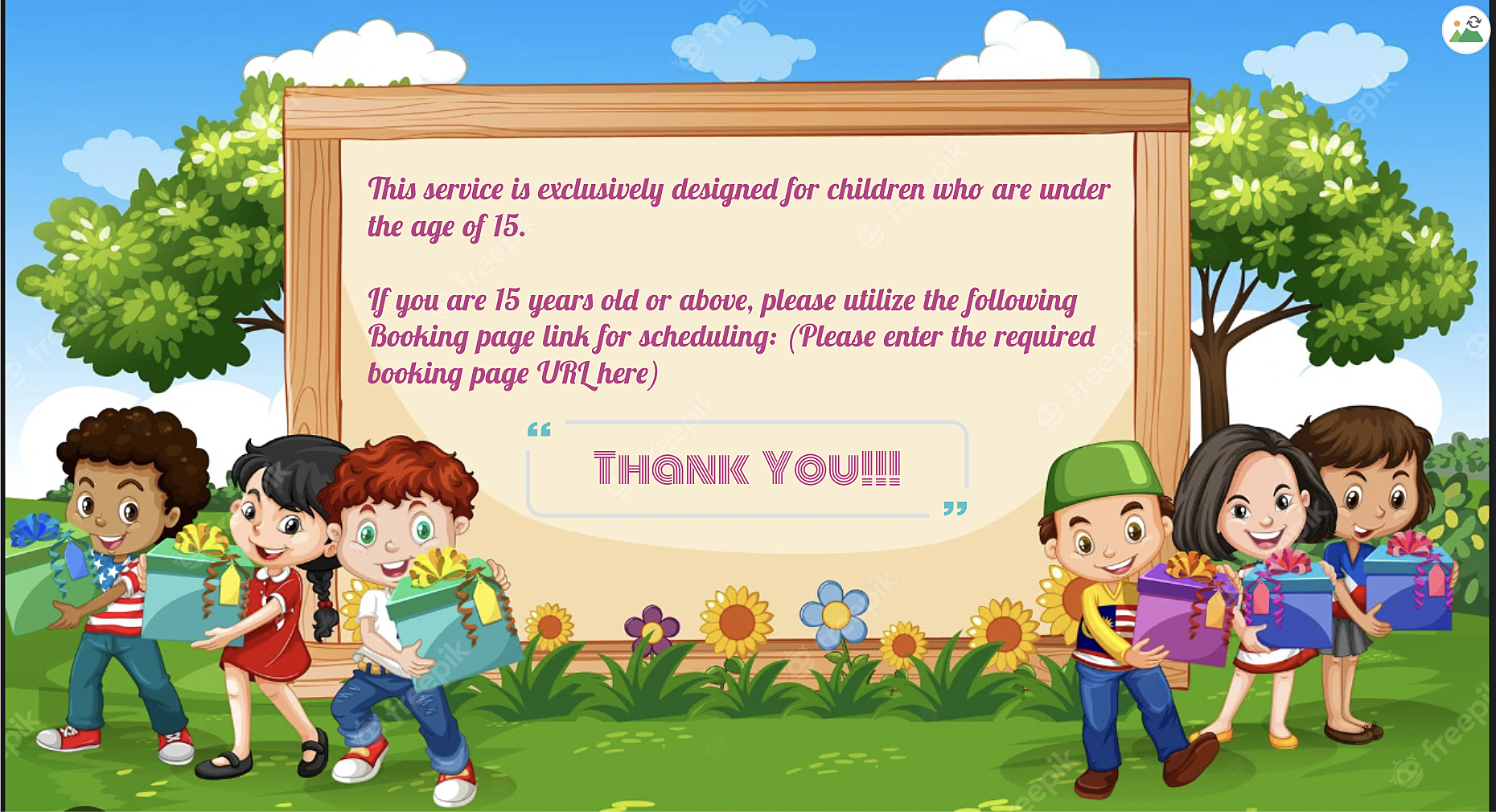
A. We can use the 'Custom Redirection' feature to redirect customers to a custom page after they book an appointment, instead of the default booking confirmation page.

Here is how to change booking confirmation page: Booking Confirmation Page


Here is the sample custom page:


B. By using the "
Terms and Conditions" check box, you can include the following message in the box: "This service is specifically designed for children under the age of 15. Bookings made by individuals above the age of 15 may be subject to cancellation". Customers will then need to check the box to confirm their agreement before completing their bookings, ensuring that they are aware of this policy.

More details: 

STEP 2: TO BE FOLLOWED IN ZOHO FLOW APPLICATION

A: Log in and search the template

  • Sign in to Zoho Flow application and create a new flow using the create flow option.

  • Select App > search for Zoho Bookings in the search bar.

  • Select the "Appointment Booked" trigger.

  • Select "Connection" and "Variable" > Done.


How to create a flow in Zoho Flow: Create a flow from scratch

How to create connection in Zoho Flow application: Create a Connection


At the end of step A, we have created a new flow including Zoho Bookings application.


B: Set Variable

  • In the Logic option > Flow Control > Set Variable > Edit the variable

  • Name the variable and in the value provide the input in following format "${trigger.customer_more_info.get("What is your age?")} " > Click on done.
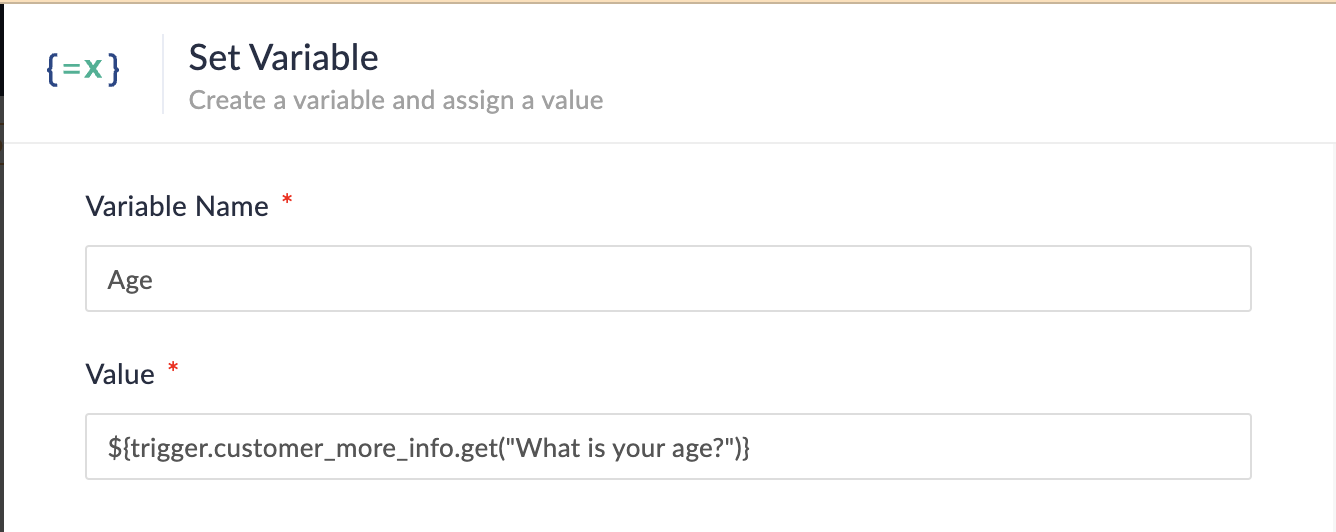


NOTE: In Step 1, we created a multi-line field named "What is your age?" If you have instead created a single-line field without spaces (e.g., "Age?") on the booking page, the format for the field would be as follows:

  • Single line field format: ${trigger.customer_more_info.fieldname}

  • Multiple line field format: ${trigger.customer_more_info.get("fieldname")}

At the end of step B, we are fetching the output of the "Age" field from the Zoho Bookings form.


C: Create Condition

  • In the Logic option > Flow Control > Decision.

  • In the condition 1, configure as Set Variable(Age) > is not null. 
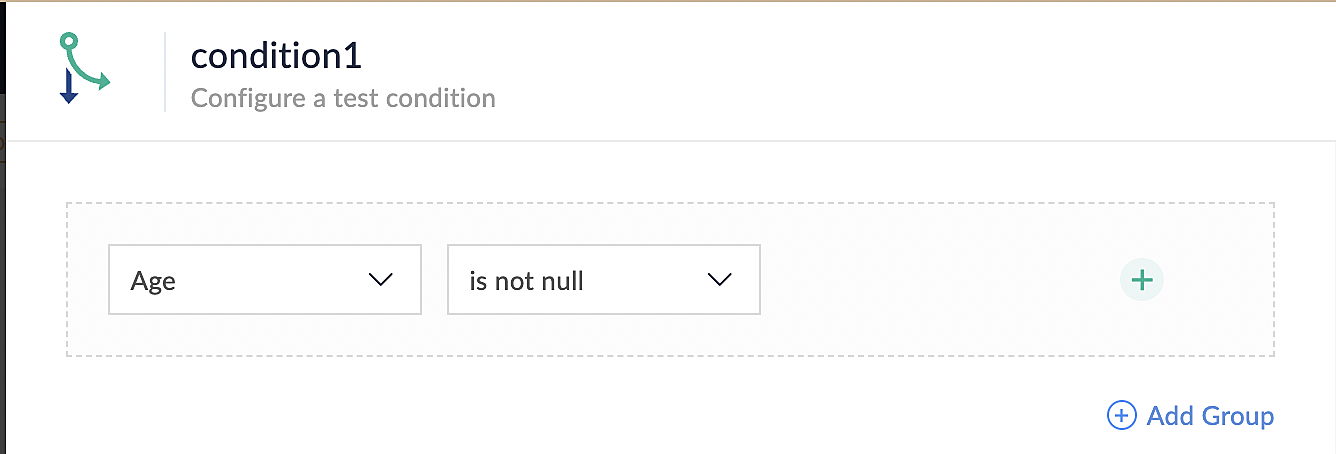

At the end of step C, we set up conditions to ensure that all bookings made through the Zoho Bookings application meet the requirements specified in the above conditions.


D: Custom Function

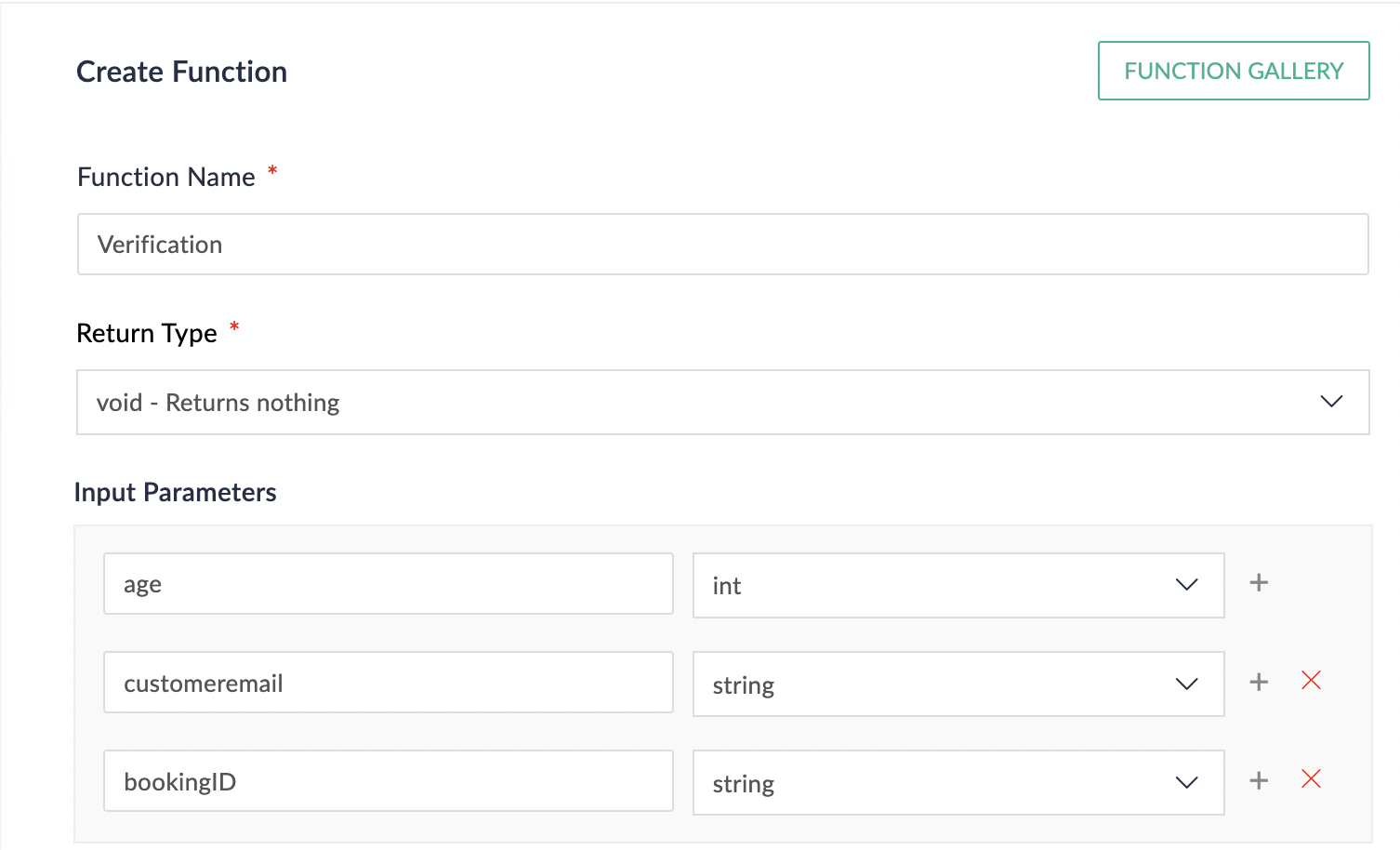
  • In the Logic option > Custom Functions > Create Function.

  • Configure function name, return type and input parameter.

  • Details on custom function: Custom Function
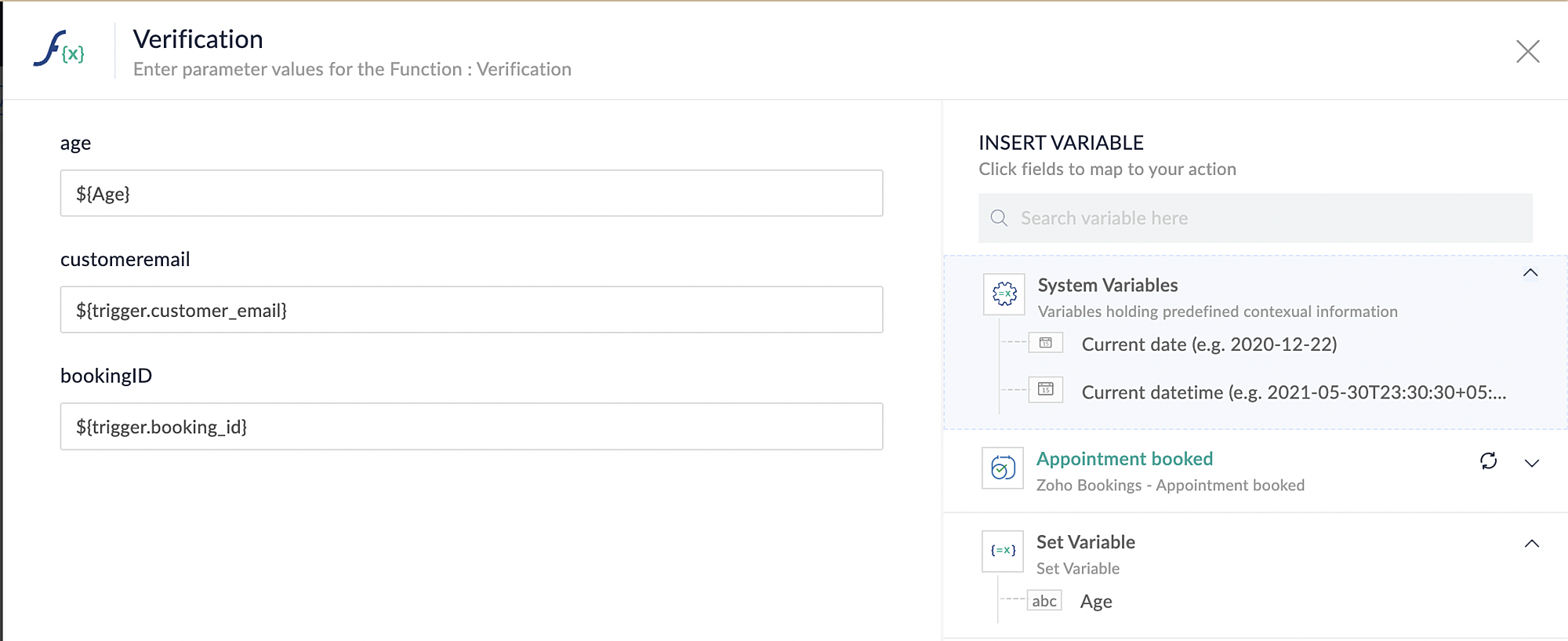
Reference below: 


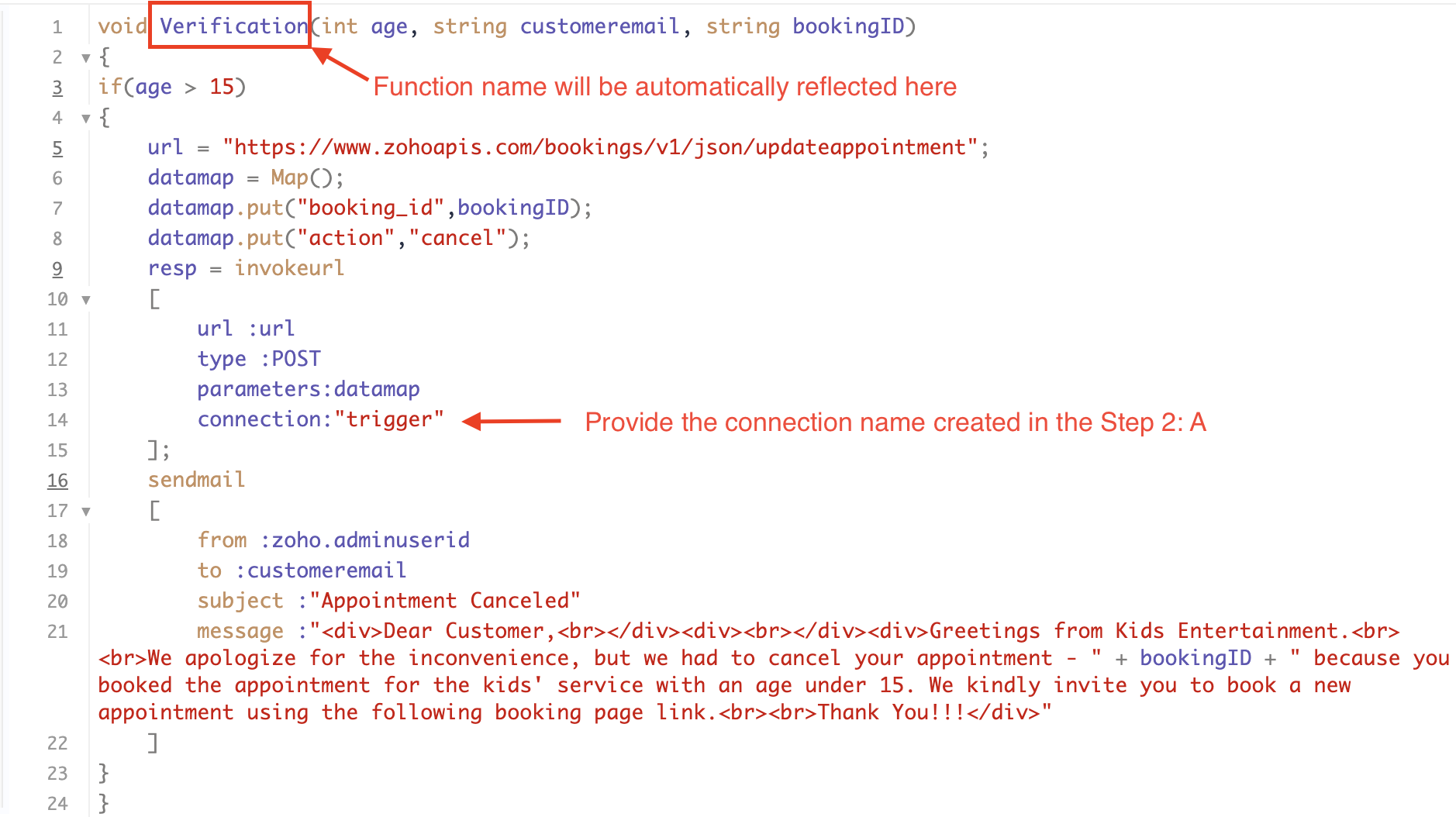
Below is the sample code which you can have for reference. You can configure and modify the code according to your specific requirements.


Code Explanation:


Line 1: To pass the input data below to the code

  • Age: This is used to verify and analyze the customer's input.

  • Customer Email: This is required to send an email notification to the customer in the event of an appointment cancellation.

  • Booking ID: This serves the purpose of identifying the specific booking that needs to be canceled using its unique booking ID.

Line 3: We are implementing an "if condition" to verify the customer's input. In this case, we will check if the entered age is greater than 15. If it meets this condition, the following loop will be executed.

Line 5 - 8: To update appointments, we are utilizing the Zoho Bookings API. Within the update appointment API, there are two mandatory fields that need to be included: BookingID and action (completed/cancel/noshow). In cases where the criteria are not met and an appointment needs to be canceled, we will pass the action field as "cancel".

Line 9 - 14: We are using invokeURL task for API calls. To know more about invokeURL task please refer to the following document: InvokeURL task for API calls

Line 16 - 21: We utilize the sendmail task to send an email to the customer when their appointment is canceled. Additionally, the Zoho Bookings application automatically sends a cancellation email to the customer in such cases. Therefore, you have the option to either use the sendmail task or rely on the default notification system to inform the customer about the cancellation of their booking.

More details on send mail task: Send Mail Task

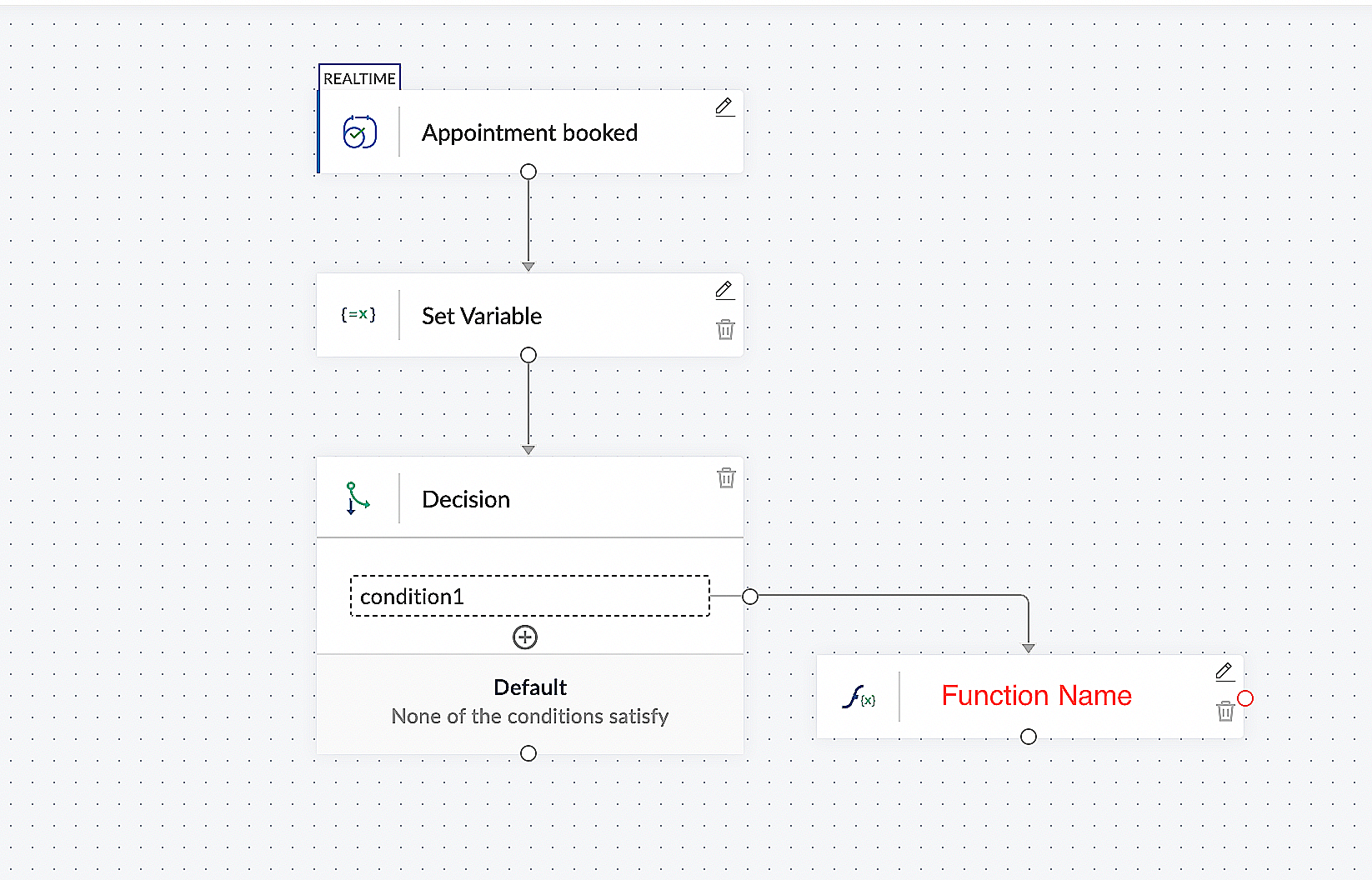
This is what the final flow will look like:


Here is the demo video:  In this demo video, we have showcased the behaviour of our setup configuration for different inputs from customers. One input satisfies the configured condition, while the other input does not meet the configured condition.


CONCLUSION:


In the preceding discussion, we have outlined a method for automatic appointment cancellation. You can use this document as a reference to explore the various possibilities that suit your needs.

In the upcoming posts, we will explore various scenarios and methods for updating the appointment status. Furthermore, we have covered the process of canceling an appointment after it has been booked.If you are wondering whether there is a way to verify customer inputs before booking an appointment, the answer is yes. We will delve into that topic in the next series.

As the above configuration may differ based on individual business requirements, we have provided a generic example for reference. If you have any questions or need assistance with configuration to align with your specific business needs, please email us at hello@zohobookings.com or support@zohobookings.com.


      • Sticky Posts

      • Approve or deny appointments based on criteria

        Hey, community members! Have you ever wondered how to automatically approve or deny appointments? While we're still working on building that feature, we've got an alternative method to cancel appointments if they don't meet your specific criteria. Let

        • Recent Topics

        • Integrate with WooCommerce using Wordpress Plugin

          We’re thrilled to announce a powerful update to the Zoho Marketing Automation WordPress plugin with WooCommerce integration! This enhancement enables new possibilities for businesses running online stores using WooCommerce, empowering them to merge seamless
        • Workdrive on Android - Gallery Photo Backups

          Hello, Is there any way of backing up the photos on my android phone directly to a specific folder on Workdrive? Assuming i have the workdrive app installed on the phone in question. Emma
        • Auto sync Photo storage

          Hello I am new to Zoho Workdrive and was wondering if the is a way of automatically syncing photos on my Android phone to my workdrive as want to move away from Google? Thanks
        • Zoho Subscriptions -- Zoho Commerce integration

          Is there integration between Zoho Subscriptions and Zoho Commerce? I would like to create subscription plans in Zoho Subscritpions and list them for on my Zoho Commerce store.
        • Need help with importing expenses

          I'm using the template downloaded from the application. When I try to import my expenses, I get the message: Duplicate entry in the Expense Date column. Ensure it contains unique values. None of the rows will import. There are duplicate dates, but they
        • Create static subforms in Zoho CRM: streamline data entry with pre-defined values

          Last modified on (9 July, 2025): This feature was available in early access and is currently being rolled out to customers in phases. Currently available for users in the the AU, CA, and SA DCs. It will be enabled for the remaining DCs in the next couple
        • Restoring records from the recycle bin programatically

          Background I'm working on a piece of software to automate conversion of Leads into Deals based on order status from my company's website. The process is mostly complete, right now I'm just working on handling a few edge cases to ensure data integrity.
        • How can I clone my website in order to try new templates?

          I want to try a new template for my existing Zoho website without the risk of changing the current site or accidentally publishing the wrong template. Therefore I thought a 'clone website'-option should be somewhere, but I can't find it. How do I try
        • Select forwarding

          For Zoho mail online on PC in web browser: I had forwarding enabled in section "Mail accounts / Forwards", and I also have some filters that send emails from some unwanted senders to Archive. But it doesn't work as intended, it forwards everything (obviously
        • Custom view inconsistencies

          Why is "is not" missing from criteria, along with other comparison operators ??? It makes it almost impossible to build required custom views, I don't want "void" invoices listed & why on earth would "Void" invoices be showing when the criteria includes
        • Cliq iOS can't see shared screen

          Hello, I had this morning a video call with a colleague. She is using Cliq Desktop MacOS and wanted to share her screen with me. I'm on iPad. I noticed, while she shared her screen, I could only see her video, but not the shared screen... Does Cliq iOS is able to display shared screen, or is it somewhere else to be found ? Regards
        • system not picking my default custom service report template

          Can you tell me why when we create a service report always pick the (standard old) template? Even when I have a custom service report selected as Default.
        • Restrict Appointment Booking to Approved Clients

          Dear Zoho Bookings Support Team, We'd like to propose a feature enhancement for managing appointments within Zoho Bookings. This feature would ensure only pre-approved clients can schedule meetings. Desired Functionality: We propose the introduction of
        • Automate Credit Card Surcharge

          Is there a way to create an automation that will add a 3.0% credit card surcharge to a subscription whenever a customer pays via credit card?
        • Product Request: Send email to Secondary email

          Guys, we should be able to send the campaign to the secondary email too.  Is this on the plans for Zoho Campaign? It looks like I can map the secondary email from the CRM to the Campaigs, but can not send the message.  
        • I have the item field and Quantity field in the sub form , on the submit of the form if the quantity is grater than inventory means show alert on submit validation only for item type goods ,

          I have the item field and Quantity field in the sub form , on the submit of the form if the quantity is grater than inventory means show alert on submit validation . Stock Check Validation only for item type goods , not for item type service . For the
        • Disappearance of all articles in the knowledge base

          Hi there! It seems like all of our articles have disappeared from the knowledge base: However, the names still appear in the "sort articles" section:
        • Logic for sending to a non-primary email address

          Hi, I have a scenario where contacts are able to sign up for emails with 2 different email addresses (example: work, personal). I've mapped both to Campaigns from Zoho CRM, but when I go to target an email only the primary email addresses are pulling in. How can I update this to look at both of the email addresses - or specifically the secondary email address in Campaigns? Thanks, Jenny
        • Composite Product (kit) - Dynamic Pricing

          I am setting up Composite Products for item kits that I sell. I also sell the items from the kit individually. Problem is when pricing changes on an individual part, the Composite Product price does not change meaning when the cost of item # 2 in the
        • Add "Reset MFA" Option for Zoho Creator Client Portal Users

          Hello Zoho Creator Team, We hope you are doing well. We would like to request an important enhancement related to Multi-Factor Authentication (MFA) for client portal users in Zoho Creator. Currently, Creator allows us to enforce MFA for portal users,
        • Tables for Europe Datacenter customers?

          It's been over a year now for the launch of Zoho Tables - and still not available für EU DC customers. When will it be available?
        • Does Zoho has chatroom/chatbot url feature?

          Hi Zoho community! I’m looking for a quick "Yes/No" answer for my dev team regarding Zoho’s capabilities. We currently use Zoho Desk for our Service Team and Zoho CRM for our Marketing Team to bring both functions under one platform. Our question: Does
        • One Support Email Managed By Multiple Departments

          Hello, We use one support email (support@company.com). Incoming emails come to the "Support Department" and based on what the customer is asking, we route that ticket to different departments (billing, technical support, etc.). When users in these different
        • What's New in Zoho Analytics - February 2026

          Hello Users! We're back with another round of updates for Zoho Analytics. This month's release focuses on giving you greater flexibility in how you visualize, manage, and act on your data - with new features like custom visualizations, remote MCP server,
        • Is it Possible to Modify Standard Report Urls

          Is there a way to permanently modify standard report Urls? Use case: Suppose I have a Products report. Showing list as timeline, calendar, or kanban doesn't make sense. Want to hide that from users by adding #Report:Products?zc_ShowAs=false&zc_Print=false
        • Updated font library: New font styles and custom font options in Zoho Sheet

          Zoho Sheet's font library now supports 500+ font styles in 60+ languages! The updated font library is stacked with new font styles, and some of the previously available font styles have been replaced with equivalent options. There are two ways you can
        • scope for phonebridge in CRM and phonebridge API documentation

          Hi I cannot find the scope to be used for phonebridge in CRM API V2 calls. I am getting OAUTH_SCOPE_MISMATCH for scope group ZohoCRM.modules.ALL,ZohoCRM.setttings.ALL Also I am not able to locate the documentation for the same, All I have is phonebridge
        • Calendar start time limit

          Hi all, Has anyone found a magical way to filter calendar reports to start from, let's say 8:00, and not 0:00? Or at least to auto scroll there like Google Calendar for example?
        • Job Alerts for Candidates

          hi All, I have 2 questions relating to sharing job details with candidates. 1. is there a way to notify candidates that meet certain criteria of current jobs available? eg. I run a candidate search, and identify 50 candidates that might be suitable. Can
        • Zoho Wiki or new Zoho Learn

          We are currently evaluating if we should move off confluence. At present in Confluence we have multiple levels within our documentation but with learn it looks like you can only have Space       - Manual             - Chapter Is it possible to have levels below Chapter? Also the same question for the existing wiki, can I have more sub-levels?
        • Fix image at bottom of a page fot automatic proposal creation

          I'm working on a proposal document to automate our proposal creation process. So far it works fine, but I experience some problems with an image I want to have fixed at the bottom of the page AND above the footer. This section of the document consists
        • Can't scroll the page down unless I refresh the page

          Hello, This issue has been going on with me and a lot of other users in my organization, we can't scroll down! the scrolling side bar doesn't appear and scrolling down through mouse or keyboard keys doesn't work, it seems that the page just ends in the
        • Price List

          II want to restrict the items to display in sales, quote, etc for which custom rates are added in price list. How I can do the same in Zoho books
        • Let’s Talk Recruit: Still switching tabs to source?

          Welcome back to the Let’s Talk Recruit series. Let’s talk about how you actually source talent. Do you open multiple job boards every single time a role opens? Run the same keyword searches you ran yesterday? Download, upload, rename, and then do it again
        • Kaizen #231 - Embedding Zoho Desk Tickets in Zoho CRM

          Hello, CRM Wizards! This week, let us enhance cross-team visibility between Zoho CRM and Zoho Desk. We will use the Zoho Request Client inside a Related List widget to display open Zoho Desk tickets directly within the Contact record in Zoho CRM. This
        • EU Problem

          Hi all, we've been facing issues with the Europe data center for two days. It's starting to disrupt our daily workflow. Any word on when this will be resolved?
        • Introducing a smarter, faster, and more flexible charting experience

          Hello Zoho Sheet users, We're delighted to share the latest news about a major update to charts in Zoho Sheet! The new version supports dynamic data ranges, granular styling options, faster loading, and other interesting enhancements that allow you to
        • Introducing Job Alerts

          Keeping candidates engaged beyond their first application is one of the most consistent hiring challenges. Many interested candidates simply do not revisit career sites regularly, which can result in missed opportunities and reduced re-applications. To
        • How to add SSL to Short URL custom domain?

          Hi, I've added a custom domain the the URL Shortener Domains. It's creating the short URL fine, but when clicking through, firstly I get an SSL warning, then a 400 Bad Request warning.
        • Where is the settings option in zoho writer?

          hi, my zoho writer on windows has menu fonts too large. where do i find the settings to change this option? my screen resolution is correct and other apps/softwares in windows have no issues. regards
        • Next Page