Découvrons Zoho Projects 8.0 : Rapprocher les fonctionnalités et l'expérience utilisateur

La nouvelle version de Zoho Projects a été conçue avec la mission de rapprocher les fonctionnalités et l'expérience utilisateur, afin de créer une plateforme sur laquelle il est agréable de travailler. Nous croyons fortement que Zoho Projects 8.0 peut faire cela !
Zoho Projects 8.0 est doté d'une toute nouvelle interface utilisateur conviviale et intuitive . Avec une vue éditable des feuilles de travail, des modèles spécifiques à chaque secteur d'activité, une application mobile améliorée et plus encore, la 8e version a de quoi satisfaire tous les utilisateurs - existants et nouveaux, de divers secteurs d'activité, travaillant au bureau ou à distance. Découvrons les nombreux avantages de Zoho Projects 8.0.
La navigation facilitée
Que vous ajoutiez des étapes ou des tâches, que vous créiez un projet complet à partir de zéro ou que vous personnalisiez les détails d'un projet, avec les flèches de votre clavier, le travail est fait en un rien de temps. Cela signifie que vous n'avez pas besoin d'ouvrir la page des détails à chaque fois. Vous pouvez également déplacer vos tâches entre les listes de tâches et les jalons, vos sous-tâches entre les tâches, et ajouter des tâches prédécesseurs et successeurs pour les dépendances à partir de la page de détails des tâches, afin de simplifier votre organisation tout en gagnant en efficacité.
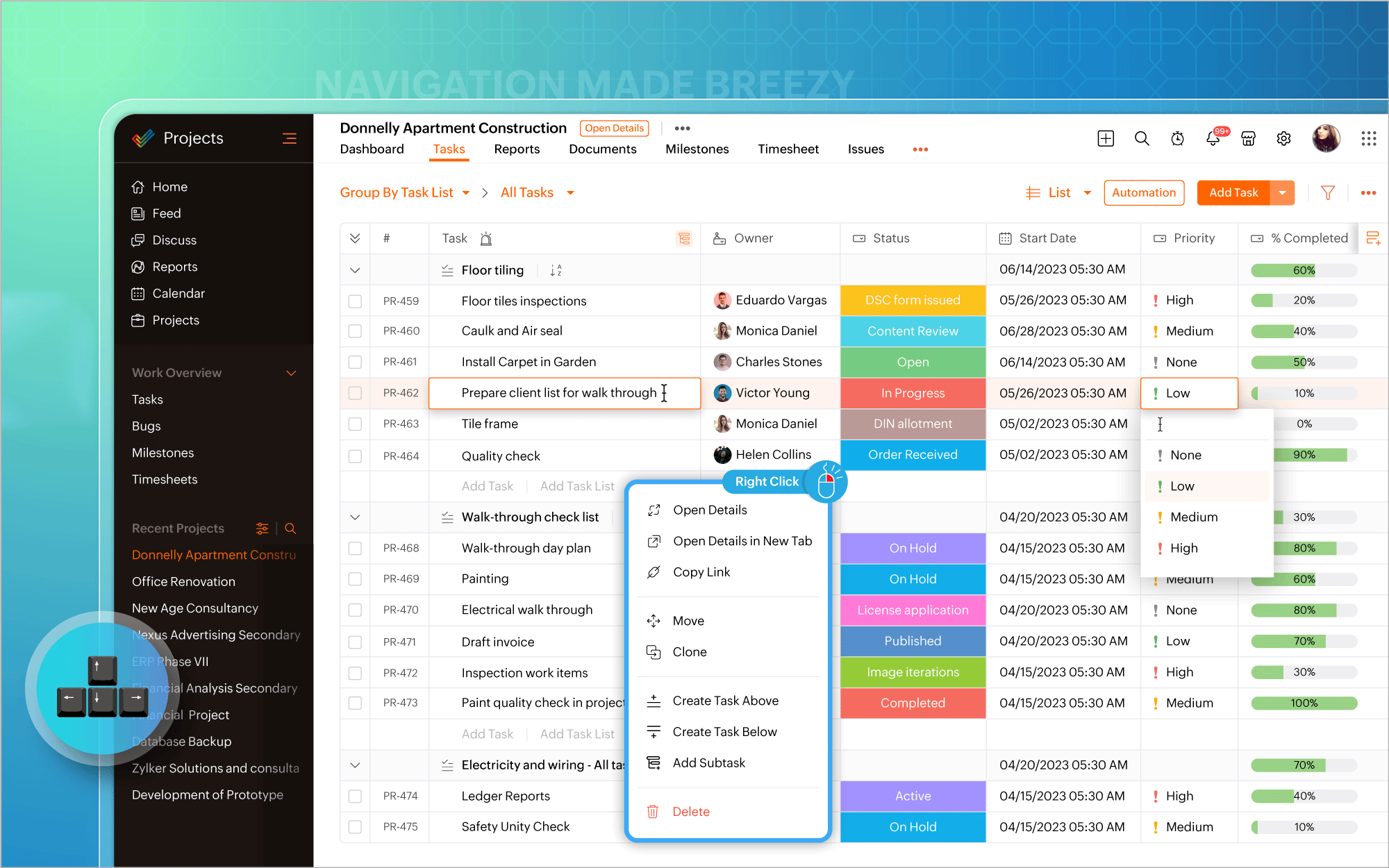
Gantt Charts
Nous avons modifié l'emplacement du diagramme de Gantt. Vous pouvez désormais y accéder directement dans la vue en liste et mettre à jour les éléments de travail en masse à partir du diagramme lui-même. Les vues quotidiennes, hebdomadaires, mensuelles, trimestrielles et annuelles de la chronologie du projet sont prises en charge, permettant de visualiser le travail depuis le point de vue qui vous intéresse, afin d'être toujours sur la bonne voie. En plus des rapports de Gantt habituels pour les tâches, vous pouvez également générer des rapports de Gantt spécifiques aux jalons et aux projets, et exporter ces données à tout moment.
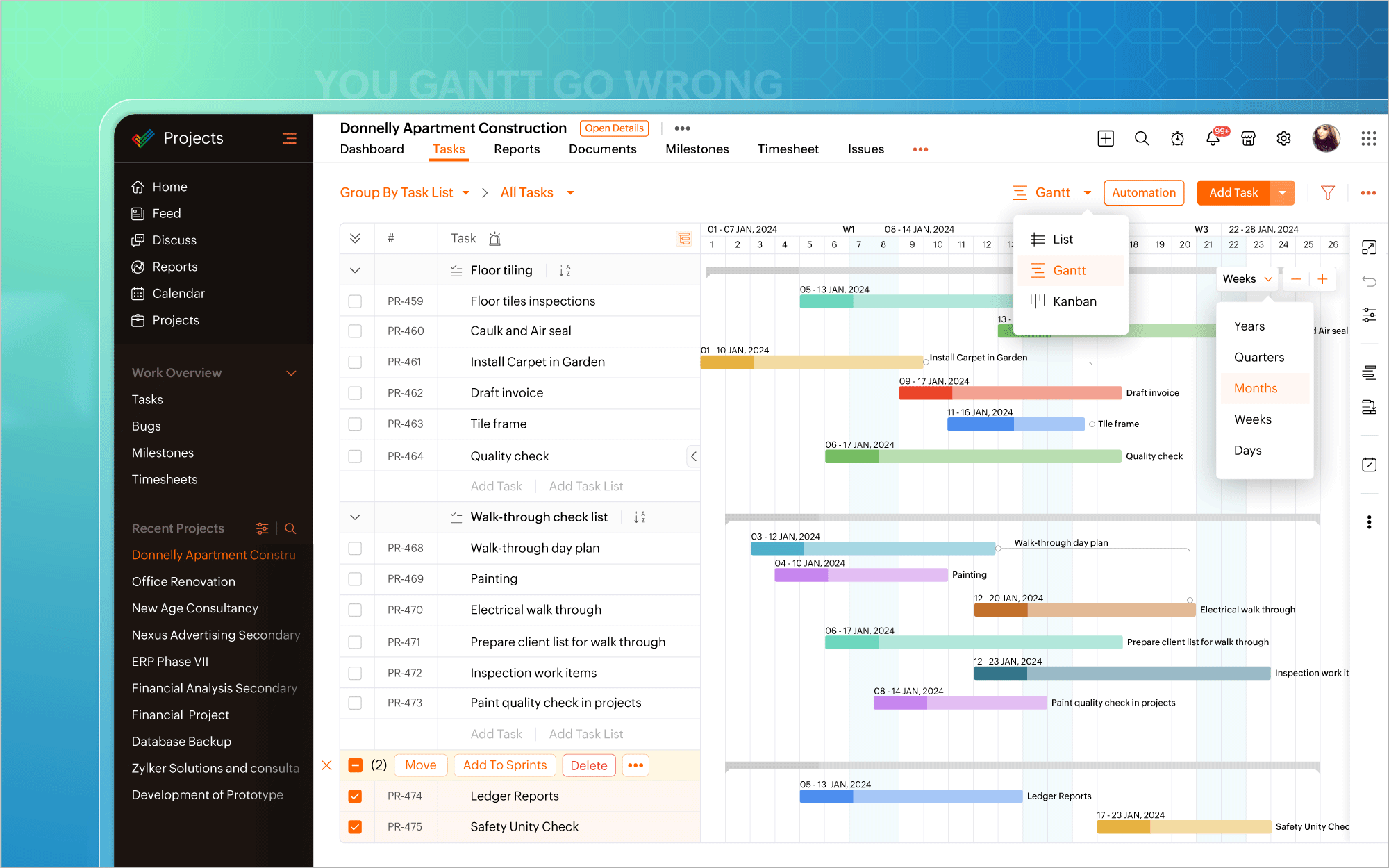
Personnaliser selon vos goûts
L'icône de personnalisation située dans le coin en haut à droite de l'écran vous permet d'ajouter facilement des champs personnalisés. Il existe également plus de 20 modèles de projets adaptés aux besoins de différents secteurs d'activité, ce qui vous permet d'éviter de créer des projets à partir de zéro. De plus, la possibilité vous est offerte de créer et de personnaliser des mises en page privées pour certains projets, tout en gardant les autres projets en l'état. Transformez chaque projet en un succès, avec une facilité accrue.
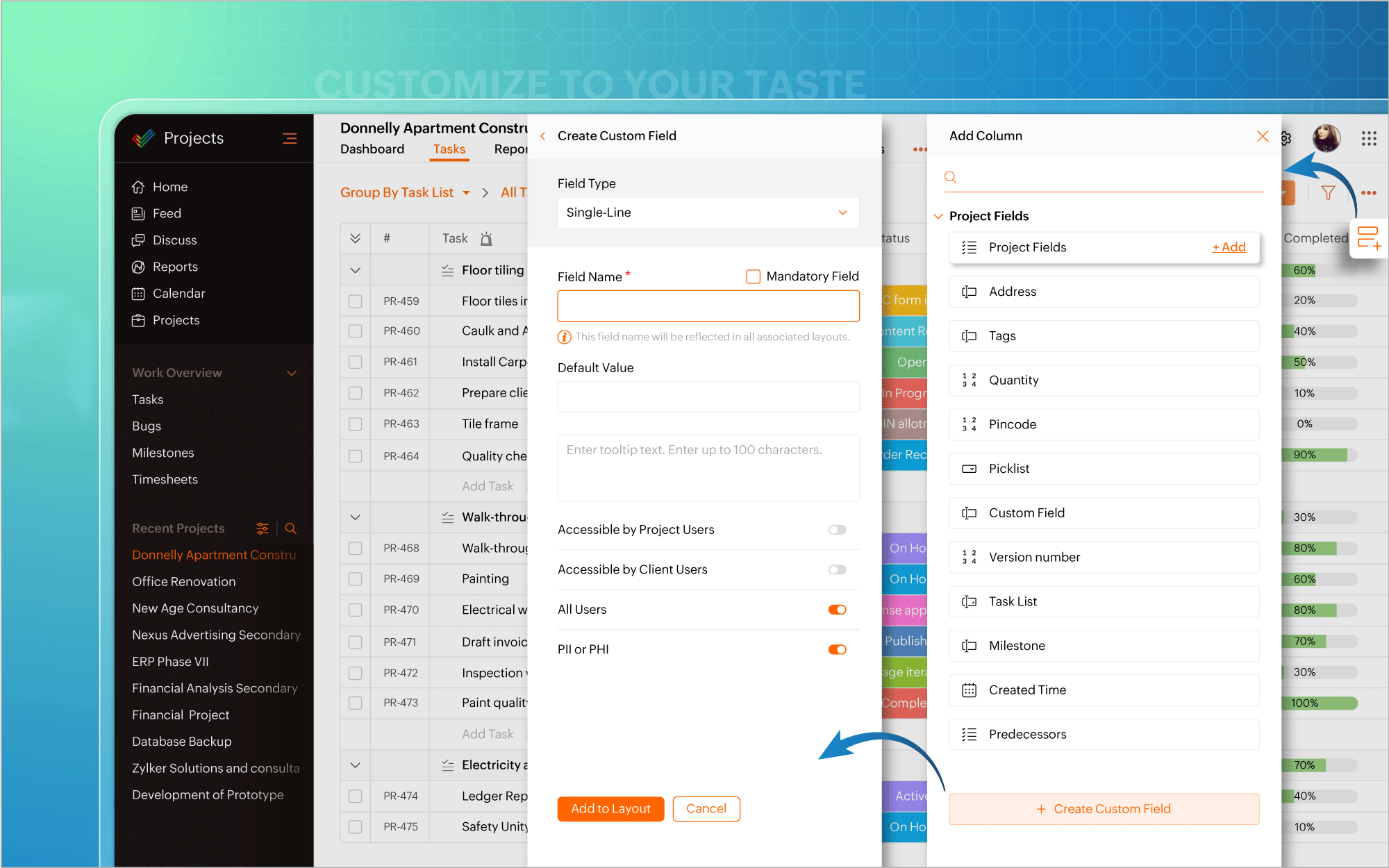
Automatiser à tout moment
Nous avons également introduit l'automatisation dans la vue en liste. Plus besoin d'aller à la page de configuration chaque fois que vous souhaitez créer des règles de flux de travail pour des projets ou des tâches. Mettez l'accent sur l'automatisation et faites en sorte que les tâches routinières fonctionnent à votre convenance.
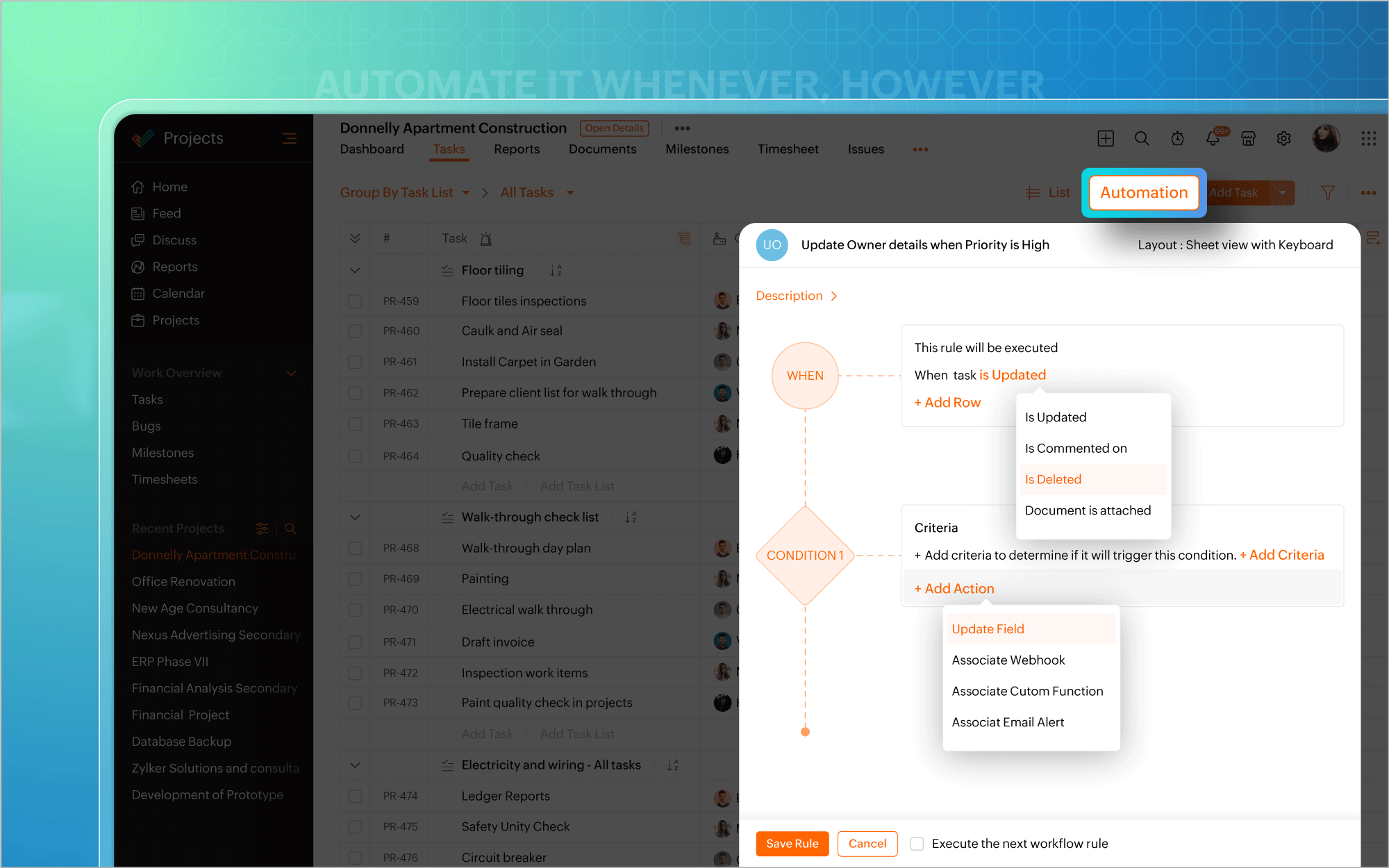
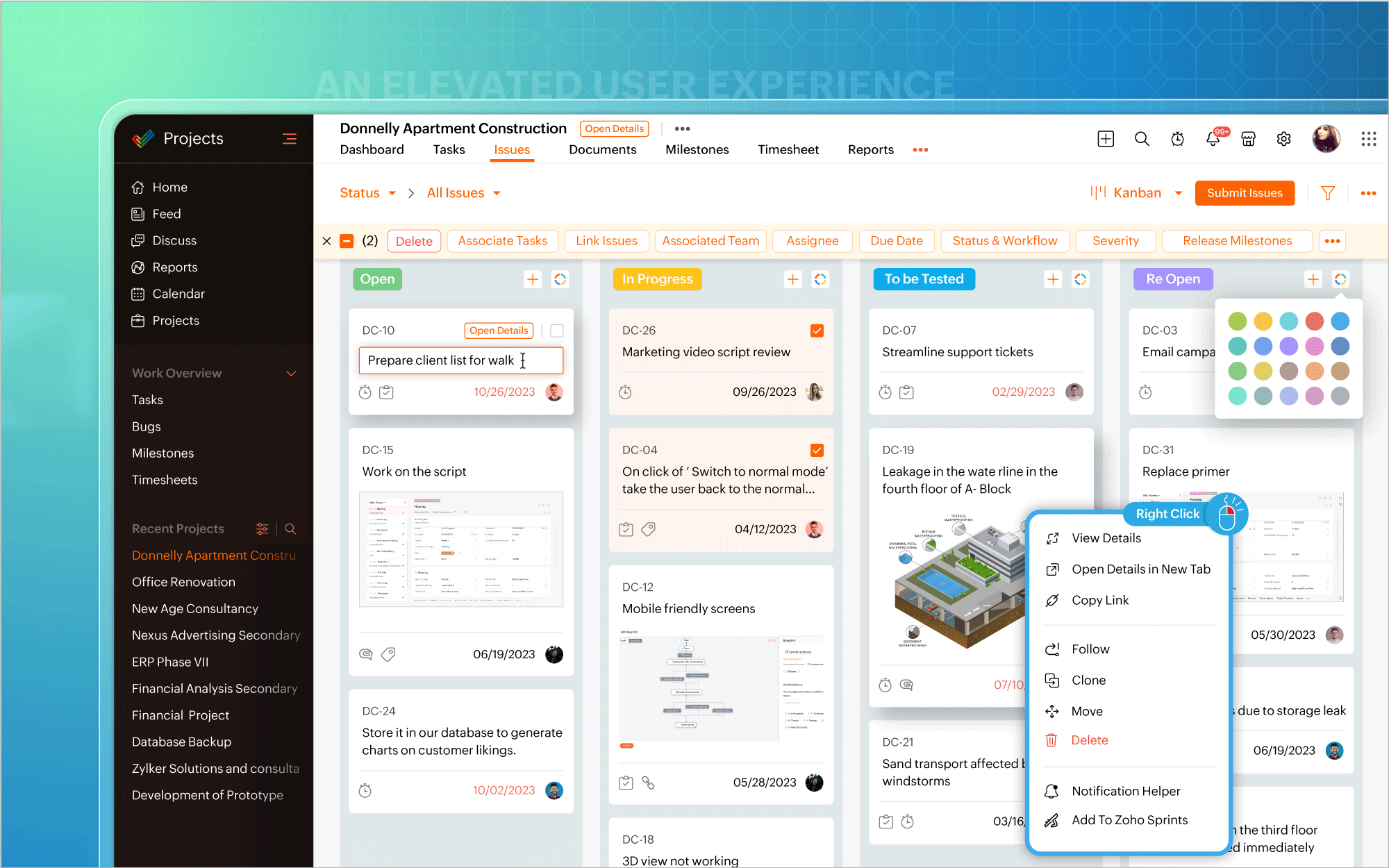
Une interface utilisateur améliorée
Vous pouvez ainsi effectuer des modifications, éditer les détails d'un projet, mettre à jour en masse des éléments de travail ou inclure des commentaires et des pièces jointes directement à partir de la vue du tableau Kanban. Un clic droit sur des modules tels que Liste, Kanban ou Gantt fait apparaître un menu contextuel qui vous permet d'effectuer des actions pertinentes, telles que consulter les détails du projet, cloner des tâches ou personnaliser les couleurs des barres de Gantt. Une page dédiée aux détails du projet s'ouvre si vous avez besoin d'informations spécifiques au projet ou si vous souhaitez apporter des modifications à votre projet.
Une expérience utilisateur améliorée sur mobile
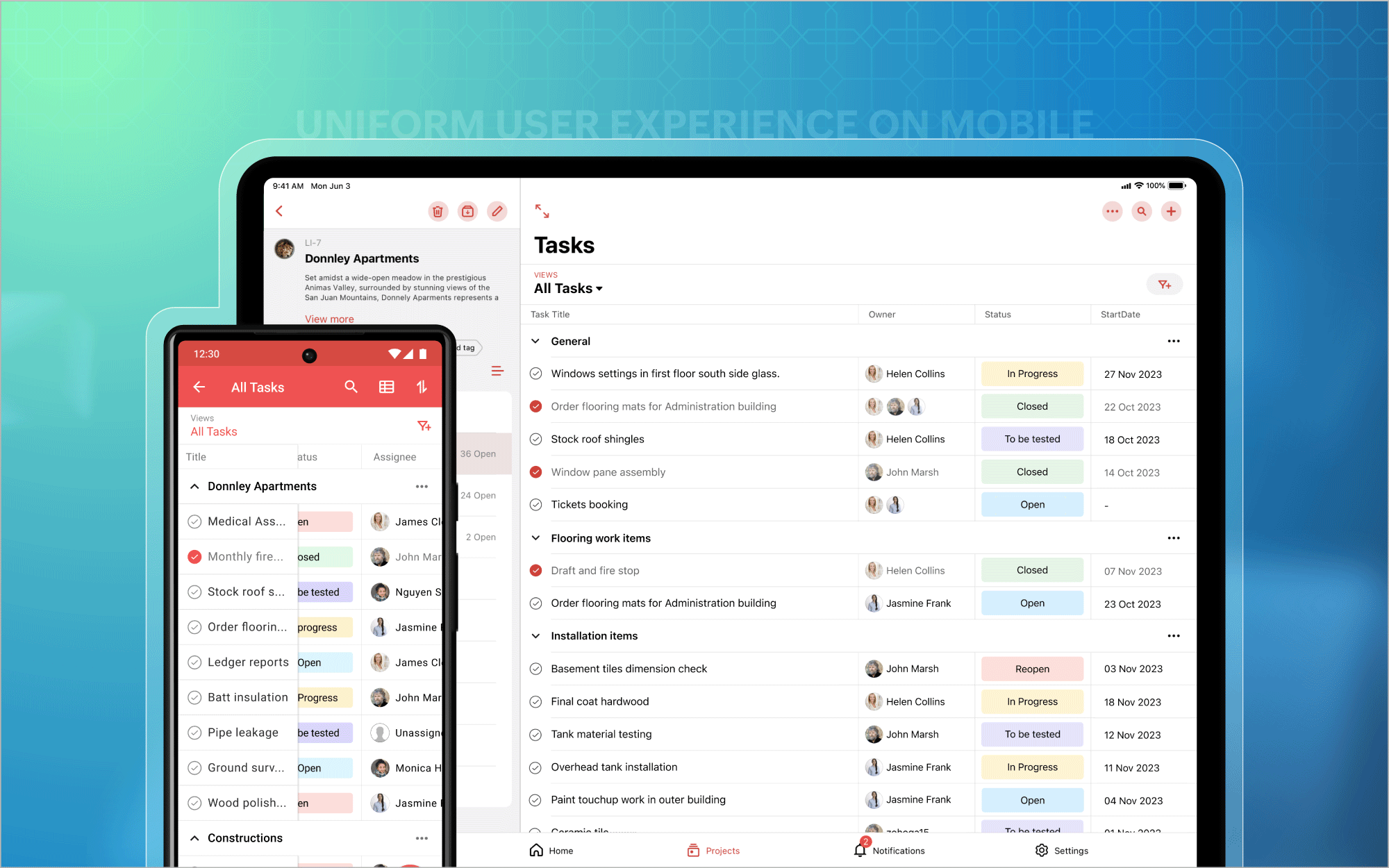
Nous avons également étendu l'affichage des listes aux appareils mobiles et aux tablettes, afin que vous puissiez profiter d'une expérience utilisateur homogène et standardisée sur toutes les plateformes. En outre, vous avez désormais accès aux tableaux de bord des projets et au module Calendrier sur les plateformes Android et iOS. Et bien plus encore est à venir !
Bon à savoir
Zoho Projects 7.0 sera inaccessible après le 31 mars 2024. Nous vous recommandons donc fortement de passer à la dernière version dès que possible. Nous avons hâte que vous l'essayiez !
N'hésitez pas à nous faire part de vos commentaires et de vos réactions sur les fonctionnalités préférées de la nouvelle version.
Plus simple, plus pratique, c'est Zoho Projects 8.0 !
L'équipe Zoho France
Topic Participants
Kinjal Lodaya
Sticky Posts
Les Zoholics sont de retour !
Bonjour à tous, Nous avons (encore une fois) une bonne nouvelle à vous partager : nous allons enfin pouvoir nous rencontrer ! Et pas dans n'importe quel contexte, mais lors de notre conférence annuelle : les Zoholics ! Mais que sont les Zoholics me direz-vousNovembre : un résumé de ce qui s'est passé le mois dernier sur Community
Bonjour à tous, L'année 2021 arrive presque à sa fin, mais nous continuons à avoir de nombreuses actualités à vous partager. En voici un résumé ! Nous avons eu notre première session "Ask The Experts" sur notre nouvelle version Zoho One 2021 et vousAoût : Un résumé de ce qui s'est passé le mois dernier sur Community
Bonjour à tous, Et bonne rentrée ! Comme chaque mois voici un résumé de ce qui s'est passé sur Community et dans l'actualité de Zoho en général. La grande nouvelle de mois d'Août est l'arrivée de la fonction Canvas : le premier studio de conception pourJuillet : Un résumé de ce qui s'est passé le mois dernier sur Community
Bonjour à tous, Le premier mois de l'été se termine, et si certain profitent d'un repos bien mérité, sur Community on continue à en apprendre toujours plus sur nos produits Zoho. Notre série sur Zoho CRM se réinvente avec la découverte de notre fonctionCommunity Digest - Résumé de mai 2021
Bonjour à tous, Que s'est il passé en Mai sur notre page Community France ? En plus de nos articles Trucs et Astuces, vous avez été nombreux a réagir, nous poser des questions ou encore publier vos propres conseils ! Vos les différents sujets abordés
Recent Topics
Advanced Payment for Inventory Items with serial numbers
Hello, We sell equipment that we track the unique serial numbers on using Sales Orders. We can charge the customers an advanced payment, then the balance on delivery. We cannot figure out a way to do this in Books/Inventory: - Cannot part invoice a SOIs it possible to restrict ZCRM user to see only custom views created by administrator
I have segmented data in my CRM and I want to allow different users to be able to see only parts of it based on some criteria. I've tried to create and share a custom view, but then there is always an option for user to see all open lead for example.Issues Logging into ZOHO
Hello, one of my coworkers is having issues logging into ZOHO, she has requested a code when entering and the email is correct but she has not received the code. can you help us with this?Google Fonts Integration in Pagesense Popup Editor
Hello Zoho Pagesense Team, We hope you're doing well. We’d like to submit a feature request to enhance Zoho Pagesense’s popup editor with Google Fonts support. Current Limitation: Currently, Pagesense offers a limited set of default fonts. Google FontsAdd Popup Rejection Metrics to Reports
Hello Zoho PageSense Team, We would like to request improved reporting for popup interactions. Current Limitation: PageSense currently provides conversion data, but there is no clear visibility into: Popup rejections Popup closes (✕ button clicks) DismissalsAbility to Reset / Reinitialize Popup Cookies
Hello Zoho PageSense Team, We would like to request the ability to manually reset popup cookies. Current Limitation: At the moment, it is not possible to initiate a new popup cookie from the our side. Visitors who rejected or closed a popup will not seeControl Popup Cookie Expiration Duration
Hello Zoho PageSense Team, We would like to request an enhancement related to popup cookie management. Current Limitation: Currently, PageSense popup cookies remain active for 365 days, and this duration cannot be modified by us. If a visitor closes orClone / Export Popup Design Across PageSense Projects
Hello Zoho PageSense Team, We hope you’re doing well. We would like to request an enhancement that allows popup designs to be reused across different PageSense projects. Problem Statement: Currently, Zoho PageSense allows popups to be duplicated onlyAre there settings for hyperlinks?
Clicking a hyperlinked cell in Sheet creates this little pop-up with the actual hyperlink inside. Is it possible to have a 1-click link where if you click the cell it opens the link directly with no pop-up?Automatically include all ticket attachments in the ticket resolution email
Hello Zoho Community, We are implementing Zoho Desk in a real customer-facing production environment and have run into a limitation that is becoming a blocking requirement for our clients. The problem When a ticket is closed or resolved, Zoho Desk sendsFinding text within a ticket: Expand All or Search this Ticket
The auto-collapse feature within a ticket is nice for screen scrolling, however it makes it difficult to find text within the ticket if the email is collapsed. In fact you cannot find text if it is collapsed. I would like to propose a feature that allowsBooks & Desk. Client mapping
Hi, I’ve been using Zoho Books for several years and am now looking to improve my customer service. I'm experimenting with Zoho Desk and want to sync and map my client data from Zoho Books. However, it seems that mapping requires both contacts to haveString handling
If I cut a currency string from a quote and try and paste it into the Deal "Amount", it will fail unless I manually delete any commas. Dollar signs are no problem, but comma's seem to fail. Please correct this Input Validation error.Feature Request - Allow Customers To Pick Meeting Duration
Hi Bookings Team, It would be great if there was an option to allow customers to pick a duration based on a max and minimum amount of time defined by me and in increments defined by me. For example, I have some slots which are available for customersYouTube Live streaming? how to? Zoom has this feature, built-in. Can't find it on zoho meetings.
YouTube Live streaming? how to? Zoom has this feature, built-in. Can't find it on zoho meetings.Feature Request - A Way To Search Item Groups
Hi Inventory Team, I can't find any way to filter or search by fields of Item Groups. It would be great to see that functionality added. I have a use case where a single product might come from 5 or more suppliers and each supplier's item is an Item inFeature Reqeust - Include MPN In Selectable FIelds
I have noticed that the MPN is not available to show in the list view of Items. Please consider adding it as EAN, UPC and ISBN are all available, so it doesn't make much sense to exclude this similar option. Thanks for considering my feedback.Feature Request - Option To Hide Default System Fields on Items
Hi Zoho Inventory Team, As far as I know it is not possible to hid some of the defult system fields on Items, such as UPC, MPN, EAN, ISBN. A good use case is that in many cases ISBN is not relevant and it would be an improved user experience if we couldMaking an email campaign into a Template
I used a Zoho Campaign Template to create an email. Now I want to use this email and make it a new template, but this seems to be not possible. Am I missing something?Campaigns does not work!
I am running into so many problems trying to use Zoho Campaigns, that I am seriously considering dropping the app from my (shrinking) list of Zoho applications I actually use. Apart from having to fight the software trying to create a design and email,Feature Request - Make Available "Alias Name" Field In Item List View
Hi Zoho Inventory Team, I have noticed that the "Alias Name" field does not appear on the list of selectable columns in the Customise Columns feature in the Items module. This would be very useful to see for businesses who are using the Alias Name fieldCliq iOS can't see shared screen
Hello, I had this morning a video call with a colleague. She is using Cliq Desktop MacOS and wanted to share her screen with me. I'm on iPad. I noticed, while she shared her screen, I could only see her video, but not the shared screen... Does Cliq iOS is able to display shared screen, or is it somewhere else to be found ? Regardsproject name field issue- n8n
Hey guys, I have a question. I want to create a new product using the workflow. The problem is with the product name field; I don't know how to fill it in. The workflow starts with retrieving information from the leads table, retrieving links to scrapeHow to filter Packages in zoho inventory api
Hi Team, I want to perform some tasks in a schedular on the packages which are in "Shipped" state. I tried to use filter_by in my api call but in return I get response as {"code":-1,"message":"Given filter is not configured"} My Api request is as followsCRM
Is anyone else experiencing this issue? Our company is not moving out of using Gmail's web app. It just has more features and is a better email program than Zoho Mail. Gmail has an extension (Zoho CRM for Gmail) that we're using but we've found some seriousSyncing with Google calendar, Tasks and Events
Is it possible to sync Zoho CRM calendar, task and events with Google Calendar's tasks and events. With the increasing adoption by many major tool suppliers to sync seamlessly with Google's offerings (for instance I use the excellent Any.do task planningHow can i view "Child" Accounts?
It can be very useful in our field of business to know the parent-child account relationship. However, there seems to be a shortcoming in the parent account view: no child account list. How can we view the child accounts per each account?Ability to assign Invoice Ownership through Deluge in FSM
Hi, As part of our process, when a service appointment is completed, we automated the creation of the invoice based on a specific business logic using Deluge. When we do that, the "Owner" of the invoice in Zoho FSM is defaulted to the SuperAdmin. ThisEasily perform calculations using dates with the new DATEDIF function
Hey Zoho Writer users! We've enhanced Zoho Writer's formula capabilities with the new DATEDIF function. This allows you to calculate the difference between dates in days, months, and years. Function syntax: =DATEDIF(start_date, end_date, unit) Inputs:Adding Comments Using Workflows - How to Change User Attributed
We have worklflows in Desk where a comment is added to a ticket based on certain criteria. It seems that the comment added is always attributed to the user who last edited the workflow. This does not make sense for us because: - It's misleading to otherAdd Attachment Support to Zoho Flow Mailhook / Email Trigger Module
Dear Zoho Support Team, We hope you are well. We would like to kindly request a feature enhancement for the Mailhook module in Zoho Flow. Currently, the email trigger in Zoho Flow provides access to the message body, subject, from address, and to address,Conect chat of salesiq with zoho cliq
Is there any way to answer from zoho cliq the chat of salesiq initiated by customers?Les dernières avancées en saisie de données et collaboration
Après une année dédiée à la recherche et au développement, notre équipe est prête à dévoiler des améliorations majeures pour Zoho Sheet. Ces nouveautés seront lancées par étapes afin d’en assurer une prise en main optimale. Nous commençons avec des fonctionnalitésDeluge Learning Series – Client functions in Deluge | January 2026
We’re excited to kick-start the first session of the 2026 Deluge Learning Series (DLS) with Client functions in Deluge. For those who are new to DLS, here’s a quick overview of what the series is all about: The Deluge Learning Series takes place on theRich Text For Notes in Zoho CRM
Hello everyone, As you know, notes are essential for recording information and ensuring smooth communication across your records. With our latest update, you can now use Rich Text formatting to organize and structure your notes more efficiently. By usingImplement Meeting Polls in Zoho Bookings
Dear Zoho Bookings Support Team, We'd like to propose a feature enhancement related to appointment scheduling within Zoho Bookings. Current Functionality: Zoho Bookings excels at streamlining individual appointment scheduling. Users can set availabilityZoho Bookings and Survey Integration through Flow
I am trying to set up flows where once an appointment is marked as completed in Zoho Bookings, the applicable survey form would be sent to the customer. Problem is, I cannot customise flows wherein if Consultation A is completed, Survey Form A would beService Account Admin for API Calls and System Actions
Hello, I would like to request the addition of a Service Account Admin option in Zoho product. This feature would allow API calls and system actions to be performed on behalf of the system, rather than an active user. Current Issue: At present, API callsHow to apply customized Zoho Crm Home Page to all users?
I have tried to study manuals and play with Zoho CRM but haven't found a way how to apply customized Zoho CRM Home Page as a (default) home page for other CRM users.. How that can be done, if possible? - kipi Moderation Update: Currently, each user hasPlease can the open tasks be shown in each customer account at the top.
Hi there This has happened before, where the open tasks are no longer visible at the top of the page for each customer in the CRM. They have gone missing previously and were reinstated when I asked so I think it's just after an update that this featureNext Page