Did you know?#3: How to target and run your experiment based on custom audience segments in PageSense

Whatever kind of online business you're running, defining your target audience is the key factor to delivering relevant messages and further positioning your brand in the industry. Most marketing efforts revolve around this basic strategy of segmenting people who have similar needs, values, or characteristics and later targeting them with products or services meant to appeal to these ideal audience groups.
Luckily, the same concept applies to website testing and optimization processes. By choosing a target audience for your experiment, you get to decide whom you should focus on and where you should run your experiments on your site. This method of audience targeting helps you reach the right consumers interested in your products or services with relevant messaging rather than entire audience groups who are less likely to convert on your website.
So, how do you target the right audience for your experiment?
Using Zoho PageSense's audience targeting, you can both target basic audience segments (for instance, visitors coming to your site for the first time, visitors from a social media platform, and more) and tailor your own segments using the custom audience feature.
In today's post, we'll learn about what custom targeted audience segments are and how to successfully build your own custom audience condition in PageSense to boost your website's conversions.
A custom audience in PageSense is a more refined approach of audience targeting. This feature lets you target and run your experiment to more precise subgroups or subsets of audiences based on visitor parameters like their geography, age, gender, browser used, purchase behavior, language, or industry type, which cannot be done using the preset audience segmentation options available in PageSense. Furthermore, the option allows you to create a more powerful combination of audience groups using the ‘AND’ and ‘OR’ operations.
Say, for example, you run an ecommerce website and you want to A/B test the revamped product pages to visitors coming only from the United States region AND who access your website using Desktop devices. This could easily be done by manually creating custom audience conditions in PageSense as explained below:
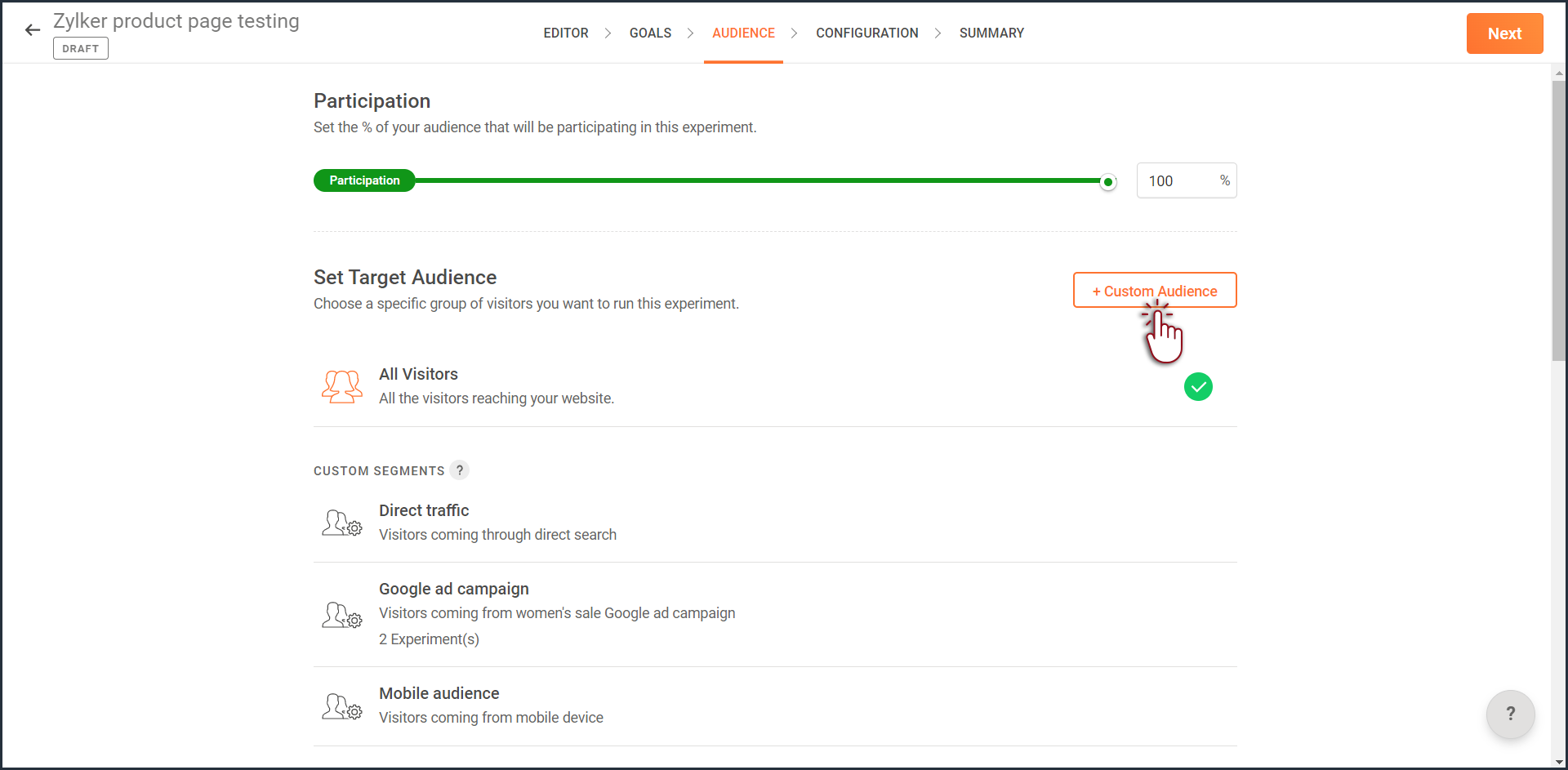
- Click the +Custom Audience button on the AUDIENCE page of your experiment.
- Enter a title and description for the custom segment you want to create.
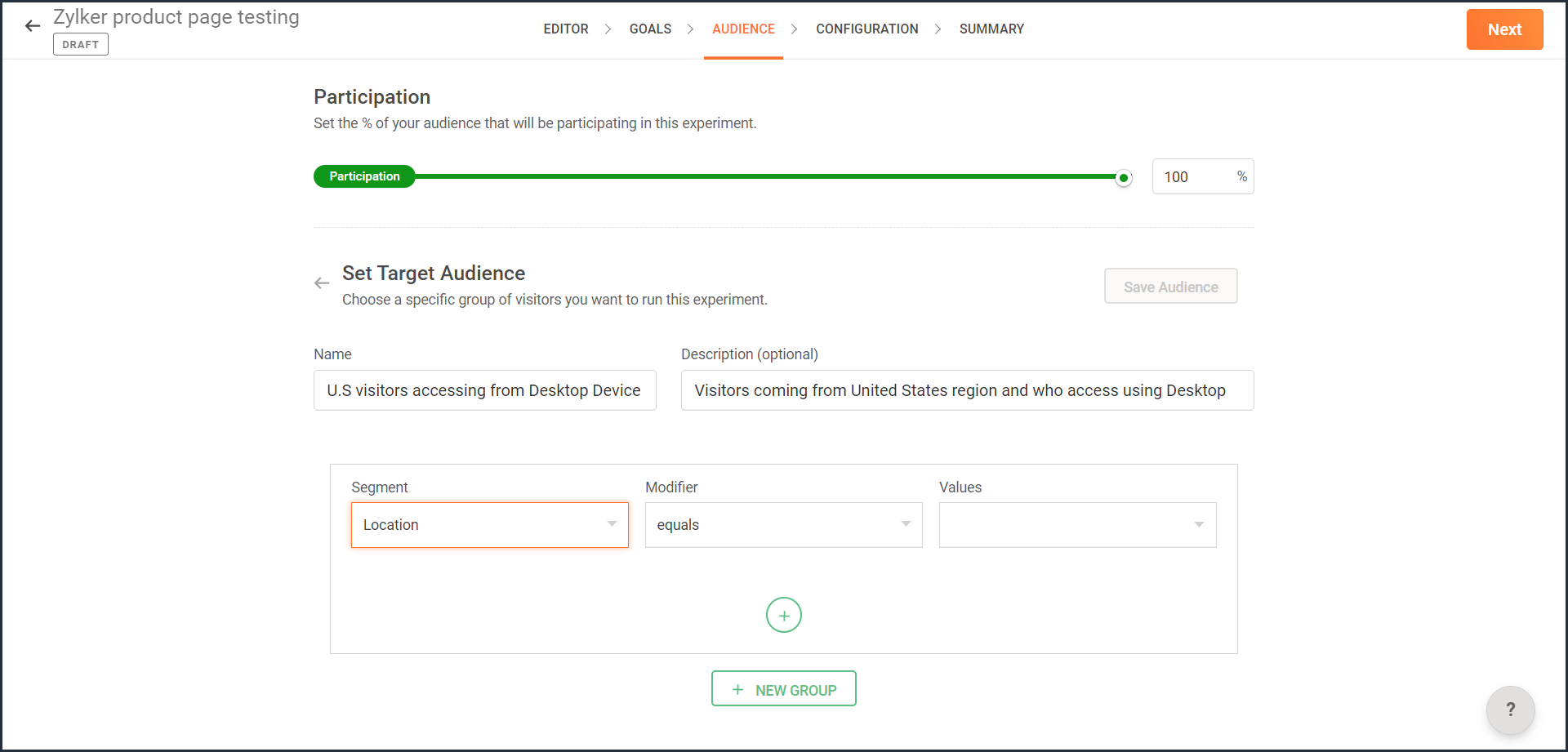
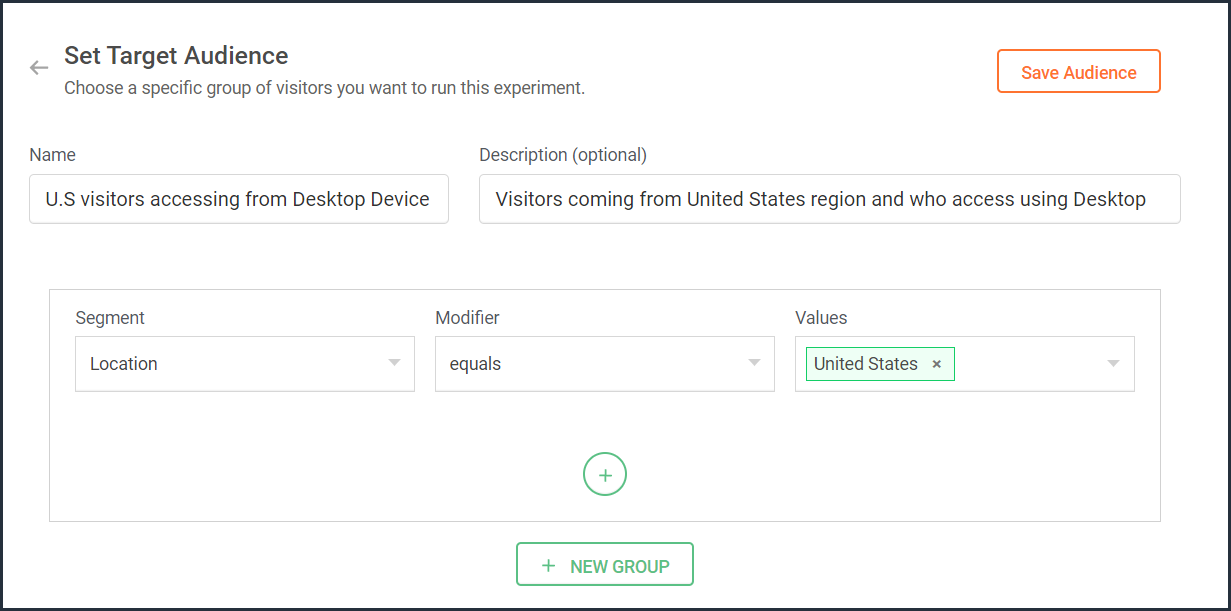
- From the Segment dropdown, choose the modifier and value for the selected audience segment as shown in the screenshot. Learn more about the different types of custom audience segments and the modifier conditions available in PageSense.
- Ensure you choose the condition as ‘AND’ or 'OR' depending on the segment you want to create.
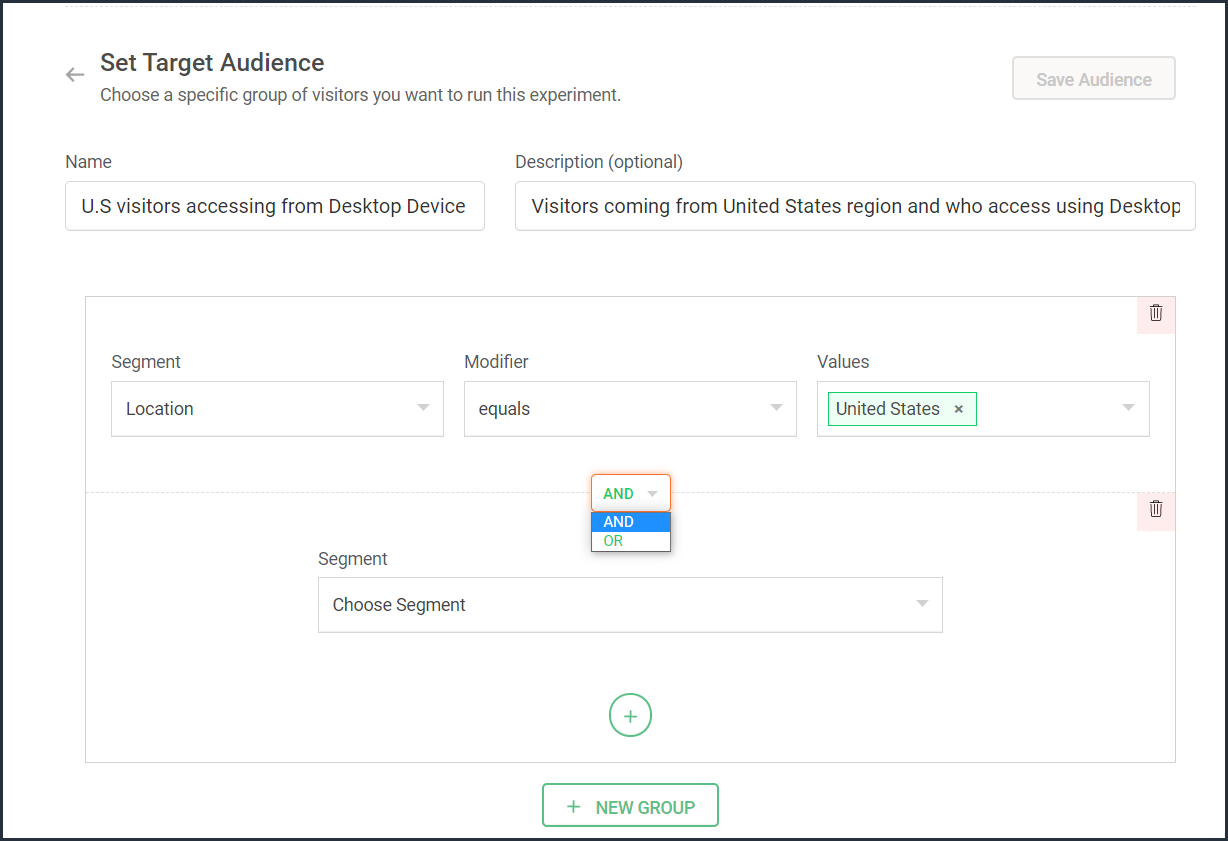
- From the Segment dropdown, choose the second modifier and value for the selected audience segment as shown in the screenshot.
The final selection looks like: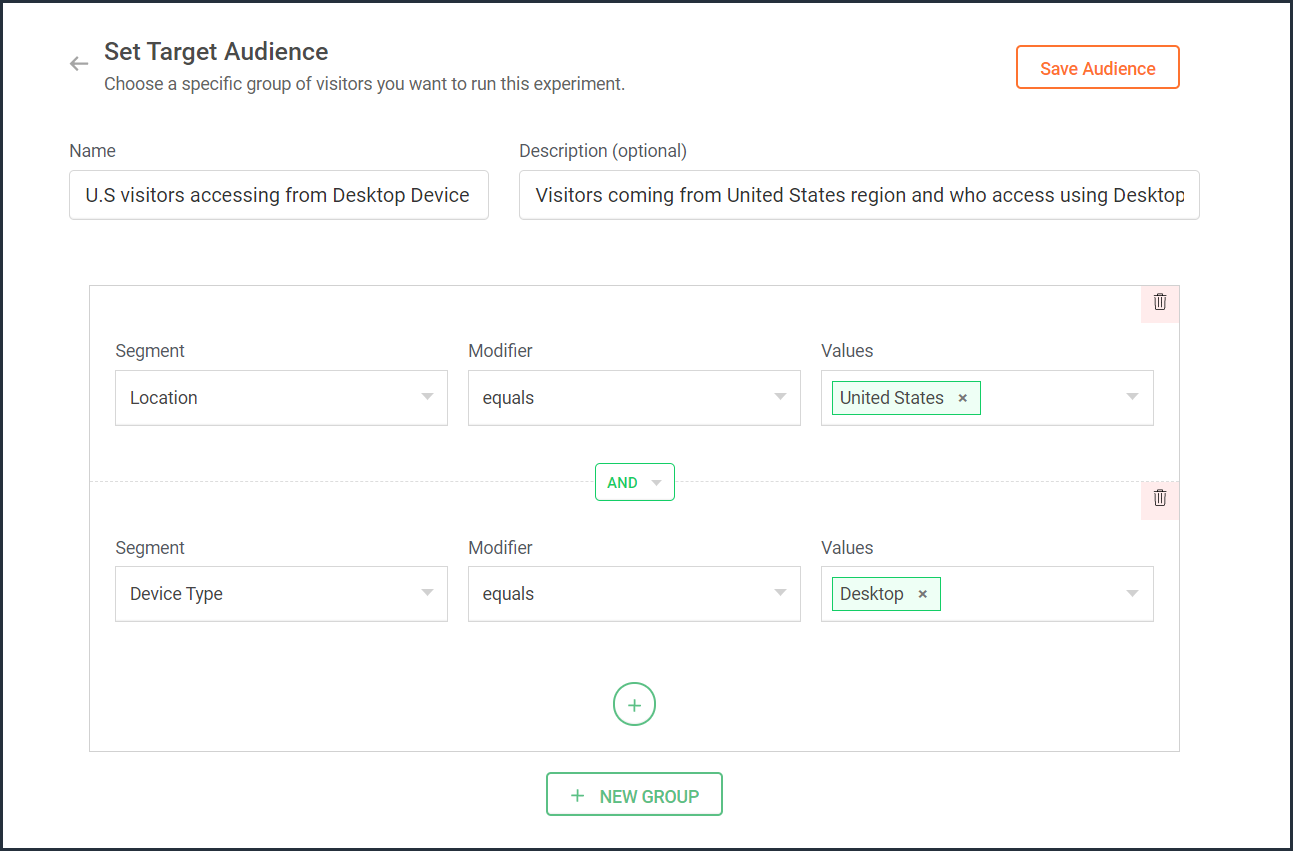
- Click the Save Audience button.
The saved segment will appear under the Custom Segments section across all of your experiments in PageSense and you can apply the same for any experiment.
Below are a few examples that show you the most effective ways to define custom audiences in PageSense for running your experiments better:
Target your experiment by geographical location
If you're looking to expand your online business to international audiences and want to understand which city or country markets are good for your business, choose to target your experiments to audiences based on the location.
Targeting your experiment by your visitors' geographic location, such as country, city, or region, is a powerful option when you want to show personalized web page content or run advertisement campaigns that match the interest of audiences from specific areas. This type of targeting is driven by factors like local festivals celebrated, popular regional news, tourism attractions, or business events happening in a region.
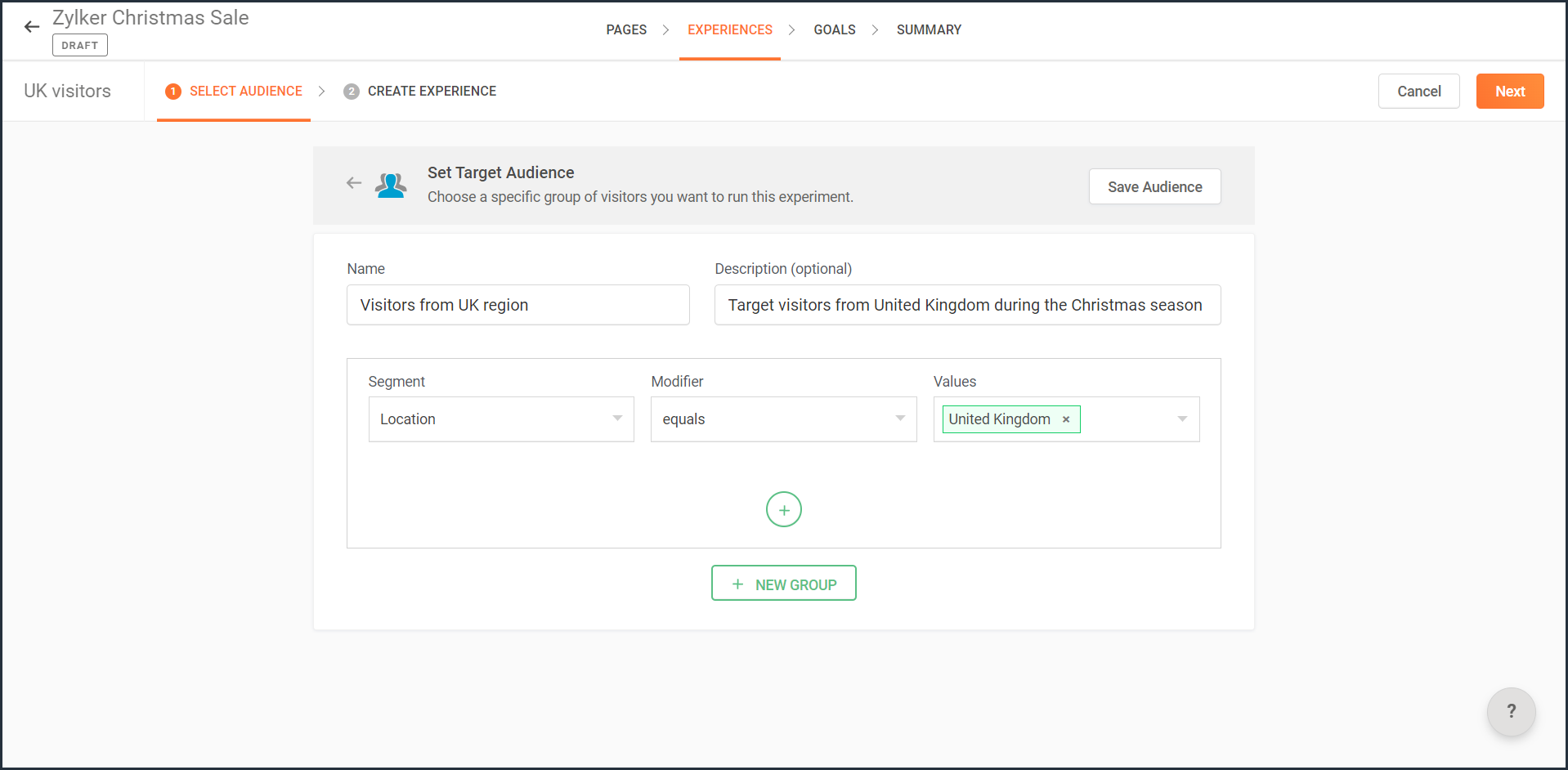
For example, say you own an ecommerce site, and you want to show personalized product recommendations to visitors from United Kingdom during the Christmas season. In this case, you can create a custom audience segment that targets your experiment page to visitors from this particular location as shown in the screenshot below.
Note: You can also use this option to target your experiment based on the languages spoken by visitors in different countries.
Target your experiment by query parameters
While running ad campaigns, it's important to both target the right consumers and provide the most relevant information to them on your website. If you find the right user who clicks on your ad, but the landing page for that ad isn’t customized, that conversion could be lost.
Targeting your experiment to visitors who reach your website pages that include (or exclude) a certain query string in their URLs could be useful when you want to understand the effectiveness of different ad campaigns on your website. This is usually tied to audiences who come through a specific utm_source like Facebook or Google and utm_campaigns like paid ads, Google Adwords, and more.
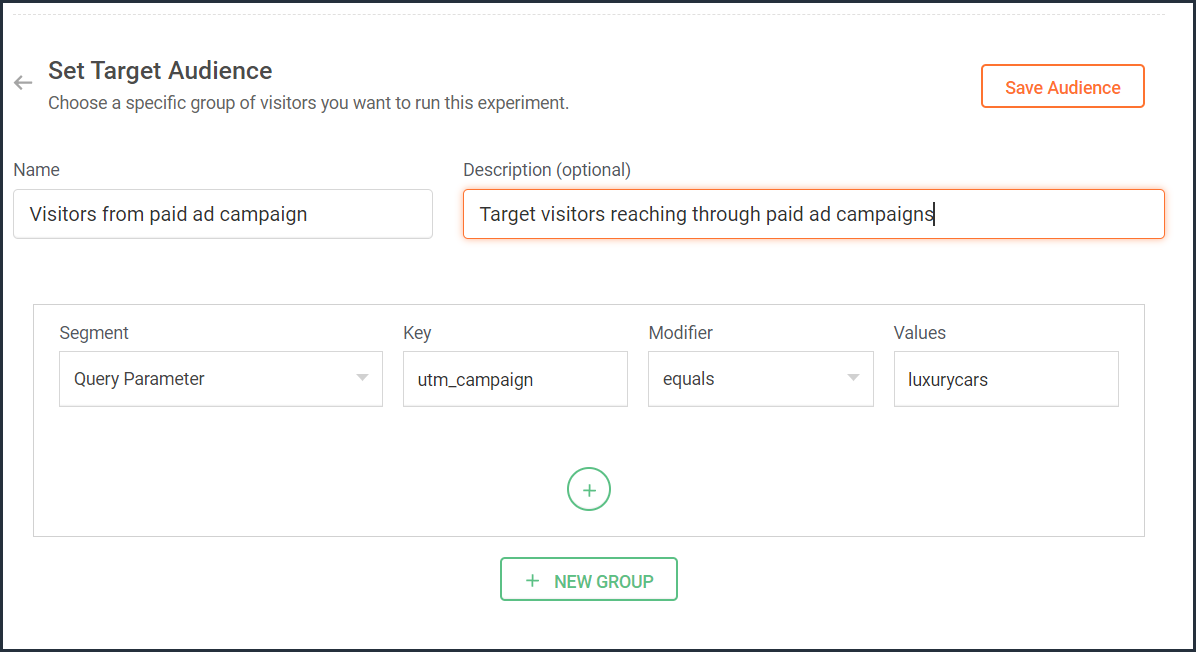
For example, say you own an online car dealership website and you want to redirect customers who click on a paid ad campaign with the utm_campaign=luxurycars to a landing page displaying luxury vehicles with prices and offers. For this, you can create a custom audience segment that explicitly targets your landing pages to visitors who contain this particular query string as shown in the screenshot below.
Target your experiment by user information
To achieve a specific goal or purpose of your online business, you will sometimes need to target your experiment to visitors with exact custom attributes such as age, email address, subscription plan, fields of interest, gender, marital status, or job role on your website. These attributes or visitor information can be collected when a user completes a form on your website, such as a signup, contact, purchase, or any other sort.
Targeting your experiment to visitors based on specific user attributes can help deliver the right message to the right audience and improve brand experience with ease. This is also considered the most precise method of audience targeting as it makes visitors stand out from the wide segment of users on your site.
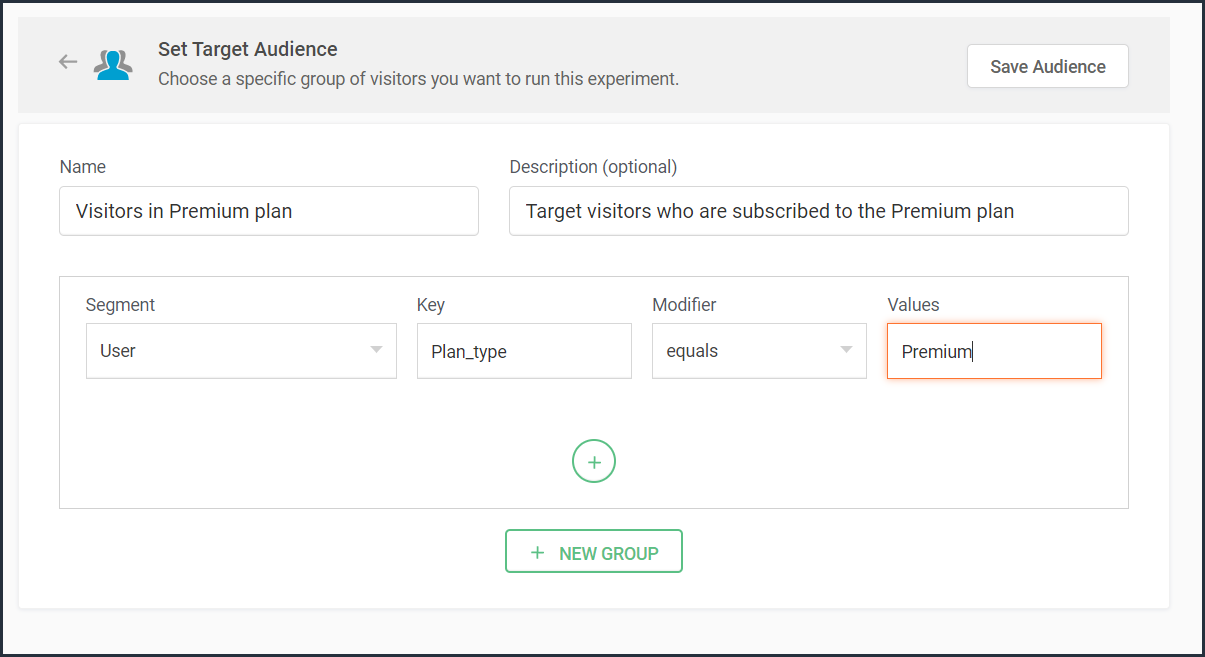
For example, let's say you run a SaaS business and you want to show a personalized pricing page that offers an additional 30-day period to visitors who are subscribed to the Premium plan. In this case, you can create a custom audience segment to target your experiment to visitors who match this specific user attribute and value as shown in the screenshot below.
Note that to use 'user information' in audience targeting, you need to add an additional code snippet to your experiment page as explained in the steps here.
Target your experiment by weather/climatic conditions
Do you see your website sell more products when the temperature rises? Or does your tourism business attract more new bookings during cooler seasons?
Targeting your experiment based on the local weather of the visitors coming to your website is another modern technique used by marketers to craft influential website content, product pages, and ad campaigns. Weather-based audience targeting allows businesses to anticipate patterns of demand and tap into the needs and purchase intentions of customers during different seasons of the year. It's also a great way to gain a competitive advantage and increase the average value of orders and conversions on a website.
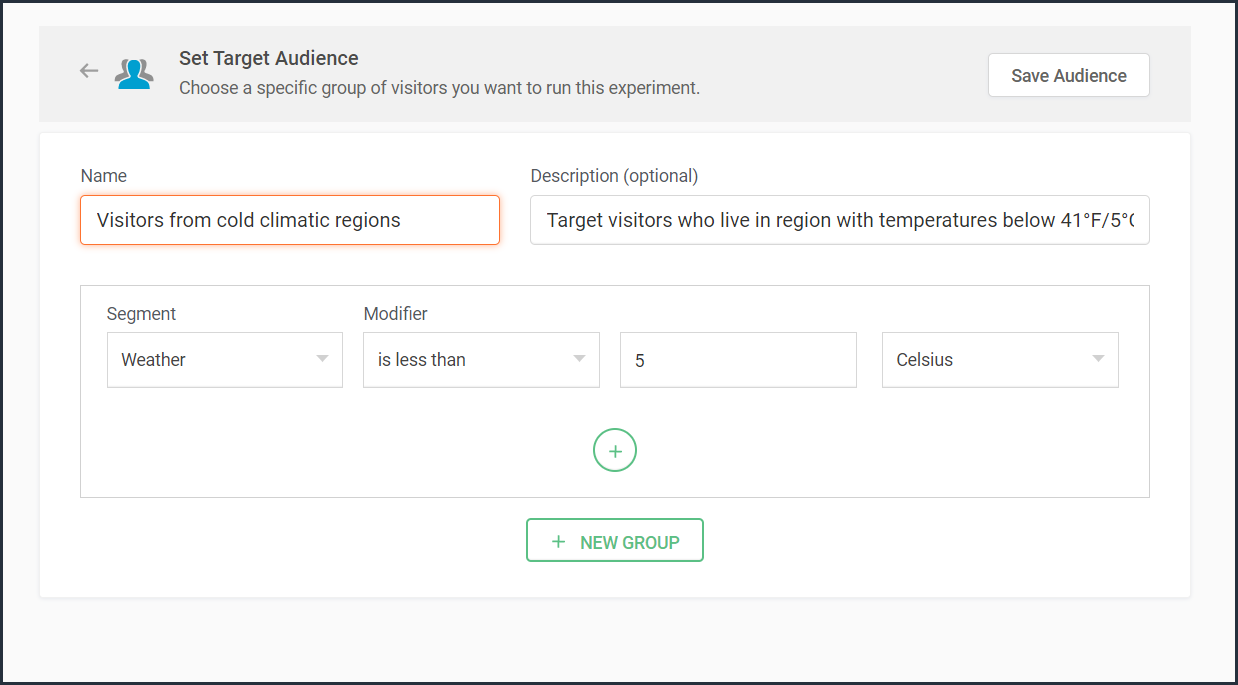
For example, say you run an ecommerce site and want to create a personalized homepage title for visitors living in climatic zones with temperatures below 41°F/5°C. In this case, you can create a custom audience segment to target your personalization experience based on audience's local weather as shown in the screenshot below.
Target your experiment by visitor activity
Visitors coming to your website will have different intentions and behaviors. For example, some might be looking to subscribe to your newsletter, some might be checking out new product releases, and others might just be there for window shopping or research purposes. If you're going to show the same home/landing page content to all visitors, you're definitely going to lose conversions and sales.
Targeting your experiment based on what pages your visitor interacts with on your site and what actions they take (or do not take) can be a great way to provide a personalized website experience during their next visit. This includes buttons clicked, products viewed, items bought, and other actions your visitor performs, revealing what your audience wants, avoids, and purchases.
Using such specific visitor metrics, you can learn why specific actions or events on the site were not successful and later reach customers with more apt content or product offers based on their current activity.
Visitors coming to your website will have different intentions and behaviors. For example, some might be looking to subscribe to your newsletter, some might be checking out new product releases, and others might just be there for window shopping or research purposes. If you're going to show the same home/landing page content to all visitors, you're definitely going to lose conversions and sales.
Targeting your experiment based on what pages your visitor interacts with on your site and what actions they take (or do not take) can be a great way to provide a personalized website experience during their next visit. This includes buttons clicked, products viewed, items bought, and other actions your visitor performs, revealing what your audience wants, avoids, and purchases.
Using such specific visitor metrics, you can learn why specific actions or events on the site were not successful and later reach customers with more apt content or product offers based on their current activity.
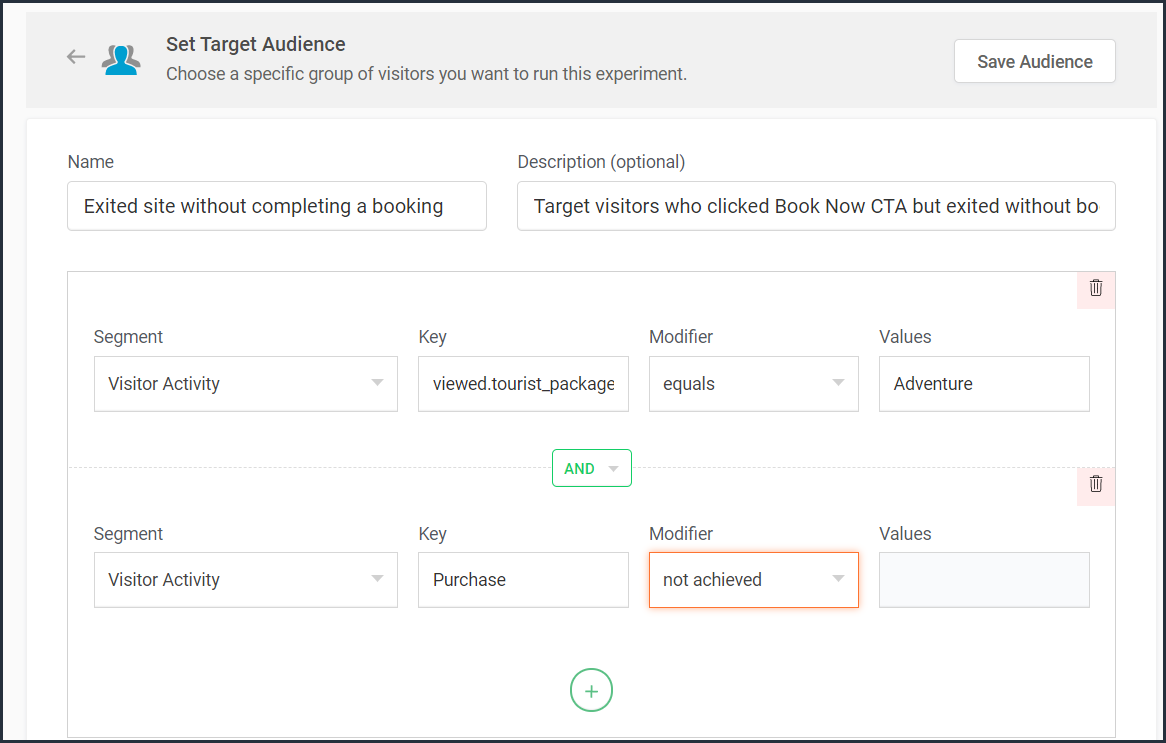
For example, say you run an online tourism website and want to provide customized tourist packages with attractive coupon codes to customers who viewed the Adventure tourism package but exited your web page without completing a booking. In this case, you can create a custom audience segment to target your experiment for these segments of visitor interest and behavior as shown in the screenshot below.
Note that to use 'visitor activity' in audience targeting, you need to add an additional code snippet to your experiment page as explained in the steps here.
Currently, weather-, user-, and visitor-activity-based audience targeting options are only available for personalization experiments in PageSense. However, the user and visitor activity(custom dimensions) based segmentation option is available under report filtering across all of the experiments in PageSense except for push notifications. Learn how to filter reports based on custom dimensions.
Target your experiment by specific referral site URLs
Note that to use 'visitor activity' in audience targeting, you need to add an additional code snippet to your experiment page as explained in the steps here.
Currently, weather-, user-, and visitor-activity-based audience targeting options are only available for personalization experiments in PageSense. However, the user and visitor activity(custom dimensions) based segmentation option is available under report filtering across all of the experiments in PageSense except for push notifications. Learn how to filter reports based on custom dimensions.
Target your experiment by specific referral site URLs
Depending on the ways you market your website online, you'll likely have numerous different referral sources. Analyzing which source brings in more traffic and revenue to your business is a surefire way to get more traffic from multiple channels. Targeting your experiment based on referral URLs—sources that your visitors came from, such as Facebook, Google, Twitter, Quora, influencer blogs, and other external sites—can help you promote your website and products on these specific channels.
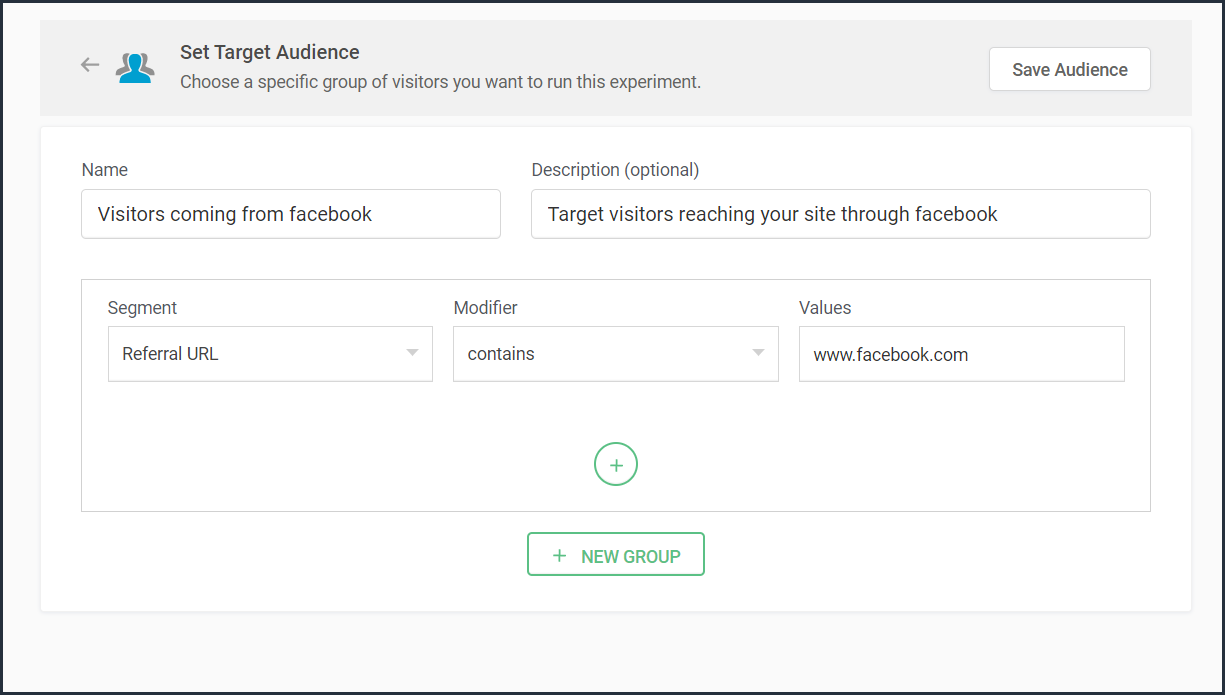
For example, say you own an ecommerce site, and you want your experiment to only target visitors referred by 'facebook.com'. In this case, you can create a custom audience segment to target visitors from this specific Referral site as shown in the screenshot below.
Bonus tip: Have no clear target audience in mind to run your experiments? Or don't know how to decide where to start when segmenting a target customer audience? Consider these points in choosing the right target audience segments:
- Do you have seasonal-only customers or customers who are only interested in certain types of products, services, or events?
- Are you an organization that needs to send different content to partners, sponsors, users, or other patrons?
- Does it matter if your contacts are local, domestic, or international?
- Have you thought about the requirements of users based on different weather conditions?
Was that useful? Please leave us your comment/feedback in the comment box below.
Are you looking to create a new custom audience segment to target in your experiment but aren't sure how to implement it? Just write to us at support@zohopagesense.com and we will be happy to guide you.
Are you looking to create a new custom audience segment to target in your experiment but aren't sure how to implement it? Just write to us at support@zohopagesense.com and we will be happy to guide you.
Start learning. Start customizing!