Enhancements to the formula field in Zoho CRM: Auto-refresh formulas with the "Now" function, stop formula executions based on criteria, and include formulas within formulas
Dear Customers,
We hope you're well!
By their nature, modern businesses rely every day on computations, whether it's to calculate the price of a product, assess ROI, evaluate the lifetime value of a customer, or even determine the age of a record.
With Zoho CRM, you can include such calculations within records using the formula field. Today, we're introducing some new enhancements that aim to improve the accuracy and usability of formulas in your business processes.
Let's look at them!
Enhancement 1: Auto-refresh time-based formulas to view real-time values.
Businesses rely on time-based computations to conduct various analyses. Some computations measure time like a stopwatch. For example:
- To ascertain the possibility a customer might churn, you would compute the age of their deals.
- To validate an applicant's eligibility for an insurance policy, you would calculate the age of the applicant as of the current date.
The above examples are ongoing calculations that show the age of the record or of the customers. For these types of computations, you might expect that the formula is constantly ticking and rendering an accurate time measurement whenever you view the record. However, formula fields in fact compute and render the latest result only when the record is edited manually or updated via automation. By simply viewing a record, an agent may not be seeing accurate results. This enhancement addresses this.
Though formulas that provide the latest values include a "now" function in their syntax, computing all of these formulas continually and concurrently across all records poses a significant technical constraint. To address this constraint, we've introduced a checkbox to the formula field property labeled, Automatically refresh formula fields containing the Now function in real time.
If checked, the auto-refresh checkbox makes the relevant formula run every time the user visits or edits the record. This means users will always see the correct time measurements.

Limitation:
- You can apply the auto-refresh only for two fields with the Now function per module.
- Formulas with date/ date time return types cannot be used in workflows that are based on date/time -based triggers.
- Fields enabled with auto-refresh will have updated values every time you view them. But, this doesn't qualify for record edit. If you have automations based on edit of a record, this record will not be used unless the record is really "edited".
- Also, creating custom views and filters using these fields cannot be done.
Enhancement 2: Stop formula executions based on criteria
In contrast to the case above—where you'd expect the formula to run constantly—there are scenarios wherein you may want to stop a computation from executing. Let's say a customer has churned, and you want to calculate the time it took them to churn. In that case, you might want the formula to stop computing under certain conditions.
Accordingly, you can use this new function to:
- Calculate the number of days the deal was under negotiation
- Calculate the number of days spent in trial before conversion
- Calculate the number of days taken to ship a product
You may want to stop ongoing computations whenever there are events acting upon a given record. By doing so, you can determine the amount of time the record spent in a particular stage.
Previously, there hasn't been any functionality in Zoho CRM that effectively stops a formula from computing. Even when a cutoff date has passed, formulas continued to compute durations. With this enhancement, you can stop computations or freeze values based on specific criteria.
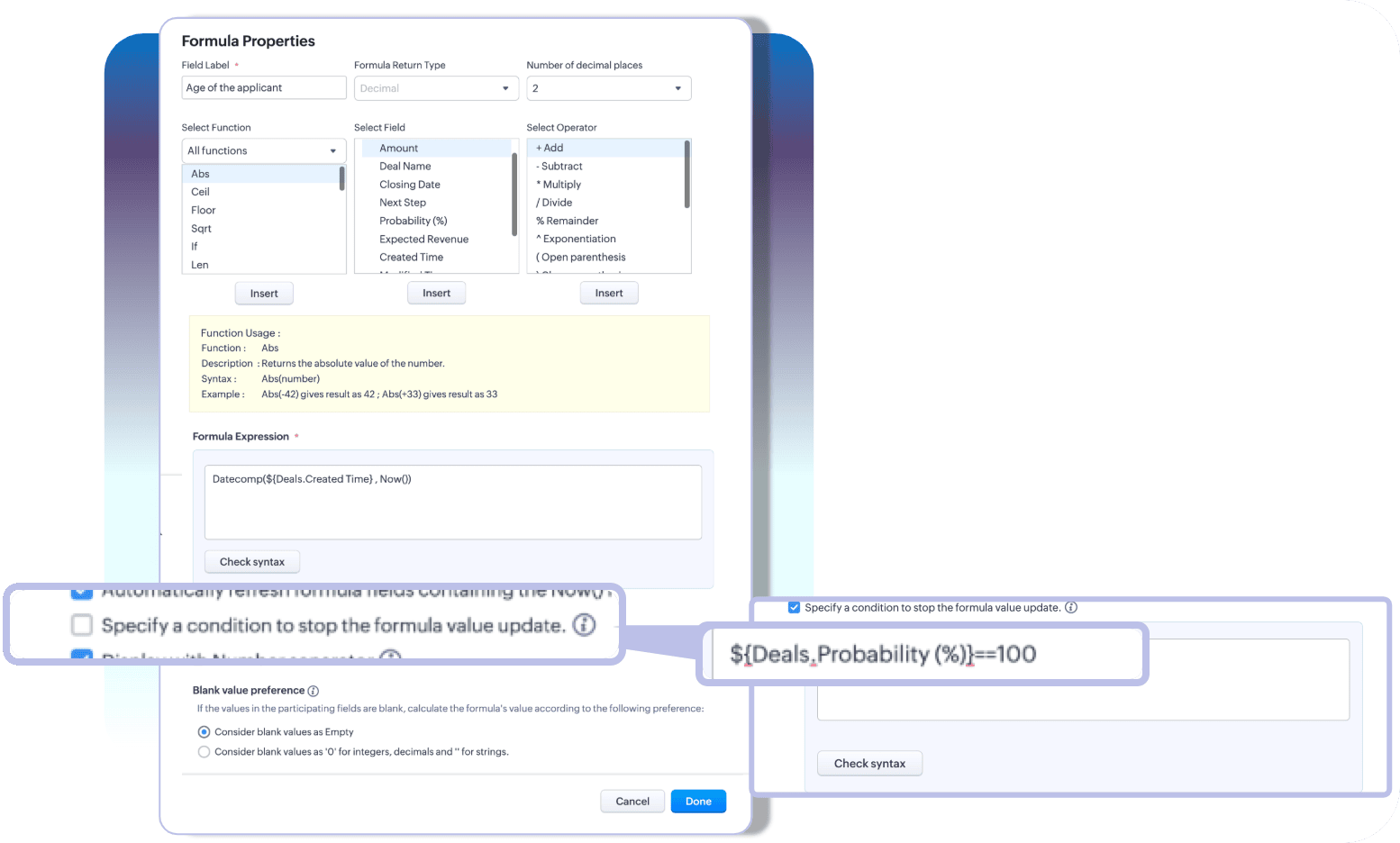
With these two enhancements, you can choose how you want your time-based formulas to be computed—to keep them running or to stop at a given time.
Limitation:
A formula field that has auto-refresh and stop criteria enabled, then those fields cannot have multiline fields, picklists, and lookup fields as participating fields.
Enhancement 3: Include an existing formula as part of another formula's component
A formula is only as powerful as its components. Zoho CRM enables you to construct various complex formulas, but one missing piece has been the inability to include an existing formula field to construct a new one.
Thus far, you could do this by building a long and linear syntax.
For example, let's say you want to determine the discounted value and overall discount percentage for your finalized quotes. Firstly, to determine the discount value, you'd write a formula.

Next, to find the discount percentage, you'd write another formula that looks something like this:

As you can see, the structure of the formula involves an existing computation. In Zoho CRM, to achieve this, you'd first formulate the discount value, and then—to find the percentage—you have to repeat the discount formula to get the percentage.

For a simple formula like this, the syntax is fairly easy to understand. But imagine calculating commissions, which would involve several smaller formulas—in which case, you have to repeat the entire formula structure even if you already have them computed in your record layout.
This is complex, redundant, and time-consuming—problems that this latest enhancement addresses.
A formula field looks like any other field in Zoho CRM. Thus, in addition to the list of fields available under the fields part of the formula configuration, all the existing formula fields will also be listed. Admins can construct new formulas using the existing formulas without having to repeat syntax.

That's all for the updates. If you have any feedback or questions, please drop them in the comments section. Let's connect!
Help document: Creating Formula fields in Zoho CRM
 Release plan: These enhancements are lined up for release DC by DC, gradually. We will keep you posted on the comments accordingly.
Thanks and have a good one!
Kind regards,
Saranya Balasubramanian
Topic Participants
Saranya Balasubramanian
Zohoboy
Haiku Technical Support
Toca Travel
Sravani
Sticky Posts
Enhancement to ICR’s field prompting: Preferred data extraction using advanced field prompting
Dear Customers, We hope you’re well A quick background Intelligent Character Recognition (ICR) comes as part of Zia’s optical recognition capability called Zia Vision. When we introduced it last April, the data extraction was training-based and was applicableGood news! Calendar in Zoho CRM gets a face lift
Dear Customers, We are delighted to unveil the revamped calendar UI in Zoho CRM. With a complete visual overhaul aligned with CRM for Everyone, the calendar now offers a more intuitive and flexible scheduling experience. What’s new? Distinguish activitiesAccessibility in Zoho CRM: Not just a feature—a way to empower
For instructions on setting up these controls, please check this help document: Configuring accessibility controls. Hello everyone, Today (December 3, 2024), on the International Day of Persons with Disabilities, we begin our journey towards a CRM thatScaling the customer journey: What's new in CommandCenter
Dear Customers, The last time we connected about CommandCenter, it was about the tool's new controls and revamped UI. Personally, the overhaul of the UI from the last update, still excites me. Today, we're here with news about its scalability and addedZoho CRM's sales trend and sales follow-up trend dashboards are now customizable
Dear Customers, We're here with good news! Sales trend and sales follow-up trend are two system-defined dashboards that help you understand trends and anomalies in your sales outreach and conversion efforts. They use Zia's intelligence to identify patterns
Recent Topics
New Account, Setting up Domain Question
Hello, I recently set up a new account with a custom domain. But after paying and setting up my account, it says OpenSRS actually owns the domain, and I have to sign up with them to host my site. But OpenSRS wants to charge me $95, which is ridiculous.【開催報告】東京 Zoho ユーザー交流会 NEXUS vol.1 ~ データドリブン経営・少人数組織のCRM活用・AIエージェントの最前線 ~
ユーザーの皆さん、こんにちは。 コミュニティグループの中野です。 2026年3月27日(金)、東京・新橋にて「東京 Zoho ユーザー交流会 NEXUS vol.1」が開催されました。 今回は「マーケティング領域のZoho 活用法 × AI」をテーマに、ユーザーさん2名による事例セッション、Zoho 社員によるAIセッションなどを実施しました。 ご参加くださったユーザーの皆さま、ありがとうございました! この投稿では、当日のセッションの様子や使用した資料を紹介しています。残念ながら当日お越しいただけなかった方も、ぜひチェックしてみてください。Monthly Webinar : Getting Started with Zoho LandingPage
Our monthly Getting Started with Zoho LandingPage webinar is back! If you're building your first page and want a little guidance, this is where to start. Learn how landing pages fit into your strategy, generate leads, and improve conversions. Here’s whatMass emails - Allow preview of which emails will receive the email based on the criteria
Feature request. Please allow us to view and confirm the exact recipients of the mass emails based on the criteria we've chosen before sending. It can be quite sensitive if you send the mass email to some wrong accounts accidently, so it would be greatLimitation in Dynamic Constant Sum Based on Previous Question Selections in Zoho Survey
Zoho Survey supports the Constant Sum question type, allowing respondents to distribute a fixed total (such as 100) across a set of options. However, it does not support dynamically populating these options based on selections made in a previous question.SAP Business One(B1) integration is now live in Zoho Flow
We’re excited to share that SAP Business One (B1) is now available in Zoho Flow! This means you can now build workflows that connect SAP B1 with other apps and automate routine processes without relying on custom code. Note: SAP Business One integrationsync two zoho crm
Hello everyone. Is it possible to sync 2 zoho crm? what would be the easiest way? I am thinking of Flow. I have a Custom Module that I would like to share with my client. We both use zoho crm. Regards.Showing the map along with mileage expense
When you use the GPS to track mileage, it shows you the map of the actual path travelled. It would be very useful and practical to save that map with the mileage expense, so that when the report is created, it provides a map of each mileage expense associatedImport MSG to Yandex Mail Account | Fast & Reliable Solution
If you are facing problem to import MSG files to Yandex Mail account can be challenging if done manually, especially when handling multiple files. A reliable solution is using the MacGater Mac MSG Converter, which simplifies the entire process with accuracyCopy all reports in a folder
I currently have a database that I need to create multiple charts filtered by market. All of the charts are identical, I just change to of the filters and then I have the next market's set of charts. The only way I've been able to copy charts (reports)OpenURL working Intermittently
Never had this issue before, everything was working fine up to a few days ago. We have a buttons on reports to open forms with pre-filled fields. Now, there are instances where it will throw and error and gives no feedback. What is really strange is notZoho Recruit mailserver get blocked by Microsoft!
Hi, We have experienced this issue twice now, where Zoho Recruit outbound IP addresses are being blocked by Microsoft. We are confident that Microsoft is the blocking party, as all outbound emails to candidates with @hotmail.com, @live.com, and @outlook.comCalculate Hours Minutes Sec in Zoho Creator Using Deluge
check_In = "8-Aug-2023 10:00:00".toDateTime().toLong(); checkout = "8-Aug-2023 18:00:00".toDateTime().toLong(); //difference = start.timeBetween(end); check_In = "8-Aug-2023 17:56:50".toDateTime().toLong(); checkout = "8-Aug-2023 18:00:00".toDateTime().toLong();Build Smarter Apps with AI in Zoho Creator
Build Smarter Apps with AI in Zoho Creator This is truly the era of AI, and businesses that adapt now will lead tomorrow. Zoho is already moving ahead in this direction, continuously evolving its platform with powerful AI capabilities. With Zoho Creator,Zia Dashboard Insights : turn your dashboard into decisions
When you look at a chart or KPI in a dashboard, you would possibly see something like: Revenue: $2.4M ↓ 18% vs last month. It can be a positive growth or a negative one, or a dip in revenue, a spike in deals, a slowdown in renewals—all you usually seeTickets without registration
Hi, would it be possible to give customers the opportunity to be able to read their tickets without registration?Zoho Desk Answer Bot vs. Zia Agents – Knowledge Base & Ticket Access
Hi everyone, I’m currently evaluating AI options in Zoho Desk and ran into some limitations with the Answer Bot: Answer Bot limitations Only uses Knowledge Base articles No access to tickets Limited control over sources: Either one Help Center or allComo estruturar automações eficientes no Zoho Creator
Como estruturar automações eficientes no Zoho Creator Introdução No contexto de aplicações empresariais, automação não é apenas uma conveniência, é um fator crítico para ganho de produtividade, redução de erros e escalabilidade operacional. O Zoho CreatorChanging the status of a work-order
Is there a way to change the status of a work-order?Online Payment Fees
We don't take many online credit card payments so the merchant service provider (PayPal) charges us the 2.9% fee for processing the amount. I would like the ability for the fee to be automatically added to the total amount for "ease of payment". We'dWhat is a realistic turnaround time for account review for ZeptoMail?
On signing up it said 2-3 business days. I am on business-day 6 and have had zero contact of any kind. No follow-up questions, no approval or decline. Attempts to "leave a message" or use the "Contact Us" form have just vanished without a trace. It stillZia Agents in Zoho CRM: a better way to set up digital employees
Hello everyone, If you've been using Zia Agents in Zoho CRM, so far using Connections was the only deployment method you're familiar with. You create an agent in Zia Agents (define its objective, write instructions, use tools, add knowledge base) andBank Feeds
Since Friday my bank feeds wont work. I have refreshed feeds, deactivate and reactivate and nothing is workingLogged out
Hi, just been working on a sheet when a pop up box appeared telling me I'm going to be logged out in x number of seconds and if I reload I may lose any edits, or words to that effect. It did indeed log me out and I did indeed lose my last edits. Any ideaZoho API
I have little experience with API. I'm trying to get a Custom API working with Zoho creator. I have created a Custom API and created an Endpoint URL, but i get a 9400 error code "The provided HTTP method is not valid for this custom API". Based off the#157127950
Where did my initial question go?Zoho writer unable to merge documents to PDF with basic fonts in Hebrew or fonts from my computer
I created several forms that will be merged into PDF files through Zoho Writer and I am unable to receive the PDF in the basic fonts of the Hebrew language or in the fonts I have on my computer. The writer exports to PDF an exchange font that looks veryHow I Implemented Subscription-Based Access Control and Expiry Handling in Zoho Creator
I recently worked on a use case where users come into the application to request a service, but they should only be able to continue the process after completing a subscription. The challenge was not just controlling access, but also making sure thatZoho Forms API
Is there any way to get all form entry list using API? Looking forward to hear from youZoho Projects : Task should auto-update to 'In Progress' if timer started
Namaskaram. Right now, if a Task's timer is started, the Task stays in 'Not Started' status. One has to manually update it to 'In Progress'. From a #uxdesign standpoint, it is an unnecessarily two step process to start working on a task. It would be better that, if I start the timer on a task, it should automatically change to 'In Progress' status. Crafted with ❤️ Zoho Gurus | Zoho One Practice Team @ CubeYogi Zoho Authorised Partner | 7+ Yrs | 200+ Projects | 100+ CustomersLaatste facturen en betalingen niet zichtbaar in mijn account
Wij gebruiken ZOHO invoice al jaren, maar sinds afgelopen week is mijn laatst verzonden factuur niet zichtbaar in mijn account, en tevens de laatst betaalde facturen zie ik niet. Hoe kan dit? Ik heb de pagina al diverse keren gerefreshed.Undelivered Mail uncategorized-bounce errors when sending invoices
Recently we have been getting Undelivered Mail bounce notification when sending invoices. Reason: uncategorized-bounce Some go through no problem some bounce back. We recently sent 10 invoices, 6 received bounce notifications. After reaching out to theCan I import MSG files into Microsoft 365 without Outlook?
Yes, absolutely. You do not need Outlook installed to import MSG files into Microsoft 365. Aryson MSG file Converter is a dedicated tool that eliminates the Outlook dependency entirely, making the migration process simple and efficient for all users.Feature Request - A Way To Search Item Groups
Hi Inventory Team, I can't find any way to filter or search by fields of Item Groups. It would be great to see that functionality added. I have a use case where a single product might come from 5 or more suppliers and each supplier's item is an Item inZoho Books/Inventory - Update Marketplace Sales Order via API
Hi everyone, Does anyone know if there is a way to update Sales Orders created from a marketplace intigration (Shopify in this case) via API? I'm trying to cover a scenario where an order is changed on the Shopify end and the changes must be reflectedTicket id issues
When I reply a ticket from desktop, it doesn't have ticket id in the subject and it's great. When I reply a ticket from Zoho desk mobile, Zoho adds ticket id in the subject and I don't want that. Please help in this matter.Advanced email configuration - agent's name vs. department name
We currently have all four Advanced Configuration options turned ON at the Global-level (Channels > Email > Advanced Configuration) - including the "Show Agent name in Ticket replies and outgoing emails" option. We also had that same option turned ONAdd Bounced as an Email Action / Notification for Bounced Emails
This is one of the hard requirements for the clients we're servicing. They want to get an internal email notification whenever the email they sent to their contacts have bounced, so that they can look into it and update the email address. Currently, theFiles Uploaded to Zoho WorkDrive Not Being Indexed by Search Engines
Hello, I have noticed that the files I upload to Zoho WorkDrive are not being indexed by search engines, including Google. I’d like to understand why this might be happening and what steps I can take to resolve it. Here are the details of my issue: Filenot able to convert pdf to jpg and other forms and vice versa.
i want to change my pdf to jpg, word, etc and some times jpg to pdf. i don't know how to do in this.Next Page