Function #48: Manage fixed installment payments using Zoho Books

Hello everyone, and welcome back to our series!
Businesses offer installment payment options to their customers, particularly for expensive purchases, to ease the financial burden on them. By breaking down the total cost into smaller, more manageable payments, businesses can attract a wider audience who may not be able to afford large upfront payments. This approach not only increases the likelihood of making more sales, but also helps to spread revenue over time, improve cash flow, enhance customer satisfaction and loyalty, and provide a competitive advantage in the market.
We receive numerous requests from our users regarding the handling of these installment scenarios. We heard you loud and clear. Today, we are excited to share a solution that utilizes custom functions to manage installment payments in Zoho Books.
Let's take the example of Mr. John Hector, who wants to buy a 75-inch TV from Zylker Electronics, priced at a hefty $2,300. He is finding it difficult to pay the entire amount upfront. Therefore, Zylker Electronics offers him the option to pay in installments. They mutually decide that John will spread the payment over 5 months, committing to monthly installments of $460 until he settles the entire purchase amount. Let's delve into how this process can be efficiently managed within Zoho Books using custom functions.
Firstly, Zylker Electronics should create a sale invoice of $2,300 in their Zoho Books organization. While creating it, they should input the start date of the installment and the number of installments in two custom fields. For instance, if the sale was made on 01.04.2024 and Mr. John agreed to pay in 5 installments starting on 10.05.2024, the start date should be entered as 10.05.2024, and the number of installments as 5.
Two custom functions will come into play: one to generate the retainer invoices to collect the installment payments and another to apply the retainer payments to the sale invoice.
Based on the number of installments entered the function will determine the amount to be charged as monthly installments.
Installment amount = Total Amount Payable / No of installments = $2300 / 5 = $460.
On the specified start date, the first function will create and send the retainer invoice for the first installment. Once the payment for this installment is recorded, the second function will apply it to the sale invoice, reducing the balance accordingly. The process repeats each month, generating and sending retainer invoices for subsequent installments until all 5 are completed. Each retainer invoice will be for $460 and due on the 10th of every month for 5 consecutive months. As each retainer invoice is paid, the second function will automatically apply it to the sale invoice, thereby recognizing the income.
Prerequisites:
1. Create a Connection named "zbooks" to successfully execute the scheduler. You can watch the GIF attached below to know how to create the connection.

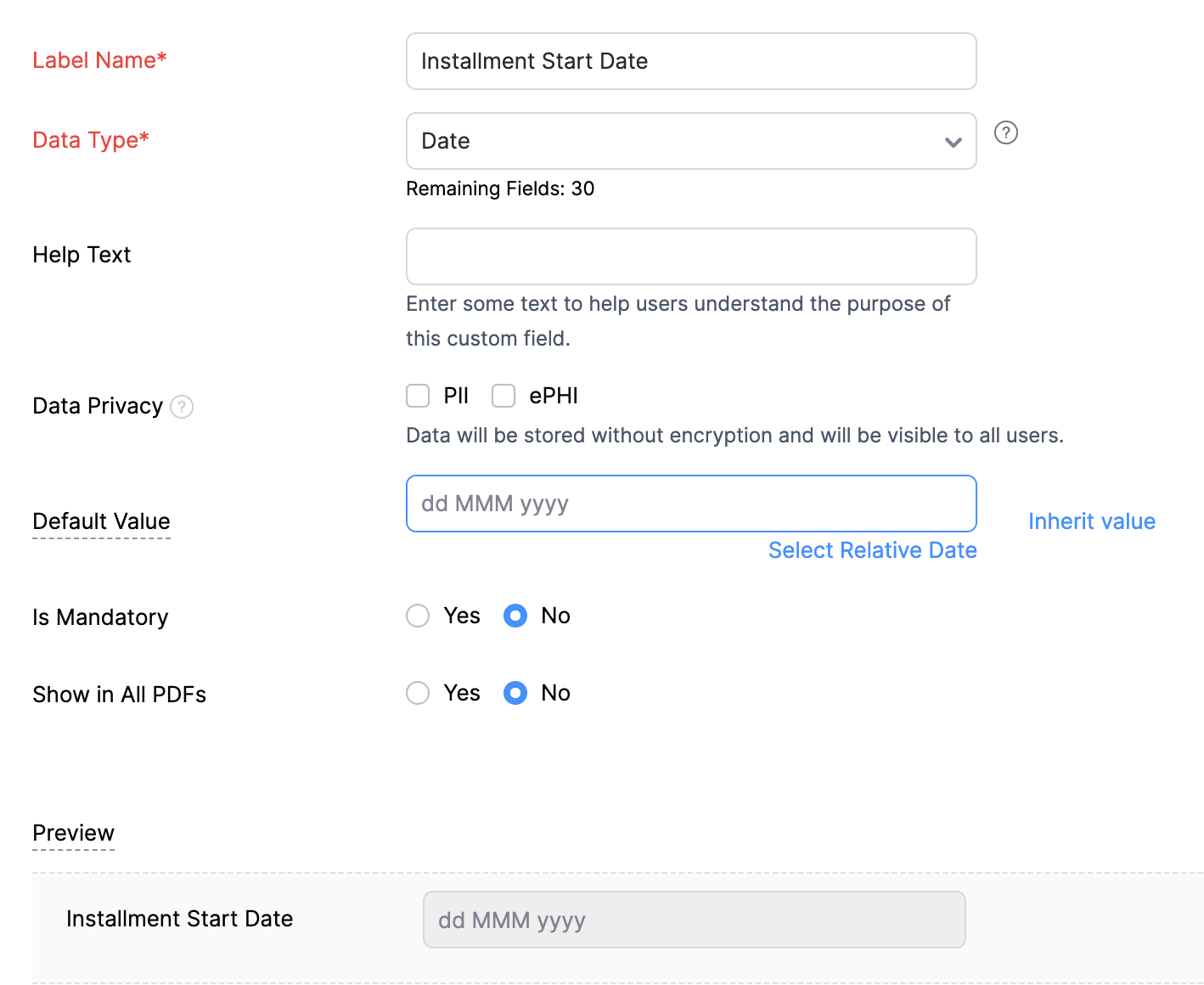
2. Create a Date-type custom field called "Installment Start Date" for the Invoices. This field will be used to input the starting date for installment payments.
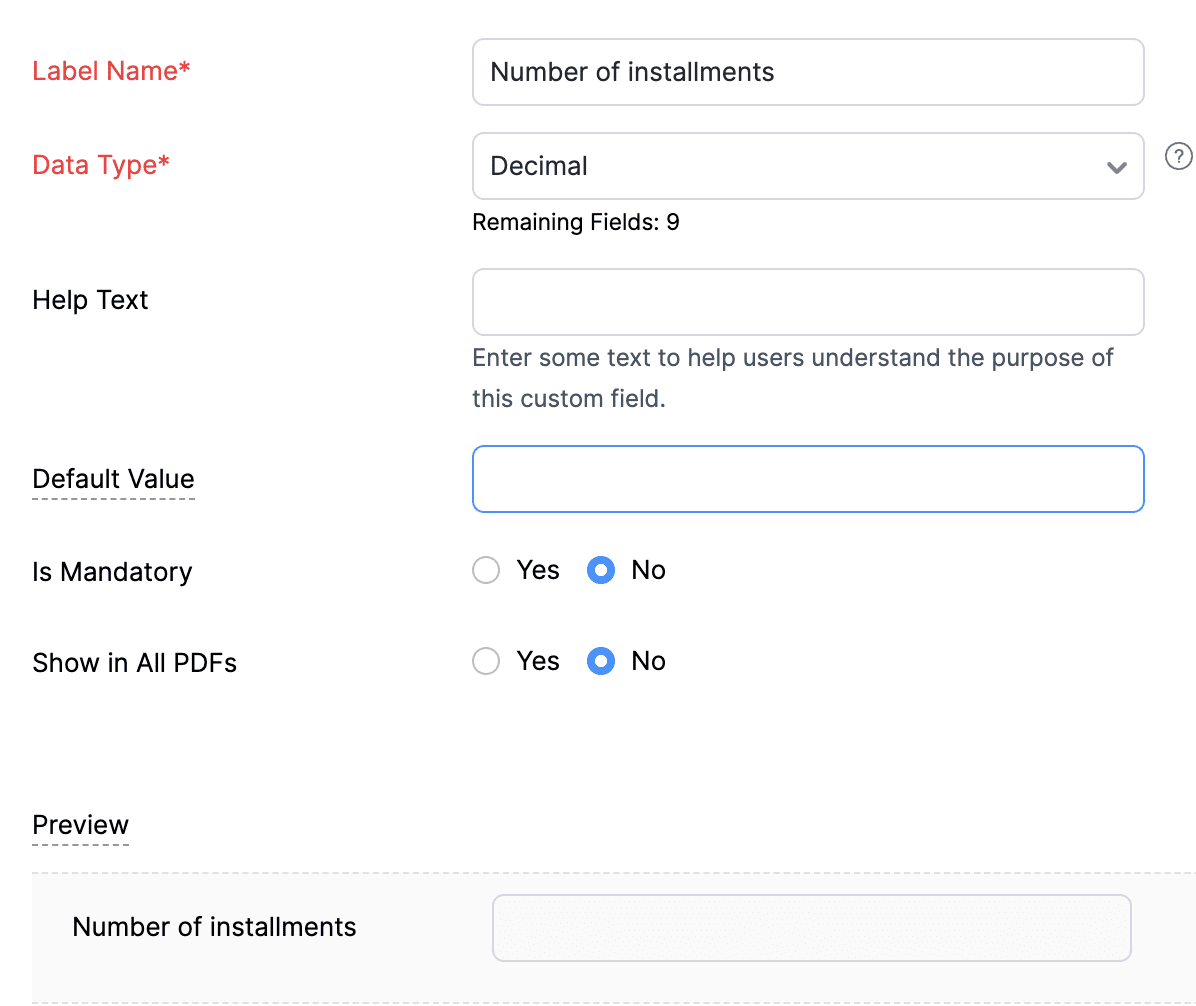
3. Create a Decimal-type custom field called "Number of installments" for the Invoices. Here, you'll specify the agreed-upon number of installments. Using this information and the total invoice amount, the function will determine the monthly installment amount.
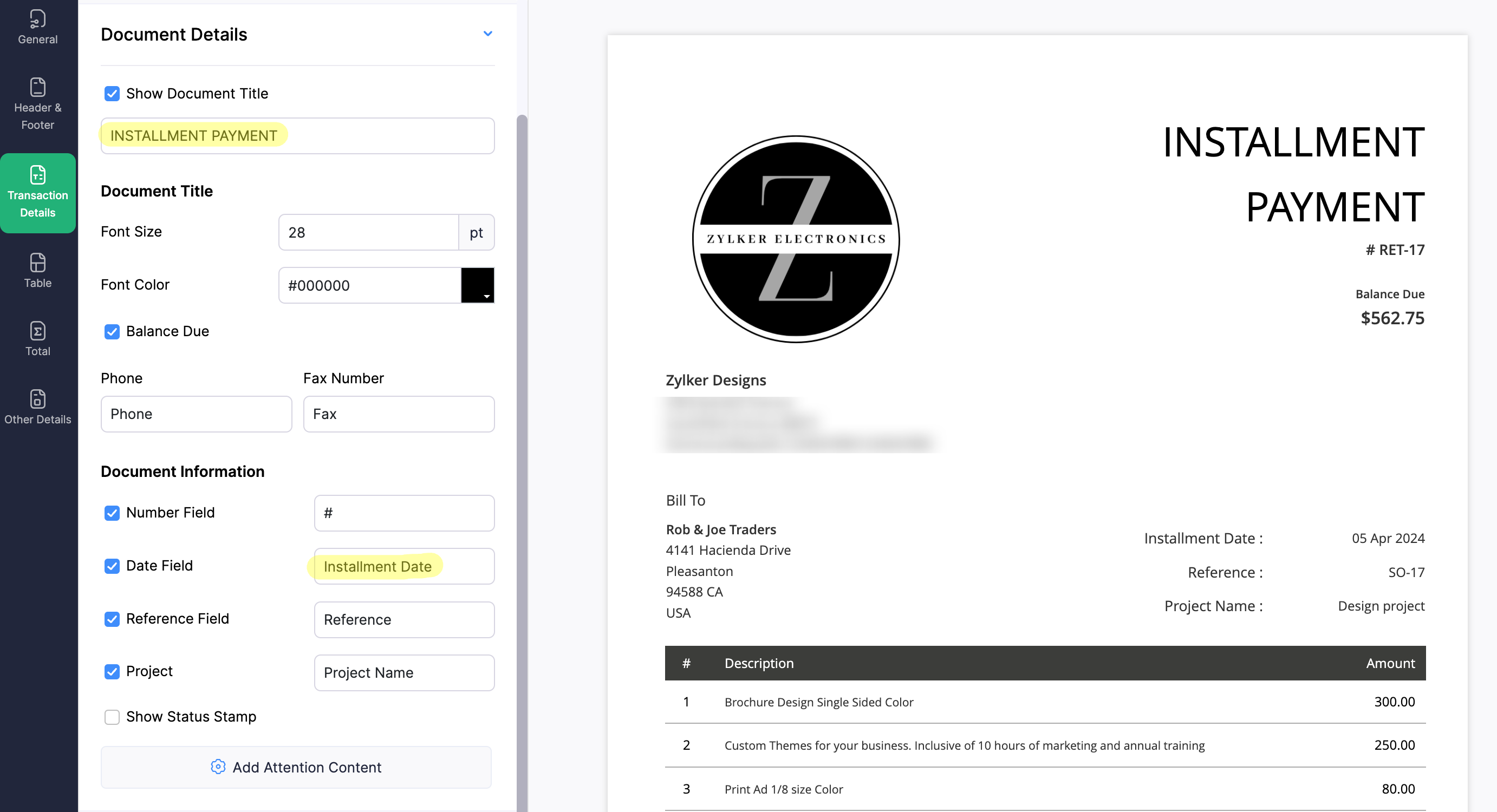
4. Create a new Retainer Invoice template with the document title "Installment Payment". Then, copy the template ID (You can get the ID from the URL of the webpage) and substitute it into line 26 of the first function. This ensures that all the retainers sent for collecting installment amounts are correctly labeled.
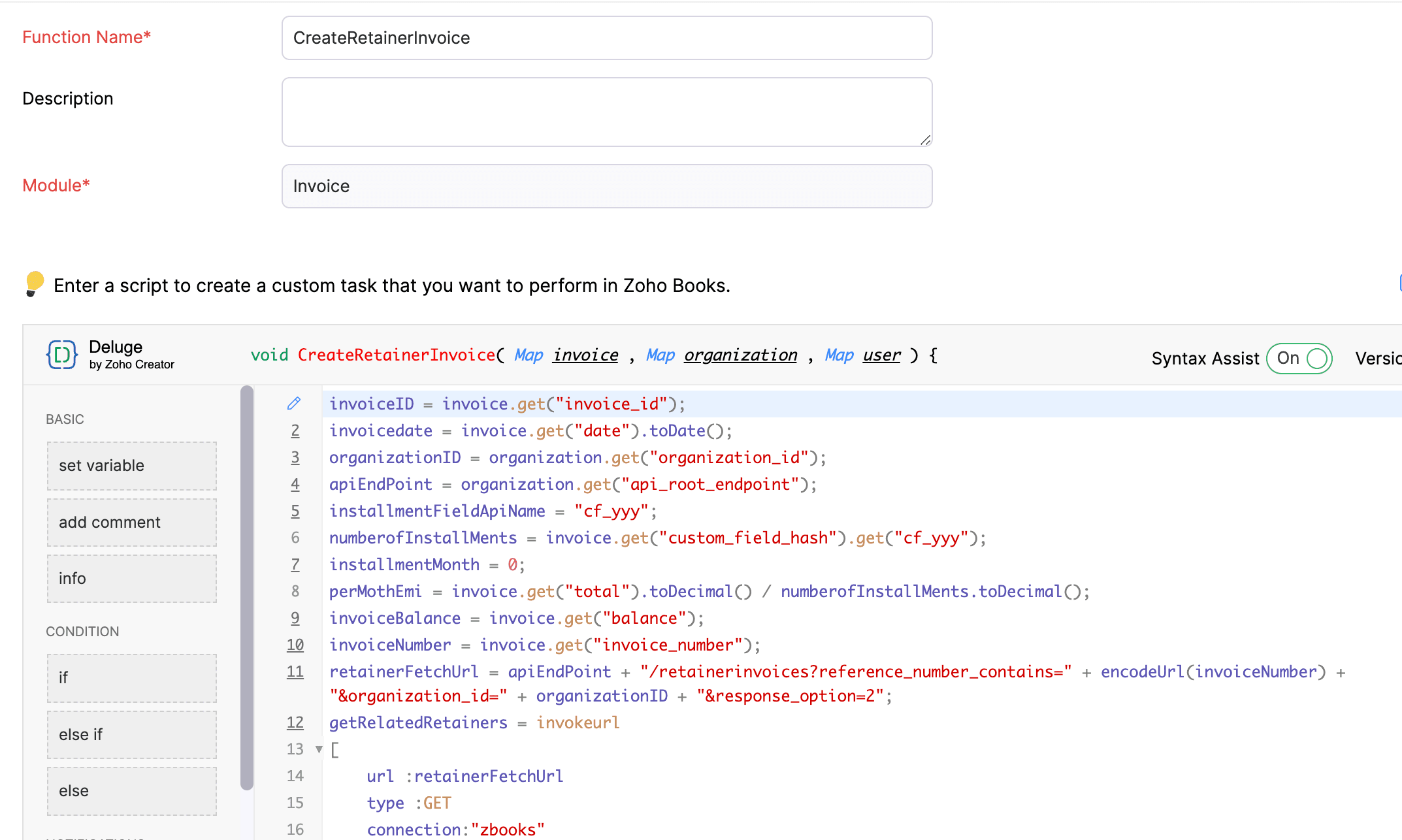
(1) Custom Function to create Retainer Invoices:
Navigate to Settings -> Automation -> Workflow Actions -> Custom Functions -> +New Custom Function -> Module -> Select Invoice -> Add the function code from this GitHub Link -> Save.
(2) Workflow Rule to create Retainer Invoices:
Go to Settings -> Automation -> Workflow Rules -> +New Workflow Rule and set up the workflow rule as shown below:-


In the final step of this workflow rule, associate the custom function you created and then hit Save.
(3) Custom Function to apply installment payments to the sale invoice:
Navigate to Settings -> Automation -> Workflow Actions -> Custom Functions -> +New Custom Function- > Module -> Select Retainer Invoice -> Add the function code from this GitHub Link -> Save.

(4) Workflow Rule to apply installment payments:
Go to Settings -> Automation -> Workflow Rules -> +New Workflow Rule and set up the workflow rule as shown below:-
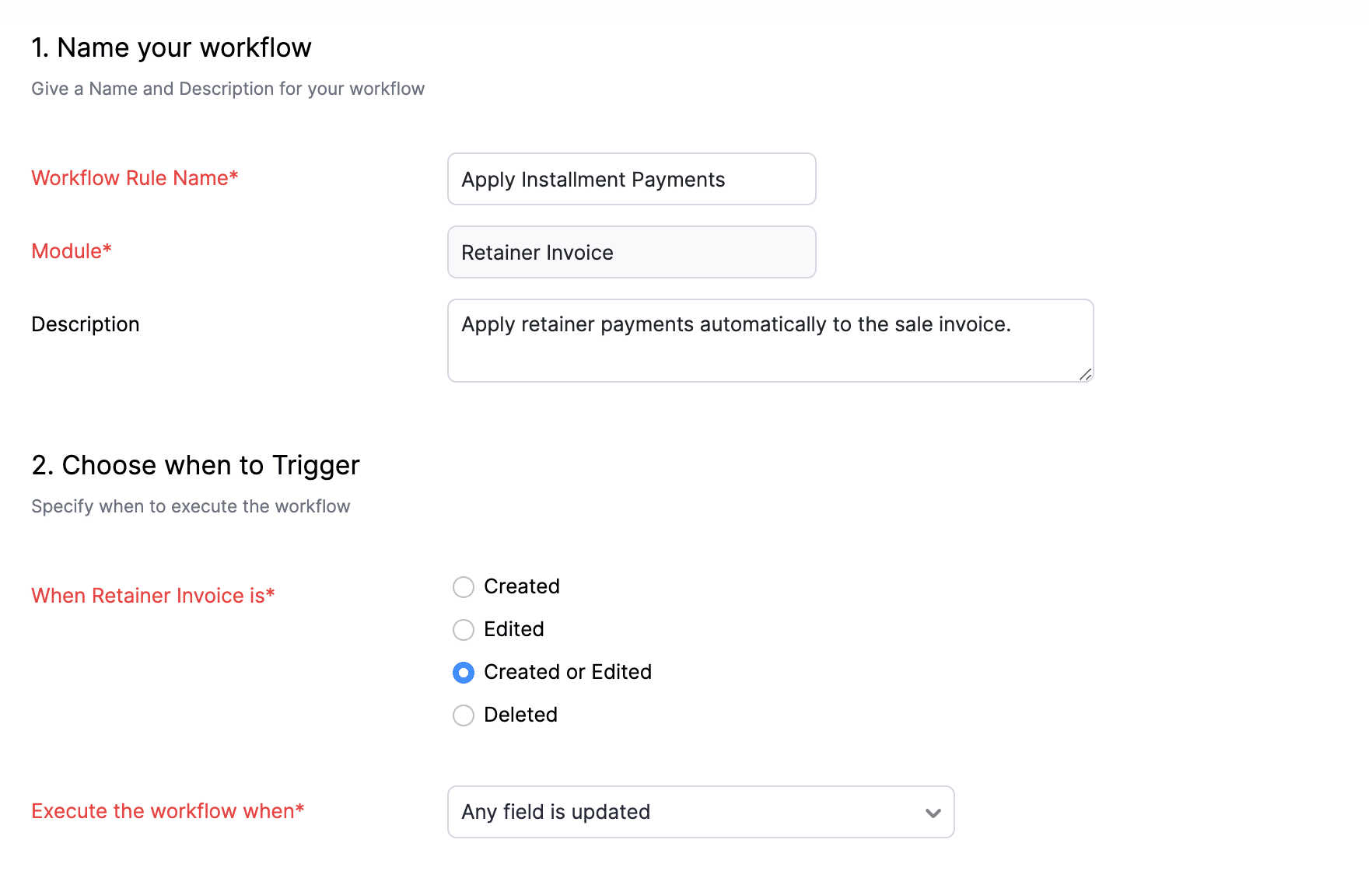
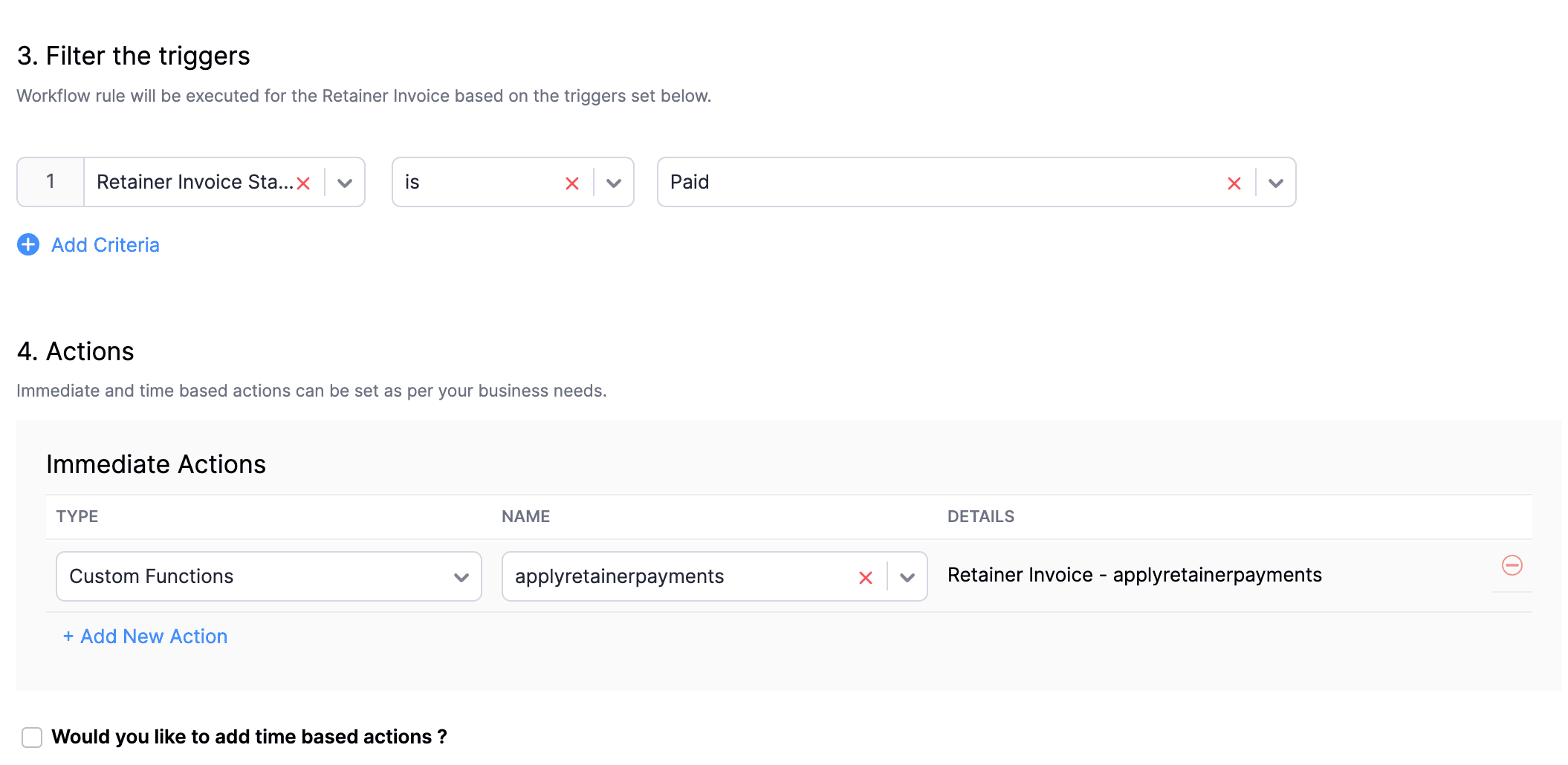
In the final step of this workflow rule, associate the custom function you created and then hit Save.
We really hope that today's functions help you streamline the process of handling installments in Zoho Books. If you need any assistance in customizing the functions to better suit your needs, please do not hesitate to contact us at support[at]zohobooks[dot]com. We are always happy to help you.
Also, for those looking to collect varying percentages of the invoice total as installments, stay tuned!
Regards,
Shireen Farhana
Zoho Books
Topic Participants
Shireen Farhana
Dmitry Solovyev
Dylan Cleppe
Julio Cazaroto
Maj
Sticky Posts
Introducing Invoice Consolidation for Offline Subscriptions
Hello Folks, Glad to announce the feature of Invoice Consolidation for Offline Subscriptions. If you are having multiple subscriptions for your customers, now, you can send a single consolidated invoice for all the Offline Subscriptions that are getting renewed on the same date. Advantage? Customers will be receiving single invoice instead of multiple invoices upon renewal. Also reduces your efforts in follow-up with your customers for payment collections. For Example: If Customer has SubscriptionNew feature: Create back-dated subscriptions
Hello from the Zoho Subscriptions team. :) We’re happy to announce that today marks the launch of a much-awaited feature: creating back-dated subscriptions! From here on out, whenever you create a new subscription with an activation date that is earlier than the present date, you’ll no longer get an error. Instead, you'll be creating a back-dated subscription. This means that the subscription started at that earlier point in time. The next billing date will be calculated automatically based onAnnouncement Regarding Notification Emails
Hello Everyone! This announcement is regarding the admin notification emails which you've been receiving from the email address "support@zohosubscriptions.com". From the 1st of October, 06:00 GMT, the emails with the following subjects will be sent from "no-reply@zohosubscriptions.com". Unable to send invoice for the profile - {profile_name} Unable to process auto payments. If you have set up any filters or workflow in your email account, please add "no-reply@zohosubscriptions.com” and “support@zohosubscriptions.com”Zoho Subscriptions plugin for WordPress
Zoho Subscriptions plugin for WordPress allows you to easily embed your plan specific checkout page in an iframe with just a few mouse clicks and without a single line of code. How can WordPress Zoho Subscriptions Plugin boost your productivity? It's now easier to embed Zoho Subscriptions checkout page in your WordPress site. Forget the old method of logging in to Zoho Subscriptions, copying a URL and scripting to make adjustments. All this can be done automatically through this plugin. A great timeIndian GST organisation Migration Guide
With respect to the new GST regime releasing on July 1, 2017in India, Zoho Subscriptions Indian edition is also gearing up to make your business GST Ready. This article focuses on how to get your existing organisation in Zoho Subscriptions to migrate to the new GST regime. Note: Any organisation created on or after July 1, 2017 will already be GST ready. You wouldn't have to migrate your organisation. Migrating your existing organisation to support GST To migrate your existing organisation to
Recent Topics
Zoho Delayed Posting & Loss of Article Thumbnails on BlueSky
Hello! I am wondering if anyone else has had the either of the following issues when posting to socials via Zoho and if there is a fix? 1. Post says it is scheduled or it is live when sent off via Zoho but it doesn't show up on socials till some timeConnection Not Secure (Certificate Mismatch) Error
Hi, Just a fyi, when you go to https://bigin.zohocloud.ca/bigin/Home you get a "Your Connection Is Not private" error. (Certificate mismatch to domain.) I get to that page after I have signed up and signed in as a customer and select the Access BiginRecording the Investment
Hello, - One Investor Invested to our company, So how do we record investment which we received in our bank in the Zoho books ? - How do we record if we provide shares to the investor in the Zoho books? ThanksClient and Vendor portal at the same time
We have companies that serve both as clients and vendors and they are linked. However, we have a problem giving them access to the vendor/client portal. If they accept the invitation from the client portal, when we try to invite them to the vendor portalIntegrate Multiple ZohoBooks organization with zoho projects
We have successfully connected our Zoho Books with Zoho Projects for synronizing timesheet data. Our Business specialty is, that the staff of the Main company (A) is working on several projects, but the Clients are sometimes contracted and paying to aWays to calculate the difference form two years or months
Hi to everyone I have this request: I need to show the difference or variation from two periods (years or months) whether using a Pivot View or a graph, in this is case is better in a Pivot view. In the pivot view I will have the amount or results fromCareer site URL - Suggestion to modify URL of non-english job posting
Hi, I would like to suggest making a few modification to career sites that are not in english. Currently, the URL are a mix of different languages and are very long. It makes for very unprofessional looking URLs... Here is an example of one of our URLIntroducing Contract Settings & Backdated Contracts in Zoho Contracts
We are rolling out updates that give you more control over how contracts are created and managed in Zoho Contracts. From defining default workflows with Contract Settings to aligning agreements with real timelines using Backdated Contracts, these enhancementsCelebrating our customers on International Client's Day
Hi everyone, Every customer is part of our Zoho Desk family, and we wouldn’t want to miss celebrating you on this special day. This International Client's Day, we’d like to take a moment to appreciate every customer who has helped us grow and build meaningfulFaster Ticket Response with use of Snippets in comments
Hello everyone, Responding to tickets often involves repeating the same messages, whether it is sharing updates with customers or leaving notes for internal collaboration. To make this easier and more consistent, we are allowing agents to use snippetsImproving Zoho Creator's email deliverability
Hi all, We're pleased to announce updates to email handling in Zoho Creator to improve the deliverability of the emails sent from the Creator platform. These updates have been designed keeping in mind the fact that emails from domains with strong senderWhat's New in Zoho Billing | February 2026
February brings a powerful set of updates to Zoho Billing, from smarter subscription management and flexible payment options to better reporting and more control over your hosted pages. Here's everything that's new this February. Create SubscriptionsReassign Partially Saved Entries
Hi, I would like to be able to go to Partially Saved Entries and like the option to delete them I would like the option to multi-select and be able to reassign them to another user to complete (Such as when a user has left the company). Thanks DanCan we rely on order of returned ids when inserting multiple records?
Hello! API https://www.zoho.com/crm/developer/docs/api/v8/insert-records.html does not mention that the response array will match the input array*, keeping this important information implicit and someone might have doubts to rely on it. (*the responseDisplaying only unread tickets in ticket view
Hello, I was wondering if someone might be able to help me with this one. We use filters to display our ticket list, typically using a saved filter which displays the tickets which are overdue or due today. What I'd really like is another filter thatWhat is a realistic turnaround time for account review for ZeptoMail?
On signing up it said 2-3 business days. I am on business-day 6 and have had zero contact of any kind. No follow-up questions, no approval or decline. Attempts to "leave a message" or use the "Contact Us" form have just vanished without a trace. It stillZoho Books: tax is not automatically pulled from product-data anymore - why?
Hi, until a short time ago, you could set a default taxrate for each product/item. This taxrate automatically appeared each time the item was chosen in an invoice or quote. Why does this not work anymore? The field is still there at the product record,Issue creating a YTD report with last years numbers
I am looking to create a widget to compare the YTD leads we have in 2023 to the YTD leads we had in 2022. I'm having issues with the aggregate formula creation to gain access to the 2022 Leads YTD data point. Feeling like this is a common view of dataBrand Studio Projects in Analytics
Hi All, Currently pulling my hair out over trying to link together some social media posts for a reporting dashboard in Analytics, so I thought I'd see if anyone on here had a solution. Our Marketing Team created a LinkedIn campaign in Zoho Brand Studio,Manage Testing Process in Zoho Sprints
Agile framework supports a robust quality assurance system that incorporates continuous testing throughout the development lifecycle of the product. The agile testing team focuses on planning the testing around the development, identifying defects earlyAnnouncing the Zohotshots of the ZDC Hackathon 2025
Hey everyone, The wait is finally over! After weeks of building, experimenting, and pushing creative boundaries, we’re excited to announce the winners of the second edition of the ZDC Hackathon. This edition brought together an incredible community ofZOHO CRM Button Integration
Hi Team, I’m currently working with Zoho CRM along with a custom application where I fetch deal details from the CRM and use them based on my requirements for each deal. Now, I want to enhance this setup. I plan to create a button on the Deal Detail pageMajor journey crash and not loading. Zoho Marketing Automation
Hi all. Last night (19MAR, 2026) Marketing Automation for a specific journey completely crashed, and since the crash the specific journey has failed to load at all (blank journey canvas, no journey appears, no menu accessible) but other separate journey'sCandidate Assessments, no workflows.
I have an issue where I would like to trigger a workflow based on a candidate assessment being completed. Sometimes a returning candidate will complete a second assessment, on completion the status of the candidate will be updated to "Unqualified" ifMail Merge in Zoho Desk
Hello Team, Do we have an option of mail merge within Zoho Desk like we have in Zoho CRM? We have a requirement to generate some pdf file in the form of mail merge doc from the ticket.Workdrive backup and default storage selection
Hi community, I have been informed by Zoho that workdrive will be the default storage mechanism for crm and projects. These 2 Apps seem to have different design on how they interact with workdrive for storage. 1. Crm: seems to have files saves at theZoho vault filling in a form it's not supposed to fill in
Hey there, I have a problem with ZOHO Vault autofill. In a software package, we have these options: For some reason zoho vault always replaces what's in the top option and fills a 2fa password in there, and then saves that value.. Meaning whatever wasZoho Booking Integration with Desk
Just wanting to share something in case it helps someone else who may run into a similar use case as we did. Issue: Currently, the Zoho Booking integration with desk will drop a comment into the ticket when a customer books a time, however it won't changeLet us view and export the full price books data from CRM
I quote out of CRM, some of my clients have specialised pricing for specific products - therefore we use Price Books to manage these special prices. I can only see the breakdown of the products listed in the price book and the specialised pricing forSyncing calendar with Google Calendar doesn't work when events are sent to auto repeat
Hi... The ZOHO CRM -- GOOGLE CALENDAR sync is broken. If I create a single event on either side, sync works, but if I create an event with auto repeat on either side it doesn't work. Furthermore, events created before the sync don't show up in the calendar.Organization wide Account and Contacts Visibility/Sharing Capabilities?
Has anyone figured out a way to make visibility or sharing of Accounts and Contacts to be available across the entire organization without having to have every individual user edit their Sharing permissions? For our sales folks they need to be able toNotification of Interaction Assignment
If a user is assigned an interaction, they should be notified via email. These are almost useless because if I assign an interaction for someone to respond to, they dont know that I assigned it to them without me telling them or them logging in and discoveringCountries List Global Set- Complete with Phone Country Code and Continent.
Dear Zoho Team I saw your recent addition to the Global Sets regarding the Countries list and states. While working on it, why didn't you also add things like Continent and Phone Country Code? Also, some ISO codes from some Countries/regions are misCustom Display Field for Lookup Dropdowns in Zoho CRM
Could Zoho CRM support changing the display field in lookup dropdowns, like Zoho Creator does? This would make it much easier to select the right record by showing a more useful field instead of only the default one. It would improve speed, clarity, andMessage as bot
I would like to be able to send a Cliq message truly as a bot. the current implementation of this function, while it sends the message as a bot it sends that message inside a chat from the user how authenticated the flow cliq connection instead of directlyA2P 10DLC Opt-in Rejection Issue with Zoho Creator Public Form
Hi everyone, I’m working on an A2P 10DLC SMS campaign and running into repeated rejections due to opt-in issues. I’m using Zoho Creator for the registration flow. The form is public (no login required). Users enter their phone number and there is an uncheckedBooks <-> CRM synchronisation with custom Fields
Hello, We are synchronising Books Customers with CRM Accounts. In CRM Accounts I set up last year a "segments" multiselect field shown below In Books, I set up a custom multi-select field with the same value as in the CRM And set up the synchronisation inside Books. Want to synchronise the Books Segments with the CRM Segments, but the later doesn't exist, and another non-existing is there ?! First, I don't understand where the field Segmentation is coming from. Second, I set CRM Segmentation to syncTrouble with using Apostrophe in Name of Customers and Vendors
We have had an ongoing issue with how the system recognizes an apostrophe in the name of customers and vendors. The search will not return any results for a name that includes the mark; ie one of our vendors names is "L'Heritage" and when entering theRecording overpayment?
So a customer just overpaid me and how do I record this? I can't enter an amount that is higher than the invoice amount. Eg. Invoice is $195 and he sent $200. He's a reccuring customer so is there a way to record so that he has a $5 advance for future invoice?Introducing the New Zoho Assist Quick Support Plugin
We are thrilled to announce the new Zoho Assist Quick Support Plugin, the upgraded and enhanced version of the Zoho Assist Customer Plugin. This new plugin allows organizations and IT administrators to deploy it directly onto their customers’ devices,Next Page