Geo-Powered Retail Intelligence with Zoho Analytics
In today’s highly competitive retail landscape, data-driven decisions are no longer optional — they’re essential. While businesses collect vast volumes of data across regions, stores, and customer segments, the real value lies in how effectively this data is visualized and interpreted.
Geo Maps in Zoho Analytics bring location intelligence to the forefront of decision-making. With powerful spatial analytics capabilities, retail businesses can now visualize store performance, identify untapped opportunities, and track customer behavior trends with a simple glance at a map.

This solution demonstrates how Zoho Analytics' Geo Maps can be leveraged to solve real retail business problems, using a step-by-step approach grounded in a practical, ready-to-use dataset.
- Business scenario
- Dataset Overview
- Problem Description
- Why Geo Maps Become a Game-Changer
- Solution Implementation – Report Creation
- Store Performance Analysis (Map – Bubble)
- Revenue-to-Traffic Ratio with Ghost Zone Detection (Map - Filled + Scatter)
- Competitor Pressure Zones (Map – Scatter)
- Customer Gender Distribution (Map - Pie)
- Summary
Business scenario
Imagine you're a retail chain operating hundreds of stores across the United States. Each store generates data—sales, visitor footfall, customer satisfaction, marketing spend—but these numbers alone don’t explain why some stores succeed while others under-perform.
Key challenges include:
- Identifying stores that are struggling before sales drop significantly.
- Understanding whether poor performance is due to location, low visibility, or intense competition.
- Evaluating which regions offer true expansion potential—and which are over-saturated.
With no visual correlation between location and business KPIs, many decisions remain reactive instead of proactive. This is where Geo Maps make all the difference—by transforming isolated data into contextual geographic insights.
Dataset Overview
To power this solution, we’ve created a comprehensive and realistic retail dataset that mirrors how actual store data behaves across geographies.
The dataset includes:
- Store-level performance data: revenue, average purchase value, and satisfaction.
- Customer insights: foot traffic, age, gender distribution.
- Market context: competitor presence and market share, population density, and economic growth rate.
- Geospatial data: zip code, city, state, latitude, and longitude of each store location.
Problem Description
Retail chains often operate on thin margins, and even minor under-performance at store level can have significant impacts across the organization. While dashboards provide revenue and performance trends, they often miss one critical dimension—geography.
Without geographic context, businesses face several recurring challenges:
- Underperforming stores go unnoticed until major losses occur.
- Ghost zones—areas with low store presence but high potential—remain unexplored.
- Marketing budgets get wasted in regions where returns are consistently low.
- Competitor pressure is misjudged due to lack of visibility on regional saturation.
- Store closures become reactive decisions, made after performance has already declined.
In short, data without location awareness leaves decision-makers blind to spatial trends and risks. Businesses need a smarter, more intuitive way to analyze store performance with geographical clarity—before it’s too late.
Why Geo Maps Become a Game-Changer
Geo Maps in Zoho Analytics address this gap by unlocking a visual layer of intelligence that traditional charts can’t offer.

Here’s what makes them a game-changer:
- Location-first insights: Instantly identify how store performance varies across the map - by city, state, or neighborhood.
- Visual correlation of multiple KPIs: Compare revenue, satisfaction, and foot traffic geographically to detect hidden patterns.
- Clutter-free, customizable visuals: Choose the right map type - bubble, filled, pie, or scatter - to match the data you want to analyze.
Unlike static dashboards, Geo Maps enable you to see the problem, context, and opportunity—all in one frame. Whether it's spotting trends, reallocating marketing spend, or planning expansion, this spatial layer puts decision-makers back in control.
Solution Implementation – Report Creation
This section walks through the step-by-step creation of four key Geo Map reports that reveal business insights from store-level data.
1. Store Performance Analysis (Map – Bubble)
To identify how stores are performing across different regions in terms of revenue and customer satisfaction, using a clean, visual-first map representation.
This helps uncover:
- High-performing stores in key zones
- Underperforming regions needing intervention
- Patterns related to location-based store success
Why Map - Bubble?
The Map - Bubble chart is ideal for visualizing store-level metrics using geolocation.
- Size indicates magnitude (e.g., Monthly Revenue)
- Color indicates health or quality (e.g., Customer Satisfaction)
- Each store appears as a distinct bubble based on its lat/long.
Procedure
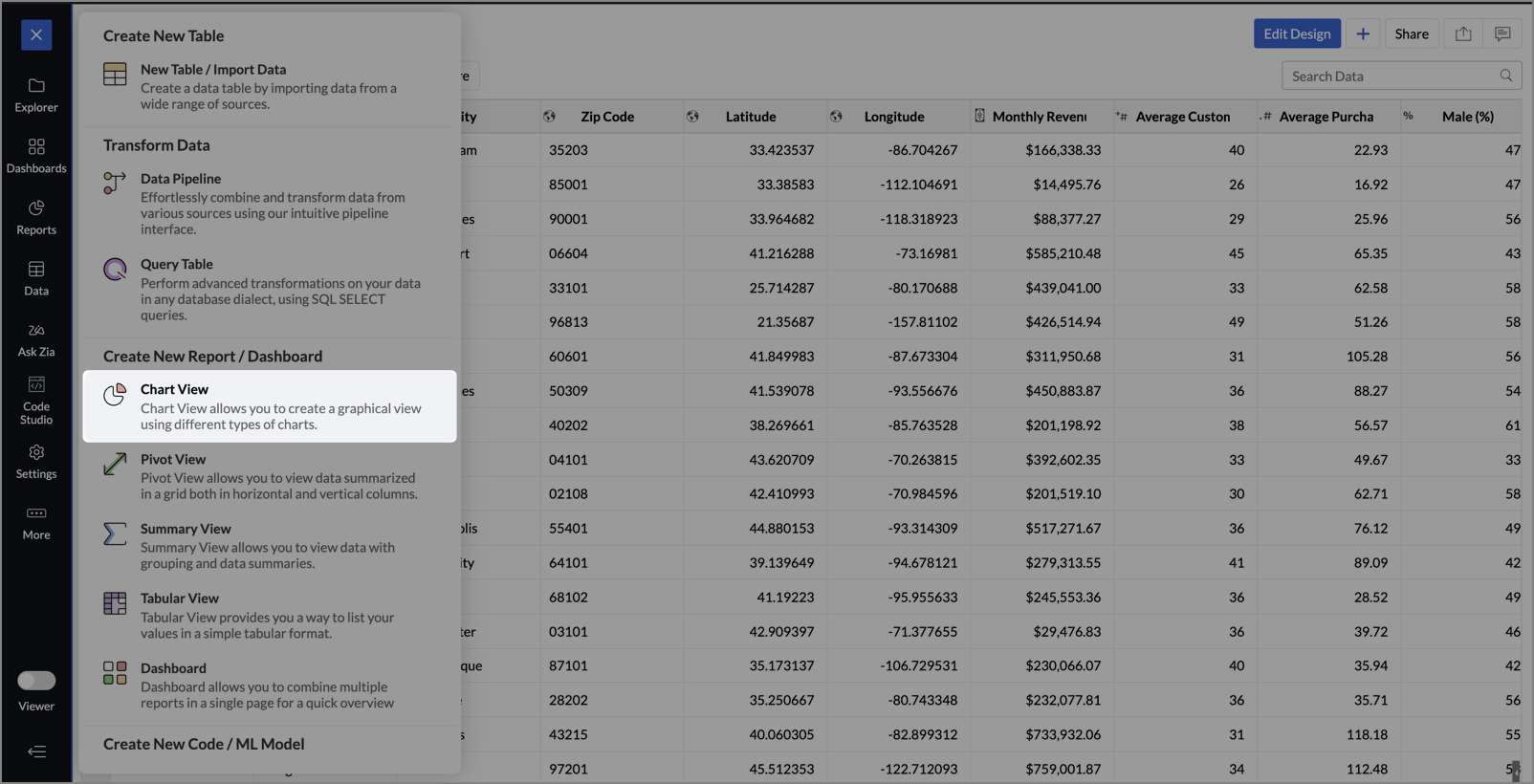
- From the dataset, click the Create icon and select Chart View.
- On the designer page, drag and drop the following columns into their respective shelves:
- Latitude → X-Axis
- Longitude → Y-Axis
- Customer Satisfaction (out of 10) → Color
- Monthly Revenue (USD) → Size
- Store ID, Store Type, City → Tooltip
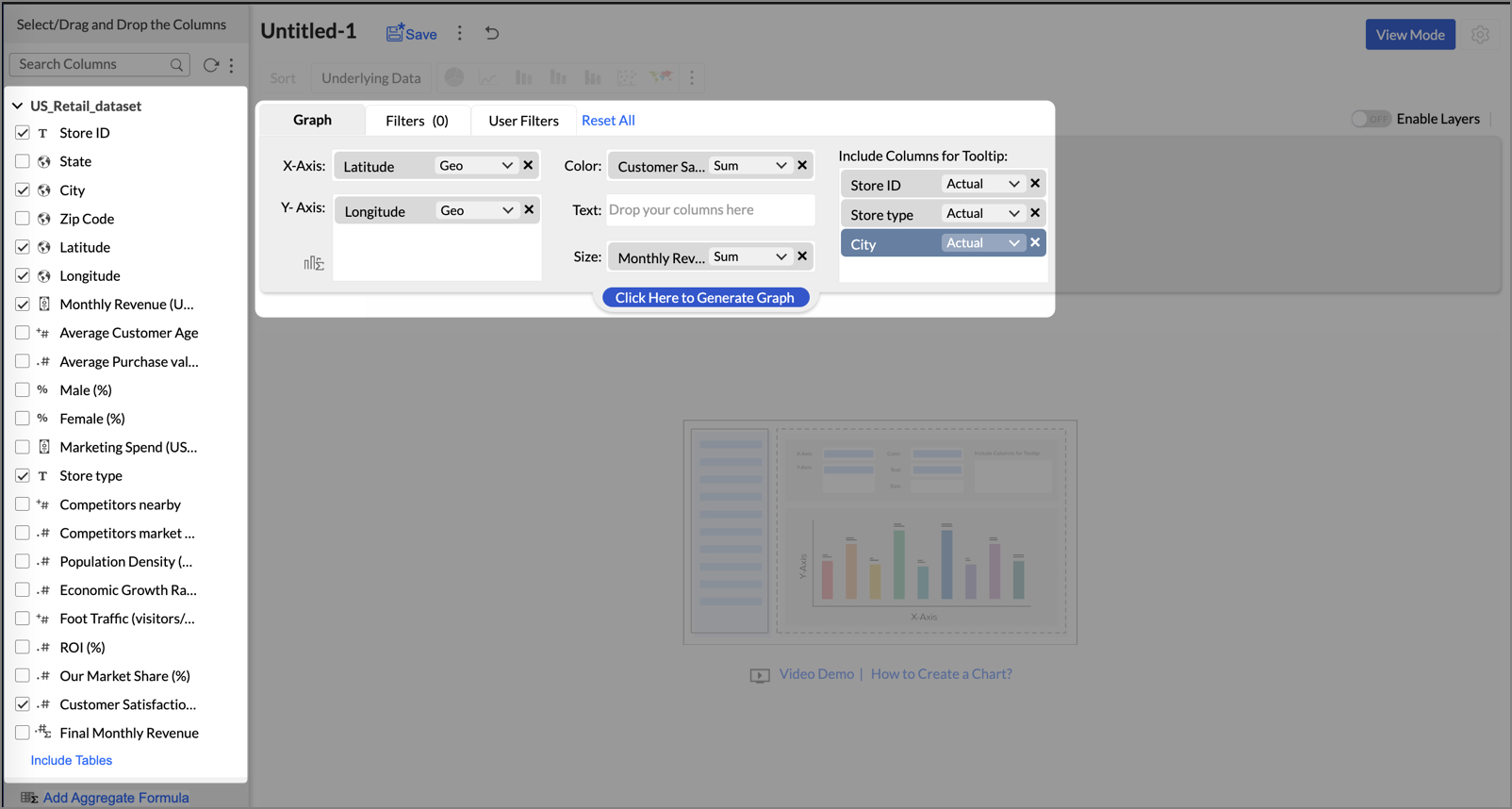
- Click Generate Graph.
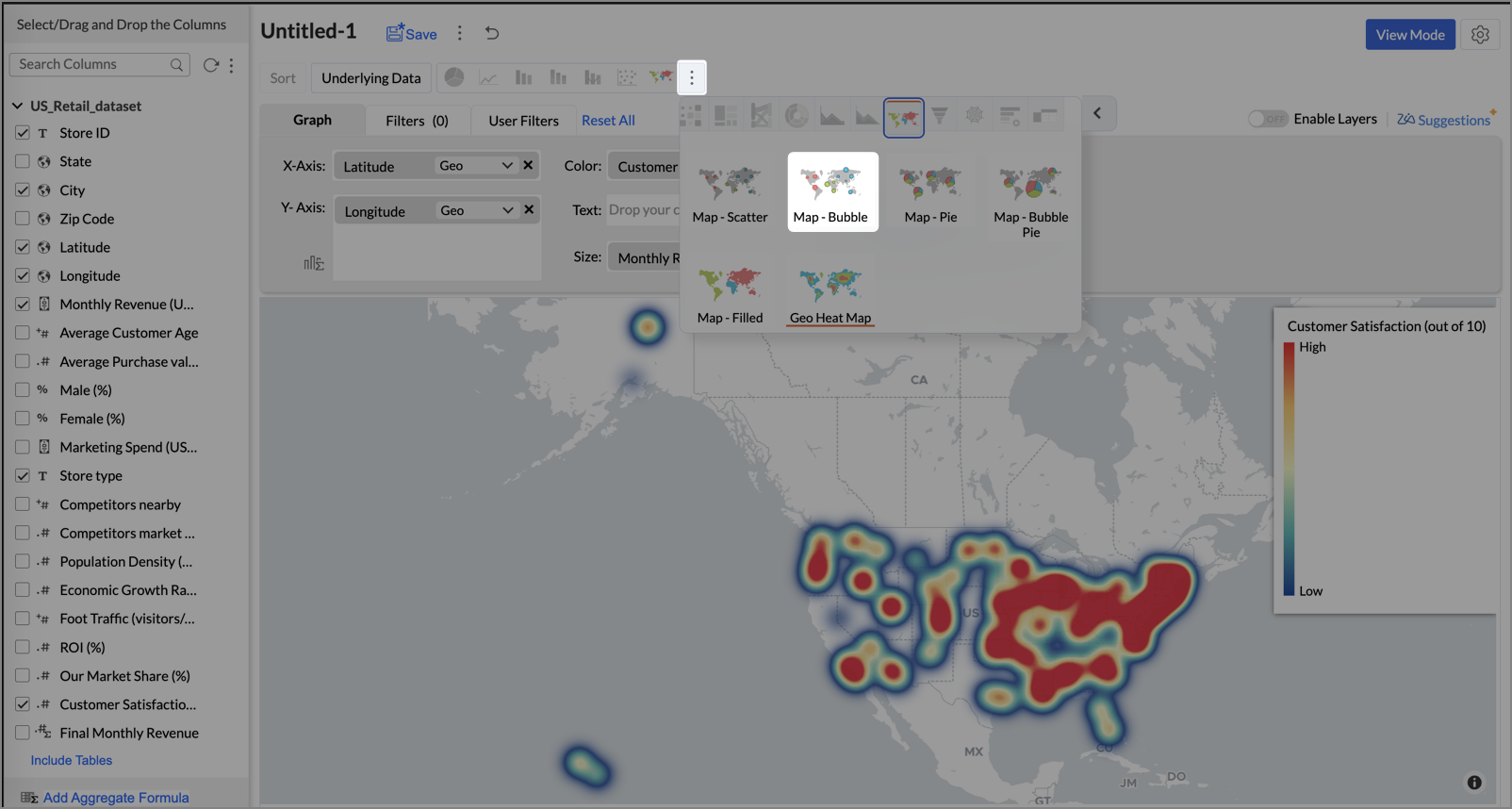
- Click on the ellipsis icon and select the chart type as Map - Bubble.
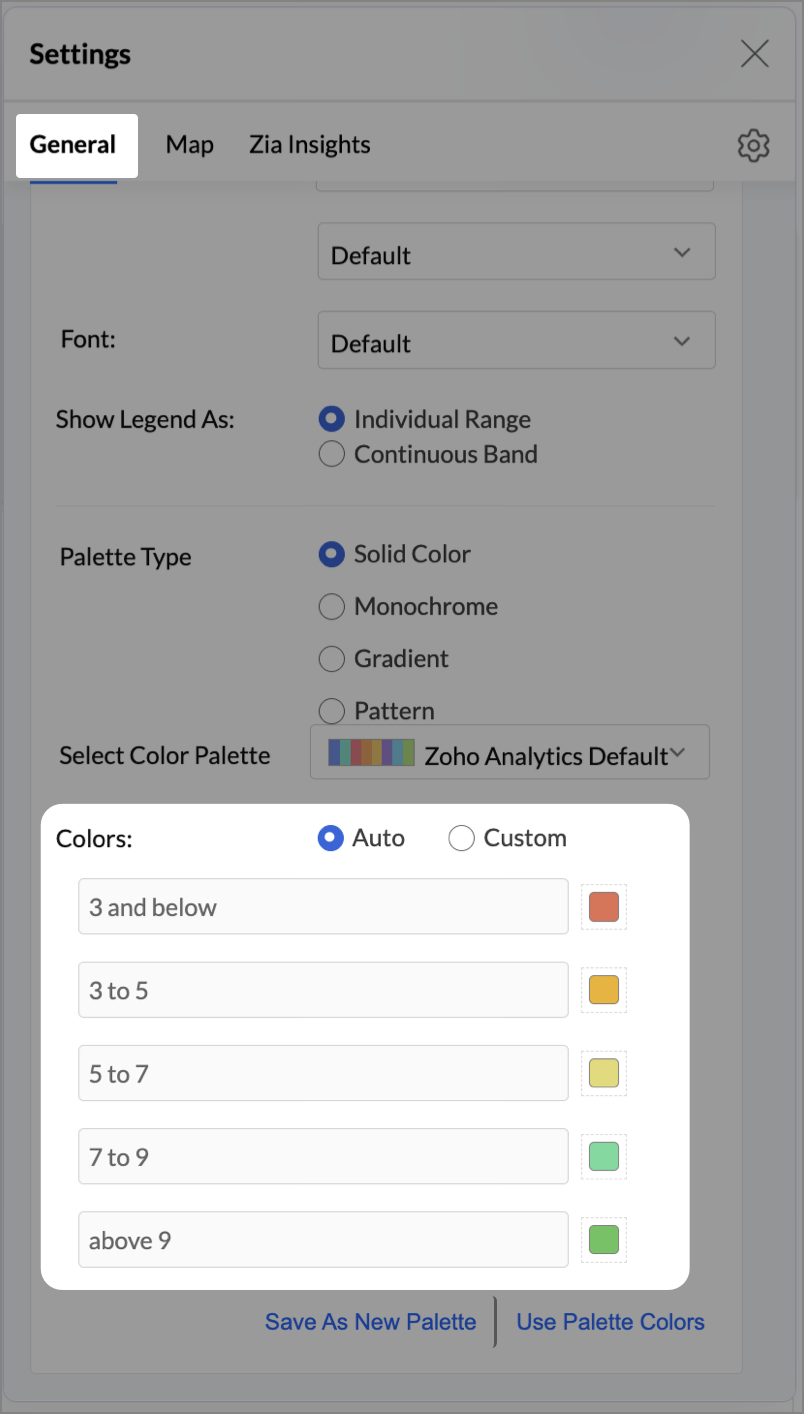
- Click the Settings icon, and under the General tab, click Legend.
- In the Colors section, customize the color scale from red to green to represent satisfaction ranges.
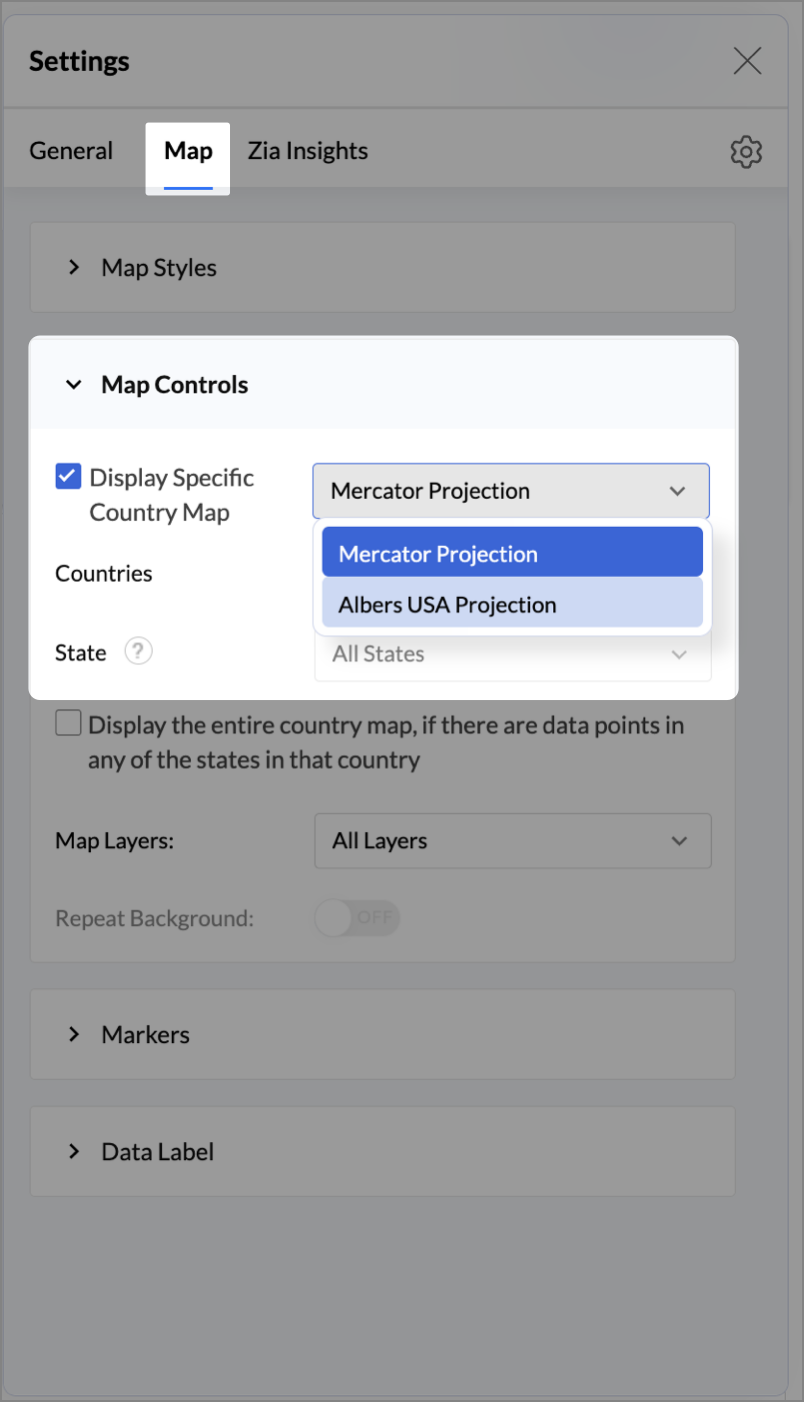
- Under the Map tab, click Map control and enable Display Specific Country Map.
- From the drop-down, select Albers USA Projection. This displays the USA map by placing Alaska and Hawaii below the mainland USA on a single map.
- Rename the report as Store Performance and click Save.
Tip:
Add a User filter such as Store type or State to analyze performance by segment.
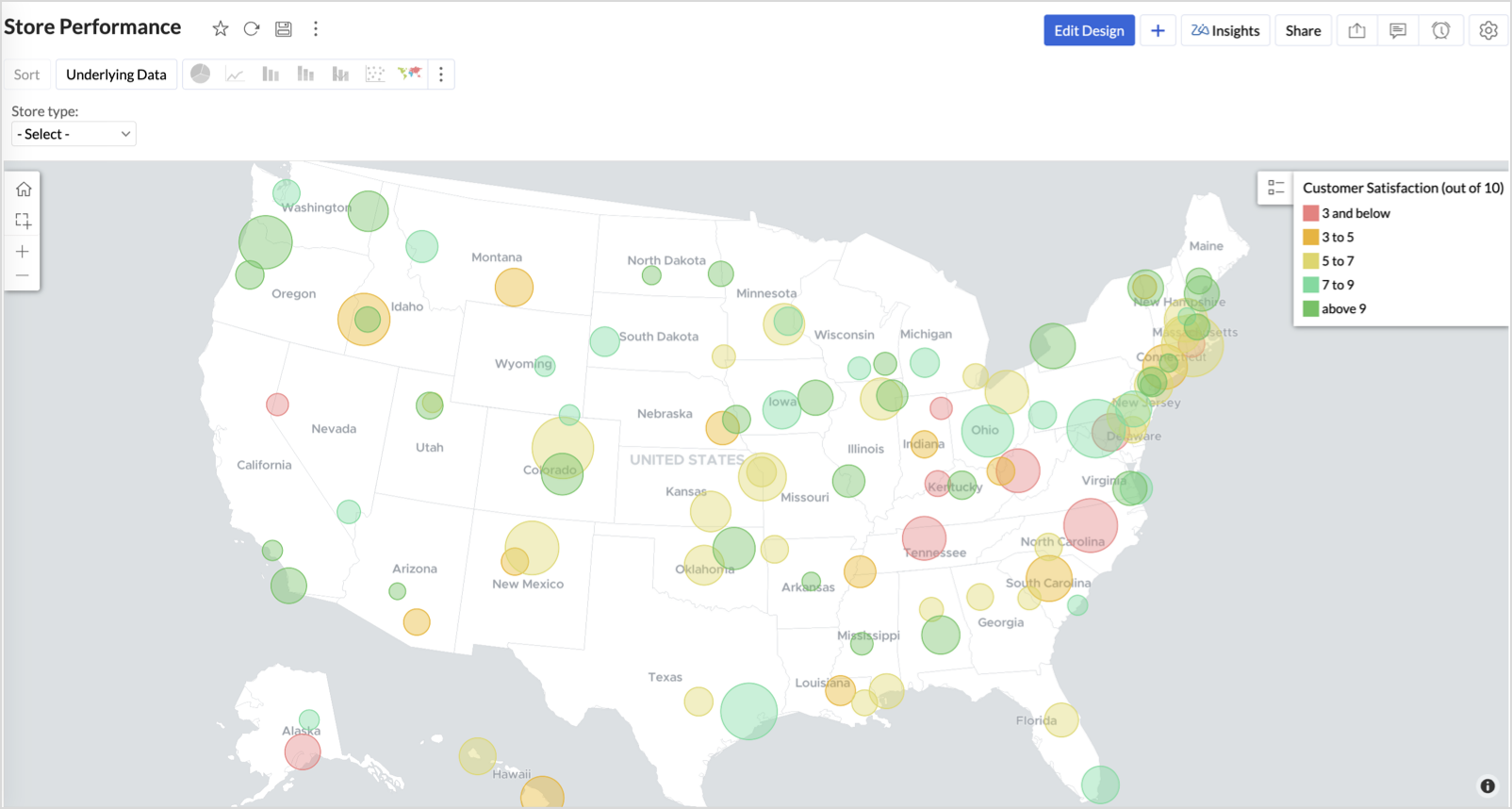
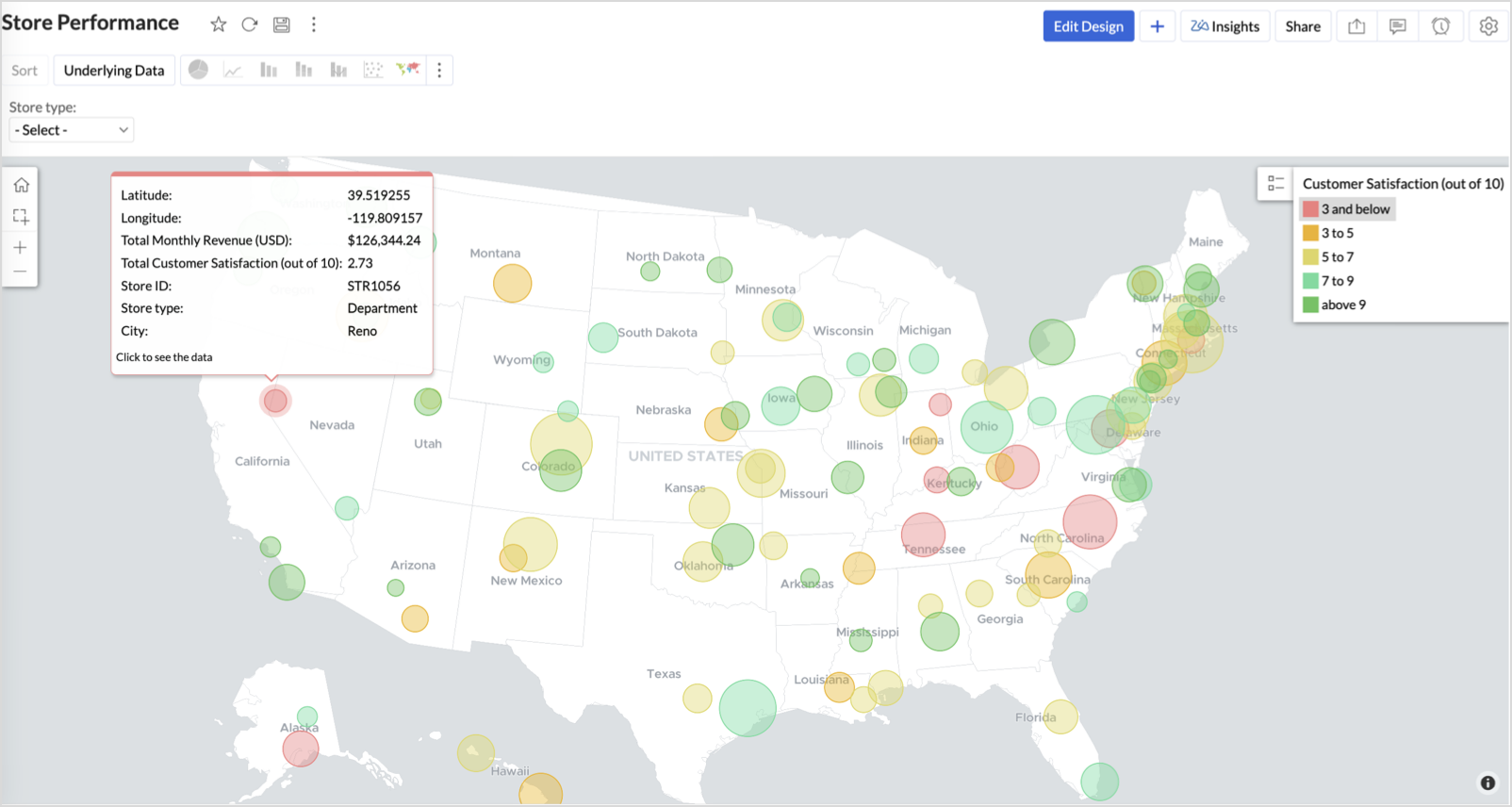
This configuration creates a bubble for every store, sized by its revenue and colored by customer satisfaction — instantly showing how happy customers are in high- or low-revenue zones.
Key Insights
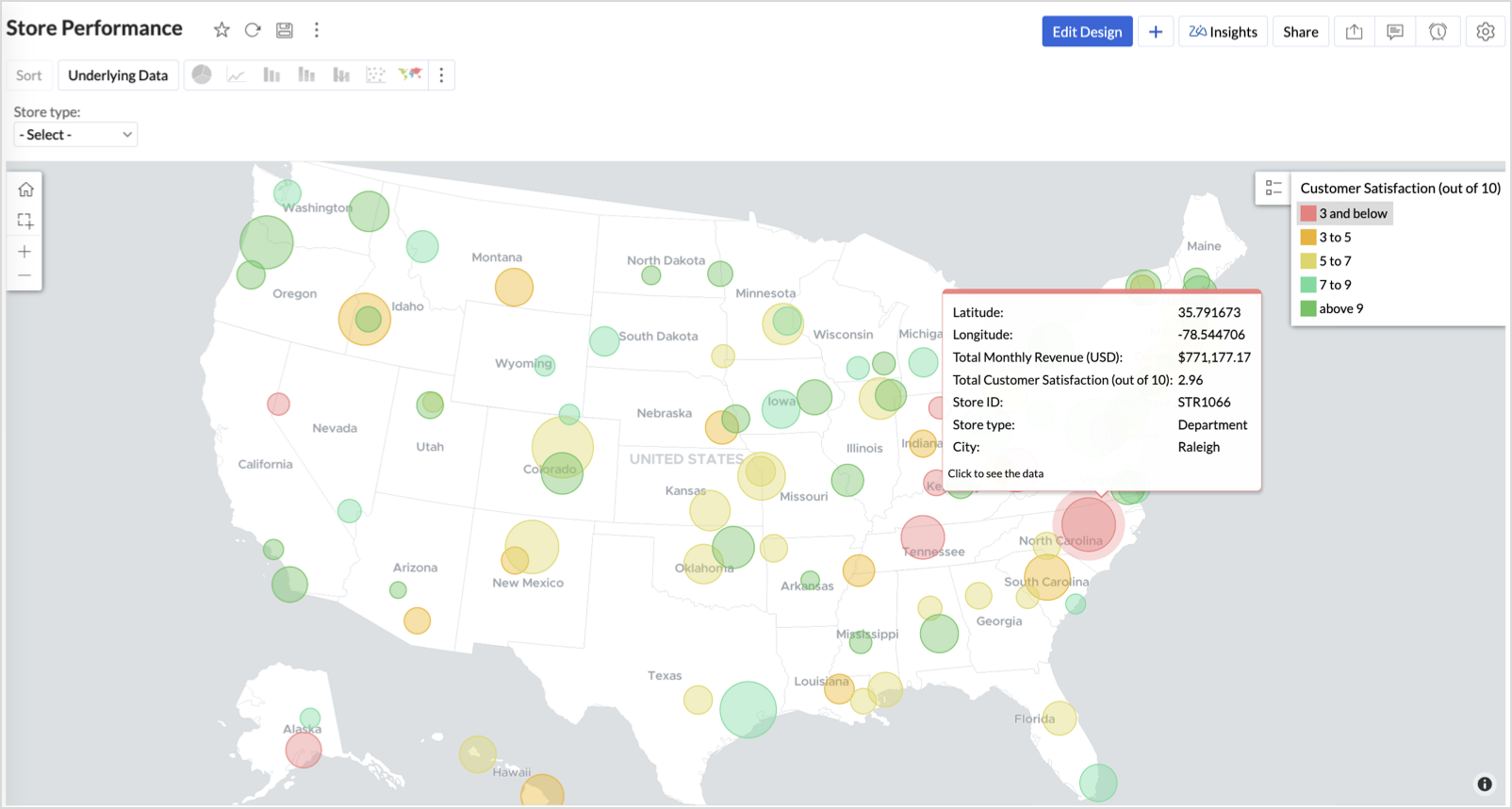
Large bubble + Red color - High revenue but poor satisfaction — risk of churn!
Small bubble + Green color - Low revenue but high satisfaction — possibly underserved
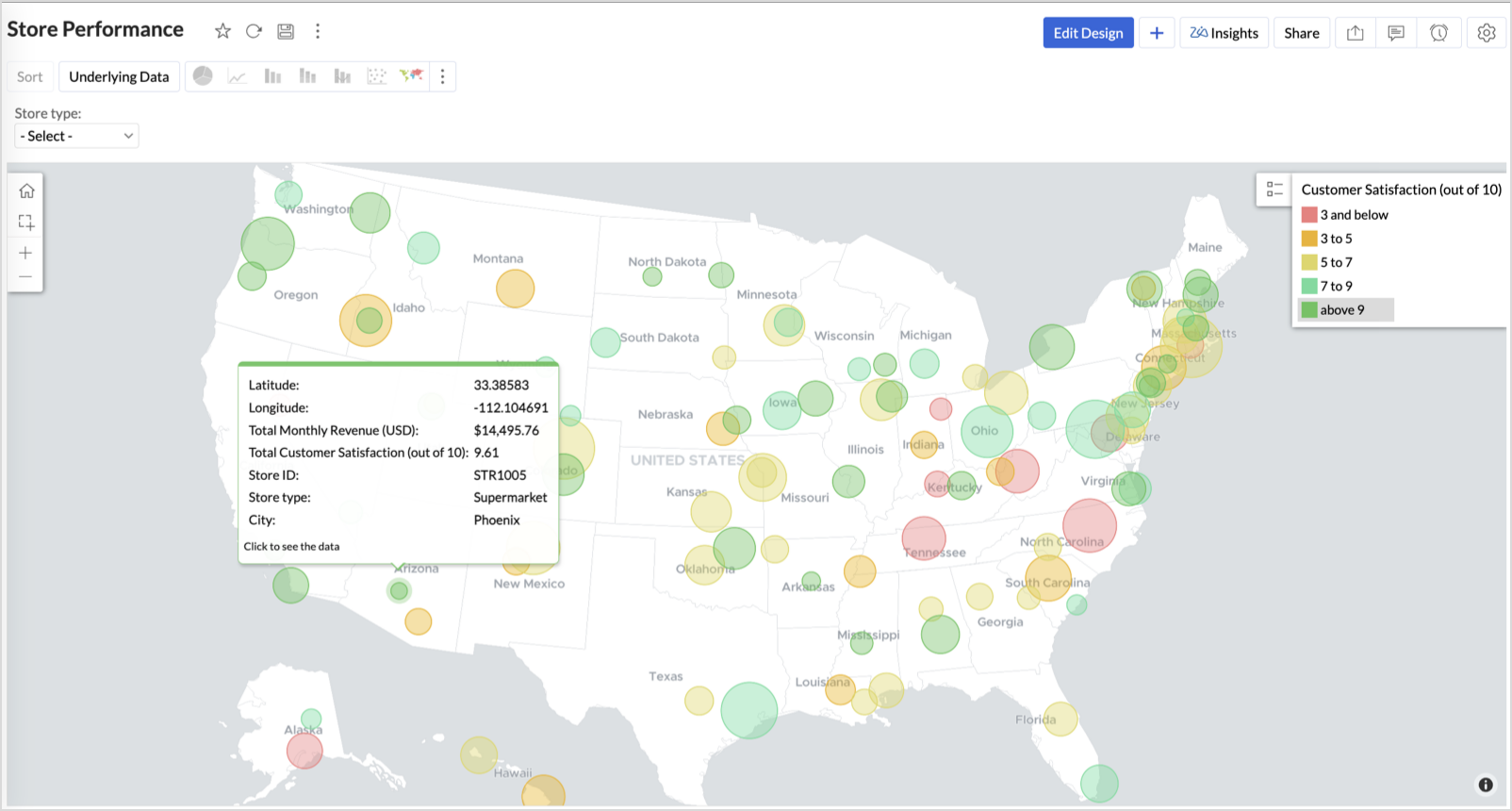
Large bubble + Green color - Healthy performers — consider replicating success
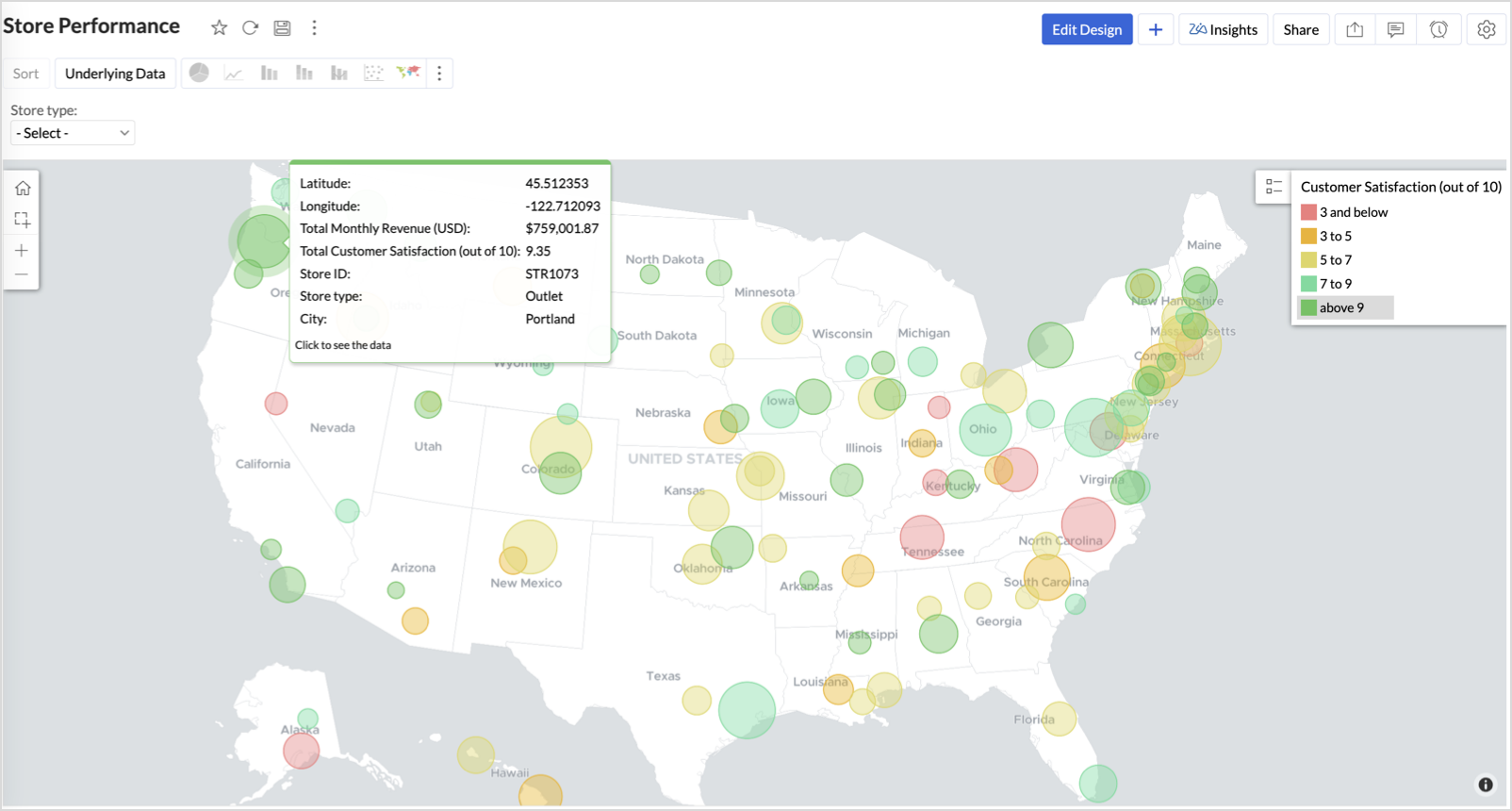
Small bubble + Red color - Low performers — review for possible closure or revamp.
Business Interpretation
This chart acts as a live performance map for executives and analysts. Instead of scanning through tables or KPIs, stakeholders can instantly spot outliers, prioritize investments, and plan corrective actions by just glancing at the map.
2. Revenue-to-Traffic Ratio with Ghost Zone Detection (Map - Filled + Scatter)
To evaluate how efficiently each state is converting foot traffic into store revenue — and more importantly, to identify high-footfall regions without store presence, often referred to as ghost zones.
This chart helps:
- Compare state-level foot traffic against actual revenue
- Spot underutilized or over-performing regions
- Discover untapped markets with high visitor potential but less to no physical stores
Why Map - Filled + Scatter?
- The Map - Filled chart provides a regional perspective of traffic density and revenue generation.
- The Scatter layer overlays actual store locations based on latitude and longitude.
This powerful combo allows you to measure performance where you’re active and spot opportunities where you're not.
Procedure
- From the dataset, click the Create icon and select Chart View.
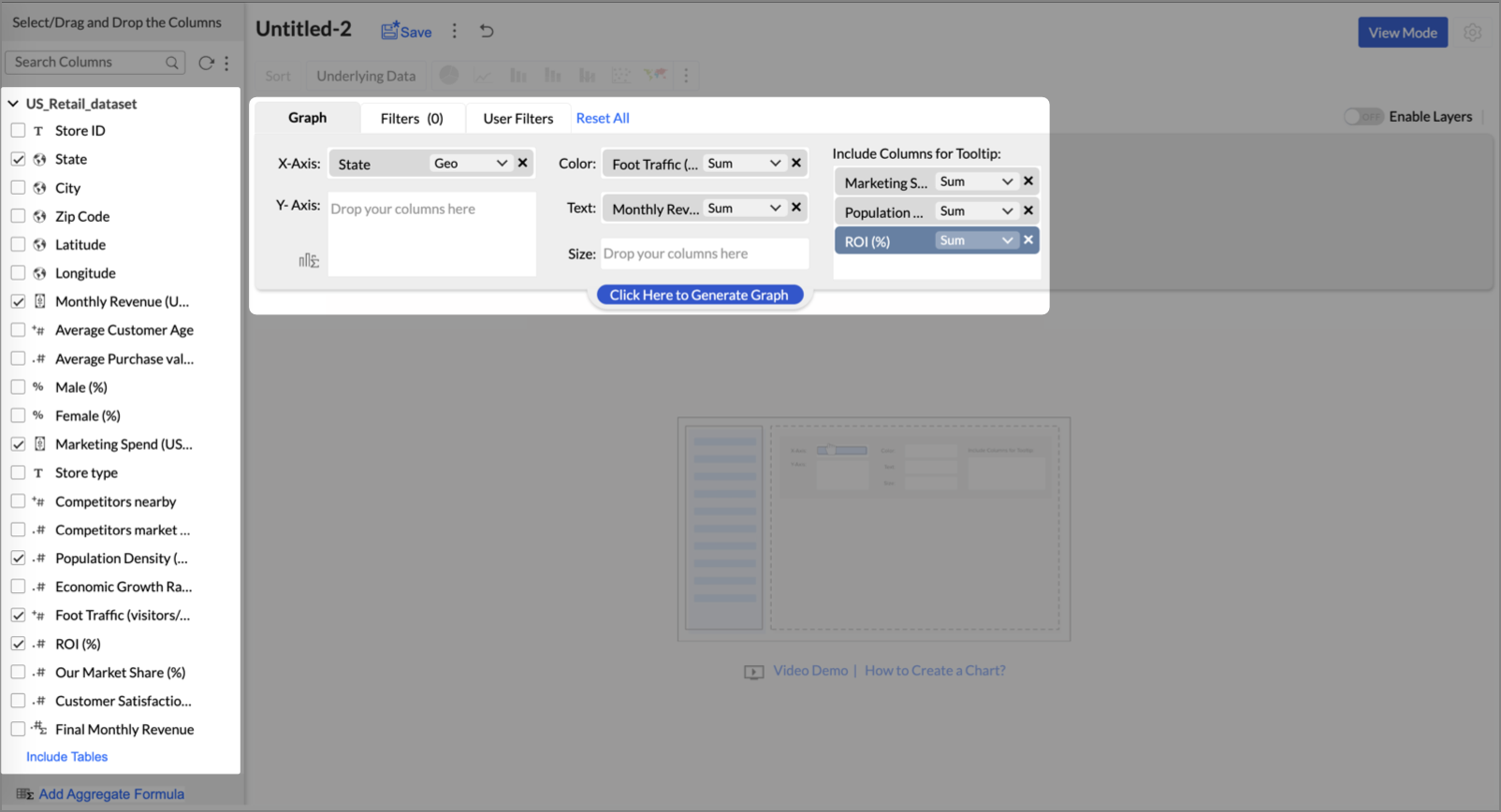
- On the designer page, drag and drop the following columns into their respective shelves:
- State → X-Axis
- Foot Traffic (visitors/month) → Color
- Monthly Revenue (USD) → Text
- Marketing Spend (USD), Population Density (people/sq km), ROI (%) → Tooltip
- Click Generate Graph.
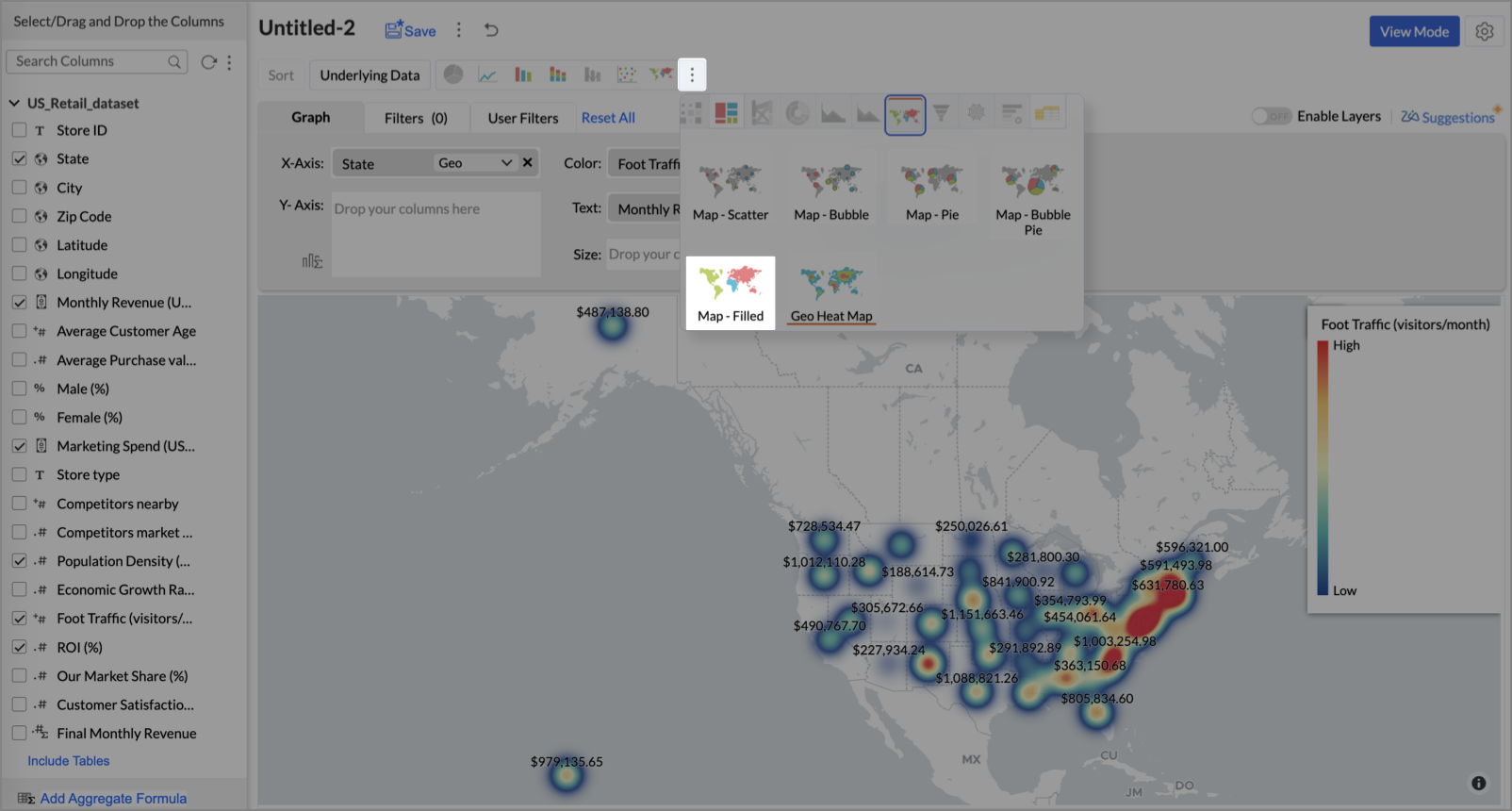
- Click on more option and select the chart type as Map-Filled.
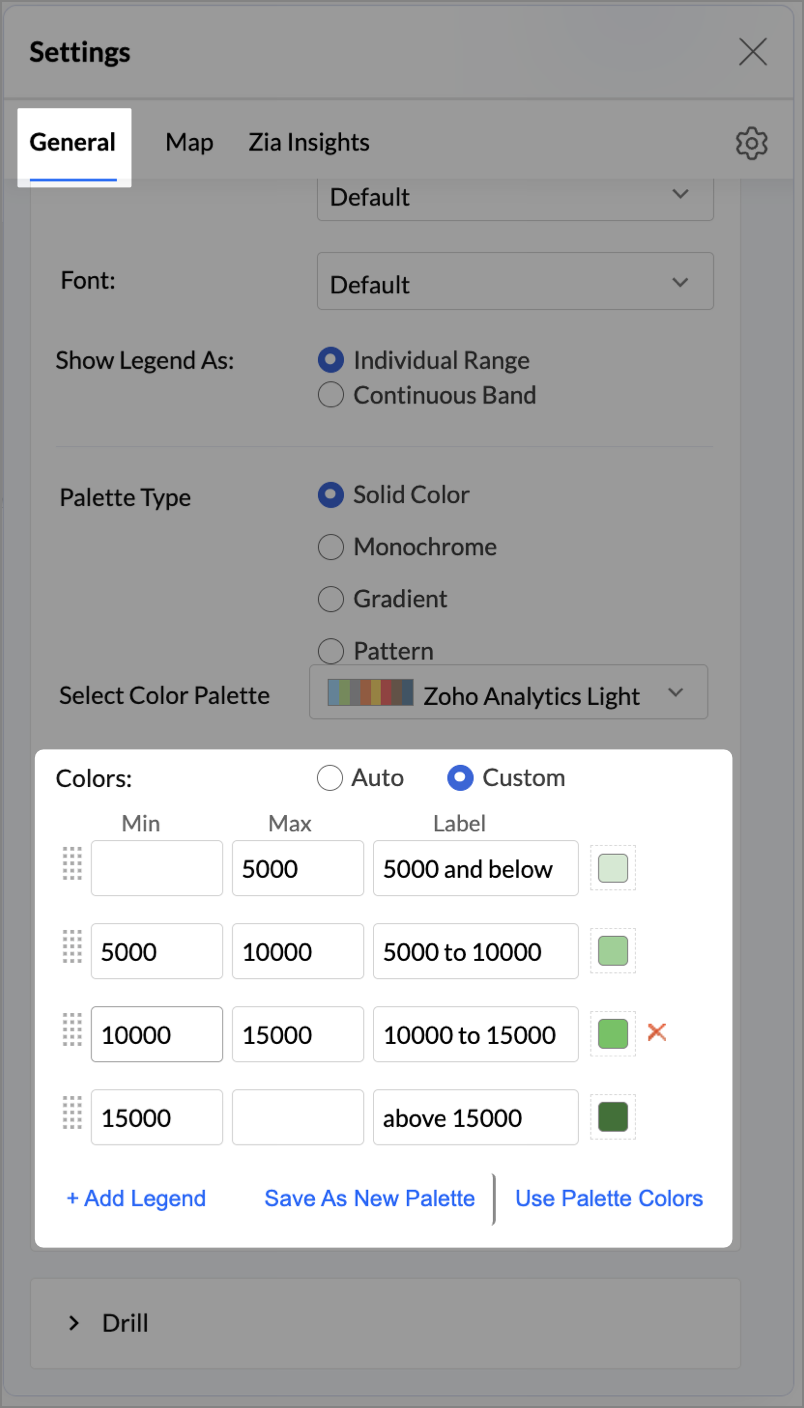
- Click the Settings icon, then click Legend.
- In the Colors section, assign from light to dark green colors for the below range of foot traffic:
- Below 5,000
- 5,000–10,000
- 10,000–15,000
- Above 15,000
- Under the Map tab, change the map to Albers USA Projection.
This filled layer highlights traffic and revenue across states.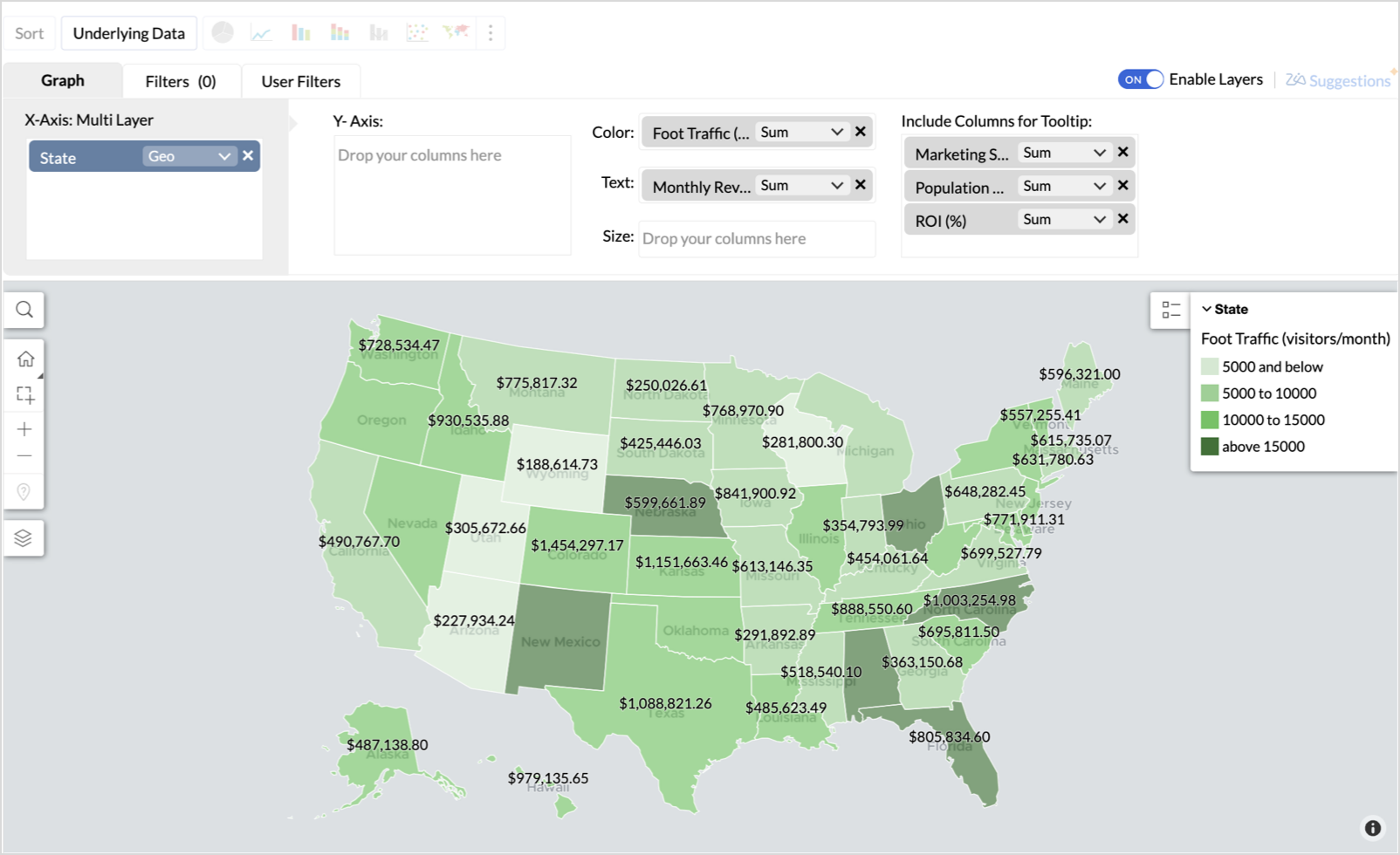
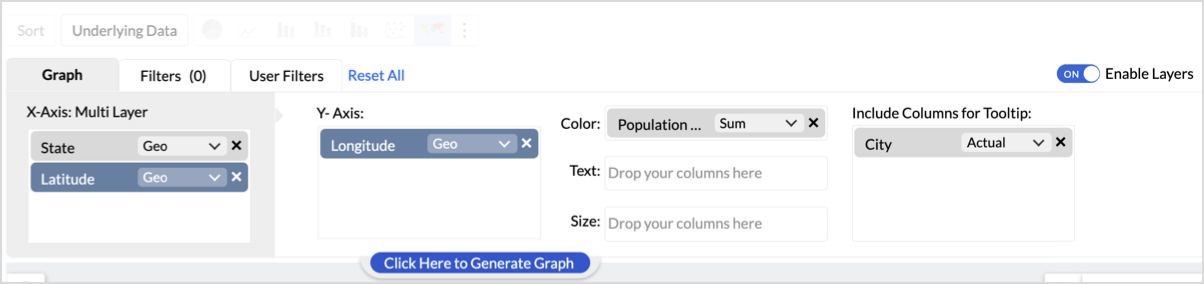
- Toggle Enable Layers to add a second layer.

- In the new layer, drag and drop Latitude and Longitude into the X-Axis and Y-Axis respectively, Population density into the Color shelf, and click Generate Graph.
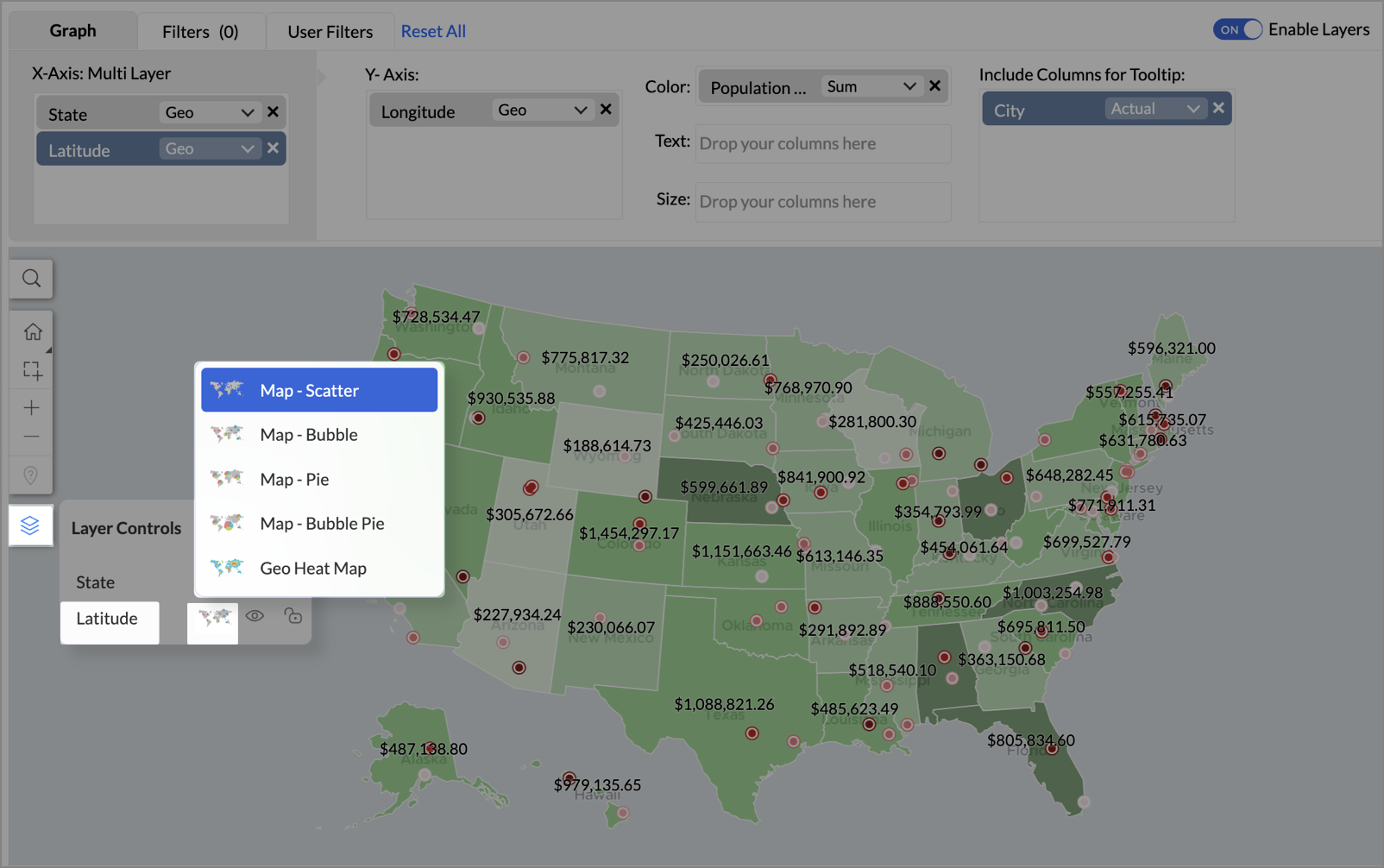
- Click Layer Controls, select Chart Chooser besides Latitude and choose the map as Map - Scatter from the list.
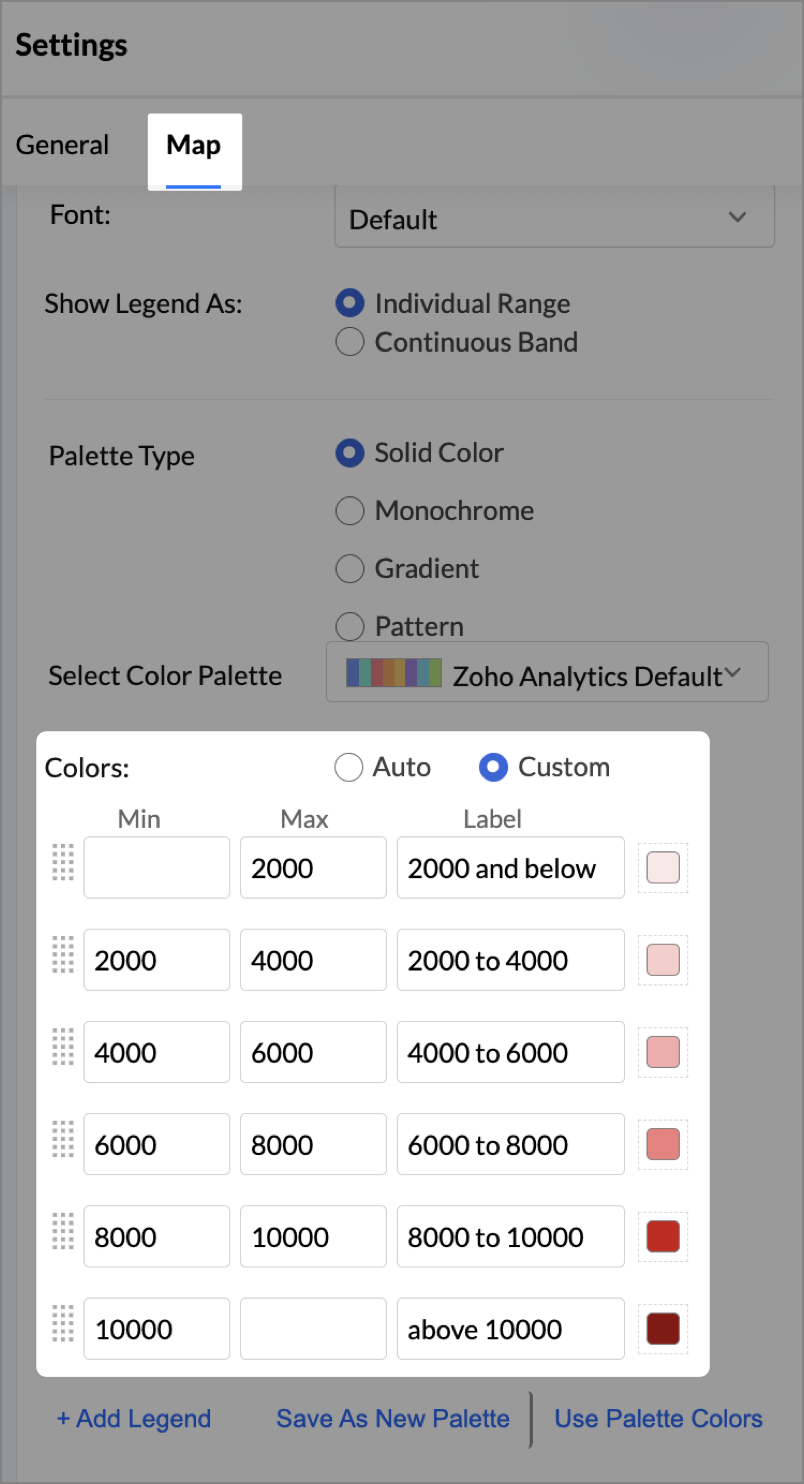
- To customize the second layer, go to Settings → Map → Latitude → Legend, and assign from light to dark red colors for the below range of population density:
- Below 2,000
- 2,000-4,000
- 4,000-6,000
- 6,000-8,000
- 8,000-10000
- Above 10,000
- Rename the report as Revenue-to-Traffic Ratio with Ghost Zone Detection and click Save.
This scatter layer marks the exact store locations, allowing visual correlation with high-traffic regions, revenue, and population density.

Key Insights
Dark green filled (high traffic) + Low revenue - Poor conversion - evaluate strategy or in-store experience
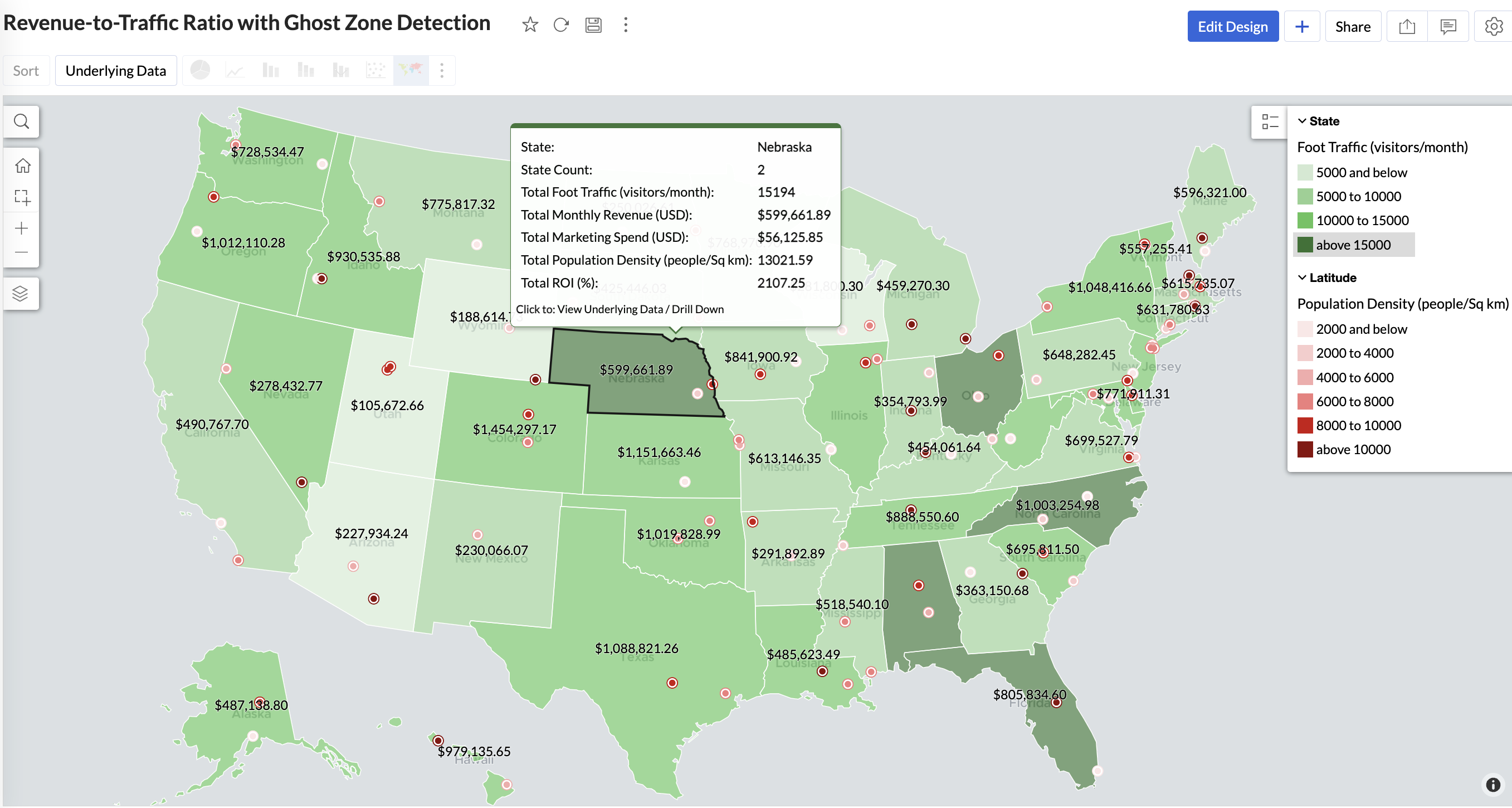
Mid to Dark green filled (high to mid traffic) + balanced revenue - Efficient zones — consider scaling efforts
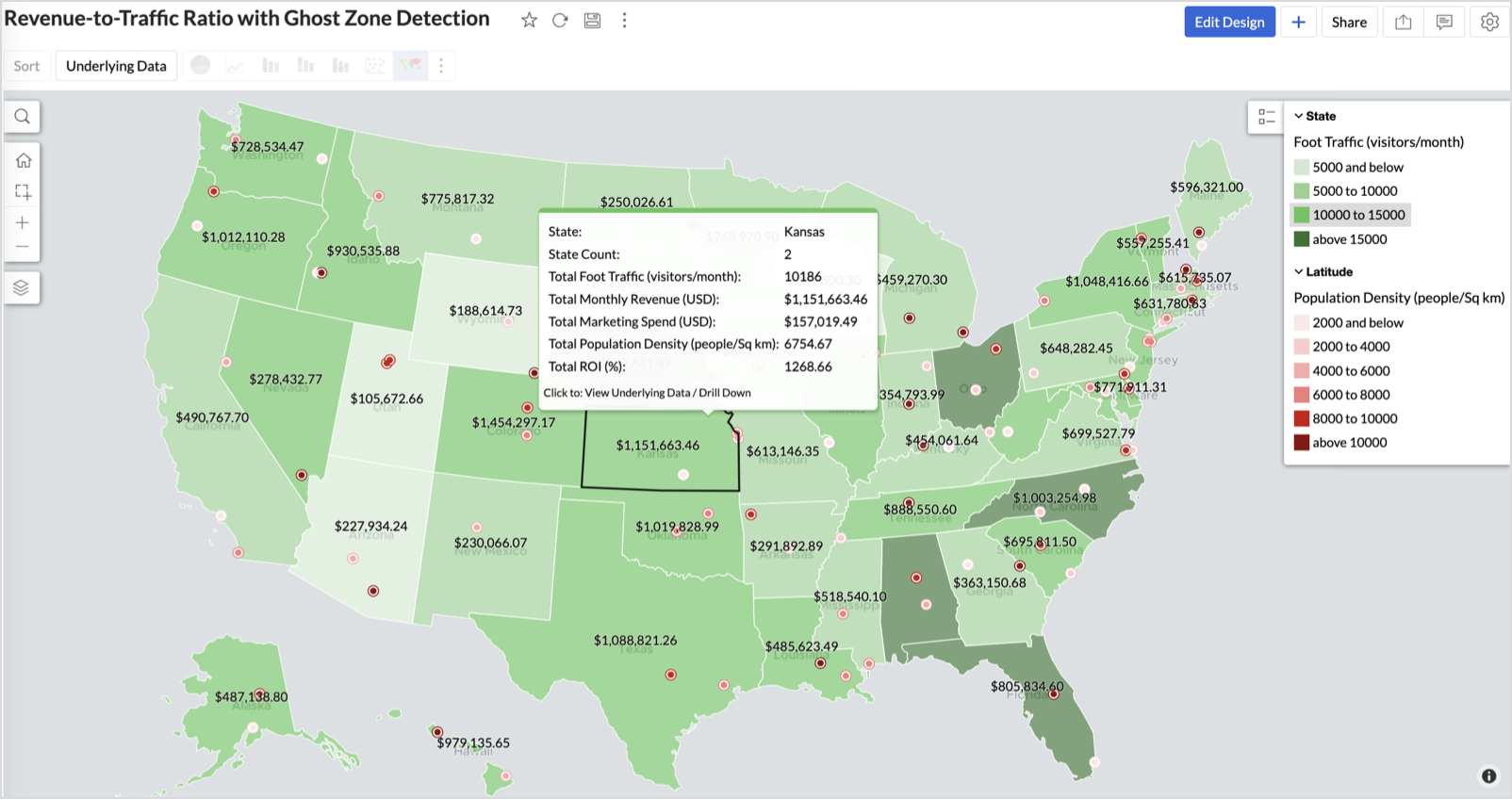
Light green filled (low traffic) + high marketing spend (from tooltip) - Budget drain — reduce spend or re-evaluate targeting
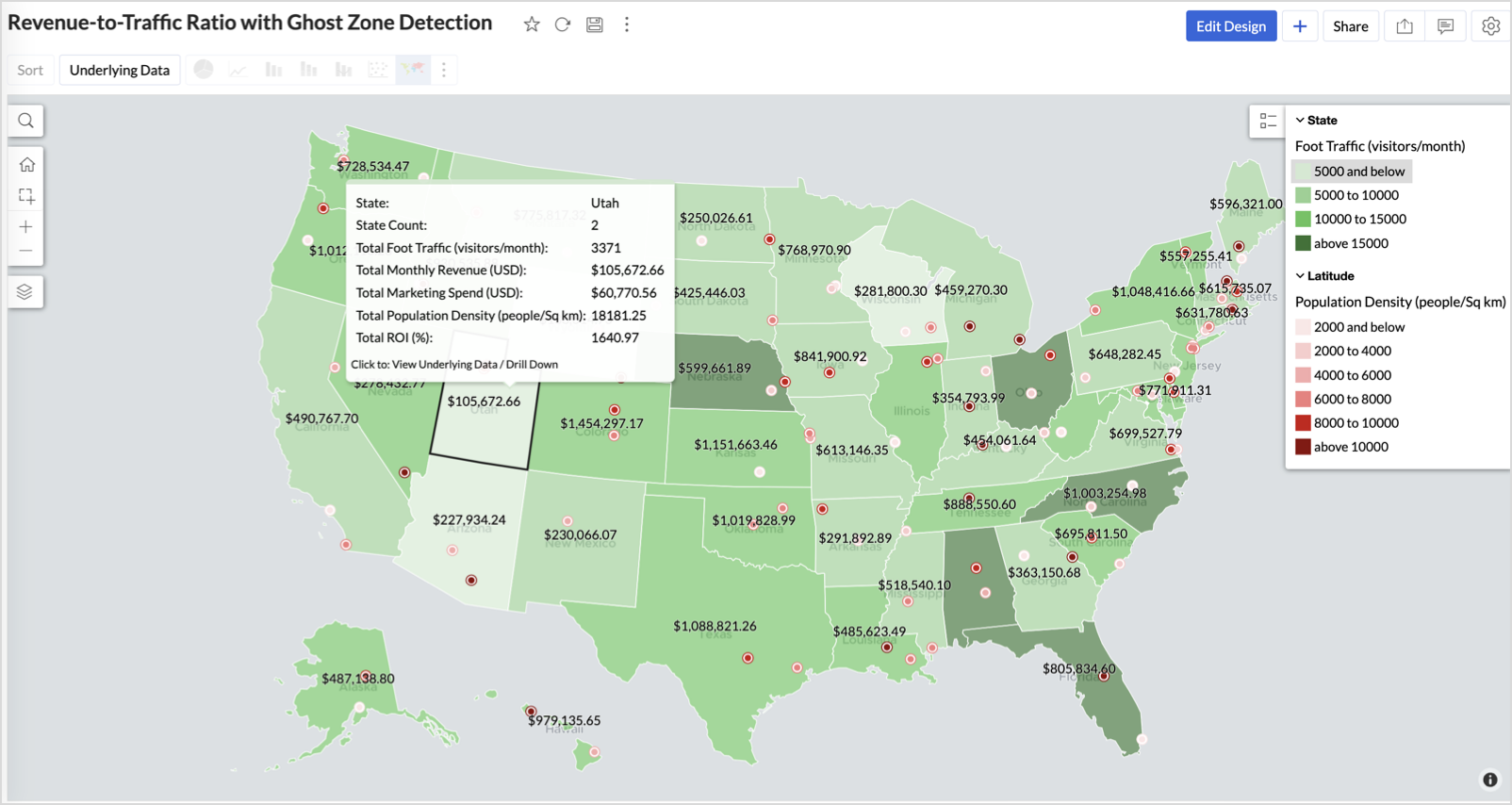
Dark red marker (high population density) + less to no store markers - Ghost Zones — high opportunity areas for expansion
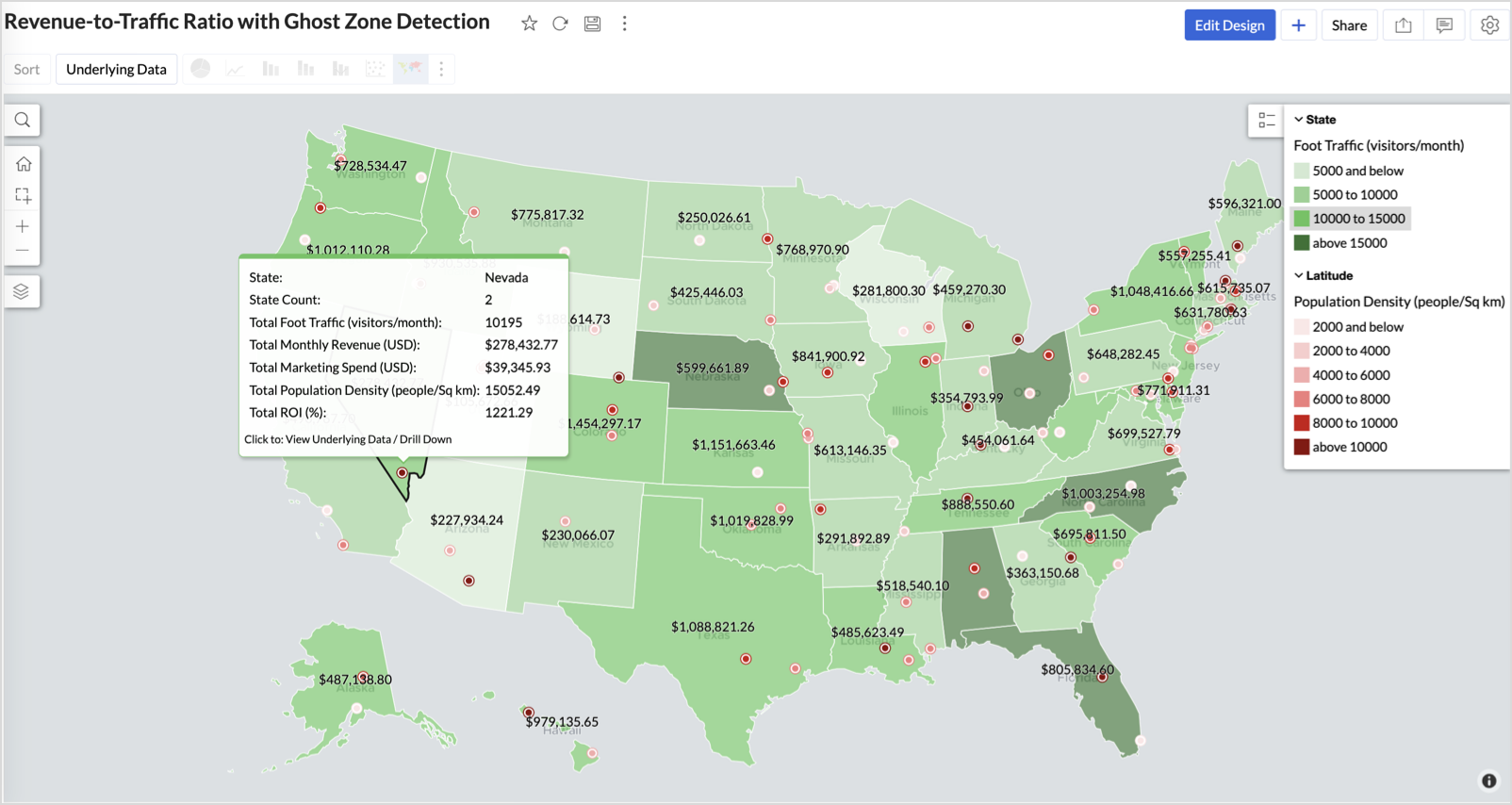
Example: In Las Vegas from Nevada, with a population density of 10,428 people/sq km and only two stores handling 10K–15K visitors/month, monthly revenue of the state remains modest at ~$278K. This indicates a high-opportunity zone for expansion, with strong footfall but untapped revenue potential.
Interpretation & Use
This map is designed for marketing and expansion teams who need to:
- Justify where to open new stores
- Optimize existing resource allocation
It visually answers the question:
Are we generating revenue where people are actually showing up?
Also, with the scatter layer:
Where are we not present — but should be?
3. Competitor Pressure Zones (Map – Scatter)
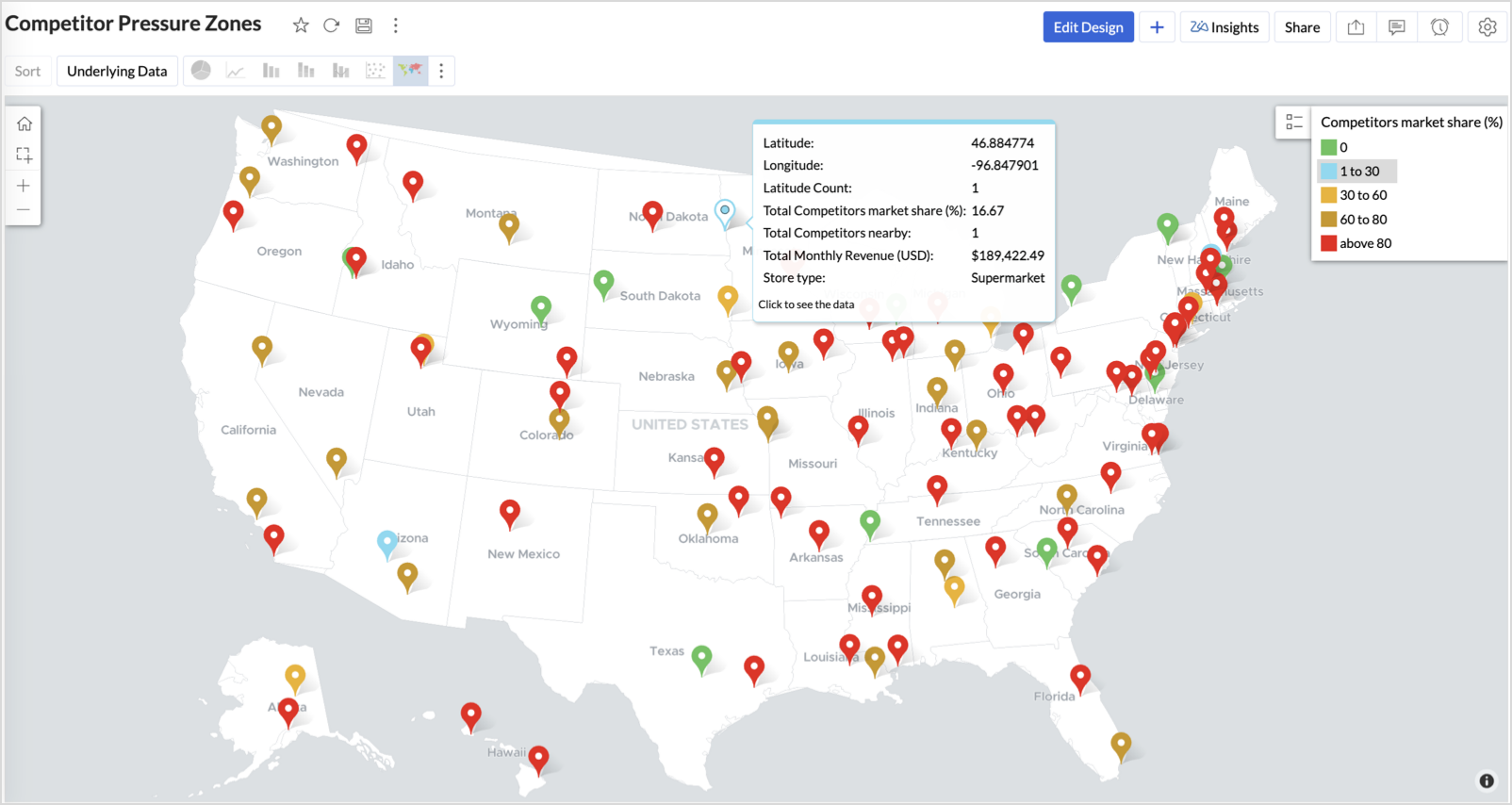
To evaluate how store performance is impacted by nearby competition, using a scatter map that plots every store across the U.S. and reflects competitor market share through color intensity.
This view helps:
- Detect locations under competitive stress
- Identify high-risk zones where your market share is at risk
- Correlate competitor presence with satisfaction and store performance
Why Map - Scatter?
Map - Scatter offers a clean and lightweight visual that plots each store based on its exact coordinates. By encoding competitor market share as color and overlaying other attributes via tooltip, this chart becomes a competitive pressure radar.
Procedure
- From the dataset, click the Create icon and select Chart View.
- In the chart designer, drag and drop the following columns into their respective shelves:
- Latitude → X-Axis
- Longitude → Y-Axis
- Competitors market share → Color
- Competitors nearby, Monthly Revenue, and Store Type → Tooltip
- Click Generate Graph.
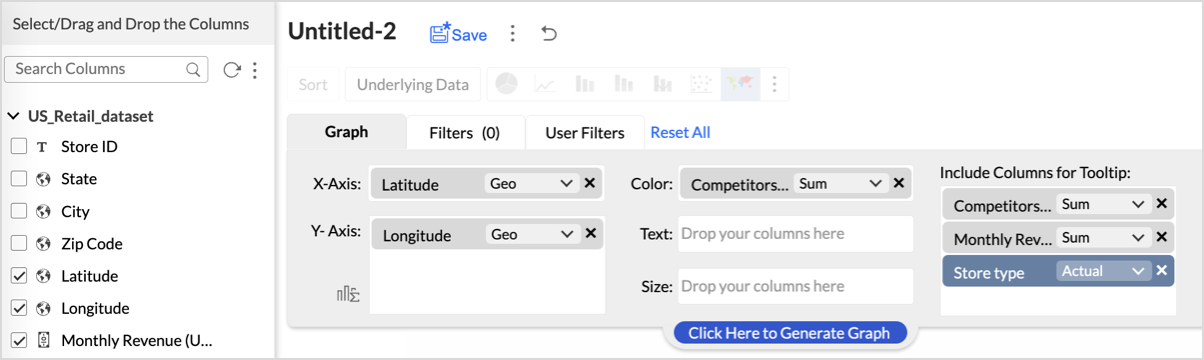
- Click on the more option and select the chart type as Map-Scatter.
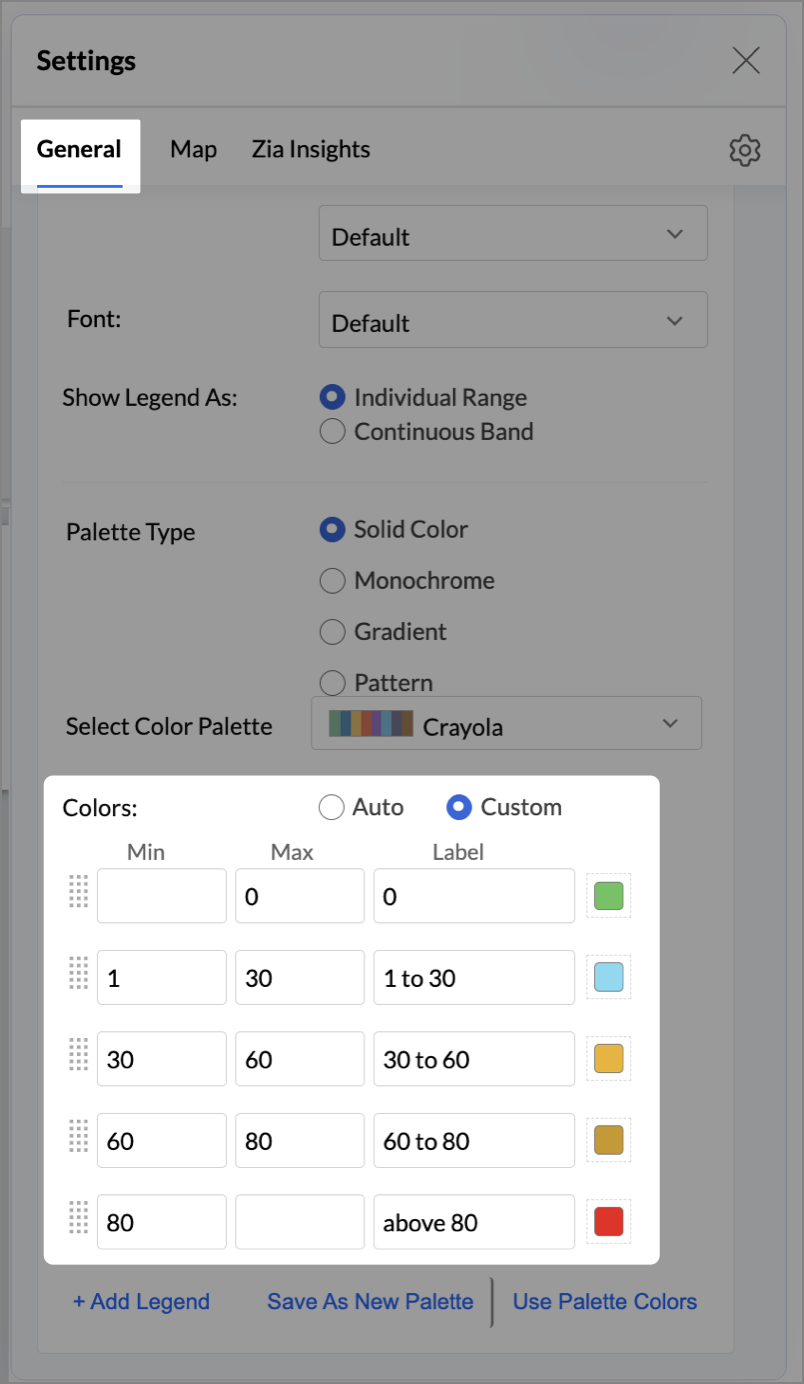
- In the Settings panel, adjust the color gradient to reflect pressure levels
- 0 → Green
- 1-30 → Cyan
- 30-60 → Orange
- 60-80 → Pale red
- Above 80 → Red
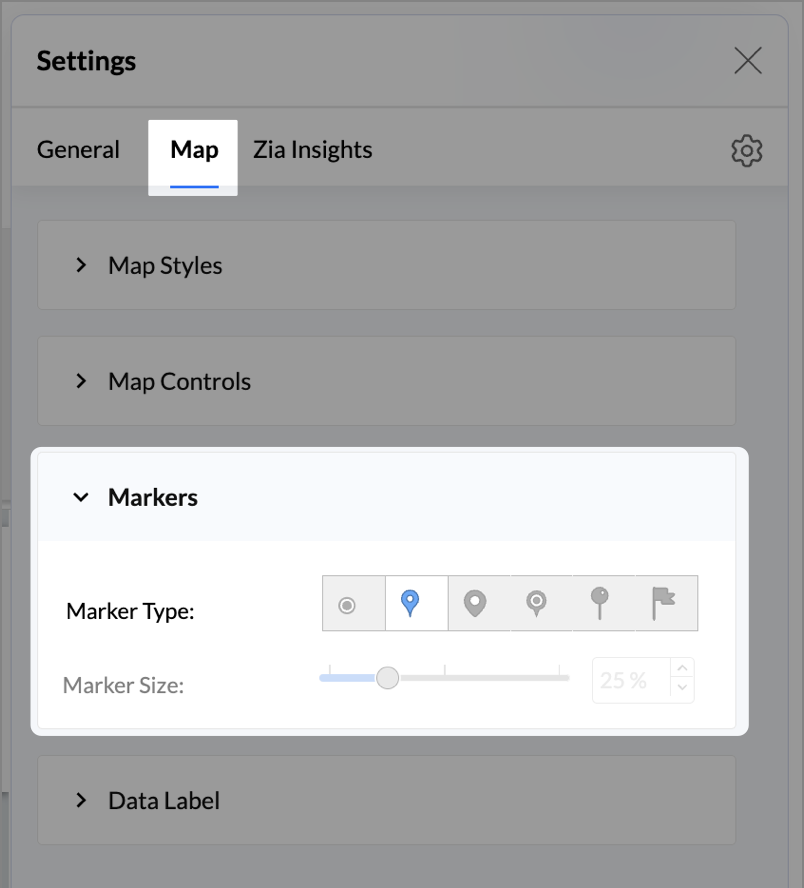
- Change the Marker type under Maps → Marker tab.
- Under the Map tab, change the map to Albers USA Projection.
- Rename the report as Competitor Pressure Zones and click Save.
The resulting chart uses color to signal competitive heat around each store, allowing you to scan pressure zones across all regions visually.
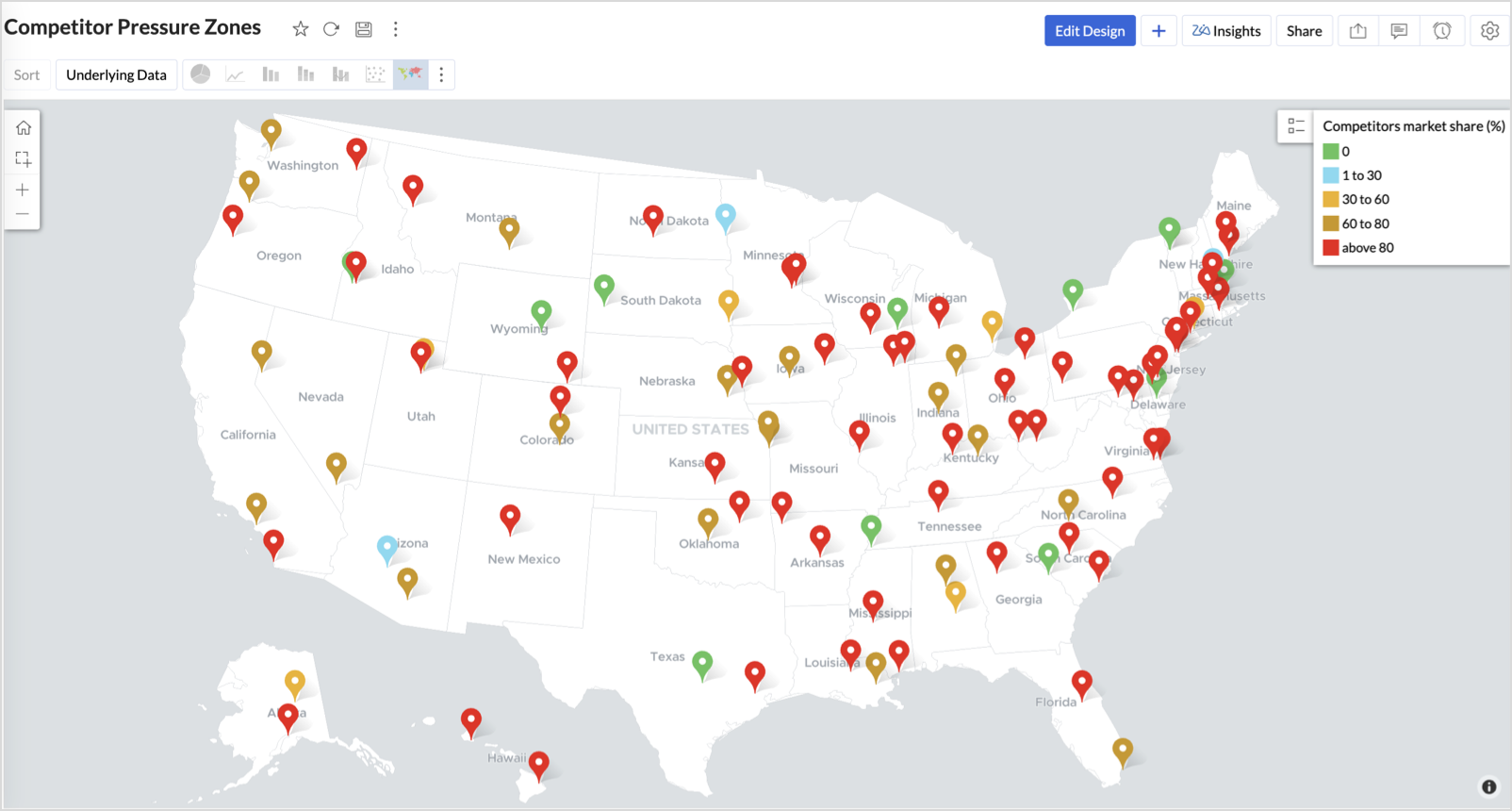
Key Insights
Red (80-100%) - High competitor dominance — urgent intervention zone
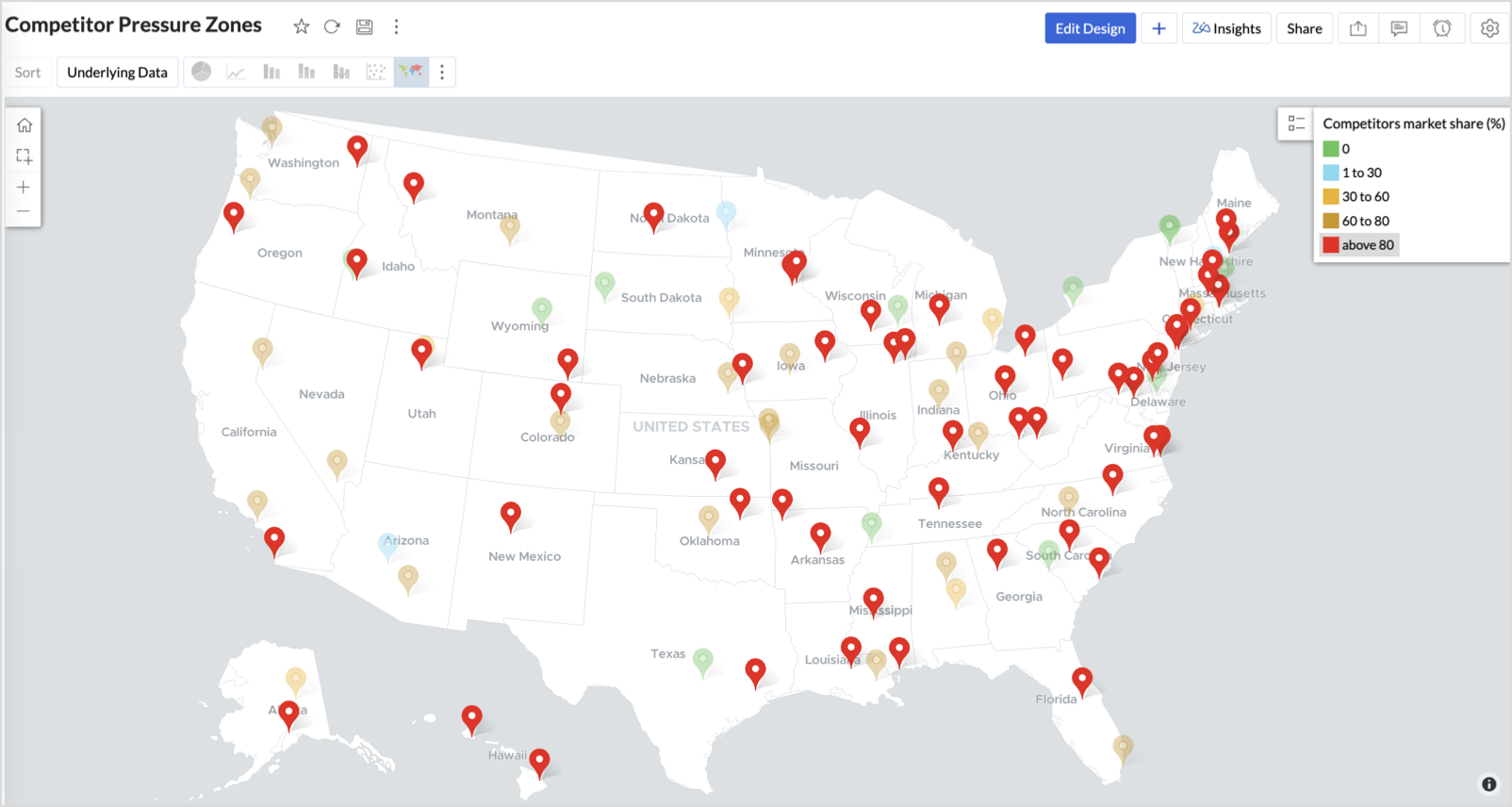
Orange (30-60%) + low revenue - Growing pressure — performance risk emerging
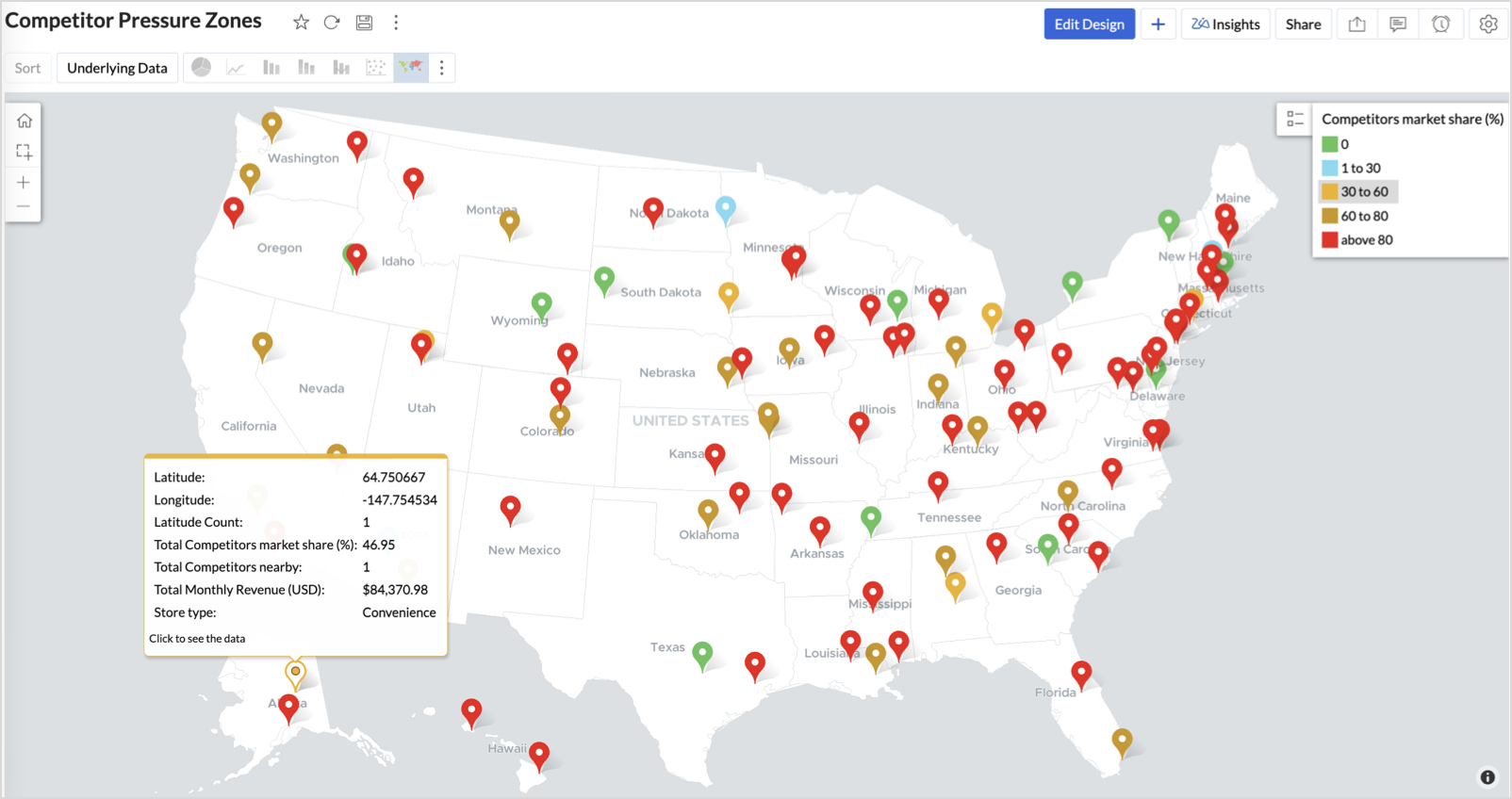
Green (0%) + strong revenue - Market leader — low competition, strong position
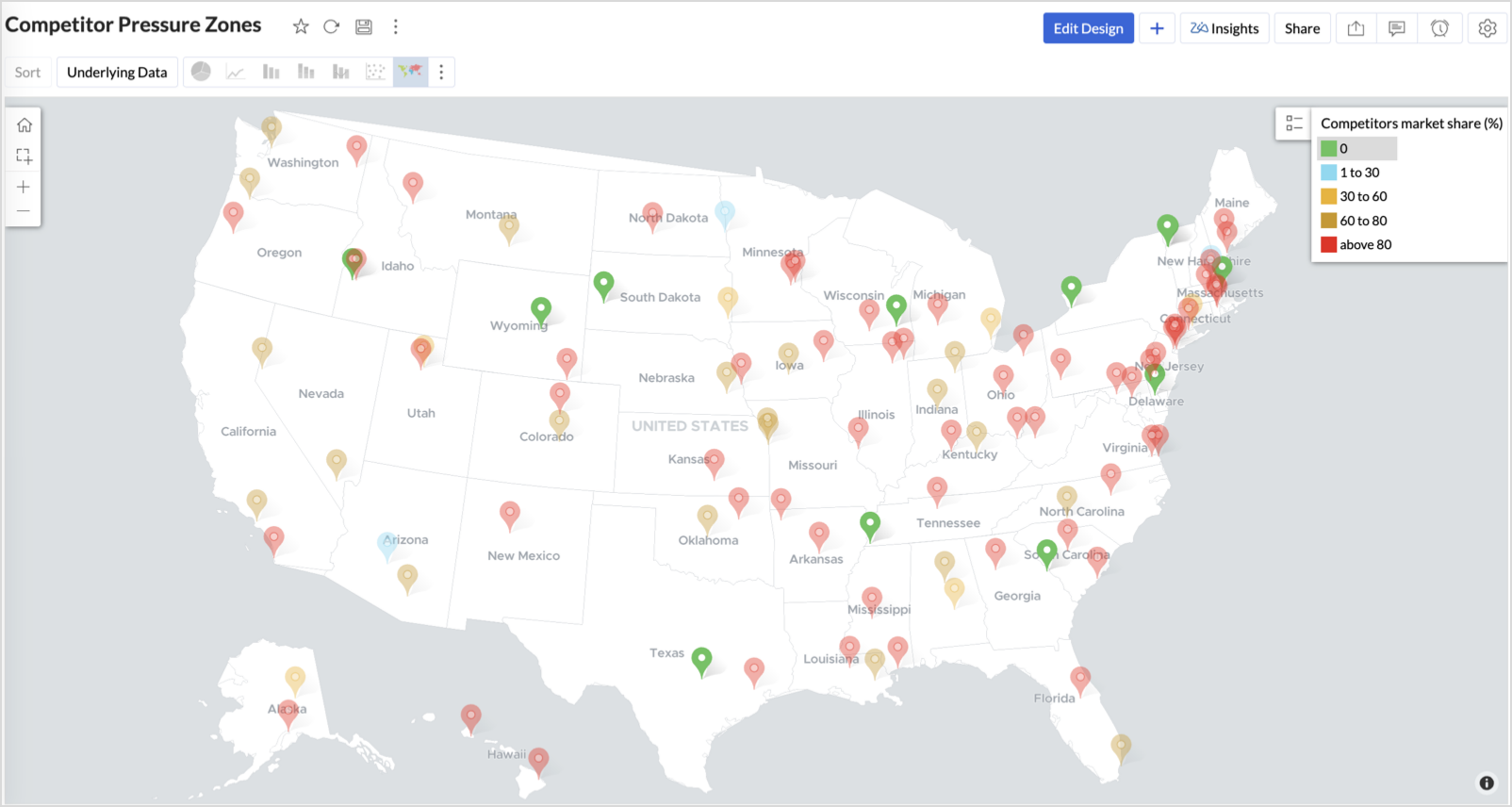
Cyan (1-30%) + moderate revenue - Mild competition — possible opportunity to scale further
Business Interpretation
This chart empowers regional and strategy teams to:
- Detect overcrowded areas where stores are losing share
- Identify safe zones where your brand leads the market
- Spot emerging competitor influence before it cuts into your margins
It acts as a competitive intelligence dashboard, mapping how your store network stands against external threats.
4. Customer Gender Distribution (Map - Pie)
To visualize how the gender distribution of customers varies across store locations. This helps identify stores with significant demographic skews, allowing for more personalized marketing, product selection, and in-store experience.
Why Map - Pie?
The Map - Pie chart is ideal for visualizing data composition across geographical locations.By breaking down each store’s customer base into Male (%) and Female (%) segments, this chart reveals who your customers are and where gender-targeted strategies might work best.
Procedure
- From the dataset, click the Create icon and select Chart View.
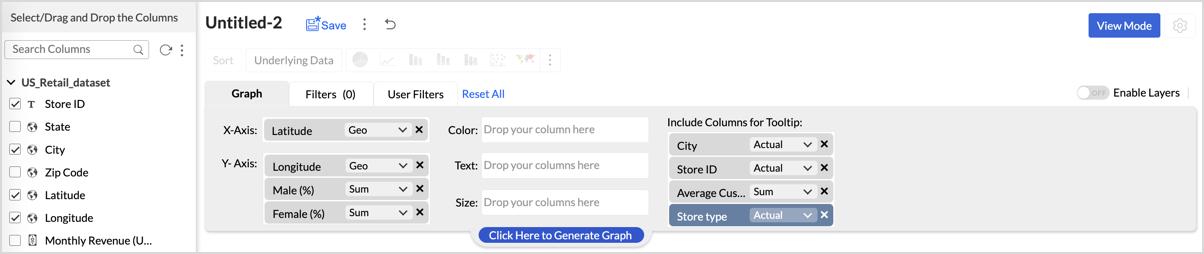
- In the chart designer, drag and drop the following columns into their respective shelves:
- Latitude → X-Axis
- Longitude, Male (%), Female (%) → Y-Axis
- City, Store ID, Average Customer Age, Store Type → Tooltip
- Click Generate Graph.
- In Settings, under the Map tab, change the map to Albers USA Projection.
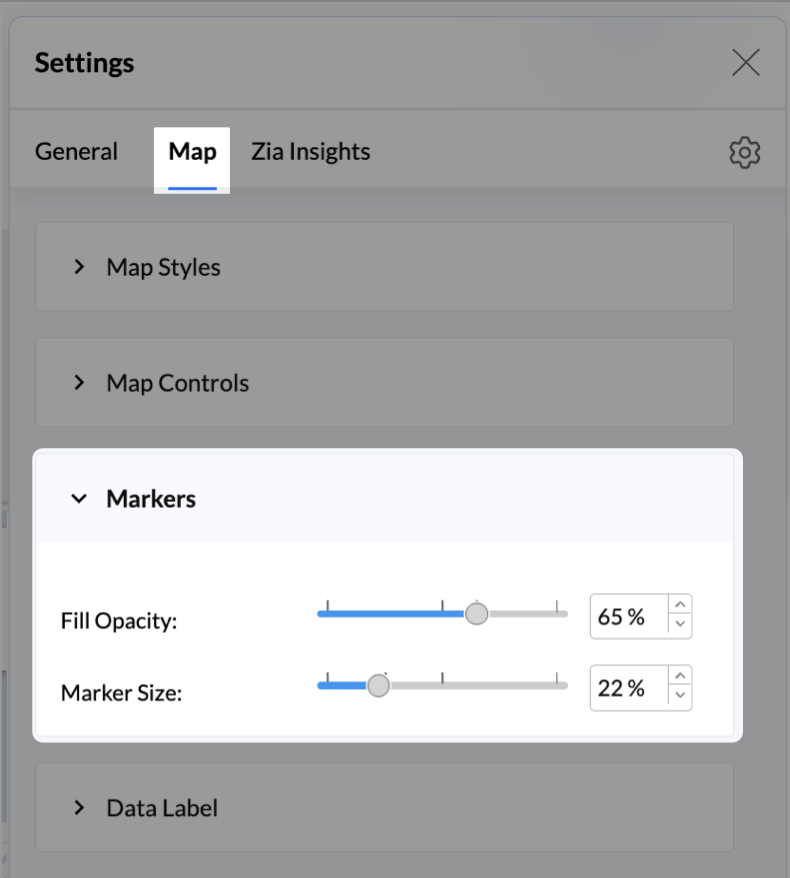
- Click on Markers, adjust the Marker Size as shown.
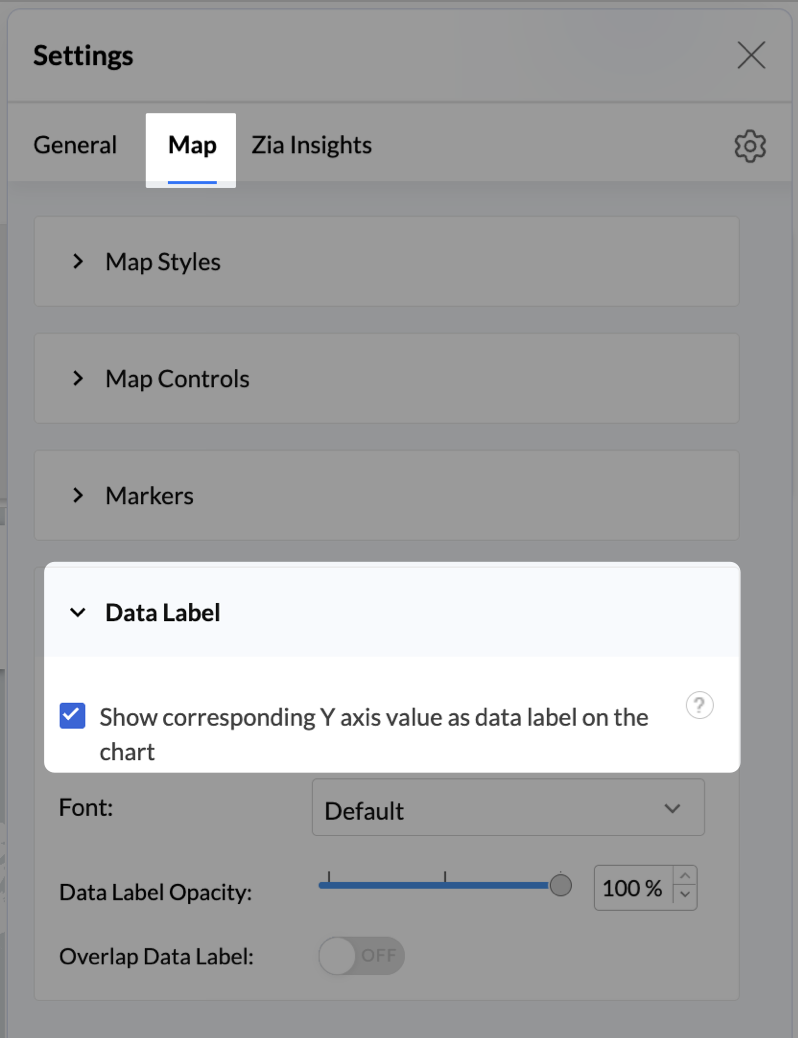
- Click on Data Label, and enable the Show corresponding Y axis value as data label on the chart to display the percentage values on the map.
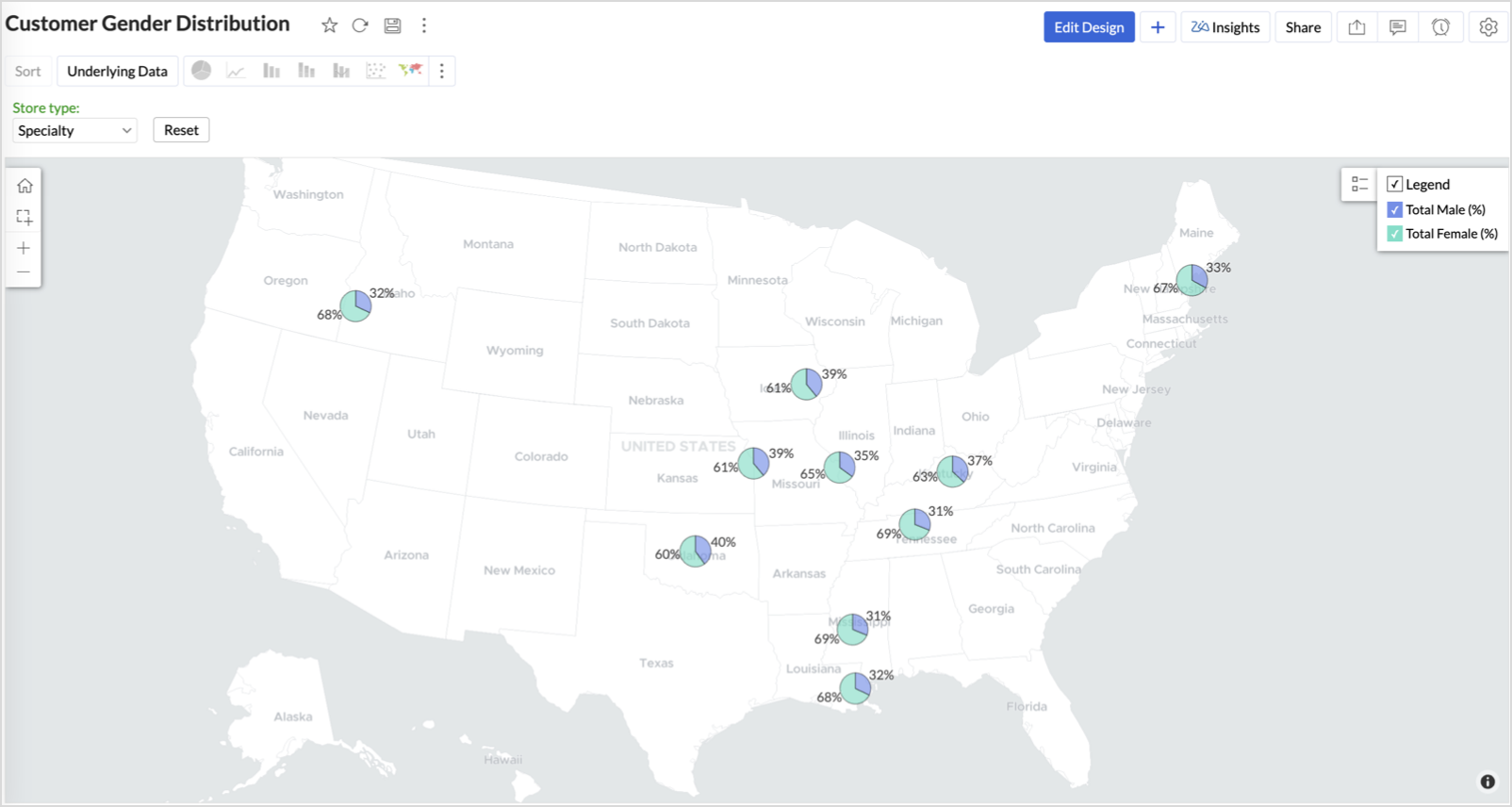
- Add Store Type as User Filters to slice down store-wise gender distribution.
- Rename the report as Customer Gender Distribution and click Save.
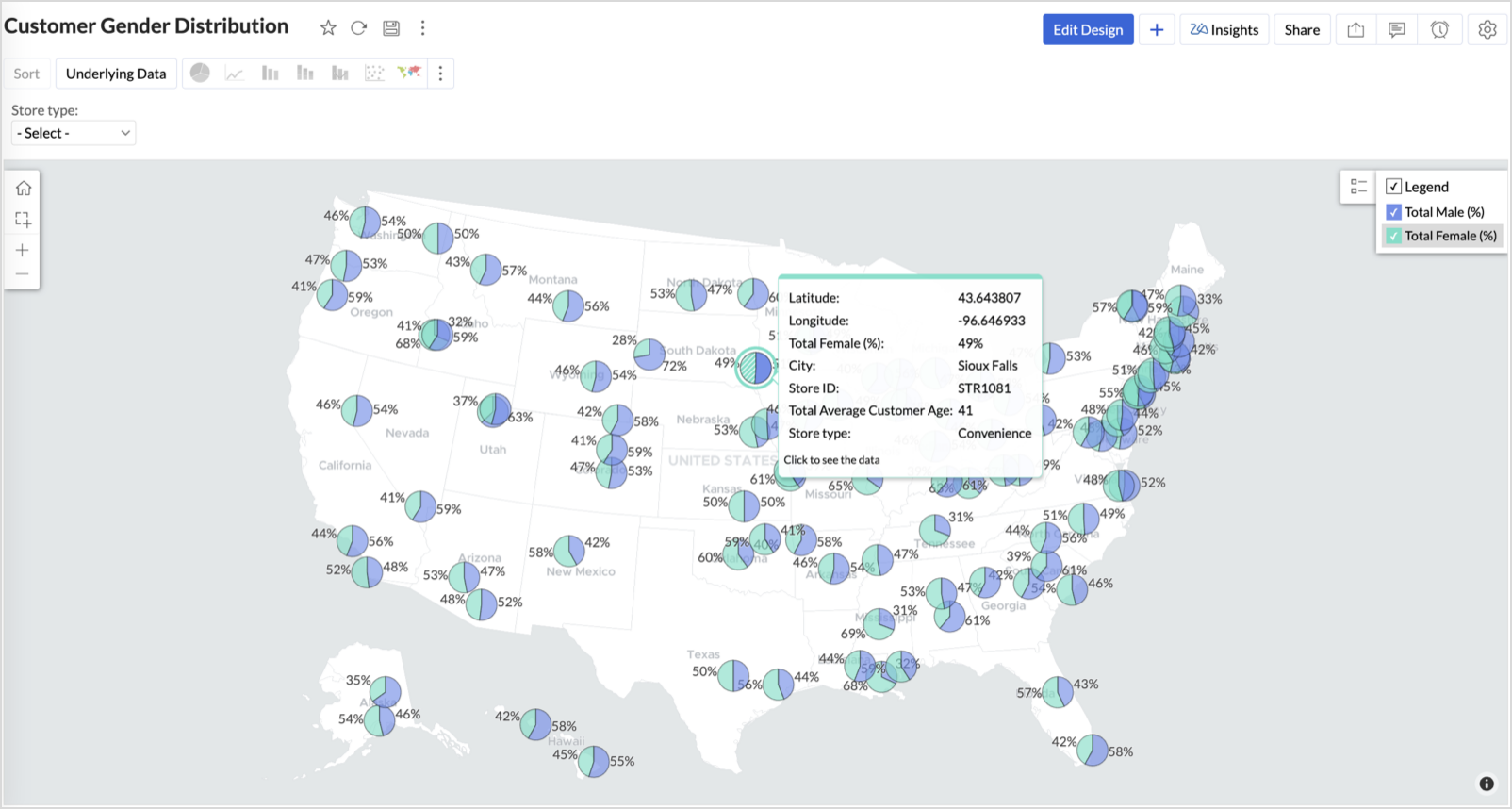
Each store will now display a pie chart representing the gender split among its customers, directly on the map.

Key Insights
Uneven gender split (e.g., 70% Male) - Potential to tailor offerings, branding, or promotions for the dominant gender
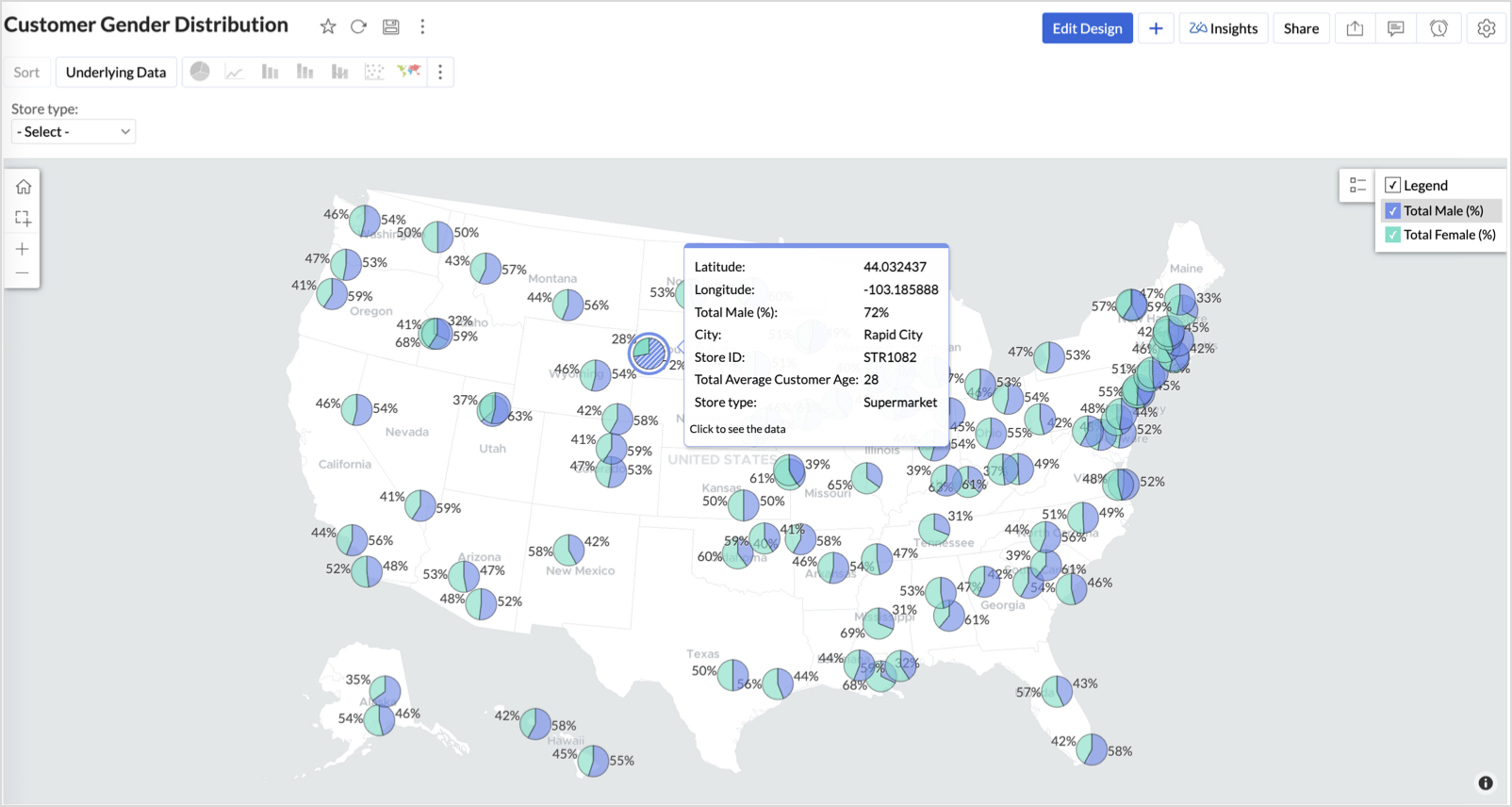
Balanced split (≈50/50) - Opportunity to run inclusive or diversified campaigns
High female ratio + specialty store - Indicates demand for niche products — expand category offerings
Business Interpretation
This chart allows marketing and merchandising teams to:
- Understand gender-based customer clustering across regions
- Launch targeted campaigns (e.g., loyalty programs, promotions)
- Refine product assortments to suit local preferences
For example: A store with 70% female shoppers may benefit from deeper investment in lifestyle categories, while a balanced store could serve as a testing ground for unisex offerings.
Summary
In this phase, we laid the foundation for geo-powered retail intelligence using Zoho Analytics. Through a single, well-structured dataset and four powerful geo map visualizations, we transformed raw store data into real, actionable business insights.
Here’s what we achieved:
|
Report
|
Business Insights
|
|
Store Performance (Bubble)
|
Identified stores that are over performing or at churn risk based on revenue and satisfaction.
|
|
Revenue-to-Traffic Ratio (Filled + Scatter)
|
Detected ghost zones and optimized marketing ROI by comparing traffic and revenue.
|
|
Competitor Pressure Zones (Scatter)
|
Mapped out competitor dominance and spotted at-risk or saturated regions.
|
|
Customer Gender Distribution (Pie)
|
Uncovered demographic patterns to tailor product, marketing, and in-store experience.
|
Click here to access the sample workspace.
These visualizations brought spatial awareness into every performance metric — turning maps into a strategic business tool.
And this... is just the beginning.
Stay tuned for Phase 2 — where Multi-Layer Geo Maps and Network Charts come together to supercharge your business strategy with even deeper spatial insights.
Topic Participants
Pradeepkumar R
Sticky Posts
What's New in Zoho Analytics - February 2026
Hello Users! We're back with another round of updates for Zoho Analytics. This month's release focuses on giving you greater flexibility in how you visualize, manage, and act on your data - with new features like custom visualizations, remote MCP server,What's New in Zoho Analytics - January 2026
Hello Users! We are starting the year with a strong lineup of updates, marking the beginning of many improvements planned to enhance your analytics experience. Explore the latest improvements built to boost performance, simplify analysis, and help youWhat's New in Zoho Analytics - November 2025
We're thrilled to announce a significant update focused on expanding your data connectivity, enhancing visualization capabilities, and delivering a more powerful, intuitive, and performant analytics experience. Here’s a look at what’s new. Explore What'sWhat's New in Zoho Analytics - October 2025
Hello Users! We're are back with a fresh set of updates and enhancements to make data analysis faster and more insightful. Take a quick look at what’s new and see how these updates can power up your reports and dashboards. Explore What's New! ExtremeWhat’s New in Zoho Analytics – September 2025
Hello Users!! In this month’s update, we’re raising the bar across multiple touchpoints, from how you bring in data, plan and track projects to how you design and brand your dashboards. We’ve added the all-new Gantt chart for project visualization, expanded
Recent Topics
Department Overview by Modified Time
We are trying to create visuals to show the work our agents do in Zoho Desk. Using Zoho Analytics how can we create a Department Overview per modified time and not ticket created time? In order for us to get an accurate view of the work our agents areEnhance Sign CRM integration
Hello all, I'm working on a custom Deluge script to enhance the integration between Zoho CRM and Sign by using a writer merge template for additional flexibility. I want to replicate the post-sign document integration that exists between CRM and SignZoho Workdrive download was block by security software
Hi Team, Recently workdrive download was blocked by huorong security. Could you please advise how to put zoho workdrive as white list? every time we put "*.zohoexternal.com" or "workdrive.zohoexternal.com", the warning msg will still pop in next dowChoosing a portal option and the "Unified customer portal"?
I am trialling Zoho to replace various existing systems, one of which is a customer portal. Our portal allows clients to add and edit bookings, complete forms, manage their subscriptions and edit some CRM info. I am trying to understand how I might bestGeneral feedback
I think Zoho is at the moment (potentially) the best, or perhaps the only, real online solution, for business, and not just business. Surely the only one that has all the features that I need (and I've probably tried everything, at least all that has a cost-free option). It has still got lots of bugs and imperfect features, so I do hope it keeps developing and becomes a really professional platform. Lots of people (including me) want to use such one platform for all scheduling/mail/note-taking...How to add SSL to Short URL custom domain?
Hi, I've added a custom domain the the URL Shortener Domains. It's creating the short URL fine, but when clicking through, firstly I get an SSL warning, then a 400 Bad Request warning.Single Portal for Multiple Apps
Hello, I'm just getting started with Zoho and I'm very overwhelmed. I am currently using the free trial of Zoho One, but if I can figure it out, I intend to upgrade to the paid version. Zoho One, of course, gives me access to an entire suite of services/applications. One of the things I'd like to do is have a single place for clients (customers?) to log in and view current projects, invoices, contact information, etc. A single login for my clients. A single portal. I've come across documentationAntispam validation failed for your domain in Accounts
I tried adding a domain to zeptomail.zoho.com, but the “add domain” operation failed. The front‑end error reads: “Domain could not be added. Please contact support@zeptomail.com.” The back‑end API returned: ``` { "error": { "code": "TM_3601", "details":CodeX Scripts for Enforcing Custom Project Logic
Every organization has a defined way of executing projects. There are clear expectations around how tasks should move, when projects should progress, and which actions require validation. When these rules are consistently followed, projects remain structuredCancelled appointments still block out timeslot
I haven't had to test this before, but I've just found a problem. I had an appointment in a certain timeslot, and that appointment was cancelled. However, Bookings won't let another appointment be booked in that slot - it makes that time unavailable untilPreventing Group Emails From Being Sent to Group Member Personal Mail
We have a group setup for a public facing email address. We have streams turned on for this group. Right now when an email is sent to this group email it hits the group stream and also sends a copy of the email to all group members. We'd like to disableUnusual activity detected from this IP. Please try again after some time.
Hello Zoho admin and IT team We are a registered website in Eloctronic services and we been trying to add our users to the zoho system but this issue faced us ,, hope you unlocked us please.¿Puedo migrar mi sitio desde WordPress a Zoho? ¿Zoho admite herramientas con código personalizado?
¡Hola comunidad! Estoy evaluando la posibilidad de migrar mi sitio web https://calculadoradenotas.cl/ desde WordPress a una solución Zoho, y tengo algunas dudas técnicas que espero puedan aclararme. Mi sitio no es solo informativo: es una herramientaHow do I link my invoice to an estimate?
There has been instances where I have created estimates, however, invoices for the same estimate were created independently. The status of these estimates hasn't converted to 'invoiced'.Impossible to import Journal from Freshbooks
I have been trying to import journals from Freshbooks since August 30th. Every time I try to import, I get an error message. I have already made sure every row has a date. First it was saying the account and notes had unexpected input and that every debit/creditPeppol: Accept Bill (Belgium)
Hi, This topic might help you if you're facing the same in Belgium. We are facing an issue while accepting a supplier bill received by Peppol in Zoho Books. There is a popup with an error message: This bill acceptance could not be completed, so it wasConvert invoice from zoho to xml with all details
How to convert an Invoice to XML format with all detailsPrevent subform editing on a module's detail's page
Hi everyone, We would like to prevent any editing of the subform data in the : Create page Edit page Details page (as subform editing is now allowed by the recent UX update) We are able to prevent editing by making the subform fields read only in theRefresh frequency
Dear Zoho Team, I really, truly appreciate that Zoho Books gets frequent updates. As a matter of fact this is how a good SaaS company should stay on top. However, I feel that I have to hit refresh almost every day. This was exciting at the beginning butWeekly Tips : Save Time with Saved Search
Let's assume your work requires you to regularly check emails from important clients that have attachments and were sent within a specific time period. Instead of entering the same conditions every time—like sender, date range, and attachments included—youDiscontinuing Zoho ShowTime service on May 30, 2026
Hello everyone, As a follow-up to our earlier announcement, we’d like to share an important update regarding Zoho ShowTime’s discontinuation timeline. Zoho ShowTime, our online training platform, reached its end of life on December 31, 2025, and its servicesAbility to CC on a mass email
Ability to CC someone on a mass email.Bookings duration - days
Hi team, Is there any way to setup services/bookings that span multiple days? I am using Zoho Bookings for meeting room bookings. Clients may wish to book a room for more than one day, for up to a month. If not, is there a plan to allow services to be setup with durations of Days as well as hours and minutes? Many thanks, Anna.Customer address in Zoho Bookings
Hello, Is it possible to add customer address information to the Zoho bookings appointment screen? Or have it pull that information automatically from the CRM? We are wanting to use this as a field management software but it is difficult to pull the address from multiple sources when it would be ideal to have a clickable address on the appointment screen that opens up the user's maps. It would also be advantageous for the "list view" to show appointment times instead of just duration and bookingFeature Request - Allow Customers To Pick Meeting Duration
Hi Bookings Team, It would be great if there was an option to allow customers to pick a duration based on a max and minimum amount of time defined by me and in increments defined by me. For example, I have some slots which are available for customersNew feature: Invite additional guests for your bookings
Hello everyone, Greetings from Zoho Bookings! We are happy to announce the much-awaited feature Guest Invite, which enhances your booking experience like never before. This feature allows additional participants to be invited for the bookings to makeChanging the owner of a call
Am I correct in my conclusion that I cannot change the owner of a call in Zoho? The field does not show up in the screen, nor can I make it show up as the systems does not give me that option. I cannot "mass update" it either. I tried it, but Zoho refuses to change the name of the owner. Please help out: how do I change the owner of a call.Unified Notes View For Seamless Collaboration
To facilitate better coordination among different departments and team members, the notes added to a record can now be accessed in all its associated records. With this, team members, from customer service representatives to field technicians, can easilyRemove Profiles from "Forecast" Module
How can I remove Profiles from My forecast Module? Image Below The only revenue generators are the VP's, and the Estimation Managers, and the Estimators subordinate to the Est. Managers. How can I remove the unused Profiles? Its frustrating to see themRestoring records from the recycle bin programatically
Background I'm working on a piece of software to automate conversion of Leads into Deals based on order status from my company's website. The process is mostly complete, right now I'm just working on handling a few edge cases to ensure data integrity.Does Zoho Learn integrate with Zoho Connect,People,Workdrive,Project,Desk?
Can we propose Zoho LEarn as a centralised Knowledge Portal tool that can get synched with the other Zoho products and serve as a central Knowledge repository?Create static subforms in Zoho CRM: streamline data entry with pre-defined values
Last modified on (9 July, 2025): This feature was available in early access and is currently being rolled out to customers in phases. Currently available for users in the the AU, CA, and SA DCs. It will be enabled for the remaining DCs in the next coupleInvoices not arriving and mail server settings
I am having an issue where some clients are not receiving invoices. I have configured Zoho Books to send on my behalf and configured the appropriate SPF, DKIM and DMARC settings on my mail server and tested these as working. I get the CC'd copies so ISalesIQ Identity Update for Logged In Wordpress User
Hey folks, SalesIQ does not automatically detect when a visitor logs in to WordPress and update their identity to match. For example, if a client of ours visits the site and logs in, SalesIQ will not track them correctly by default. The Solution The solutionParagraph spacings in Zoho Notebook are double-spaced only. Is there a way to keep the original spacing format?
Sorry I don't know the proper terminologies but the best way I can put it is all single-spaced paragraphs that I copy to Zoho Notebook become double-spaced paragraphs. It's very inconvenient and counterproductive when copying and pasting things from andChanging line space in Notebook
My lines are double spaced. How do i change to single space?Plug Sample #14: Automate Invoice Queries with SalesIQ Chatbot
Hi everyone! We're back with a powerful plug to make your Zobot smarter and your support faster. This time, we're solving a common friction point for finance teams by giving customers quick access to their invoices. We are going to be automating invoiceWorkdrive on Android - Gallery Photo Backups
Hello, Is there any way of backing up the photos on my android phone directly to a specific folder on Workdrive? Assuming i have the workdrive app installed on the phone in question. EmmaAuto sync Photo storage
Hello I am new to Zoho Workdrive and was wondering if the is a way of automatically syncing photos on my Android phone to my workdrive as want to move away from Google? ThanksIs anyone experience missing functions in the new UI until hard refresh?
The set of functions including search is almost always missing upon loading an app in the new UI. If you refresh, the functions return. (see second screenshot) Anyone else experiencing this?Next Page