Kaizen 214 - Workflow APIs - Part 2

Last week, we discussed how Zylker Cloud Services used the Workflow APIs to discover and audit all the automations in their CRM, listing every workflow, checking triggers, and understanding their automation limits. This week, we take the next step: understanding what configurations are valid before creating or updating workflows via APIs.
Step 4: Workflow Rule Configurations API
When you work in the CRM UI, creating workflows feels straightforward. The interface shows only valid triggers and actions. Try adding an unsupported action, and it simply will not appear. This is because the UI enforces hundreds of rules behind the scenes.
With APIs, these validations must be handled manually. That is where the Workflow Rule Configurations API comes in. It gives all the valid triggers and actions for a given module, preventing errors before they happen.
Why this API matters
Consider two examples:
You want to create a workflow for the Products module based on a Scoring Rule update. The UI hides this option because scoring rules are not supported for Products.
You try to add a Field Update action for a Record Delete trigger. This is invalid, as the record no longer exists. The UI prevents it, but via API, you would get an error if you try to create or update the workflow with this configuration.
The Configuration API removes this guesswork, allowing you to fetch and respect valid triggers and actions.
Sample Request:
GET {api-domain}/crm/v8/workflow_configurations?module=Deals
Sample Response:
{ "workflow_configurations": { "related_triggers_details": [ { "api_name": "Notes", // The API name of the related module that can trigger workflows "module": { // Details about the related module "singular_label": "Note", "plural_label": "Notes", "api_name": "Notes", "name": "Notes", "id": "4876876000000002197" }, "name": "Notes", // Module name "triggers": [ // Available triggers for this related module { "api_name": "create", "deprecated": false, "name": "Create", "scheduled_actions_supported": true, "actions": [ // List of supported actions for this trigger "add_tags", "remove_tags", "email_notifications", "tasks", "create_record", "create_connected_record", "add_meeting", "webhooks", "functions", "flow" ] }, // ... other triggers (create_or_edit, edit, delete) omitted for brevity ] } ], "triggers": [ // Primary triggers for the Deals module itself { "api_name": "score_increase", "deprecated": false, "name": "ScoreIncrease", "scheduled_actions_supported": false, // Indicates whether scheduled actions are allowed for this trigger "actions": [ // Only these instant actions are supported "field_updates", "assign_owner", "add_tags", "remove_tags", "email_notifications", "tasks", "webhooks", "functions", "circuits", "flow" ] }, // ... other triggers omitted for brevity ... ], "actions": [ // Details about available workflow actions { "is_clickable": true, "associate_action": false, "limit_per_action": null, "api_name": "schedule_call", "supported_in_scheduled_action": true, "name": "ScheduleCall", "limit": 1 // Maximum instances per workflow }, { "is_clickable": true, "associate_action": true, "limit_per_action": null, "api_name": "tasks", "supported_in_scheduled_action": true, "name": "Task", "limit": 5 }, // ... other actions omitted for brevity ... ] } } |
Interpreting and using the Workflow Configuration API
The configuration response might look complex, but it gives us all the information we need about configuring Workflow Rules in Zoho CRM, for the specific module.
4.1 "What can trigger my Workflow?"
The triggers array shows all the supported triggers for that specific module.
"triggers": [ { "api_name": "create", "deprecated": false, "name": "Create", "scheduled_actions_supported": true, "actions": [ "field_updates", "assign_owner", "add_tags", "remove_tags", "email_notifications", "tasks", "create_record", "create_connected_record", "add_meeting", "webhooks", "functions", "circuits", "flow" ] }, . . // ... other triggers omitted for brevity ... { "api_name": "score_increase", "deprecated": false, "name": "ScoreIncrease", "scheduled_actions_supported": false, "actions": [ "field_updates", "assign_owner", "add_tags", "remove_tags", "email_notifications", "tasks", "webhooks", "functions", "circuits", "flow" ] } ] |
The response lists all available triggers for the module. For each trigger type, you get:
Trigger conditions: When the workflow will be triggered (on create, edit, score change, etc.)
Action compatibility: Which actions can be used with each trigger type
Scheduled actions support: Whether scheduled actions are supported for that trigger or not.
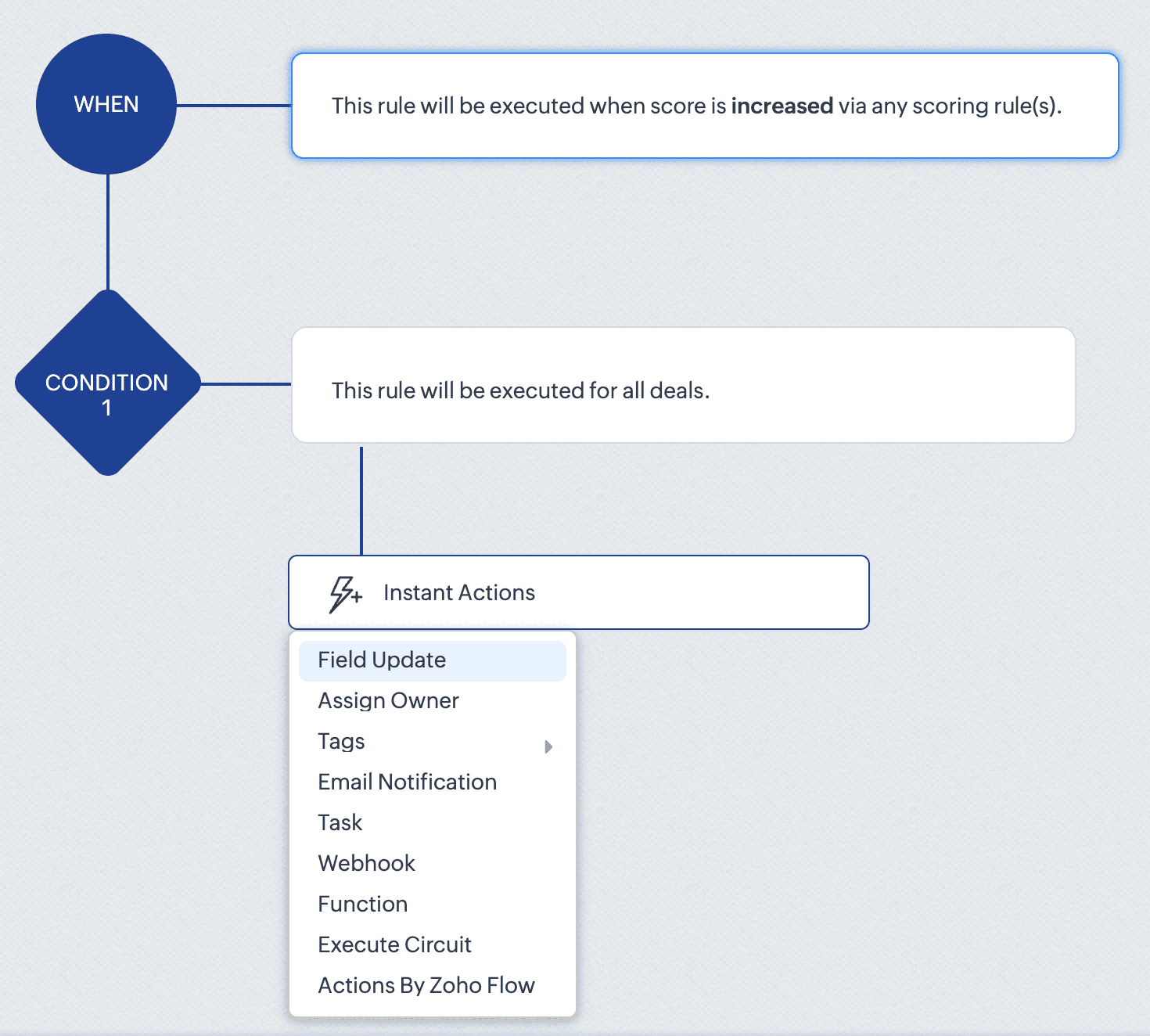
For instance, the score_increase trigger triggers the workflow when the score of a record is increased. The scheduled_actions_supported key is false for this trigger, which means that this specific trigger type doesn't support scheduled actions. This directly translates to API behaviour: attempting to configure a Workflow Rule via API with a scheduled action for the score_increase trigger will result in an error.
This API constraint is visibly enforced in the CRM interface. When configuring a score-based trigger in the UI:
4. 2. "What can my Workflow actually do?" - Understanding Actions
The actions array defines the execution capabilities of your workflows. For each action type, you get important information like:
Limits per action instance: Maximum number of items that can be processed within a single action instance
Instance limits: How many times this specific action can be added to a condition in the Workflow rule.
Scheduled action support: Whether the action can be added as a scheduled action.
For example, in the add_tags action:
{ "is_clickable": true, "associate_action": false, "limit_per_action": 10, // Maximum 10 tags per Add Tags action "api_name": "add_tags", "supported_in_scheduled_action": true, "name": "AddTags", "limit": 1 // Maximum one Add Tags action per workflow } |
From this data, it is clear that within a single Add Tags action, you can select up to 10 specific tags to add. Similarly, you can only include one Add Tags action instance in the entire workflow rule. Also, this action cannot be used as a scheduled action.
This has direct implications for API users:
Attempting to configure a workflow that adds more than 10 tags in one action will result in an error
Trying to add two separate Add Tags actions to the same workflow will fail
Adding a Add Tags action under scheduled actions section will also result in an error.
In the UI, these constraints are proactively taken care of. As seen in the GIF, if you add fewer than 10 tags, clicking Add Tags again only lets you edit the existing action. Also it lets you add only up to 10 tags in an action. And if you have already added an action with 10 tags, the Add Tags option will no longer be available. Either way, the system prevents any possibility of adding a second Add Tags action, regardless of tag count.
This UI experience is what the Workflow Rules Configuration API replicates for developers. By checking these limits before making API calls, you can build workflows using APIs with the same confidence and error-free experience that UI users have.
4.3. “What can trigger my Workflow from a related module?” – Understanding related triggers
The related_triggers_details array shows how changes in related records can trigger workflows in your primary module. For example, in the Deals module, for the Notes related trigger:
"related_triggers_details": [ { "api_name": "Notes", // The API name of the related module "module": { // Detailed information about the related module "singular_label": "Note", "plural_label": "Notes", "api_name": "Notes", "name": "Notes", "id": "4876876000000002197" }, "name": "Notes", // Module name "triggers": [ // Available triggers for this related module { "api_name": "create", // Trigger when related records are created "deprecated": false, "name": "Create", "scheduled_actions_supported": true, "actions": [ // Supported workflow actions for this trigger "add_tags", "remove_tags", "email_notifications", "tasks", "create_record", "create_connected_record", "add_meeting", "webhooks", "functions", "flow" ] }, // ... other triggers (create_or_edit, edit, delete) omitted for brevity ] } ] |
For each related module, you get:
Module information: Details about the related module that can trigger workflows.
Available triggers: The actions on the related record (create, edit, delete, etc) that can trigger the workflow.
Supported actions: For each trigger, the actions that are supported for that specific trigger.
For instance, the Notes related trigger allows you to create workflows that execute when notes are added to deals. The configuration shows that when a note is created, your workflow can perform actions like sending email notifications, creating tasks, triggering webhooks, and more.
If you try to include an unsupported trigger or unsupported action, the API call will fail. For example, adding a field_updates action for a Notes create trigger . The configuration API response clearly shows that field_updates is not among the supported actions for Notes-related triggers.
The API also gives us important differences between trigger-action configurations. For example, while field_updates action is supported for the create trigger for the main module (Deals), the same action is not supported for the related module (Notes) create trigger. These distinctions would otherwise only be discovered through API errors.
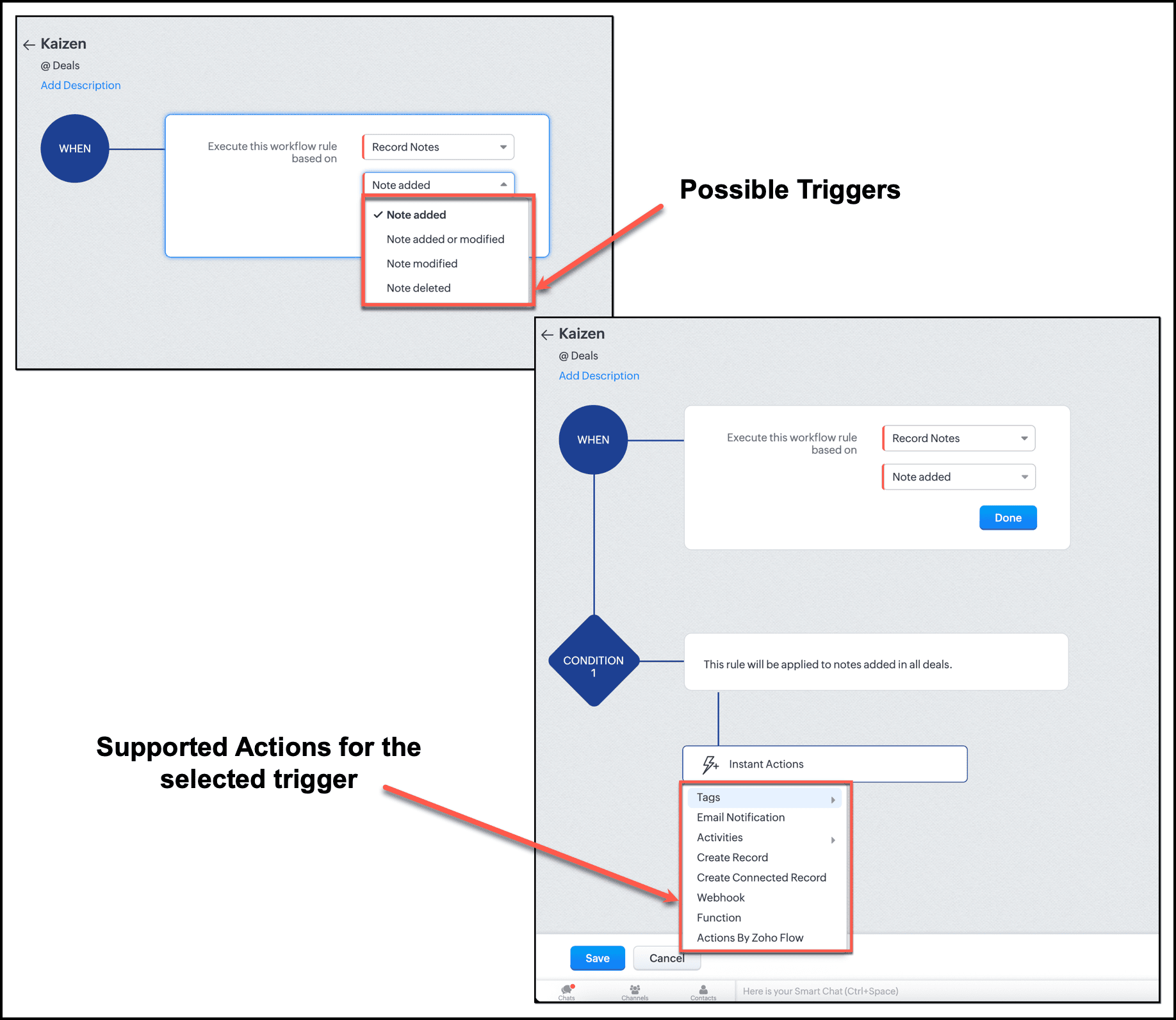
In the UI, this limitation is enforced. When setting up a workflow triggered by Notes, the "Field Updates" action does not appear in the available actions list.
By checking the related_triggers_details section before making API calls, you can discover exactly which actions are supported for each related module trigger, thus avoiding configuration errors while creating or updating Workflow rules.
Conclusion
The Workflow Configuration API transforms how we approach automation development through APIs. Instead of discovering constraints through failed API calls, we can now design workflows with the right configuration, without any trial-and-error methods. It gives us complete visibility into all valid trigger-action combinations before a single line of code is written, enough information to build automations triggered by related records, and limit awareness to respect action constraints before they become API errors.
For Zylker, this means we can now confidently proceed with updating the old Workflow rules and creating new ones. In our next post, we will put this knowledge into action.
We hope that you found this post useful. If you have any questions or feedback, let us know in the comments below, or write to us at support@zohocrm.com. We would love to hear from you!
