Kaizen 224 - Quote-driven Deal Reconciliation Using Zoho CRM Functions and Automation

Hello everyone!
Welcome back to another instalment in the Kaizen series.
This post covers quote-driven deal reconciliation, emphasizing Functions and Automation to address practical sales challenges.
Business Challenge
Sales organizations often mark deals as Closed Won before commercial transactions fully conclude. Quotes generate promptly upon closure, yet businesses typically provide a brief window such as one week for renegotiation or payment. During this period, currency fluctuations, payment delays, and risk thresholds can significantly alter the final deal value.
This Kaizen demonstrates how Zoho CRM Functions and Automation work together to reconcile deal financials with quote activity over time. Sales, finance, and operations teams can thus access accurate, policy-compliant values.
Here is a typical sequence:
- Deal closes with Closed Won status
- Quote generates immediately
- Customer receives grace period (e.g., one week) for payment or adjustments
Key factors during this window:
- Exchange rates fluctuate
- Payments may succeed or fail
- Business absorbs limited losses(up to 10%, for example)
- Major variances trigger renegotiation
CRM must reflect actual outcomes rather than initial closure assumptions. Quotes serve as the authoritative commercial record, with final deal values depending on execution timing. This approach captures intermediate and final financial states to enable automated decisions and audits.
Key business scenarios covered
Scenario 1: Payment is made during the grace period
- Quote is generated on day 0
- Customer completes payment on day 7
- Exchange rate has changed since quote generation
Business Requirement
The business wants to calculate the actual payable amount using the exchange rate on the payment day and store it explicitly in CRM.
Outcome
The realized value is captured and stored, ensuring that reports and downstream systems reflect the true commercial result.
Scenario 2: Acceptable loss threshold (10%)
- Exchange rate movement results in a loss
- The business is willing to absorb losses up to 10%
- Loss exceeds the acceptable threshold
Business requirement
If the loss exceeds the defined tolerance, the quote should move to renegotiation instead of being accepted automatically.
Outcome
CRM enforces pricing policy consistently, without manual intervention or subjective judgment.
Scenario 3: Significant currency fluctuations
- Exchange rate volatility is unusually high
- Even if loss is within limits, risk exposure is significant
Business requirement
Large fluctuations should trigger renegotiation, regardless of absolute loss percentage.
Outcome
Financial risk is handled proactively based on measurable criteria.
Scenario 4: No payment after the grace period
- Customer does not pay within the allowed window
- Updated exchange rate is favorable to the business
Business Requirement
If the updated rate is profitable, the quote can be revised and reissued with the new amount.
Outcome
CRM reflects market-aligned pricing while maintaining transparency around why the amount changed.
Why Zoho CRM Functions is the best fit?
This reconciliation pattern requires the following capabilities beyond static configuration.
- Reading and reconciling data across Deals and Quotes
- Applying time-based and threshold-based business rules
- Writing calculated values into dedicated fields
- Supporting multiple decision paths(accept, renegotiate, revise)
- Running logic at specific business moments
Zoho CRM Functions provide the flexibility and control required to implement this logic cleanly, while automation ensures it runs consistently and reliably.
Custom fields used in this post
Deals
- Final Accepted Amount - Currency - Amount finally agreed and accepted
- FX Impact Percentage - Percent - Gain or loss due to exchange movement
- Reconciliation Status - Picklist - Accepted or Renegotiate
- Reconciled On - DateTime- Timestamp of final reconciliation
Quotes
- Quote Reference Amount - Currency - Amount at quote generation
- Quote Exchange Rate - Decimal - Exchange rate used in quote
- Payment Due Date - Date - End of grace period
- Potential Payable Amount - Currency - Recalculated amount at evaluation time
- FX Variance Percentage - Decimal - Difference vs quoted amount
- FX Evaluation Status - Picklist - Pending or Evaluated
- Recalculate FX - Checkbox - Explicit recalculation trigger
These fields capture commercial intent and outcome, not just static numbers.
High level automation flow
- Deal is marked Closed Won
- Workflow triggers a function to generate a Quote
- Business updates evaluation inputs when needed
- User explicitly triggers FX recalculation
- Function
- Calculates financial impact
- Updates quote and deal
- Applies business decisions
- CRM reflects finalized commercial reality
Function 1: Generate a Quote from the Deal
This function creates a Quote automatically when a Deal is closed, ensuring downstream processes start immediately and consistently.
void automation.generateQuoteFromDeal(int dealId) { deal = zoho.crm.getRecordById("Deals", dealId); if(deal == null) return; amount = deal.get("Amount"); exchangeRate = deal.get("Exchange_Rate"); account = deal.get("Account_Name"); productItem = Map(); productItem.put("product", {"id":"<PRODUCT_ID>"}); productItem.put("quantity", 1); productItem.put("list_price", amount); productList = List(); productList.add(productItem); quoteMap = Map(); quoteMap.put("Subject", "Quote for Deal"); quoteMap.put("Deal_Name", dealId); quoteMap.put("Account_Name", account.get("id")); quoteMap.put("Product_Details", productList); quoteMap.put("Quote_Stage", "Draft"); quoteMap.put("Valid_Till", zoho.currentdate.addDay(7)); quoteMap.put("Quote_Reference_Amount", amount); quoteMap.put("Quote_Exchange_Rate", exchangeRate); zoho.crm.createRecord("Quotes", quoteMap); } |
Function 2: Reconcile Deal from Quote
This function calculates payable values, evaluates financial impact, and updates the Deal with finalized financial information.
void automation.reconcileDealFromQuote(Int quoteId) { info "Starting FX reconciliation for Quote ID: " + quoteId; // ------------------------------------------------- // Fetch Quote // ------------------------------------------------- quote = zoho.crm.getRecordById("Quotes", quoteId); if(quote == null) { info "Quote not found"; return; } dealInfo = quote.get("Deal_Name"); if(dealInfo == null) { info "Quote not linked to Deal"; return; } dealId = dealInfo.get("id"); deal = zoho.crm.getRecordById("Deals", dealId); if(deal == null) { info "Deal not found"; return; } // ------------------------------------------------- // Mark FX Evaluation as PENDING // ------------------------------------------------- zoho.crm.updateRecord( "Quotes", quoteId, {"FX_Evaluation_Status" : "Pending"} ); // ------------------------------------------------- // Read required FX inputs // ------------------------------------------------- quotedAmount = quote.get("Quote_Reference_Amount"); quoteRate = quote.get("Quote_Exchange_Rate"); evaluationRate = quote.get("Evaluation_Exchange_Rate"); info "Quoted Amount: " + quotedAmount; info "Quote Rate: " + quoteRate; info "Evaluation Rate: " + evaluationRate; if(quotedAmount == null || quoteRate == null || evaluationRate == null) { info "Missing required FX inputs"; return; } // ------------------------------------------------- // FX Calculations(rounded) // ------------------------------------------------- payableAmount = (quotedAmount * evaluationRate / quoteRate).round(2); fxVariance = (((payableAmount - quotedAmount) / quotedAmount) * 100).round(2); info "Payable Amount: " + payableAmount; info "FX Variance %: " + fxVariance; // ------------------------------------------------- // Decide Quote Stage(Business decision here) // ------------------------------------------------- quoteStage = ""; reconciliationStatus = ""; if(fxVariance <= 10) { quoteStage = "Acceptable FX Impact"; reconciliationStatus = "Accepted"; } else { quoteStage = "FX Impact Exceeds Threshold"; reconciliationStatus = "Renegotiate"; } // ------------------------------------------------- // Update Quote(Final state) // ------------------------------------------------- quoteUpdate = Map(); quoteUpdate.put("Potential_Payable_Amount", payableAmount); quoteUpdate.put("FX_Variance_Percentage", fxVariance); quoteUpdate.put("FX_Evaluation_Status", "Evaluated"); quoteUpdate.put("Quote_Stage", quoteStage); quoteUpdate.put("Recalculate_FX", false); quoteResp = zoho.crm.updateRecord("Quotes", quoteId, quoteUpdate); info "Quote update response:"; info quoteResp; // ------------------------------------------------- // Update Deal // ------------------------------------------------- dealUpdate = Map(); dealUpdate.put("Final_Accepted_Amount", payableAmount); dealUpdate.put("FX_Impact_Percentage", fxVariance); dealUpdate.put("Reconciliation_Status", reconciliationStatus); dealUpdate.put( "Reconciled_On", zoho.currenttime.toString("yyyy-MM-dd'T'HH:mm:ssXXX") ); dealResp = zoho.crm.updateRecord("Deals", dealId, dealUpdate); info "Deal update response:"; info dealResp; info "FX reconciliation completed successfully"; } |
Workflow
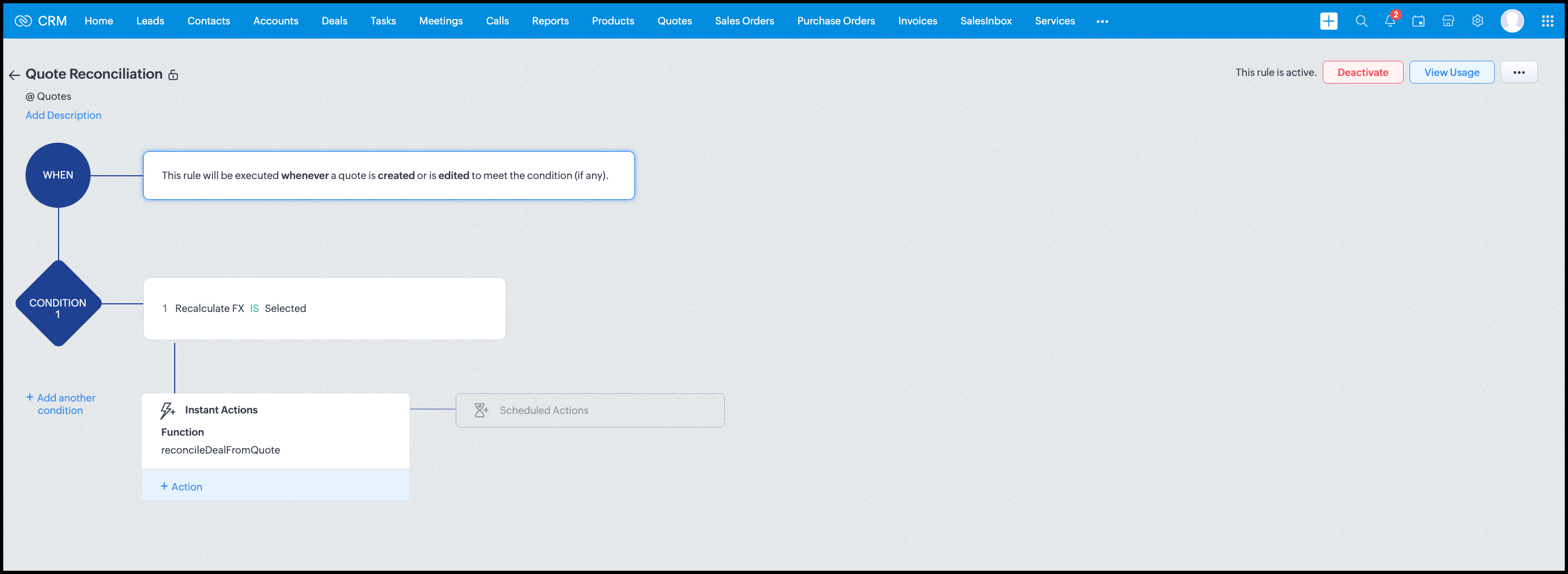
Module: Quotes
Trigger: On create or edit
Condition: Recalculate FX = true
Action: Execute reconcileDealFromQuote
Argument: quoteId -> ${Quotes.id}
All decision logic lives inside the function.
Business Outcome
After implementing this pattern,
- Deals and quotes stay aligned with real-world behavior
- FX risk is measurable and auditable
- Renegotiation is policy-driven
- Reports reflect finalized values, not assumptions
- Sales and finance operate on the same truth.
Summary
Zoho CRM extends beyond static closures by reconciling deals against quote behavior. Functions plus Automation enforce pricing, limit exposure, and capture true outcomes reliably at scale.
The true value of this implementation is not the calculation itself, but the fact that it produces stable, auditable financial states that can be reused across reporting, approvals, integrations, and policy enforcement.
Further extensions
Executive reporting and dashboards
You can build Dashboards that answer questions like
- Total revenue before vs after FX reconciliation
- Total FX gain or loss by
- Region
- Currency
- Quarter
- Sales owner
- Percentage of deals renegotiated due to FX risk
Without the function,
- FX impact is implicit
- Numbers keep changing
- Finance does not trust reports
With the function,
- Final Accepted Amount is stable
- FX Impact % is explicit
- Reconciled On gives a time anchor
Policy enforcement and compliance
Examples
- Automatically flag deals where FX loss > 10% but status = Accepted
- Audit trail for
- Who recalculated FX
- When renegotiation was triggered
- SLA checks when Deals are not reconciled within 'X' days of quote creation
For many companies, FX policy violations are discovered at a later point in time, but you now enforce them at the moment of decision.
Sales coaching and deal hygiene
Unlock insights such as
- Which sales reps close deals with high FX volatility or frequently trigger renegotiation?
- Which regions or currencies produce unstable deals?
- Which deals are consistently over-optimistic at closure?
Other scenarios
- Approval and exception workflows
- Integration with ERP or accounting systems
- Predictive insights to forecast FX risk
- Historical snapshots for audit and analytics
We hope you found this post useful. Let us know your feedback in the comments or write to us at support@zohocrm.com.
Thanks!
=============================================================================

See Also
Topic Participants
Shylaja S
Sticky Posts
Kaizen #226: Using ZRC in Client Script
Hello everyone! Welcome to another week of Kaizen. In today's post, lets see what is ZRC (Zoho Request Client) and how we can use ZRC methods in Client Script to get inputs from a Salesperson and update the Lead status with a single button click. In thisKaizen #222 - Client Script Support for Notes Related List
Hello everyone! Welcome to another week of Kaizen. The final Kaizen post of the year 2025 is here! With the new Client Script support for the Notes Related List, you can validate, enrich, and manage notes across modules. In this post, we’ll explore howKaizen #217 - Actions APIs : Tasks
Welcome to another week of Kaizen! In last week's post we discussed Email Notifications APIs which act as the link between your Workflow automations and you. We have discussed how Zylker Cloud Services uses Email Notifications API in their custom dashboard.Kaizen #216 - Actions APIs : Email Notifications
Welcome to another week of Kaizen! For the last three weeks, we have been discussing Zylker's workflows. We successfully updated a dormant workflow, built a new one from the ground up and more. But our work is not finished—these automated processes areKaizen #152 - Client Script Support for the new Canvas Record Forms
Hello everyone! Have you ever wanted to trigger actions on click of a canvas button, icon, or text mandatory forms in Create/Edit and Clone Pages? Have you ever wanted to control how elements behave on the new Canvas Record Forms? This can be achieved
Recent Topics
Locked Notebook
Hi, I hadn't used my Notebook in some time and was refamiliarizing myself with it. I clicked a lock icon and now I can't unlock. When I hit the information or unlock icons I'm taken to a page with the notebook icon and a keyboard. When I type, nothingUnable to produce monthly P&L reports for previous years
My company just migrated to Books this year. We have 5+ years financial data and need to generate a monthly P&L for 2019 and a monthly P&L YTD for 2020. The latter is easy, but I'm VERY surprised to learn that default reports in Zoho Books cannot createHide fields only for creation
Hello, I'd like to hide some fields only during the creation of a contact in Zoho CRM. In fact I have some fields that are automatically calculated thanks to an automation, so when my users create a contact I don't want them to fill those fields. I knowIssues with Zoho Sheet in Mac
I have downloaded the Zoho App from App Store but It is failing to Save As, Open & Download Operations. App StoreWeekly Sales Summary
Is it possible to generate a weekly report in Zoho Books to show -$$ amount of estimates generated -# of estimates generated by Salesperson -$$ amount of Sales Orders created -$$ amount of Invoices generatedCan I write a check in Zoho Books with no associated bill?
This currently does not seem possible, and I have a client that desperately needs this function if I am able to convert them with Quickbooks. Thank you in advance for your reply.OpenAPI Specs are just plain wrong
The provided yml files for generating the OpenAPI specs are absolutely riddled with errors and inconsistencies. From missing fields on the objects, to just incorrectly named resource objects. I'm having to go through and manually changing the spec toCustom Footer – Zoho Writer Document
Hello everyone, I’m having an issue adding a custom footer in a Zoho Writer document. I would like to insert my company information (including a logo + address) in the footer. The problem is that when I add these elements, the main content of my pagesReport grouping
I have added a grouping in a report but it is not working how i had expected. I wanted to group a summary on a field named Size but when i add the grouping the report is still showing me each record and making a summary at the bottom of the report. WhatSocial Media Simplified with Zoho Social: Preview your Instagram grid before posting
For a platform like Instagram that relies on visual appeal, it's important that you plan your image and video content in a way that holds your audience's attention. Planning your grid ahead of time gives you the benefit of understanding how your postsSpreadsheet View click & focus issue in Arabic (RTL) localization
Hello Zoho Support Team, I am facing an issue in Zoho Creator Spreadsheet View when using Arabic localization (RTL). Scenario: My app supports English (LTR) and Arabic (RTL). I created a Spreadsheet View for a form. In English, everything works correctly.VAT rates - exempt and out of scope
Good Evening, UK based company here. I am a bit confused in respect of setting up VAT rates for exempt goods and services; at present I am simply leaving the VAT rate blank in the transactions in order to prevent any VAT appearing in the VAT return. WhenHow to loop through Multiple Upload and Display Actual File Name
I have been reading the help on the File Upload Control and reviewed the Deluge help on files and I can not figure out how to loop through the uploaded files and do anything but get the automatically created file names. The code below will run but eachabou arattai
I want to use the Arattai app for business purposes, so please convert my account to a business account.I have my own invoice app, and I want to link it with the Arattai app for direct messaging.Configurable Zoho Cliq Notifications for Zoho People Alerts
Hello Zoho People Product Team, Greetings and hope you are doing well. We would like to request an enhancement to Zoho People notifications, enabling a native delivery via Zoho Cliq with admin-level control, similar to the notification settings availableOverlapping Reports in Dashboards
It's rare, but occasionally it would be a good feature if I were able to overlap reports, either fully or partially in the Dashboards. Also, then having the ability to move objects to the front or rear, or make them transparent/translucent would be goodLooking back at Zoho Calendar in 2025
Hello Zoho Calendar Community, As we step into a brand-new year, we’d like to take a moment to thank you for being an active and valued part of the Zoho Calendar community. Your trust, feedback, and continued engagement motivate us to keep evolving andThere was an error while connecting to GSTN
I am trying to file GSTR1. Everything flows smoothly until I reach the final step of filing the return. After I enter the PAN and OTP for filing it raises the error "There was an error while connecting to GSTN"Zoho Books Extension: What Happens If Custom Fields Already Exist?
When developing Zoho Books extensions, what happens if the target Zoho Books organization already has a custom field with the same API name as one defined in the extension? I’m asking because we originally created an on-Books version of this functionality,Internal Server Error (500) When Attempting to View Banking Transactions
I am experiencing an Internal Server Error (500) when attempting to view transactions across all of my banking accounts. Despite multiple attempts to resolve this, I have received little more than runaround from support, and the issue remains unresolved.How do I add a blank line to the Organisation Address Format?
I'd like to have my VAT number, for example, shown prominently by having a clear gap between it and the address block above, but any blank lines in the address format get ignored in PDF outputs.Automatic Invoice Number generation for createRecord
Hello, while testing some custom Buttons in my Zoho Books application, I noticed that I get an error that previously did not occur. After some further digging I found that the automatic transaction numbering of invoices no longer work in my organization.Adding number of days to an estimate.
I need both QTY of item and "number of days hire" in my estimates at the line item level. Any clues as to how this is done would be greatly appreciated. It needs to calculate. Thanks JBooks Api: listing expenses created after certain dates
Is there any parameter I can add to the List Expenses endpoint that will let me look up expenses by when they were created?Why can't we change the Account type from an Expense to an Asset?
Like the question. Why in QuickBooks for example if I mistakenly created an account as an expenses and I already captured information in those accounts, I can just change the account type from expense to assetIs it possible to do validation for the Actions added to Reports?
We have an all-around On Validate function that checks all the possibilities before the Created/Edited form submissions. We want to have a button in the report view, so we can change records without entering. We are able to add this button, and it doesAbility to Edit Ticket Subject when Splitting a Ticket
Often someone will make an additional or new request within an existing ticket that requires we split the ticket. The annoying part is that the new ticket maintains the subject of the original ticket after the split so when the new ticket email notification[Free Webinar] Environments in Zoho Creator - Creator Tech Connect
Hello Everyone, We’re delighted to kick off the 2026 edition of the Zoho Creator Tech Connect Series and are excited to continue this learning journey with you. The Creator Tech Connect series is a free monthly webinar featuring deep-dive technical sessionsZoho Voice API SMS
I made a post request in Zapier to try to send an SMS. Authentication appears to be configured correctly. I followed the documentation and I'm getting a 400 Error "Internal Server Error". Not helpful at all. Anyways, I could not find any information onHow do I change (error) display messages
Hi! I would like to edit display messages like "invalid entries" and "enter a value for Nome" and so on into Italian language messages. How can I do that? Already tried on Validate on form submit. Where I am failing? Thanks in advance.Record Overseas Transactions Along with CC charges
Hi All, We receive payments via stripe in multiple currencies and stripe takes around 2.5% fees. The amount is settled in INR into our local bank. What should be the currency of the income account used for Stripe payments? Here is a sample flow that weEasier onboarding for new users with stage descriptions
Greetings, I hope all of you are doing well. We're happy to announce a recent enhancement we've made to Bigin. You can now add descriptions to the stages in your pipeline. Previously, when creating a pipeline, you could only add stages. With this update,Pieds de page personnalisé - Document Zoho Writer
Bonjour à tous, Je rencontre un souci avec l’ajout d’un pied de page personnalisé dans un document Zoho Writer. Je souhaite insérer les informations de mon entreprise (notamment un logo + adresse) dans le pied de page. Le problème, c’est que lorsque j’ajoutePermissions on Views
Having the option of any agent creating custom views is firing back and got a situation where there are a hundred different views across the team and tickets are not being dealt in the most efficient of ways. Tickets seems to be missed by some agents,Credit card transactions are backwards after importing statements
I am new to Zoho Books so I'm importing my firm's bank and credit card statements in. My credit card statements have a single column with negative numbers so that is the option I chose. But when I went to categorize the credit card transactions, I canKnowledgebase SEO
We have a custom-domain mapped help center that is not restricted via login. I have some questions: a) will a robots.txt file still allow us to control indexing? b) do we have the ability to edit the sitemap? c) do category URLs get indexed by searchVIsual maindmaps in Zoho notebook Ai
Can I create and export VIsual maindmaps in Zoho notebook Ai1stDibs Integration to Zoho Inventory
Hello is it possible to integrate my Zoho inventory and 1stDibs?Community Question: Renewal vs Invoicing
This is a question for the community. Does anyone else consider there to be a difference between a subscription renewal event and sending out a recurring invoice for a subscription? For example, let's say customer XYZ purchases a 1-year subscription tocloud console support for music websites
Hi Friends, I am not from a very technical background.. So need support from the Zoho family. I want to build a e-commerce website which is in Musical Niche. It will help people learn music & play instruments of all types. There are a few players in the market like Chordify , Guitaa, Guitar Dashboard, ChordU & few others. But I all these websites allow only a few instruments to play. So I want to build a better website than the one I mentioned. So wnated to know what UI & AI should I use so thatNext Page