Kaizen #59 - Creating alerts and custom messages using Client Script
Hello everyone!
We are happy to resume our Zoho CRM Developer Community series - The Kaizen series!
Welcome back to the new start of Kaizen!
What is Client Script?
The Client Script feature gives you a seamless platform for achieving and extending your business cases in Zoho CRM by allowing Java Script code execution in your browser. It enables you to configure events for the UI components and define the actions once those events are triggered.
The ZDK Client Functions available in Client Script are,
ZDK Client Function | Description |
showMessage | To display a text message on create/clone/edit/detail(canvas) page. |
showConfirmation | To display a confirmation box with accept and reject message on create/clone/edit/detail(canvas) page. |
showAlert | To show alert message on create/clone/edit/detail(canvas) page. |
openMailer | To open mailer component from detail(canvas) page. |
Use Case
Let us consider that you want to achieve the following using Client Script.
- Calculate age based on Date of Birth and display the message "Age is more than 80" whenever the age is above 80 in create page of Policyholder module.
- Show the alert message "You cannot change the Rating of a verified account" whenever you try to update the field Rating in Accounts module.
- When you click the mail button on detail(canvas) page, ask for confirmation and open a mailer window.
Solution using Client Script
Note:
The solution listed in this post includes detail(canvas) page and create page.
To create a canvas page,
- Go to Setup > Customization > Canvas
- Click Create Record Detail Page.
- On the Create a Custom Record pop up that appears, select the module as "Accounts" and select the required layout for the canvas page
- Choose a template from the gallery and click Select.
- Enter a name and save the canvas page.
- Click Canvas Assignment and assign the page to the required profiles.
- Click here for more details on creating a canvas page(Customizing the record detail page).
1. Calculate age based on Date of Birth and display the message "Age is more than 80" whenever the age is above 80 in create page of Policyholder module
- Go to Setup > Developer Space > Client Script. Click +New Script.
- Specify the details to create a script and click Next.
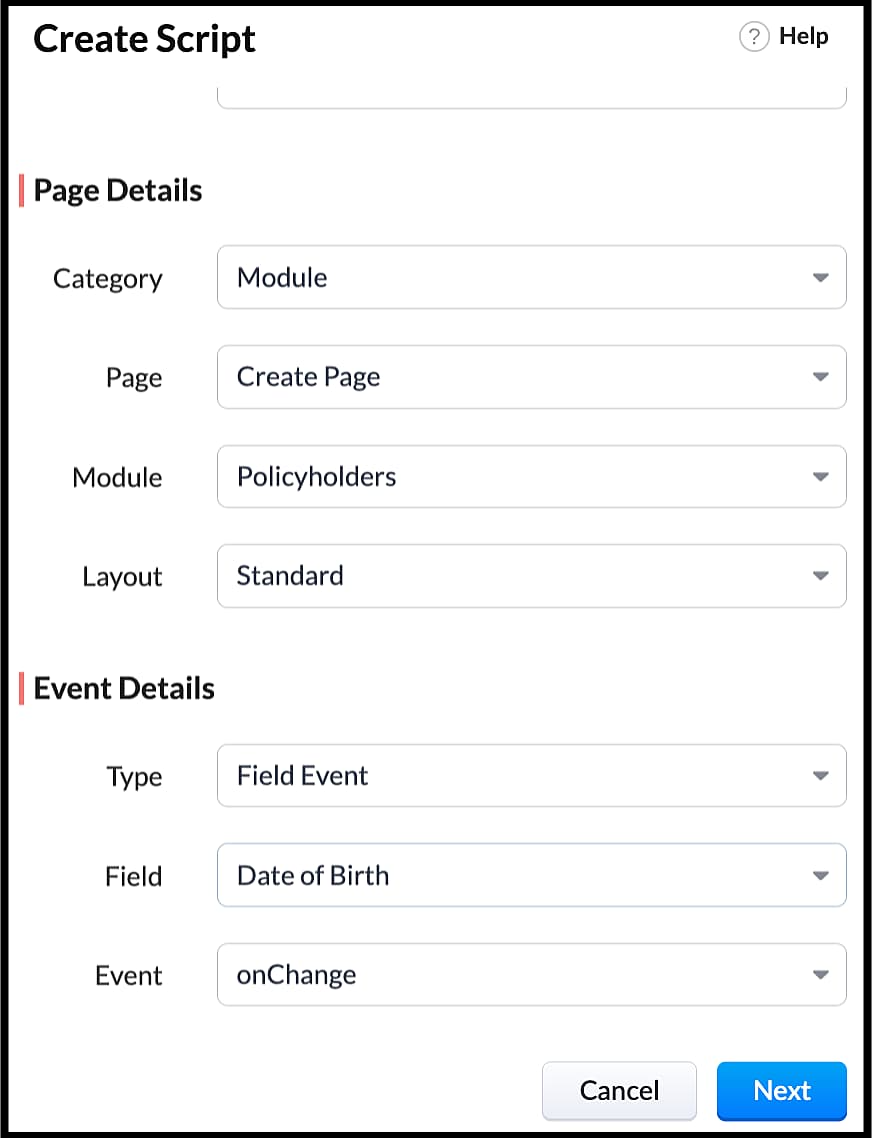
- Enter the following script in the Client Script IDE and click save.
- function getAge(dateString)
- {
- var today = new Date();
- var birthDate = new Date(dateString);
- var age = today.getFullYear() - birthDate.getFullYear();
- var m = today.getMonth() - birthDate.getMonth();
- if (m < 0 || (m === 0 && today.getDate() < birthDate.getDate()))
- {
- age--;
- }
- return age;
- }
- let age = getAge(value);
- var age_field = ZDK.Page.getField("Age");
- var category_field = await ZDK.Page.getField("Category");
- age_field.setValue(age);
- if (age > 80) {
- ZDK.Client.showMessage('Age is more than 80', { type: 'info' });
- }
- You can see the code working from the create page. You can also see how the client script works using the Run component of the Client Script IDE.
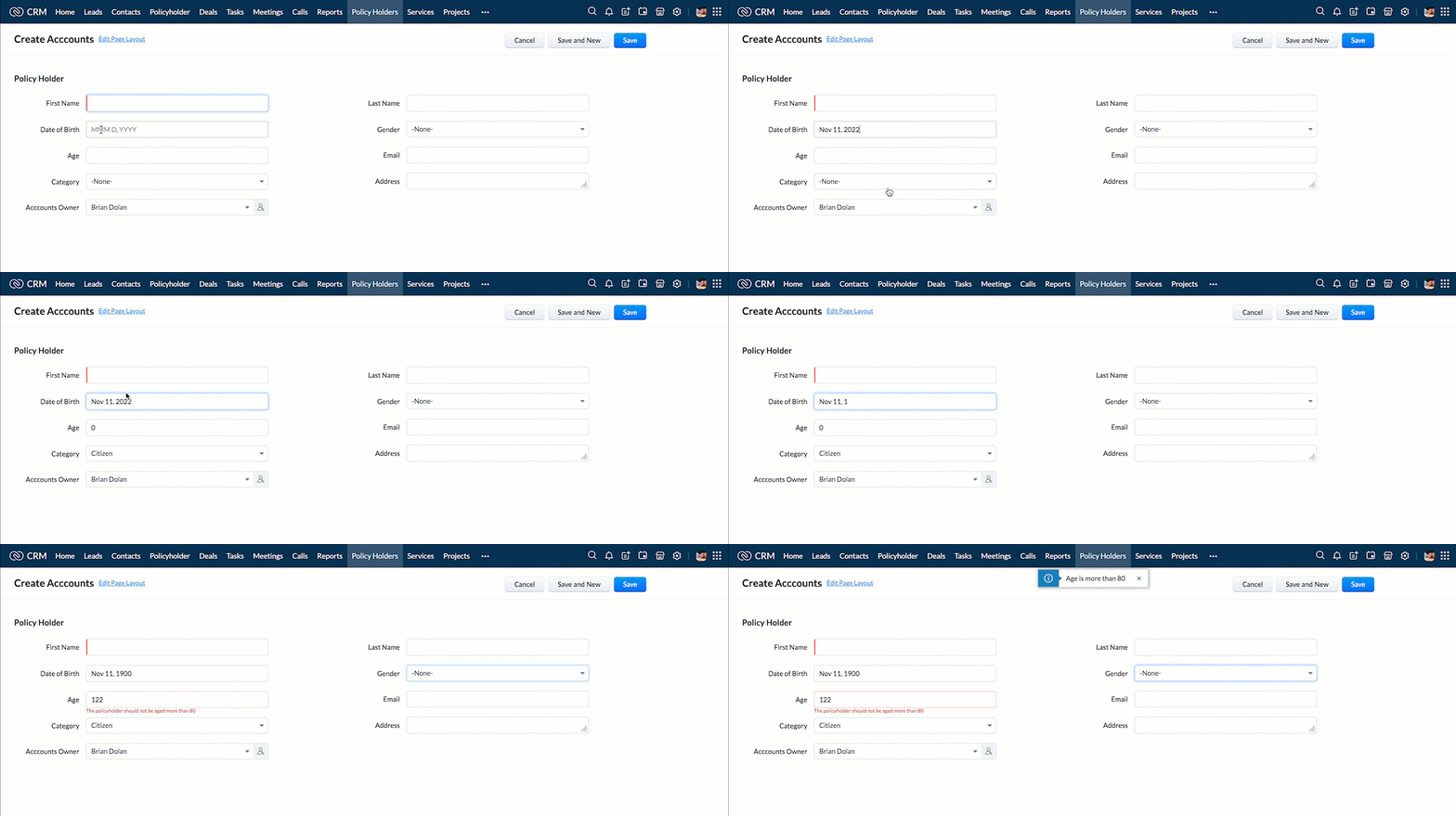
- You can use any of the following types in showMessage() function
Possible 'type' | Script |
info | ZDK.Client.showMessage('message', { type: 'info' }); |
warning | ZDK.Client.showMessage('message', { type: warning }); |
| error | ZDK.Client.showMessage('message', { type: error }); |
success | ZDK.Client.showMessage('message', { type: success }); |
2. Show the alert message whenever you try to update the field Rating
- Go to Setup > Developer Space > Client Script. Click +New Script.
- Specify the details to create a script and click Next.
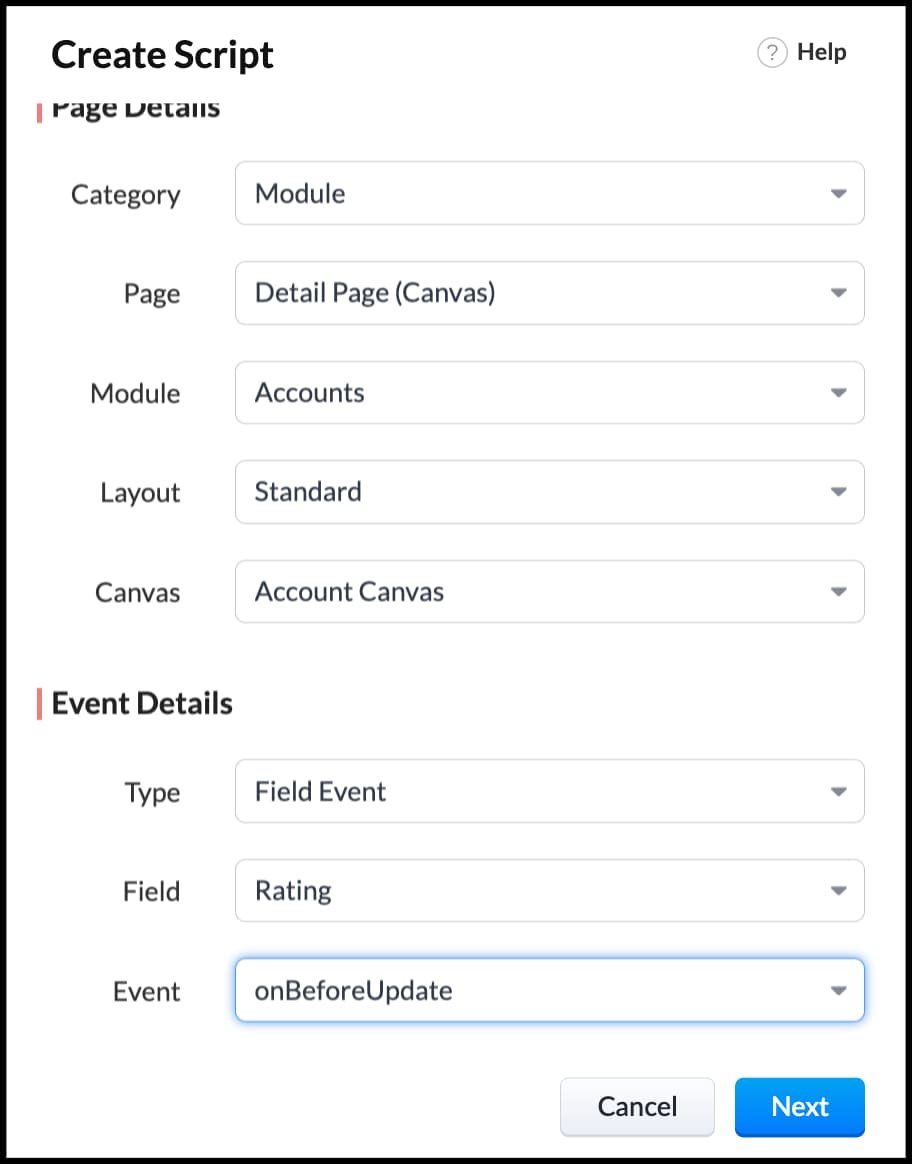
- Enter the following script in the Client Script IDE and click save.
- ZDK.Client.showAlert('You cannot change the Rating after account creation');
- Here is how the Client Script works. You can also see how the client script works using the Run component of the Client Script IDE.
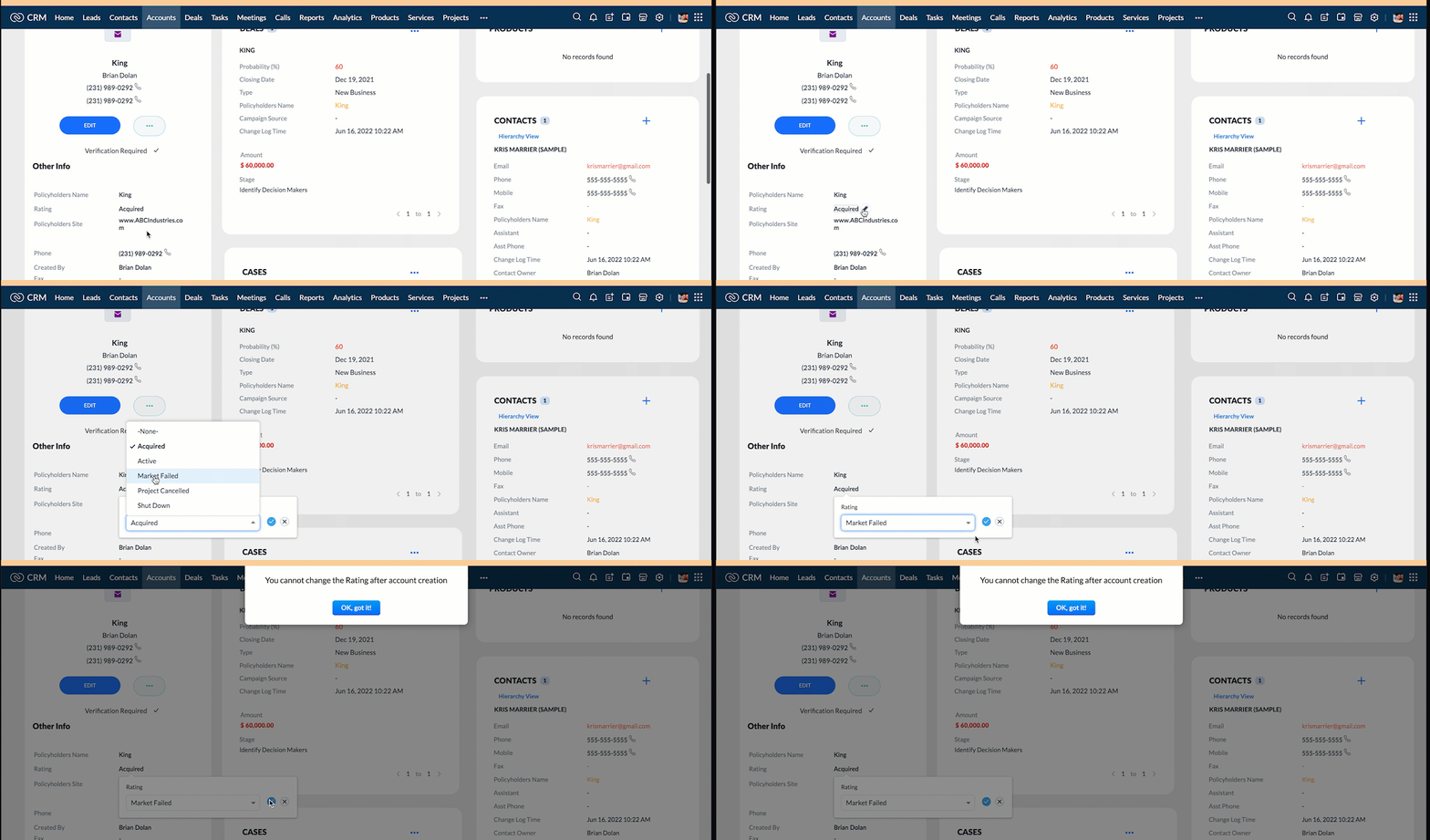
3. Configure the mailer box with the click of a button
First of all, you need to add the button to the detail(canvas) page.
- Go to Setup > Customization > Canvas.
- Right click on the Canvas page for Accounts module and click Edit.
- Click Elements, drag and drop the button wherever required and specify a label for the button.
- Right click on the button, select Add Element ID and enter the ID of the button in the pop up that appears.
- Once the button is created, you can configure Client Script in two ways:
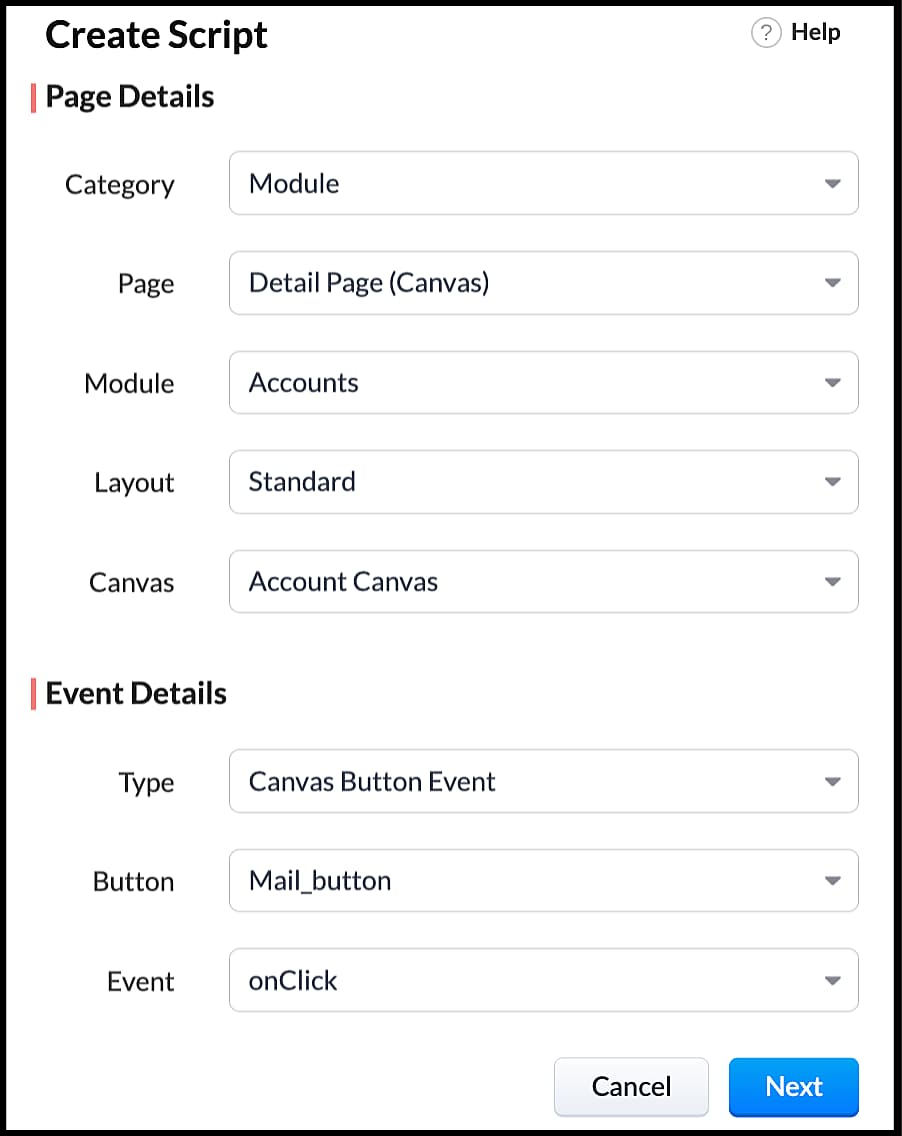
- Right click on the button--> Add Client Script-->onClick. The Client Script IDE appears with the event type as Canvas Button Event.
(or)
- Go to Setup > Developer Space > Client Script. Click +New Script.
- Specify the details to create a script and click Next.
- Enter the following script and click save.
- var isProceed = ZDK.Client.showConfirmation('Do you want to open the mailer window?','Proceed','Cancel');
- //If user clicks Proceed button
- if (isProceed) {
- ZDK.Client.openMailer({ from: '', to: [{ email: '', label: 'ABC Industries' }], cc: [{ email: '', label: 'ABC Industries' }], subject: 'Greetings from ABC Industries!', body: ' ' });
- }
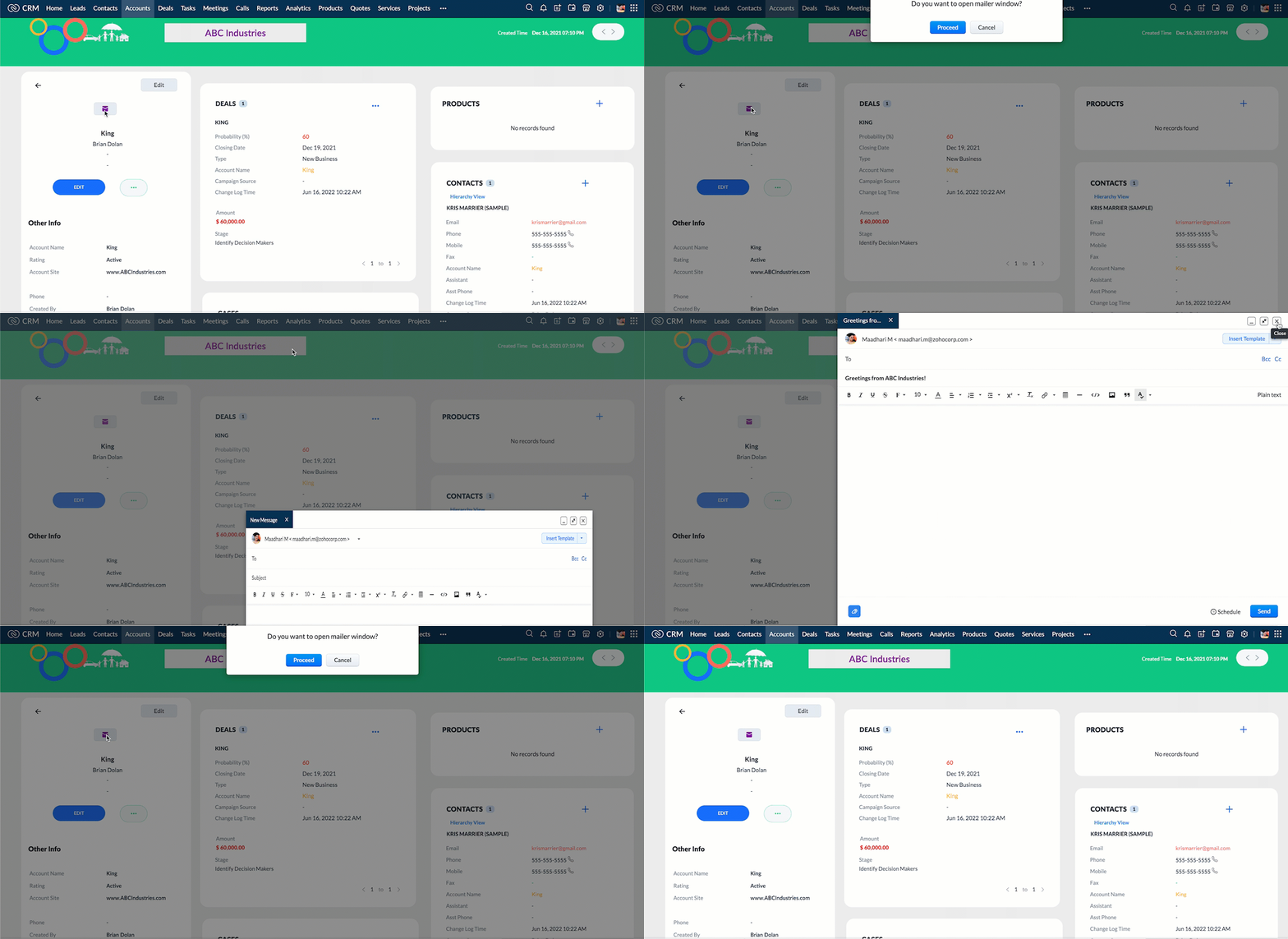
- The showConfirmation() function will return a boolean value based on the user selection. You should capture this boolean value using a variable and write the actions based on the boolean value returned. Here the variable isProceed will capture the user response and based on that boolean value, the mailer box will get displayed.
- Here is how the client Script works,
We hope you found this post useful. We will meet you next week with another interesting topic!
If you have any questions let us know in the comment section.
Cheers!
Click here for more details on Client Script in Zoho CRM.
Related Links
Topic Participants
Maadhari M
tbiedma
Joe Sweeney
Anz
Jason
Sticky Posts
How to reach the official Zoho Support channels and avoid fake ones.
Dear Customers, Thanks a lot for choosing Zoho! Our applications are built to help achieve your day-to-day business goals. We are committed to engaging with you, to understand and develop solutions that enhance your productivity. We are happy and ready to help you use our services effectively. Understanding and avoiding fake support Just like using popular bank names and financial applications for phishing purposes, using Zoho and claiming to be providing Zoho Support or services with false numbersFunction #35: Close all tasks associated with a lead and create a new task.
Welcome back everyone! Last week, we learnt how to close all tasks of a deal depending upon the deal stage. This week, let's look at a custom function that lets you close all of the tasks associated with a lead while simultaneously creating a new task, like when you need to halt all progress towards a lead while the lead is not available at the moment but create a reminder task. Business scenario: The success of a company, in one way or another, is determined by the leads it gets. Each lead is justZoho CRM Webinar - Redesigning Daily User Experiences with Canvas
<br> Your users across roles use the CRM for day-to-day tasks that are necessary. Whether they perform their tasks on time, the right way, or at all depends on a lot of factors, including User Experience. Many businesses struggle with rigid layouts,Join us at the Canada ZUG Meetup: What’s New in Zoho CRM
Hello Zoho Community! Start your year with fresh insights into Zoho CRM’s latest updates and tools. Whether you're a CRM beginner or a experienced user, this meetup is crafted to help you optimise your processes and leverage new features. Explore practicalCRM Hack #2: Automate sending of birthday greetings to your customers.
Hello everyone! What sets you apart as a sales person is your ability to add that personal touch to your business relationship with your customers. Sending a gift on a special day, or leaving a note wishing them on their birthdays, are small, yet significant actions that show your customers that you care. And these are actions done without any expectations :) You must be engaging with a lot of customers and it is highly unlikely that they all are your friends on Facebook or some social channel,
Recent Topics
Evernote (ENEX) import limitations
I have been with Evernote since 2010, but the latest price increase is ridiculous. I am currently testing Zoho Notebook as a replacement. I am impressed so far - if it were not for critical need to import legacy Evernote notes, I would 100% migrate toCan I create a CODE 128 custom field for my items in Zoho Inventory and then use it for generating Sales Orders?
Can anyone helps me, I don't want to use the SKU code for scanning my products. Because all my products have a CODE-128 label attached.Prevent duplicate with custom fields?
I was wondering something about custom field/custom modules in Zoho Desk. For some reason you can make a custom field mandatory but not unique? For example, if I create a custom module to manage equipment and renewal and make a field serial number noZoho Books' 2025 Wrapped
Before we turn the page to a new year, it’s time to revisit the updates that made financial management simpler and more intuitive. This annual roundup brings together the most impactful features and enhancements we delivered in 2025, offering a clearMultiple Vendor SKUs
One of the big concerns we have with ZOHO Inventory is lack of Vendor Skus like many other inventory software packages offer. Being able to have multiple vendor skus for the same product would be HUGE! It would populate the appropriate vendor Sku forCreate Invoice automated with Package
Does anyone knows how to create an invoice from a SO when we have created the package? We do these manually. and validate that the product packed is the product invoiced (if the order is partially packed) Regards, JSUnable to integrate Zoho Projects and Zoho Workdrive
I'm a Zoho One subscriber. When I go to Zoho Projects > Settings > Marketplace > Zoho Apps I do not see an option for Zoho Workdrive but I do see one for Zoho Docs that does nothing. How do I get the option to integrate Zoho WorkDrive and Zoho ProjeDisable payment thank-you emails
Hello, can someone please tell me how to disable sending of the "Payment Thank-You" emails?How to backdate record payment for the invoice
I would like to record a payment which happened 2 days ago, but I am not able to select any date later than today. I backdated the invoice, too, but it doesn't change anythingHelp with deluge script
Hi Community, this is my first Deluge script. I've pieced it together from reading various articles I want to use it in a workflow to 1 Convert a lead to a contact 2. Create a record in a custom module Below is what I have got so far but it does not fireMarketer's Space: Why email authentication matters in Zoho Campaigns
Welcome back to another post in Marketer's Space! If you've recently started using Zoho Campaigns, you've probably come across terms like SPF and DKIM. You may have also noticed emails that show "via zcsend.net" in Gmail when testing or sending campaigns.Edit email address that appears on invoice
Hi How do I change the email address that appears on invoices, it is showing the email address that i used to sign up to zoho with but I want to change it to another email address that we use for accounts. also is there a way to edit the position of aGoogle Fonts Integration in Pagesense Popup Editor
Hello Zoho Pagesense Team, We hope you're doing well. We’d like to submit a feature request to enhance Zoho Pagesense’s popup editor with Google Fonts support. Current Limitation: Currently, Pagesense offers a limited set of default fonts. Google FontsClone Entire Zoho Boooks Organization, including all transactions for testing & training
Can Zoho Books support help with direct cloning of entire Zoho Books & Inventory Organization? including all transactions, just like a copy & paste or disk cloning. Is this possible?Restrict portal signup until registration form and payment are completed
Hi everyone, I am working on a Zoho Creator portal for a project. In our business flow, users must first fill out a registration form and pay a registration fee before they are allowed to access the portal. However, when I share the portal link, usersZoho Creator In-App Notification
Hi Team, I have implemented an in-app notification using code, as it required some customization. I followed the example in the link below: https://www.zoho.com/deluge/help/pushnotify-using-deluge.html#Example I have a couple of questions regarding thisTip #64- Exploring Technician Console: Screenshot- 'Insider Insights'
Hello Zoho Assist Community! Have you ever needed to capture exactly what's happening on a remote machine, whether to document an issue, guide a customer, or keep a record of your session? That's where the Screenshot feature in Zoho Assist comes in! WithRelating Invoices to Projects
Hi Zoho team, If I have already created previously an invoice in Books, so I want to know how can I associate it with a relevant project? Thank youCreate a quote/estimate that includes a range of prices
I am interested in using Zoho Books' Quote templates to create estimates for my customers. I do a mix of fixed-bid quotes and quotes based on an hourly rate. For the hourly rate quotes/estimates, I like to include a price range, for example: 2-4 laborBudget
I have just upgraded to the standard plan in order to be able to utilize the budgeting function and record budget amountCapirec bank Automatic feed update
Can anyone tell me if Zoho supports Automatic bank feed update from a Capitec bank account in south africa?Free webinar! Accelerate deals with Zoho Sign for Zoho CRM and Bigin by Zoho CRM
Hello, Paperwork shouldn’t slow you down. Whether you’re growing a small business or running a large enterprise, manual approvals and slow document turnaround can cost you time and revenue. With Zoho Sign for Zoho CRM and Bigin by Zoho CRM, you can takeAdd Lookup Field in Tasks Module
Hello, I have a need to add a Lookup field in addition to the ones that are already there in the Tasks module. I've seen this thread and so understand that the reason lookup fields may not be part of it is that there are already links to the tables (Upload own Background Image and set Camera to 16:9
Hi, in all known online meeting tools, I can set up a background image reflecting our corporate design. This doesn't work in Cliq. Additionally, Cliq detects our cameras as 4:3, showing black bars on the right and left sides during the meeting. Where【まだ間に合う!】Zoho ユーザー交流会 | AI活用・CRM・Analytics の事例を聞いて、ユーザー同士で交流しよう!
ユーザーの皆さま、こんにちは。コミュニティチームの藤澤です。 3月27日(金)に東京、新橋で開催する「東京 Zoho ユーザー交流会 NEXUS」へのお申し込みがまだの方は、この機会にぜひお申し込みください!(参加無料) ーーーーーーーーーーーーーーーーーーーーーーーーーーーーーーーーーーーー イベントの詳細はこちらから▷▷ https://www.zohomeetups.com/tokyo2026vol1#/?affl=communityforumpost3 ーーーーーーーーーーーーーーーーーーーーーーーーーーーーーーーーーーーーZeptoMail API
Hello Since today, we experience issues with the ZeptoMail API. When trying to send e-mails using: https://api.zeptomail.eu/v1.1/email we receive the error: (503) Site unavailable due to a traffic surge. Please try again shortly. I kindly ask you to identifySender Email Configuration Error.
Hello Team, Hope you are all doing well. We are in the process of creating the Zoho FSM environment in the UAE. When we try to add the sender email address “techsupportuae@stryker.com”, we receive the error message: “Error occurred while sending mailManaging user mailbox actions
An organization often has users with different roles and responsibilities, such as leadership, operations, or support teams. While some users may require full access to email features, others may only need limited functionality. For example, enablingCustom function return type
Hi, How do I create a custom deluge function in Zoho CRM that returns a string? e.g. Setup->Workflow->Custom Functions->Configure->Write own During create or edit of the function I don't see a way to change the default 'void' to anything else. AddingUpdate P_Leave: code: 7052 "Employee_ID": "Enter Employee ID"
Hi, Zoho People - Update Leaves Can someone assist? ------------------------------------------------------------------------------------------ col = Collection(); col.insert("recordid":id); col.insert("Date_Check_Approval":zoho.currentdate); info zoho.people.update("P_Leave",col.toMap());Using workflows to automatically set classification of new tickets
Hello, I am trying to use a workflow to set a classification for a new ticket that is created via an email coming into my desk department. The workflow is working fine if I create a ticket from within desk, however if a ticket is emailed in then thisText/SMS With Zoho Desk
Hi Guys- Considering using SMS to get faster responses from customers that we are helping. Have a bunch of questions; 1) Which provider is better ClickaTell or Screen Magic. Screen Magic seems easier to setup, but appears to be 2x as expensive for United States. I cannot find the sender id for Clickatell to even complete the configuration. 2) Can customer's reply to text messages? If so are responses linked back to the zoho ticket? If not, how are you handling this, a simple "DO NOT REPLY" asDefault/Private Departments in Zoho Desk
1) How does one configure a department to be private? 2) Also, how does one change the default department? 1) On the list of my company's Zoho Departments, I see that we have a default department, but I am unable to choose which department should be default. 2) From the Zoho documentation I see that in order to create a private department, one should uncheck "Display in customer portal" on the Add Department screen. However, is there a way to change this setting after the department has been created?What's New in Zoho Inventory | Q2 2025
Hello Customers, The second quarter have been exciting months for Zoho Inventory! We’ve introduced impactful new features and enhancements to help you manage inventory operations with even greater precision and control. While we have many more exciting"Spreadsheet Mode" for Fast Bulk Edits
One of the challenges with using Zoho Inventory is when bulk edits need to be done via the UI, and each value that needs to be changed is different. A very common use case here is price changes. Often, a price increase will need to be implemented, andCloning Item With Images Or The Option With Images
Hello, when I clone an item, I expect the images to carry over to the cloned item, however this is not the case in Inventory. Please make it possible for the images to get cloned or at least can we get a pop up asking if we want to clone the images asZOHO BOOKS - RECEIVING MORE ITEMS THAN ORDERED
Hello, When trying to enter a vendor's bill that contains items with bigger quantity than ordered in the PO (it happens quite often) - The system would not let us save the bill and show this error: "Quantity recorded cannot be more than quantity ordered."Stock count by bin location
Is there a configuration to make a stock count by bin or area and not by product. these is useful to manage count by area RegardsServer-based Appication API access for Social, Sites, Flow, Pages.
Hello, I am trying to hook up API access for a number of apps and I have hit a wall trying to add these scopes to the API feed. We cannot find the correct way to list the scope for these Zoho apps; Social, Sites, Flow, Writer. Error on web-page comesZoho Survey – Page Skip Logic Not Working
Hi everyone, I'm experiencing an issue with the page skip logic in Zoho Survey. Last week, it was working fine, and I haven’t changed anything in the settings. However, today the skip logic is not working at all. I also tried testing it with differentNext Page