View subform entries without viewing a record in Zoho CRM | Kiosk Studio Session #8

View subform entries without viewing a record in Zoho CRM | Kiosk Studio Session #8

In a nutshell

Have you ever wanted to take a quick peek at a record's subform

Examples might be invoiced items in an invoice, ordered items in a sales order, or purchased items in a purchase order. 

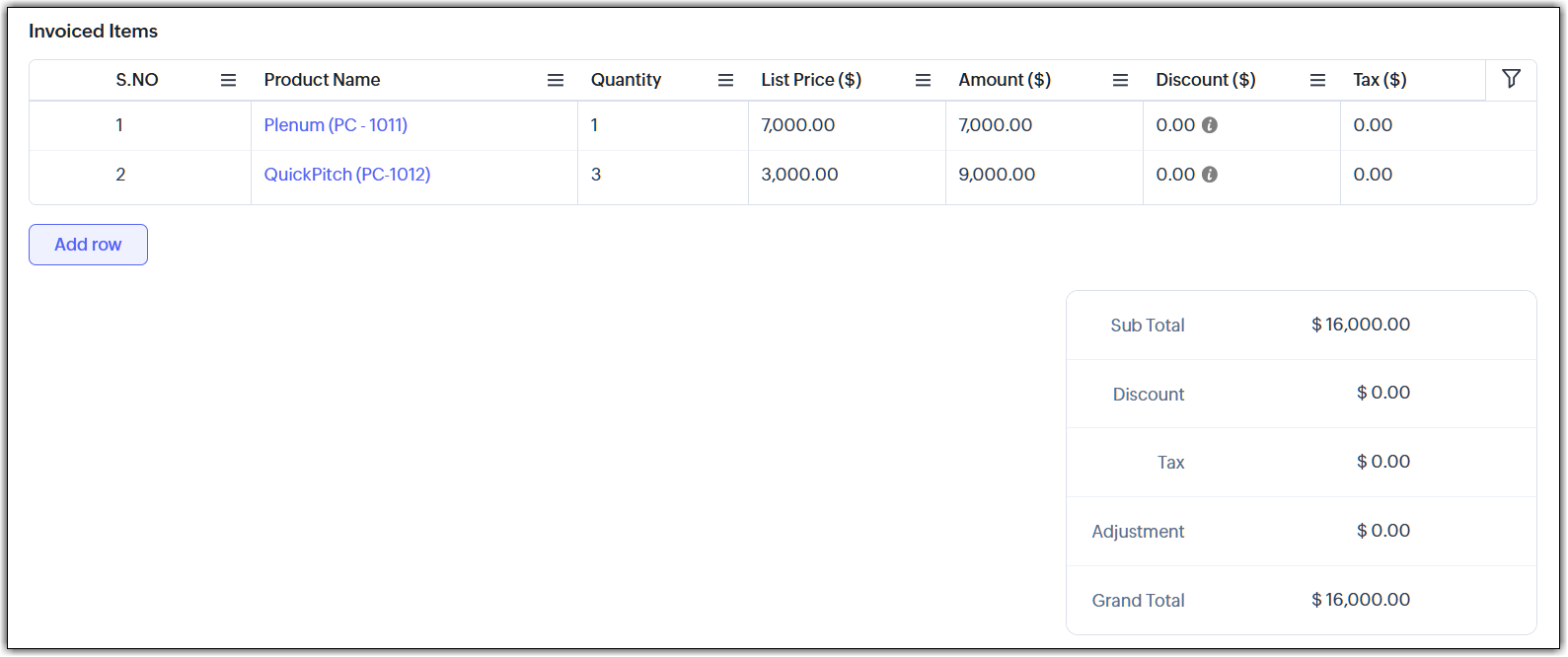
Let's say you're viewing your list of invoices in Zoho CRM and there's a button next to an invoice. When you click it, you see the invoiced items (subform entries) for that invoice—and you can do the same for every invoice in the list. And imagine you can quickly add a subform entry or delete multiple entries—all without ever opening a record.

With Kiosk Studio, you can now quickly build this for your CRM users.

Want to replicate this option in multiple modules? Simply clone the kiosk and rework it to suit each module. Easy work with Kiosk Studio!
Hello everyone, 

Modules in Zoho CRM often contain subforms, which are collections of individual entries related to the specific module you're looking at. For example, records in an invoice module might contain the products/services for which each customer has been billed, all added as entries in a subform, along with other details like quantity, list price, and so on.

In the past, working with a subform has usually involved opening a record, scrolling down, making changes, saving them, and then returning to the list view. Doing that for multiple records ends up in a slow workflow for your end users.

Speed it up with Kiosk Studio

What if you could add a button that made the following possible?
  • Click the button and instantly see the invoiced items tied to that invoice.
  • Need to add a new item? Do that right there.
  • Want to remove one or more items? Select and delete—again, without opening that record.
You can make this happen with Kiosk Studio. Let's look at how.

Scenario
Members of your finance team open the Invoices module and are surprised to see a new addition. Next to each invoice is a button: “View Invoiced Items.”


They decide to try it out:


Your teams can zoom through their workflows and make small changes quickly—all thanks to this new button. You can even clone this kiosk for other modules, like Sales Orders, Quotes, and so on.

Behind the button

The button that you see in the UI is connected to a kiosk. 


Let's see how this kiosk is configured:


As you can see, we can quickly configure the kiosk using elements like GetRecords, Screens, and others.

The code for the adding and removing subform entries is attached to this article. Please note that the code in these files will give you a rough idea of what to do, but you'll have to tweak it and make it better before you use it in your account.

New to Kiosk Studio? Get up to speed quickly by checking out the following resources:
Check out previous Kiosk Studio session posts here:
  • Session #1 covers how to view customers from the same industry.
  • Session #2 covers how to build a call script kiosk.
  • Session #3 looks at streamlining appointments.
  • Session #4 shows how kiosks can simplify sales for bank employees.
  • Session #5 helps you review loan applications quickly.
  • Session #6 packs an entire service request workflow into a single kiosk.
  • Session #7 helps you create your own convert feature.
Got a Kiosk Studio success story or creative use case? Share it in the comments—we might feature yours in an upcoming post!


        • Recent Topics

        • OpenAPI Specs are just plain wrong

          The provided yml files for generating the OpenAPI specs are absolutely riddled with errors and inconsistencies. From missing fields on the objects, to just incorrectly named resource objects. I'm having to go through and manually changing the spec to
        • Why Sharing Rules do Not support relative date comparison???

          I am creating a Sharing Rule and simply want to share where "Last Day of Coverage" (Date field) is Greater than TODAY (Starting Tomorrow). However, sharing rules don't have the option to compare a date field to a relative date (like today), only to Static
        • Create case via email

          Good Afternoon, I have just registered and am taking a look around the system. Is it possible to create a case via email.  I.e. an employee/client/supplier emails a certain address and that auto generates the case which then prompts a member of staff
        • How create a draft via workflow?

          I wish to create a workflow rule for specific emails that creates a draft response - not an automatic email reply, but just a draft with a set response ready to be verified by an agent who can then manually select recipients. Alternatively, the workflow
        • About Meetings (Events module)

          I was working on an automation to cancel appointments in zoho flow , and in our case, we're using the Meetings module (which is called Events in API terms). But while working with it, I'm wondering what information I can display in the image where the
        • Custom Footer – Zoho Writer Document

          Hello everyone, I’m having an issue adding a custom footer in a Zoho Writer document. I would like to insert my company information (including a logo + address) in the footer. The problem is that when I add these elements, the main content of my pages
        • From Zoho CRM to Paper : Design & Print Data Directly using Canvas Print View

          Hello Everyone, We are excited to announce a new addition to your Canvas in Zoho CRM - Print View. Canvas print view helps you transform your custom CRM layouts into print-ready documents, so you can bring your digital data to the physical world with
        • Workflow Down/Bug

          We have a workflow that sends an email to one of our internal departments 10 minutes after a record is created in a custom module. The workflow actually works correctly. However, we have now noticed that on January 8, between 3:55 p.m. and 4:33 p.m.,
        • Report grouping

          I have added a grouping in a report but it is not working how i had expected. I wanted to group a summary on a field named Size but when i add the grouping the report is still showing me each record and making a summary at the bottom of the report. What
        • Social Media Simplified with Zoho Social: Preview your Instagram grid before posting

          For a platform like Instagram that relies on visual appeal, it's important that you plan your image and video content in a way that holds your audience's attention. Planning your grid ahead of time gives you the benefit of understanding how your posts
        • FSM - Timesheet entires for Internal Work

          Hi FSM Team, Several of my clients have asked how they can manage internal timesheets within Zoho FSM. Since their technicians already spend most of their day working in FSM, it would be ideal if they could log all working hours directly in the FSM app.
        • Weekly Sales Summary

          Is it possible to generate a weekly report in Zoho Books to show -$$ amount of estimates generated -# of estimates generated by Salesperson -$$ amount of Sales Orders created -$$ amount of Invoices generated
        • VAT rates - exempt and out of scope

          Good Evening, UK based company here. I am a bit confused in respect of setting up VAT rates for exempt goods and services; at present I am simply leaving the VAT rate blank in the transactions in order to prevent any VAT appearing in the VAT return. When
        • Are there settings for hyperlinks?

          Clicking a hyperlinked cell in Sheet creates this little pop-up with the actual hyperlink inside. Is it possible to have a 1-click link where if you click the cell it opens the link directly with no pop-up?
        • How to loop through Multiple Upload and Display Actual File Name

          I have been reading the help on the File Upload Control and reviewed the Deluge help on files and I can not figure out how to loop through the uploaded files and do anything but get the automatically created file names. The code below will run but each
        • abou arattai

          I want to use the Arattai app for business purposes, so please convert my account to a business account.I have my own invoice app, and I want to link it with the Arattai app for direct messaging.
        • IF Statement in Zoho CRM Formula Field

          Hi, I am attempting to write a formula field that will give me one result if one statement AND another statement are true, then a different value if the first statement AND a different statement are true, else 0. Stated differently: if account = destination
        • Sending automated messages that appear in the ticket's conversation thread

          Good morning, esteemed Zoho Desk community, warm greetings Today I am here to raise the following problem, seeking a solution that I can implement: I need to implement an automation that allows me to send reminder messages to customers when I am waiting
        • Configurable Zoho Cliq Notifications for Zoho People Alerts

          Hello Zoho People Product Team, Greetings and hope you are doing well. We would like to request an enhancement to Zoho People notifications, enabling a native delivery via Zoho Cliq with admin-level control, similar to the notification settings available
        • Overlapping Reports in Dashboards

          It's rare, but occasionally it would be a good feature if I were able to overlap reports, either fully or partially in the Dashboards. Also, then having the ability to move objects to the front or rear, or make them transparent/translucent would be good
        • PDF Annotation is here - Mark Up PDFs Your Way!

          Reviewing PDFs just got a whole lot easier. You can now annotate PDFs directly in Zoho Notebook. Highlight important sections, add text, insert images, apply watermarks, and mark up documents in detail without leaving your notes. No app switching. No
        • Looking back at Zoho Calendar in 2025

          Hello Zoho Calendar Community, As we step into a brand-new year, we’d like to take a moment to thank you for being an active and valued part of the Zoho Calendar community. Your trust, feedback, and continued engagement motivate us to keep evolving and
        • Why hybrid project management might be the best fit for you?

          Project management techniques are designed to equip teams with proven methods for easy and efficient project execution. While management teams may have apprehensions about adopting the hybrid method of project management, we’ve compiled the top reasons
        • Add a way of clearing fields values in Flow actions

          It would be great if there was an option to set a field as Null when creating flows. I had an instance today where I just wanted to clear a long integer field in the CRM based on an action in Projects but I had to write a custom function. It would be
        • There was an error while connecting to GSTN

          I am trying to file GSTR1. Everything flows smoothly until I reach the final step of filing the return. After I enter the PAN and OTP for filing it raises the error "There was an error while connecting to GSTN"
        • Zoho Books Extension: What Happens If Custom Fields Already Exist?

          When developing Zoho Books extensions, what happens if the target Zoho Books organization already has a custom field with the same API name as one defined in the extension? I’m asking because we originally created an on-Books version of this functionality,
        • Internal Server Error (500) When Attempting to View Banking Transactions

          I am experiencing an Internal Server Error (500) when attempting to view transactions across all of my banking accounts. Despite multiple attempts to resolve this, I have received little more than runaround from support, and the issue remains unresolved.
        • How do I add a blank line to the Organisation Address Format?

          I'd like to have my VAT number, for example, shown prominently by having a clear gap between it and the address block above, but any blank lines in the address format get ignored in PDF outputs.
        • Automatic Invoice Number generation for createRecord

          Hello, while testing some custom Buttons in my Zoho Books application, I noticed that I get an error that previously did not occur. After some further digging I found that the automatic transaction numbering of invoices no longer work in my organization.
        • Adding number of days to an estimate.

          I need both QTY of item and "number of days hire" in my estimates at the line item level. Any clues as to how this is done would be greatly appreciated. It needs to calculate. Thanks J
        • Books Api: listing expenses created after certain dates

          Is there any parameter I can add to the List Expenses endpoint that will let me look up expenses by when they were created?
        • Why can't we change the Account type from an Expense to an Asset?

          Like the question. Why in QuickBooks for example if I mistakenly created an account as an expenses and I already captured information in those accounts, I can just change the account type from expense to asset
        • Nueva edición de "Ask The Expert" en Español Zoho Community

          ¡Hola Comunidad! ¿Te gustaría obtener respuestas en directo sobre Zoho CRM, Zoho Desk u otra solución dentro de nuestro paquete de CX (Experiencia del Cliente? Uno de nuestros expertos estará disponible para responder a todas tus preguntas durante nuestra
        • Highlight a candidate who is "off limits"

          Hello: Is there a way to highlight a candidate who is "off limits"?  I would like to have the ability to make certain candidate and / or Client records highlighted in RED or something like that.   This would be used for example when we may have placed a candidate somewhere and we want everyone in our company to quickly and easily see that they are off limits.  The same would apply when we want to put a client or former client off limits so no one recruits out of there. How can this be done? Cheers,
        • Is it possible to do validation for the Actions added to Reports?

          We have an all-around On Validate function that checks all the possibilities before the Created/Edited form submissions. We want to have a button in the report view, so we can change records without entering. We are able to add this button, and it does
        • Ability to Edit Ticket Subject when Splitting a Ticket

          Often someone will make an additional or new request within an existing ticket that requires we split the ticket. The annoying part is that the new ticket maintains the subject of the original ticket after the split so when the new ticket email notification
        • [Free Webinar] Environments in Zoho Creator - Creator Tech Connect

          Hello Everyone, We’re delighted to kick off the 2026 edition of the Zoho Creator Tech Connect Series and are excited to continue this learning journey with you. The Creator Tech Connect series is a free monthly webinar featuring deep-dive technical sessions
        • Zoho Voice API SMS

          I made a post request in Zapier to try to send an SMS. Authentication appears to be configured correctly. I followed the documentation and I'm getting a 400 Error "Internal Server Error". Not helpful at all. Anyways, I could not find any information on
        • How do I change (error) display messages

          Hi! I would like to edit display messages like "invalid entries" and "enter a value for Nome" and so on into Italian language messages. How can I do that? Already tried on Validate on form submit. Where I am failing? Thanks in advance.
        • Record Overseas Transactions Along with CC charges

          Hi All, We receive payments via stripe in multiple currencies and stripe takes around 2.5% fees. The amount is settled in INR into our local bank. What should be the currency of the income account used for Stripe payments? Here is a sample flow that we
        • Next Page