Product updates in Zoho Workplace applications | July 2026
Hello Workplace Community,
Let’s take a look at the new features and enhancements that went live across all Workplace applications for the month of July.
Zoho Mail
Display Reply & Forward Subjects in Your Preferred Language
Choose how email subjects appear when replying to or forwarding emails. Select English or your preferred display language to automatically use localized subject prefixes that match your language preference.
Introducing Web Tabs
Web Tabs let you open external applications, tools, and websites directly within Zoho Mail, so you can work without switching between multiple browser tabs.
Filter Emails in Storage Management
Storage Management section now lets you filter and view emails within Clean Up by Sender and Clean Up by Newsletter, making email cleanup faster and more organized.
Remove invitees from Streams
Group moderators can now remove invitees directly from the Add/View Invitees option, making it easier to manage group invitations.
Zoho Mail Mobile Updates - Android
- Classification labels are now supported for delegated mailboxes.
- To retrieve emails once you have sent them, use Recall option from the sent folder by clicking on the Mail Delivery Status (MDS) icon
- Pin important emails so they remain at the top and are easily accessible across different folders.
- You can now view, accept and deliver Quarantined emails along with a detailed view.
Zoho Mail Mobile Updates - iOS
- Pin important emails so they remain at the top and are easily accessible across different folders.
- You can now select Cliq Meeting directly from the Conferencing drop-down while creating a calendar event in Zoho Mail mobile app.
- To retrieve emails once you have sent them, use Recall option from the sent folder by clicking on the Mail Delivery Status (MDS) icon.
- BIMI(Brand Indicators for Message Identification) has been enabled, allowing organization's to display their verified brand logo alongside authenticated emails. A blue tick is also shown next to the sender's email address for BIMI verified domains.
- Preview EML attachments added to emails you receive.
Control migration status notifications for users
You can now control whether users are notified about the success or failure of their migration status through email.
Learn more!
Learn more!
Export emails from Spam and Trash folders
You can now include emails from Spam, Trash, or both folders when exporting user accounts from Zoho Mail Admin Console.
Enhanced Domains report
The Domains report gives administrators a complete view of all domains added to the organization along with their configuration and verification status. It also allows administrators to view complete information on DNS records, mail traffic, and audit logs for each domain.
Manage and monitor enhanced Shared mailbox activity
The Shared Mailbox Activity report tracks all events within a shared mailbox, including event category, action performed, responsible user, and client IP address. Administrators can filter, search, and click on any activity to view detailed information for each event.
Track external email traffic with External traffic reports
External Traffic Reports provide administrators a complete view of all emails sent to or received from outside the organization, covering details such as domain name, recipient count, and email size.
Share and export displayed data from Admin Reports
Administrators can now export select report data from the Admin Reports section to their device, Cliq, or WorkDrive. You can view the total number of records to be exported before the action is completed.
Zoho Calendar
Find the right MCP tools for your tasks in seconds
Find the right MCP tool faster with the new Tool Finder, your centralized guide to exploring Zoho Calendar MCP capabilities and supported actions.
Meet the All-New Sidebar: Clean, compact, and customizable
Finding your schedules just got easier, Our latest sidebar update introduces smart collapsible accordions to declutter your view instantly, alongside a powerful inline search filter to find any calendar in a flash.
Resource Booking — Now with Approvals!
Admins can now configure approval workflows for resource bookings by reviewing, approving, or rejecting booking requests, ensuring better control over shared resource reservations.
Zoho Cliq
Integrate Jira, Trello, Bookmarks and Translate Phrase to Cliq
Enhanced Jira integration
Summarize Jira issues instantly with ChatGPT, Claude, or Gemini, let bots automatically close discussion threads when issues are completed, and enjoy a redesigned Jira widget with a more intuitive experience.

Trello, revamped
Experience a redesigned Trello integration with a smoother, more intuitive interface, richer previews for Trello links, and the new follow-ups feature to help you track and manage pending actions with ease.

Mail Bookmarks and Notes in Cliq
Access your Zoho Mail Bookmarks and Notes directly within Cliq without switching apps.

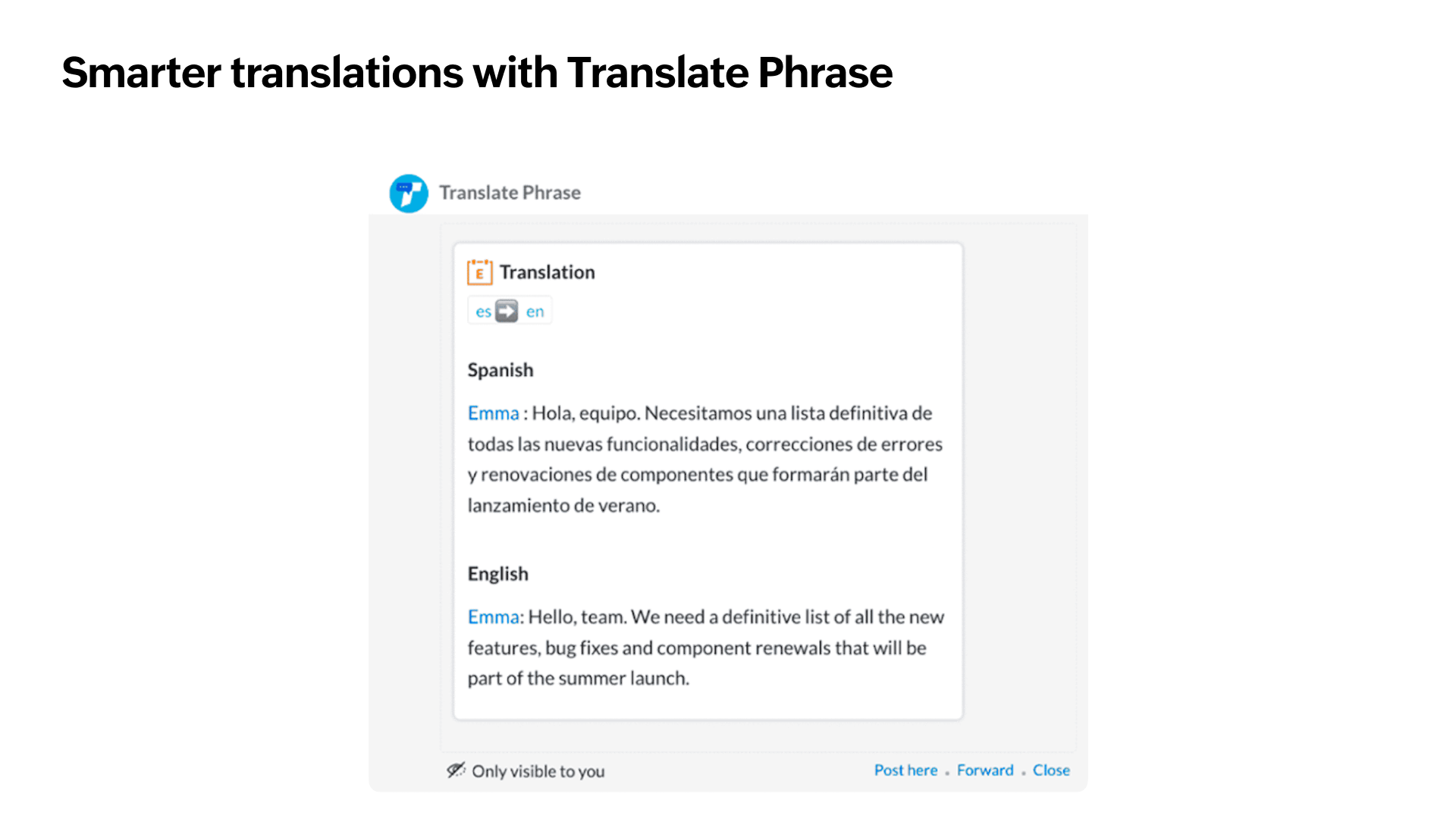
Smarter translations with Translate Phrase
- More reliable translations: Translate Phrase now uses a new translation engine for faster, more accurate translations.
- Choose source and target languages: Select both the source and target languages, or let Cliq automatically detect the source language.
- Translate messages: Translate one or multiple messages directly from the message actions menu without leaving the conversation.
Zoho Show
Introducing MP4 Export in Zoho Show for Android
Convert your presentations into high-quality MP4 videos without leaving the app. No screen recording. No third-party apps. Just a seamless video export.
Offline editing is now available in Show for iOS and macOS
Continue editing presentations offline. Changes are automatically synchronised to the cloud when you're back online.
Zoho Connect
A refreshed experience on your Zoho Connect iOS app
Zoho Connect now embraces Apple’s Liquid Glass design language on supported iPhone, iPad, and Mac devices. The updated interface introduces elegant translucent effects, refined animations, and a modern visual experience that feels more responsive while maintaining the familiar navigation and functionality.
A refreshed look for your network dashboard
Enhance the appearance of your Zoho Connect dashboard with an image background of your choice for a clean and immersive experience. We've also introduced a new Greeting widget that lets you welcome users with personalized messages when they land on the dashboard, making their experience more engaging from the moment they sign in.
Zoho Writer
Conditionally show or hide sections in merged documents
Display sections of your document only when your data meets the conditions you define, and generate personalised documents for every recipient from a single merge template.
Enhancements to formulas
Zoho Writer's latest formula enhancements introduce 12 new string formulas, conditional formulas in merge templates, and an AI-powered formula assistant.
Feature spotlight post | String formulas user guide | Conditional formulas and AI-powered formula assistant user guide
Insert Zoho Checkout payment links in your merge documents
Zoho Writer now integrates with Zoho Checkout. Add a payment field to your merge template, and every generated document—like invoices, order forms, and agreements— will carry a personalized "Pay Now" link that lets recipients pay without leaving the document.
Feature spotlight post | Writer Checkout integration user guide | Document merge in Writer user guide
Topic Participants
Saranya A
Sticky Posts
What's new in Zoho Workplace | September 2026
Hello Zoho Workplace community! Here's a roundup of all the new features and announcements that went live across Zoho Workplace applications in September. Zoho Mail Compose Options Across Templates You can now use the Undo, Redo, and New List optionsWhat's new in Zoho Workplace | August 2026
Hello Zoho Workplace community! Here's a roundup of all the new features and announcements that went live across Zoho Workplace applications in August. Zoho Mail Zoho Mail is now available in AWS Marketplace! AWS Marketplace users can access and subscribeProduct updates in Zoho Workplace applications | July 2026
Hello Workplace Community, Let’s take a look at the new features and enhancements that went live across all Workplace applications for the month of July. Zoho Mail Display Reply & Forward Subjects in Your Preferred Language Choose how email subjects appearProduct updates in Zoho Workplace applications | June 2026
Hello Workplace Community, Let’s take a look at the new features and enhancements that went live across all Workplace applications for the month of June. Zoho Mail Default Calendar for New Events When you create or add a new event, Zoho Calendar is nowProduct updates in Zoho Workplace applications | May 2026
Hello Workplace Community, Let’s take a look at the new features and enhancements that went live across all Workplace applications for the month of May. Zoho Mail Introducing Zoho Mail MCP - Manage your inbox using AI agents With Zoho Mail MCP, you can
Recent Topics
Zoho Forms API
Is there any way to get all form entry list using API? Looking forward to hear from youBNZ Bank Feeds No Longer Available
The BNZ (New Zealand) bank feeds are still failing and it's been months since they last worked! Uploading bank statements (CSV's) mean waiting to the end of the month when they become available. It is unacceptable to keep my clients waiting for paymentHow can I connect Zoho CRM with Power BI with no Rest API ?
Hello, My version of Power BI does not accept Rest API with Zoho. I have a module "Deals" in Zoho CRM that I want to connect to Power BI to exchange Data. I want to be able to automatically exchange data from Power BI to Zoho CRM (CRUD), and from ZohoMCP is now easier to access and configure in Bigin
Greetings! We hope you're all doing well. We've previously introduced Zoho MCP for Bigin, which lets you connect Bigin with AI tools and interact with your Bigin data using natural language. Now we're making MCP easier to access and configure directly[ZohoDesk] Improve Status View with a new editeble kanban view
A kanban view with more information about the ticket and the contact who created the ticket would be valueble. I would like to edit the fields with the ones i like to see at one glance. Like in CRM where you can edit the canvas view, i would like to editLaunch agents from more custom button locations and attach files in Ask Zia
Hello all, Your agents now meet your team where the work happens. You can add agents to custom buttons in list views, create and edit pages, and related lists, so users launch them without leaving the page they’re on. What’s new Agents in more customPhone system to integrate with Zoho CRM
I am looking for phone software that would allow my agency to do the following within Zoho CRM: Make calls from zoho Track calls and notes Leave pre-recorded messages after reaching voicemail of lead Only 2 members, so need company who will allow justUI Enhancement Request - Projects Users Section
UI Enhancement Request - Projects Users Section Under Projects → Users, the UI for the Departments and Sub BU fields needs to be improved. Currently, the input area appears as a simple underline and visually looks like the end of the field label ratherIntroducing PRM: Build, manage, and scale your partner ecosystem
Growing a partner ecosystem is a good problem to have. What starts as a handful of partners can quickly turn into a maze of spreadsheets, emails, and disconnected processes. More partners mean more opportunities, greater reach, and new ways to growZoho Projects connector with Zoho CRM (Related List module) features
Hi community, I use Zoho Projects connected to Zoho CRM, where we associate Projects with Deals, clients, etc.. I am looking to change/edit the fields that are available in the integration. Currently it shows Project Status, Project Completion, Milestones,Feature Request: Render Markdown (.md) files in Zoho Cliq
Hi, We regularly share Markdown (.md) files in Zoho Cliq. However, when we open these files in Cliq, the content does not render as Markdown—it displays as plain text. This forces us to copy/paste the content into an external Markdown viewer to read itFree webinar: Zoho Sign for Microsoft apps
Hello, Did you know Zoho Sign works right inside the Microsoft apps you already use? A signature request shouldn't mean leaving Teams for another tab, or downloading an Outlook attachment just to sign it. Zoho Sign integrates with Microsoft 365, Teams,Users can now notify the contact while adding a 'Resolution' to the ticket.
Hello, In the latest version of the Desk iOS mobile app (v2.6.4), users can now notify the contact while adding a 'Resolution' to the ticket. Also, the 'Resolution' UI has been tweaked to support edit and delete option. Please update the app eitherBetter Time Tracking
We need better time tracking customization for IT MSPs. We also need reporting that is built in, rather than having to try and fumble with creating custom reports. We also need to be able to mark whether a ticket has been billed or not, I don't thinkIntroducing Custom Fonts for Career Sites
Your Careers page is often the first place candidates interact with your organization. From exploring job opportunities to submitting applications, a consistent visual experience helps candidates recognize and connect with your brand. To give you moreNeed help with importing expenses
I'm using the template downloaded from the application. When I try to import my expenses, I get the message: Duplicate entry in the Expense Date column. Ensure it contains unique values. None of the rows will import. There are duplicate dates, but theytime tracking on zoho crm cases
Is there a time tracking feature in zoho crm cases? I need calculate time spent in calls, tasks and events Thanks in AdvanceIntegrate with Power BI
Hi, How to connect Zoho CRM dashboards & reports with POWER BI ?Error creating an XML file
I am creating an xml as string in the function Employee.generatePartA_XML_String, and then I want to save it as a file to the field "Part_A_XML", but I get the response: {"code":3700,"message":"Unable to upload a file. Please check and try again."} HowUnbundle feature for composite items
We receive composite items from our vendors and sell them either individually or create other composite items out of them. So, there is a lot of bundling and unbundling involved with our composite items. Previously, this feature was supported in formTrident Missing
No way you guys get so close to having trident complete for over a year then just kill it off. Wow just wowZoho Recruit: Time to Step Up Your AI Game!
I've been using Zoho Recruit for many years and I love it. But let's be honest, it's starting to feel a bit like a relic from the pre-ai era. I recently tried out new systems that have ai resume screening and ai interviewing capabilities, these systemsZoho mail app throwing network error
Zoho mail app is throwing network error and I do not know how to fix the issue.Cannot unblock account
Hi, I have recently been travelling for work and now my mail account has been locked due to suspicious activity (I guess login attempts from different countries) however when I go into my admin panel it won’t let me unblock and asks me to contact support.WorkDrive Desktop Sync Is Being Deprecated: Move to WorkDrive TrueSync for a Smarter Experience
Hi everyone, We are excited to share a better, smarter way to access and manage your files directly from your computer! We’re transitioning from our legacy Desktop Sync app to WorkDrive TrueSync, designed to give you faster performance,greater flexibility,Time logging issues
I am losing times tracked on tasks. The problem is that it is not clear when the time is logged, when the timer is stopped or when the task is closed? I've done both and neither works. Whats more when the task is closed, the tracked time disapperas (i guess bc it shouldve been logged) but when it's not logged you've just lost your tracked time. The bigger problem is the UN-NATURAL way this time logging is set up. On every other plat form that tracks time, it is made clear to save timer or log whenStart/Stop Timmer in Chrome Extension
The chrome extension is great and allows you to do allot however one of the most common things employees working on projects need to do is track their time. Having an easy start/stop timer to track time would be great.Employee Logged Hours Report
Hi Team, We are looking at having all Employees logged hours report, but different staff uses diferent modules to log their time. Is there anywhere that we can get a report that captures every time entered through all Zoho modules? Thank you.Time Log Report Across Zoho Apps?
Currently there are at least 4 different apps in Zoho where users can book time. Projects Desk Books People In our case for instance, the same user may book time against both Projects and Desk Tickets. So we have no way to see a simple timesheet for aZoho Time tracking option with automated screen shots.
Time tracking option with automated screen shots would be an exceptionally good feature, any plans to develop something like that? Please do the needful. Thank you, Raj RajincDetailed time tracking (for productivity/accountability). How to?
Hello everyone! I read an interesting article about accurately tracking your time in 15 mins intervals and after some time analyzing it in order to improve your productivity. I'd like to give this a try myself. I would like to use Zoho apps. (How) could I do this? Thanks for the tips!Time Tracking Needed in Zoho
It seems lots of people request a Time Tracking Zoho Desktop App, that is only problem I have with working with Zoho. People need to know how much time they spend on specific tasks. Is Zoho planning to do this sometime in the future?emails?
Why can't I send emails from my account anymoreErase function in Zoho PDF editor does not truly redact
Using the "erase" function in the Zoho PDF editor online does not redact the text underneath when opening the file in Adobe. When I used the erase function to whiteout the areas I didn't want to be seen, I opened the supposed redacted files in Adobe.Backorder For Composite Items
Hello If i released SO for composite item and use backorder feature of zoho inventory then it should backorder child item items of composite and not composite item.This is basic of backordering.I conveyed this to zoho call center but no solution yet.Global Constants / Variables
It would be great if there were a Global Constant feature. The idea here is for managing constants that are used in multiple Flows and Subflows, but might change over time. The idea is that the change could be made in one place and cascade to all futureDeal Activity Tracking - By Time
Hello, I am trying to figure out a way to implement a time tracking ability within the CRP that will provide a line item on the final invoice in books. Would the Cases module be of good to use in this scenario? Want to integrate into Books as well. ITime Card Tracking For Employees
Does ZOHO have an add-on or app that my employees can use to clock in & out on a daily basis. In the past we had used a third party solution, but it was hard to use and pricey. We would really like to use your time tracking feature if you have one......ifLogging time within Time Tracking
At the moment I use the call logging feature of CRM to log time spent on clients work. Its nice to be able to start, stop and pause the timer and record how many hours I need to bill the client. Any chance of implementing this in Zoho Invoice's time tracking feature The same interface as CRM would be great or a simple start/stop/pause/restart timer.3rd Party/Easy Time Tracking Integration with Zoho
We are new customers using Zoho One with Zoho Project/CRM/Desk being the 3 big applications we will use. The majority of our work is done in the field and we need accurate and easy time tracking for our workers on mobile phones. aka TSheets type functionality. but tied to Zoho. Zoho is outstanding overall so I am surprised at how laborious, inefficient and disconnected time tracking is mobile devices. Adding time to a project task on a mobile phone can be a 10+ click task and that's not an exaggeration!Next Page