Building extensions #1: Creating and testing extensions for Zoho Finance Suite applications
Hello developers!
We're excited to announce a new series called "Building extensions" to assist developers in creating efficient extensions for Zoho Finance Suite products. We'll support and guide you through the process of creating an extension and using the features offered in the developer portal.
What are extensions?
Extensions are installable plugins or add-ons that help enhance the existing functionality of your Zoho product or seamlessly integrate and interact with third-party applications for data transmission.
How can you build extensions?
Zoho offers a developer platform called Zoho Developer that allows you to build different types of applications. Sigma is a platform offered within Zoho Developer that is specifically designed for creating extensions for various Zoho products. Throughout this series, we'll look at how to create and develop extensions for the Zoho Finance Suite applications using Sigma.
Get to know all about extensions and building them further in detail.
Sigma extension support
The Zoho Finance Suite consists of seven applications: Zoho Books, Zoho Inventory, Zoho Expense, Zoho Invoice, Zoho Billing, Zoho Checkout, and Zoho Payroll. Currently, the Sigma platform supports creating and building extensions for these five Zoho Finance applications:
- Zoho Books
- Zoho Inventory
- Zoho Expense
- Zoho Invoice
- Zoho Billing
Creating an extension
- Log in or sign up at developer.zoho.com.
- Go to Sigma and access your workspace.
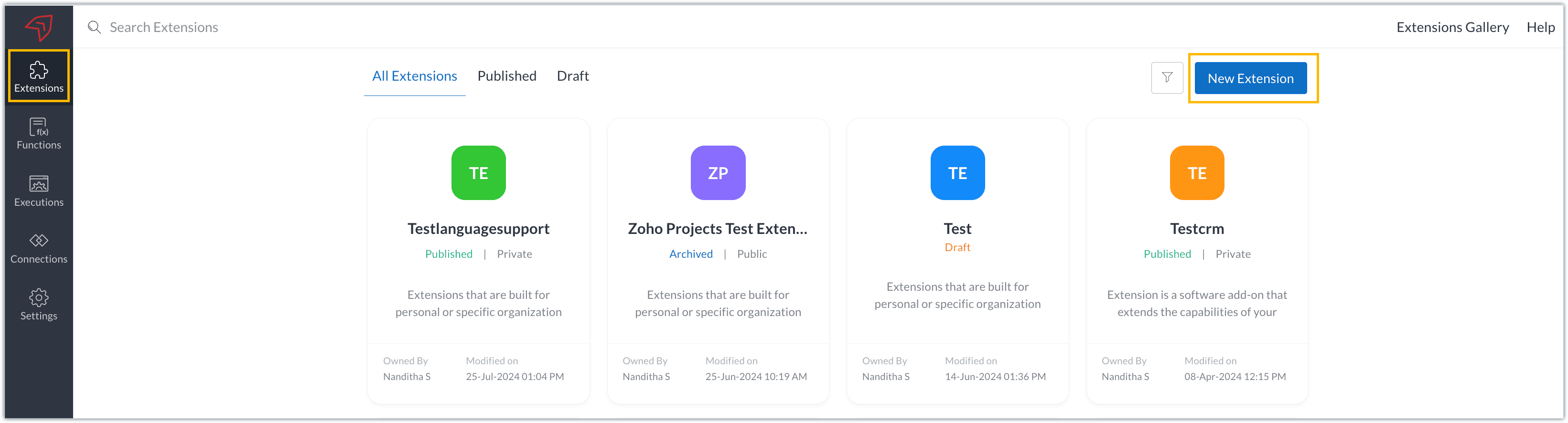
- Once you enter your workspace, you'll be taken to the Extensions section in Sigma.
- Click the New Extension button to start building an extension.
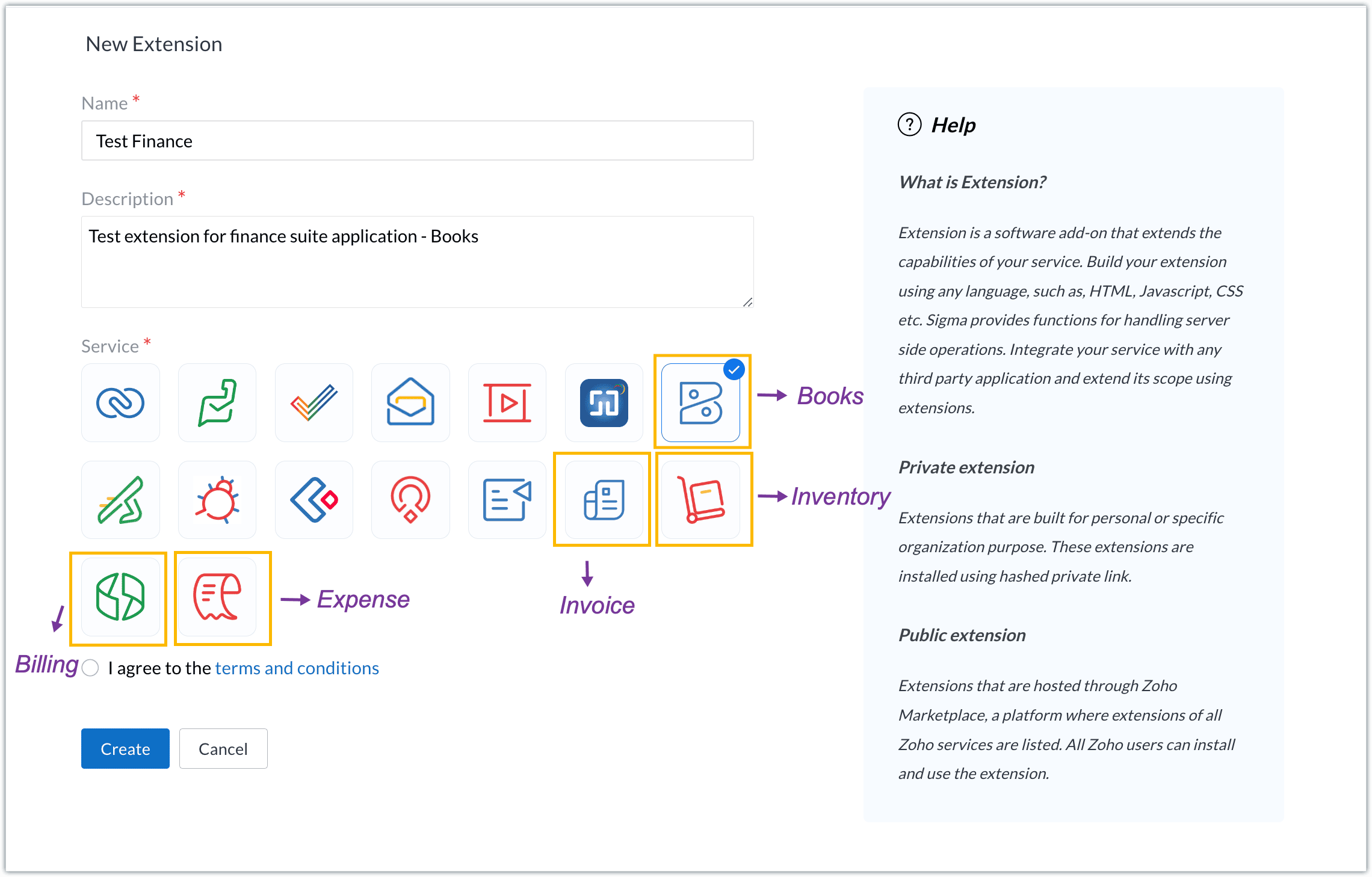
- Enter a name and description for the extension and choose the service you want to build the extension for. As mentioned earlier, Sigma offers support for Zoho Books, Zoho Invoice, Zoho Inventory, Zoho Billing, and Zoho Expense.
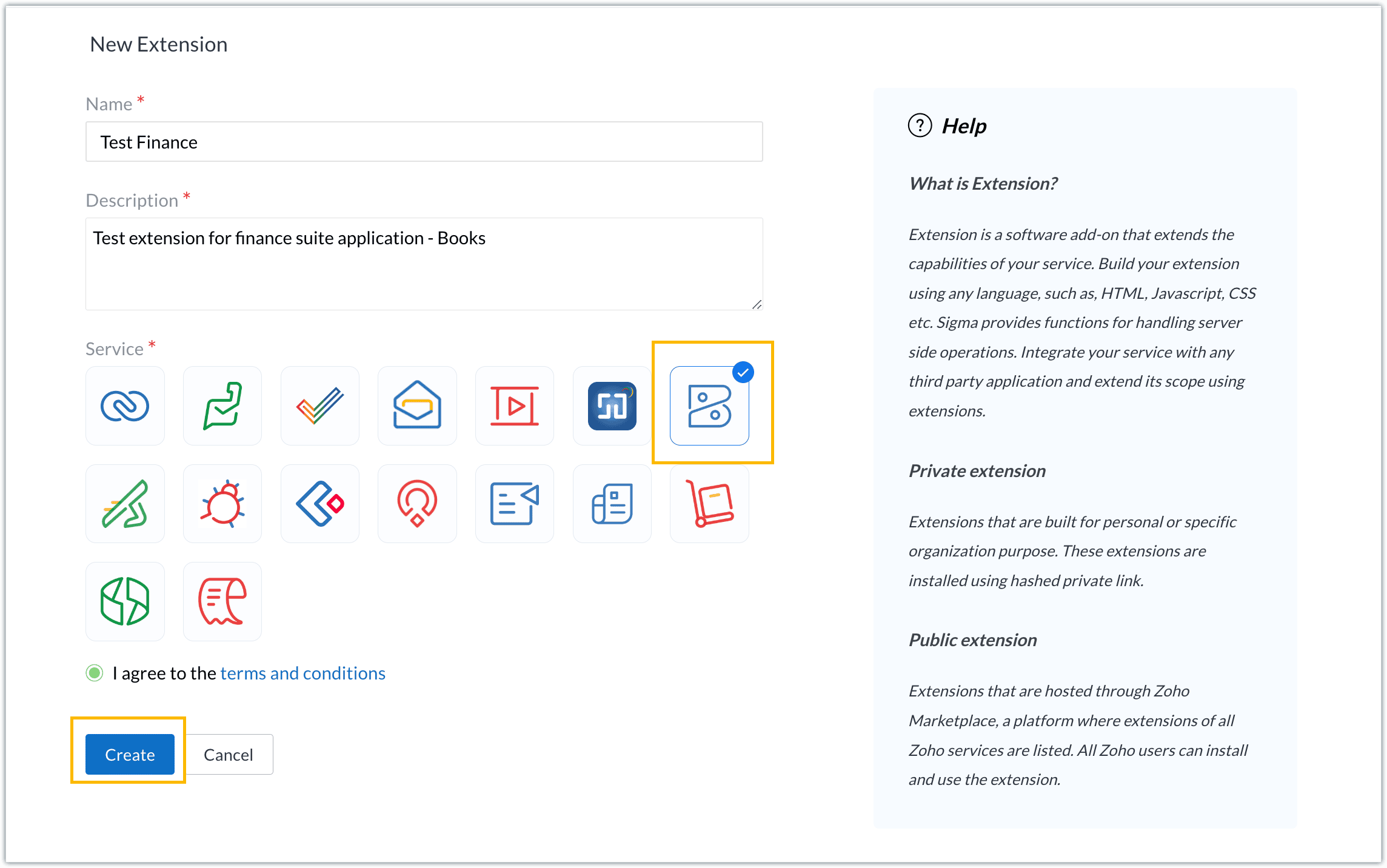
- For our demo, let's choose the service as Zoho Books. Accept the terms and conditions, and then click Create.
- The extension is successfully created. You can click the Extension Details icon to see an overview of the extension.
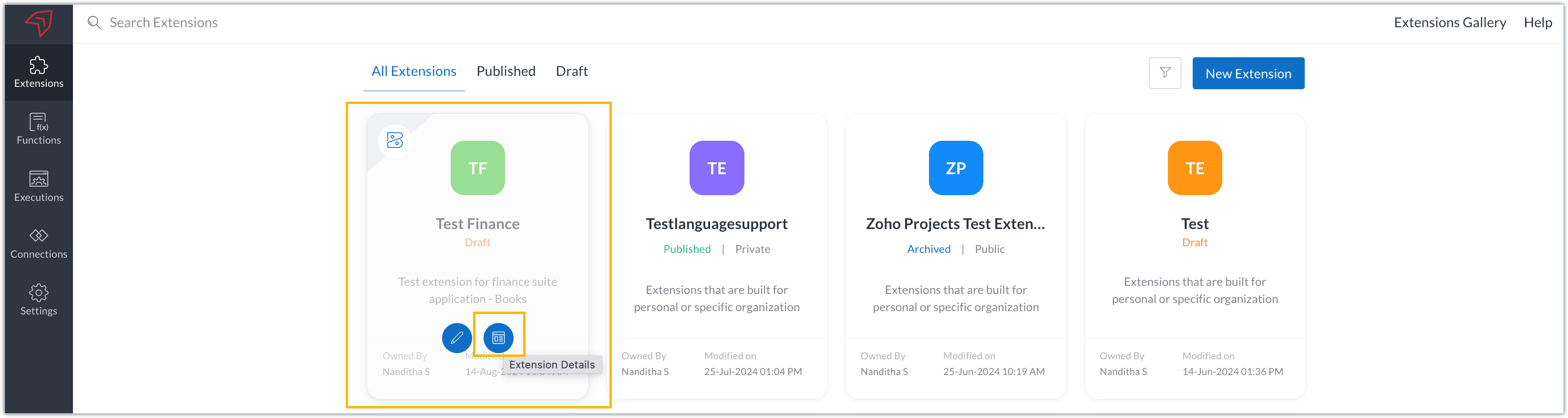
The extension details page shows the general details of the extension, such as creation date, creation time, and version, and allows you to associate developers with the extension.
- Click the Edit Extension icon to start developing the extension.
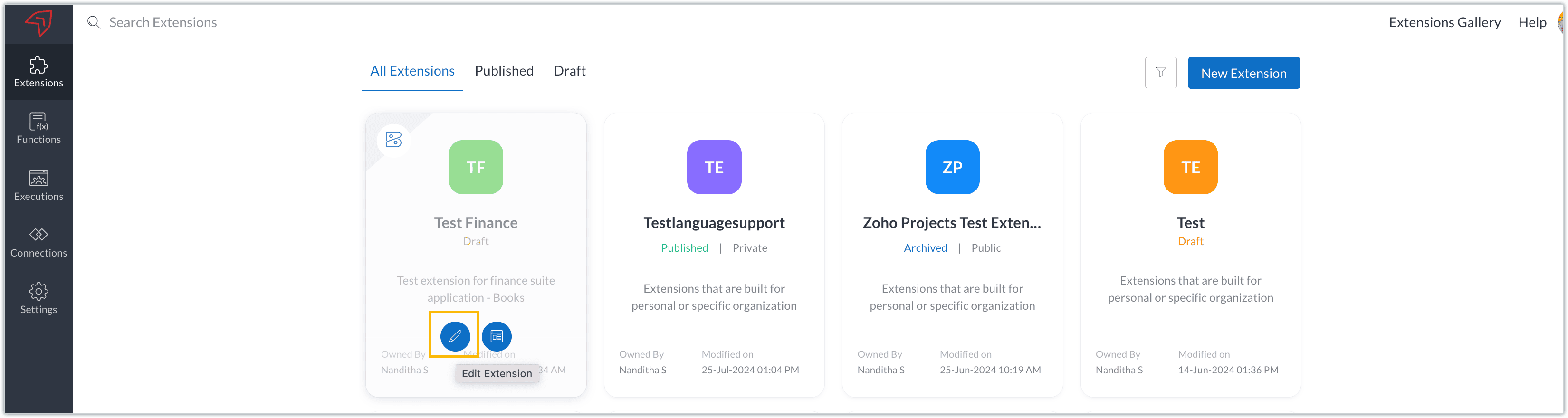
- The Zoho Books Developer Portal opens with the options and native features available to customize, curate, and develop your extension.
Zoho Books Developer Portal sections
The developer portal has four different sections to help customize and build your extension.
Learn: This section lists the native Zoho Books capabilities that can be used to create and develop extensions. Clicking the Set up Now button next to each feature will take you to the feature's development setup page.

Build: This is the development setup section, which includes customization, automation, and components like connections, widgets, schedules, webhooks, and signals. You can customize your extension preferences, establish connections to integrate with other applications, and design custom interfaces to enhance user experience.

Configure: This section assists with handling your extension's required configurations, whether they are generic settings or customizations required from the user. You can add global fields, which can be incorporated as either variables that store static data or through custom widgets that retrieve user inputs. You can also define functionalities that happen during installation and uninstallation.

Publish: Once the extension has been built and configured, you can use this section to publish it for either private or public use. In both cases, the Zoho Books team will review the extension; for public extensions listed on Zoho Marketplace, the Zoho Marketplace approval team will also review them. You can share your privately published extension with other users using the Shared List option.

We will explore more about each of these sections and their features in upcoming posts.
Testing an extension
The Zoho Books Developer Portal offers a dedicated testing environment for each extension, allowing you to test and validate it before publishing.
As a developer, you can use the Test Your Extension option in the top right corner of the portal to access your extension's sandbox environment.

This will redirect you to the sandbox testing environment for the extension you're developing, which is similar to Zoho Books and contains relevant modules to test with.

You can populate necessary data and test your extension functionality. Once everything is validated, you can go ahead and publish your extension for private or public use.
For support or questions related to Zoho Finance Suite extension development, you can email developer@zohofinance.com.
We hope you found this guide useful. Keep following this space for more information!
Topic Participants
Nanditha Somasundaram Somasundaram
Sticky Posts
Building extensions #5: Creating custom connections for extensions
In our previous post, we discussed the significance of connections, identified their types, developed a predefined connection, and demonstrated how it can be integrated with Zoho Books using an example. In this post, we'll walk through the process ofBuilding extensions #4: Integrating Zoho Books with applications using connections
In our last post, we looked at an overview of the key features available for creating a Zoho Books extension, including connections. In this post, we'll go over connections in depth, including their types and applications. What are connections? "Connections"Building extensions #3: Fundamental features of a Zoho Books extension
In our earlier posts, we covered how to create, test, and publish an extension for Zoho Finance suite applications. Moving forward, we'll look specifically at instances relating to one of the products from the Zoho Finance suite: Zoho Books. In this post,Building extensions #2: Publishing an extension
Hello developers, Welcome to our next post about building extensions for Zoho Finance Suite applications. In our previous post, we looked at extensions, their purpose, and how to create and test them. To recap, extensions are installable plugins or add-onsBuilding extensions #1: Creating and testing extensions for Zoho Finance Suite applications
Hello developers! We're excited to announce a new series called "Building extensions" to assist developers in creating efficient extensions for Zoho Finance Suite products. We'll support and guide you through the process of creating an extension and using
Recent Topics
Zoho Flow + QuickBooks Estimates – Line items not created from CRM subform
Hi everyone, I’m trying to create QuickBooks Estimates from Zoho CRM Quotes using Zoho Flow. I’m aware that Zoho Flow’s native “Create Estimate” action does not support multiple line items, so I followed the community guidance for Invoices using a customSAP S/4 HANA Integration via ZOHO Flow
Hi How do I change the SAP Client ID while creating a new connection ? MY client ID is 421. I believe the client id should be an input field for length 3 numbers rather then a drop down to select from a fixed set of values. ThanksVLOOKUP FUNCTION PROBLEM
Hello, i have a problem with the VLOOKUP function in my sheet http://public.sheet.zoho.com/public/tonimoreno/indicemasacorporal2 in cell D2. This function doesn't work correctly and always returns the last content of the range. Can you help me?Zoho Flow Completely Broken?
Since December 13th, 100% of our flows have stopped working completely. Nothing is working or triggering??? I called support & sat on the line with them for 2 HOURS until they finally concluded it was a back-end problem on their end?? Now i'm callingPrint / Export full Dashboard page
Hello Zoho team, It is currently only possible to print/export one component of a dashboard at a time. Requesting the option to print/export a full dashboard page with all components to a pdf or picture. Doing through the browser doesn't give good results.emails duplicated in my outlook client
Hello I am just new here and I have a litle problem that I do not find how to solve. I sumarise here after. Your help would be very appreciated. I have just recently contracted this zoho mail servicesservices as an initial evaluation yesterday night. I then: - opened a free account - created 1 initial email address ..........@domain.com - created a second email address ..........@domain.com - proceeded with the config instructions (checking the ownership of my domain, changing MX etc... ) asHow to check task starting time in zoho mobile app?
I am using the Zoho mobile app on my iPhone, and I am not able to see the task's starting and finishing times. When opening the Task information / Details, I can only see the Task start date and due date, but not the time. Is there any way to check aCreating an extension in Sigma: Zoho CRM isn't selectable as a service
I have 2 Zoho accounts which are part of 2 different workplaces. One workplace is able to select 'Zoho CRM' as a service option when creating a new extension, the other one is not. I'm not sure what the exact differences are between them. What do I needList of packaged components and if they are upgradable
Hello, In reference to the article Components and Packaging in Zoho Vertical Studio, can you provide an overview of what these are. Can you also please provide a list of of components that are considered Packaged and also whether they are Upgradable?How to track a list of ALL the items that ONE customer bought?
Hello, I am interested in getting a list of all the items that only ONE of my customers bought, and the invoices are what show up instead. It's very tedious to go through every single invoice when we sell a lot of items to this customer. Surely thereRouteIQ for Zoho FSM
Beste, Zou wel top zijn dat we een RouteIQ hebben voor FSM aangezien we constant moeten zien wat de beste route is voor onze monteurs. Nu moeten we een speciale aparte programma hebben om de beste route te berrekenen voor onze monteurs aangezien de planningExport Tickets from the Help Center
Hello everyone! We are now allowing end users to export tickets directly from the help center. The ticket export allows users to: Filter tickets by Department, Priority, and Account before exporting. Download files from Export History (Setup > Data administrationSuper Admin Logging in as another User
How can a Super Admin login as another user. For example, I have a sales rep that is having issues with their Accounts and I want to view their Zoho Account with out having to do a GTM and sharing screens. Moderation Update (8th Aug 2025): We are workingIs it possible to remove filtering options?
My CRM has a lot of custom fields that should not be used in filters or views. Fields that are automated and exist only to store temporary values that get used in functions. These create a lot of noise in the list of fields to filter. Isn't there anyFunction #18: Associate invoice templates automatically based on customer language
For businesses dealing with a diverse linguistic clientele, it becomes crucial to send out invoices in the customer's preferred language to ensure effective communication. This requirement can be handled in Zoho Books by creating invoice templates inChanging field types
Question im a Zoho CRM user and curious, if I change a flied type from single or multi line text to a URL field type will i lose the data in the field or will it be converted to website link automatically. ThanksQuote PDF – Header image stopped rendering suddenly
Hello Zoho Support Team, We are facing an issue with Quote PDF templates in Zoho Books. Previously, images added inside the Quote header HTML were rendering correctly. However, recently the header image is no longer appearing, while header text stillChanging Default PDF Name
Is it possible to change the default name of a PDF? As of right now, all of my quotes are named 'QT_$QuoteNumber' (i,e: 'QT_19803471298374) - would it be possible to change this to: '$CompanyName - $AccountName - $QuoteNumber' for instance?Tip 2: Recursive functions in Deluge: How to dynamically run a function for a specified number of times.
Hi folks, As part of the Zoho Creator - Tips and Tricks series every fortnight, we are back today with a new tip on Recursive functions. Let us first quickly understand what Recursive functions are: A function that calls itself one or more times is known as a Recursive function. That is, you can execute a function to perform a particular action a specific number of times. And, at the end of each iteration, a new output is generated. Recursive functions are commonly used by programmers as it enablesFunction #48: Manage fixed installment payments using Zoho Books
Hello everyone, and welcome back to our series! Businesses offer installment payment options to their customers, particularly for expensive purchases, to ease the financial burden on them. By breaking down the total cost into smaller, more manageableSpotlight series #6: The Show app for Android TV has a new look!
Hello everyone! We are delighted to introduce our revamped and redesigned Show app for Android TV. Smart TVs are exploding in popularity. Android TV alone has over 110 million active monthly devices. Zoho Show, as part of a constant effort to improveCan’t create alias “Email alias already exists”
Hi, I’m trying to create the following alias for my domain email. contact@ personal@ private@ But I get a email alias already exists. I had a soho account previously which I deleted which I suspect is causing the issue. Can someone assist? Kind RegaZoho Books integration sync from Zoho CRM does not work
Hi Zoho Community & Zoho Support We just tried to get a sync some products into Zoho Books from CRM using the native sync and we're getting an error: "It looks like some mandatory fields you're trying to map are empty. Please provide valid field namesAppraisals - Order of Previous Reviews Should Be Newest to Oldest
The new Zoho People layout generally does a decent job at providing the necessary information for performing appraisals of employee performance. One example of this is the Previous Reviews section: This information is helpful when conducting a review.Paging through API results. a major gap in your documentation.
There is no way for me. to get all of my data through a single API call. Typically REST APis have mechanisms for paging through API results. But the documentation for the API I am using: https://desk.zoho.com/DeskAPIDocument#Introduction Has no mentionRecurring invoices were generated with old template...
I have recurring invoices setup. Ones generated on 10.20.2025 used the modified template I had used. But for some reason, on the ones created on 11/20/2025, it seems the invoices created reverted to the previous version of the invoice template. Notably,Tip #54- Exploring the Files Icon in Zoho Assist- 'Insider Insights'
As we’re already in mid-December, it’s a good time to take a closer look at one of the most useful options in the Zoho Assist remote support dashboard—the Files icon. To get started, log in to Zoho Assist using your credentials. Once you’re in, navigateTip#47: Estimation planner
Sprint planning becomes easier, smoother, more collaborative and more accurate with the Estimation Planner extension. Most work items involve multiple users, and each user's role and effort vary. To provide an unbiased and fair estimation point to theUpcoming update to Google Drive integration in Zoho Creator
Hello everyone, We're writing to inform you about an upcoming update to how Zoho Creator integrates with Google Drive. In Zoho Creator, during actions like importing files to create an app or attaching files to fields, you can choose files directly fromTime Tracking on Iphone doesn't stop
When I start a time tracking session the timer starts as expected. However when I hit stop, the timer remains on that project. The only buttons available are discard and start. Start runs the timer more and discard says it will throw away the data fromZoho Sign - Zoho CRM extension upgrade
Hi everyone, We've updated Zoho Sign extension for Zoho CRM with significant internal changes. Impact on existing Zoho Sign extension users Users using the extension without customization If you are using the integration without implementing Zoho Sign'sZoho Books blocks invoicing without VeriFactu even though it is not mandatory until 2027
I would like to highlight a very serious issue in Zoho Books for Spain. 1. The Spanish government has postponed the mandatory start of VeriFactu to January 1st, 2027. This means that during all of 2026 businesses are NOT required to transmit invoicesGroup by Owner/ Owner Kanban /Group by Custom Field
Hi, We are missing the option of viewing Tasks grouped by their owner, as it is an essential function for us to manage our employees' working tasks. We find it hard to inspect what are the tasks that our employees are working on. We are seeking an optionFlow using way too many tasks
I built a flow that is using way too many tasks for what it is doing. I reached out to support a week ago but never heard back so hoping the community can help. Does a filter count as a task? I am seeing tons of records filtered with < 1 Sec Time TakenRegarding the integration of Apollo.io with Zoho crm.
I have been seeing for the last 3 months that your Apollo.io beta version is available in Zoho Flow, and this application has not gone live yet. We requested this 2 months ago, but you guys said that 'we are working on it,' and when we search on GoogleStart Workflow from Deluge Script
I have developed a customized process from our CRM that leverages a deluge script to create a statement of work document. Once the document has been created via the merge and store function, I would like the ability to start a workdrive review & approveSaved Sections?
In sites editor, the + button reveals options to add a section, element, etc. It includes Saved Sections, but I can find no way to save a section I've already created. Otherwise, is there a way to copy a section from one page to another?Marketer's Space: Unable to select a sender address? Here's the fix
Hello Marketers, Welcome back to yet another post! So you've added a sender address in Zoho Campaigns and later found that you're not able to select it while creating an email campaign. Has this ever happened to you? If so, don't worry—you're not alone.Loading Project Balances in ZOHO Books for each project
Hello, What is the best method for loading project balances actual and budget into ZOHO books to provide tracking to our project managers. We have projects and federal awards (also treated as projects) which span multiple years. We are converting fromScale up your writing style with content analysis tool in Knowledge Base
Hello everyone, Sometimes writers may have strong knowledge about the subject but may find it challenging to articulate clearly or produce comprehensible, jargon free content. To make the process easier and to ensure consistent, high-quality articles,Next Page