What’s New in Zoho Expense: August - October 2024
Hello users,
We are thrilled to share some exciting product updates and enhancements in Zoho Expense that will help you streamline and improve your travel and expense management experience. Our latest additions include the ability for users to view their budgets, petty cash management, a feature to track your rides automatically from the mobile apps, a new edition of Zoho Expense, and much more. Let's dive in to explore all the updates!
User Budgets in My View
Users can now view their budgets from the Budgets tab in My Settings. By default, the current fiscal year's budget will be displayed. However, users can also view their previous years' budgets by selecting the desired year from the Budget Period filter. The Budgets tab will be available to all users with default roles. Users in custom roles can access their budgets when admins configure the necessary permissions for them to view their budgets.

 Note: Only the particular user's budget will be displayed here, not the organization's budget.
Petty Cash Management
Petty cash management, commonly referred to as the imprest system, involves overseeing and controlling a small fund of cash set aside by a business to cover minor, everyday expenses, typically for branch operations. We've added the Petty Cash Accounts module in Zoho Expense to help businesses manage their petty cash.
In the Admin View, users can view all pending funds and unsubmitted expenses. Admins can also perform actions such as creating funds and fund withdrawals, as well as activating or deactivating petty cash accounts. In My View, users can perform actions such as creating expenses, requesting funds, and generating reports.
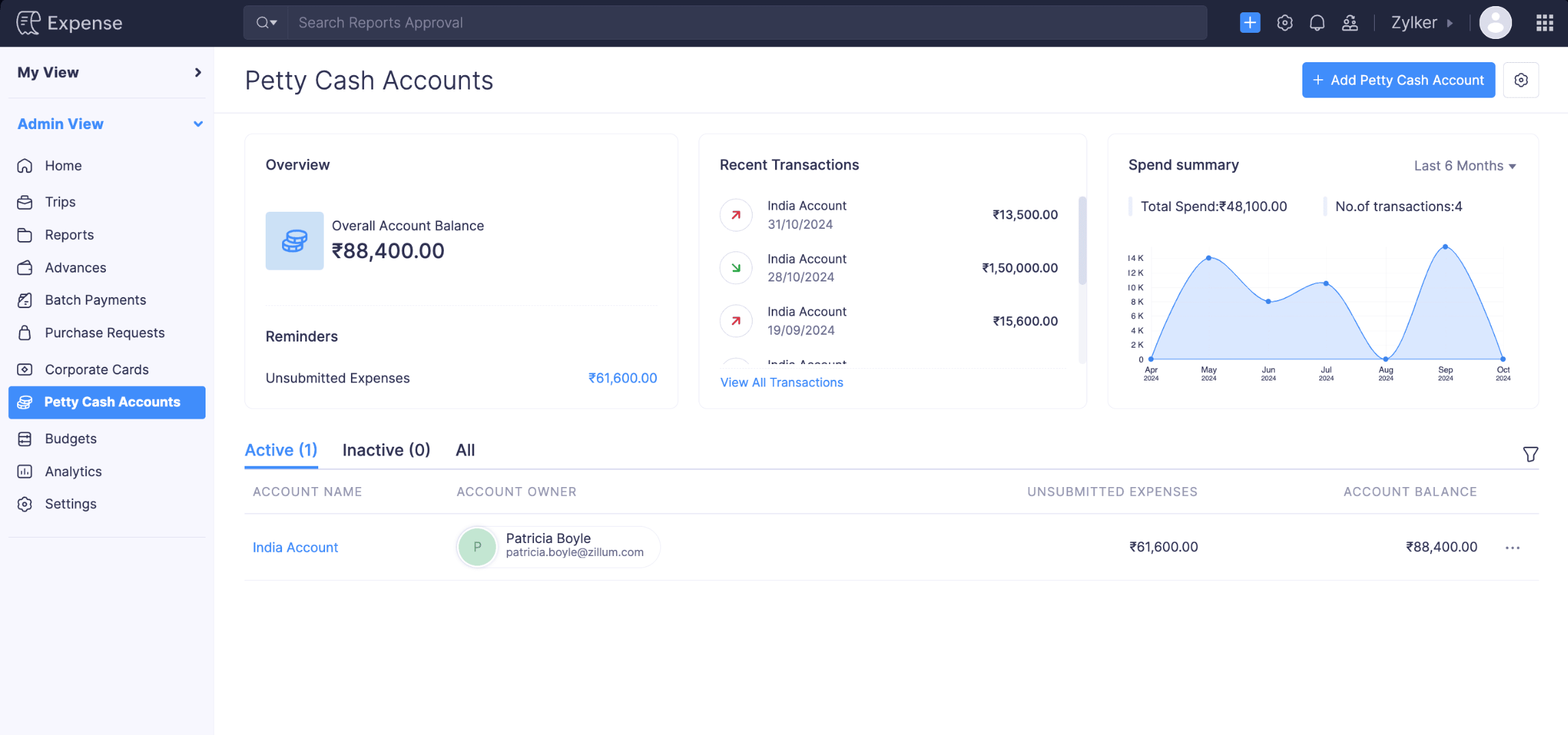 Note: This feature is currently available for early access. Write to us at support@zohoexpense.com to enable it for your organization.
Audit Trail Backup [India Edition]
We’ve introduced the Audit Trail Backup feature, allowing users to back up their audit trails. Users can export the data in ZIP format, which they can download on the same page or from an email sent to them once the backup is completed.
To back up your audit trial, go to Admin View > Settings > Data Administration > Backups > Audit Trial Backup > Backup Your Audit Trial.

SBI Bank Integration [India Edition]
Integrate Zoho Expense with SBI Bank to reimburse your employees' expense reports directly from Zoho Expense. For an employee to receive reimbursements, you need to add their bank account through which they'll receive the reimbursement.
To reimburse your employees' expenses, go to Admin View > Reports > Awaiting Reimbursement > Select the report to be reimbursed > Reimburse > Via SBI.
 Note: This feature is currently available for early access. Write to us at support@zohoexpense.com to enable it for your organization.
Traveler Details Under Trips
We've included the traveler's information on the Details page of trips in Admin View. This allows admins to access all traveler information in one place while booking itineraries, including their travel profile, travel documents, and loyalty programs.

Introducing the South Africa Edition of Zoho Expense
We're expanding Zoho Expense's presence in the MEA region with the VAT-ready South Africa edition of Zoho Expense.
Businesses in South Africa can use the Zoho Expense South Africa edition to configure VAT, which allows users to associate VAT with expenses recorded in Zoho Expense. Once you record expenses, you can gain insights into your taxable expenses by generating a tax report.

Automatic Mileage Tracking
We are thrilled to announce a major update to our mobile apps that will make tracking your rides easier than ever! With our new Automatic Mileage Tracking feature, tracking your rides happens seamlessly in the background, saving you time and effort!
How it works:
- Enable Automatic Mileage Tracking: Turn on Automatic Mileage Tracking in your app under the Mileage Log Preferences in My Settings.
- Permissions: Grant the necessary permissions.
- Set Ride Classification Rules: Set your usual work hours in the app, and your rides during this period will be added as unexpensed rides which you can convert to an expense later. The rides tracked outside your work schedule will be automatically excluded.
- Manage Mileage Logs: Use the Mileage Logs module to view all your mileage logs with the ability to search, filter, and convert them to expenses.
- Track and Review: Drive as usual, and the app will automatically capture and record your rides. You can merge multiple rides to a single expense and exclude rides which do not need to be expensed.
Note:
- This feature is available only in the Zoho Expense iOS and Android apps.
- This feature is currently available for early access. Write to us at support@zohoexpense.com to enable it for your organization.
Assets and liabilities in Budgets
We’ve added two new groups, Assets and Liabilities, in the Budgets module of Zoho Expense. This enhancement enables you to create and manage budgets specifically for your assets and liabilities, giving you greater control and visibility over your financial planning.
Note: For organizations integrated with Zoho Books or other accounting software, assets and liability accounts retrieved will be listed under the Categories module.
Real-Time Feeds [Canada Edition]
We've now introduced Real-Time Feeds for the Canada edition of Zoho Expense. Real-time feeds are card transactions that are received directly from card networks without relying on the bank, as soon as transactions occur. Read our help document on Real-Time Feeds to learn more.
Note: Currently, Real-Time Feeds is supported only for users using the Canada edition of Zoho Expense using Mastercards issued in the Canada region.Other Updates and Enhancements
- We've added a new filter in the Advanced Search feature for users. Admins can now easily identify users who have added their bank account information and those who have not. This new filter will help admins ensure all users have provided bank account information to receive reimbursements.
- Updates for the Zoho CRM Integration in Zoho Expense:
- We've introduced new preferences for duplicate contact persons in Zoho CRM. You can Overwrite or Skip duplicates.
- We've included a new field, Potential, on the Bulk Add Expenses page and the Bulk Field Update pop-up. Potentials are prospective business opportunities or deals identified with your customers, representing the possibility of converting leads into customers and including details about the estimated deal value and stage of conversion in the sales process.
- We've provided an option to display terms and conditions in the advance creation page. This enables admins to communicate the organization's terms and conditions to all employees, ensuring they are informed when requesting advance requests.
- We now support the option to include car rental loyalty programs in addition to frequent flyer and hotel loyalty programs. To include car rental loyalty program details, go to My View > My Settings > Travel Details > Loyalty Programs > Add New Program > Car Rental Loyalty Program.
- We’ve introduced filters in Notifications to help users easily find specific types of notifications. Unread will be the default filter to help users focus on notifications they haven’t viewed yet. You can also view All and Mentioned notifications.
- Users can now store details of their emergency contacts in case they encounter any emergency during trips. Users can add up to two emergency contacts, which will be synced with online booking tools like GetThere. To add an emergency contact, go to My View > My Settings > Travel Details > Emergency Contacts > + Add Emergency Contact.
That's a wrap for now! We hope you found these updates useful. If you have any inquiries or feature requests, please write to us at support@zohoexpense.com.
Until the next update!
Cheers,
The Zoho Expense Team
Topic Participants
Jessica Sharon W
Recent Topics
Automatically include all ticket attachments in the ticket resolution email
Hello Zoho Community, We are implementing Zoho Desk in a real customer-facing production environment and have run into a limitation that is becoming a blocking requirement for our clients. The problem When a ticket is closed or resolved, Zoho Desk sendsFinding text within a ticket: Expand All or Search this Ticket
The auto-collapse feature within a ticket is nice for screen scrolling, however it makes it difficult to find text within the ticket if the email is collapsed. In fact you cannot find text if it is collapsed. I would like to propose a feature that allowsBooks & Desk. Client mapping
Hi, I’ve been using Zoho Books for several years and am now looking to improve my customer service. I'm experimenting with Zoho Desk and want to sync and map my client data from Zoho Books. However, it seems that mapping requires both contacts to haveString handling
If I cut a currency string from a quote and try and paste it into the Deal "Amount", it will fail unless I manually delete any commas. Dollar signs are no problem, but comma's seem to fail. Please correct this Input Validation error.Feature Request - Allow Customers To Pick Meeting Duration
Hi Bookings Team, It would be great if there was an option to allow customers to pick a duration based on a max and minimum amount of time defined by me and in increments defined by me. For example, I have some slots which are available for customersYouTube Live streaming? how to? Zoom has this feature, built-in. Can't find it on zoho meetings.
YouTube Live streaming? how to? Zoom has this feature, built-in. Can't find it on zoho meetings.Feature Request - A Way To Search Item Groups
Hi Inventory Team, I can't find any way to filter or search by fields of Item Groups. It would be great to see that functionality added. I have a use case where a single product might come from 5 or more suppliers and each supplier's item is an Item inFeature Reqeust - Include MPN In Selectable FIelds
I have noticed that the MPN is not available to show in the list view of Items. Please consider adding it as EAN, UPC and ISBN are all available, so it doesn't make much sense to exclude this similar option. Thanks for considering my feedback.Feature Request - Option To Hide Default System Fields on Items
Hi Zoho Inventory Team, As far as I know it is not possible to hid some of the defult system fields on Items, such as UPC, MPN, EAN, ISBN. A good use case is that in many cases ISBN is not relevant and it would be an improved user experience if we couldMaking an email campaign into a Template
I used a Zoho Campaign Template to create an email. Now I want to use this email and make it a new template, but this seems to be not possible. Am I missing something?Campaigns does not work!
I am running into so many problems trying to use Zoho Campaigns, that I am seriously considering dropping the app from my (shrinking) list of Zoho applications I actually use. Apart from having to fight the software trying to create a design and email,Feature Request - Make Available "Alias Name" Field In Item List View
Hi Zoho Inventory Team, I have noticed that the "Alias Name" field does not appear on the list of selectable columns in the Customise Columns feature in the Items module. This would be very useful to see for businesses who are using the Alias Name fieldCliq iOS can't see shared screen
Hello, I had this morning a video call with a colleague. She is using Cliq Desktop MacOS and wanted to share her screen with me. I'm on iPad. I noticed, while she shared her screen, I could only see her video, but not the shared screen... Does Cliq iOS is able to display shared screen, or is it somewhere else to be found ? Regardsproject name field issue- n8n
Hey guys, I have a question. I want to create a new product using the workflow. The problem is with the product name field; I don't know how to fill it in. The workflow starts with retrieving information from the leads table, retrieving links to scrapeHow to filter Packages in zoho inventory api
Hi Team, I want to perform some tasks in a schedular on the packages which are in "Shipped" state. I tried to use filter_by in my api call but in return I get response as {"code":-1,"message":"Given filter is not configured"} My Api request is as followsCRM
Is anyone else experiencing this issue? Our company is not moving out of using Gmail's web app. It just has more features and is a better email program than Zoho Mail. Gmail has an extension (Zoho CRM for Gmail) that we're using but we've found some seriousZOHO add-in issue
I cannot connect ZOHO from my Outlook. I am getting this error.Syncing with Google calendar, Tasks and Events
Is it possible to sync Zoho CRM calendar, task and events with Google Calendar's tasks and events. With the increasing adoption by many major tool suppliers to sync seamlessly with Google's offerings (for instance I use the excellent Any.do task planningHow can i view "Child" Accounts?
It can be very useful in our field of business to know the parent-child account relationship. However, there seems to be a shortcoming in the parent account view: no child account list. How can we view the child accounts per each account?Ability to assign Invoice Ownership through Deluge in FSM
Hi, As part of our process, when a service appointment is completed, we automated the creation of the invoice based on a specific business logic using Deluge. When we do that, the "Owner" of the invoice in Zoho FSM is defaulted to the SuperAdmin. ThisEasily perform calculations using dates with the new DATEDIF function
Hey Zoho Writer users! We've enhanced Zoho Writer's formula capabilities with the new DATEDIF function. This allows you to calculate the difference between dates in days, months, and years. Function syntax: =DATEDIF(start_date, end_date, unit) Inputs:Adding Comments Using Workflows - How to Change User Attributed
We have worklflows in Desk where a comment is added to a ticket based on certain criteria. It seems that the comment added is always attributed to the user who last edited the workflow. This does not make sense for us because: - It's misleading to otherAdd Attachment Support to Zoho Flow Mailhook / Email Trigger Module
Dear Zoho Support Team, We hope you are well. We would like to kindly request a feature enhancement for the Mailhook module in Zoho Flow. Currently, the email trigger in Zoho Flow provides access to the message body, subject, from address, and to address,Conect chat of salesiq with zoho cliq
Is there any way to answer from zoho cliq the chat of salesiq initiated by customers?Les dernières avancées en saisie de données et collaboration
Après une année dédiée à la recherche et au développement, notre équipe est prête à dévoiler des améliorations majeures pour Zoho Sheet. Ces nouveautés seront lancées par étapes afin d’en assurer une prise en main optimale. Nous commençons avec des fonctionnalitésDeluge Learning Series – Client functions in Deluge | January 2026
We’re excited to kick-start the first session of the 2026 Deluge Learning Series (DLS) with Client functions in Deluge. For those who are new to DLS, here’s a quick overview of what the series is all about: The Deluge Learning Series takes place on theRich Text For Notes in Zoho CRM
Hello everyone, As you know, notes are essential for recording information and ensuring smooth communication across your records. With our latest update, you can now use Rich Text formatting to organize and structure your notes more efficiently. By usingImplement Meeting Polls in Zoho Bookings
Dear Zoho Bookings Support Team, We'd like to propose a feature enhancement related to appointment scheduling within Zoho Bookings. Current Functionality: Zoho Bookings excels at streamlining individual appointment scheduling. Users can set availabilityZoho Bookings and Survey Integration through Flow
I am trying to set up flows where once an appointment is marked as completed in Zoho Bookings, the applicable survey form would be sent to the customer. Problem is, I cannot customise flows wherein if Consultation A is completed, Survey Form A would beService Account Admin for API Calls and System Actions
Hello, I would like to request the addition of a Service Account Admin option in Zoho product. This feature would allow API calls and system actions to be performed on behalf of the system, rather than an active user. Current Issue: At present, API callsHow to apply customized Zoho Crm Home Page to all users?
I have tried to study manuals and play with Zoho CRM but haven't found a way how to apply customized Zoho CRM Home Page as a (default) home page for other CRM users.. How that can be done, if possible? - kipi Moderation Update: Currently, each user hasPlease can the open tasks be shown in each customer account at the top.
Hi there This has happened before, where the open tasks are no longer visible at the top of the page for each customer in the CRM. They have gone missing previously and were reinstated when I asked so I think it's just after an update that this featureHow to Customize Task Creation to Send a Custom Alert Using JavaScript in Zoho CRM?
Hello Zoho CRM Community, I’m looking to customize Zoho CRM to send a custom alert whenever a task is created. I understand that Zoho CRM supports client scripts using JavaScript, and I would like to leverage this feature to implement the alert functionality.Send Whatsapp with API including custom placeholders
Is is possible to initiate a session on whatsapp IM channel with a template that includes params (placeholders) that are passed on the API call? This is very usefull to send a Utility message for a transactional notification including an order numberConfigurable Zoho Cliq Notifications for Zoho People Alerts
Hello Zoho People Product Team, Greetings and hope you are doing well. We would like to request an enhancement to Zoho People notifications, enabling a native delivery via Zoho Cliq with admin-level control, similar to the notification settings availableAdd Israel & Jewish Holidays to Zoho People Holidays Gallery
Greetings, We hope you are doing well. We are writing to request an enhancement to the Holidays Gallery in Zoho People. Currently, there are several holidays available, but none for Israel and none for Jewish holidays (which are not necessarily the sameKeep Zoho People Feature Requests in the Zoho People Forum
Hello Zoho People Product Team, Greetings. We would like to submit a feature request regarding the handling of feature requests themselves, specifically for Zoho People. Issue: Feature Requests Being Moved to Zoho One Zoho People feature requests areZO25: The refreshed, more unified, and intelligent OS for business
Hello all, Greetings from Zoho One! 2025 has been a remarkable year, packed with new features that will take your Zoho One experience to the next level! From sleek, customizable dashboards to an all-new action panel for instant task management, we’veIntroducing Multi-Asset Support in Work Orders, Estimates, and Service Appointments
We’re excited to announce a highly requested enhancement in Zoho FSM — you can now associate multiple assets with Work Orders, Estimates, and Service Appointments. This update brings more clarity, flexibility, and control to your field service operations,[Product Update] Locations module migration in Zoho Books integration with Zoho Analytics
Dear Customers, As Zoho Books are starting to support an advance version of the Branches/Warehouses module called the Locations module, users who choose to migrate to the Locations module in Zoho Books will also be migrated in Zoho Analytics-Zoho BooksNext Page