Zoho Desk + Zoho Sales IQ - Intégration pour offrir la meilleure expérience support
Tout en bénéficiant des services de support client performants, il arrive fréquemment que des données importantes soient isolées sur plusieurs plateformes, ce qui gêne et complique l'expérience des agents et des consommateurs. Les systèmes de support traditionnels se concentrent sur la résolution des problèmes, mais ne disposent pas des capacités nécessaires pour interagir activement avec les consommateurs. Pour devenir un champion de l'assistance à la clientèle, il faut disposer des bons outils et des bonnes stratégies.
Combler le fossé avec SalesIQ
C'est là que SalesIQ intervient en tant que plateforme efficace d'engagement des clients (EC). SalesIQ élargit le paradigme traditionnel de support en offrant des informations en temps réel sur le comportement, les préférences et les interactions des clients. Notre intégration avec Zoho Desk vous permet de combler facilement le fossé entre le support et l'engagement proactif, améliorant ainsi votre capacité à offrir une expérience client personnalisée et efficace.
Avantages de l'intégration de Zoho Desk avec Zoho SalesIQ
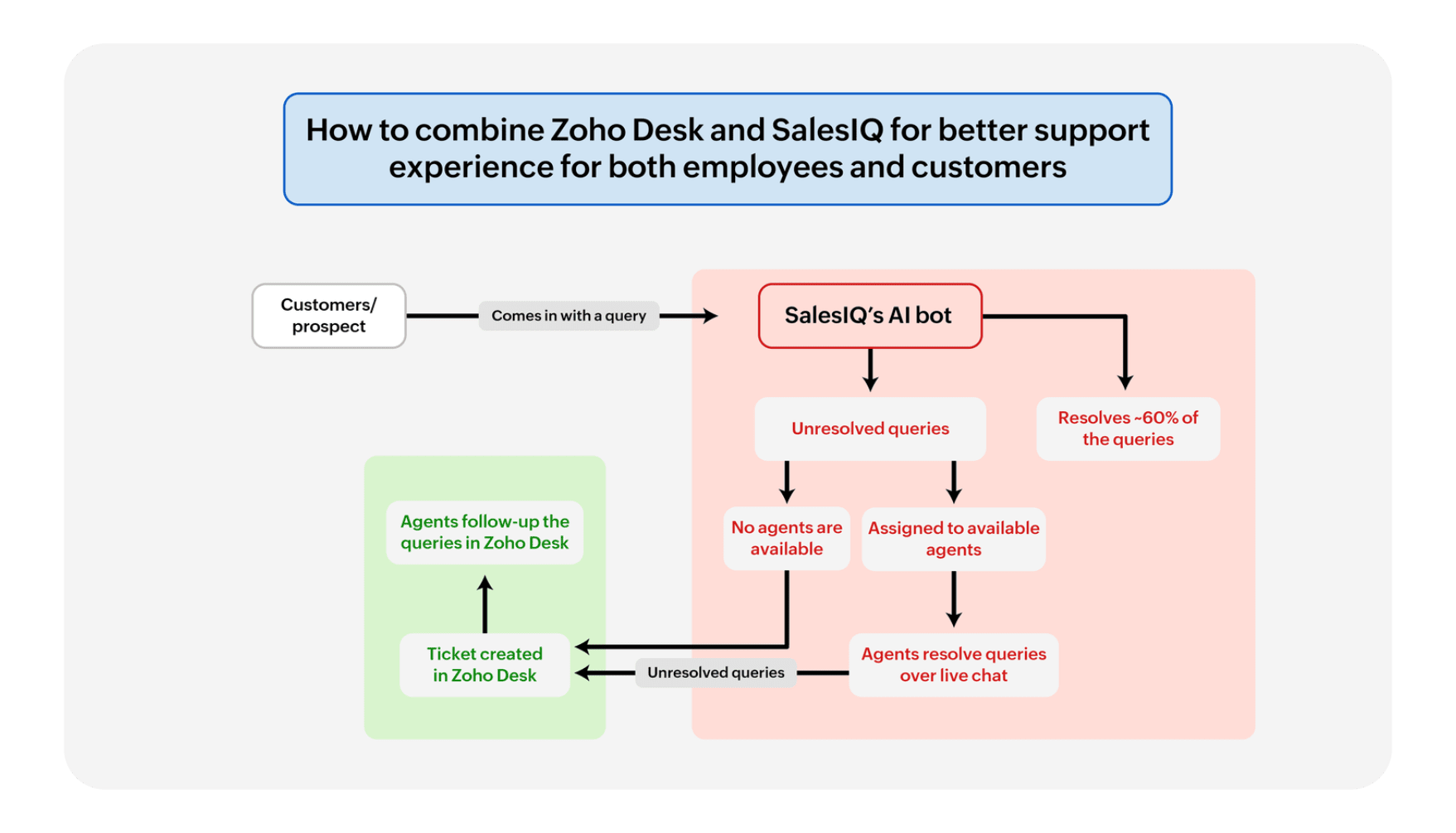
Communication transparente
Plus besoin de passer d'un onglet à l'autre. Les chats en direct sur Zoho SalesIQ s'intègrent aux tickets de Zoho Desk, créant ainsi un parcours fluide pour les clients et les agents. Pas de conversations interrompues, juste une prise en charge cohérente.
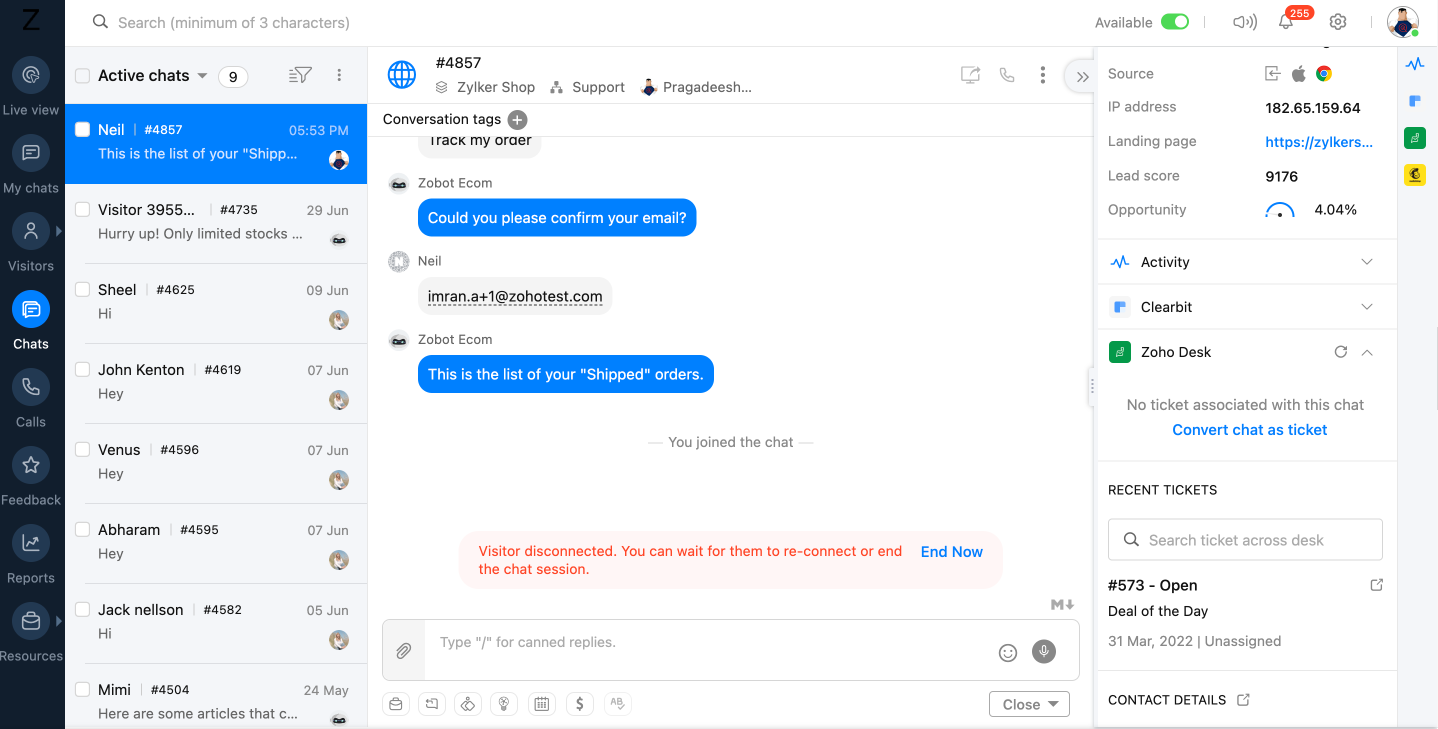
Un système de ticket support efficace
Un système de ticket support efficaceLe système de ticket de Zoho Desk est alimenté par les informations de chat de Zoho SalesIQ. Les requêtes des clients se transforment en tickets, ce qui garantit qu'aucune demande ne se perd dans la masse.
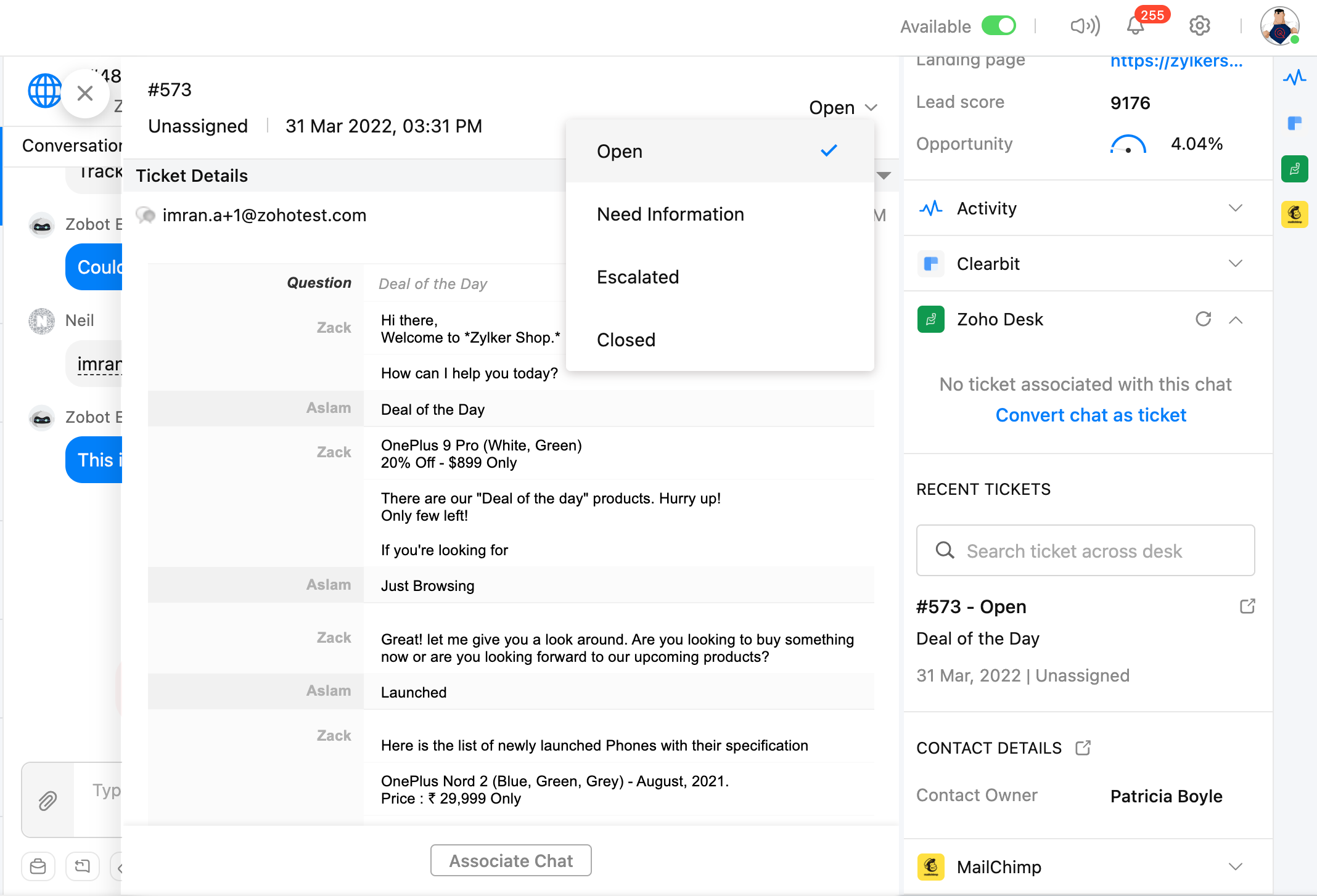
Vue à 360 degrés du client
Plus de vision en tunnel. Voyez la situation dans son ensemble grâce à une vue à 360 degrés du client. L'historique de vos conversations avec Zoho SalesIQ est intégré aux tickets Zoho Desk, ce qui permet aux agents de personnaliser l'assistance et de dépasser les attentes.
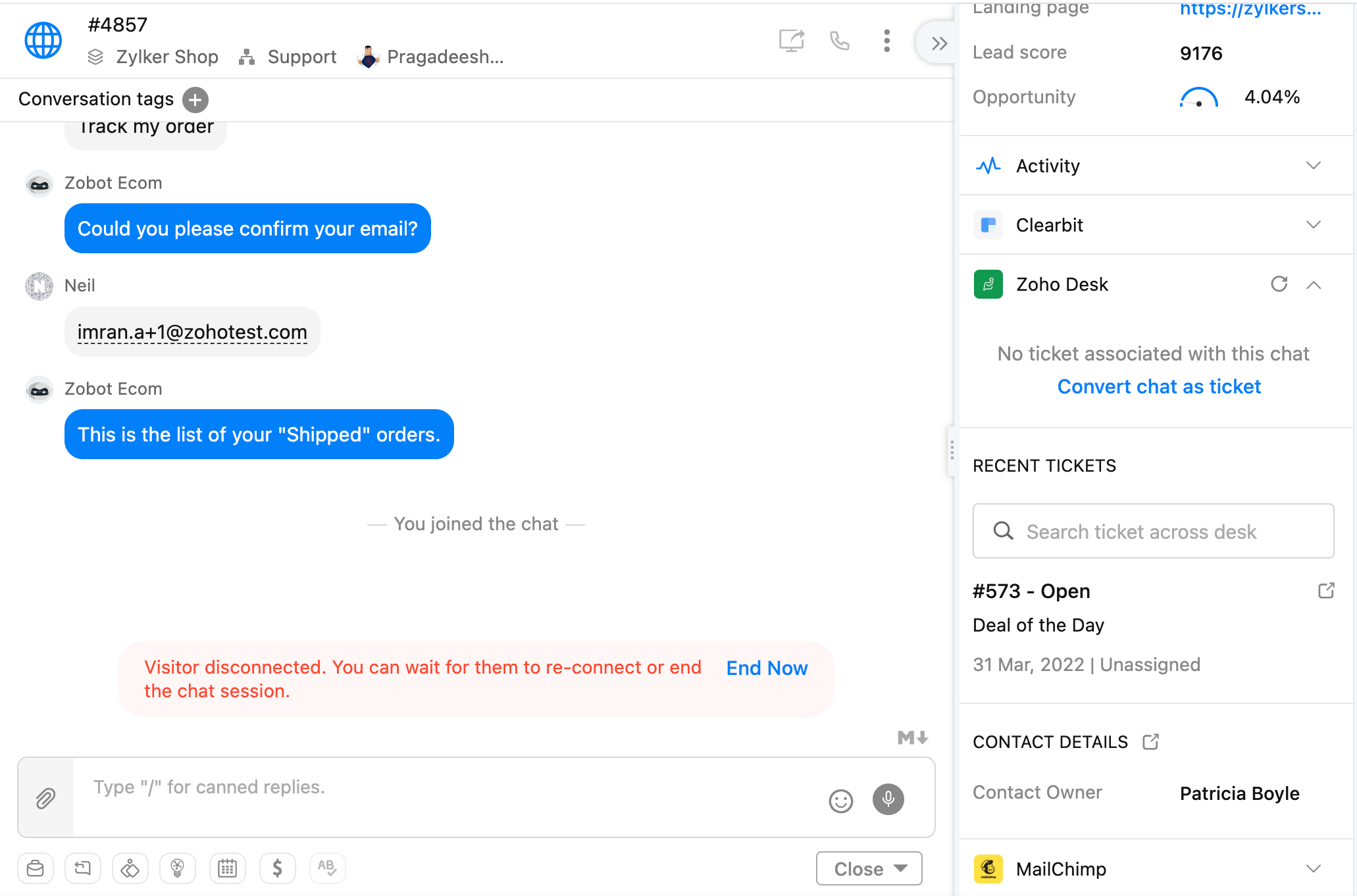
Synchronisation des données
Plus besoin d'entrer manuellement des données. Grâce à cette intégration, les détails des clients, les transcriptions de chat et les tickets se déplacent sans effort d'une plateforme à l'autre, ce qui permet de gagner du temps et de minimiser les erreurs. Votre équipe peut se concentrer sur ce qui compte le plus : les clients.
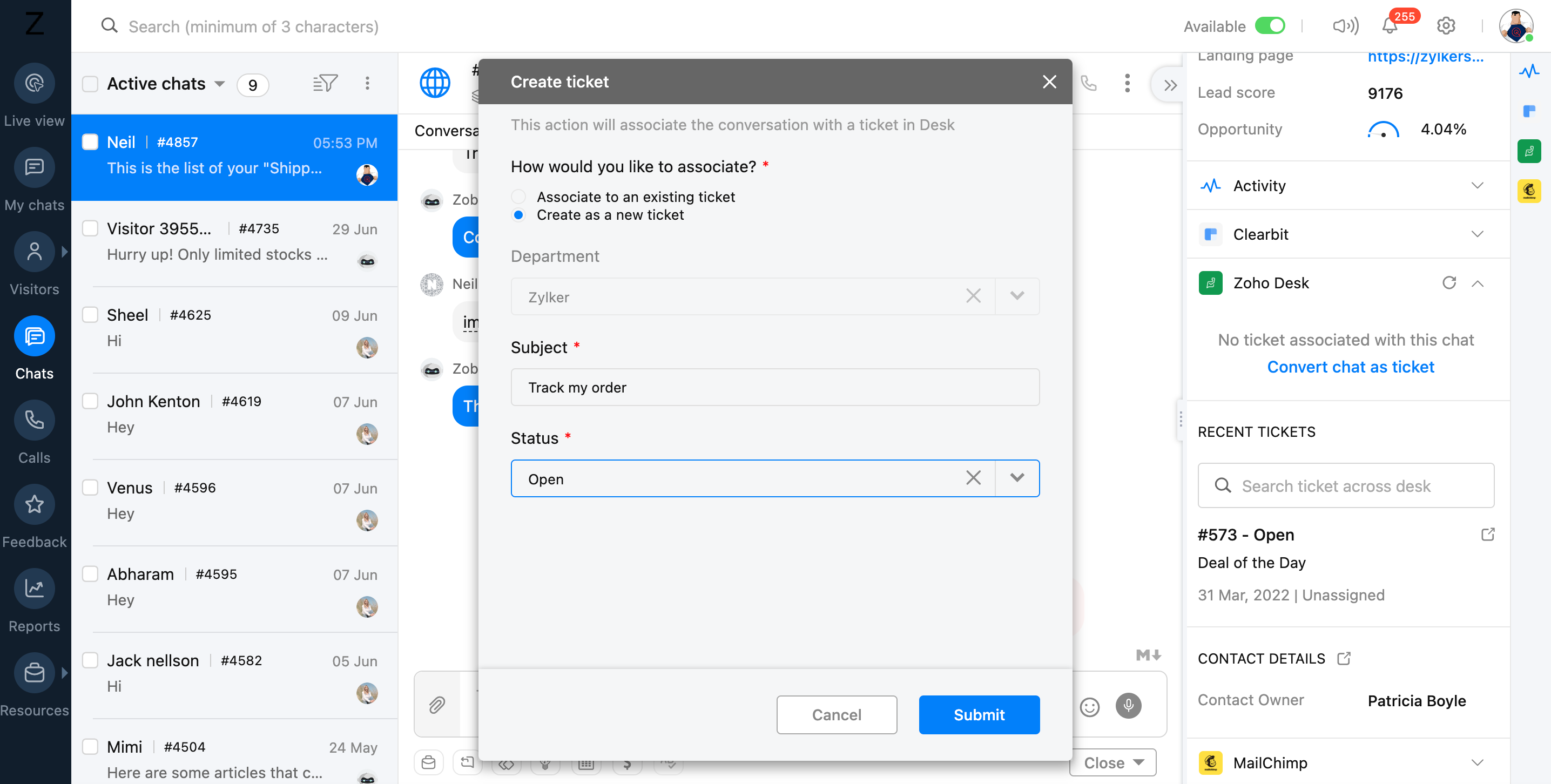
Engagement dynamique
Passez de la réactivité à la proactivité. Le chat de Zoho SalesIQ déclenche des conversations au moment opportun, tandis que les outils de support Zoho Desk offrent des réponses parfaites. Anticipez les besoins, offrez une aide ciblée et transformez les visiteurs du site Web en fans fidèles.
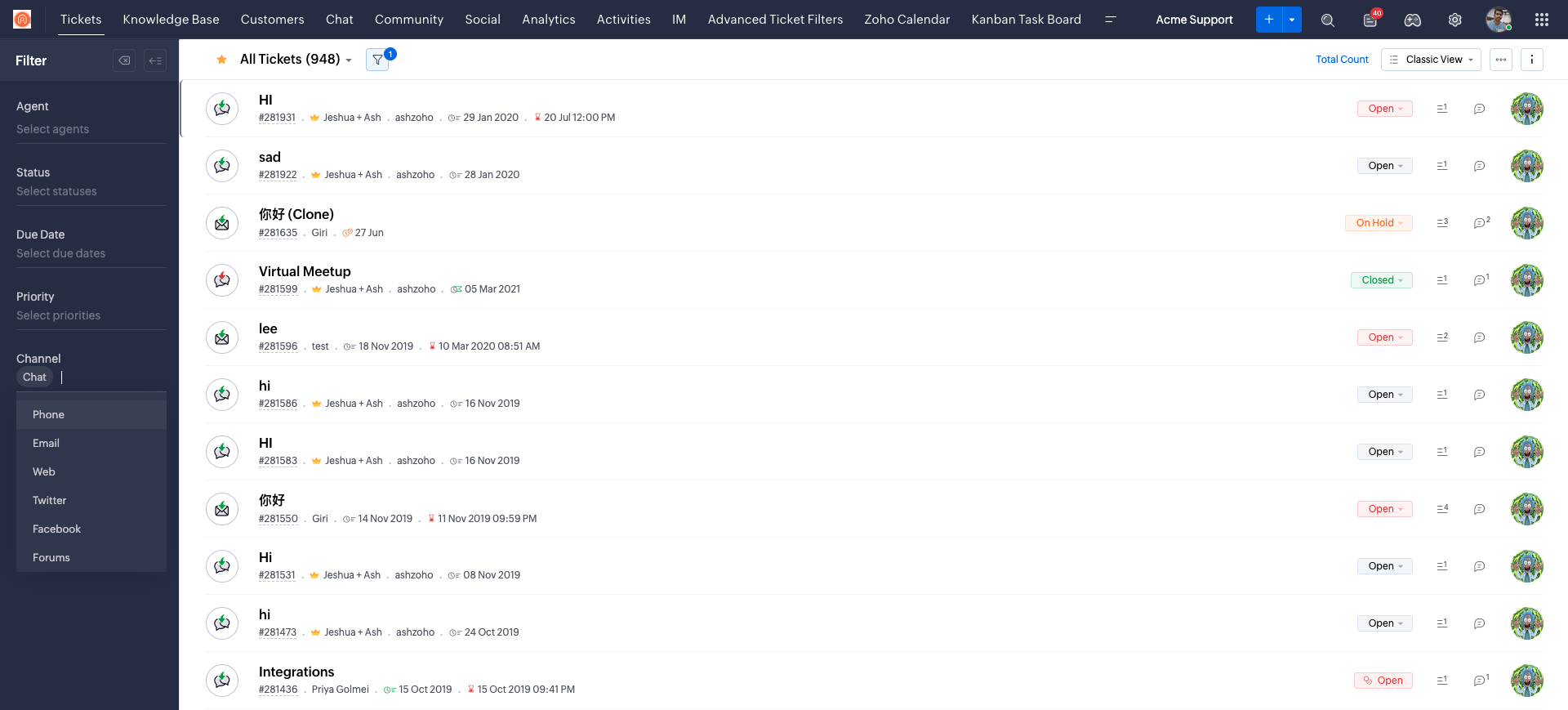
L'intégration Zoho SalesIQ + Zoho Desk n'est pas qu'une question de facilité, c'est une façon de ré-imaginer le support client. Cette intégration dynamique vous permettra d'élever votre performance et de devenir un véritable champion dans le domaine du service client.
Associer votre compte Zoho Desk à votre compte Zoho Sales IQ
Avant de commencer à explorer comment l'intégration des deux applications peut améliorer l'ensemble de vos opérations de support client, vous devez configurer votre Zoho SalesIQ pour qu'il fonctionne avec votre base de données client à l'intérieur de Zoho Desk.
Bon à savoir :
- Vous devez avoir un compte Zoho Desk. Les privilèges, accès et permissions attribués à votre compte de Desk sera identique à celui de Zoho SalesIQ.
- L'email du compte utilisé dans Zoho SalesIQ et Zoho Desk doit être le même, vous ne pouvez pas intégrer le compte d'un autre bureau avec votre compte SalesIQ.
- Après l'intégration, si le compte Zoho Desk ou l'utilisateur est supprimé/désactivé, SalesIQ vous demandera d'intégrer un autre compte.
- Lorsque vous avez réussi à associer votre compte Zoho Desk à votre compte Zoho SalesIQ, vous pouvez commencer à configurer les autres aspects de votre intégration.
Avez-vous déjà intégré votre service d'assistance et de chat en direct ? Faites-nous part de la manière dont cette intégration a profité à votre organisation dans les commentaires ci-dessous.
L'équipe Zoho France
Topic Participants
Kinjal Lodaya
Sticky Posts
Desk - Astuce #5 : Déplacer les tickets entre les départements
Bonjour à tous, Il n'est pas rare que vos clients créent des tickets dans un département qui n'a pas l'expertise requise pour les traiter. Vous devez transférer ces tickets vers le département concerné, afin qu'ils ne passent pas à travers les maillesZoho Desk - Nouveautés 2023
Bonjour à tous, Comme vous le savez, Zoho cherche en permanence à vous proposer des logiciels complets et au plus proche de vos attentes. C'est pourquoi toute l'équipe Zoho Desk est fière de vous présenter la nouvelle version de votre logiciel de serviceDesk : Le cycle de vie d'un ticket - Introduction
Voici une nouvelle série en 3 chapitres, dans laquelle nous allons vous dévoiler comment Zoho gère l'intégralité de son service client sur Zoho Desk. Zoho compte plus de 60 millions d'utilisateurs à travers le monde et offre plus de 50 différentes solutions.Zoho Desk - Chapitre 1 : Anticipez vos besoins
Bonjour à tous, Continuons notre série de la rentrée et découvrons comment Zoho gère 60 millions de clients grâce à Zoho Desk. Contrairement à ce que l'on peut penser le cycle de vie d'un ticket commence bien avant qu'il arrive dans notre logiciel client.Desk Astuce #6 : Ajouter plusieurs comptes réseaux sociaux
Bonjour à tous, Découvrons dans cet article comment vous pouvez ajouter plusieurs pages d'un meme réseau social dans Zoho Desk. Pour cela suivez les étapes suivantes : Connectez-vous à Zoho Desk avec les privilèges d'administrateur. Cliquez sur les paramètres
Recent Topics
Why am I seeing deleted records in Zoho Analytics syncing with Zoho CRM?
I have done a data sync between Zoho CRM and Zoho Analytics, and the recycle bin is empty. Why do I see deleted leads/deals/contacts in Zoho Analytics if it doesn't exist in Zoho CRM? How can I solve this problem? ThanksNueva edición de "Ask The Expert" en Español Zoho Community
¡Hola Comunidad! ¿Te gustaría obtener respuestas en directo sobre Zoho CRM, Zoho Desk u otra solución dentro de nuestro paquete de CX (Experiencia del Cliente? Uno de nuestros expertos estará disponible para responder a todas tus preguntas durante nuestraHow to use MAIL without Dashboard?
Whenever I open Mail, it opens Dashboard. This makes Mail area very small and also I cannot manage Folders (like delete/rename) etc. I want to know if there is any way to open only Mail apps and not the Dashboard.Peppol: Accept Bill (Belgium)
Hi, This topic might help you if you're facing the same in Belgium. We are facing an issue while accepting a supplier bill received by Peppol in Zoho Books. There is a popup with an error message: This bill acceptance could not be completed, so it wasclick to call feature
I've Zoho CRM and in that i want click to call feature.Zoho Books is now integrated with Zoho Checkout
Hello everyone, We're glad to be announcing that Zoho Books is now integrated with Zoho Checkout. With this integration, you can now handle taxes and accounting on your payment pages with ease. An organization you create in Zoho Checkout can be added to Zoho Books and vice-versa. Some of the key features and benefits you will receive are: Seamless sync of customer and invoice data With the end-to-end integration, the customer and invoice details recorded via the payment pages from Zoho CheckoutSync Issue
My Current plan only allows me with 10,000 rows and it is getting sync failure how to control it without upgrading my planAdd Zoho PDF to Zoho One Tool Applications
It should be easy to add from here without the hassle of creating a web tab:JOB WISE INVOICE PROCESS
I WANT TO ENABLE JOB WISE TRACKING OF ALL SALES AND PURCHASEPDF Template have QTY as first column
I want to have the QTY of an item on the sales orders and invoices to be the first column, then description, then pricing. Is there a way to change the order? I went to the Items tab in settings but don't see how to change the order of the columns onRAG (Retrieval Augmented Generation) Type Q+A Environment with Zoho Learn
Hi All, Given the ability of Zoho Learn to function as a knowledge base / document repository type solution and given the rapid advancements that Zoho is making with Zia LLM, agentic capabilities etc. (not to mention the rapid progress in the broaderWelcome to the Zoho ERP Community Forum
Hello everyone, We are thrilled to launch Zoho ERP (India edition), a software to manage your business operations from end to end. We’ve created this community forum as a space for you to ask questions, comment answers, provide feedback, and share yourIn App Auto Refresh/Update Features
Hi, I am trying to use Zoho Creator for Restaurant management. While using the android apps, I reliased the apps would not auto refresh if there is new entries i.e new kitchen order ticket (KOT) from other users. The apps does received notification but would not auto refresh, users required to refresh the apps manually in order to see the new KOT in the apps. I am wondering why this features is not implemented? Or is this feature being considered to be implemented in the future? With theConsolidated report for multi-organisation
I'm hoping to see this feature to be available but couldn't locate in anywhere in the trial version. Is this supported? The main aim to go to ERP is to have visibility of the multi-organisation in once place. I'm hopeful for this.IMAP mail after specify date
Hi My customer's mail server is on premise and mail storage is very huge. So It never finish sync. and finally stop sync. Cloud CRM have a option like zoho mail sync mail after some date.Claude + MCP Server + Zoho CRM Integration – AI-Powered Sales Automation
Hello Zoho Community 👋 I’m excited to share a recent integration we’ve worked on at OfficehubTech: ✅ Claude + MCP Server + Zoho CRM This integration connects Zoho CRM with Claude AI through our custom MCP Server, enabling intelligent AI-driven responsesNotes badge as a quick action in the list view
Hello all, We are introducing the Notes badge in the list view of all modules as a quick action you can perform for each record, in addition to the existing Activity badge. With this enhancement, users will have quick visibility into the notes associatedSearch Bar positioning
Why is the Search bar on the far right when everything is oriented towards the left?Basic Mass Update deluge schedule not working
I'm trying to create a schedule that will 'reset' a single field to 0 every morning - so that another schedule can repopulate with the day's calculation. I thought this would be fairly simple but I can't work out why this is failing : 1) I'm based inThe Social Playbook - January edition: Getting started with content creation
Social media isn’t just about posting some random content. It’s about why certain content works, how brands stand out, and what makes people pause mid-scroll. The Social Playbook is a monthly community series where we break all of that down. Through realImport Error: Empty values for mandatory fields - Closing Date
Hello, I've tried multiple times to import a CVS Potential list from another Zoho account. But the error message I get is: Empty values for mandatory fields - Closing Date There are valid dates in this field, so I don't understand why this error messagesAdding custom "lookup" fields in Zoho Customization
How can I add a second “lookup” field in Zoho? I’m trying to create another lookup that pulls from my Contacts, but the option doesn’t appear in the module customization sidebar. In many cases, a single work order involves multiple contacts. Ideally,Special characters (like â, â, æ) breaking when input in a field (encoding issue)
Hey everyone, We are currently dealing with a probably encoding issue when we populate a field (mostly but not exclusively, 'Last Name' for Leads and Contracts). If the user manually inputs special characters (like ä, â, á etc.) from Scandinavian languages,Feature Requests - Contact Coloured Picklist Visibility & Field Visibility During Ticket Creation
Hi Desk Team, I have 2 feature requests for you. Since Coloured Picklists are now available in Desk, It would be great if the colours were visible on the Related Details (Contact Information) when creating a ticket. In the screenshot below, I have 2 fieldsHow to integrate XML with Zoho CRM
Hi, I have an eCom service provider that gives me a dynamic XML that contains order information, clients, shipments... The XML link is the only thing I have. No Oath or key, No API get... I want to integrate it into Zoho CRM. I am not a developer norFeature Request - Ability to Customise Contact Info Card on Ticket Details View
Hi Desk Team, I've added a "Contact Priority" and "Account Prioirty" field and it would be very useful to agents if they could see that information in the Contact Info card on the Ticket Details view. It would be great if we could choose some fields toTax in Quote
Each row item in a quote has a tax value. At the total numbers at the bottom, there is also a Tax entry. If you select tax in both of the (line item, and the total), the tax doubles. My assumption is that the Tax total should be totalling the tax fromZoho Flow integration with Facebook Messenger and Whatsapp
Hi there, any plans of adding integrations with Facebook Messenger and Whatsapp into Zoho Flow? Seems that more and more business are delivering automated updates such as "your order is received", "your order has been shipped" and so on via these two platforms. Not sure if Whatsapp has the API access needed i am pretty sure that Facebook Messenger has... Kind regards Bo ThygesenMulti-currency and Products
One of the main reasons I have gone down the Zoho route is because I need multi-currency support. However, I find that products can only be priced in the home currency, We sell to the US and UK. However, we maintain different price lists for each.Campaigns unsubscribe/manage preferences links
Hi, Where can I edit the unscubscribe and manage preferences link in the footer of the email. I would like it so that when you click 'manage preferences' an form opens up that allows the person to choose what type of emails they do and don't wish toemail address somehow still not verified (?!)
L.S. After creating a new email template in CRM I was about to send a group email to my clients, then Zoho CRM announced that they would change the sender address to some kind of Zoho-e-ddress because my email address "has not been verified". Not onlyMarketing Tip #17: Add credibility to your online store with Review Widgets
One of the fastest ways to build trust in an online store is to show real customer feedback right where people are deciding to buy. Third-party widgets let you embed things like Google Reviews, Instagram feeds, or even a WhatsApp chat button. These addadding several team members to an Opportunity
How can we add several team members to one opportunity for collaboration? I have researched and only found something called Deal Team which I cannot find in my CRM to configure.PDF Annotation is here - Mark Up PDFs Your Way!
Reviewing PDFs just got a whole lot easier. You can now annotate PDFs directly in Zoho Notebook. Highlight important sections, add text, insert images, apply watermarks, and mark up documents in detail without leaving your notes. No app switching. NoBulk update Profile Permissions
Dears, What should we do if we add new forms or reports and need to update more than 20 permissions? Updating them one by one feels pretty harsh, doesn’t it?From Zoho CRM to Paper : Design & Print Data Directly using Canvas Print View
Hello Everyone, We are excited to announce a new addition to your Canvas in Zoho CRM - Print View. Canvas print view helps you transform your custom CRM layouts into print-ready documents, so you can bring your digital data to the physical world withFilter in fields from Jira extension
We have installed the Jira extension so we can maken Jira issues from Zoho desk. In Zoho desk I can also see the Jira issue status for example but I can not filter on this field. I would like to setup an filter showing me the closed Jira issues. How cantext length in list report mobile/tablet
Is there a way to make the full text of a text field appear in the list report on mobile and tablet? With custom layouts, the text is always truncated after a certain number of characters.Zoho Creator customer portal limitation | Zoho One
I'm asking you all for any feedback as to the logic or reasoning behind drastically limiting portal users when Zoho already meters based on number of records. I'm a single-seat, Zoho One Enterprise license holder. If my portal users are going to add records, wouldn't that increase revenue for Zoho as that is how Creator is monetized? Why limit my customer portal to only THREE external users when more users would equate to more records being entered into the database?!? (See help ticket reply below.)Link Contacts to Billed Accounts
Hello, I want to do a survey on all my customers of 2025. For that I want to select all contacts linked to accounts who where billed in 2025. How to I create this link to I can then use Zoho Survey with this database of contacts?Next Page