Zoho One Tips & Tricks 02: Single Sign-On (SSO) in Zoho One
Sinds de uitbreiding van MarketPlace heb je nu de mogelijkheid om nóg meer apps toe te voegen aan Zoho One. Meer apps betekent echter ook meer inloggegevens die je moet opslaan en bijhouden. Zou het niet makkelijker zijn om vanuit één inlog-account toegang te krijgen tot je favoriete apps? Maar als je één credential gebruikt dan wordt je toch blootgesteld aan meerdere gevaren? Dat klopt, en hiervoor is er een oplossing. SSO, ofwel Single Sign On.
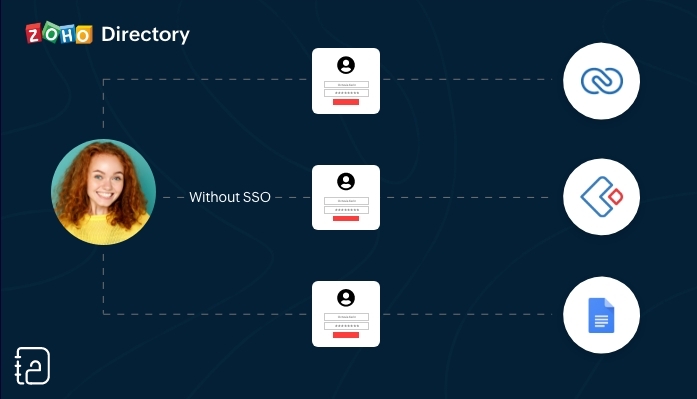 Zonder SSO
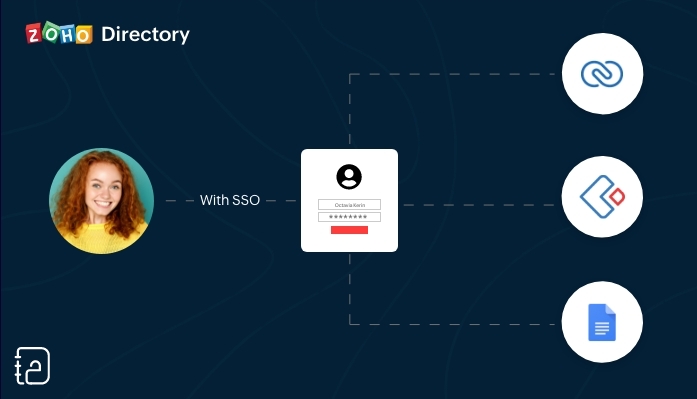 Met SSO
SSO (Single Sign On) is een authenticatiedienst die een gebruiker in staat stelt om op een veilige manier met één enkele aanmelding toegang te krijgen tot meerdere webapplicaties in verschillende domeinen en services. SSO gebruikt Security Assertion Markup Language (SAML)* voor de uitwisseling van authenticatie tussen de applicaties.
*SAML is een op XML gebaseerd framework voor het uitwisselen van informatie over gebruikersverificatie, -rechten en -kenmerken.
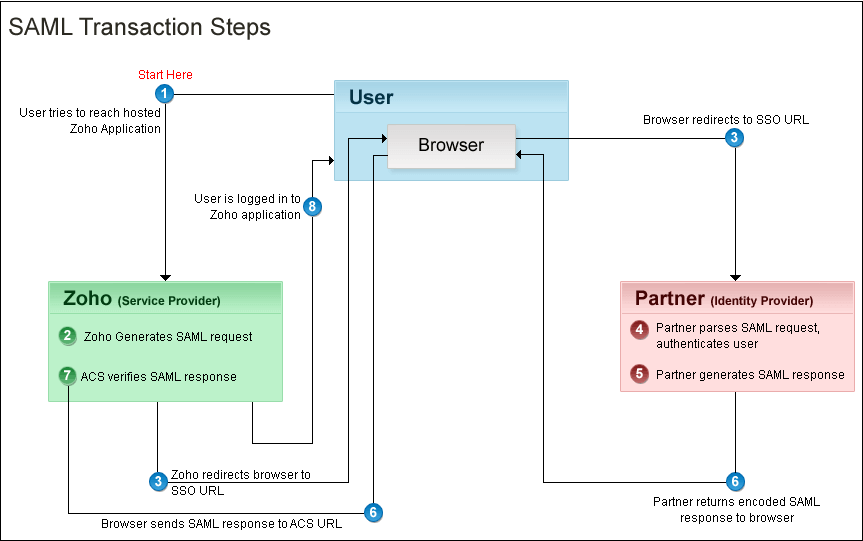
Kort samengevat. Vanuit je Zoho One Admin-paneel stel je een SAML-gebaseerde SSO-authenticatie in waardoor gebruikers de mogelijkheid hebben om vanuit Zoho One toegang te krijgen tot meerdere applicaties zonder dat je telkens opnieuw je wachtwoord moet zoeken en opnieuw moet inloggen. Hiermee automatiseer en verbeter je het beheer van je inloggevens.
Hoe werkt het?
Je gebruikers hoeven alleen hun e-mailadres in te voeren op de aanmeldingspagina van Zoho One en worden automatisch doorgestuurd naar jouw Identity Provider (IdP) voor verificatie. Als alternatief kunnen zij zich ook eerst aanmelden bij jouw IdP en van daaruit Zoho One benaderen. Aangepaste verificatie kan worden gebruikt met elke IdP die SAML ondersteunt.
Wij raden je aan om de volgende stappen te ondernemen:
Log in op Zoho One, klik op "instellingen".
1. Ga naar "beveiliging"
2. Klik vervolgens op de Aangepaste Verificatie-tab.
3. Klik op "Aan de slag".
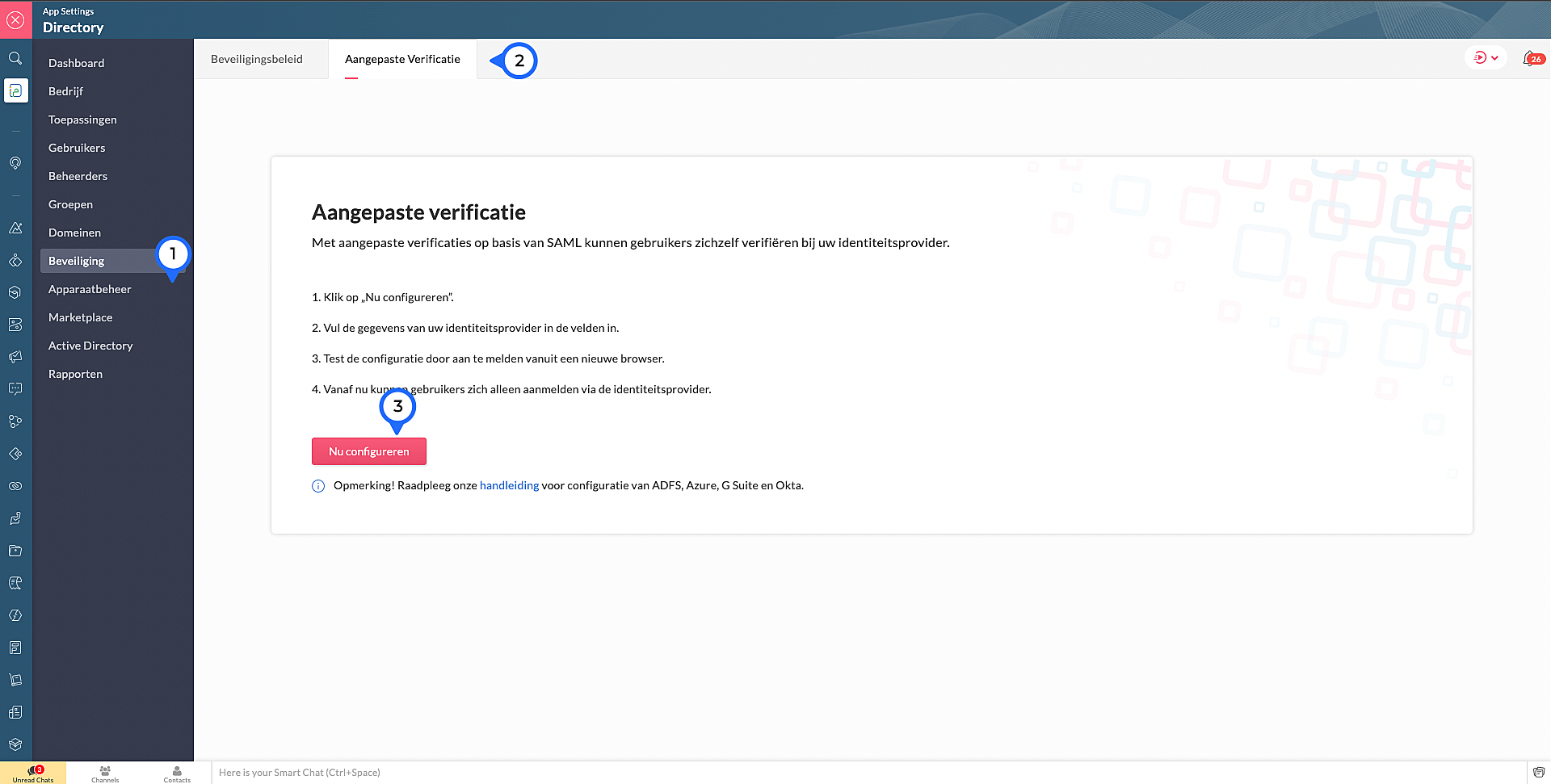
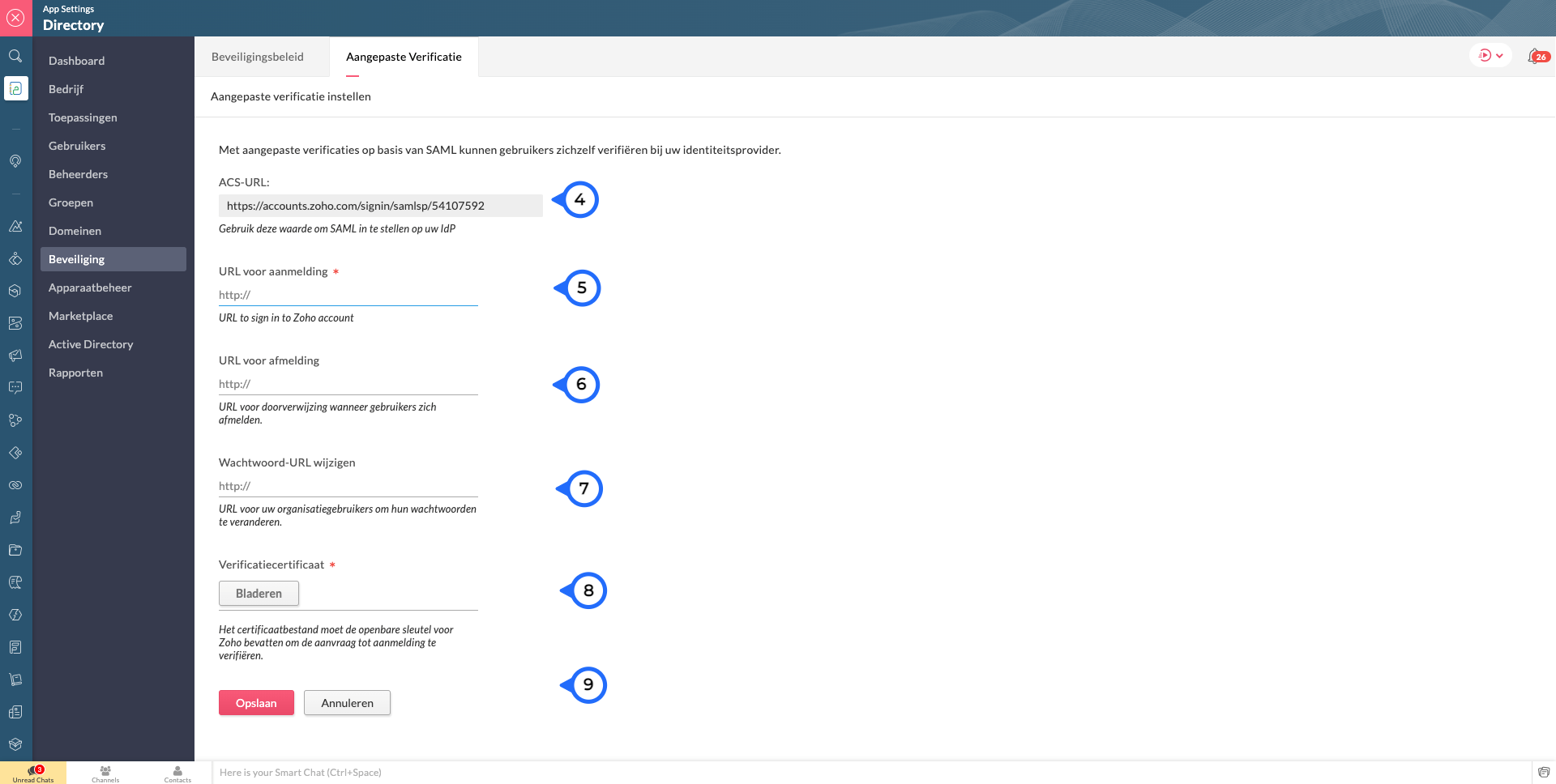
4. Kopieer de ACS Url.Waarschijnlijk heb je dit nodig om jouw IdP in te stellen.
Voer de volgende details in die je verzameld van je IdP:
5. Sign-in URL: De URL de gebruiker wordt doorgestuurd wanneer ze inloggen in Zoho
6. Sign-out URL. De URL de gebruiker wordt doorgestuurd wanneer ze uitloggen in Zoho
7. Wachtwoord URL wijzigen: De URL van de gebruiker wordt doorgestuurd wanneer ze hun wachtwoorden willen veranderen in hun Zoho accounts.
(Nb: Admins worden niet doorverwezen naar de IdP's Wachtoord URL wijzigen en kunnen hun wachtwoord in Zoho wijzigen)
8. Verificatiecertificaat: De certificaat met welke Zoho de digitale handtekening kan checken op de IdP's authenticatie.
(Alleen base-64 gecodeerd .CER, .CRT, .CERT of .PEM-bestanden worden geaccepteerd)
9. Klik op "Opslaan" en vervolgens bevestig je het.
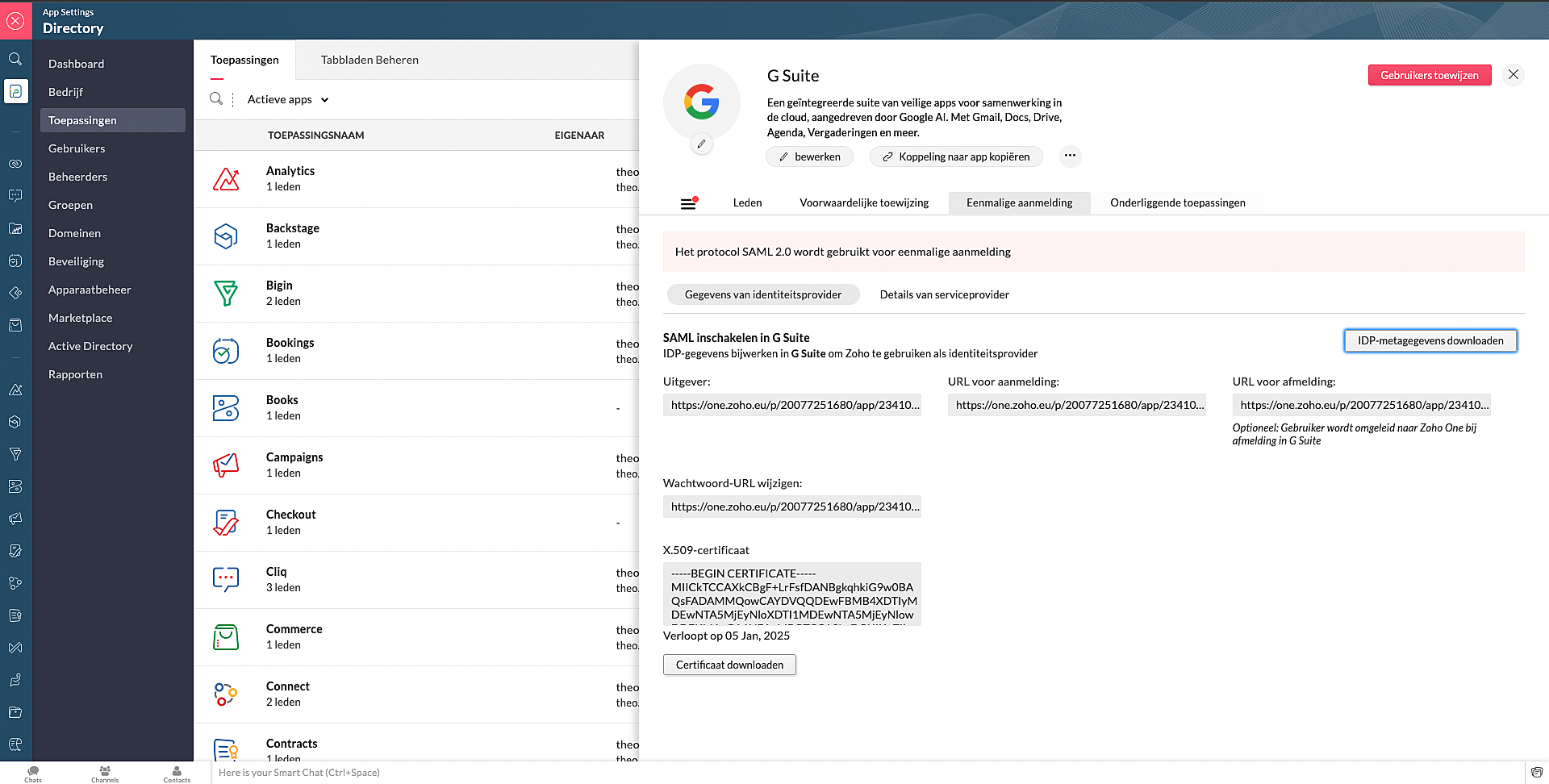
Marketplace:
Via Zoho Marketplace kan je ook makkelijk en snel de SSO instellen. Na installatie van de app via MarketPlace ga naar Eenmalige aanmelding en vul daar de nodige gegevens in.
Wil je lezen hoe je andere apps kan toevoegen aan Zoho One? Klik op deze link voor meer informatie.
SSO in OneAuth:
OneAuth is onze gratis multi-factor authenticatie (MFA) app ontwikkeld voor het beveiligen van uw Zoho-accounts en sociale accounts zoals Google, Facebook, en Twitter. Door MFA voor jouw online accounts te configureren, verhoog je de veiligheid en verminder je het risico op een inbreuk of ongeautoriseerde toegang tot jouw accounts. OneAuth is beschikbaar voor iOS-, Android- en Windows-platforms.
OneAuth biedt een echte single sign-on (SSO) ervaring. Zodra OneAuth voor jouw account is geconfigureerd, hoef je niet telkens je inloggegevens niet meer in te voeren wanneer je een nieuwe Zoho-app installeert. Meer informatie vind je hier. Om dit in te stellen dien je OneAuth te installeren en vervolgens te koppelen aan je Zoho One-account.
Wil je meer weten over SSO, lees dan dit artikel over waarom Single Sign-On belangrijk is voor jouw bedrijf. Heb je meer vragen laat een reactie achter.
Topic Participants
Theo Su
Sticky Posts
De nieuwe Zoho One is hier! Deel 1
Beste Community-leden, Zoho One, hét besturingssysteem voor bedrijven introduceert vandaag haar nieuwste update met maar liefst 5 nieuwe apps, 3 nieuwe services en 7 grote platform verbeteringen. Wij hebben gekeken naar hoe wij jullie verder kunnen helpen.Tips &Tricks: Jouw online boekingssysteem in 5 stappen!
1 Creëer een afsprakenkalender die past bij jouw branding Met Zoho Bookings behoud je de kleuren van jouw merk in alle applicaties. Je kan kiezen uit vier voorgedefinieerde thema's (Modern Web, Nieuwe Opmaak, Klassiek en Nieuw) met daarnaast opties omStart met Zoho One
Welkom op de community-pagina van Zoho One, hét besturingssysteem voor bedrijven. Op deze pagina geven wij een korte introductie over Zoho One. Daarnaast geven wij een aantal tips om te starten met deze besturingssysteem. Tegenwoordig zijn Cloud-oplossingen
Recent Topics
Add link/button to open approved record from approval list and detail views?
Hi, How do I allow users to click on an approval record and open that submission? For example, userA submits a quotation then userB approves/rejects. They both can see the quotation on "completed task" list & detail views, but there's no way for themrecord submitted from creator and invoice is creating in books , but the workflow of books is not tiggering on create of record in books
record submitted from creator and invoice is creating in books , but the workflow of books is not tiggering on create of record in books headermap = Map(); headermap.put("X-ZOHO-Execute-CustomFunction","true"); response_inv = invokeurl [ url :"https://www.zohoapis.com/books/v3/invoices/fromsalesorder?salesorder_id="Prevent editing of a record after getting approved/rejectedr
Hi, I'd like to block any user from editing a record after it was approved or rejected, how can I do that?Formula Field/Campo de Fórmula
Hello everyone, I have a purchase requisition form in which each department submits a request, and the request is automatically routed to the person responsible for that department. In this form, I have several fields with the following link names: Quantidade1,Free Webinar: Zoho Sign for Zoho Projects: Automate tasks and approvals with e-signatures
Hi there! Handling multiple projects at once? Zoho Projects is your solution for automated and streamlined project management, and with the Zoho Sign extension, you can sign, send, and manage digital paperwork directly from your project workspace. JoinFormatting Problem | Export to Zoho Sheet View
When I export data to Zoho Sheet View, ID columns are automatically formatted as scientific notation. Reformatting them to text changes the actual ID values. For example, 6557000335603071 becomes 6557000335603070. I have attached screenshots showing thisIntroducing Workqueue: your all-in-one view to manage daily work
Hello all, We’re excited to introduce a major productivity boost to your CRM experience: Workqueue, a dynamic, all-in-one workspace that brings every important sales activity, approval, and follow-up right to your fingertips. What is Workqueue? SalesFeature Request - The Ability to Link A Customer with a Vendor
Hi Finance Suite Team, Many businesses buy and sell products from the same companies or individuals. For example, a car sales business may buy a car from a member of the public, and that member of the public may also buy a new car from us. This makesLong table name (sync from Zoho Creator)
Dears, How can I remove the suffix in parentheses? These tables are synced from Zoho Creator and are treated as system tables, so their names cannot be changed. This issue makes the aggregation formulas look awful.[Free Webinar] Learning Table Series - Streamlining incident management process with Zoho Creator
Hello everyone, We’re excited to invite you to another edition of the Learning Table Series webinar. As you may already know, we've moved to a purpose-based approach in the Learning Table Series this year. Each session now focuses on how a Zoho CreatorUnattended - Silent
How can I hide the tray icon / pop up window during unattended remote access for silent unattended remote access?Importing into Multiselect Picklist
Hi, We just completed a trade show and one of the bits of information we collect is tool style. The application supplied by the show set this up as individual questions. For example, if the customer used Thick Turret and Trumpf style but not Thin Turret,Text snippet
There is a nice feature in Zoho Desk called Text Snippet. It allows you to insert a bit of text anywhere in a reply that you are typing. That would be nice to have that option in Zoho CRM as well when we compose an email. Moderation Update: We agree thatMarketing Tip #18: Make your online store mobile-friendly to improve traffic
Most online shoppers browse on their phones first. If your store is hard to read, slow to load, or tricky to navigate on mobile, they’ll bounce fast. A mobile-friendly store doesn’t just look nice; it improves engagement, reduces drop-offs, and helps[Need help] Form closed. Please contact your form administrator for further assistance.
https://forms.zohopublic.com/cceinfoifly1/form/CCE2025CCEFocusGroupRegistrationForm2025Fall/formperma/s_8XcLETTbFxZ_TAS4r_W6W5UBl8o5oxEnIX35IBKg4 I checked we didn't exceed the usage limit and form availability is enabled, Please help us enable this formZoho People. Updating TabularData
I am trying to update tabular data in the record. I always have the same response. I have checked many times. Section ID is correct. May be something wrong with request structure itself. Can someone help me. Body content type: form urlencoded query paramsAutomatically CC an address using Zoho CRM Email Templates
Hi all - have searched but can't see a definitive answer. We have built multiple email templates in CRM. Every time we send this we want it to CC a particular address (the same address for every email sent) so that it populates the reply back into ourUnable to Send Different Email Templates for Different Documents in Zoho Sign
Hello Zoho Community, I am facing a limitation with Zoho Sign regarding email notifications sent to customers when a document is sent for signing. Currently, whenever I send any template/document for signing, the email notification that goes to the customerReminder needs 0 minute choice
I most use 0 minute reminders. Every other calender service has this choice. If I create an event in my Android calendar with 0 minute reminder it will change to 5 minute. Please ad 0 as a reminder choice, this should be a 5 minute fix. Thanks.Customer ticket creation via Microsoft Teams
Hi all, I'm looking to see if someone could point me in the right direction. I'd love to make it so my customers/ end users can make tickets, see responses and respond within microsoft teams. As Admin and an Agent i've installed the zoho assist app withinIs there a way to update all the start and end dates of tasks of a project after a calendar change?
Hi! Here's my situation. I've built a complete project planning. All its tasks have start dates and due dates. After completing the planning, I've realized that the project calendar was not the right one. So I changed the project calendar. I now haveHow to update task start date when project start date changes?
Hi there, When the start date of a project changes, it's important to update the start dates of the tasks associated with that project to reflect the new timeline. Is there a way to shift the start date of all project tasks when the start date of a projectIssue with Picklist Dropdown Not Opening on Mobile
Hello I am experiencing an issue with picklist values on mobile. While the arrow is visible, the dropdown to scroll through the available values often does not open. This issue occurs sporadically, it has worked occasionally, but it is very rare and quiteusing the client script based on the look up filed i wnat to fetch the record details like service number , service rate
based on selected service look up field iwant to fetch the service serial number in the serice form how i achive using client script also how i get the current date in the date field in the on load of the formZoho Books/Square integration, using 2 Square 'locations' with new Books 'locations'?
Hello! I saw some old threads about this but wasn't sure if there were any updates. Is there a way to integrate the Square locations feature with the Books locations feature? As in, transactions from separate Books locations go to separate Square locationsZoho Commerce - How To Change Blog Published Date and Author
Hi Commerce Team, I'm discussing a project with a client who wants to move from Woo Commerce / Wordpress to Zoho Commerce. They have around 620 blog posts which will need to be migrated. I am now aware of the blog import feature and I have run some tests.Does zoho inventory need Enterprise or Premium subsrciption to make Widgets.
We have Zoho One Enterprise and yet we can't create widgets on inventory.Handling Agent Transfer from Marketing Automation Journey to SalesIQ WhatsApp
We are currently using Marketing Automation for WhatsApp marketing, and the features are great so far We have a scenario where, during a campaign or journey, we give customers an option to chat with our sales team. For this, we are using SalesIQ WhatsAppComment to DM Automation
Comment to DM automation feature in Zoho Marketing Automation, similar to what tools like ManyChat offer. Use case: When a user comments on a social media post (Instagram / Facebook), the system should automatically: Send a private DM to the user CaptureZMA shows as already connected to Zoho CRM, but integration not working
When I try to connect ZMA with Zoho CRM, it shows as already connected, but the integration doesn’t seem to be working. I’ve attached the screen recording for reference.Automatic Email Alerts for Errors in Zoho Creator Logs
Hello, We would like to request a feature enhancement in Zoho Creator regarding error notifications. Currently, Zoho Creator allows users to view logs and errors for each application by navigating to Zoho Creator > Operations > Logs. However, there isRecurring Automated Reminders
Hi, The reminders feature in Zoho Books is a really helpful feature to automate reminders for invoices. However, currently we can set reminders based on number of days before/after the invoice date. It would be really helpful if a recurring reminder featureWorkflow Rule - Field Updates: Ability to use Placeholders
It will be great if you can use placeholder tags to update fields. For example if we want to update a custom field with the client name we can use ${CONTACT.CONTACT_FIRSTNAME}${CONTACT.CONTACT_LASTNAME}, etcZobot Execution Logs & Run History (Similar to Zoho Flow)
Dear Zoho SalesIQ Team, We would like to request an enhancement for Zoho SalesIQ Zobot: adding an execution log / run history, similar to what already exists in Zoho Flow. Reference: Zoho Flow In Zoho Flow, every execution is recorded in the History tab,Password Assessment Reports for all users
I'm the super admin and looking at the reporting available for Zoho Vault. I can see that there is a Password Assessment report available showing the passwords/weak and security score by user. However I'm confused at the 'report generated on' value. MonitorCan't change form's original name in URL
Hi all, I have been duplicating + editing forms for jobs regarding the same department to maintain formatting + styling. The issue I've not run into is because I've duplicated it from an existing form, the URL doesn't seem to want to update with the newSetting certian items to be pickup only
How do we have some items that are pickup only? I have several items in my item's list that I do not ship. But they need to be on the website to be sold, and picked up in store. Need to be able to do this as one of these products is a major seller forUsing gift vouchers
We would like to be able to offer a limited number of gift vouchers, of varying values, to our customers, and are looking for the best way to do this. We have looked at Coupons and Gift Certificates, but neither seem to fit the bill perfectly. Coupons:Automatically updating field(s) of lookup module
I have a lookup field, which also pulls through the Status field from the linked record. When the lookup is first done, the Status is pulled through - this works perfectly. If that Status is later updated, the lookup field does not update as well. AsZoho Commerce and Third-party shipping (MachShip) API integration
We are implementing a third-party shipping (MachShip) API integration for our Zoho Commerce store and have made significant progress. However, we need guidance on a specific technical challenge. Current Challenge: We need to get the customer input toNext Page