Approve or deny appointments based on criteria
Hey, community members!
Have you ever wondered how to automatically approve or deny appointments?
To make this happen, you'll need Zoho Bookings and the Zoho Flow Standard Plan.
Here's a simplified breakdown of the process in three steps:
Zoho Bookings will collect the criteria data and pass it to Zoho Flow.
In Zoho Flow, we'll configure a workflow to verify the validity of the data.
If the data is invalid, Zoho Flow will trigger a cancellation request to Zoho Bookings, resulting in the appointment being canceled.
1. Create a mandatory field in Zoho Bookings Forms.
A. For service booking form: Add Field
B. For workspace booking form: Add Field
Additional Step:
Canceling an appointment without the customer's knowledge might affect the customer experience. Therefore, we should acknowledge the customers in every possible way.
Here are some tips:
A. We can use the 'Custom Redirection' feature to redirect customers to a custom page after they book an appointment, instead of the default booking confirmation page.
Here is how to change booking confirmation page: Booking Confirmation Page
Here is the sample custom page: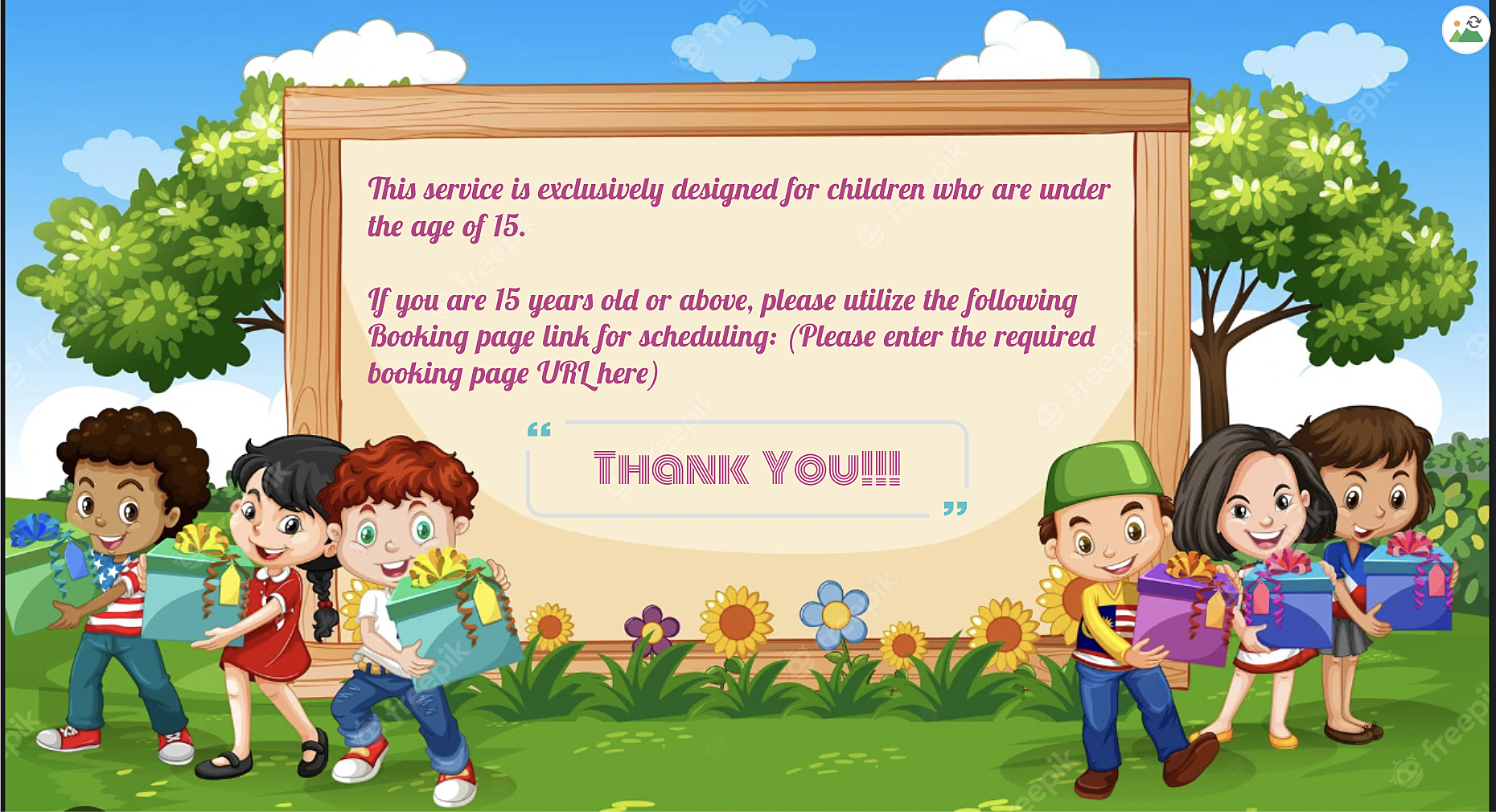
B. By using the "Terms and Conditions" check box, you can include the following message in the box: "This service is specifically designed for children under the age of 15. Bookings made by individuals above the age of 15 may be subject to cancellation". Customers will then need to check the box to confirm their agreement before completing their bookings, ensuring that they are aware of this policy.
- For Workspace: Terms and Conditions
- For Service: Terms and Conditions
STEP 2: TO BE FOLLOWED IN ZOHO FLOW APPLICATION
A: Log in and search the template
Sign in to Zoho Flow application and create a new flow using the create flow option.
Select App > search for Zoho Bookings in the search bar.
Select the "Appointment Booked" trigger.
Select "Connection" and "Variable" > Done.
How to create a flow in Zoho Flow: Create a flow from scratch
How to create connection in Zoho Flow application: Create a Connection
B: Set Variable
In the Logic option > Flow Control > Set Variable > Edit the variable
Name the variable and in the value provide the input in following format "${trigger.customer_more_info.get("What is your age?")} " > Click on done.
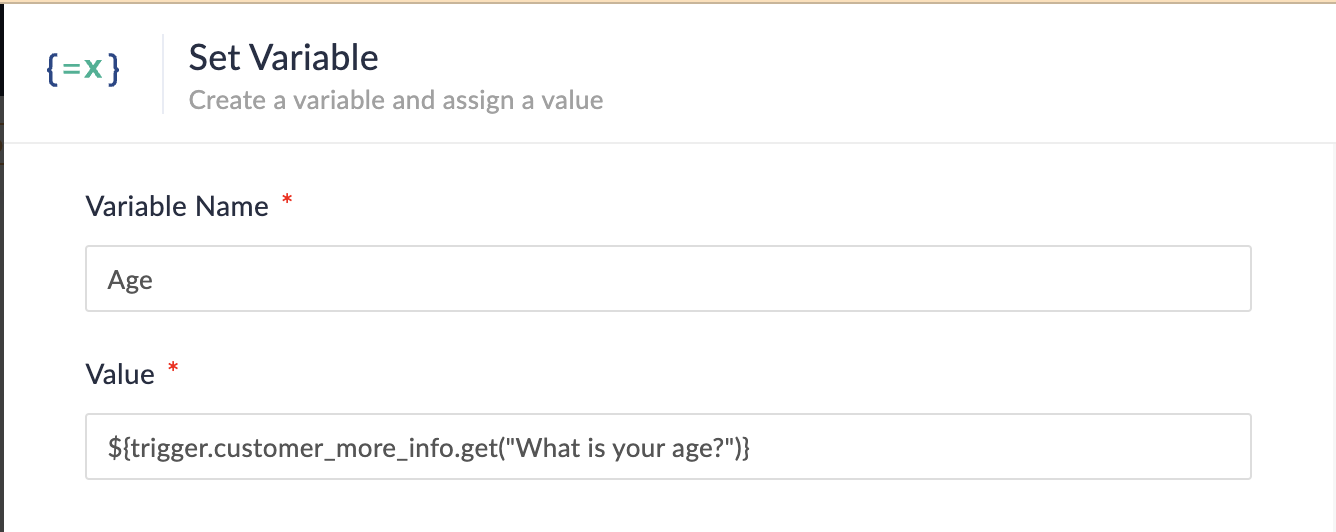
- How to set variable: Set Variable
NOTE: In Step 1, we created a multi-line field named "What is your age?" If you have instead created a single-line field without spaces (e.g., "Age?") on the booking page, the format for the field would be as follows:
Single line field format: ${trigger.customer_more_info.fieldname}
Multiple line field format: ${trigger.customer_more_info.get("fieldname")}
At the end of step B, we are fetching the output of the "Age" field from the Zoho Bookings form.
C: Create Condition
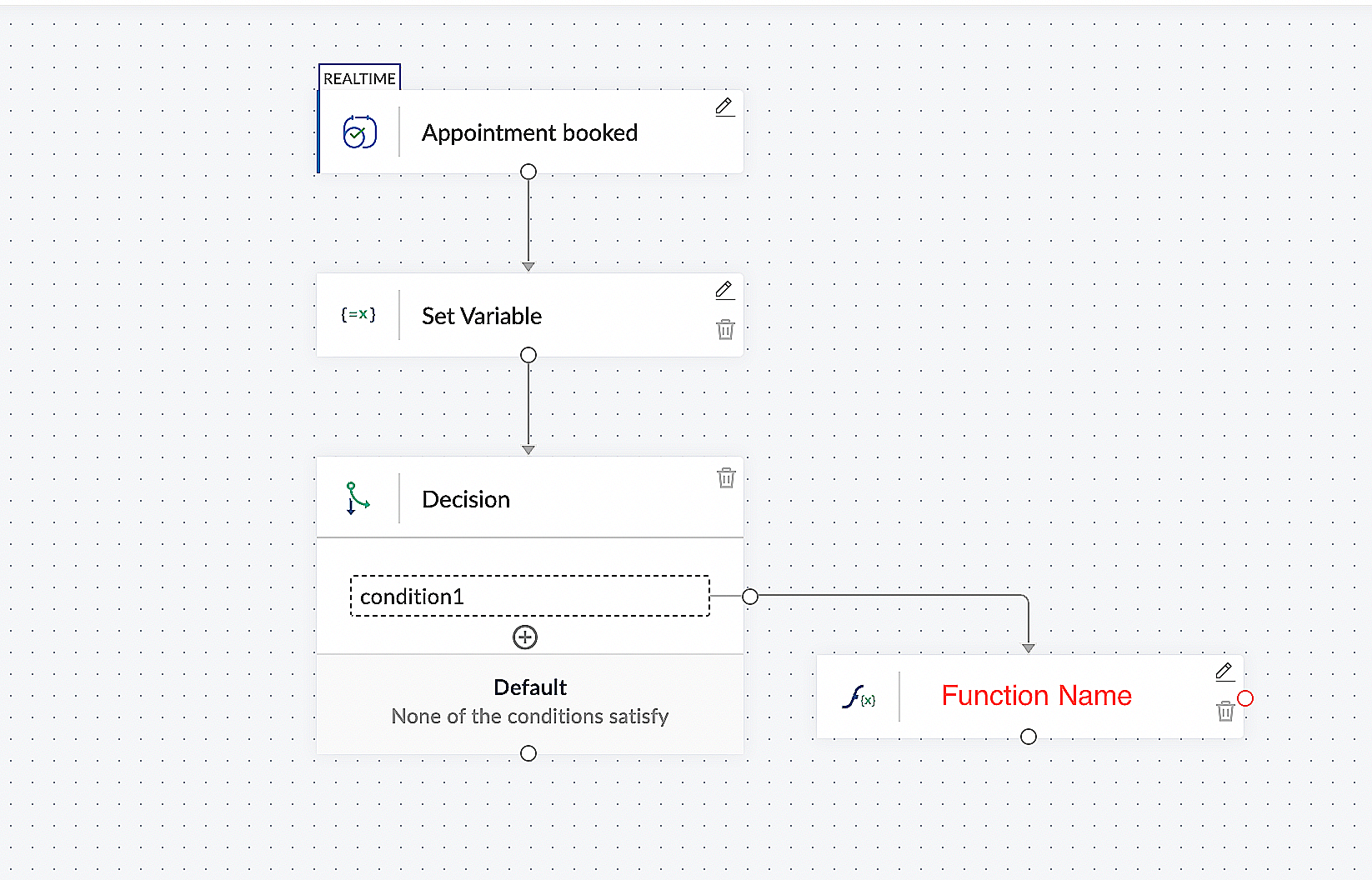
In the Logic option > Flow Control > Decision.
In the condition 1, configure as Set Variable(Age) > is not null.
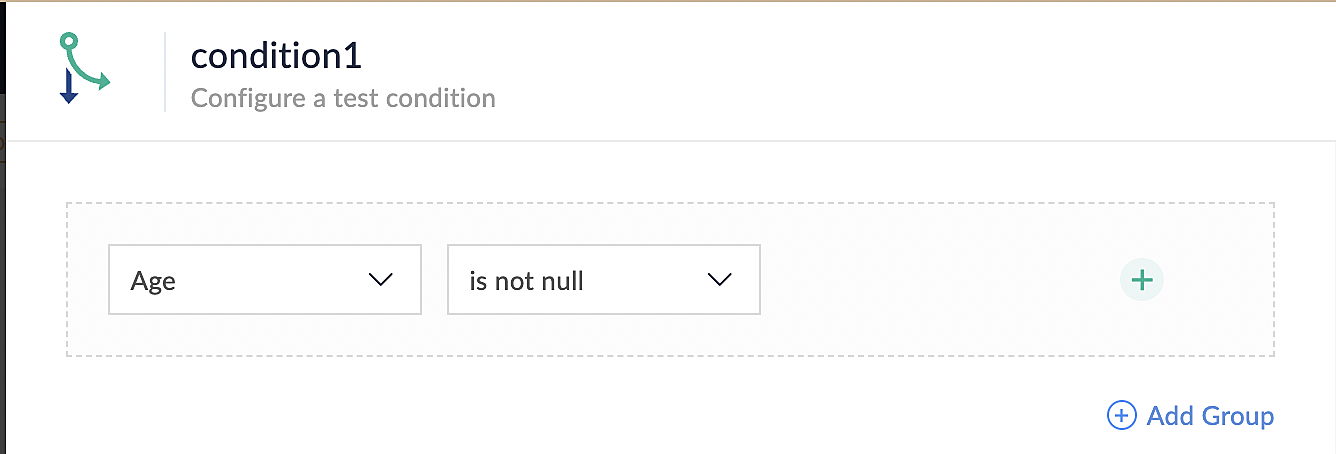
- How to set decision: Set Decision
D: Custom Function
In the Logic option > Custom Functions > Create Function.
Configure function name, return type and input parameter.
Details on custom function: Custom Function
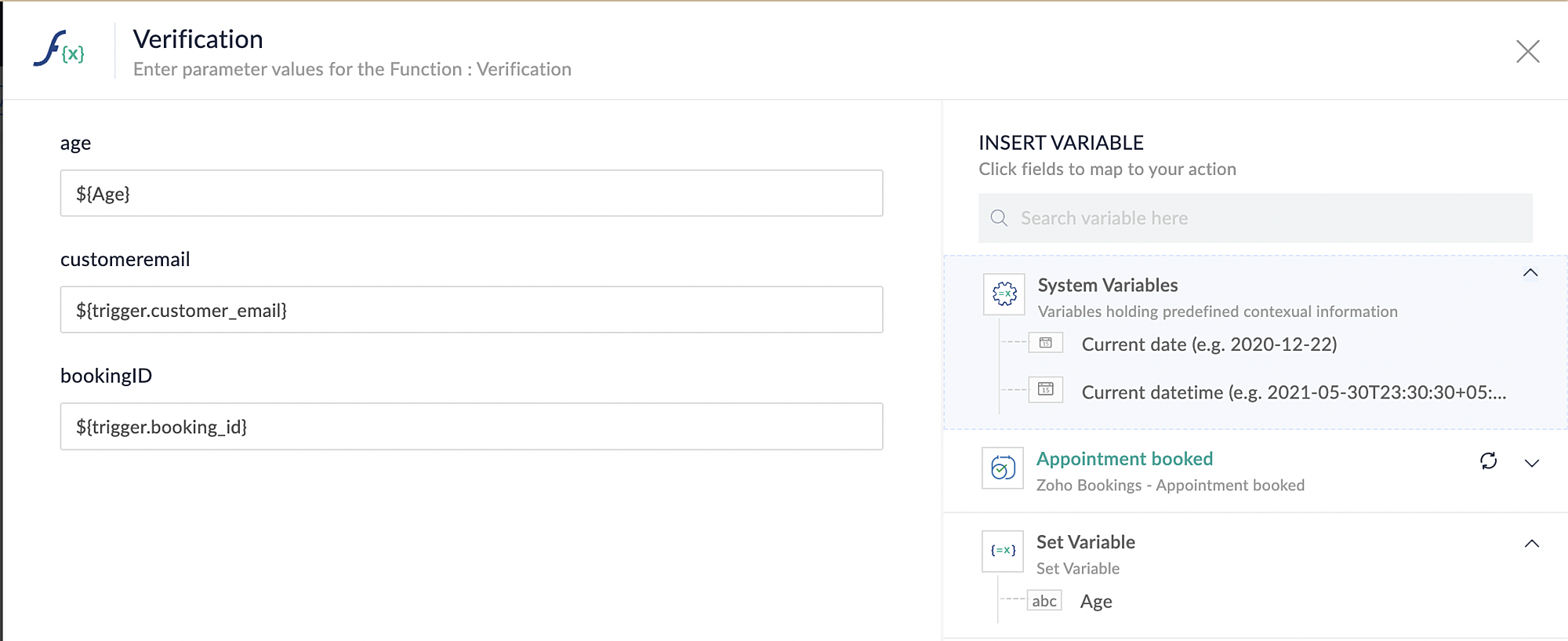
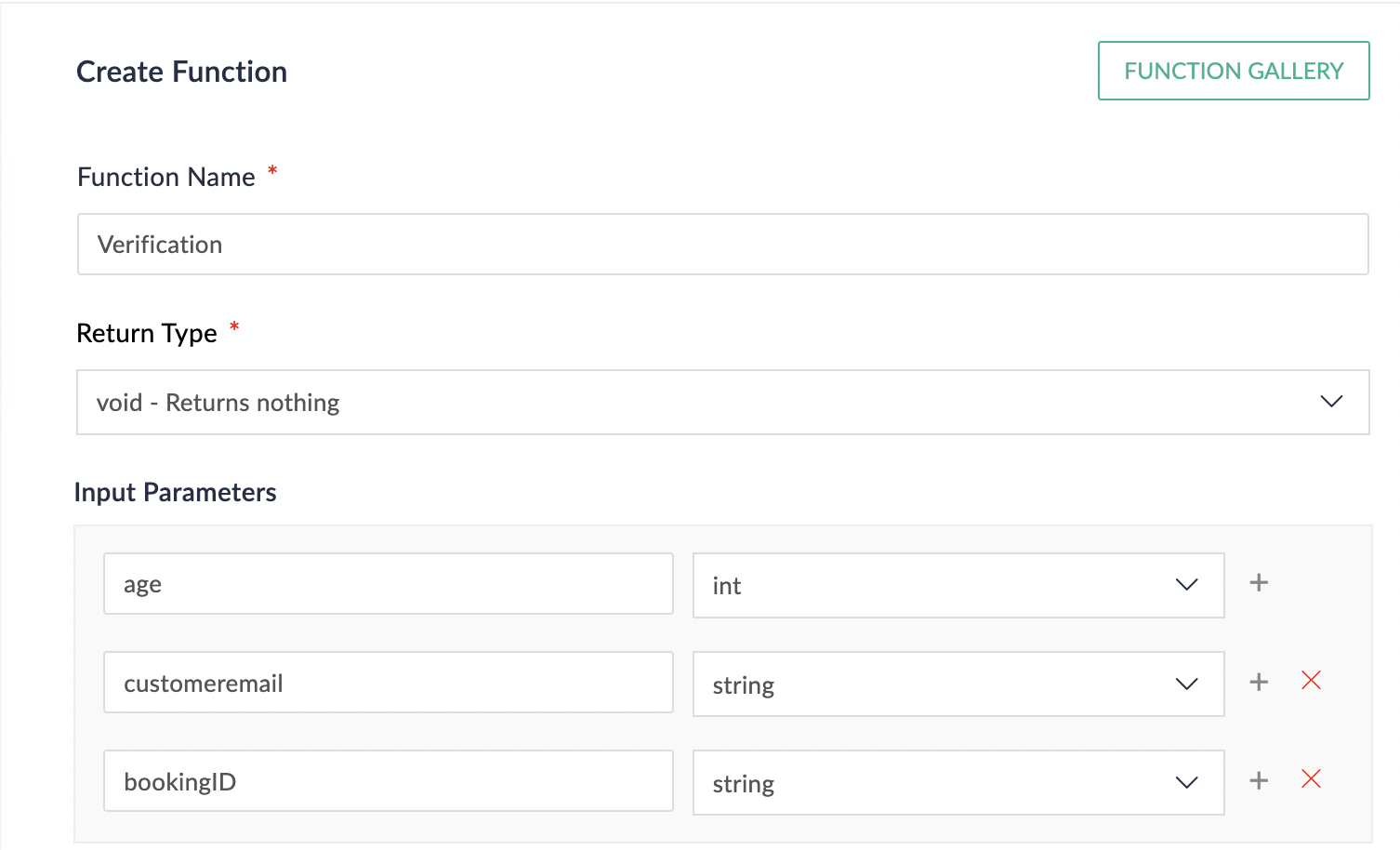
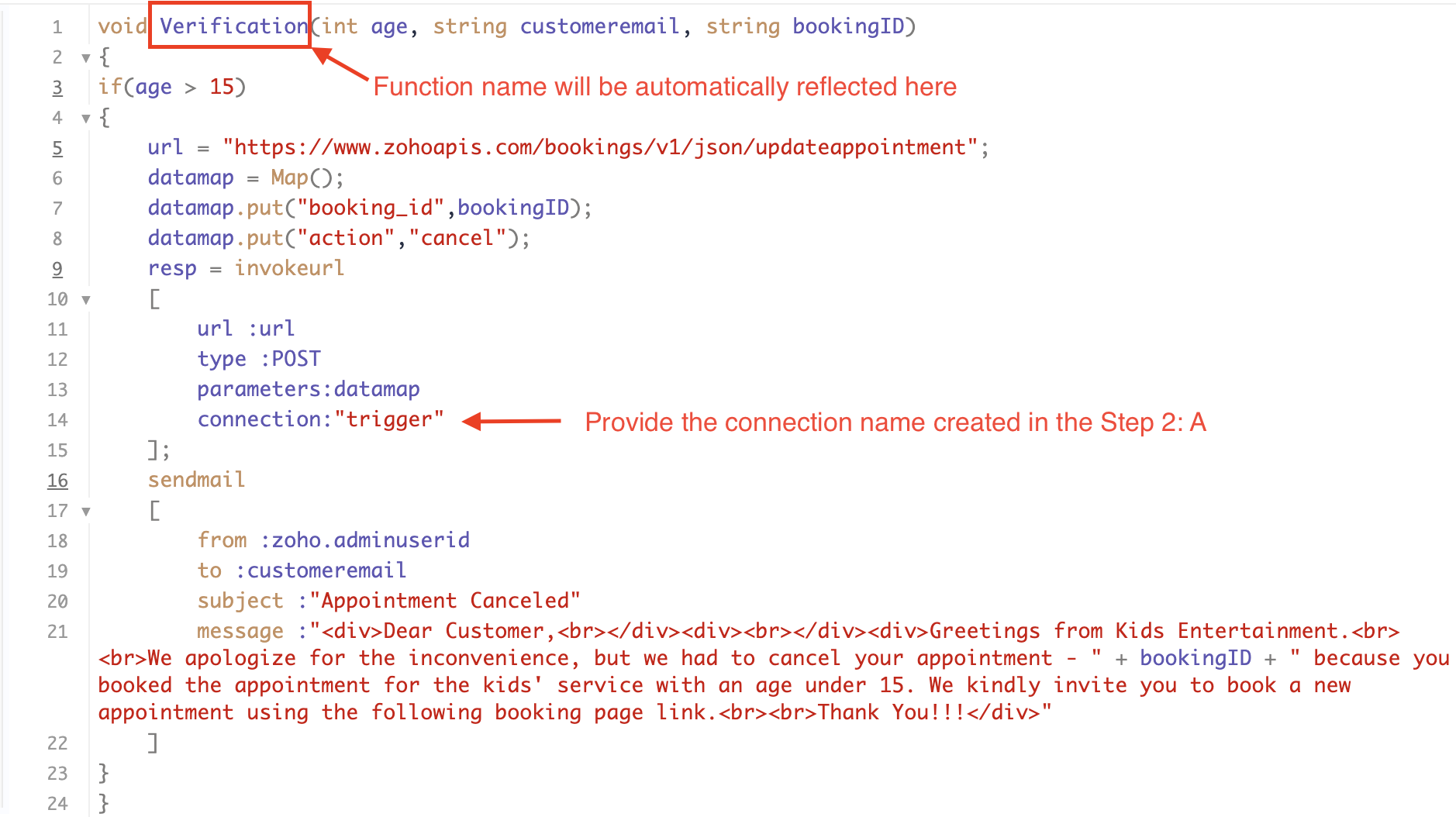
Line 1: To pass the input data below to the code
Age: This is used to verify and analyze the customer's input.
Customer Email: This is required to send an email notification to the customer in the event of an appointment cancellation.
Booking ID: This serves the purpose of identifying the specific booking that needs to be canceled using its unique booking ID.
Line 16 - 21: We utilize the sendmail task to send an email to the customer when their appointment is canceled. Additionally, the Zoho Bookings application automatically sends a cancellation email to the customer in such cases. Therefore, you have the option to either use the sendmail task or rely on the default notification system to inform the customer about the cancellation of their booking.
CONCLUSION:
In the preceding discussion, we have outlined a method for automatic appointment cancellation. You can use this document as a reference to explore the various possibilities that suit your needs.
Topic Participants
Kaushik S
Sticky Posts
Approve or deny appointments based on criteria
Hey, community members! Have you ever wondered how to automatically approve or deny appointments? While we're still working on building that feature, we've got an alternative method to cancel appointments if they don't meet your specific criteria. Let
Recent Topics
What's New in Zoho Inventory | Q2 2025
Hello Customers, The second quarter have been exciting months for Zoho Inventory! We’ve introduced impactful new features and enhancements to help you manage inventory operations with even greater precision and control. While we have many more exciting"Spreadsheet Mode" for Fast Bulk Edits
One of the challenges with using Zoho Inventory is when bulk edits need to be done via the UI, and each value that needs to be changed is different. A very common use case here is price changes. Often, a price increase will need to be implemented, andCloning Item With Images Or The Option With Images
Hello, when I clone an item, I expect the images to carry over to the cloned item, however this is not the case in Inventory. Please make it possible for the images to get cloned or at least can we get a pop up asking if we want to clone the images asZOHO BOOKS - RECEIVING MORE ITEMS THAN ORDERED
Hello, When trying to enter a vendor's bill that contains items with bigger quantity than ordered in the PO (it happens quite often) - The system would not let us save the bill and show this error: "Quantity recorded cannot be more than quantity ordered."Stock count by bin location
Is there a configuration to make a stock count by bin or area and not by product. these is useful to manage count by area RegardsServer-based Appication API access for Social, Sites, Flow, Pages.
Hello, I am trying to hook up API access for a number of apps and I have hit a wall trying to add these scopes to the API feed. We cannot find the correct way to list the scope for these Zoho apps; Social, Sites, Flow, Writer. Error on web-page comesZoho Survey: Bulk Exporting Raw Data (CSV/Excel) from 100+ Individual Survey Projects
Hi Zoho Community, I am currently managing a 360-degree evaluation process that involves 100+ individual survey projects (one separate survey for each employee being evaluated). I need to download the raw response data (CSV or Excel) for all 100 surveys.ERROR: Product type cannot be changed for Items having transactions.
I have mistakenly added a product type as goods for an item that was a digital service. Now when HSN/SAC became mandatory, this brought my attention to this error I did. So I tried changing the product type but it displayed this error message ProductCombine and hide invoice lines
In quickbooks we are able to create a invoice line that combines and hides invoices lines below. eg. Brochure design $1000 (total of lines below, the client can see this line) Graphic Design $600 (hidden but entered to reporting andInclude Notes in email templates for task
Hi there, I am setting up some automated email reminders via "setup-automation-workflow" to be send out when a task is being edited. I would like to include the "task notes" in the email. Is that possible? I do not find that field in the dropdown table when setting up the email template. Is it also possible to trigger the workflow rule when a new note is added to the task? In my opinion that should be quite essential, since a task update is often done by adding a new note to the task.... Also i[Free webinar] Custom domains for portals in Zoho Creator - Creator Tech Connect
Hello everyone, We’re excited to invite you to another edition of the Creator Tech Connect webinar. About Creator Tech Connect The Creator Tech Connect series is a free monthly webinar featuring in-depth technical sessions designed for developers, administrators,Marking a meeting 'done'.
I would like to somehow mark a meeting 'done' and placed under the contact's page rather than deleting it and having no record of it. Am I missing a button that does this?Partial payments for retainer invoices
When a customer does not pay the entire retainer invoice there is no way to apply a partial payment. PLEASE add this function.Can I export to PDF in Zoho Learn
I have seen help pages where export to pdf options are available but I do not see that option available from the application. I see that exprt is available in my free trial version but that is only to html pages. I need to be able to export my manualsService line items
Hello Latha, Could you please let me know the maximum number of service line items that can be added to a single work order? Thanks, Chethiya.Sending emails via Books
Anyone else getting similar problems recently ??..... Hi, Your message to the following recipient was not delivered. Please find the details below. Bounce Details: Bounced Address : someone@google.com Bounce Reason : other ; Status : 5.0.0 (undefined status) ; Daignostic-Code : smtp;542 someone@google.com Rejected ; Bounced Time : Sep 05, 2017 06:37 PM BST Regards, Zoho Team The email addresses were fine only a few days ago but are now being rejected ?PDF Generator Upgrade
Hi Team, What will happen if I don't make any changes for existing template. Zoho just ask us upgrade but haven't tell the benefit. Zoho CorporationNo Need To Fix Something That Is Working
Zoho Books is a great financial tool which helps businesses to become more efficient and productive with day-to-day operations. As such, every change, upgrade, improvement needs to be carefully thought before implemented in the software and I'm sure ZohoTotal Cost in reports showing zero
The image below shows my issue. The column Total Cost should show the cost to our company based on hours logged and the employee's rate. For instance, if the person working on Subtask 1 is paid 20/hr, then Total Cost should display $160 ($20x8 loggedZoho Books (and other finance suite apps) - Retrospective Linking of Invoice and Sales Orders to Quotes.
In some cases, Quotes and Invoies may be created sperately instead of using the convert feature. In this feature request I am asking for the Finance Suite team to consider adding a lookup field to reference the quote on Invoices and Sales Orders, or someBring real app analytics into Zoho Creator apps with Zoho Apptics
We’re kicking off the year with a release we’ve been looking forward to for a long time. After being in the works for a while, Zoho Creator and Zoho Apptics are now officially integrated, bringing in-depth product analytics directly into the Zoho CreatorEarly Access: Check Printing in Zoho Books
Hello Everyone, Are you constantly writing checks to pay your vendors? We've got a great news to share with you! You can now pay your vendors by writing and printing a check directly from Zoho Books. The feature is ready and we'll be rolling it out to our customers in phases. It is available in the US Edition of Zoho Books and also in the Global edition, where the country is selected as USA and the currency is USD. Here’s a summary of what’s possible: 1. Write and print a check. 2. MakeZohoMail's outbound webhook sends incorrect folderId and messageId
I used a webhook (outbound) from within ZohoMail to send message details when a new message arrives that meets specific criteria. I received this data correctly. Now I want to get the attachment from this email message. When I made an api call using folderUse URL field to populate Image in a Email Template
We have two records Record 1: Appointments (with a Lookup to Doctors module) Related Record 2: Doctors (with a URL field that is an image of the doctor) We would like to populate a CRM email template with the image of the URL field for the related doctorAbility to add VAT to Retainer Invoices
Hello, I've had a telephone conversation a month ago with Dinesh on this topic and my request to allow for the addition of VAT on Retainer Invoices. It's currently not possible to add VAT to Retainer Invoices and it was mutually agreed that there is absolutely no reason why there shouldn't be, especially as TAX LAW makes VAT mandatory on each invoice in Europe! So basically, what i'm saying is that if you don't allow us to add VAT to Retainer Invoices, than the whole Retainer Invoices becomesZoho Bookings Forge: A hands-on workshop series
Hello all! We’re hosting a five-part, hands-on workshop series to help you optimize Zoho Bookings for your business. In these sessions, we’ll cover key features, practical use cases, and clear steps to get started or improve your current setup. Here areDelete button
Hi, The delete button were hide into the three dot button. Can I display outside? why Zoho make this update?Zoho Vault CLI for Developers and Automations
Hi everyone, If you're managing credentials in scripts, CI/CD pipelines, or automation workflows, Zoho Vault's Command Line Interface (CLI) can help you securely access and manage secrets directly from your terminal. Zoho Vault was launched in 2013 asZoho Subscriptions -- Zoho Commerce integration
Is there integration between Zoho Subscriptions and Zoho Commerce? I would like to create subscription plans in Zoho Subscritpions and list them for on my Zoho Commerce store.Synching changes to Stripe when changes are made in Zoho Billing
We have a situation where we have merged customers in Zoho BIlling and then found out later that the payment in Stripe was not updated and still associated with the old customer record. The card gets updated and billed, but that payment is still associatedHow can I link Products in a Deal Subform to the Products Module
Hello, I have a pricing subform on our Deals page and use a lookup field to associate a product with each line. I want to be able to look at a product page within the Products module and see a list of the deals connected to that product. I have this workingHelp Center and SEO: Any Benefit to My Domain-Mapped Website Ranking?
First of, I love the Help Center which I've just decided to integrate into my website to replace its old-fashioned FAQs. So much more to achieve there now! Lots of new benefits to the site visitors and to me in terms of organizing and delivering all theBusiness Hours with lunch break
Our business hours are: mon - fri 08:30 - 13:00, 15:00 - 18:30. How can I handle the lunch break? If I use 8:30 - 18:30 it obviously breaks SLA. ThanksEnable Free External Collaboration on Notecards in Zoho Notebook
Hi Zoho Notebook Team, I would like to suggest a feature enhancement regarding external collaboration in Zoho Notebook. Currently, we can share notes with external users, and they are able to view the content without any issue. However, when these externalZoho Commerce
Hi, I have zoho one and use Zoho Books. I am very interested in Zoho Commerce , especially with how all is integrated but have a question. I do not want my store to show prices for customers that are not log in. Is there a way to hide the prices if notMulti-currency in Zoho CRM Forecast and Reports
As a company we have branches in 4 different countries with as many different currencies. Our Sales Teams would like to work with their local currency as much as possible. The Forecast module using only 1 currency is practically usable only by the salesZoho Projects Android and iOS app update: Conditional layout rules for Tasks
Hello everyone! Task conditional layout rules configured on the web app(projects.zoho.com) are now applied on the Zoho Projects Android and iOS app. Conditional layout rules can be set for the Add/ edit task form and it allows you to change the propertyHow to account for vat with postponed VAT accounting
Hi everyone, looking for some help with postponed VAT accounting, I use DHL express for my imports and they used to pay the VAT for me and then invoice me. I could then log this as a bill and the VAT element from import was recorded as input VAT, allZoho CRM WooCommerce Integrtation
Looking for a solution for my 50 client to show detailed analytics on source of traffic that led to events, leads, conversions. Hi all, I have not been able to find a workable guide or solution to how exactly step by step integrate the Zoho CRM with WooCommerce500 internal server error on opening an iframe through a deluge script
Hi Team I am trying to open an external url in an iframe through my deluge script which is associated to a custom button . By doing this i am getting an "Internal Server Error" . Please can you help me with this.Next Page