Handling identifiers during an import
Importing your data


- Users can upload a .csv file or a .zip file containing multiple .csv files.
- The .zip file must be named, for example, Contacts.zip, Accounts.zip, etc.
Working with the Identifier Field
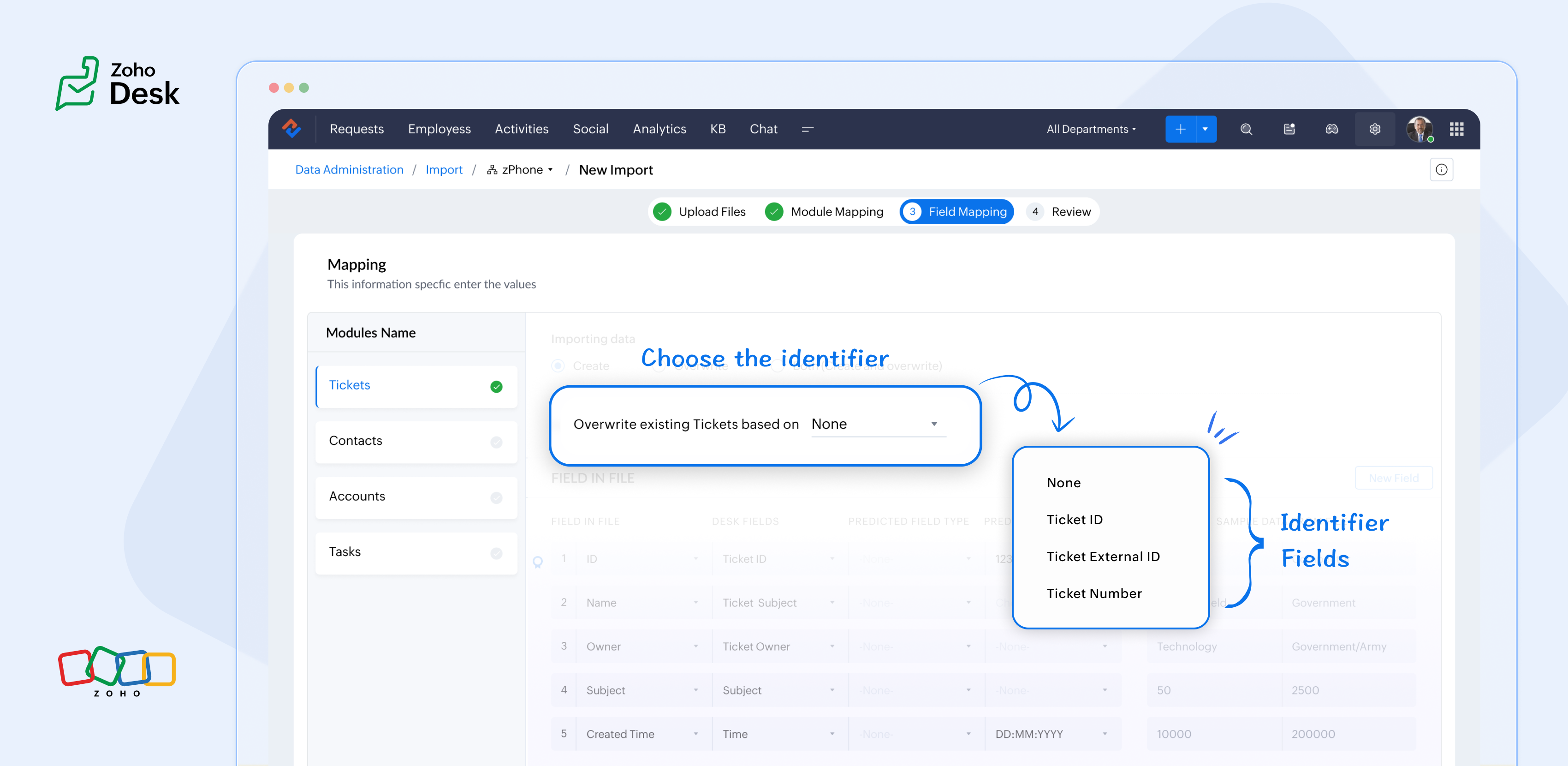
What are the Identifier Fields?
Identifier fields are fields used to find and match existing records when importing data into the product. They also help link related records, like connecting a contact’s name with their email address.
Each module supports different unique identifier fields for identification, as described in the table below:
Module | Unique Identifier Fields |
Accounts | Account ID Account External ID Account Name |
Contacts | Contact ID Contact External ID Last Name First Name Phone Number Mobile |
Tickets | Ticket ID Ticket External ID Ticket Number |
Products | Product ID Product External ID Product Name |
Tasks | TaskId Task External ID |
Calls | Call ID Call External ID |
Events | Event ID Event External ID |
Article Translation | Translation: External ID Translation ID |
Custom Modules | Record External ID Custom Module Name |

Points to remember:
- While these fields help find matching records.
- So, if multiple records match the value, the first matching record will be selected automatically.
- This can lead to unexpected matches or data being updated in the wrong record if you're not careful.
For your understanding:
Some users expressed a preference for matching Contacts by Last Name instead of Email, highlighting the importance of flexibility in their workflow. Furthermore, some additional users approached matching through the use of a custom field, emphasising the need for tailored solutions to fit their unique requirements. Moreover, users requested that the functionality be enhanced by updating existing records with the relevant entity's Zoho Desk ID, aiming to streamline their processes and improve data accuracy.
Commonly used identifier fields:
- Find By is used to identify an existing record during the import process.
- Map By is utilized to link a child record to a parent record, for instance, by linking a Contact to a Ticket.
You can now select specific fields for matching, providing enhanced control and customization during bulk processes or integrations. This functionality enables more precise data handling, ensuring that the information aligns with your specific requirements. By tailoring the matching criteria, you can streamline processes, ultimately leading to enhanced efficiency and better outcomes for your team. This flexibility enables you to harness the full potential of your data.
Import Systems
Let's start by preparing the CSV file.
A sample tickets module CSV file is given below,
External ID | Subject | Contact Email | Contact Name | About |
101 | Hitman | Sharma | Rohit Sharma's journey from a gifted schoolboy to an international icon and fierce competitor reflects resilience, elegance, and remarkable leadership. | |
102 | King Kohli | Virat | Virat Kohli is a world-renowned Indian cricketer known for his aggressive batting, unmatched consistency, and passionate leadership across all forms of the game. | |
103 | Lambu Ishanth | Sharma | Ishant Sharma is a tall and experienced Indian fast bowler known for his 300 test wickets and key performances in overseas conditions. |
Then choose the appropriate Find By identifier field.
The Find By field is selected from a predefined set of fields specific to each module. It is used to determine whether a record already exists in Zoho Desk.
When using the import tool, the system searches the Desk portal for a record (e.g., a ticket) that matches the value mapped to the selected Find By field. This prevents duplicate records by identifying existing entries based on the chosen field.
- Once the file is uploaded, you need to choose a Find By Field — for instance, Ticket External ID.
- Whichever Find By field we choose must correspond to the relevant column in the CSV file. Since we've selected the Ticket External ID, the Case External ID column in your file should be mapped to the Ticket External IDfield.
 If the chosen operation is to 'create new records while avoiding duplicates', and there is no existing ticket with the External ID 101, the import tool will generate a new ticket using the mapped fields. To associate the ticket to the correct Contact, the import tool utilizes the Map By field feature.
Finally, choose the appropriate Map By field.
The Map By field enables users to link imported records to their corresponding dependent records, such as associating a ticket with a specific contact. This functionality ensures that when you import ticket data, the import tool actively searches for a matching Contact in Zoho Desk based on the value defined in the selected Map By field.
For instance, during the field mapping process, you can specifically choose to map the Ticket to a Contact using criteria such as the Contact's email ID. This approach enhances the accuracy of data integration by ensuring that each ticket is correctly associated with the relevant Contact, thereby improving data integrity and streamlining the support process. This meticulous mapping not only minimizes the chances of errors but also facilitates a more organized and efficient ticket management system, ultimately leading to improved customer experiences and satisfaction.
Map by identifier field functionality
The tool efficiently searches for contacts associated with the provided email address.
Search: When a user submits a ticket, the system initiates a search for contacts associated with the specified email address.
Match found: If a single match is identified, the ticket is seamlessly associated with that Contact, ensuring that all relevant customer information is readily accessible for support agents.
Multiple Matches: If numerous contacts are found with the same email address, the system will prioritize and use the first match. This helps streamline the ticketing process while maintaining clarity in customer support.
In summary, the strategic use of Custom Unique Fields and External ID fields as identifiers, along with the potential for composite identifiers, positions support teams to operate more effectively and improve overall customer interactions.
Significant improvements in user experience
Transparent process and status tracking
Unique identifiers for entity mapping
Enhanced error handling and log accessibility
Support for custom modules
Takeaway
Topic Participants
Kavya Rao Addepalli
Sticky Posts
Zoho Desk Partners with Microsoft's M365 Copilot for seamless customer service experiences
Hello Zoho Desk users, We are happy to announce that Zoho Desk has partnered with Microsoft's M365 to empower customer service teams with enhanced capabilities and seamless experiences for agents. Microsoft announced their partnership during their keynoteWhatsApp pricing changes: Pay per message starting July 1, 2025
Starting July 1, 2025, WhatsApp is shifting from conversation-based pricing to per-message billing. That means every business-initiated message you send will count. Not just the first one in a 24-hour window. Pricing updates on the WhatsApp Business PlatformLive Webinar - Work smarter with Zoho Desk and Zoho Workplace integration
Hello customers! Zoho Desk and Zoho Workplace are coming together for a webinar on 14th May, 2024. Zoho Workplace is a suite of productivity apps for email, chat, docs, calls, and more at one single place. Zoho Desk is closely integrated with a few toolsApple iOS 17 and iPadOS 17 updates for Zoho Desk users
Hello Zoho Desk users! Apple recently announced the release of iOS 17 and iPad OS 17. These latest OS updates will help you stay productive and efficient, through interactive and seamless user experiences. Zoho Desk has incorporated the updates to helpZoho Desk Cheat Sheet For The Year-End
Check out these Zoho Desk best practices to end this year on a high and have a great one ahead! #1 Set Business (Holiday) Hours - If you have limited working hours, please make sure you restrict your business hours or set them as holidays for the coming days. Let your customers know when you will, and won't, be available. #2 Update the Annual Holiday List - Check the holidays for the new year and update the holiday schedule. Usually, holidays from the current year will be carried over for the next
Recent Topics
Formula Field/Campo de Fórmula
Hello everyone, I have a purchase requisition form in which each department submits a request, and the request is automatically routed to the person responsible for that department. In this form, I have several fields with the following link names: Quantidade1,Free Webinar: Zoho Sign for Zoho Projects: Automate tasks and approvals with e-signatures
Hi there! Handling multiple projects at once? Zoho Projects is your solution for automated and streamlined project management, and with the Zoho Sign extension, you can sign, send, and manage digital paperwork directly from your project workspace. JoinFormatting Problem | Export to Zoho Sheet View
When I export data to Zoho Sheet View, ID columns are automatically formatted as scientific notation. Reformatting them to text changes the actual ID values. For example, 6557000335603071 becomes 6557000335603070. I have attached screenshots showing thisIntroducing Workqueue: your all-in-one view to manage daily work
Hello all, We’re excited to introduce a major productivity boost to your CRM experience: Workqueue, a dynamic, all-in-one workspace that brings every important sales activity, approval, and follow-up right to your fingertips. What is Workqueue? SalesFeature Request - The Ability to Link A Customer with a Vendor
Hi Finance Suite Team, Many businesses buy and sell products from the same companies or individuals. For example, a car sales business may buy a car from a member of the public, and that member of the public may also buy a new car from us. This makesLong table name (sync from Zoho Creator)
Dears, How can I remove the suffix in parentheses? These tables are synced from Zoho Creator and are treated as system tables, so their names cannot be changed. This issue makes the aggregation formulas look awful.[Free Webinar] Learning Table Series - Streamlining incident management process with Zoho Creator
Hello everyone, We’re excited to invite you to another edition of the Learning Table Series webinar. As you may already know, we've moved to a purpose-based approach in the Learning Table Series this year. Each session now focuses on how a Zoho CreatorUnattended - Silent
How can I hide the tray icon / pop up window during unattended remote access for silent unattended remote access?Importing into Multiselect Picklist
Hi, We just completed a trade show and one of the bits of information we collect is tool style. The application supplied by the show set this up as individual questions. For example, if the customer used Thick Turret and Trumpf style but not Thin Turret,Text snippet
There is a nice feature in Zoho Desk called Text Snippet. It allows you to insert a bit of text anywhere in a reply that you are typing. That would be nice to have that option in Zoho CRM as well when we compose an email. Moderation Update: We agree thatMarketing Tip #18: Make your online store mobile-friendly to improve traffic
Most online shoppers browse on their phones first. If your store is hard to read, slow to load, or tricky to navigate on mobile, they’ll bounce fast. A mobile-friendly store doesn’t just look nice; it improves engagement, reduces drop-offs, and helps[Need help] Form closed. Please contact your form administrator for further assistance.
https://forms.zohopublic.com/cceinfoifly1/form/CCE2025CCEFocusGroupRegistrationForm2025Fall/formperma/s_8XcLETTbFxZ_TAS4r_W6W5UBl8o5oxEnIX35IBKg4 I checked we didn't exceed the usage limit and form availability is enabled, Please help us enable this formZoho People. Updating TabularData
I am trying to update tabular data in the record. I always have the same response. I have checked many times. Section ID is correct. May be something wrong with request structure itself. Can someone help me. Body content type: form urlencoded query paramsAutomatically CC an address using Zoho CRM Email Templates
Hi all - have searched but can't see a definitive answer. We have built multiple email templates in CRM. Every time we send this we want it to CC a particular address (the same address for every email sent) so that it populates the reply back into ourUnable to Send Different Email Templates for Different Documents in Zoho Sign
Hello Zoho Community, I am facing a limitation with Zoho Sign regarding email notifications sent to customers when a document is sent for signing. Currently, whenever I send any template/document for signing, the email notification that goes to the customerReminder needs 0 minute choice
I most use 0 minute reminders. Every other calender service has this choice. If I create an event in my Android calendar with 0 minute reminder it will change to 5 minute. Please ad 0 as a reminder choice, this should be a 5 minute fix. Thanks.Customer ticket creation via Microsoft Teams
Hi all, I'm looking to see if someone could point me in the right direction. I'd love to make it so my customers/ end users can make tickets, see responses and respond within microsoft teams. As Admin and an Agent i've installed the zoho assist app withinIs there a way to update all the start and end dates of tasks of a project after a calendar change?
Hi! Here's my situation. I've built a complete project planning. All its tasks have start dates and due dates. After completing the planning, I've realized that the project calendar was not the right one. So I changed the project calendar. I now haveHow to update task start date when project start date changes?
Hi there, When the start date of a project changes, it's important to update the start dates of the tasks associated with that project to reflect the new timeline. Is there a way to shift the start date of all project tasks when the start date of a projectIssue with Picklist Dropdown Not Opening on Mobile
Hello I am experiencing an issue with picklist values on mobile. While the arrow is visible, the dropdown to scroll through the available values often does not open. This issue occurs sporadically, it has worked occasionally, but it is very rare and quiteusing the client script based on the look up filed i wnat to fetch the record details like service number , service rate
based on selected service look up field iwant to fetch the service serial number in the serice form how i achive using client script also how i get the current date in the date field in the on load of the formZoho Books/Square integration, using 2 Square 'locations' with new Books 'locations'?
Hello! I saw some old threads about this but wasn't sure if there were any updates. Is there a way to integrate the Square locations feature with the Books locations feature? As in, transactions from separate Books locations go to separate Square locationsZoho Commerce - How To Change Blog Published Date and Author
Hi Commerce Team, I'm discussing a project with a client who wants to move from Woo Commerce / Wordpress to Zoho Commerce. They have around 620 blog posts which will need to be migrated. I am now aware of the blog import feature and I have run some tests.Does zoho inventory need Enterprise or Premium subsrciption to make Widgets.
We have Zoho One Enterprise and yet we can't create widgets on inventory.ZMA shows as already connected to Zoho CRM, but integration not working
When I try to connect ZMA with Zoho CRM, it shows as already connected, but the integration doesn’t seem to be working. I’ve attached the screen recording for reference.Automatic Email Alerts for Errors in Zoho Creator Logs
Hello, We would like to request a feature enhancement in Zoho Creator regarding error notifications. Currently, Zoho Creator allows users to view logs and errors for each application by navigating to Zoho Creator > Operations > Logs. However, there isWorkflow Rule - Field Updates: Ability to use Placeholders
It will be great if you can use placeholder tags to update fields. For example if we want to update a custom field with the client name we can use ${CONTACT.CONTACT_FIRSTNAME}${CONTACT.CONTACT_LASTNAME}, etcPassword Assessment Reports for all users
I'm the super admin and looking at the reporting available for Zoho Vault. I can see that there is a Password Assessment report available showing the passwords/weak and security score by user. However I'm confused at the 'report generated on' value. MonitorCan't change form's original name in URL
Hi all, I have been duplicating + editing forms for jobs regarding the same department to maintain formatting + styling. The issue I've not run into is because I've duplicated it from an existing form, the URL doesn't seem to want to update with the newSetting certian items to be pickup only
How do we have some items that are pickup only? I have several items in my item's list that I do not ship. But they need to be on the website to be sold, and picked up in store. Need to be able to do this as one of these products is a major seller forUsing gift vouchers
We would like to be able to offer a limited number of gift vouchers, of varying values, to our customers, and are looking for the best way to do this. We have looked at Coupons and Gift Certificates, but neither seem to fit the bill perfectly. Coupons:Automatically updating field(s) of lookup module
I have a lookup field, which also pulls through the Status field from the linked record. When the lookup is first done, the Status is pulled through - this works perfectly. If that Status is later updated, the lookup field does not update as well. AsZoho Commerce and Third-party shipping (MachShip) API integration
We are implementing a third-party shipping (MachShip) API integration for our Zoho Commerce store and have made significant progress. However, we need guidance on a specific technical challenge. Current Challenge: We need to get the customer input toAdding custom "lookup" fields in Zoho Customization
How can I add a second “lookup” field in Zoho? I’m trying to create another lookup that pulls from my Contacts, but the option doesn’t appear in the module customization sidebar. In many cases, a single work order involves multiple contacts. Ideally,Can you import projects into Zoho Projects yet?
I see some very old posts asking about importing project records into Zoho Projects. But I can't find anything up to date about the topic. Has this functionality been added? Importing tasks is helpful. But we do have a project where importing projectsZoho Inventory. Preventing Negative Stock in Sales Orders – Best Practices?
Dear Zoho Inventory Community, We’re a small business using Zoho Inventory with a team of sales managers. Unfortunately, some employees occasionally overlook stock levels during order processing, leading to negative inventory issues. Is there a way toAutomation #10 - Auto Assign Ticket based on Keywords
This is a monthly series designed to help you get the best out of Desk. We take our cue from what's being discussed or asked about the most in our community. Then we find the right use cases that specifically highlight solutions, ideas and tips on optimizingAutomate attendance tracking with Zoho Cliq Developer Platform
I wish remote work were permanently mandated so we could join work calls from a movie theatre or even while skydiving! But wait, it's time to wake up! The alarm has snoozed twice, and your team has already logged on for the day. Keeping tabs on attendanceReusable Custom Functions Across Department Workflows
Dear Zoho Desk Team, We appreciate the powerful workflow automation capabilities in Zoho Desk, particularly the ability to create and use custom functions within workflows. However, we have encountered a limitation that impacts efficiency and maintainability.Don't Allow Customer to Edit Values After Submitting Ticket
After a customer submits a ticket through the customer portal, they can go into the ticket and see some of the values from the questions they answered in the sidebar. Currently, a customer can edit these values even after they submitted them. This makes no sense. We ask very specific questions that we don't want customers to later change! Please disable the ability for customers to edit the values to their submission questions in the portal. Screenshot attached.Next Page