Introducing Schedules for smarter availability management

Introducing Schedules for smarter availability management

Greetings from the Zoho Bookings team!

We’re excited to introduce Schedules, a powerful enhancement to manage availability across your workspace. Schedules are reusable working-hour templates that help you define and maintain consistent availability across multiple event types, while still giving you the flexibility to handle exceptions such as holidays or any extended working hours.

With Schedules, admins can define available hours once and reuse them across multiple event types, making availability management simpler, consistent, and scalable.

What’s new?  

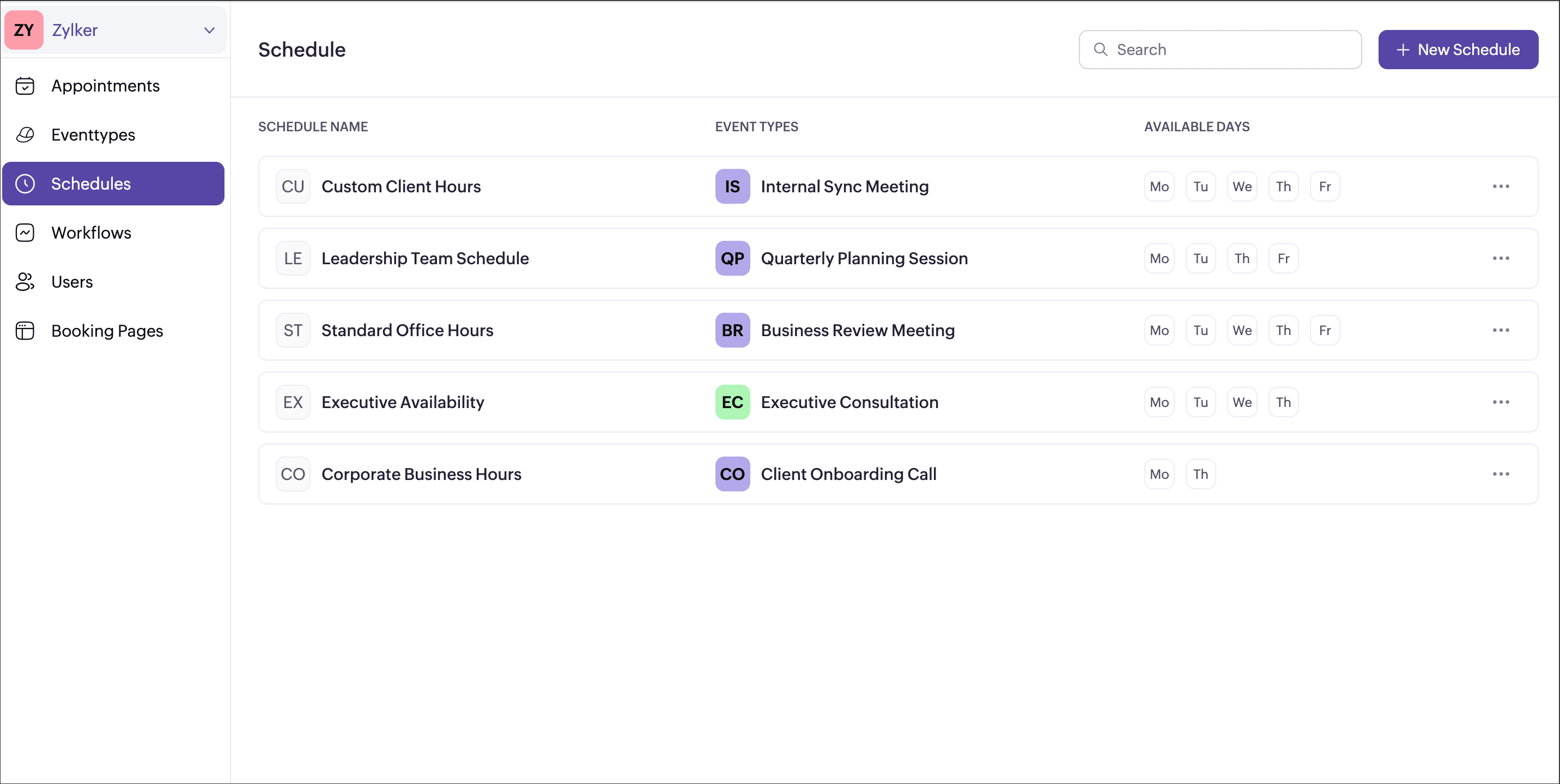
Schedule  

  • Create a common working hour template at the workspace level.

  • Assign it to multiple or all event types in one go.

  • Any updates to the schedule automatically reflect across assigned event types.

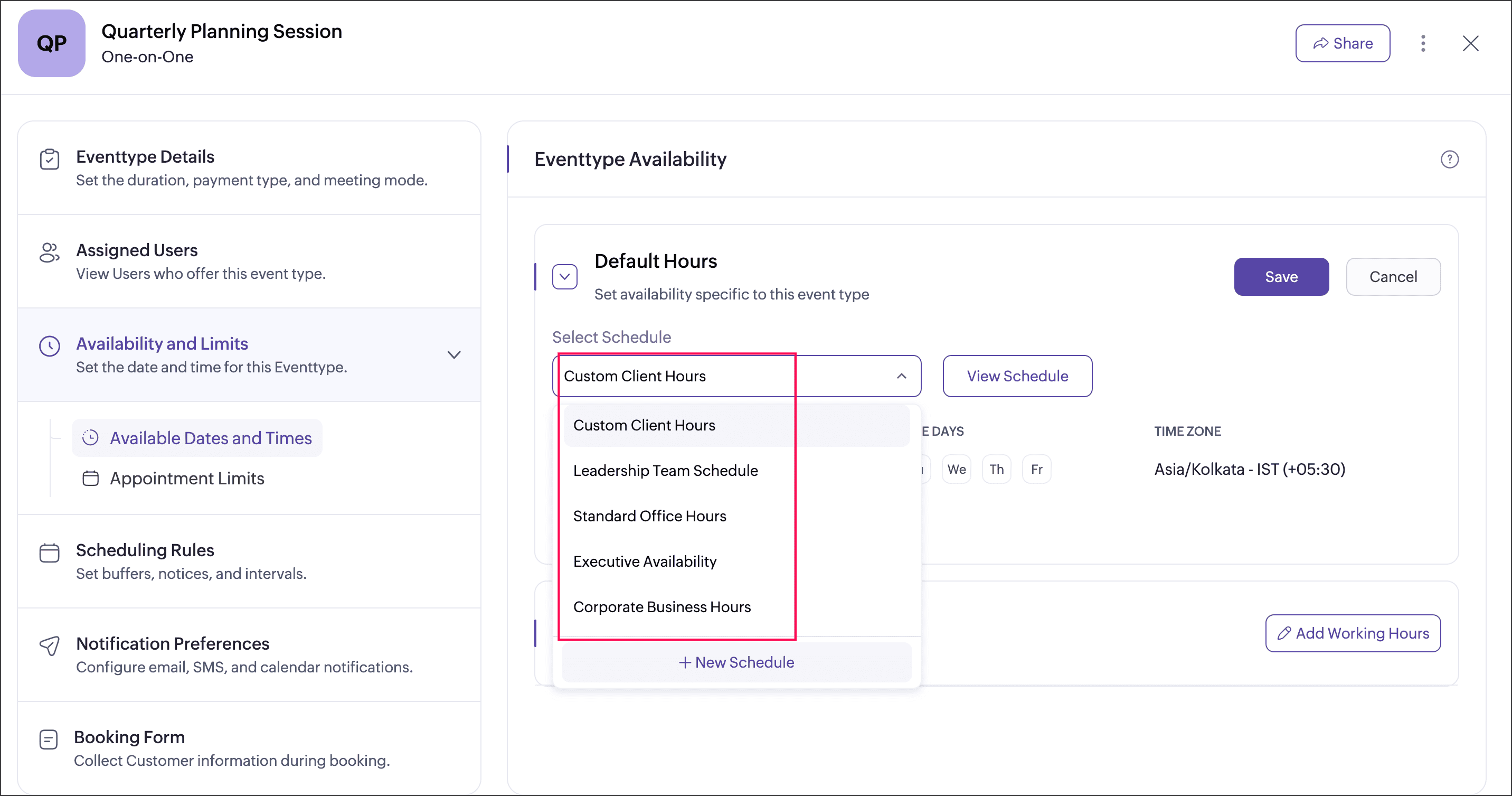
Event type availability

  • Event type can be assigned with the schedule that has been created at the workspace level, or the event type can be set to follow user working hours.

  • User-specific hours let you define custom availability for multiple users within an event type, and you can choose whether to apply or ignore these hours by enabling or disabling the Override user-specific hours option.

  • Each event type can be associated with a single schedule at a time.

Date Overrides

Date overrides let you make temporary exceptions to a regular schedule without changing the defined working hours. You can use them to add additional availability or mark unavailability for specific dates or date ranges. For more precise control, you can choose a custom range to define specific chunks of hours on a particular day. For example, making an event type available from 10 AM to 12 PM and again from 4 PM to 6 PM on the same day for special sessions.

Why this matters  

  • Maintain consistent availability across your workspace
  • Reduce repetitive schedule setup
  • Support complex real-world scenarios like team-based bookings and shared resources
  • Keep control centralized while allowing necessary flexibility
Availability  

This feature is available to all users on paid plansAdmins can create schedule for every workspace, while users can view their assigned schedules under My Space → Availability.

We believe schedule will make managing availability simpler, cleaner, and more scalable especially for growing teams. Have questions or feedback? Drop a comment below or write to us at
support@zohobookings.com. We’d love to hear from you!

Regards,
The Zoho Bookings Team

    • Sticky Posts

    • New feature: Invite additional guests for your bookings

      Hello everyone, Greetings from Zoho Bookings! We are happy to announce the much-awaited feature Guest Invite, which enhances your booking experience like never before. This feature allows additional participants to be invited for the bookings to make
    • 📣📣 Zoho Bookings Schedulathon 2025 is here!

      Hey Zoho Bookings fam, We're excited to invite you to our first-ever hackathon: Yes, Zoho Bookings Schedulathon 2025 is live now. This is a virtual event and you can participate anywhere from the world. Businesses should be able to set up meetings from
    • 📣 [Webinar] Spikra shows how businesses leverage Zoho Bookings to increase revenue

      [Webinar] Spikra shows how businesses leverage Zoho Bookings to increase revenue Hi all, Service-based businesses need to be on top of their client experience game to stay ahead. Spikra, one of our Advanced Zoho Partners, has been helping businesses deliver
    • 📣📣 Zoho Bookings - Feature Roadmap 2024

      Hi Everyone, Thank you for all the support you have been showing Zoho Bookings. We had a fabulous 2023, with a bunch of new features and over 60K new users. In 2024, our prime focus will be on user experience, and we have a few vital features coming in
    • Attention: Important updates to the payment gateway integrations

      Greetings from the Zoho Bookings team! We have a few important updates to the payment gateway integrations that allow you to collect online payments for your appointments. The following payment gateways will be updated, and we encourage you to make the
    • Recent Topics

    • Sync workdrive feature inside ZohoCRM

      Hi, I'm exploring the new workdrive/ZohoCRM connector released by Zoho to replace the free extension workdriveforCRM which is decomissioned https://marketplace.zoho.com/app/crm/zoho-workdrive-for-zoho-crm I'm rather upset with this long awaited feature,
    • Adding Custom Status Options in Work Order Action Menu

      Hello FSM Team, We would like to inquire if it is possible to add more custom options in the Work Order action/status dropdown (e.g., Cancel, Terminate, Non-Billable, Void, etc.). Currently, the available options are limited, and we are unable to customize
    • Timesheet Task Icons

      In the image below which shows the task field drop down when creating a timesheet against a project and task. What do the icons mean the the right side column against each task? I can't find any documentation or guide that explains what the no entry sign,
    • Open Records in a New Browser Tab

      Hi FSM Team, Just a suggestion: It would be helpful to have a right-click → Open in New Tab option in FSM, similar to CRM. This should ideally work for any clickable record or module, allowing users to open multiple records in separate tabs without losing
    • Facturation électronique 2026 - obligation dès le 1er septembre 2026

      Bonjour, Je me permets de réagir à divers posts publiés ici et là concernant le projet de E-Invoicing, dans le cadre de la facturation électronique prévue très prochainement. Dans le cadre du passage à la facturation électronique pour les entreprises,
    • Marketing Tip #18: Make your online store mobile-friendly to improve traffic

      Most online shoppers browse on their phones first. If your store is hard to read, slow to load, or tricky to navigate on mobile, they’ll bounce fast. A mobile-friendly store doesn’t just look nice; it improves engagement, reduces drop-offs, and helps
    • Cannot add note to record on mobile

      In the latest version of the mobile app - if a record already has notes associated with it - you can add a note via the mobile app - if a record does not have previous notes there is no way to add a new one - it allows me only to send email
    • Admin Logging in as another User

      How can a Super Admin login as another user. For example, I have a sales rep that is having issues with their Accounts and I want to view their Zoho Account with out having to do a GTM and sharing screens. Latest Update (27th April 2026): With the early
    • ChatGPT Plugin / MCP Server auth error

      Hi all I'm trying to connect the ChatGPT plugin for Zoho CRM but after username stage of the auth process, I get this error from the URL https://mcp.zoho.eu/mcp-client/ {"error_description":"Invalid request url, Request is not as per defined in oauth
    • Dashboards for Customers

      Is it possible to build dashboards for each customers in the community for their tickets?
    • Project Management Platforms for AI Agents: What Matters Most?

      Zoho Projects is already going beyond basic AI assistance with MCP, AI Bridge, and integrations that let AI models access project data and perform actions. That raises an interesting question: what should a project management platform for AI agents actually
    • Custom color coding for your entities

      Our brains are fine tuned to recognize colors before any text or shapes, making color coding a powerful tool to organize data and find items quickly. Color coding of our day-to-day work help with quickly processing the information, reducing cognitive
    • The Social Wall: August 2026

      Hello everyone. Welcome to the August 2026 edition of The Social Wall. This month, we're bringing you updates that make it easier to reach your audience, manage more channels, and streamline your publishing workflow. Here’s what’s new. WhatsApp bulk messaging
    • Check out in Meetings

      Why there is no check out in Meetings of Zoho CRM, very difficult to track
    • How do I get to "Admin Panel"

      I just started a Cliq account. I am the sole administrator. As I read the documentation, I keep seeing reference to an "Admin Panel". I see no way to access this from my Cliq account. How do I access this panel?
    • 【初開催! オンライン】Zoho Campaigns メール配信の基礎・活用勉強会を開催します! 10/15 参加無料

      ユーザーの皆さま、こんにちは。 Zoho コミュニティグループの中野です。 Zoho ユーザーコミュニティ初となる、メールマーケティングをテーマにしたオンライン勉強会を開催します! ▶︎イベント詳細・参加登録はこちら 今回取り上げるサービスは「Zoho Campaigns」です。 「Zoho CRMとZoho Campaignsのどちらからメールを配信すればよいか分からない」 「一斉配信はできるようになったけれど、現在のリスト管理や設定が正しいか不安」 「メールを送るだけで終わり、配信後の改善につなげられていない」
    • Lookups and Custom Modules

      I created a Custom Module that I'm calling "Item Purchasing Group". This module will store information for groups of Items that must be purchased together (including minimum overall quantities and/or values, etc.). This will have a one-to-many relationship
    • Marketing Tip #46: Run flash sales the right way

      A flash sale can do a lot for your store. It can clear slow-moving inventory, spike revenue on a slow day, or reward your most loyal customers. But if done carelessly, flash sales can backfire. Customers start expecting discounts, stop buying at full
    • Introducing Smart Fields in Zoho Forms

      Hello form builders! We are excited to introduce Smart Fields in Zoho Forms - a faster way to add calculations to your forms without writing formulas. Instead of creating multiple fields and configuring complex calculations yourself, you can now drag
    • Checkbox not displaying correctly in subform

      Greetings: I have shared my app (wv) with support.  I am having problems with a checkbox field not displaying correctly in a subform.  The main form is called volunteers and the subform is called volunteers_subform.  The field in question is called roles. When you access the subform by itself the checkbox lookup displays as checkboxes.  But when you view it in the main volunteers form, it displays as a multi-select dropdown instead.   I have attached jpegs showing the difference.   Any thoughts?
    • Unbundle feature for composite items

      We receive composite items from our vendors and sell them either individually or create other composite items out of them. So, there is a lot of bundling and unbundling involved with our composite items. Previously, this feature was supported in form
    • The reason I switched away from Zoho Notebook

      My main reason for switching to Zoho was driven by three core principles: moving away from US-based products, keeping my data within India as much as possible, and supporting Indian companies. With that intent, I’ve been actively de-Googling my digital
    • Valid characters for use in email addresses using Zoho's apps/APIs

      We have found an issue with the + sign character in zoho subs - we are allowed to create a customer with an email address that has a plus sign but the API doesn't allow the + so the billing portal is not created. We are going to prevent users from using
    • Expand Zoho Analytics Spatial Capabitlities

      Dear Analytics team Thanks for the great product - I'm a big fan on Analytics and the monthly release highlights is one of my favourite emails to receive. I'd like to request expansion and improvement of Zoho Analytics spatial data capabilities, namely:
    • Automate customer follow-ups with Sequences in Bigin

      Greetings, We hope you're all doing well! We're happy to announce a new feature that we've added to Bigin. Following up with every lead at the right time can be challenging, especially when your team is managing multiple conversations across emails, calls,
    • Displaying only unread tickets in ticket view

      Hello, I was wondering if someone might be able to help me with this one. We use filters to display our ticket list, typically using a saved filter which displays the tickets which are overdue or due today. What I'd really like is another filter that
    • Can we have an automated TDS Receivable Recon with Form 26AS of Income Tax Portal ?

      Can we have an automated TDS Receivable Recon with Form 26AS of Income Tax Portal ?
    • Customers would like to add tips when paying in Client Portal

      I am happy with the clean interface of the Client Portal. However, I am running into a challenge: my customers would like to be able to add tips/gratuities when making payments. Currently, this is very clunky because they have to 1) manually over-pay,
    • Tag Limi?

      is there any way to create more than 20 tags? 
    • prefill_data for Creator + Merge & Sign

      Hello, Is there an option to use prefill_data for signer fields from creator? I see the option for CRM but it will not work with creator? I have tried passing the value in the signer data, and that also does not work. Alternatively, is there a way to
    • Delug script

      I have been looking at auto-update a amount (home currency) field from another module. Zoho native multicurrency was used in the other module (we have 4 here). Custom script was input with no error, but the field was not updated on trigger. Script as
    • Can I Build a Gaming Website Using Zoho? Need a Quick Roadmap

      Hi Dear Members, I want to create a gaming website using Zoho. Is it possible? My goal is to build a sleek, unique, easy-to-navigate, and fast-loading website for a gaming project. I want the site to look professional, user-friendly, and optimized for
    • Remove Due Date from Statements

      Is it possible to remove the Due Date on the Invoice transation line on statements? I have figured work arounds to get the Invoice detail on the Statement but cannot work out haw to simplify the stament by removing the "- due on xx/xx/2026" - it really
    • What Should an Agent-Native Project Workspace Look Like

      AI is moving beyond assistants that simply answer questions. With tools like MCP, agents can now interact directly with project data and perform actions. That makes me wonder: what should an agent-native project workspace actually look like? For me, it
    • unable to join meeting due to speaker issue

      unable to join meeting due to speaker issue
    • How to add formatting in zoho.cliq.postToUser(...) message?

      In a CRM Deluge function, I'm trying to use the message formatting guidelines given here: https://www.zoho.com/deluge/help/cliq/posting-to-zoho-cliq.html#message-formats My message is: message: #Title text. The result in Cliq is: #Title text. (no large
    • Marketing Tip #50: Sell digital products and use them to grow your store

      Physical products need packaging, shipping, and stock management. Digital products need none of that. Once created, they can be sold an unlimited number of times, delivered instantly, and never go out of stock. What counts as a digital product? A digital
    • Turn off Mobile Optimize

      Hello is it possible to stop the automatic mobile optimization of my site as it looks much better on a mobile in full site format rather than mobile format. Thanks
    • How to select from pricebook when creating a salesorder or quote

      I am creating a sales order and when selecting the Products I do not see any where to select from pricebooks. How do i associate this to my orders?
    • API - Available Stock Definitions

      Okay, Zoho team... your copywriters fell down on the job for this one :) I think these warrant a bit more explanation as to what they include and what they don't.
    • Next Page