Kaizen #126 - Circuits in Zoho CRM - Part 1
Hello everyone!
Welcome back to another week of Kaizen!
Today, we will discuss an exciting topic—Circuits in Zoho CRM.
For starters, we will discuss what Circuits are, how beneficial they are for businesses, different views of a Circuit, and the different states and flow controls.
In the next post, we will discuss associating a Circuit to a blueprint, workflow, and a button, testing and execution, and see a Circuit in action with an interesting use case.
What are Circuits in Zoho CRM?
We use different microservices to accomplish our business needs, but most of the time, we are forced to switch over to multiple places.
With Circuits in Zoho CRM, you can integrate multiple microservices in a single platform and create automated workflows, all within your CRM!
For example, consider that you have an e-commerce application that involves multiple processes like tracking inventory, payment processing, fulfilling and tracking orders, generating receipts and reports, etc.
Typically, you would code this entire logic and use it to fulfill your business needs. But, with Functions in Zoho CRM, you can write the logic for each of these individual processes and simply orchestrate them using Circuits.
So, for the above example, you can simply create an automated workflow using Circuits and use the functions in the right order. That's not just it! You can re-use these functions elsewhere, too.
Another simple example of a Circuit is when you want to automating sending SMS alerts to users when an event occurs. How this is different from a workflow is that in this circuit, you can have a function that triggers an SMS alert, and also a function that sends an email to the user when the SMS alert ails. This involves circuit's functional states and a decision making state.
Like this, the use cases of circuits are endless.
Advantages of Circuits
- Automate your routines
Convert all your manual routines to automated workflows to save time. Avoid the need to trigger or interrupt applications to control the system flow, as you can create smooth-sailing, smart workflows that control themselves. - Scale fast
Handle any number of requests hassle free as your workflows get executed on cloud. While Zoho Circuit dynamically allocates resources on need, you can focus more on building your applications rather than managing them. - Update in minutes
Building the business logic of your applications in workflows empowers you to update the applications quickly. Swap or reorganize the components easily and build the modified applications in minutes. - Low-code
Create a circuit effortlessly with the visual drag-and-drop interface, which makes it easier for the users with minimum coding knowledge. - Developer-friendly
Circuits help you manage parallel processes, service integrations, spot failures, retry, and view logs, within minutes. Developers can focus on the business logic and not worry about these factors. - Orchestrate CRM Functions
Use various CRM functions on your circuit to integrate multiple third-party apps and Zoho CRM seamlessly. Write functions once, and orchestrate them in circuits to solve different business needs. - Automate IT and business processes within CRM
Create a circuit, associate it with a workflow, blueprint, or button, and automate your entire business process. With high availability, scalability, and fault tolerance, circuits ensure the performance of your workflow remains consistent even with changing states and an increase in frequency. - Diagnose errors and view audit logs
A detailed log of each execution provides the status of each state's task execution, the payload and parameters passed, and the responses and exceptions generated. - Use Existing Functions
From picking functions you've already tried, tested, and are up and running in your CRM account, to using a circuit within another circuit, this flexibility opens up possibilities of handling so much of your out-of-the-box requirements in a single space.
How are Circuits different from Workflow Rules and Blueprints?
Circuits is simply an orchestration of functions with powerful state management capabilities, along with in-built flow controls to automate the business process.
Workflow rules help us automate repetitive tasks and standardize business processes within the CRM system.
Workflow rules are useful in simple automations that the sales person does on a regular basis, like sending an email after record creation.
Builder View and Code View of a Circuit
Builder View
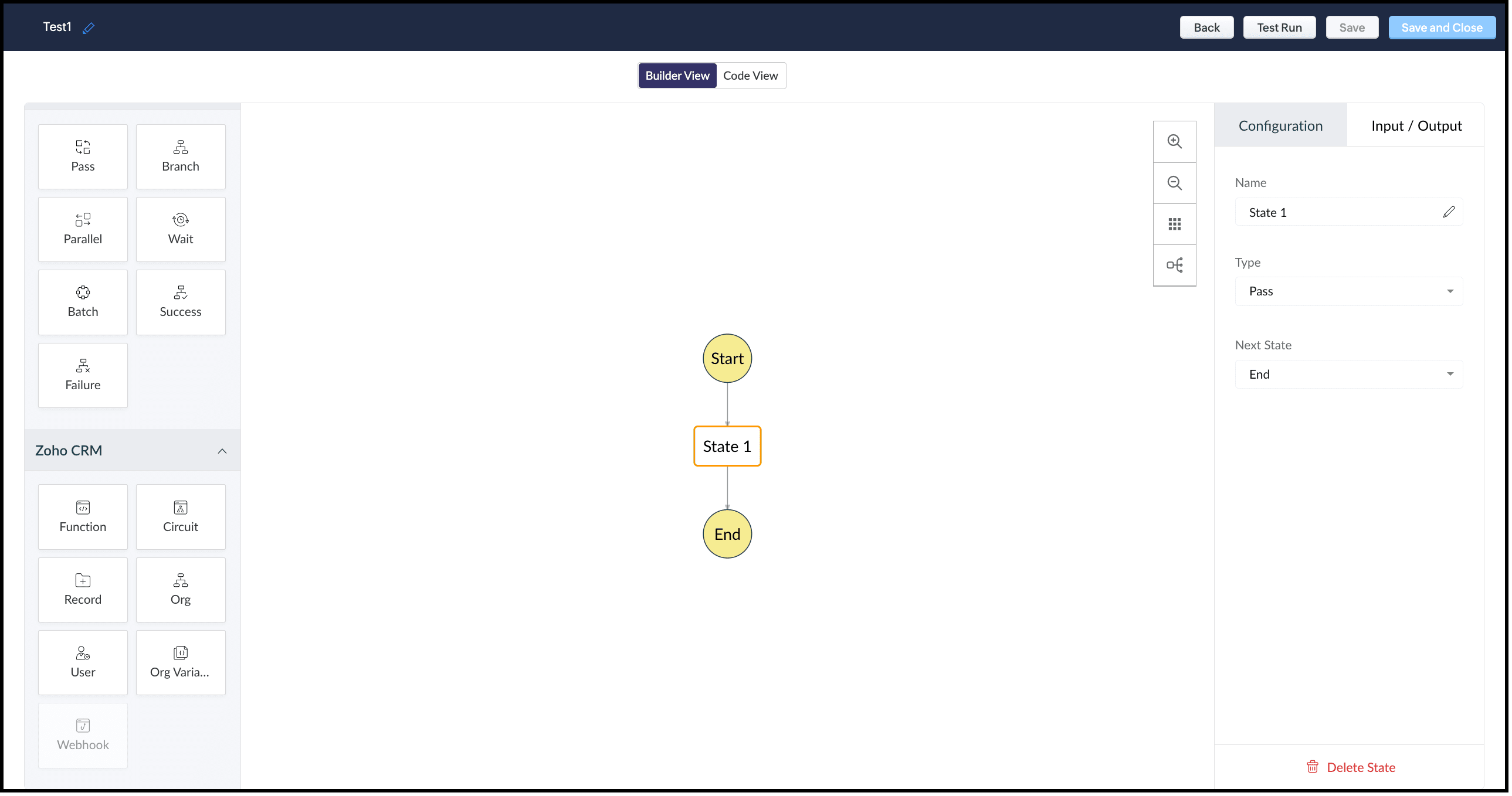
This view offers an easy drag-and-drop interface to build your circuit. The left pane in this view comprises all the states that can be added to a circuit.
The right pane comprises Configuration and Input/Output.
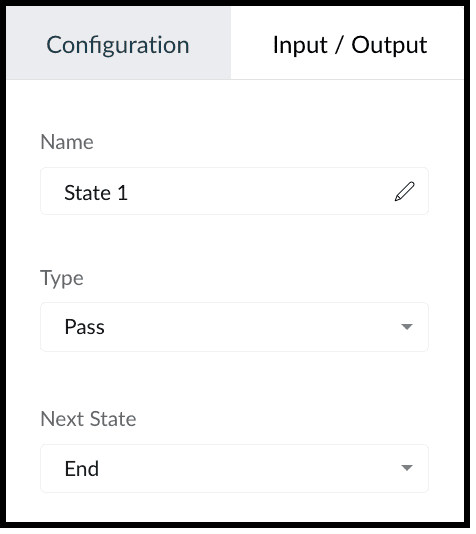
The Configuration tab lets you give a name to the state, choose its type, and select its next state.
The Input/Output tab allows you to control how JSON data must flow from one state to another through Paths.
Paths are strings beginning with $ that identify the components within the JSON. Specific parts of a JSON can be accessed by denoting their attributes in Input Path, Result Path, and Output Path.
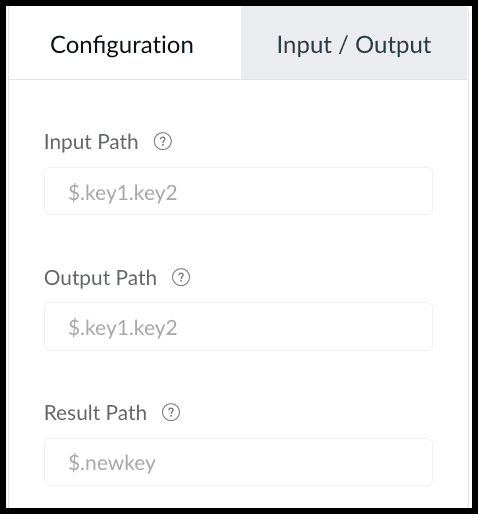
This tab contains the following.
1. Input Path
Input path selects parts of the input JSON to pass to the state. You can also pass parameters to the input as a collection of key-value pairs. The values of Parameters can either be static or parts of the input JSON selected as a Path. For example, if your state's input is
{
"Entry1": {...},
"Entry2": {...}
}
then, you can apply the input path as $.Entry2 within the state definition. So, only the data inside the "Entry2" object will be passed as input to the state.
2. Result Path
After the input is processed by the state, Result Path selects what combination of the state result and the actual state input has to be passed to the output.
3. Output Path
Output Path further filters the data from the Result Path to pass it as state output.
Code View of a Circuit
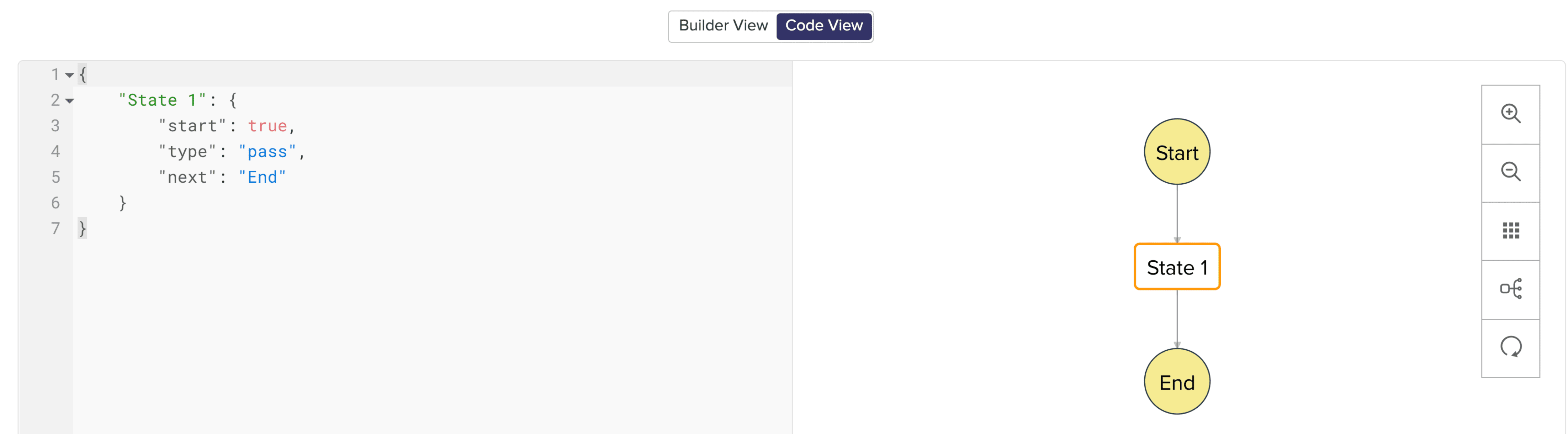
In Code View, you can define your state machine in a simple JSON-based, structured language. Once a circuit is created, a sample workflow with the pass state as 'State 1' is created by default.
States of a Circuit and Flow Controls
Circuits offer a cascading structure to different states in a business process, allowing you to write functions that each feed their output into the next one, or any other one you pre-define, individually. You can also reroute, pause for a certain period, or feed it in batches to enable just about any sort of action.
Simply put, Circuits have different 'functional states' and 'flow controls' that allow you to automate execute your business process.
Flow Controls
Flow Controls let you control the flow of your circuit. To achieve this, Circuits make use of different states that allow you to make the execution, 'Wait' for another state, 'Pass' the input of a state to another, use 'Success' and 'Failure' to stop the execution of the Circuit.
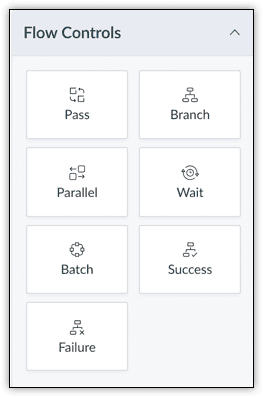
The different states available are:
- Pass: Transfers the input from one state to another.
- Branch: Decides between branches of execution based on input.
- Parallel: Performs simultaneous executions.
- Wait: Inserts a delay for a specific time. The maximum wait time is 30 days.
- Batch: Implements multiple group executions. You can have a maximum of 10 jobs per batch.
- Success: Terminates an execution, returning 'Success'.
- Failure: Terminates an execution, returning 'Failure'.
For more details on states, refer to this article.
Zoho CRM
Zoho CRM states help you execute business logic in circuits with respect to the data available in CRM.
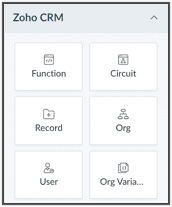
You can write functions in the built-in editor or orchestrate existing ones, get the details of a record as an input to other the states, get the details of your org, user, CRM variables and use them in your Circuit.
You can also trigger another Circuit within a Circuit using the 'Circuit' flow control.
'Function' State
Use this state in your Circuit to use an existing function in CRM. Depending on your need, you can configure the input and output, and control data flow in your circuit. Only the functions that are REST API-enabled are shown here.
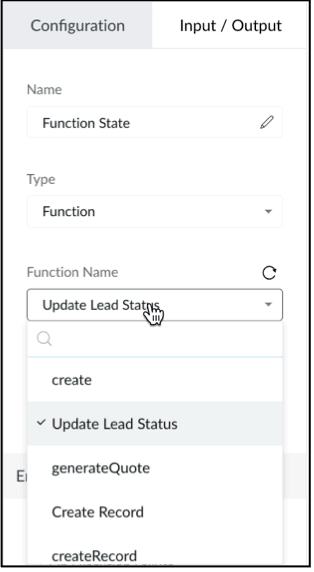
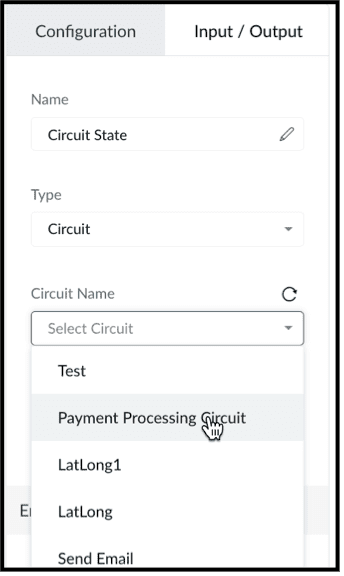
'Circuit' State
You can use another Circuit in one of the states and configure the flow accordingly.
'Record' State
This state fetches the details of a particular record in a module in CRM. You can choose to pass a portion or all of this state's result as an input to the next state in the circuit. Note that the information displayed will be based on the scope provided to the user.
Depending on where the Circuit is associated(Blueprint, Workflow, Button - Create/Clone/Details/Edit View pages, individual record, mass action), the response of the Record State differs.
'Org' State
This state gives you the details of your CRM org that you can use in your circuit.
'User' State
Use this state in your circuit to get the details of the current user in your org and process this information in other states.
'Org Variable'
This state gives you the details of all CRM Variables in your org.
Error Handling
When you use any of the Zoho CRM states, you can also perform error handling as these functional states tend to have runtime errors.
On TimeOut
When a functional state runs longer than the expected time, timeout errors occur. For handling timeout errors in code view, the field value "errorType": "Error.TimeOut" will be added.
On Execution Failure
When a state's execution fails due to some exception that cannot be processed, it can be handled using execution failure. In code view, key-value "errorType": "Error.ExecutionFailure" is appended.
Custom Error
You can also have custom error handling for your states.
Configure Exception Type and Exception Value to set the error handling options based on the error code or error message delivered by the state's output.
Retry the function in case of failure or timeout, set the Attempt (number of retries) and Delay (wait time after failure for every retry attempt).
In case of failure, if the retries fail to fix the error, the State will Fallback the error output to the Next state in the Result field.
We hope you found this post useful. Stay tuned for part 2!
Let us know if you have any questions or suggestions.
Cheers!
Shylaja S
Topic Participants
Shylaja S
Ash-Tech.co.il
Pheranda Nongpiur
Nicolás
Sam Stemp
Sticky Posts
Kaizen #198: Using Client Script for Custom Validation in Blueprint
Nearing 200th Kaizen Post – 1 More to the Big Two-Oh-Oh! Do you have any questions, suggestions, or topics you would like us to cover in future posts? Your insights and suggestions help us shape future content and make this series better for everyone.Kaizen #226: Using ZRC in Client Script
Hello everyone! Welcome to another week of Kaizen. In today's post, lets see what is ZRC (Zoho Request Client) and how we can use ZRC methods in Client Script to get inputs from a Salesperson and update the Lead status with a single button click. In thisKaizen #222 - Client Script Support for Notes Related List
Hello everyone! Welcome to another week of Kaizen. The final Kaizen post of the year 2025 is here! With the new Client Script support for the Notes Related List, you can validate, enrich, and manage notes across modules. In this post, we’ll explore howKaizen #217 - Actions APIs : Tasks
Welcome to another week of Kaizen! In last week's post we discussed Email Notifications APIs which act as the link between your Workflow automations and you. We have discussed how Zylker Cloud Services uses Email Notifications API in their custom dashboard.Kaizen #216 - Actions APIs : Email Notifications
Welcome to another week of Kaizen! For the last three weeks, we have been discussing Zylker's workflows. We successfully updated a dormant workflow, built a new one from the ground up and more. But our work is not finished—these automated processes are
Recent Topics
Form to PDF template
I am looking to create a Form and when information is inputted, it will merge it into a PDF template we already have. There could be multiple lines in the form and each line inputs information into a new page of a PDF template.Writing SQL Queries - After Comma Auto Suggesting Column
When writing SQL Queries, does anyone else get super annoyed that after you type a comma and try to return to a new line it is automatically suggest a new column, so hitting return just inputs this suggested column instead of going to a new line? AnyonePlease verify my account
Hi, We have just launched our website and received media coverage in our country. Hundreds of users are signing up for our platform every day. We would like to send them a welcome email, but we are unable to do so because our ZeptoMail account has notSubject character limit increase
We have an occasional user case where subject lines exceed 500 characters which is the ZeptoMail imposed limit. While I understand long subject lines are not "best practice", these are particular notification emails with specific information for clientAccount blocked
Yesterday I got my Zeptomail account blocked due to too many hard bounces. My account is used exclusively for sending transactional emails (eg. your order has been shipped, a form has been filled, etc) and the sudden blocking impacted hundreds of websitesNested notebooks
Dear Sir/Madam, I would like to know if it is possible to nest notebooks. It would be very helpful when there are too many, as it would improve organization. Thank you for your response. Best regards.Cannot see correct DNS config for mail after moving domain to another provider
I have moved my domain from one provider to another and after that zoho mail stopped working (expected). Problem is, zoho mail admin panel still shows (10 hours after move) that all records are correct while I haven't changed anything in my domain DNSProactive Alert for Existing Open Tickets per Contact / Account
Hello Zoho Desk Team, Greetings, and hope you’re doing well. We would like to submit a feature request aimed at improving agent awareness and efficiency when handling tickets in Zoho Desk. Use case When an agent opens a ticket (new or existing), it isAdd the ability to Hide Pages in Page Rules
Hi, We have Field Rules to show and hide fields and we have page Rules, but we can't hide a page in Page Rules so it isn't completed before the previous page (And then have the Deny Rules to prevent submitting without both pages completed), we can onlyTicket resolution field - can you add links, video, and images?
Seems like the ticket resolution fields is just a text field. Any plans to add the ability to add links, images...the same functionality in the problem description box? I would like to send the customer a link to a KB article, a link to our Wiki, embedTicket Resolution - Add rich formatting, screenshots and attachments
The resolution field only allows plain text at the moment. Many of our resolutions involve posting screenshots as evidence, it would be great for us to be able to have rich text formatting, be able to paste screenshots and add attachments in the solutionDeprecation Notice: OpenAI Assistants API will be shut down on August 26, 2026
I recieved this email from openAI what does it means for us that are using the integration and what should we do? Earlier this year, we shared our plan to deprecate the Assistants API once the Responses API reached feature parity. With the launch of Conversations,Deleting a memorized email address
How can I delete a memorized email address? Even though the address has been deleted from Contacts, Zoho mail still auto suggests the address when typing it into the TO field. Thanks!CRUD actions for Resources via API
Hello, is it possible to perform CRUD actions through the API for Resources? We want to create a sync from Zoho CRM Car record to Bookings resources to create availabilities for Car bookings. For Test drives, not only the sales person needs to be available,Kaizen #140 - Integrating Blog feed scraping service into Zoho CRM Dashboard
Howdy Tech Wizards! Welcome to a fresh week of kaizen. This week, we will look at how to create a dashboard widget that displays the most recent blog post of your preferred products/services, updated daily at a specific time. We will leverage the potentialConvert Lead Automation Trigger
Currently, there is only a convert lead action available in workflow rules and blueprints. Also, there is a Convert Lead button available but it doesn't trigger any automations. Once the lead is converted to a Contact/Account the dataset that can be fetchedI'm getting this error when I try to link an email to a deal inside the Zohomail Zoho CRM extension.
When I click "Yes, associate," the system displays an "Oops!! Something went wrong" error message. I have attached a screenshot of the issue for reference.Zoho Sheet - Desktop App or Offline
Since Zoho Docs is now available as a desktop app and offline, when is a realistic ETA for Sheet to have the same functionality?I am surprised this was not laucned at the same time as Docs.ZOHO add-in issue
I cannot connect ZOHO from my Outlook. I am getting this error.Marketing Automation
L.S. Marketing Automation is and has always been part of the Zoho One bundle - according to the information provided on the Zoho Website. Why when I open Marketing Automation do I get the following message?: "Your trial has expired. We hope you enjoyedWhat's New in Zoho Analytics - January 2026
Hello Users! We are starting the year with a strong lineup of updates, marking the beginning of many improvements planned to enhance your analytics experience. Explore the latest improvements built to boost performance, simplify analysis, and help youTranslation from Chinese (Simplified) to Chinese (Traditional) is not working. It randomly translated. Google Translate accurately but zoho translate is not working at all
Hi friends, The newly added language for translation. https://www.zoho.com/deluge/help/ai-tasks/translate.html "zh" - Chinese "zh-CN" - Chinese (Simplified) "zh-TW" - Chinese (Traditional) my original text: 郑这钻 (and it is zh-CN) translated traditionalThe Social Playbook - January edition: Getting started with content creation
Social media isn’t just about posting some random content. It’s about why certain content works, how brands stand out, and what makes people pause mid-scroll. The Social Playbook is a monthly community series where we break all of that down. Through realSupport for Custom Fonts in Zoho Recruit Career Site and Candidate Portal
Dear Zoho Recruit Team, I hope you're doing well. We would like to request the ability to use custom fonts in the Zoho Recruit Career Site and Candidate Portal. Currently only the default fonts (Roboto, Lato, and Montserrat) are available. While theseAdding bank details to the contact through API
How to add bank-related information to the contact while creating it using API? The account number needs to be encrypted before sending it through API but not sure how to encrypt and get those values. Please guide me in this.Font breakage in Zoho Mail Desktop Lite application for Mac
Dear Zoho Mail and Workplace Community, With the latest update of macOS Sequoia and macOS Tahoe, there has been font breakages in the email preview of Zoho Mail Desktop Lite application for Mac. This breakage is due to the corruption of the System fontsFeature request - image resizing on sales orders
I need to be able to show the items on the sales orders, currently the item image shows really small and no way to resize it, need the ability to make the image larger to showcase the product on the pdfsWhat's new in Zoho Sheet: Simplify data entry and collaboration
Hello, Zoho Sheet community! Last year, our team was focused on research and development so we could deliver updates that enhance your spreadsheet experience. This year, we’re excited to deliver those enhancements—but we'll be rolling them out incrementallyNueva edición de "Ask The Expert" en Español Zoho Community
¡Hola Comunidad! ¿Te gustaría obtener respuestas en directo sobre Zoho CRM, Zoho Desk u otra solución dentro de nuestro paquete de CX (Experiencia del Cliente? Uno de nuestros expertos estará disponible para responder a todas tus preguntas durante nuestraAutomation Series: Auto-Notify External Users on Issue Closure
Hello Folks! In Zoho Projects, you can notify external issue reporters via email when an issue is marked as Closed. This helps the users avoid manual follow-ups and keeps the reporter updated. In this post, we’ll walk through a simple setup using a WebTurn chat conversations into real action with Integration Blocks in Guided Conversations
When a Guided Conversation fails, it's usually not because the logic is wrong. They fail because the conversation stops moving. A customer starts a chat with a clear goal: report an issue, check a status, or confirm something. At first, the flow doesBasic Mass Update deluge schedule not working
I'm trying to create a schedule that will 'reset' a single field to 0 every morning - so that another schedule can repopulate with the day's calculation. I thought this would be fairly simple but I can't work out why this is failing : 1) I'm based inclick to call feature
I've Zoho CRM and in that i want click to call feature.We Asked, Zoho Delivered: The New Early Access Program is Here
For years, the Zoho Creator community has requested a more transparent and participatory approach to beta testing and feature previews. Today, I'm thrilled to highlight that Zoho has delivered exactly what we asked for with the launch of the Early AccessFrom Zoho CRM to Paper : Design & Print Data Directly using Canvas Print View
Hello Everyone, We are excited to announce a new addition to your Canvas in Zoho CRM - Print View. Canvas print view helps you transform your custom CRM layouts into print-ready documents, so you can bring your digital data to the physical world withCan the Product Image on the Quote Template be enlarged
Hello, I am editing the Quote Template and added ${Products.Product Image} to the line item and the image comes up but it is very tiny. Is there anyway that you can resize this to be larger? Any help would be great! ThanksCreating Parent Child relationship in Accounts
We have customers with multiple locations, I setup the HQ as an account, then I setup the different sites marking the HQ as the parent to that location. If I then do a Deal for one of the locations, is there a way to show by looking at the parent accountLearner transcript Challenges.
Currently i am working on a Learner Transcript app for my employer using Zoho Creator. The app is expected to accept assessment inputs from tutors, go through an approval process and upon call up, displays all assessments associated with a learner inClient and Vendor Portal
Some clients like keeping tabs on the developments and hence would like to be notified of the progress. Continuous updates can be tedious and time-consuming. Zoho Sprints has now introduced a Client and Vendor Portal where you can add client users andneed a packing list feature
In our business, goods listed on an invoice are packed in separate boxes and shipped off. for e.g. an invoice may have 10 items. each item could then be packed in different boxes depending on qty of each item. this packing list is as important as the invoice for purposes of shipping documents. Request you to add this feature asap.Next Page