Kaizen #175 - Leverage Settings Widget for Zoho CRM Extensions

Howdy, innovators!
Welcome back to a fresh week of Kaizen.
This week, we will delve into configuring a Settings widget in Zoho CRM for the effective functioning of extensions. It centralizes around key configurations that will be carried out to various integrations in an extension. A user-friendly settings widget enhances the usability and flexibility of your extensions.
Why use a Settings Widget?
A Settings Widget plays a crucial role in making extensions user-friendly and adaptable to specific business needs. Following are a few key advantages of using the settings widget:
- Seamless Setup Post-Installation: Users can configure critical parameters right after installing the extension.
- Dynamic Customization: Users can revisit and modify configurations at any time, ensuring that the extension adapts to changing needs without re-installation or development
- Improved User Experience: Allows the end-users to control how the extension interacts with their workflows and data.
- Enhanced Control: Provides an overview and centralized control, making maintenance, troubleshooting, and updates simpler and faster.
Business Scenario: Notification Settings for Lead Import Extension
Let’s take a real-world use case to understand the value of this settings widget.
Imagine an organization named Zylker, using Zoho CRM along with a lead import extension. This extension pulls in leads from multiple sources like web forms, social media, or third-party marketing tools.
Requirement
Whenever a new lead enters a Zoho CRM organization through this extension, the sales team wants to receive an instant notification on a specific Zoho Cliq channel for that organization. This ensures they never miss a lead.
Solution
By adding a Settings Widget to the extension, users can:
> Select a Preferred Zoho Cliq Channel: From the settings page, users can choose the channel where notifications should be sent.
> Modify the Channel Anytime: Based on team restructuring or communication preferences, users can revisit the settings and update the channel as needed.
With this setup, the settings widget becomes the control center, ensuring the efficient functioning of both the extension and the sales process.
Building a Settings Extension Widget
Let us create a sample settings widget for the above business scenario.
Create a Private Extension Widget
1. Log into Zoho CRM, navigate to Setup > Marketplace > Extension Builder, and create a new extension by selecting Zoho CRM as the service.
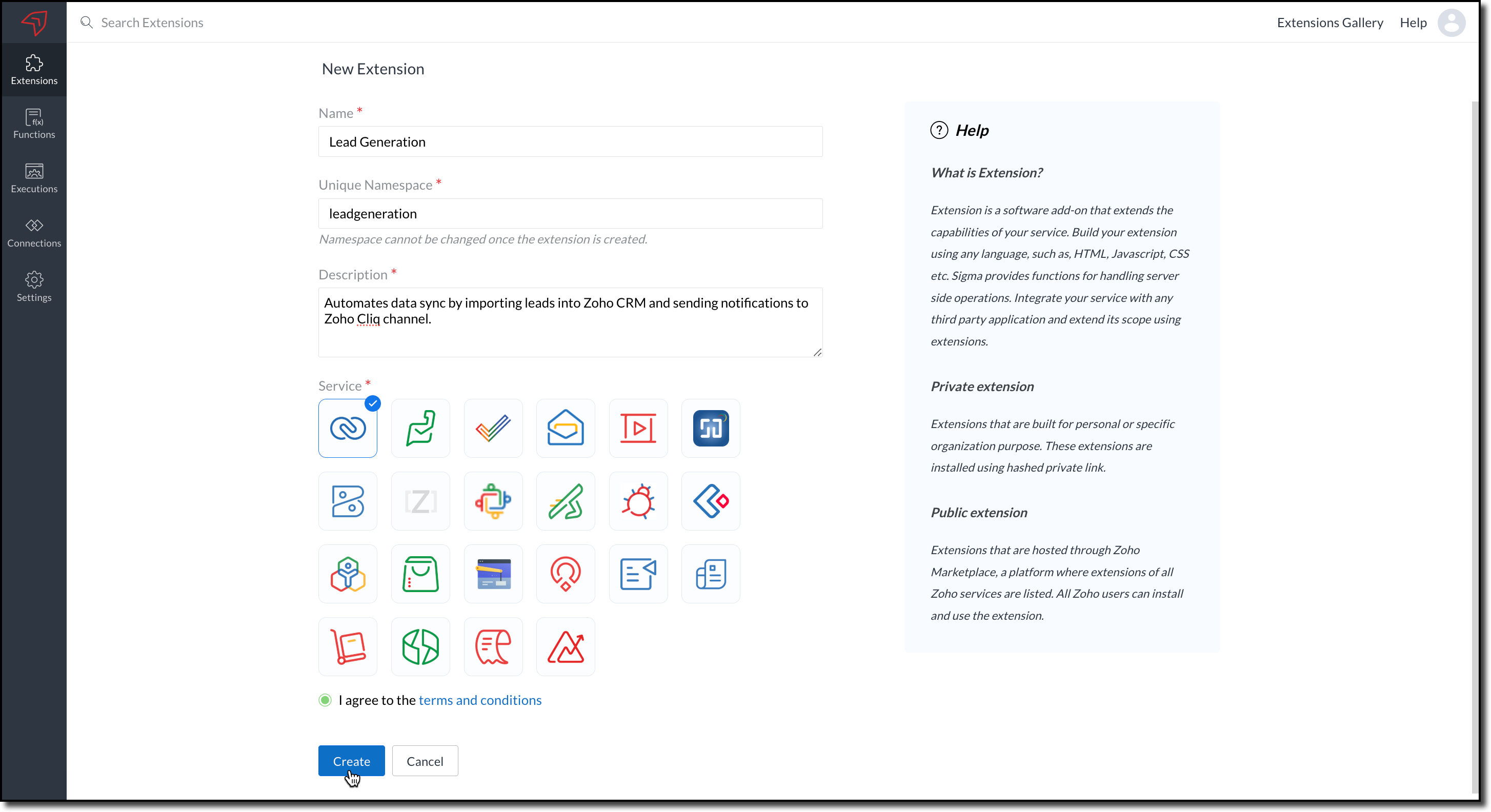
2. The private extension that you have created will be listed in the Extensions page. Choose your extension and click the edit icon.
You will then be redirected to the Zoho Developer Console.
Dependency Configuration
Now, let us configure a couple of dependencies required for this use case in the developer console.
Connectors
To notify a Zoho Cliq channel, Connectors authorize the end user's Zoho Cliq account with the extension and grant access to the necessary data. Follow these steps to create a connector with the required APIs for the widget.
3. In the console, navigate to Utilities > Connectors on the left-side menu.
4. Click Create Connector and provide the required details using the guidance available on the Server-based Application help page.
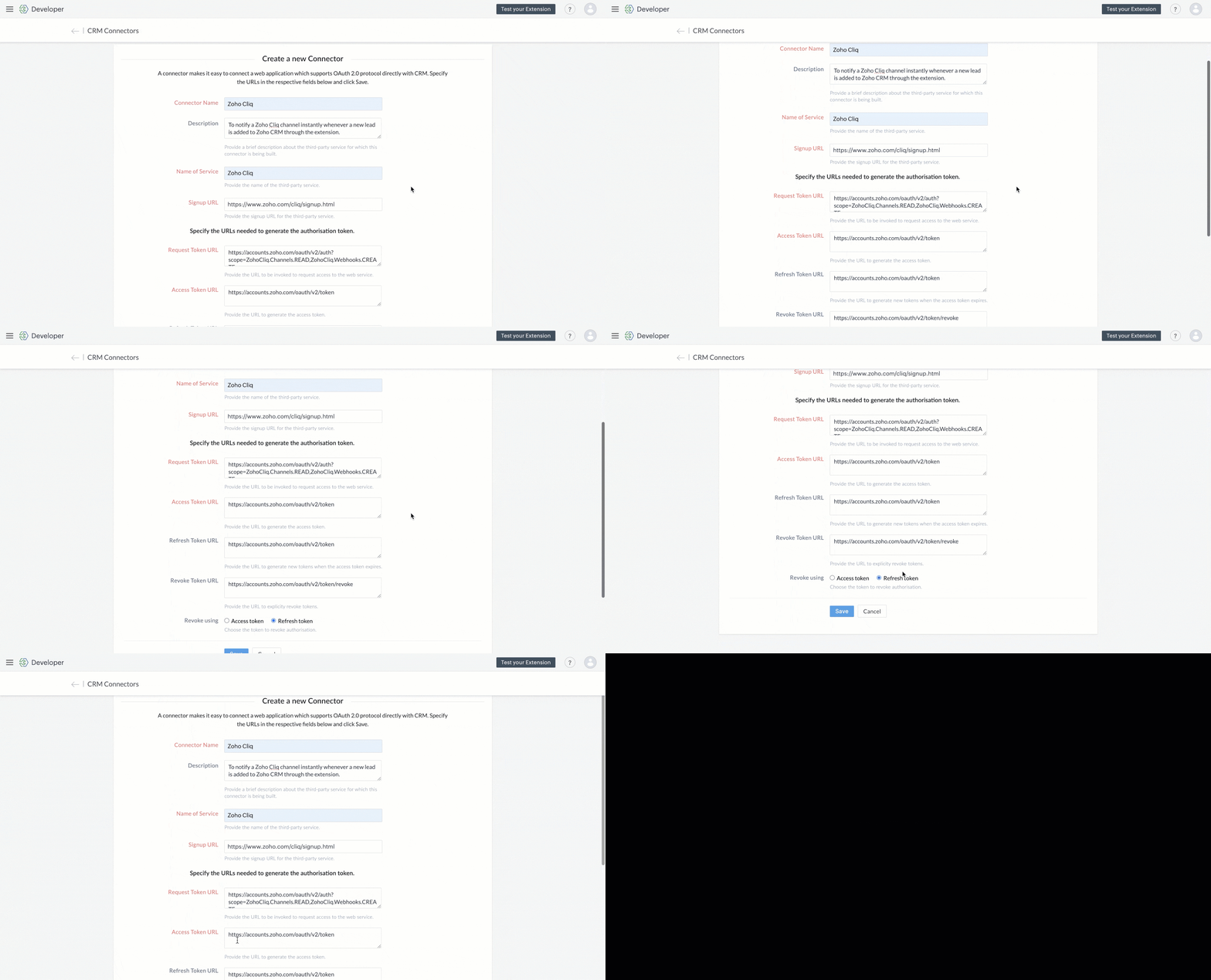
5. Use the generated Redirect URL to register your application in Zoho's API Console. After registration, enter the Client ID and Client Secret in the developer console.

6. Create Connector APIs for the following:
- GET List of all Channels to fetch all the available channels from your Zoho Cliq Account.
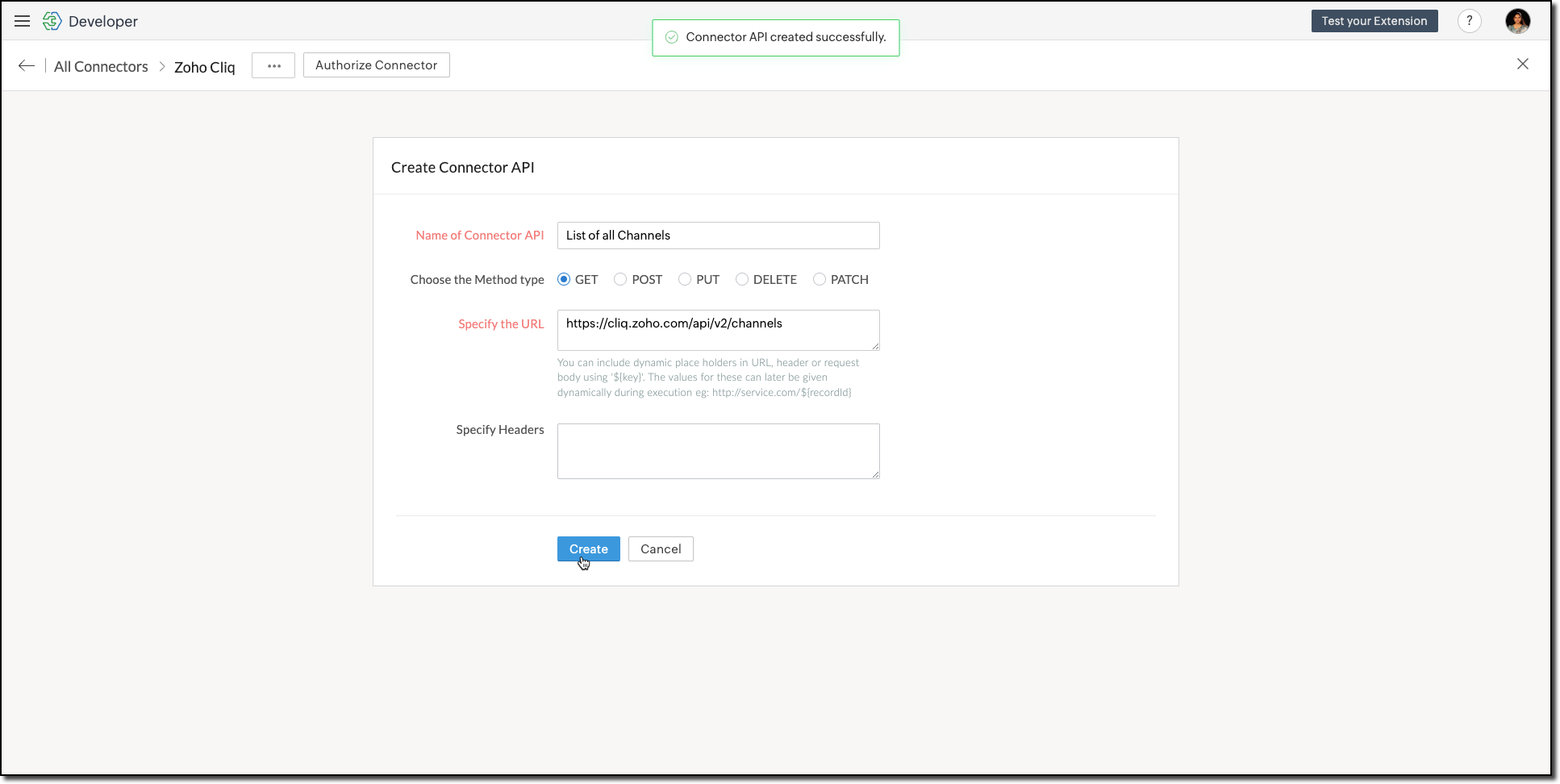
The Authorization header is automatically added to all the Connector APIs. - POST Message in Channel to notify the incoming leads in the channel.
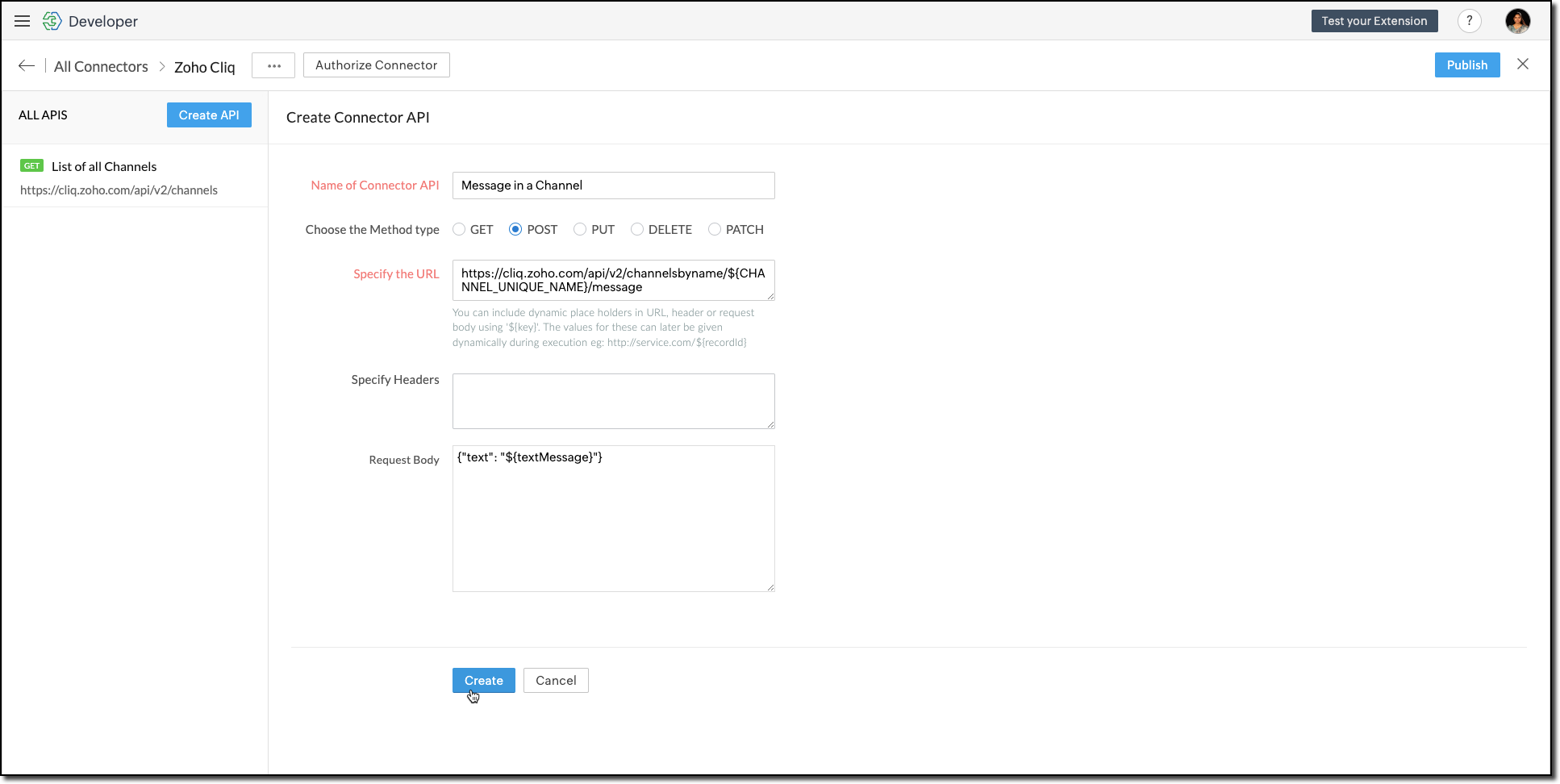
You can include dynamic place holders in the URL, header, or request body using this format ${place_holder}.
7. Once the APIs are configured, publish and associate the connector with the extension.

Refer to the Connectors help document to learn more.
Variable
Variables are required to store the admin's preferred channel details and retrieve them when a lead enters Zoho CRM through the extension. Upon installing the extension, this variable is automatically created in your Zoho CRM org.
8. Go to Build > Custom Properties and create a variable.

Set the variable's permission to Hidden to prevent the CRM users from accessing/modifying the variable data from the Zoho CRM Variables page. This ensures that variables can only be configured through the extension.
For more information, refer to the Custom Variables help document.

Tip
In your Zoho CRM, go to Setup > Security Control > Profiles and restrict permissions for your extension to prevent unauthorized access to the settings page.
In your Zoho CRM, go to Setup > Security Control > Profiles and restrict permissions for your extension to prevent unauthorized access to the settings page.
Building a Connected App
9. In the console, go to Utilities > Connected Apps on the left-side menu.
10. Follow the steps provided in this kaizen to create a new Zoho CRM widget for this use case.
Code Logic for the Settings Panel
- Create a drop-down field called Select Cliq Channel to the settings panel. This dropdown should dynamically list the channels from your Zoho Cliq account by invoking the GET Cliq Channels API. Follow the given Invoke Connector method to execute Connector APIs.
// Initialize Zoho Embed SDK ZOHO.embeddedApp.on("PageLoad", function () { fetchCliqChannels(); }); ZOHO.embeddedApp.init(); // Fetch Cliq channels async function fetchCliqChannels() { const channelDropdown = document.getElementById("cliqChannel"); try { console.log("Fetching channels from Zoho Cliq..."); const req_data = { "parameters": {} }; const response = await ZOHO.CRM.CONNECTOR.invokeAPI("leadgeneration.zohocliq.listofallchannels", req_data); console.log("Response from Zoho Cliq:", response); const parsedResponse = JSON.parse(response.response); const channels = parsedResponse.channels; if (channels && Array.isArray(channels)) { channelDropdown.innerHTML = channels.map(channel => `<option value="${channel.unique_name}">${channel.name}</option>`).join(''); } else { throw new Error("Invalid response structure"); } } catch (error) { console.error("Error fetching channels:", error); if (error.code === '403') { console.error("Authorization Exception: Please check your API permissions and authentication."); } channelDropdown.innerHTML = '<option value="">Failed to load channels</option>'; } } |
- Add a Save Configuration button that stores the selected channel name and channel ID in the variable created earlier. To save the selected data into the variable, use the invokeAPI() function, with the namespace as crm.set.
// Save configuration async function saveConfiguration(event) { event.preventDefault(); const channelDropdown = document.getElementById("cliqChannel"); const selectedChannelUniqueName = channelDropdown.value; const selectedChannelName = channelDropdown.options[channelDropdown.selectedIndex].text; if (!selectedChannelUniqueName) { alert("Please select a channel."); return; } const settings = { unique_name: selectedChannelUniqueName, name: selectedChannelName }; const data = { "apiname": "leadgeneration__Cliq_Channel", "value": JSON.stringify(settings) }; try { const response = await ZOHO.CRM.CONNECTOR.invokeAPI("crm.set", data); console.log("Updated settings:", response); document.getElementById("setupStatus").innerText = "Configuration saved successfully!"; } catch (error) { console.error("Error saving configuration:", error); document.getElementById("setupStatus").innerText = "Failed to save configuration."; } } |
- When a lead enters Zoho CRM through the extension, it should trigger a function that:Retrieves the saved channel details:
> Retrieves the saved channel details: Uses the Get Organization Variable JS SDK to call the Zoho CRM GET Variable API to fetch the saved channel details.
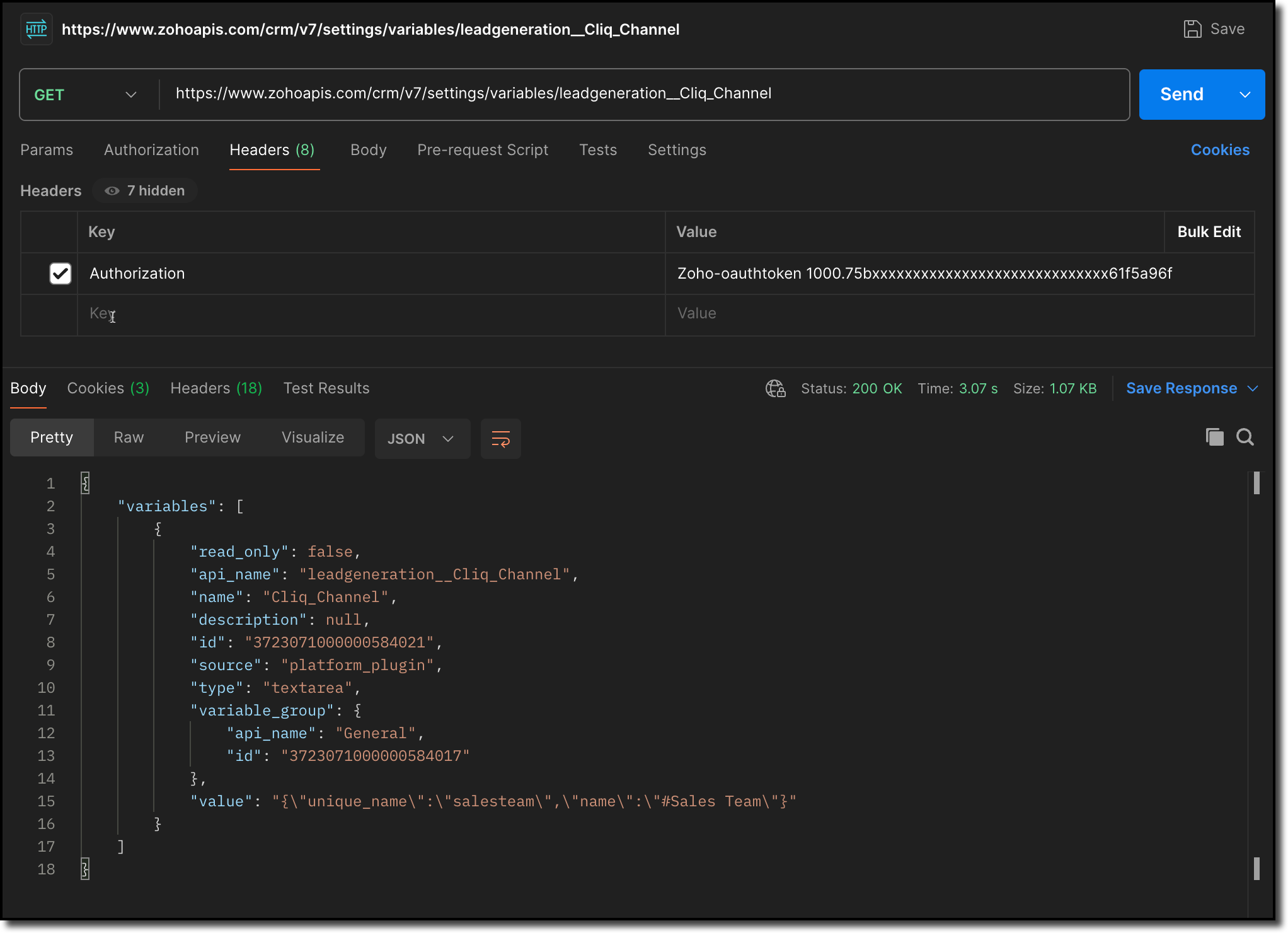
> Notifies the channel: Sends a message to the retrieved channel using the Post Message API.

Info
-> A complete working code sample for the use case is attached at the end of this post for your reference.
-> The test function for triggering notifications is also included in the attachment. You can use the same snippet in your extension to initiate the notification process.
-> Ensure to replace the unique names of your Connector APIs and Variable.
11. Fill in the details of the application as shown in this image and upload the widget ZIP file packed using the Zoho CLI command.
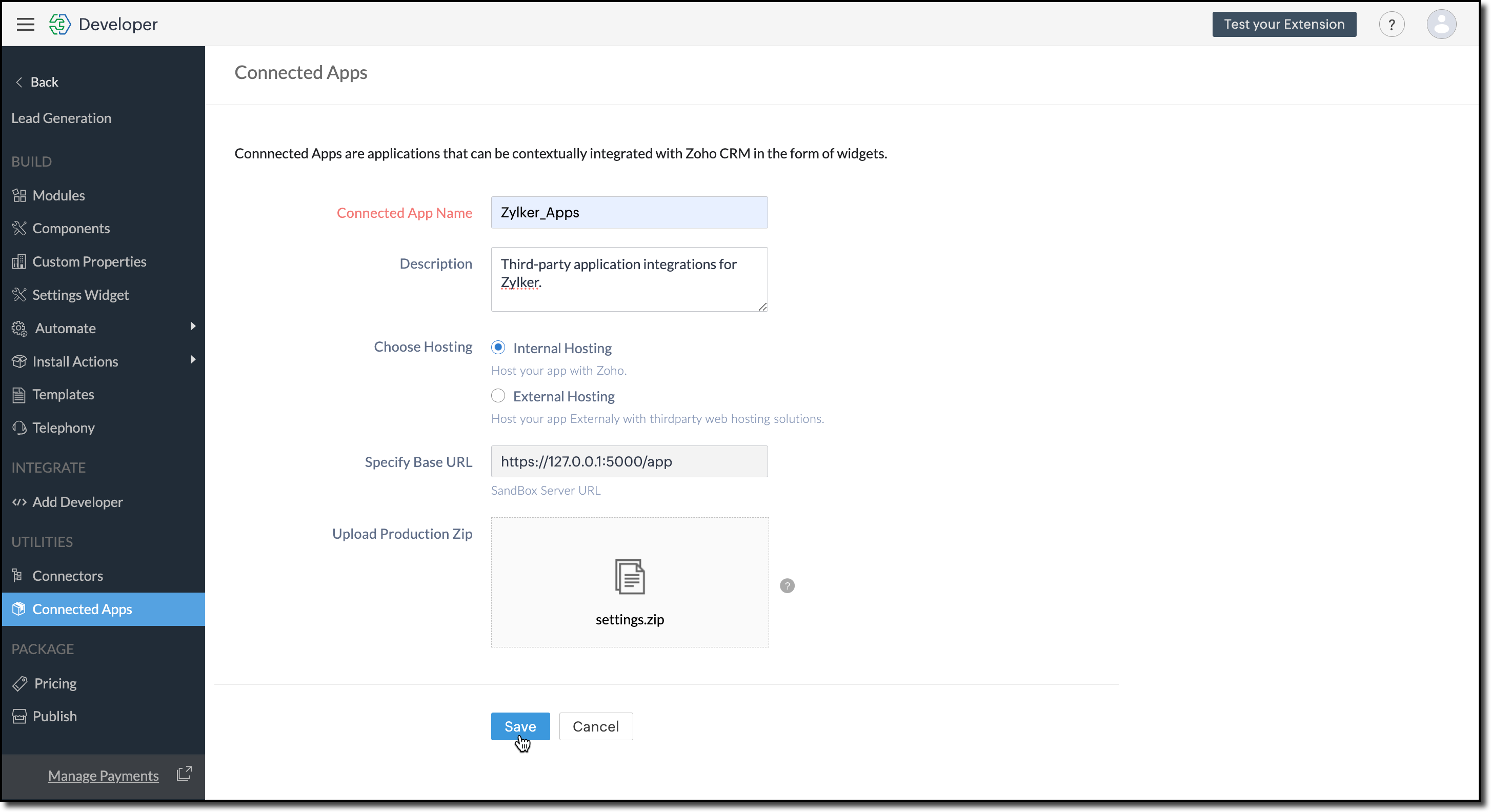
12. Click Save.
Configure the Settings Widget
13. Navigate to Build > Settings Widget in the left menu.
14. Provide a Name and the Resource Path of your widget.
15. Click Save.

The Settings Widget for Extension is available upon request. Contact support@zohocrmplatform.com to enable it for your account.
Packaging, Publishing and Deploying
16. Go to Package > Publish on the left-side menu and publish the extension.
17. The review process for listing an extension in the Marketplace will take from three weeks to one month.
For the demo, we will proceed with deploying the extension using the private plugin deployment link.

18. Now, replace the URL of your Zoho CRM page with the deployment link from the Developer Console and approve the extension installation.
Try it Out!
Once installed:
> A pop-up will appear, prompting you to authorize Zoho Cliq for the required configurations.
If you do not already have a Zoho Cliq account, you can sign up directly from the pop-up and proceed with the authorization.
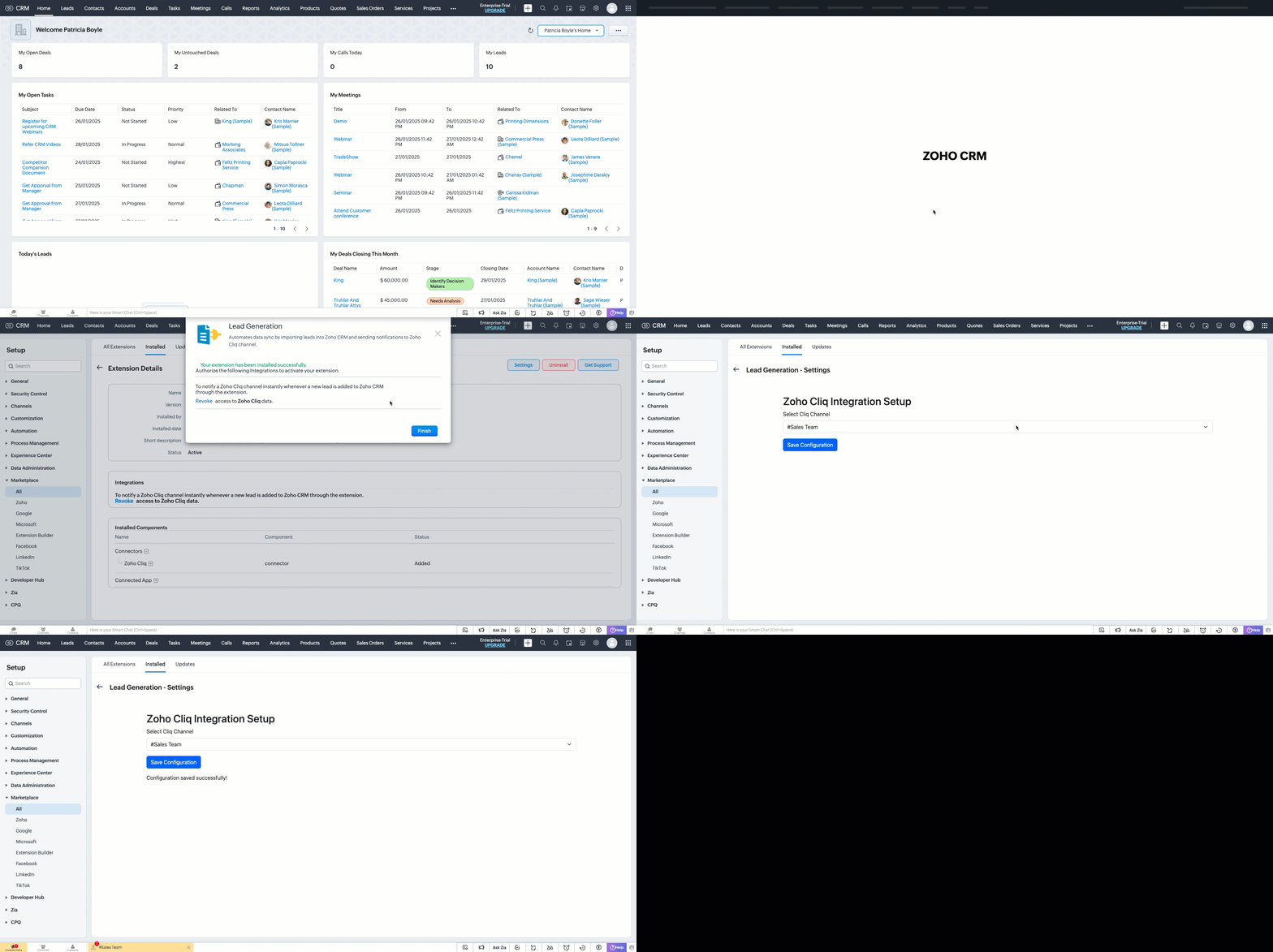
> After authorization, you will be redirected to the Settings widget page, where you can select and save your preferred Cliq channel.
> If you need to update the settings later, you can find them on the Installed Extensions page under the respective extension.


Note
The demo videos above use a testing function to notify the channel. You can deploy it anywhere in your extension to trigger a notification whenever a lead enters a Zoho CRM organization through the extension.
Find the function in the attachments at the end of this post.
Similar Scenarios
- Sales Territory Management: An extension that auto-assigns incoming leads to sales reps can use a settings widget to allow managers to define territories and sales rep mappings dynamically.
- Custom Field Mapping: For extensions that sync data between Zoho CRM and external systems, a settings widget can let users map CRM fields to external system fields.
- Automated Email Preferences: In email automation extensions, the settings widget can allow users to specify email templates, recipients, or trigger conditions for follow-ups and campaigns.
Adding a Settings Widget to your Zoho CRM Extensions not only enhances user experience but also boosts the flexibility and efficiency of your extension. Whether it is notifying sales teams or customizing field mappings, a well-designed settings page is a game-changer for your extensions.
Explore the Widget section in our Kaizen collection to try out various widget types and discover their unique use cases.
If you have any queries or a topic to be discussed reach out to us at support@zohocrm.com or drop your comment below.
Until next time, keep innovating!
Cheers!
----------------------------------------------------------------------------------------------------------------------------------------
Related Reading
- Zoho CRM Widget - An Overview, Installation and Creation, Mobile Compatibility, Telephony Widget Extension, and other Kaizens.
- Widget SDKs - An Overview, Invoke Connector and Get Organization Variable.
- Zoho Developer Console - An Overview, Creating Extensions, Building Connected Apps, and A Quick Start Guide.
- Zoho Extensions - Custom Variables and Connectors
- Zoho Cliq - GET List of Channels and POST Message in Channel.
- Zoho Marketplace - An Overview
----------------------------------------------------------------------------------------------------------------------------------------
Previous Kaizen: Kaizen #174 - Client Script Commands | Kaizen Collection: Directory
More enhancements in the COQL API are now live in Zoho CRM API Version 7. Check out the V7 Changelog for detailed information on these updates.
Topic Participants
Kiruthiga G
Sticky Posts
Kaizen #217 - Actions APIs : Tasks
Welcome to another week of Kaizen! In last week's post we discussed Email Notifications APIs which act as the link between your Workflow automations and you. We have discussed how Zylker Cloud Services uses Email Notifications API in their custom dashboard.Kaizen #216 - Actions APIs : Email Notifications
Welcome to another week of Kaizen! For the last three weeks, we have been discussing Zylker's workflows. We successfully updated a dormant workflow, built a new one from the ground up and more. But our work is not finished—these automated processes areKaizen #152 - Client Script Support for the new Canvas Record Forms
Hello everyone! Have you ever wanted to trigger actions on click of a canvas button, icon, or text mandatory forms in Create/Edit and Clone Pages? Have you ever wanted to control how elements behave on the new Canvas Record Forms? This can be achievedKaizen #142: How to Navigate to Another Page in Zoho CRM using Client Script
Hello everyone! Welcome back to another exciting Kaizen post. In this post, let us see how you can you navigate to different Pages using Client Script. In this Kaizen post, Need to Navigate to different Pages Client Script ZDKs related to navigation A.Kaizen #210 - Answering your Questions | Event Management System using ZDK CLI
Hello Everyone, Welcome back to yet another post in the Kaizen Series! As you already may know, for the Kaizen #200 milestone, we asked for your feedback and many of you suggested topics for us to discuss. We have been writing on these topics over the
Recent Topics
Zoho Sites - contact us form
I have added a contact us form to my website. I wanted to change the layout so I deleted the section of Contact Us form. When I again try to add the section of Contact Us form, it shows error that "This form already exists on this page." I am unableswitching from POP3 to IMAPI do I need to change settings in Web email?
hi so I am using Outlook with My Zoho mail, also have Verizon email /AOL. they no longer support POP3 and said imapi is much better, so I want to switch my ZoHo to imapai. I googled and it said i need to change it in my account....i looked at my accountWhat functionality is new in the Z025 Spaces UI dashboard compared to the previous Zoho One dashboard?
My company is interested in creating a revamped dashboard this coming year, and are trying to weigh different platform options. The new Spaces UI is said to be a more "feature-rich" dashboard experience than the previous. Could a developer please explainCollections Management: #5 Convenience on Offer, using Self-Checkout
"Is this the right page? Oh, now, it wants my address again. Why am I being redirected?" These were the exact thoughts running through Karan's mind as he tried to subscribe to an application he genuinely liked. He clicked "Buy Now", expecting a quickTip #50- A Closer Look at the Unattended Access Dashboard- 'Insider Insights'
Having complete visibility and quick access to everything you need certainly makes managing multiple remote devices a lot easier, and that is precisely what the Unattended Access Dashboard in Zoho Assist is designed to offer. Once you go to the UnattendedHow to update custom multi-user field in Zoho Projects?
I'm trying to update custom multi-user fields in Zoho Projects via a Deluge function in CRM. The code I have so far is below. It works for updating standard project fields and single-line custom fields, but it does not work to update multi-user fields.Tip of the Week #75– Manage your social media messages from a single shared inbox.
Are you tired of jumping between apps or browser tabs to reply to your business's Facebook and Instagram DMs? Handling customer messages on social media might seem simple, but switching between multiple platforms can easily lead to lost messages, duplicateZoho Map integration tasks have changed - you need to "Locate all instances of Zoho Map integration tasks in your Deluge scripts by searching for the v1 marker... before 16 January 2026"
The Zoho Map deluge integration task has been changed (as at 21 October 2025) to provide a more structured, JSON-like response. This change affects all three Zoho Map integration tasks (Geocode, Reverse Geocode, and Distance Between). More details canUsing files from Zoho CRM in Gemini/ChatGPT/Claude
Hi all, I’ve got subscriptions to Gemini and a few other AI tools which I use for tasks like data enrichment, email composition, etc. In our workflow, we often receive various documents from clients — such as process workflows, BRDs/requirement documentsZoho Analytics & Zoho Creator - Modified Time value
I'm trying to use the Zoho Creator system field 'modified time' in Zoho Analytics, but it's consistently showing 12 hours 'out' In Zoho Creator In Zoho Analytics Is this a constant difference that I just need to correct with a timezone change - or isZoho CRM - Option to create Follow-Up Task
When completing a Zoho CRM Task, it would be very helpful if there was an option to "Complete and Create Follow-Up Task" in the pop-up which appears. It could clone the task you are closing and then show it on the screen in edit mode, all the user wouldPortal For Different Apps
I found some older threads on this but didn't see anything very recent. I'm new to Zoho One so forgive me if my terminology is off a bit. I was hoping set up a single point of entry into Zoho One. So, many of the apps could be found in one single placeCalls undetected
Zoho Voice records indicate my last call ended at 6:00 PM. All incoming and outgoing calls occurred between 6:00 PM and 7:00 PM.Unable to Select Authenticated Domain as Sender
We’ve already authenticated our domain, but it’s still not appearing in the sender list when we try to run a campaign. Could you please check what might be causing this issue?Introducing WhatsApp integration in Bigin
Greetings! In today's business landscape, messaging apps play a significant role in customer operations. Customers can engage with businesses, seek support, ask questions, receive personalized recommendations, read reviews, and even make purchases—allZoho Projects - Show Task List as dropdown field on Task records
Hi Project's Team, I noticed today that there is no field on a task record related to the task list it belongs to. A dropdown would be helpful for quickly moving tasks between lists while in a task. I know that you can go to "Other Actions" and chooseMy followed tickets extension is not working under the All departments view
Hi. I've installed the My followed tickets extension. However, when I try to open the extension under the all departments view, I get the following message: 'Sorry, this extension is not supported in the All Departments view.' How can I solve this pTicket Time Entry to Timesheet
The title just about sums it up. I have searched here and not found anything relevant, but If I overlooked, then please set me straight. We have staff that do nothing but close tickets in desk all day long. These tickets represent their timesheet. Is there a way to have this information sync or for a tech to go into their timesheet themselves and sync it with their tickets of the same timeframe?? We waste a ton of time doing timesheets and the old "Clock in/Clock out" isnt detailed enough for us!!Calls undetected.
The call is not showing on the call log.Calls undetected
Zoho is not reading calls made.Multi-currency and Products
One of the main reasons I have gone down the Zoho route is because I need multi-currency support. However, I find that products can only be priced in the home currency, We sell to the US and UK. However, we maintain different price lists for each.Missing information data Zoho inventory
there some missing data in Zoho inventory connection. pick list stock counts bin location we have requested it via mail and the support team doesn’t gove feedback. has anyone achieve to get these info or to ask other ya lesCalendar Events Issues
Not able to view scheduled events on my calendarExtensions 101 webinar series: Build, integrate, and monetize with extensions
Attention developers! Are you ready to take your extension development skills to the next level? We're excited to bring back the Extensions 101 webinar series with an expanded lineup of Zoho products and an introduction to more platform features. LastCustom Related List Inside Zoho Books
Hello, We can create the Related list inside the zoho books by the deluge code, I am sharing the reference code Please have a look may be it will help you. //..........Get Org Details organizationID = organization.get("organization_id"); Recordid = cm_g_a_data.get("module_record_id");Where are recordings stored?
I have hosted a couple of test meeting, used the "record" button to start and stop the recording but I am unable to find where are those recordings saved? Can anybody help? ThanksZoho Desk's integration with Microsoft PowerBI delivers advanced analytics insights
Hello everyone, Gaining advanced insights through reports and dashboards is one of the critical requirements of every business. In addition to key metrics tracked in Zoho Desk, such as agent performance, SLA adherence, and ticket lifecycle, businessesCreate static subforms in Zoho CRM: streamline data entry with pre-defined values
Last modified on (9 July, 2025): This feature was available in early access and is currently being rolled out to customers in phases. Currently available for users in the the AU, CA, and SA DCs. It will be enabled for the remaining DCs in the next coupleIMAP error message in Zoho mail
I cannot send emails today. Everything fine for years until today. Get a message: "You are yet to enable IMAP for your account. Please contact your administrator". Does anyone know how to correct this?IMAP stopped working today
Hello! I've been a paid customer for more than 10 years, IMAP was always working fine. But today this is the error I've got on my iPhone: I've tried toggling the IMAP for my account (Mail -> Settings -> Mail accounts) off and on again, but that did notAre custom portals accessible on the Zoho learn smartphone app?
In other words, can users external to my organisation, once signed up, use the app in the same way as internal users? ThanksZoho Books/Inventory - Update Marketplace Sales Order via API
Hi everyone, Does anyone know if there is a way to update Sales Orders created from a marketplace intigration (Shopify in this case) via API? I'm trying to cover a scenario where an order is changed on the Shopify end and the changes must be reflectedConditional Layouts On Multi Select Field
How we can use Conditional Layouts On Multi Select Field field? Please help.Multiple columns in a form
I am evaluating Zoho Creator. However, I am seeing almost no layout control on a form. Just a basic 1 or 2 column format that is then imposed on the entire form. That's not going to work for many, many real world cases. We need multiple columns per line, and we need each line/section to occupy a single column or be able to span the columns. Someone please tell me that I'm missing something and the capability is actually there.Global search
Hi! I think it would be great to have a global search that would give you results from all records of a database, no only for a single field of a single form as we have now. Thanks!Any insights about API/v2? Having problem for a while.
I don't know why it is throwing a 404 error, my report name is correct. Has someone had this issue and how you fix it?Edit QR code with redirect to form
Guten morgen, wir haben ein Formular Reklamation_erstellen. Dort soll ein QR Code erstellt werden, der im Lieferschein angezeigt wird. Beim Scannen auf dem soll das jeweilige Formular zum BEARBEITEN geöffnet werden. Leider bekomme ich es nur so hin, dassGetting all the ingredients together for baking an app
Good day everyone. After reading a lot of the help docs and watching videos, I now started on my app. To prevent hours and hours wasted on going down the wrong track, I would like some clarification on the following. But first some background: I haveHelp Needed with Configuring ZC Microservice
I'm attempting to create a simple microservice, but am running into problems with scope and auth. Using Custom API Builder, here's my setup: 1. Method: GET 2. Auth: OAuth2 3. User Scope: All users 4. Response: Standard 5. Function: A function that returnsCreator Simplified #10: Predefine Form Field Values and Make Them Read-Only for Users
Hey Creators, Ready for this week's tip in the Creator Simplified series? Today, we will explore how to have read only fields in a form. Use Case: Assume a scenario where the default value for a Department field needs to be English Literature, but youNext Page