Kaizen #187 - Building a Timer and Worklog Widget (Part 1)

Howdy Tech Wizards!
Welcome back to a fresh week of Kaizen!
This time, we are diving into a two-part series where you will learn how to build a Timer and Worklog Widget for Zoho CRM. This widget helps track active work time and log multitasking sessions using Zoho CRM APIs, Client Script, Functions, and Workflows.
Why It Matters?
Zoho CRM effectively captures stage/status transitions, like tracking when a case moves from Open to In Progress or On Hold. However, in dynamic work environments, employees juggle multiple work items and engage in impromptu tasks or conversations.
Let’s take the On Hold status as an example.
While it can be used to indicate pauses in progress, it does not always align with real-world workflows. Consider these scenarios:
Not all interruptions justify a status change
Moving the case to On Hold for every minor detour (to clarify something with a colleague or respond to another emergency work item) would be impractical and could lead to under reporting actual work hours. Over time, this untracked effort adds up, creating a gap in visibility.
Frequent status changes may dilute their meaning
In many teams, On Hold signifies a legitimate blocker like waiting on customer input or an external dependency. Using it frequently to reflect quick shifts in attention could compromise that clarity.
A timer widget solves this by:
- Capturing hands-on work items.
- Logging context switches (unrelated tasks) with descriptive entries.
- Feeding structured entries into a custom module for reporting and subform sync.
Business Scenario: IT Service Desk & Ticket Resolution
A tech support team uses the Cases module to resolve customer issues. Some tickets are straightforward; others require follow-ups, escalations, or cross-team coordination. While CRM timestamps (like stage transitions or picklist tracking) track when changes happen, they do not reflect how long someone actively worked on a case.
This Timer Widget can be the ultimate solution to track down the active time spent on each case through out the day.
What are we Building?
By the end of this two-part guide, you will know how to:
- Build a timer widget to track time per task or any CRM record.
- Log work sessions into a custom module every time the timer is started/stopped.
- Automatically populate a subform in the corresponding record module using workflows and Deluge functions.
- Leverage the Reports module to analyze work patterns, SLA adherence, and productivity trends.
In Part I, we will focus on:
-> Building and configuring the Timer Widget.
-> Capturing each timed session as a record in a custom module.
Prerequisites
1. Create a Custom Module
Create a custom module named Timer Entries to log work details and generate reports from the Reports module. A new record will be added to this module each time a timer is started.
Set up the following custom fields in the Timer Entries module:
Custom Fields | Data Type |
Start Time | DateTime |
End Time | DateTime |
Total Duration (in mins.) | Formula DateBetween(${Timer Entries.Start Time},${Timer Entries.End Time},'Minutes') |
Related to Case | Lookup to Cases module |
Work Description | Multi Line |

2. Add a custom picklist option
Add a custom picklist option called In Progress to the Status picklist field in the Cases module for precisely identifying the status of the cases.
Follow this Add/Remove Picklist Values help section for more details.

3. Setup Custom Views for Contextual Filtering
To streamline the widget experience and ensure users only see relevant records to associate while tracking time, set up two smart custom views—one in the Cases module and another in the Timer Entries module.
Active Cases View (Cases Module)
Create a custom view in the Cases module to list only the active tickets the logged-in user is working on. Use the following criteria tips:
- Use the Status field to filter records with values like In Progress, On Hold, or Escalated.
- Use the Case Owner field to show records that are assigned only to the currently logged-in user.
This view powers the drop-down inside the widget where users select the case they want to start the timer for.
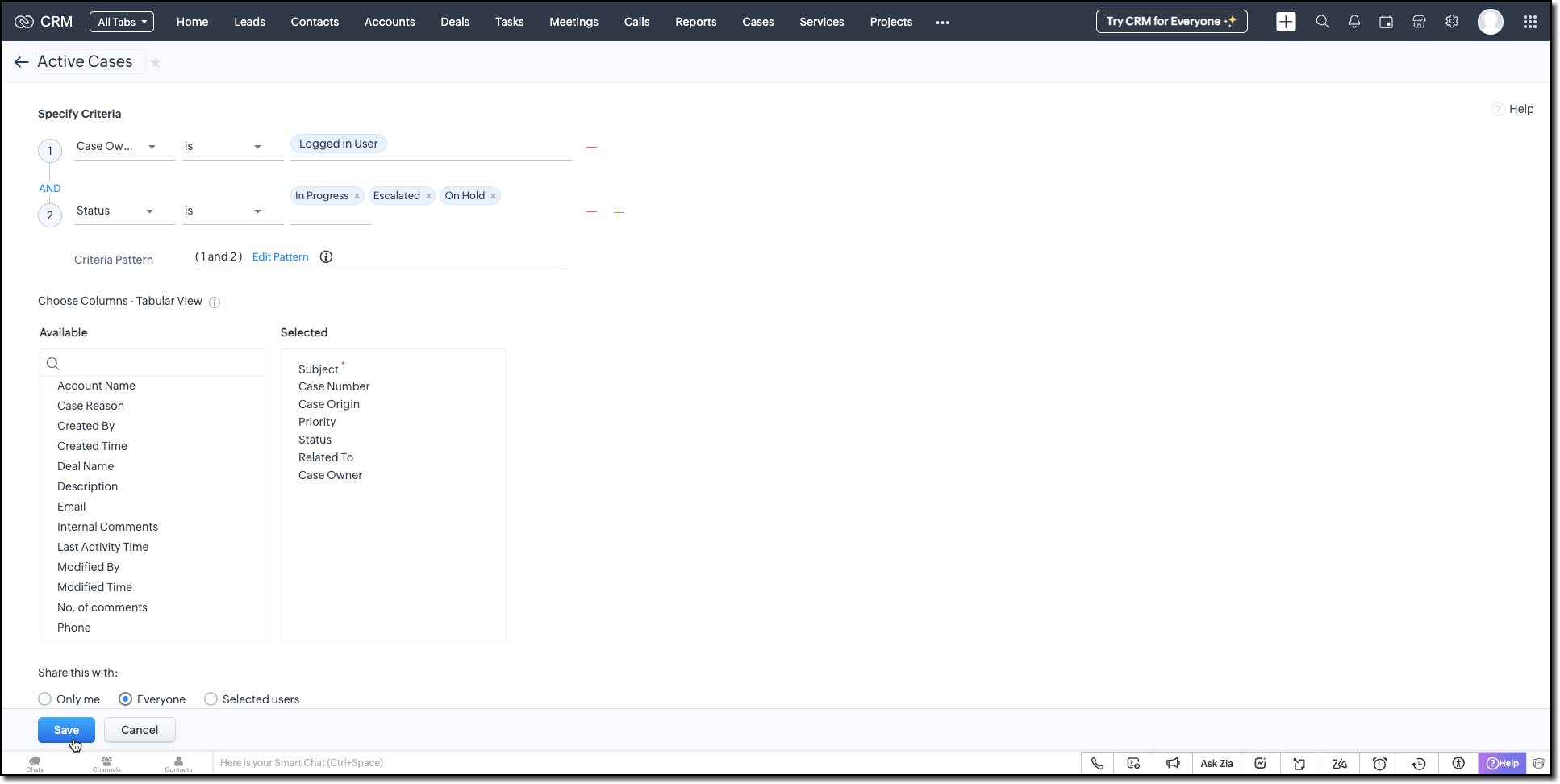
Active Timers View (Timer Entries Module)
Set up a second custom view in the Timer Entries module to track entries where the timer has been started but not yet stopped. These represent active timers. Use the following logic for criteria:
- The End Time field is empty (i.e., timer still running).
- Timer Entry owner field matches the logged-in user.
This view is used internally by the widget to detect if a timer is already running and update the same entry once the timer is stopped.
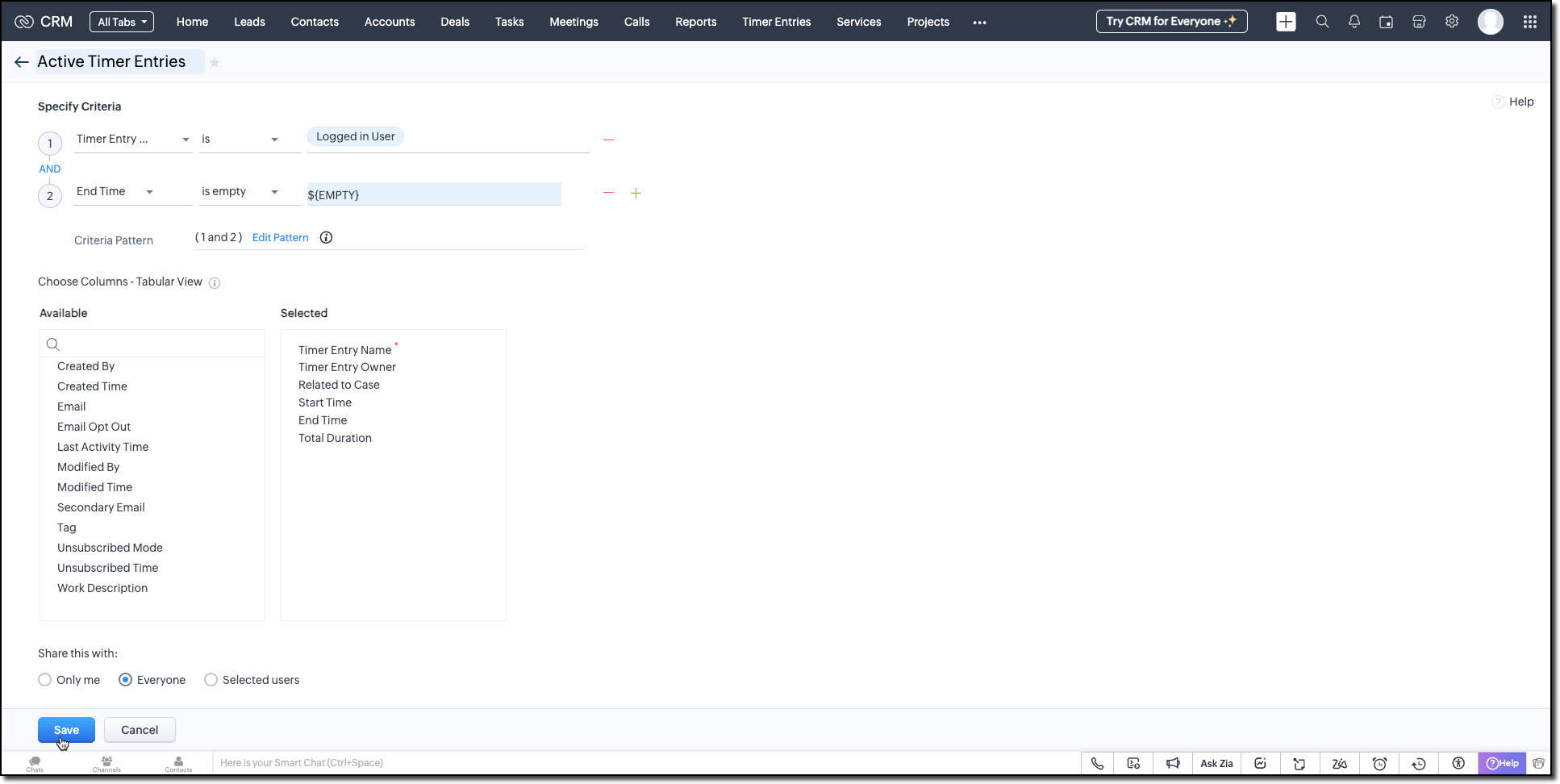
Follow the Managing List View help page and use the specifications shown in the following image.
Building the Timer Widget
Step -1: Review Basics
Refer to our earlier Kaizen on CLI Installation, Creating a Widget Project, and Internal hosting of the same.
Step 2 - Develop the Widget
After initializing your widget project using CLI, implement the timer logic:
Fetching Active Cases
On page load, the populateRecordsDropdown function initiates a Get Records API call to the Cases module, using the Active Cases custom view ID. This fetches all active case records assigned to the logged-in user.
These records are then listed in a dropdown, allowing users to quickly select the relevant case they are about to work on.
async function populateRecordsDropdown() { const recordsDropdown = document.getElementById("moduleRecords"); recordsDropdown.innerHTML = ""; try { const recordsResponse = await ZOHO.CRM.API.getAllRecords({ Entity: casesModule, cvid: casesCVID, per_page: 10 }); if (recordsResponse.data && recordsResponse.data.length > 0) { recordsResponse.data.forEach(record => { const option = document.createElement("option"); option.value = record.id; option.textContent = record.Subject || "Unnamed Record"; recordsDropdown.appendChild(option); }); } else { const placeholderOption = document.createElement("option"); placeholderOption.value = ""; placeholderOption.textContent = "No records found"; placeholderOption.disabled = true; placeholderOption.selected = true; recordsDropdown.appendChild(placeholderOption); } } catch (error) { console.error("Error fetching records:", error); } } |
Starting the Timer and Creating an Entry
Once the user starts the timer, The createRecord function triggers a Create Record API call to log the session in the Timer Entries custom module. The record captures the start time and the related case and description (if provided).
Even if no details are entered or case is selected, a timer entry is still created with the start time. This ensures that spontaneous work sessions are tracked and not lost.
async function createRecord(startTime) { try { const workDescription = document.getElementById("workDescription").value; const selectedRecordId = document.getElementById("moduleRecords").value; const selectedRecordText = document.getElementById("moduleRecords").options[ document.getElementById("moduleRecords").selectedIndex ].text; const data = { Start_Time: startTime, Owner: currentUserId, Work_Description: workDescription, Related_to_Case: selectedRecordId, Name: selectedRecordText }; const response = await ZOHO.CRM.API.insertRecord({ Entity: timerModule, APIData: data }); console.log("Start time recorded successfully"); } catch (error) { console.error("Error creating record:", error); } } |
Stopping the Timer and Updating the Entry
When the timer is stopped, the widget uses the Active Timer Entry custom view to locate the most recent Timer Entry record created by the logged-in user that does not have an end time.
The updateRecord is then triggered to update that active entry using the Update Record API call. It updates the End time of the session and the related case, descriptions, if it was not already provided when the timer was started.
async function updateRecord(endTime) { try { const workDescription = document.getElementById("workDescription").value; const selectedRecordId = document.getElementById("moduleRecords").value; const response = await ZOHO.CRM.API.getAllRecords({ Entity: timerModule, cvid: timerEntriesCVID, per_page: 1 }); const latestRecord = response.data[0]; if (latestRecord) { const recordId = latestRecord.id; const data = { id: recordId, End_Time: endTime, Work_Description: workDescription, Related_to_Case: selectedRecordId }; await ZOHO.CRM.API.updateRecord({ Entity: timerModule, APIData: data, RecordID: recordId }); console.log("End time updated successfully"); } } catch (error) { console.error("Error updating record:", error); } } |
Step 3 - Validate and Pack the Widget
- Follow the steps given in the Widget help page to validate and package the widget.
- Go to Zoho CRM > Setup > Developer Hub > Widgets and click Create New Widget.
- Fill in the required details as shown in this image and ensure to select Button as the widget type.

Step 4 - Associate it with Flyout
- Go to Setup > Developer Space > Client Script. Click New Script.
- Enter a name and description for the script. Choose Command type in Category.

- Create a Flyout and render a widget within it using its details like the API name of the widget, title, size, and animation type. You can get the Widget API name from the widget's detail page.
let allowedUserEmails = []; allowedUserEmails.push('user1_email_address'); allowedUserEmails.push('user2_email_address'); allowedUserEmails.push('user3_email_address'); let currentUserEmail = $Crm.user.email; if (allowedUserEmails.indexOf(currentUserEmail) == -1) { ZDK.Client.showMessage('Command access resticted', { type: 'error' }); return false; } ZDK.Client.createFlyout('myFlyout', {header: 'Timer', animation_type: 4, height: '600px', width: '500px', top: '10px', left: '10px', bottom: '10px', right: '10px' }); ZDK.Client.getFlyout('myFlyout').open({ api_name: 'Timer', type: 'widget' }); return true; |
Refer to Creating a Client Script help page for more details.
Try It Out!
A complete working code sample of this widget is attached to this post.
Now, let us see how this Timer widget works:
1. Start the Timer
Open the widget and select an active case from the dropdown. As soon as you start the timer, a new record will be automatically created in the Timer Entries module to capture the session.

2. Stop the Timer
When the task is complete, provide a description of the work you have done and stop the timer. The same Timer Entry record (created when the timer was started) will be updated automatically with the end time and your work description.
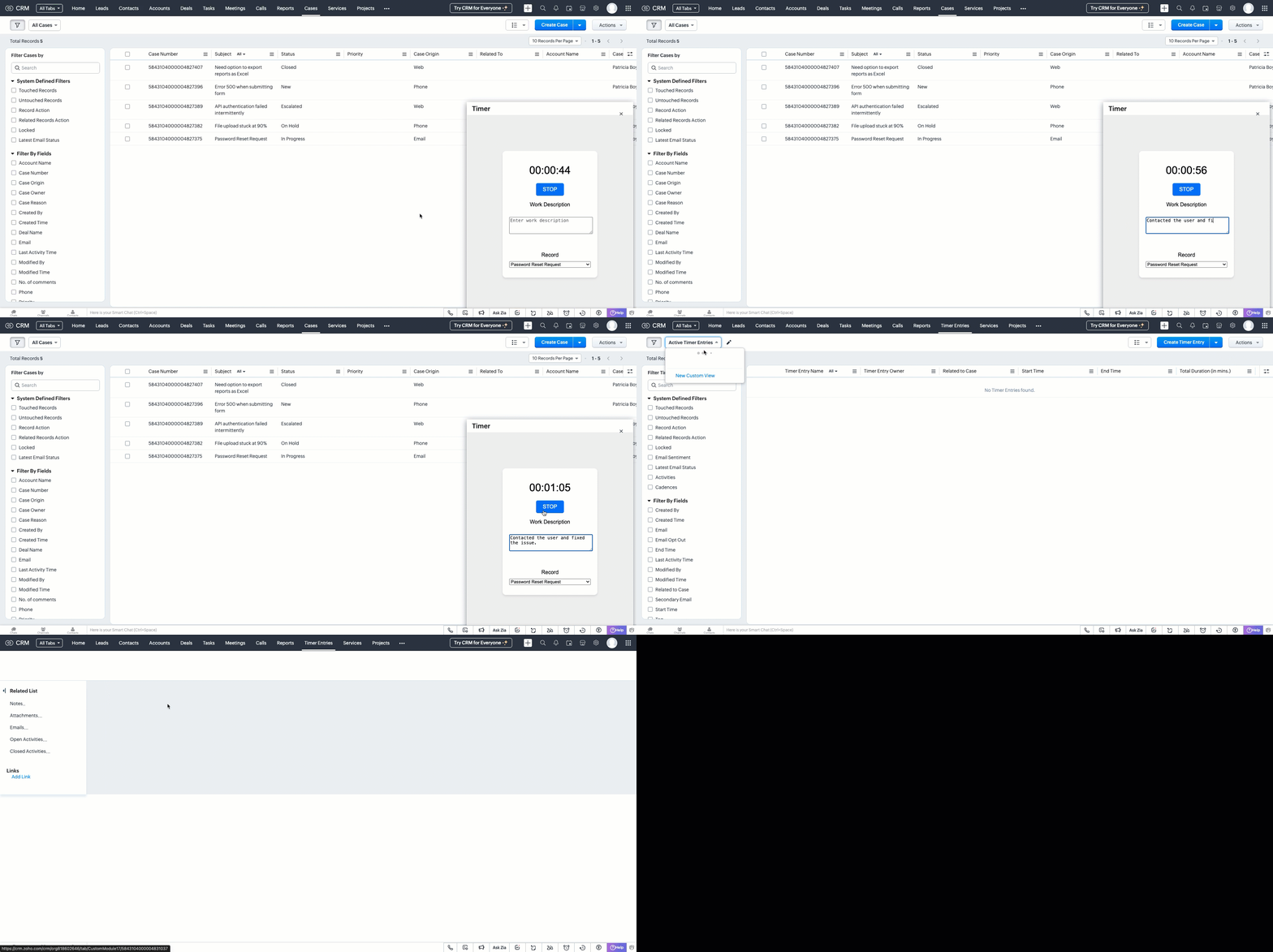
This forms the foundation for accurate time tracking at the record level.
In Part 2, we will show how to:
-> Use a workflow and Deluge function to transfer these entries into the Work Log subform inside the relevant Cases record.
-> Use CRM Reports to slice and dice work time for better SLA and productivity insights.
In the meantime, would you like us to address any of your pain-points or have a topic to discuss? Let us know in the comments or reach out to us via support@zohocrm.com.
Until next time, Happy Coding!
-----------------------------------------------------------------------------------------------------------------
Related Reading
- Custom Fields - Working with Custom Fields and Working with Picklist Field
- Widget - An Overview, CLI Installation, Working with Widgets, JS SDKs, Mobile Compatibility of Widgets and Kaizens
- Core APIs - GET Records, POST Records and UPDATE Records
- Client Script - An Overview, Creating a Client Script, Best Practices and Troubleshooting
-----------------------------------------------------------------------------------------------------------------

Previous Kaizen: Client Script Support for Subforms | Kaizen Collection: Directory
Topic Participants
Kiruthiga G
Sticky Posts
Kaizen #198: Using Client Script for Custom Validation in Blueprint
Nearing 200th Kaizen Post – 1 More to the Big Two-Oh-Oh! Do you have any questions, suggestions, or topics you would like us to cover in future posts? Your insights and suggestions help us shape future content and make this series better for everyone.Kaizen #226: Using ZRC in Client Script
Hello everyone! Welcome to another week of Kaizen. In today's post, lets see what is ZRC (Zoho Request Client) and how we can use ZRC methods in Client Script to get inputs from a Salesperson and update the Lead status with a single button click. In thisKaizen #222 - Client Script Support for Notes Related List
Hello everyone! Welcome to another week of Kaizen. The final Kaizen post of the year 2025 is here! With the new Client Script support for the Notes Related List, you can validate, enrich, and manage notes across modules. In this post, we’ll explore howKaizen #217 - Actions APIs : Tasks
Welcome to another week of Kaizen! In last week's post we discussed Email Notifications APIs which act as the link between your Workflow automations and you. We have discussed how Zylker Cloud Services uses Email Notifications API in their custom dashboard.Kaizen #216 - Actions APIs : Email Notifications
Welcome to another week of Kaizen! For the last three weeks, we have been discussing Zylker's workflows. We successfully updated a dormant workflow, built a new one from the ground up and more. But our work is not finished—these automated processes are
Recent Topics
Accounting for Territories
We have different territories i.e. Europe and US and although we can manage the sales process for each and allocate different currencies in the CRM - we want to keep the accounting separate for each territory as there are different reporting and accounting requirements - is there any way to do this? We want to avoid having two separate instances of zoho.User
If user is already part of manage engine endpoint central , what hapens when i try to add them to another Zoho org / directory? Are these users added as external users?Create static subforms in Zoho CRM: streamline data entry with pre-defined values
Last modified on (9 July, 2025): This feature was available in early access and is currently being rolled out to customers in phases. Currently available for users in the the AU, CA, and SA DCs. It will be enabled for the remaining DCs in the next coupleOutlook - Zoho CRM Calendar Integration
I'm facing an issue integrating Outlook with Zoho CRM. Has anyone successfully connected their Outlook to Zoho, and are all your meetings and emails being captured correctly in the CRM? Any insights or troubleshooting tips would be appreciated【Zoho CRM】ポータル機能のアップデート
ユーザーの皆さま、こんにちは。コミュニティチームの藤澤です。 今回は「Zoho CRM アップデート情報」の中から、ポータル機能のアップデートをご紹介します。 ポータル管理の新機能「自動招待」により、Zoho CRMからポータルへの招待を自動化できるようになりました。これまで必要だった、ユーザーごとの手動設定は不要になります。設定した条件に基づいて、対象ユーザーに自動で招待が送信されます。 ポータルの新機能 条件に基づく自動招待:指定した条件を満たすユーザーに、自動で招待を送信 招待設定:招待メールの言語を選択し、言語ごとに条件を設定可能Contact data removes Account data when creating a quote
Hi, Our customer has address fields in their quote layout which should be the address of the Account. They prefill the information, adding the account name - the address data is populated as per what is in the account - great. However when they then addExport all of our manuals from Zoho Learn in one go
Hi, I know there's a way to export manuals in Zoho Learn, but I want to export everything in one go so it won't take so long. I can't see a way to do this, can I get some assistance or is this a feature in the pipeline? Thanks, HannahAutomation#31: Automate Splitting Names for New Contact Records
Hello Everyone, This week, we present to you a custom function, which allows you to split the first and last names from the user's email ID based on the separator used in the ID. Having grown into a large firm, Zylker Techfix aims to optimize its processes,Automatically remove commas
Team, Please be consistent in Zoho Books. In Payments, you have commas here: But when we copy and paste the amount in the Payments Made field, it does not accept it because the default setting is no commas. Please have Zoho Books remove commas automProject Change Orders and Additions
We are in the process of migrating from QuickBooks Online to Zoho Books. We have Zoho One and like the ability to sync all of our data across everything. And I like that projects work in a way that's less dumb than QuickBooks. I'm trying to figure outZOHO Desk - Description of slave ticket disappeared after Merge
Dear Support, On Zoho Desk the description of a ticket disappeared after merging two ticket. The one which was the slave one completely disappeared. The problem that in this description there was an image which i had only on Desk in that ticket. CouldHow do I insert a cross-reference link to a different section within one Knowledge Base article using Zoho Desk?
I would like to insert a link within a Knowledge Base article to a different section of that same article. The section I want to link to is formatted with the Heading 3 style and is displayed within my TOC. However, I do not see any way to add a linkProblem Adding Facebook Account
Hi, I'm new here, I'm having trouble setting up my Facebook account as a social channel. I think the issue is down to how my Facebook is set up, which is pretty confusing. I have a personal Facebook account (let’s called it A) which is my main FacebookZoho Desk Teams App is not loading
Hi Zoho Desk support. Need an assistance on the Zoho Desk Teams app. Once I click View Ticket, it isn't showing anything. Kindly refer to attached: ZohoDesk Teams App_View Ticket Error.jpg For our Dashboard, we are still experiencing the same issue. KindlyMapping a new Ticket in Zoho Desk to an Account or Deal in Zoho CRM manually
Is there any way for me to map an existing ticket in Zoho desk to an account or Deal within Zoho CRM? Sometimes people use different email to put in a ticket than the one that we have in the CRM, but it's still the same person. We would like to be ableWhich WhatsApp API works seamlessly with Zoho CRM?
I’m exploring WhatsApp API solutions that integrate seamlessly with Zoho CRM for customer communication, lead nurturing, and automation. I would love to hear insights from those who have successfully implemented WhatsApp within Zoho CRM. My Requirements:Allow people to sign a zoho form by using esign or scanned signature
Allow people to sign a zoho form by using esign or scanned signatureButton to Reapply Filters on Sheet(s)
I wrote a macro that I attached to a button to reapply the filters on all my sheets and it says it works, but it doesn't actually do anything. What is wrong with it? Is there another way? Or even make it work for one sheet? Sub UniversalFilterRefresh()Integrate Multiple ZohoBooks organization with zoho projects
We have successfully connected our Zoho Books with Zoho Projects for synronizing timesheet data. Our Business specialty is, that the staff of the Main company (A) is working on several projects, but the Clients are sometimes contracted and paying to aZoho OAuth Connector Deprecation and Its Impact on Zoho Desk
Hello everyone, Zoho believes in continuously refining its integrations to uphold the highest standards of security, reliability, and compliance. As part of this ongoing improvement, the Zoho OAuth default connector will be deprecated for all Zoho servicesHow do I add todays date to merge field
I don't see any selection of todays date when creating a letter. Surely the date option of printing is standard? JohnTracking Emails sent through Outlook
All of our sales team have their Outlook 365 accounts setup with IMAP integration. We're trying to track their email activity that occurs outside the CRM. I can see the email exchanges between the sales people and the clients in the contact module. ButWhats that
Price?The same Contact associated to multiple Companies - Deals
Hi, I would like to know if there is an option to associate the same contact with multiple companies (two or more) deals, using the same contact details for all. This is because we have contacts who are linked to different companies or branches of thePortals-Adjust Column Sizes
I am trying to adjust the column widths in Portals tabs. Columns that don't need to be wide are wide and longer ones are very short. I thought adding more to the digits box in Edit would widen them, but it doesn't. Anyone know how to adjust these?Add link/button to open approved record from approval list and detail views?
Hi, How do I allow users to click on an approval record and open that submission? For example, userA submits a quotation then userB approves/rejects. They both can see the quotation on "completed task" list & detail views, but there's no way for themrecord submitted from creator and invoice is creating in books , but the workflow of books is not tiggering on create of record in books
record submitted from creator and invoice is creating in books , but the workflow of books is not tiggering on create of record in books headermap = Map(); headermap.put("X-ZOHO-Execute-CustomFunction","true"); response_inv = invokeurl [ url :"https://www.zohoapis.com/books/v3/invoices/fromsalesorder?salesorder_id="Prevent editing of a record after getting approved/rejectedr
Hi, I'd like to block any user from editing a record after it was approved or rejected, how can I do that?Formula Field/Campo de Fórmula
Hello everyone, I have a purchase requisition form in which each department submits a request, and the request is automatically routed to the person responsible for that department. In this form, I have several fields with the following link names: Quantidade1,Formatting Problem | Export to Zoho Sheet View
When I export data to Zoho Sheet View, ID columns are automatically formatted as scientific notation. Reformatting them to text changes the actual ID values. For example, 6557000335603071 becomes 6557000335603070. I have attached screenshots showing thisFeature Request - The Ability to Link A Customer with a Vendor
Hi Finance Suite Team, Many businesses buy and sell products from the same companies or individuals. For example, a car sales business may buy a car from a member of the public, and that member of the public may also buy a new car from us. This makesLong table name (sync from Zoho Creator)
Dears, How can I remove the suffix in parentheses? These tables are synced from Zoho Creator and are treated as system tables, so their names cannot be changed. This issue makes the aggregation formulas look awful.[Free Webinar] Learning Table Series - Streamlining incident management process with Zoho Creator
Hello everyone, We’re excited to invite you to another edition of the Learning Table Series webinar. As you may already know, we've moved to a purpose-based approach in the Learning Table Series this year. Each session now focuses on how a Zoho CreatorUnattended - Silent
How can I hide the tray icon / pop up window during unattended remote access for silent unattended remote access?Text snippet
There is a nice feature in Zoho Desk called Text Snippet. It allows you to insert a bit of text anywhere in a reply that you are typing. That would be nice to have that option in Zoho CRM as well when we compose an email. Moderation Update: We agree thatMarketing Tip #18: Make your online store mobile-friendly to improve traffic
Most online shoppers browse on their phones first. If your store is hard to read, slow to load, or tricky to navigate on mobile, they’ll bounce fast. A mobile-friendly store doesn’t just look nice; it improves engagement, reduces drop-offs, and helps[Need help] Form closed. Please contact your form administrator for further assistance.
https://forms.zohopublic.com/cceinfoifly1/form/CCE2025CCEFocusGroupRegistrationForm2025Fall/formperma/s_8XcLETTbFxZ_TAS4r_W6W5UBl8o5oxEnIX35IBKg4 I checked we didn't exceed the usage limit and form availability is enabled, Please help us enable this formZoho People. Updating TabularData
I am trying to update tabular data in the record. I always have the same response. I have checked many times. Section ID is correct. May be something wrong with request structure itself. Can someone help me. Body content type: form urlencoded query paramsAutomatically CC an address using Zoho CRM Email Templates
Hi all - have searched but can't see a definitive answer. We have built multiple email templates in CRM. Every time we send this we want it to CC a particular address (the same address for every email sent) so that it populates the reply back into ourUnable to Send Different Email Templates for Different Documents in Zoho Sign
Hello Zoho Community, I am facing a limitation with Zoho Sign regarding email notifications sent to customers when a document is sent for signing. Currently, whenever I send any template/document for signing, the email notification that goes to the customerNext Page