Passez au nouveau Zoho One : nouvelles applications, nouveaux services, nouvelle expérience !
Le nouveau Zoho One se dévoile avec son interface unifiée, ses nouvelles fonctionnalités et ses nouveaux services !

Très chers utilisateurs de Zoho One,
C'est avec un immense plaisir que nous vous informons de la sortie mondiale du nouveau Zoho One.
Renchéri de 5 nouvelles applications, 3 nouveaux services et 7 améliorations de la plateforme, Zoho One se réinvente pour offrir l'expérience de l'entreprise unifiée à son paroxysme, par les systèmes, les données et les équipes.
Nous allons tout vous décrire dans cet article. En outre, nous tenons un webinar pour découvrir les nouveautés et leur optique le 20 octobre à 14h pour une découverte tous ensemble. Découvrez comment nous en sommes arrivés à ces fonctionnalités là et à quels besoins elles entendent répondre.
Cette nouvelle version permet aux entreprises de résoudre les problèmes de données disjointes et de combler les lacunes en matière de communication entre les silos. Nous espérons que cette nouvelle version est l'avancée majeure que nous souhaitions et qu'elle vous simplifiera considérablement la tâche dans votre quotidien pour vous amener à un nouveau niveau.
Plongeons-y dès à présent :
L'interface unifiée
- Tableaux de bord customisables
Si dans l'ancienne version l'accès aux applications primait, aujourd'hui nous faisons d'une pierre deux coups : les informations de vos applications par les widgets dans les tableaux de bords vous permettent de voir les données qui vous intéressent sans changer d'onglet ni aller les chercher dans l'application.
En effet, lorsque vous créez un ou plusieurs tableaux de bords, pour vous ou vos collaborateurs, les widgets de vos applications sont disponibles d'un simple clic. Créez vos propres tableaux de bord à l'envi, classez-les selon vos besoins et visualisez vos informations depuis votre cockpit Zoho One !
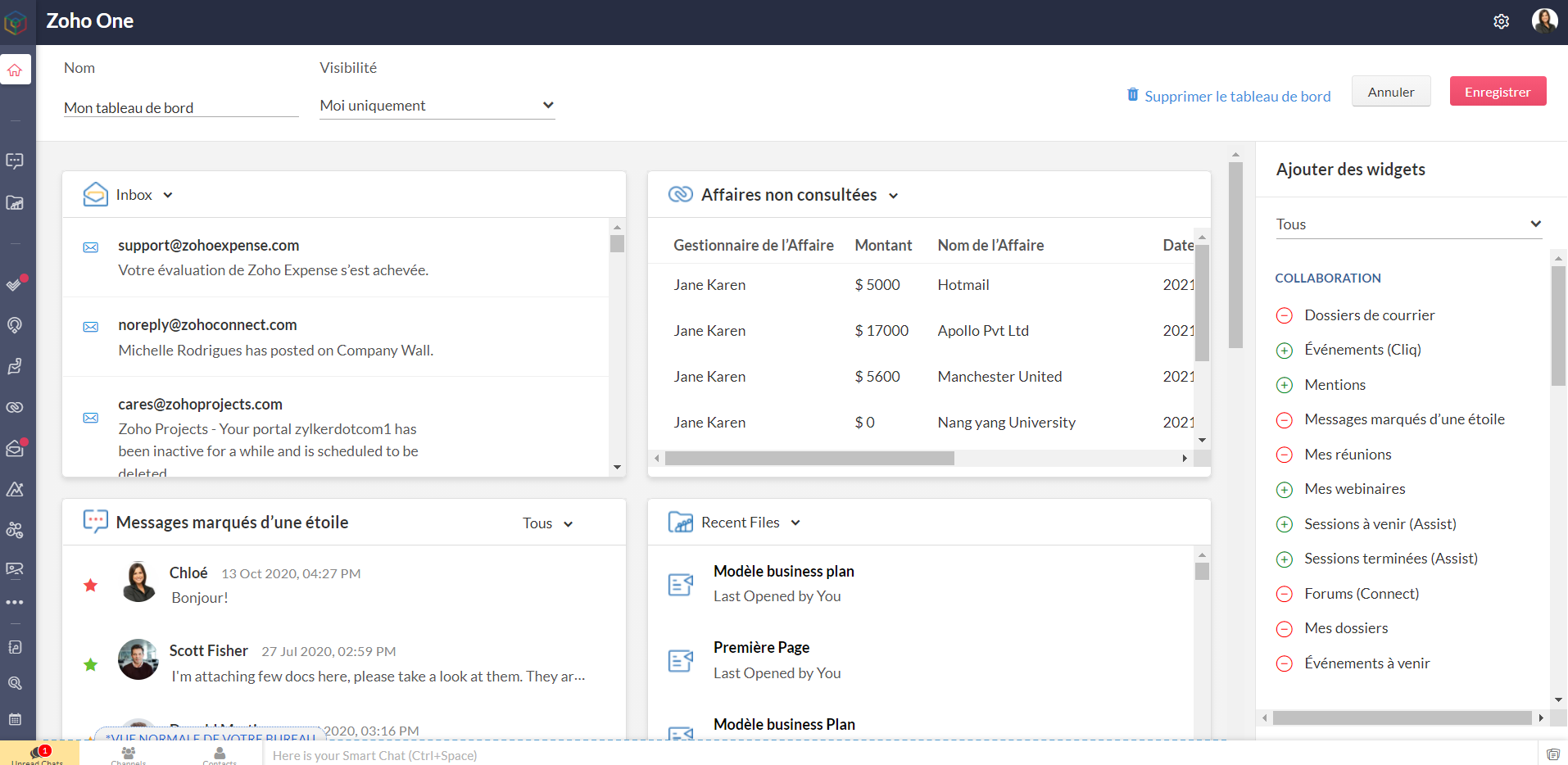
Bon à savoir : les niveaux d'accès que vous avez configurés restent valables pour les tableaux de bord. Les personnes n'ayant pas accès à une application n'en verront pas les widgets, tout comme celles ayant un accès restreint ne verront que les informations accordés par ce niveau d'accès, dans l'hypothèse où le tableau de bord leur est partagé.
- Barre latérale
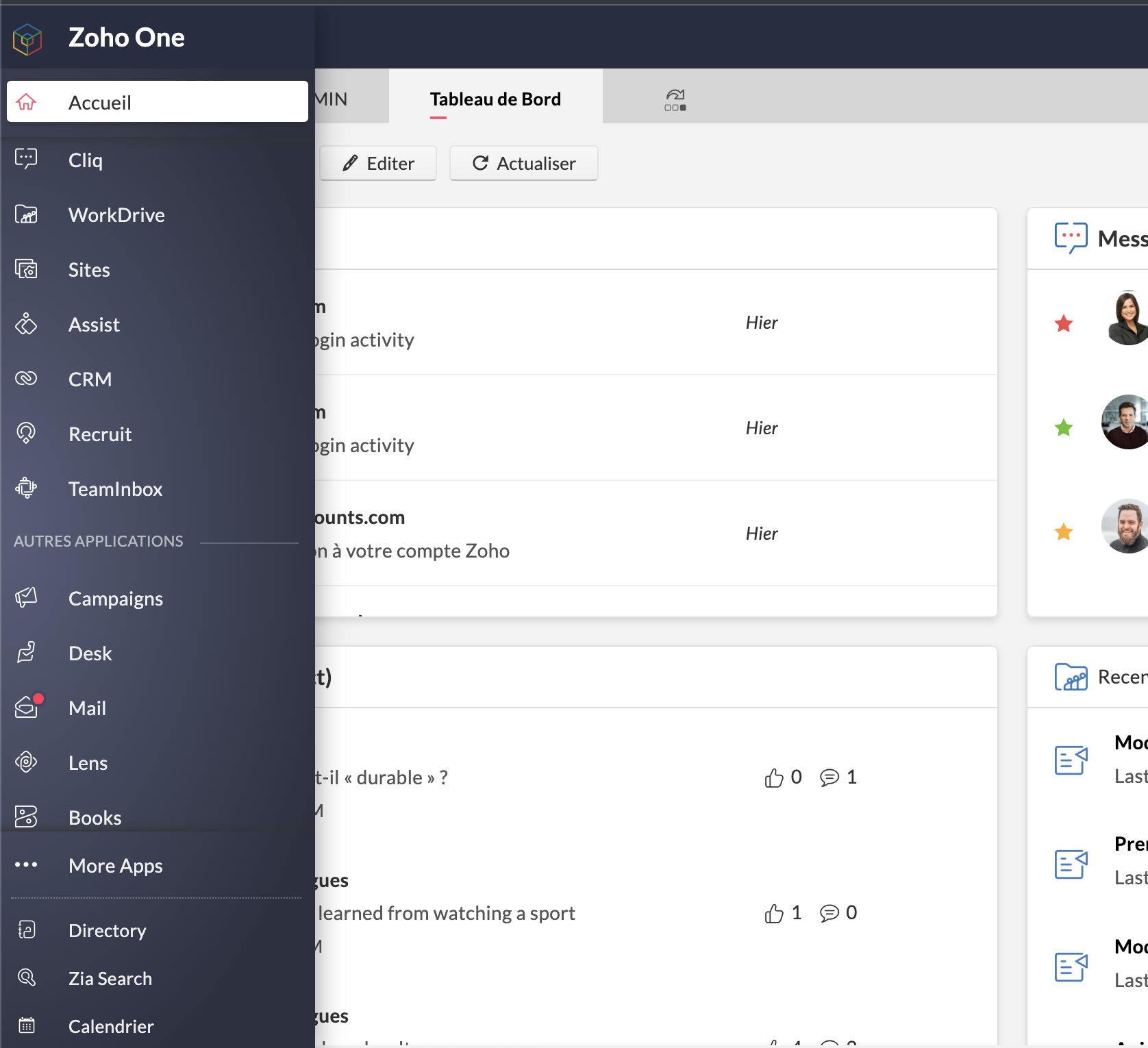
L'accès aux applications reste tout aussi rapide et ne disparait pas de l'interface : les applications sont toutes accessibles depuis la barre latérale et ne requièrent plus de s'ouvrir dans un nouvel onglet et de changer d'écran : un clic et toujours sur Zoho One, vous êtes sur l'accueil de votre application préférée.
Préférée, en effet : vous pouvez épingler les applications que vous utilisez le plus pour les avoir toujours sous la main. Par défaut, une autre catégorie dans la barre contient celles que vous ouvertes récemment.
Enfin, "Plus d'applications" vous permet de voir toutes vos applications, rangées selon les catégories, y compris les applications tierces que vous auriez ajoutées.
- Calendrier unifié
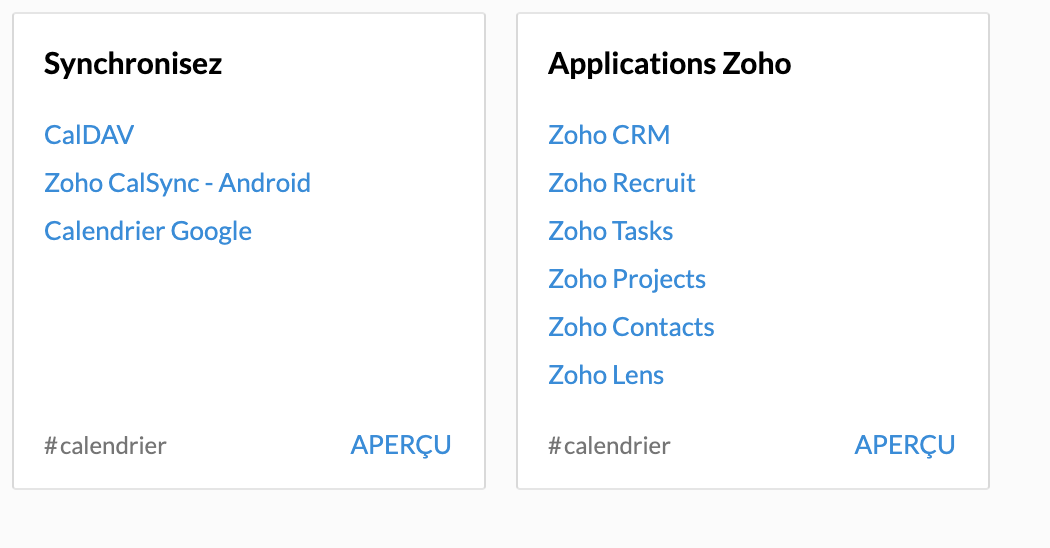
Le calendrier de Zoho Mail est le calendrier de votre compte Zoho One et se synchronise avec les événements créés dans Zoho CRM, Zoho Recruit, Zoho Projects, Zoho Contacts et Zoho Lens (susceptible d'évolutions futures).
A noter qu'à ce jour et pour les trois derniers modules, la synchronisation ne va que de l'application vers Zoho One.
- Paramètres > Directory
Une petite mise à jour dans la terminologie : les "paramètres" apparaissent sous le nom "Directory".
Lorsque vous vous y rendez, vous vous retrouvez en terrain familier. Vous connaissez la plupart des onglets, bien que certaines nouveautés pourront vite vous sauter aux yeux. C'est justement le sujet de notre point suivant.
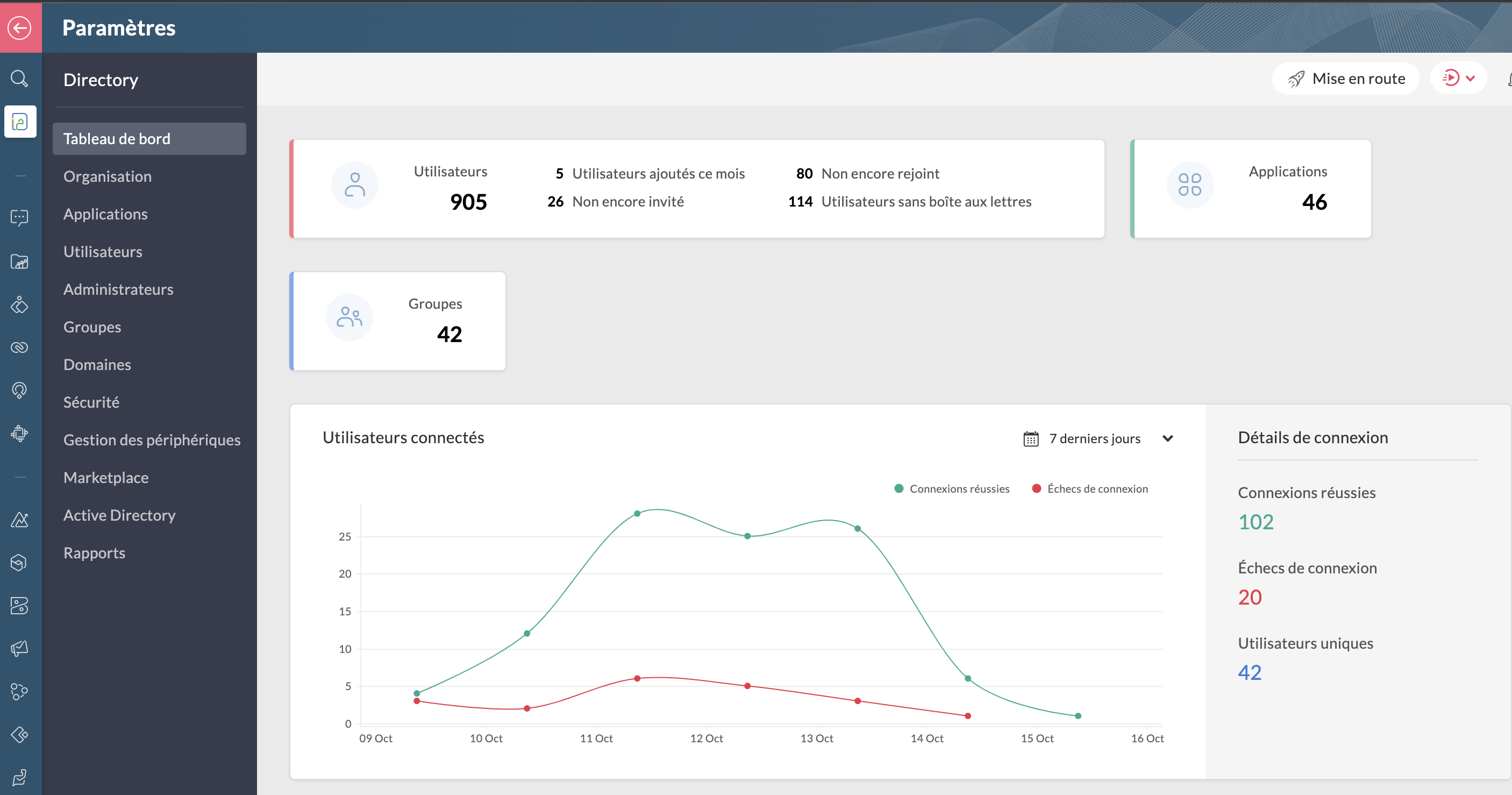
Bon à savoir : lorsque vous êtes dans Directory, toutes les applications dans la barre latérale vous feront directement accéder aux paramètres de ces dernières lorsque vous cliquez dessus.
Les améliorations :
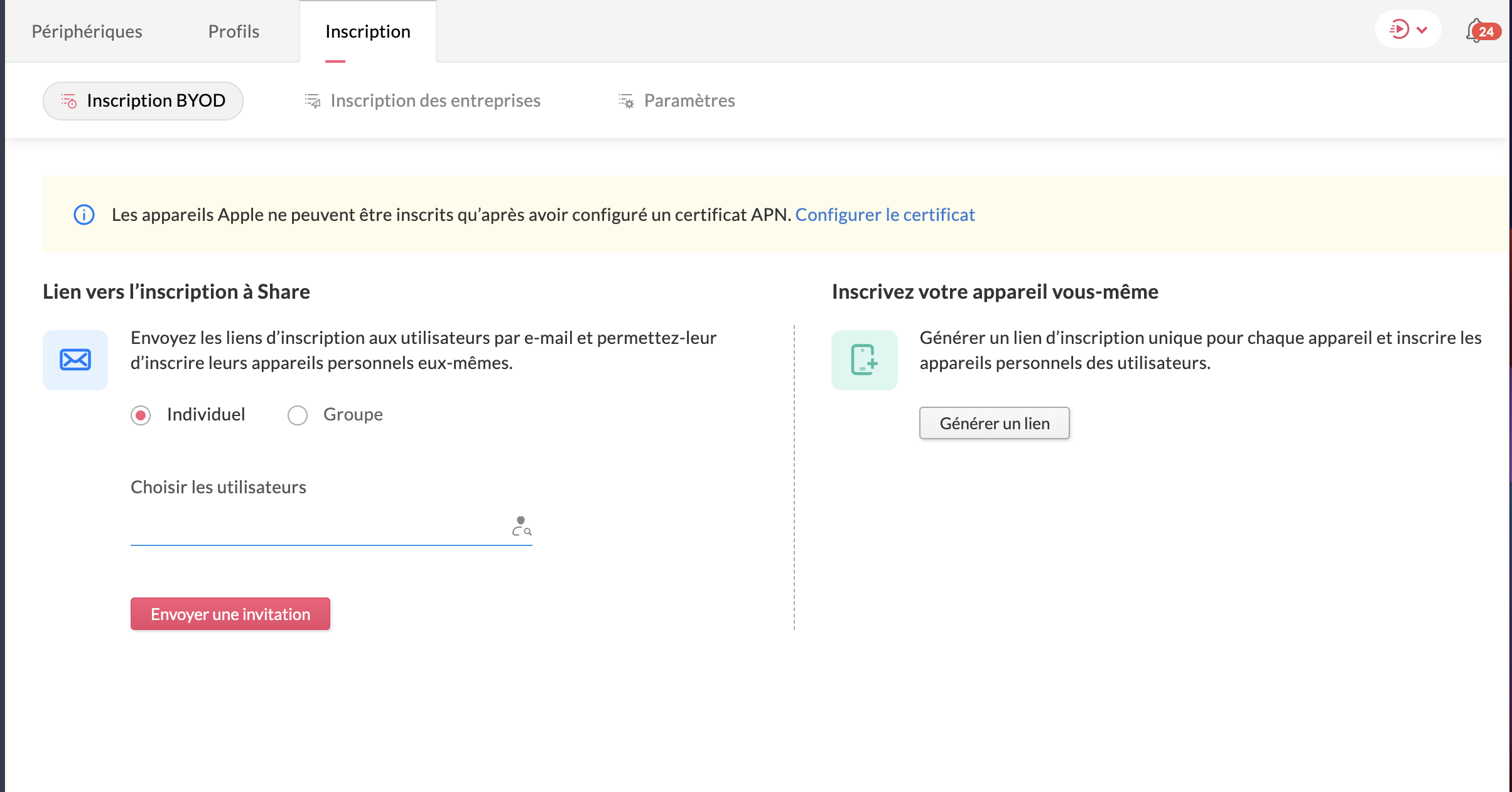
- La gestion des périphériques
Veuillez noter d'ores et déjà que ceci est un add-on et ne fait pas partie du plan Zoho One de base. N'hésitez pas à contacter support@zohoone.com pour l'ajouter à votre abonnement si vous en ressentez le besoin, et vous pourrez intégrer l'application MDM (Mobile Device Management).
Avec l'essor du télétravail, les employés n'utilisent plus forcément leur poste de travail fixe et il était impératif de permettre aux organisations, par l'admin ou le super-admin, de contrôler les accès des utilisateurs ayant une licence active One sur d'autres appareils où sont installées les applications.
Vous avez les appareils de l'entreprise (ordinateurs, portables professionnels...) et les appareils personnels des employés recensés ou à ajouter, où le contrôle est minimal.
Vous pouvez ainsi installer les applications à distance sur le portable sans besoin que l'utilisateur touche à quoi que ce soit, restreindre l'installation d'applications (comme une application de jeux sur un portable professionnel de l'entreprise), et configurer des politiques d'accès spéciales.
- Le dictionnaire d'entreprise
Dans votre onglet Organisation s'est ajoutée une nouvelle section : le dictionnaire d'entreprise, pour que tous puissent comprendre et avoir recours au vocabulaire spécifique de votre secteur ou de votre organisation.

Les applications
Toujours dans ce contexte de travailler à distance, Zoho One intègre de nouvelles applications, qu'il s'agisse de vos clients ou encore le partage de connaissances pour que vos employés restent actifs :
- Zoho Learn
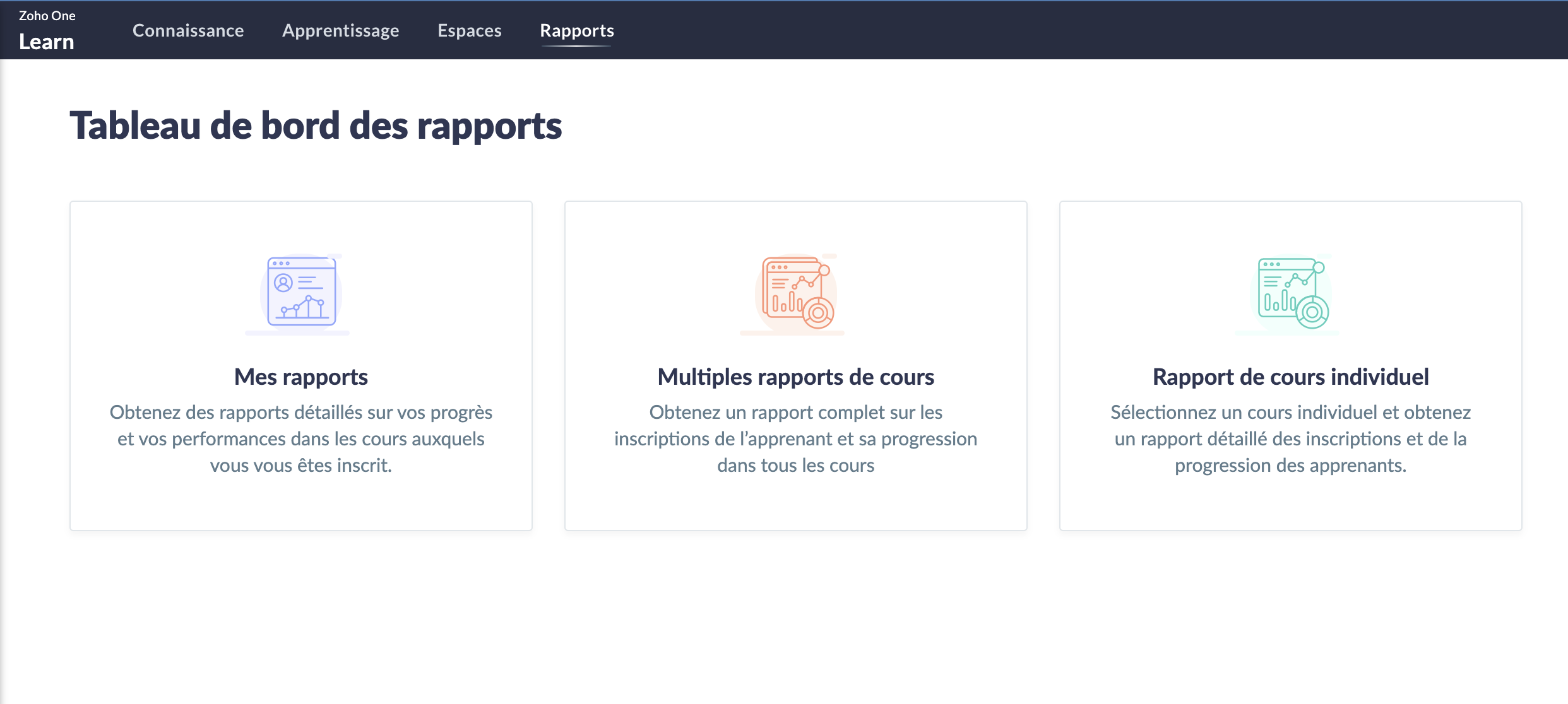
Le partage de connaissances est un must et Zoho Learn, notre plateforme complète de gestion des connaissances et de formation, vous permet de stocker et conserver les connaissances de votre équipe. Qu'elles soient établies ou que vous créiez de nouveaux parcours, tout est recensé dans Zoho Learn. Vous pouvez même faire passer des formations et tests à vos équipes afin d'être sûr que les connaissances ont été assimilées.
En savoir plus sur Zoho Learn
- Zoho Commerce
Avec l'essor (voire la nécessité) du commerce en ligne, l'application Zoho Commerce pour construire facilement votre boutique en ligne en drag-and-drop a été ajoutée.

En savoir plus sur Zoho Commerce.
- Zoho Lens
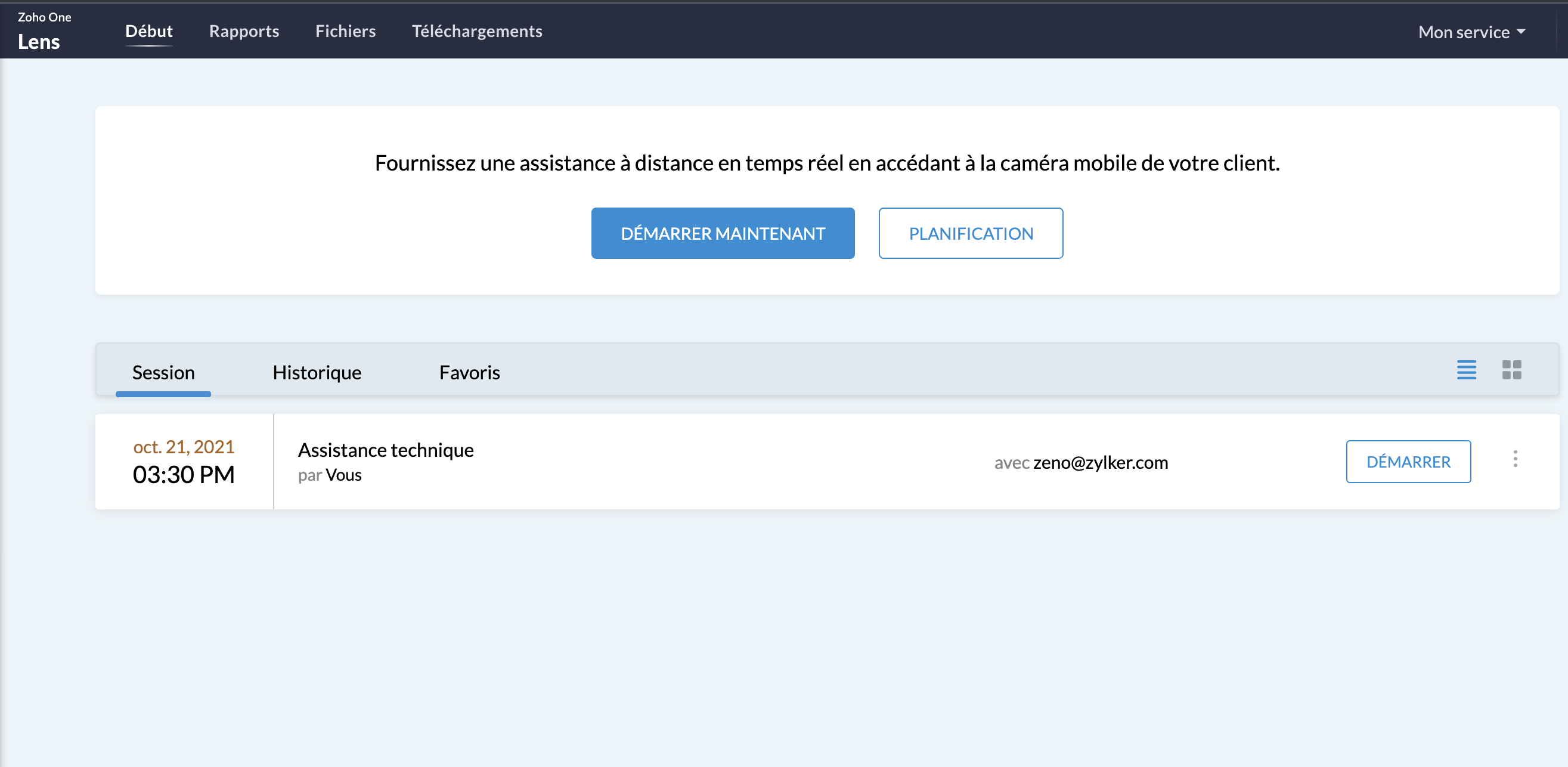
L'assistance sur site sans (pouvoir) se rendre sur site : avec la réalité augmentée, utilisez Zoho Lens pour guider et dépanner vos clients grâce à la caméra de leur smartphone.
En savoir plus sur Zoho Lens
- Zoho TeamInbox
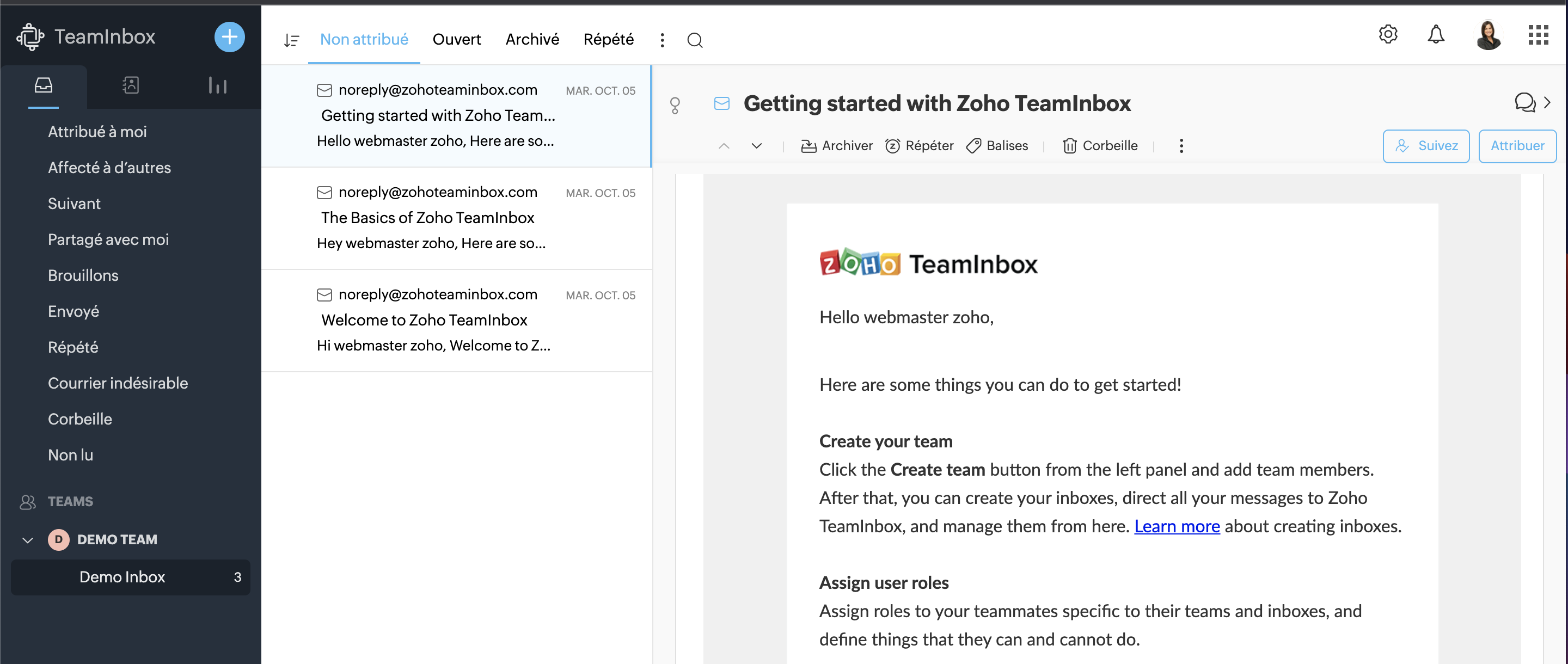
TeamInbox est la boîte e-mail partagée pour une collaboration intelligente, le tout en un seul endroit. Menez des discussions parallèles avec votre équipe au sujet de conversations complexes, assignez les e-mails et évitez les couacs afin de pouvoir envoyer des réponses précises à chaque fois.
En savoir plus sur Zoho TeamInbox
La Business Intelligence
Les entreprises disposent désormais d'analyses en temps réel plus solides à l'échelle de l'organisation, reliant les points entre des données auparavant perdues entre les départements, les équipes et les comptes. Grâce à Zia, l'assistant d'intelligence artificielle de Zoho, et à la plateforme de BI et d'analyse de Zoho, Zoho One permet aux utilisateurs de prédire et de fournir des informations à l'échelle de l'entreprise pour une prise de décision en toute confiance. Les nouvelles innovations comprennent :
- La BI conversationnelle
Zoho One est désormais doté d'une fonction d'analyse intégrée et conversationnelle permettant aux décideurs d'approfondir leurs données et de glaner des informations interservices, le tout par le biais de commandes en langage naturel grâce à Zia Insights. Grâce à plus de 1 500 rapports d'analyse et tableaux de bord préétablis, les décisions critiques peuvent être prises avec plus de précision et de rapidité.
- La recherche unifiée
Vous connaissez déjà la recherche actionnable de Zoho à l'échelle de l'entreprise, alimentée par Zia ; cette dernière peut désormais comprendre les demandes en langage naturel. La recherche en langage naturel permettra une découverte plus précise des données au sein des équipes et des fonctions.
Notez que ces fonctionnalités incluant Zia ne sont pour l'instant disponibles qu'en anglais.
- Data Prep
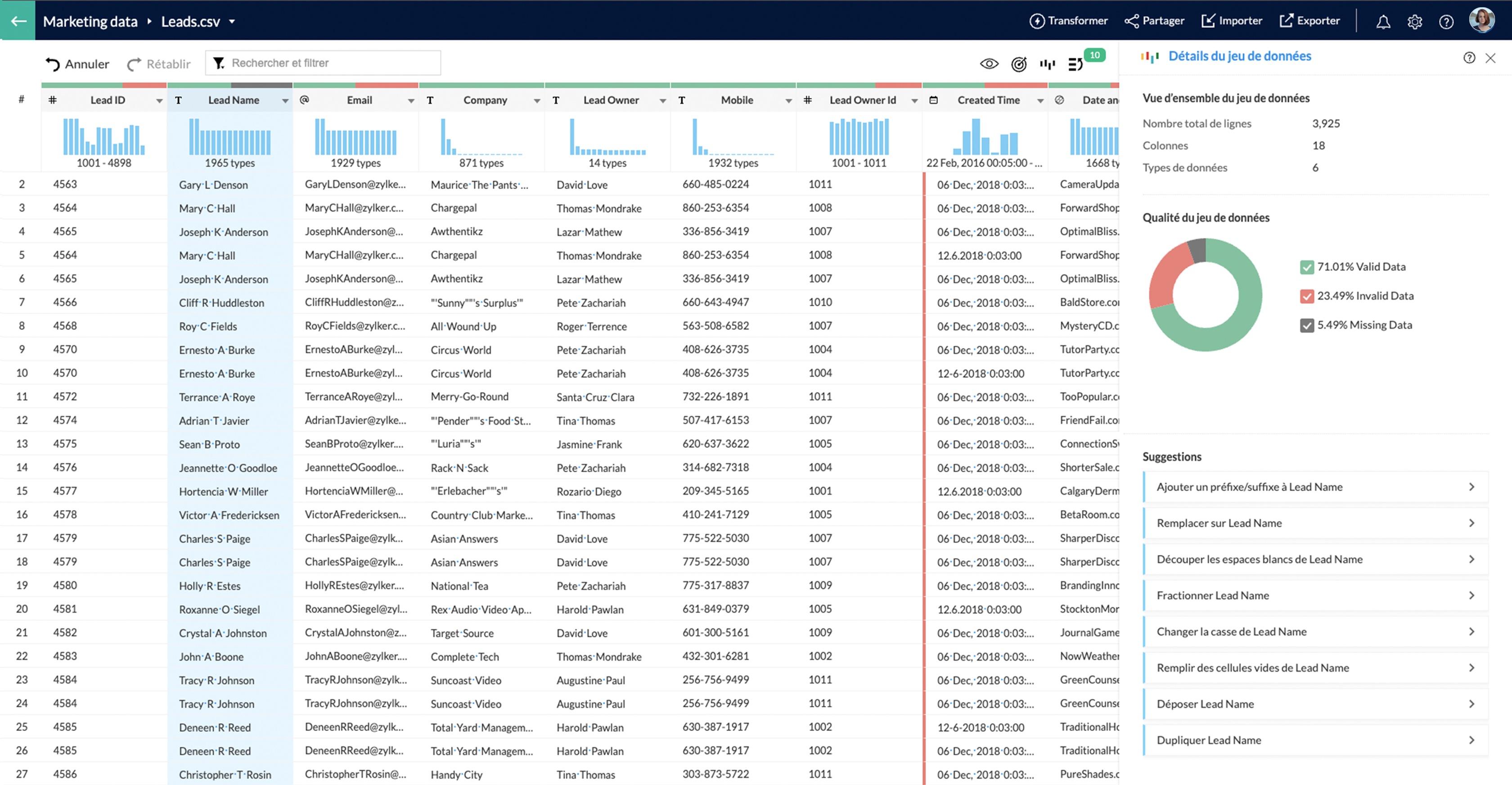
Cet outil de préparation et de gestion des données est désormais disponible dans Zoho One. Que les utilisateurs préparent des données à partir d'applications tierces ou d'autres sources, DataPrep, alimenté par le machine learning, peut aider les utilisateurs à intégrer, modéliser, nettoyer, transformer, enrichir et cataloguer les données, ainsi qu'à s'intégrer à Analytics ou à une tierce partie. A vous les perspectives inexplorées !
Fort de toutes ces nouveautés, que pensez-vous de venir les tester avec nous ?
Suivez-nous lors d'une session live pour explorer votre nouvelle interface ce mercredi 20 octobre à 14h !
N'hésitez pas également à nous faire vos retours sur votre prise en main de ce nouveau Zoho One pour nous aider à constamment nous améliorer !
A très vite dans ce nouveau chapitre Zoho One !
L'équipe Zoho France
Topic Participants
Claire Curaba
Sticky Posts
Collaboration sans faille avec Zoho One
Bonjour à tous, Dans cet article nous allons voir comment Zoho One permet une collaboration à différents niveaux . La façon dont nous travaillons évolue. À mesure que les entreprises se mondialisent, la plupart des activités sont menées en équipe.
Recent Topics
Unify Overlapping Functionalities Across Zoho Products
Hi Zoho One Team, We would like to raise a concern about the current overlap of core functionalities across various Zoho applications. While Zoho offers a rich suite of tools, many applications include similar or identical features—such as shift management,Automation #7 - Auto-update Email Content to a Ticket
This is a monthly series where we pick some common use cases that have been either discussed or most asked about in our community and explain how they can be achieved using one of the automation capabilities in Zoho Desk. Email is one of the most commonlyTicket to article and Ticket to template
Hello! I would like to know if it is possible (and how) to do the following actions: 1. To generate an article from a ticket (reply + original message) 2. Easy convert an answer to an email templateIs there API Doc for Zoho Survey?
Hi everyone, Is there API doc for Zoho Survey? Currently evaluating a solution - use case to automate survey administration especially for internal use. But after a brief search, I couldn't find API doc for this. So I thought I should ask here. ThanWindows Desktop App - request to add minimization/startup options
Support Team, Can you submit the following request to your development team? Here is what would be optimal in my opinion from UX perspective: 1) In the "Application Menu", add a menu item to Exit the app, as well as an alt-key shortcut for these menusKaizen #225 - Making Query-based Custom Related Lists Actionable with Lookups and Links
Hello everyone! Welcome back to another post in the Kaizen series! This week, we will discuss an exciting enhancement in Queries in Zoho CRM. In Kaizen #190, we discussed how Queries bridge gaps where native related lists fall short and power custom relatedWebDAV / FTP / SFTP protocols for syncing
I believe the Zoho for Desktop app is built using a proprietary protocol. For the growing number of people using services such as odrive to sync multiple accounts from various providers (Google, Dropbox, Box, OneDrive, etc.) it would be really helpfulNon-responsive views in Mobile Browser (iPad)
Has anyone noticed that the creator applications when viewed in a mobile browser (iPad) lost its responsiveness? It now appears very small font size and need to zoom into to read contents. Obviously this make use by field staff quite difficult. This is not at all a good move, as lots of my users are depending on accessing the app in mobile devices (iPads), and very challenging and frustrating.[Free Webinar] Learning Table Series - AI-Enhanced Logistics Management in Zoho Creator
Hello Everyone! We’re excited to invite you to another edition of Learning Table Series, where we showcase how Zoho Creator empowers industries with innovative and automated solutions. About Learning Table Series Learning Table Series is a free, 45-60Customizable UI components in pages | Theme builder
Anyone know when these roadmap items are scheduled for release? They were originally scheduled for Q4 2025. https://www.zoho.com/creator/product-roadmap.htmlFeature Request - Set Default Values for Meetings
Hi Zoho CRM Team, I would be very useful if we could set default values for meeting parameters. For example, if you always wanted Reminder 1 Day before. Currently you need to remember to choose it for every meeting. Also being able to use merge tags toHow to use Rollup Summary in a Formula Field?
I created a Rollup Summary (Decimal) field in my module, and it shows values correctly. When I try to reference it in a Formula Field (e.g. ${Deals.Partners_Requested} - ${Deals.Partners_Paid}), I get the error that the field can’t be found. Is it possibleZoho Creator to Zoho CRM Images
Right now, I am trying to setup a Notes form within Zoho Creator. This Notes will note the Note section under Accounts > Selected Account. Right now, I use Zoho Flow to push the notes and it works just fine, with text only. Images do not get sent (thereCRM gets location smart with the all new Map View: visualize records, locate records within any radius, and more
Hello all, We've introduced a new way to work with location data in Zoho CRM: the Map View. Instead of scrolling through endless lists, your records now appear as pins on a map. Built on top of the all-new address field and powered by Mappls (MapMyIndia),Error Logs / Failure logs for Client Scripts Functions
Hi Team, While we are implementing client scripts for the automation, it is working fine in few accounts but not working for others. So, it would be great if we can have error Logs for client scripts also just like custom functions. Is there any way thatAutomate pushing Zoho CRM backups into Zoho WorkDrive
Through our Zoho One subscription we have both Zoho CRM and Zoho WorkDrive. We have regular backups setup in Zoho CRM. Once the backup is created, we are notified. Since we want to keep these backups for more than 7 days, we manually download them. TheyZoho Books blocks invoicing without VeriFactu even though it is not mandatory until 2027
I would like to highlight a very serious issue in Zoho Books for Spain. 1. The Spanish government has postponed the mandatory start of VeriFactu to January 1st, 2027. This means that during all of 2026 businesses are NOT required to transmit invoicesProblem : Auto redirect from zoho flow to zoho creator
Hi there, I've been waiting for zoho team to get back on this for last couple of days. Anyone else have the problem to access zoho flow? everytime I click on zoho flow it redirects me to zoho creator. I tried incognito mode but it still direct me to zohoTrouble with using Apostrophe in Name of Customers and Vendors
We have had an ongoing issue with how the system recognizes an apostrophe in the name of customers and vendors. The search will not return any results for a name that includes the mark; ie one of our vendors names is "L'Heritage" and when entering theWhy am I seeing deleted records in Zoho Analytics syncing with Zoho CRM?
I have done a data sync between Zoho CRM and Zoho Analytics, and the recycle bin is empty. Why do I see deleted leads/deals/contacts in Zoho Analytics if it doesn't exist in Zoho CRM? How can I solve this problem? ThanksHow to use MAIL without Dashboard?
Whenever I open Mail, it opens Dashboard. This makes Mail area very small and also I cannot manage Folders (like delete/rename) etc. I want to know if there is any way to open only Mail apps and not the Dashboard.Peppol: Accept Bill (Belgium)
Hi, This topic might help you if you're facing the same in Belgium. We are facing an issue while accepting a supplier bill received by Peppol in Zoho Books. There is a popup with an error message: This bill acceptance could not be completed, so it wasZoho Books is now integrated with Zoho Checkout
Hello everyone, We're glad to be announcing that Zoho Books is now integrated with Zoho Checkout. With this integration, you can now handle taxes and accounting on your payment pages with ease. An organization you create in Zoho Checkout can be added to Zoho Books and vice-versa. Some of the key features and benefits you will receive are: Seamless sync of customer and invoice data With the end-to-end integration, the customer and invoice details recorded via the payment pages from Zoho CheckoutSync Issue
My Current plan only allows me with 10,000 rows and it is getting sync failure how to control it without upgrading my planAdd Zoho PDF to Zoho One Tool Applications
It should be easy to add from here without the hassle of creating a web tab:JOB WISE INVOICE PROCESS
I WANT TO ENABLE JOB WISE TRACKING OF ALL SALES AND PURCHASEPDF Template have QTY as first column
I want to have the QTY of an item on the sales orders and invoices to be the first column, then description, then pricing. Is there a way to change the order? I went to the Items tab in settings but don't see how to change the order of the columns onRAG (Retrieval Augmented Generation) Type Q+A Environment with Zoho Learn
Hi All, Given the ability of Zoho Learn to function as a knowledge base / document repository type solution and given the rapid advancements that Zoho is making with Zia LLM, agentic capabilities etc. (not to mention the rapid progress in the broaderWelcome to the Zoho ERP Community Forum
Hello everyone, We are thrilled to launch Zoho ERP (India edition), a software to manage your business operations from end to end. We’ve created this community forum as a space for you to ask questions, comment answers, provide feedback, and share yourIn App Auto Refresh/Update Features
Hi, I am trying to use Zoho Creator for Restaurant management. While using the android apps, I reliased the apps would not auto refresh if there is new entries i.e new kitchen order ticket (KOT) from other users. The apps does received notification but would not auto refresh, users required to refresh the apps manually in order to see the new KOT in the apps. I am wondering why this features is not implemented? Or is this feature being considered to be implemented in the future? With theConsolidated report for multi-organisation
I'm hoping to see this feature to be available but couldn't locate in anywhere in the trial version. Is this supported? The main aim to go to ERP is to have visibility of the multi-organisation in once place. I'm hopeful for this.IMAP mail after specify date
Hi My customer's mail server is on premise and mail storage is very huge. So It never finish sync. and finally stop sync. Cloud CRM have a option like zoho mail sync mail after some date.Claude + MCP Server + Zoho CRM Integration – AI-Powered Sales Automation
Hello Zoho Community 👋 I’m excited to share a recent integration we’ve worked on at OfficehubTech: ✅ Claude + MCP Server + Zoho CRM This integration connects Zoho CRM with Claude AI through our custom MCP Server, enabling intelligent AI-driven responsesNotes badge as a quick action in the list view
Hello all, We are introducing the Notes badge in the list view of all modules as a quick action you can perform for each record, in addition to the existing Activity badge. With this enhancement, users will have quick visibility into the notes associatedSearch Bar positioning
Why is the Search bar on the far right when everything is oriented towards the left?The Social Playbook - January edition: Getting started with content creation
Social media isn’t just about posting some random content. It’s about why certain content works, how brands stand out, and what makes people pause mid-scroll. The Social Playbook is a monthly community series where we break all of that down. Through realImport Error: Empty values for mandatory fields - Closing Date
Hello, I've tried multiple times to import a CVS Potential list from another Zoho account. But the error message I get is: Empty values for mandatory fields - Closing Date There are valid dates in this field, so I don't understand why this error messagesAdding custom "lookup" fields in Zoho Customization
How can I add a second “lookup” field in Zoho? I’m trying to create another lookup that pulls from my Contacts, but the option doesn’t appear in the module customization sidebar. In many cases, a single work order involves multiple contacts. Ideally,Feature Requests - Contact Coloured Picklist Visibility & Field Visibility During Ticket Creation
Hi Desk Team, I have 2 feature requests for you. Since Coloured Picklists are now available in Desk, It would be great if the colours were visible on the Related Details (Contact Information) when creating a ticket. In the screenshot below, I have 2 fieldsHow to integrate XML with Zoho CRM
Hi, I have an eCom service provider that gives me a dynamic XML that contains order information, clients, shipments... The XML link is the only thing I have. No Oath or key, No API get... I want to integrate it into Zoho CRM. I am not a developer norNext Page