What's New - March 2025 | Zoho Backstage
Hello there,
We’re thrilled to introduce a much-awaited lineup of powerful features and enhancements designed to fulfill your event management needs. Here's a round-up of the latest updates that will enhance your experience with Zoho Backstage this month.
Offer Tickets
Early bird and limited-time offers are powerful tools to boost ticket sales and generate early revenue. With the new Offer Tickets feature, you can create multiple offers as tiers within a single ticket class, making the process more streamlined and automated.
Previously, you had to create separate ticket classes for each offer and manually manage their availability. Now, you can:
- Add multiple offers under a single ticket class
- Automate the offer start and stop conditions
- Reduce manual intervention
Key benefits
- Increased marketing impact: Time-sensitive discounts create a sense of urgency, encouraging faster ticket purchases.
- Early revenue and cash flow: Early sales provide immediate cash flow to cover event expenses like venue deposits, marketing, and logistics.
- Leverage Psychological Triggers:
- FOMO (Fear of Missing Out): Limited-time availability compels attendees to act quickly.
- Perceived Savings: Attendees feel they are getting a deal, making them more likely to buy.
How to use
Setting up offers

You can add offers as tiers within a ticket class and configure their availability based on:
- Time: Set specific start and end dates for the offer.
- Quantity: Define the number of tickets available at the offer price.
Flexible offer progression
From the second offer onward, you can choose to automatically start the next offer when the previous one ends. Or, set a custom start date for the new offer.
Customizing offer display
You can customize how offers are displayed on your event website using the Website Designer. The offer card can show:

- Current Offer
- Previous Offer
- Next Offer
- Both Previous and Next Offers
This flexibility helps you highlight the most relevant deals and enhance visibility.
Good to know
- During the ticket purchase process, the offer name appears alongside the ticket class name. The order summary clearly displays the applied offer.
- After attendees purchase their tickets, the "Your Orders" section displays the offer name along with the ticket class name. The invoice also reflects the offer name for transparency.
- When manually adding an order, any valid offers associated with the ticket class are applied automatically. There's no need for manual price adjustments.
- During check-in, only the original ticket class amount is displayed.
- Offer-tiered tickets cannot be selected during manual check-in.
Click here to learn more.
Tax Rules - Canada (Early access)
Accurate tax calculation is essential for ensuring compliance and transparency in event management. With the new Tax Rules feature for Canada, you can automatically apply the correct tax rates based on your event location, making tax management simpler and more efficient. Zoho Backstage now allows you to create tax rules for all 10 provinces and 3 territories, which can be selected and applied to an event automatically, ensuring the correct tax rates are applied without manual adjustments. This feature supports in-person, hybrid, and online events, offering flexibility and accuracy.
The Canadian tax rule engine covers 10 provinces, 3 territories, multiple tax agencies, and 12 sales tax rates, providing a comprehensive solution for handling event-related taxes.

How do taxes work on Canadian events?
For in-person and hybrid events, the tax rate is determined by the event’s physical location, based on the Place of Supply, in compliance with Canada Revenue Agency (CRA) regulations. This ensures attendees are charged the appropriate tax rate according to the province or territory where the event takes place.
For online events, where no physical venue exists, the tax is calculated based on the attendee’s location. This ensures the correct sales tax is applied, even when attendees purchase tickets from different provinces or countries.
How to use
To enable Canada Tax Rules, configure your organization’s location:
- Go to Portal Settings > Payments and Tax.
- Select Canada as the organization location.
Once configured, the system automatically populates:
- 12 default tax rates covering all provinces and territories.
- 13 tax rules (one for each region).
- A default rule for online events, applying the correct tax based on the attendee’s location.
- 5 tax agencies for accurate tax handling.
You can create new tax rates, groups, and authorities to meet your event’s specific needs. Additionally, you can add custom tax rules for both in-person/hybrid and online events, giving you full control over how taxes are applied.
Applying Tax Rules to In-Person and Hybrid events
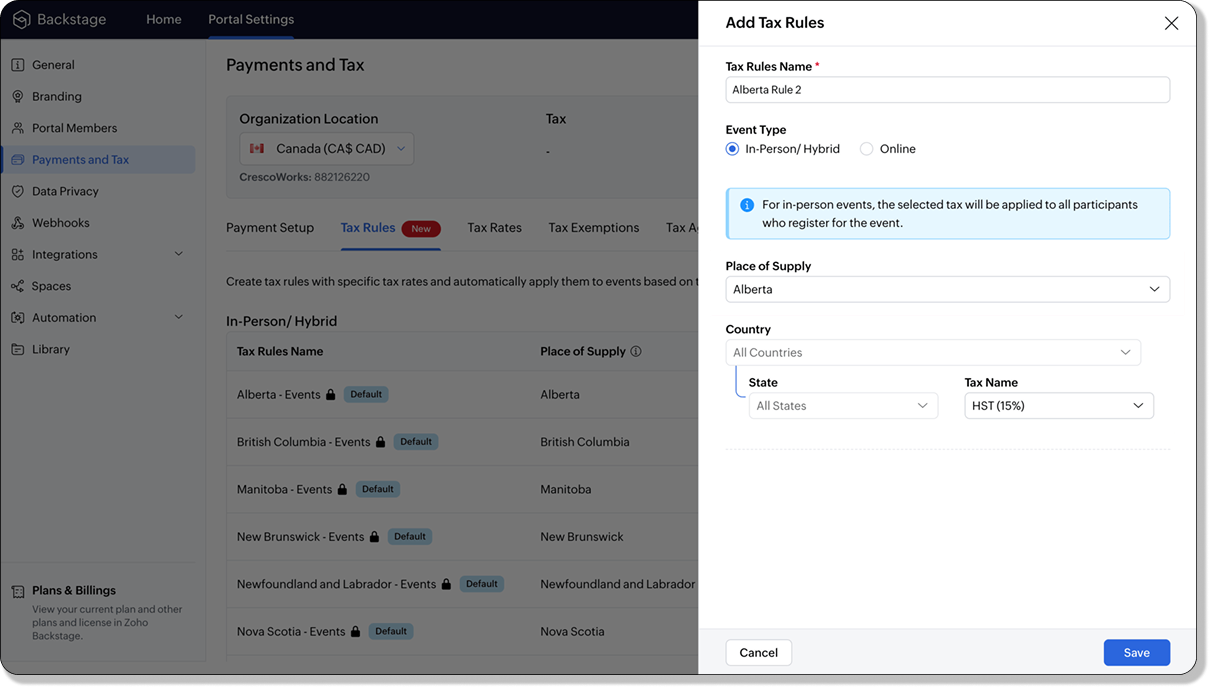
For in-person and hybrid events, Zoho Backstage automatically suggests tax rules based on the event location. The 13 default tax rules cover all Canadian provinces and territories. If the event location changes, the system automatically updates the relevant tax rules to reflect the new region’s rates.
You can also create custom tax rules by selecting a specific province or territory and applying a custom tax rate, offering greater flexibility for managing event taxes.
Applying Tax Rules to Virtual events
For online events, the system uses a default tax rule that covers all Canadian provinces and territories. Taxes are applied based on the attendee's location.
Canadian attendees are charged the applicable provincial tax rate.
International attendees are assigned a zero tax rate by default.
If you need to apply taxes to international attendees, you can create new tax rules tailored for online events, ensuring compliance with international tax regulations.

- Tax rules in Zoho Backstage are flexible and dynamic. You can modify them at any time during your event setup. However, changes will only apply to new transactions. Existing transactions will retain the original tax rule, ensuring previous purchases remain unaffected.
- If you select a non-Canadian location for your event, the Canada Tax Rule will not be applied. This ensures taxes are only charged where applicable, preventing errors in cross-border events.
Event Category

Categorize and filter events based on custom classifications for organizers and attendees to find and manage events easily. This new addition is aimed at improving event management by giving organizers the flexibility to create, manage, and filter events using custom categories. Organizers can now create up to 100 custom categories when setting up an event, giving them the freedom to define categories that suit their specific needs.
Previously, categories selected in Event Info were not utilized elsewhere, and there was no option to add new/manage categories.
Now, organizers can tailor categories to their specific needs and filter them on the Event Directory.
To access:
- While Creating an Event: On the Event Info page.
- For Category Management: Under Portal Settings > Branding > Event Category.
Permissions:
Portal Owners & Admins:
- Add, edit, and delete custom categories.
- Cannot edit or delete default categories.
Event Organizers:
- Can only add new categories.
- Cannot edit or delete existing custom or default categories.
Other Enhancements
Floor plan Focus Area

The Focus Area in the floor plan refers to designated spaces within the event venue that are visually highlighted to draw attention to specific sections, such as booths, stages, or key locations. These areas allow organizers to emphasize important spots, making navigation easier for attendees and improving the overall flow of the event. Focus areas help guide visitors to essential parts of the venue, enhancing their event experience.
Custom Dates for ticket classes (Early access)
In cases where smaller sessions or events (like welcome events, after-event parties, etc.) occur before or after the main event, this feature allows organizers to assign specific dates to separate ticket classes, ensuring tickets are only valid for the selected dates.
Custom dates can be set within 30 days before or after the main event.
New WhatsApp triggers and templates
The WhatsApp Integration, designed to enhance communication and engagement with all event stakeholders, now includes new triggers and templates to facilitate messaging and ensure timely updates for everyone.
For Purchasers:
- Send Registration Confirmation: Instantly confirm registration to enhance the attendee experience.
- Order Canceled: Notify purchasers promptly in case of any order cancellations.
For Speakers:
- Welcome Speaker: Extend a warm welcome to our speakers and set a positive tone for their participation.
- Speaker Added to a Session: Inform speakers when they’re added to a session, ensuring they are well-prepared.
- Speaker Removed from a Session: Provide timely updates should there be any changes to their session involvement.
For Sponsors:
- Thank a Sponsor Before Website is Live: Show appreciation early on, fostering positive relationships with sponsors.
- Welcome and Thank Sponsor After Website is Live: Acknowledge sponsors publicly once the event website goes live.
- Deny Sponsor Proposal: Deliver sensitive information with professionalism and clarity.
- Acknowledge Sponsor Proposal: Confirm receipt of sponsor proposals, keeping communication open and transparent.
For Participants:
- Event Canceled: Quickly inform participants in the event of cancellations, ensuring they’re kept in the loop.
We are continuously refining Zoho Backstage to make your event management experience even more powerful and intuitive. Stay tuned for more updates in the coming months!
If you have any questions, please contact support@zohobackstage.com.
Topic Participants
Jithan Raghuraj
Recent Topics
User
If user is already part of manage engine endpoint central , what hapens when i try to add them to another Zoho org / directory? Are these users added as external users?Create static subforms in Zoho CRM: streamline data entry with pre-defined values
Last modified on (9 July, 2025): This feature was available in early access and is currently being rolled out to customers in phases. Currently available for users in the the AU, CA, and SA DCs. It will be enabled for the remaining DCs in the next coupleOutlook - Zoho CRM Calendar Integration
I'm facing an issue integrating Outlook with Zoho CRM. Has anyone successfully connected their Outlook to Zoho, and are all your meetings and emails being captured correctly in the CRM? Any insights or troubleshooting tips would be appreciated【Zoho CRM】ポータル機能のアップデート
ユーザーの皆さま、こんにちは。コミュニティチームの藤澤です。 今回は「Zoho CRM アップデート情報」の中から、ポータル機能のアップデートをご紹介します。 ポータル管理の新機能「自動招待」により、Zoho CRMからポータルへの招待を自動化できるようになりました。これまで必要だった、ユーザーごとの手動設定は不要になります。設定した条件に基づいて、対象ユーザーに自動で招待が送信されます。 ポータルの新機能 条件に基づく自動招待:指定した条件を満たすユーザーに、自動で招待を送信 招待設定:招待メールの言語を選択し、言語ごとに条件を設定可能Contact data removes Account data when creating a quote
Hi, Our customer has address fields in their quote layout which should be the address of the Account. They prefill the information, adding the account name - the address data is populated as per what is in the account - great. However when they then addExport all of our manuals from Zoho Learn in one go
Hi, I know there's a way to export manuals in Zoho Learn, but I want to export everything in one go so it won't take so long. I can't see a way to do this, can I get some assistance or is this a feature in the pipeline? Thanks, HannahAutomation#31: Automate Splitting Names for New Contact Records
Hello Everyone, This week, we present to you a custom function, which allows you to split the first and last names from the user's email ID based on the separator used in the ID. Having grown into a large firm, Zylker Techfix aims to optimize its processes,Automatically remove commas
Team, Please be consistent in Zoho Books. In Payments, you have commas here: But when we copy and paste the amount in the Payments Made field, it does not accept it because the default setting is no commas. Please have Zoho Books remove commas automProject Change Orders and Additions
We are in the process of migrating from QuickBooks Online to Zoho Books. We have Zoho One and like the ability to sync all of our data across everything. And I like that projects work in a way that's less dumb than QuickBooks. I'm trying to figure outZOHO Desk - Description of slave ticket disappeared after Merge
Dear Support, On Zoho Desk the description of a ticket disappeared after merging two ticket. The one which was the slave one completely disappeared. The problem that in this description there was an image which i had only on Desk in that ticket. CouldHow do I insert a cross-reference link to a different section within one Knowledge Base article using Zoho Desk?
I would like to insert a link within a Knowledge Base article to a different section of that same article. The section I want to link to is formatted with the Heading 3 style and is displayed within my TOC. However, I do not see any way to add a linkProblem Adding Facebook Account
Hi, I'm new here, I'm having trouble setting up my Facebook account as a social channel. I think the issue is down to how my Facebook is set up, which is pretty confusing. I have a personal Facebook account (let’s called it A) which is my main FacebookZoho Desk Teams App is not loading
Hi Zoho Desk support. Need an assistance on the Zoho Desk Teams app. Once I click View Ticket, it isn't showing anything. Kindly refer to attached: ZohoDesk Teams App_View Ticket Error.jpg For our Dashboard, we are still experiencing the same issue. KindlyMapping a new Ticket in Zoho Desk to an Account or Deal in Zoho CRM manually
Is there any way for me to map an existing ticket in Zoho desk to an account or Deal within Zoho CRM? Sometimes people use different email to put in a ticket than the one that we have in the CRM, but it's still the same person. We would like to be ableWhich WhatsApp API works seamlessly with Zoho CRM?
I’m exploring WhatsApp API solutions that integrate seamlessly with Zoho CRM for customer communication, lead nurturing, and automation. I would love to hear insights from those who have successfully implemented WhatsApp within Zoho CRM. My Requirements:Allow people to sign a zoho form by using esign or scanned signature
Allow people to sign a zoho form by using esign or scanned signatureButton to Reapply Filters on Sheet(s)
I wrote a macro that I attached to a button to reapply the filters on all my sheets and it says it works, but it doesn't actually do anything. What is wrong with it? Is there another way? Or even make it work for one sheet? Sub UniversalFilterRefresh()Integrate Multiple ZohoBooks organization with zoho projects
We have successfully connected our Zoho Books with Zoho Projects for synronizing timesheet data. Our Business specialty is, that the staff of the Main company (A) is working on several projects, but the Clients are sometimes contracted and paying to aZoho OAuth Connector Deprecation and Its Impact on Zoho Desk
Hello everyone, Zoho believes in continuously refining its integrations to uphold the highest standards of security, reliability, and compliance. As part of this ongoing improvement, the Zoho OAuth default connector will be deprecated for all Zoho servicesHow do I add todays date to merge field
I don't see any selection of todays date when creating a letter. Surely the date option of printing is standard? JohnTracking Emails sent through Outlook
All of our sales team have their Outlook 365 accounts setup with IMAP integration. We're trying to track their email activity that occurs outside the CRM. I can see the email exchanges between the sales people and the clients in the contact module. ButWhats that
Price?The same Contact associated to multiple Companies - Deals
Hi, I would like to know if there is an option to associate the same contact with multiple companies (two or more) deals, using the same contact details for all. This is because we have contacts who are linked to different companies or branches of thePortals-Adjust Column Sizes
I am trying to adjust the column widths in Portals tabs. Columns that don't need to be wide are wide and longer ones are very short. I thought adding more to the digits box in Edit would widen them, but it doesn't. Anyone know how to adjust these?Add link/button to open approved record from approval list and detail views?
Hi, How do I allow users to click on an approval record and open that submission? For example, userA submits a quotation then userB approves/rejects. They both can see the quotation on "completed task" list & detail views, but there's no way for themrecord submitted from creator and invoice is creating in books , but the workflow of books is not tiggering on create of record in books
record submitted from creator and invoice is creating in books , but the workflow of books is not tiggering on create of record in books headermap = Map(); headermap.put("X-ZOHO-Execute-CustomFunction","true"); response_inv = invokeurl [ url :"https://www.zohoapis.com/books/v3/invoices/fromsalesorder?salesorder_id="Prevent editing of a record after getting approved/rejectedr
Hi, I'd like to block any user from editing a record after it was approved or rejected, how can I do that?Formula Field/Campo de Fórmula
Hello everyone, I have a purchase requisition form in which each department submits a request, and the request is automatically routed to the person responsible for that department. In this form, I have several fields with the following link names: Quantidade1,Formatting Problem | Export to Zoho Sheet View
When I export data to Zoho Sheet View, ID columns are automatically formatted as scientific notation. Reformatting them to text changes the actual ID values. For example, 6557000335603071 becomes 6557000335603070. I have attached screenshots showing thisFeature Request - The Ability to Link A Customer with a Vendor
Hi Finance Suite Team, Many businesses buy and sell products from the same companies or individuals. For example, a car sales business may buy a car from a member of the public, and that member of the public may also buy a new car from us. This makesLong table name (sync from Zoho Creator)
Dears, How can I remove the suffix in parentheses? These tables are synced from Zoho Creator and are treated as system tables, so their names cannot be changed. This issue makes the aggregation formulas look awful.[Free Webinar] Learning Table Series - Streamlining incident management process with Zoho Creator
Hello everyone, We’re excited to invite you to another edition of the Learning Table Series webinar. As you may already know, we've moved to a purpose-based approach in the Learning Table Series this year. Each session now focuses on how a Zoho CreatorUnattended - Silent
How can I hide the tray icon / pop up window during unattended remote access for silent unattended remote access?Text snippet
There is a nice feature in Zoho Desk called Text Snippet. It allows you to insert a bit of text anywhere in a reply that you are typing. That would be nice to have that option in Zoho CRM as well when we compose an email. Moderation Update: We agree thatMarketing Tip #18: Make your online store mobile-friendly to improve traffic
Most online shoppers browse on their phones first. If your store is hard to read, slow to load, or tricky to navigate on mobile, they’ll bounce fast. A mobile-friendly store doesn’t just look nice; it improves engagement, reduces drop-offs, and helps[Need help] Form closed. Please contact your form administrator for further assistance.
https://forms.zohopublic.com/cceinfoifly1/form/CCE2025CCEFocusGroupRegistrationForm2025Fall/formperma/s_8XcLETTbFxZ_TAS4r_W6W5UBl8o5oxEnIX35IBKg4 I checked we didn't exceed the usage limit and form availability is enabled, Please help us enable this formZoho People. Updating TabularData
I am trying to update tabular data in the record. I always have the same response. I have checked many times. Section ID is correct. May be something wrong with request structure itself. Can someone help me. Body content type: form urlencoded query paramsAutomatically CC an address using Zoho CRM Email Templates
Hi all - have searched but can't see a definitive answer. We have built multiple email templates in CRM. Every time we send this we want it to CC a particular address (the same address for every email sent) so that it populates the reply back into ourUnable to Send Different Email Templates for Different Documents in Zoho Sign
Hello Zoho Community, I am facing a limitation with Zoho Sign regarding email notifications sent to customers when a document is sent for signing. Currently, whenever I send any template/document for signing, the email notification that goes to the customerReminder needs 0 minute choice
I most use 0 minute reminders. Every other calender service has this choice. If I create an event in my Android calendar with 0 minute reminder it will change to 5 minute. Please ad 0 as a reminder choice, this should be a 5 minute fix. Thanks.Next Page