Zoho Creator Upcoming Updates - November 2025
Hello everyone,
Welcome to your monthly roundup of new features and enhancements! We hope you've already taken a look at Release Projection 2—it details the features coming your way for the rest of the year. And this month, we're excited to start rolling out some of those key updates.
Without further ado, let's dive in!
- Theme builder
- Sync to external calendars
- Record comments for portal users
- Refreshed UI for mobile apps
- Add and remove dependency apps to environments
- Data sync in integration fields
- New built-in connectors
--------
Theme builder
The upcoming all-new theme builder is designed to help you create a professional and vibrant appearance for your apps. With an intuitive, easy-to-use interface, you can now pick modern themes to align with your brand identity and deliver a polished user experience.
The theme builder allows you to customize:
- Layout: Choose from predefined theme layouts.
- Logo: Decide whether to display your organization logo, app icon, or no logo at all.
- Color: Select preferred colors from preset color palettes.
- Font: Choose from 12 available fonts.

How to access
Once the feature is released, you can navigate to the edit mode of your application and click Themes under the Design section.
Once the feature is released, you can navigate to the edit mode of your application and click Themes under the Design section.

Note: The themes feature is being rolled out in a phased manner. The first time you access it, you'll need to click the Try New Themes button to enable it for your account.
How can this help you?
The theme builder enables you to maintain brand consistency and create visually appealing apps effortlessly. It helps present users of your applications with a superior experience across devices.
The theme builder enables you to maintain brand consistency and create visually appealing apps effortlessly. It helps present users of your applications with a superior experience across devices.
Applicable for: C5, C6
Availability: All DCs
Availability: All DCs
Status: To be released
--------
Adding acyclic dependency apps to environments
Now, you can add applications with dependencies to environments, streamlining the lifecycle management of complex, interlinked apps that share logic through cross-app references (like lookups or page references).
Initially, acyclic dependencies (where apps follow a linear dependency structure without circular references) will be supported. Cyclic dependencies (where apps reference each other in a loop) will be introduced later in a phased rollout.
Additionally, when removing apps from environments, all acyclic dependent apps will now be removed together, ensuring more efficient and consistent dependency management without orphaned references.
Use case
Assume a company uses separate Creator apps for different functions, like employee management and payroll processing. Since the payroll depends on the employee data, one app references another in a linear manner. With this new update, you can add both apps together to environments. This ensures seamless ADLM flow without breaking app relationships.
Assume a company uses separate Creator apps for different functions, like employee management and payroll processing. Since the payroll depends on the employee data, one app references another in a linear manner. With this new update, you can add both apps together to environments. This ensures seamless ADLM flow without breaking app relationships.
How to access
When adding an app to an environment, dependent apps with acyclic references will automatically be included.

When removing from environments, the dependent apps will also be removed together.
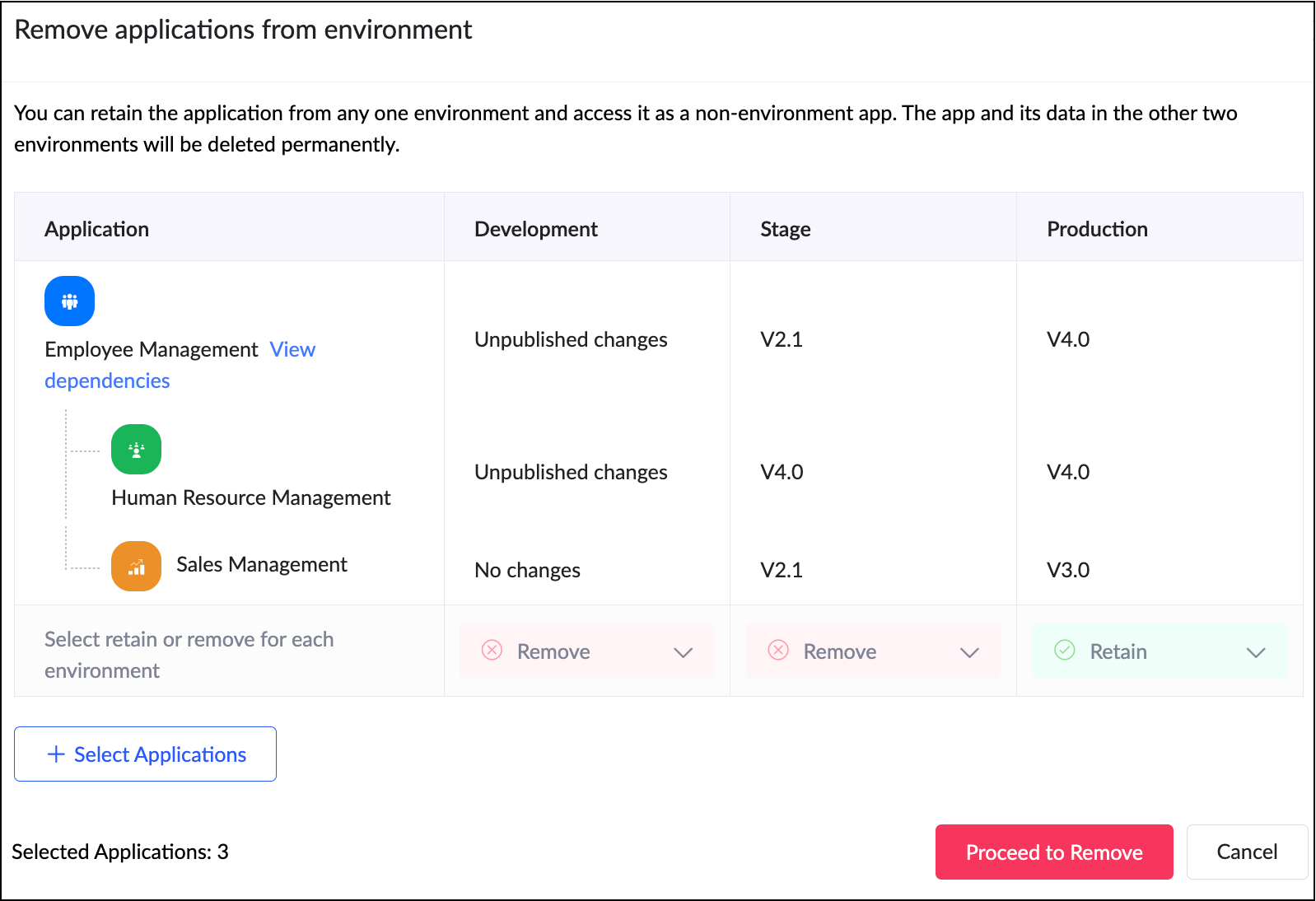
When adding an app to an environment, dependent apps with acyclic references will automatically be included.
When removing from environments, the dependent apps will also be removed together.
How can this help you?
This enhancement removes a long-standing limitation in Zoho Creator and unlocks true environment-level management for dependent applications. It streamlines the management and deployment of dependent applications,ensuring consistency and stability across environments.
Applicable for: C6
Availability: All DCs
Status: General Availability
Reference: Adding applications to environment
Availability: All DCs
Status: General Availability
Reference: Adding applications to environment
--------
Sync to external calendar
The Sync to External Calendar feature allows you to integrate published reports from your app with popular calendar tools like Zoho Calendar, Google Calendar, Outlook, Apple Calendar, and more. This feature works through an iCal feed URL and is helpful in ensuring that your events and schedules stay synchronized across platforms.
Use case
Let's say you use Zoho Creator to manage appointments for your business. With syncing to external calendars, you can automatically push these appointments to Google Calendar or Outlook. This provides your staff and clients with real-time updates directly on their personal calendars.
Let's say you use Zoho Creator to manage appointments for your business. With syncing to external calendars, you can automatically push these appointments to Google Calendar or Outlook. This provides your staff and clients with real-time updates directly on their personal calendars.
How to access
Navigate to the published report, click More Options (⋮), and select Sync to External Calendar. Generate the iCal feed URL and add it to the calendar application of your choice.
Navigate to the published report, click More Options (⋮), and select Sync to External Calendar. Generate the iCal feed URL and add it to the calendar application of your choice.
How can this help you?
This feature keeps your schedules automatically up to date by exporting data from published reports to external calendars, ensuring real-time updates and seamless synchronization across platforms.
This feature keeps your schedules automatically up to date by exporting data from published reports to external calendars, ensuring real-time updates and seamless synchronization across platforms.
Applicable for: C5, C6
Availability: All DCs
Status: General Availability
Reference: Understanding Sync to External Calendar
Availability: All DCs
Status: General Availability
Reference: Understanding Sync to External Calendar
--------
Record comments for portal users
We've brought in the capability for portal users to add comments to records. Previously, only internal users could add comments to records. With this enhancement, portal users can now join the conversation by adding comments as well. This update bridges the gap between internal and external stakeholders, allowing both user types to collaborate seamlessly within records.
Use case
Imagine a training management app where clients log in to a portal to track their sessions. With this feature, both the trainers (internal users) and clients (portal users) can discuss updates or clarify details directly within the record.
Imagine a training management app where clients log in to a portal to track their sessions. With this feature, both the trainers (internal users) and clients (portal users) can discuss updates or clarify details directly within the record.
How to access
Portal users can add comments directly within record details, just like internal users.
Portal users can add comments directly within record details, just like internal users.
How can this help you?
This feature fosters better collaboration and transparency by enabling direct communication between internal users and portal users.
This feature fosters better collaboration and transparency by enabling direct communication between internal users and portal users.
Applicable for: C5, C6
Availability: All DCs
Status: General availability
Reference: Understanding record comments
Availability: All DCs
Status: General availability
Reference: Understanding record comments
--------
Refreshed mobile UI
We're introducing a refreshed, modern UI that redefines the experience for users on Zoho Creator mobile apps. The new interface offers intuitive navigation, simplified data submission, and a clearer presentation of information across reports and dashboards.
Beyond core elements such as forms and reports, the new theme extends to other aspects of the mobile app, such as notifications, error responses, and more, with the aim of ensuring a consistent and polished experience throughout.
How can this help you?
The refreshed UI focuses on enhancing usability and accessibility. It ensures a unified and professional experience across every part of the mobile app.
The refreshed UI focuses on enhancing usability and accessibility. It ensures a unified and professional experience across every part of the mobile app.
Applicable for: iOS and Android
Availability: All DCs
Status: To be released
Status: To be released
--------
Data sync in integration fields
We've introduced the ability to manually sync data in integration fields, ensuring that Creator always reflects the latest information from your connected services. These integration fields in Creator forms serve as lookups to pull data from third-party services when a new record is created within Creator. Previously, once a record was saved, the corresponding data remained static and didn’t automatically reflect updates from the external service.
With this enhancement, admins and developers can now initiate a sync for integration fields from the Connections slider in live mode. This action updates existing Creator records with the most recent information from the connected service keeping both systems aligned.
Further, we've also added support for reconfiguring datasources without affecting your existing connections. If the datasource includes module-specific configuration fields, you can manage them from the Connection slider in Live mode. After the initial setup, these fields can be modified anytime using the Reconfigure option.
Use case
Let's say a Creator app pulls customer details from Zoho CRM via an integration field. Earlier, if a customer updated their phone number in CRM, it wouldn't reflect in those existing records mapped to it. Now, you can refresh the integration fields' data anytime and keep your records up to date, in line with the current value in CRM.
How to access
Navigate to the Connections slider in the live mode of your application and go to Datasource > [Required datasource name] > Integration Fields Sync.
Navigate to the Connections slider in the live mode of your application and go to Datasource > [Required datasource name] > Integration Fields Sync.
How can this help you?
This enhancement ensures the data in integration fields stay accurate, improving data reliability and decision-making.
This enhancement ensures the data in integration fields stay accurate, improving data reliability and decision-making.
Applicable for: C5, C6
Availability: All DCs
Status: General availability
Reference: Connections in Live and Edit mode
Availability: All DCs
Status: General availability
Reference: Connections in Live and Edit mode
--------
Expanded suite of built-in connectors
We've broadened our built-in connector line-up by introducing hundreds of new connectors. Some of the widely used services now supported include:
- AWS services(like Dynamo DB, Kinesis, EC2, Lambda, and more)
- LinkedIn
- Confluence
- Airtable
- Jira Service Management Alert
- Netsuite
- Xero
- Mailchimp
- ... and more!
With this update, Zoho Creator now offers over 1,200 built-in connectors, empowering you to integrate with most popular apps used in different industries.
--------
And that's all for this month! We'll keep this post updated as and when each feature is released.
We'd love to hear your feedback in the comments. Stay tuned for more enhancements coming your way!
Regards,
Zoho Creator Team