Zoho Creator Upcoming Updates - November 2025
Hello everyone,
Welcome to your monthly roundup of new features and enhancements! We hope you've already taken a look at Release Projection 2—it details the features coming your way for the rest of the year. And this month, we're excited to start rolling out some of those key updates.
Without further ado, let's dive in!
- Theme builder
- Sync to external calendars
- Record comments for portal users
- Refreshed UI for mobile apps
- Add and remove dependency apps to environments
- Data sync in integration fields
- New built-in connectors
--------
Theme builder
The upcoming all-new theme builder is designed to help you create a professional and vibrant appearance for your apps. With an intuitive, easy-to-use interface, you can now pick modern themes to align with your brand identity and deliver a polished user experience.
The theme builder allows you to customize:
- Layout: Choose from predefined theme layouts.
- Logo: Decide whether to display your organization logo, app icon, or no logo at all.
- Color: Select preferred colors from preset color palettes.
- Font: Choose from 12 available fonts.

How to access
Once the feature is released, you can navigate to the edit mode of your application and click Themes under the Design section.
Once the feature is released, you can navigate to the edit mode of your application and click Themes under the Design section.

Note: The themes feature is being rolled out in a phased manner. The first time you access it, you'll need to click the Try New Themes button to enable it for your account.
How can this help you?
The theme builder enables you to maintain brand consistency and create visually appealing apps effortlessly. It helps present users of your applications with a superior experience across devices.
The theme builder enables you to maintain brand consistency and create visually appealing apps effortlessly. It helps present users of your applications with a superior experience across devices.
Applicable for: C5, C6
Availability: All DCs
Availability: All DCs
Status: To be released
--------
Adding acyclic dependency apps to environments
Now, you can add applications with dependencies to environments, streamlining the lifecycle management of complex, interlinked apps that share logic through cross-app references (like lookups or page references).
Initially, acyclic dependencies (where apps follow a linear dependency structure without circular references) will be supported. Cyclic dependencies (where apps reference each other in a loop) will be introduced later in a phased rollout.
Additionally, when removing apps from environments, all acyclic dependent apps will now be removed together, ensuring more efficient and consistent dependency management without orphaned references.
Use case
Assume a company uses separate Creator apps for different functions, like employee management and payroll processing. Since the payroll depends on the employee data, one app references another in a linear manner. With this new update, you can add both apps together to environments. This ensures seamless ADLM flow without breaking app relationships.
Assume a company uses separate Creator apps for different functions, like employee management and payroll processing. Since the payroll depends on the employee data, one app references another in a linear manner. With this new update, you can add both apps together to environments. This ensures seamless ADLM flow without breaking app relationships.
How to access
When adding an app to an environment, dependent apps with acyclic references will automatically be included.

When removing from environments, the dependent apps will also be removed together.
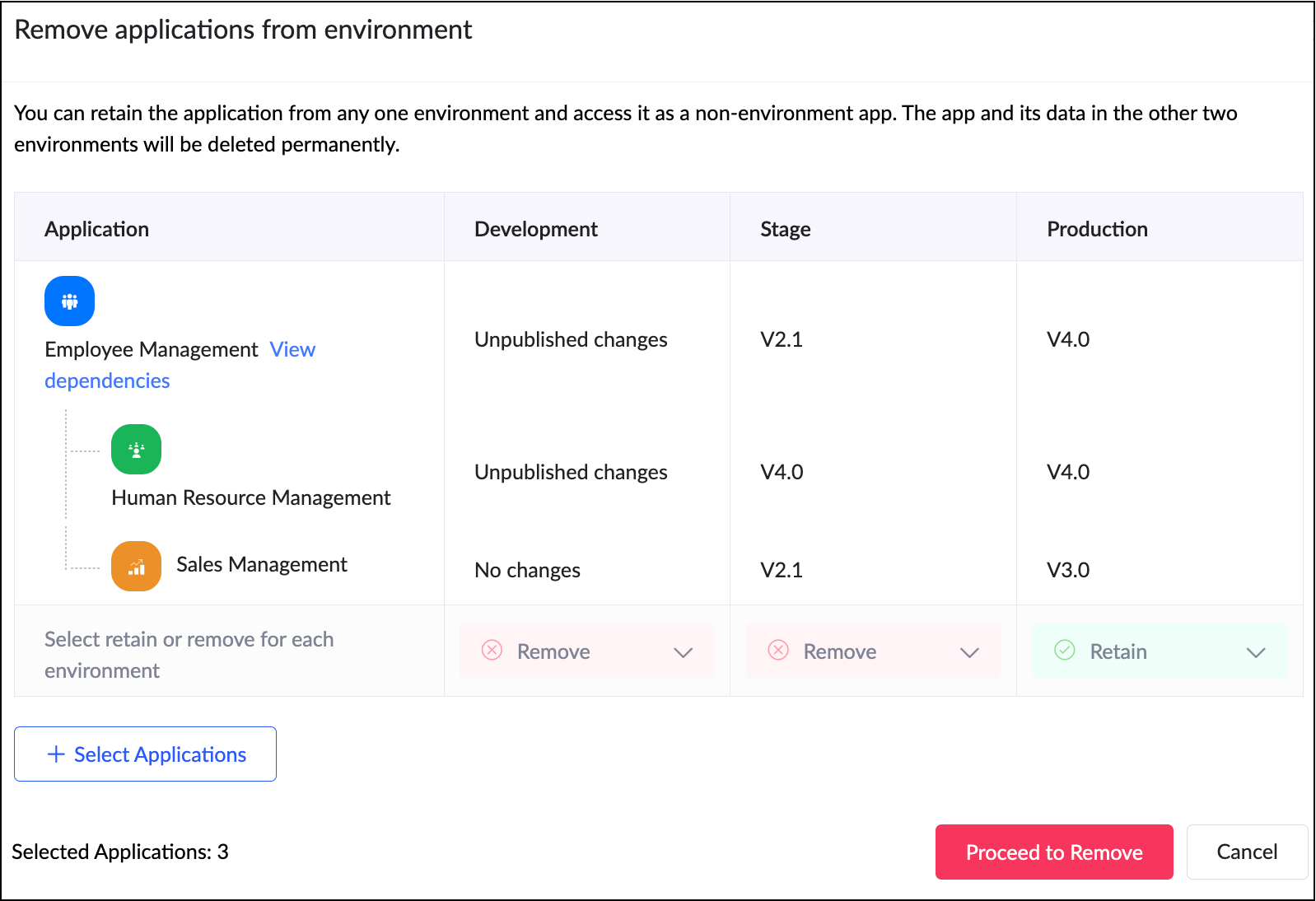
When adding an app to an environment, dependent apps with acyclic references will automatically be included.
When removing from environments, the dependent apps will also be removed together.
How can this help you?
This enhancement removes a long-standing limitation in Zoho Creator and unlocks true environment-level management for dependent applications. It streamlines the management and deployment of dependent applications,ensuring consistency and stability across environments.
Applicable for: C6
Availability: All DCs
Status: General Availability
Reference: Adding applications to environment
Availability: All DCs
Status: General Availability
Reference: Adding applications to environment
--------
Sync to external calendar
The Sync to External Calendar feature allows you to integrate published reports from your app with popular calendar tools like Zoho Calendar, Google Calendar, Outlook, Apple Calendar, and more. This feature works through an iCal feed URL and is helpful in ensuring that your events and schedules stay synchronized across platforms.
Use case
Let's say you use Zoho Creator to manage appointments for your business. With syncing to external calendars, you can automatically push these appointments to Google Calendar or Outlook. This provides your staff and clients with real-time updates directly on their personal calendars.
Let's say you use Zoho Creator to manage appointments for your business. With syncing to external calendars, you can automatically push these appointments to Google Calendar or Outlook. This provides your staff and clients with real-time updates directly on their personal calendars.
How to access
Navigate to the published report, click More Options (⋮), and select Sync to External Calendar. Generate the iCal feed URL and add it to the calendar application of your choice.
Navigate to the published report, click More Options (⋮), and select Sync to External Calendar. Generate the iCal feed URL and add it to the calendar application of your choice.
How can this help you?
This feature keeps your schedules automatically up to date by exporting data from published reports to external calendars, ensuring real-time updates and seamless synchronization across platforms.
This feature keeps your schedules automatically up to date by exporting data from published reports to external calendars, ensuring real-time updates and seamless synchronization across platforms.
Applicable for: C5, C6
Availability: All DCs
Status: General Availability
Reference: Understanding Sync to External Calendar
Availability: All DCs
Status: General Availability
Reference: Understanding Sync to External Calendar
--------
Record comments for portal users
We've brought in the capability for portal users to add comments to records. Previously, only internal users could add comments to records. With this enhancement, portal users can now join the conversation by adding comments as well. This update bridges the gap between internal and external stakeholders, allowing both user types to collaborate seamlessly within records.
Use case
Imagine a training management app where clients log in to a portal to track their sessions. With this feature, both the trainers (internal users) and clients (portal users) can discuss updates or clarify details directly within the record.
Imagine a training management app where clients log in to a portal to track their sessions. With this feature, both the trainers (internal users) and clients (portal users) can discuss updates or clarify details directly within the record.
How to access
Portal users can add comments directly within record details, just like internal users.
Portal users can add comments directly within record details, just like internal users.
How can this help you?
This feature fosters better collaboration and transparency by enabling direct communication between internal users and portal users.
This feature fosters better collaboration and transparency by enabling direct communication between internal users and portal users.
Applicable for: C5, C6
Availability: All DCs
Status: General availability
Reference: Understanding record comments
Availability: All DCs
Status: General availability
Reference: Understanding record comments
--------
Refreshed mobile UI
We're introducing a refreshed, modern UI that redefines the experience for users on Zoho Creator mobile apps. The new interface offers intuitive navigation, simplified data submission, and a clearer presentation of information across reports and dashboards.
Beyond core elements such as forms and reports, the new theme extends to other aspects of the mobile app, such as notifications, error responses, and more, with the aim of ensuring a consistent and polished experience throughout.
How can this help you?
The refreshed UI focuses on enhancing usability and accessibility. It ensures a unified and professional experience across every part of the mobile app.
The refreshed UI focuses on enhancing usability and accessibility. It ensures a unified and professional experience across every part of the mobile app.
Applicable for: iOS and Android
Availability: All DCs
Status: To be released
Status: To be released
--------
Data sync in integration fields
We've introduced the ability to manually sync data in integration fields, ensuring that Creator always reflects the latest information from your connected services. These integration fields in Creator forms serve as lookups to pull data from third-party services when a new record is created within Creator. Previously, once a record was saved, the corresponding data remained static and didn’t automatically reflect updates from the external service.
With this enhancement, admins and developers can now initiate a sync for integration fields from the Connections slider in live mode. This action updates existing Creator records with the most recent information from the connected service keeping both systems aligned.
Further, we've also added support for reconfiguring datasources without affecting your existing connections. If the datasource includes module-specific configuration fields, you can manage them from the Connection slider in Live mode. After the initial setup, these fields can be modified anytime using the Reconfigure option.
Use case
Let's say a Creator app pulls customer details from Zoho CRM via an integration field. Earlier, if a customer updated their phone number in CRM, it wouldn't reflect in those existing records mapped to it. Now, you can refresh the integration fields' data anytime and keep your records up to date, in line with the current value in CRM.
How to access
Navigate to the Connections slider in the live mode of your application and go to Datasource > [Required datasource name] > Integration Fields Sync.
Navigate to the Connections slider in the live mode of your application and go to Datasource > [Required datasource name] > Integration Fields Sync.
How can this help you?
This enhancement ensures the data in integration fields stay accurate, improving data reliability and decision-making.
This enhancement ensures the data in integration fields stay accurate, improving data reliability and decision-making.
Applicable for: C5, C6
Availability: All DCs
Status: General availability
Reference: Connections in Live and Edit mode
Availability: All DCs
Status: General availability
Reference: Connections in Live and Edit mode
--------
Expanded suite of built-in connectors
We've broadened our built-in connector line-up by introducing hundreds of new connectors. Some of the widely used services now supported include:
- AWS services(like Dynamo DB, Kinesis, EC2, Lambda, and more)
- LinkedIn
- Confluence
- Airtable
- Jira Service Management Alert
- Netsuite
- Xero
- Mailchimp
- ... and more!
With this update, Zoho Creator now offers over 1,200 built-in connectors, empowering you to integrate with most popular apps used in different industries.
--------
And that's all for this month! We'll keep this post updated as and when each feature is released.
We'd love to hear your feedback in the comments. Stay tuned for more enhancements coming your way!
Regards,
Zoho Creator Team
Topic Participants
Ashwin Vishal R
Sticky Posts
Introducing Zoho Creator's 2025 Release Projection 2
Hello Creators! I'm Prakash, from the Creator product management team, and today I'm delighted to unveil our next set of features as part of Release Projection 2 for 2025. With thoughtful analysis and planning, we've curated powerful new capabilitiesZoho Creator - 2023 Release Projection 1
Hello everyone! A very Happy New Year to you and your family. Hope you're all good and having a great time using Zoho Creator to make your lives easier and your businesses prosper. 2022 was an action-packed year for us at Creator, and we hope to continueZoho Creator User Group meetups in a city near you! - Oct - Nov, 2023
Greetings from the Zoho Creator team! We're hosting a series of Zoho Creator meetups in various cities across the globe, and we'd love to meet you there! Our meetups are a great opportunity to network with industry peers, exchange ideas and best practices,Zoho Creator - 2023 Release Projection 2
Hello everyone! Time truly flies when you're having an incredible journey, and today we mark the completion of an eventful and action-packed six months. It feels like just yesterday when we embarked on this adventure together with the launch of our newUpcoming Updates - August 2022
Hi all, Greetings from the Zoho Creator team! Today we've got news for you on some exciting updates. And rest assured— there’s more to come! In this post, we'll be going over the upcoming features and improvements for this month as mentioned below. A
Recent Topics
Kaizen #233 - Generating AI-powered Follow-up Emails Using CRM Functions and Widgets
Hey everyone! Welcome back to another interesting post in the Kaizen series! Sales teams regularly capture interaction notes in CRM after speaking with prospects. However, drafting a follow-up email that reflects the conversation context can be repetitiveConnect Bank in Zoho Books
Can I connect UOB or Ariwallex in Zoho Books?Using MPN across multiple SKUs and inventory tracking
I have several different SKU's that share a common MPN and would like to track inventory by MPN. SKU1 has MPN1 assigned SKU2 has MPN1 assigned Here is an example If I start with 5 of MPN 1 in stock I want each SKU1 and SKU2 to show as 5 in stock, If IExtend Zoho Canvas Customization to Zoho Creator Forms and Reports
Currently, Zoho Canvas allows users to design and customize the UI of Zoho CRM modules with a much better visual experience. This helps organizations create cleaner layouts, improve usability, and design interfaces that match their workflows. However,Marketing Tip #1: Optimize item titles for SEO
Your item title is the first thing both Google and shoppers notice. Instead of a generic “Leather Bag,” go for something detailed like “Handcrafted Leather Laptop Bag – Durable & Stylish.” This helps your items rank better in search results and instantlyFeature Enhancement Request – Text Formatting Options in Item Description (Zoho Books/Quotes Module)
Dear Zoho Development Team, Greetings from Radiant360 Integrated Technical Services LLC. We would like to bring to your attention a functional limitation we've encountered within the Item Table / Quote Description section of Zoho Books (and Zoho CRM Quotes).ZOHO Books Query
Good day, Can someone please advise. I recently migrated from ZOHO Invoice to ZOHO Books. No that I want to use the inventory on Books I cant as all my items have transaction history. The person I spoke to at ZOHO said I need to create a new Company profileBest way to schedule bill payments to vendors
I've integrated Forte so that I can convert POs to bills and make payments to my vendors all through Books. Is there a way to schedule the bill payments as some of my vendors are net 30, net 60 and even net 90 days. If I can't get this to work, I'll haveZOHO.CRM.UI.Record.open not working properly
I have a Zoho CRM Widget and in it I have a block where it will open the blocks Meeting like below block.addEventListener("click", () => { ZOHO.CRM.UI.Record.open({ Entity: "Events", RecordID: meeting.id }).catch(err => { console.error("Open record failed:",inventory removal at packing list or shipment.
currently our system is set to remove inventory at invoice. This is creating an inventory nightmare? Is it possible to change the settings to remove the item from inventory at either the packing slip stage or shipping the item.How to add employee and not invite them to log in?
I want to add 50 employees, but invite them only when everything will be configured and ready. Is it possible? Should we create employee profiles and then convert them later? Thank you,How is Your eCommerce Experience w/Zoho Inventory?
First off, I'm SUPER grateful for the advent of Zoho Inventory and now the Zoho Commerce Suite. Overall, Inventory is a great product, especially for customers without an eCommerce presence. For eCommerce companies (especially those shipping more than ~10 packages/day), however, there are certain drawbacks that keep my clients from moving over to Zoho Inventory: Cons: 1. Invoice + Package Creation from Shopify/Other eCommerce Integrations: Zoho Inventory makes the somewhat perplexing decision toAbility to Use Both AND and OR When Creating Rules (Advanced Conditions)
I'd like to be able to use more complicated logic when setting up rules. E.g. in Zoho Mail, I can choose "Advanced conditions (AND/OR) to create a rule that can be applied to multiple subject lines from the same sender. But in Zoho TeamInbox, I will haveZoho Desktop App- Unable to Minimize/Freezes
I'm having issues with my Zoho Mail desktop app (PC). When go on my desktop and open the app this is what happens: - Unable to minimize and close app (in the screenshot attached you can see at the top right there is no option to minimize/close) - UnableZoho Invoice Zapier Integration
Is there still a way to use Zapier with Zoho Invoice? I've read online that that migrated to Zoho Books or Billing but since I am just using Invoice I can not find a Zapier Connection anymore.Conect chat of salesiq with zoho cliq
Is there any way to answer from zoho cliq the chat of salesiq initiated by customers?Bug: OAuth 2.0 State Parameter fails with Pipe Delimiters (RFC 6749 Non-Compliance)
I've discovered a bug in how Zoho's API Console handles the OAuth 2.0 authorization flow when the state parameter contains pipe characters (|), and I'm hoping the Zoho team can address this in a future update. The Issue Zoho's OAuth 2.0 implementationZobot with Plugs
Hello, I am having a problem with Zobot using Plugs. Here is my current flow: When I run the flow, I should immediately see the messages from the initial cards (Send Message cards), then after running the plug, and finally, see the messages after thePrint a document from Zoho Writer via Zoho Creator
If i use the code below i can get writer to create a new document or email it to me but i want to be able to print it directly from the browser and not have to send it via email and then print. Below is the code im using. Attached options form zoho writerIs it possible to use HTML formatting in SMS messages sent from Zoho?
Hi everyone, I have a question regarding sending SMS from Zoho When we send emails from Zoho, we can include HTML code to format the message (like adding links, styling, etc.). Is it possible to do something similar when sending SMS messages through ZohoTraining for How can i Operate the Software Features
need to Help for Training of the ZOHO Billing SoftwareAutomating Vendor Contract Management between Zoho Contracts and Zoho Books using Zoho Flow
Managing vendor agreements across procurement and finance systems often requires manually downloading executed contracts and attaching them to vendor records. This can become time-consuming and difficult to manage when dealing with a large number of contracts.Problem applying batch operation error keeps looping that error
Problem applying batch operation error keeps looping that error an wont loginShared Email Sending Duplicate Copies of Emails
Hi there, We recently have moved our info@ email to Team Inbox to trial. We set this channel up using the Microsoft setup which works fine and have 3 users. I am wanting to know: 1. When I send a new email, it will create a copy of that email and sendmerhaba
merhaba sosyal medya paketimiz mevcut ama yorumları göremiyoruz ve o yüzden cevap veremiyoruz destek rica ediyoruz.Teaminbox not working
We couldn't send or receive any mail within the team inbox. Displaying error 'Unable to process this request.'Related lists New option in missing
hi I have created quite a few modules and added as related lists to my main module. Some have new, some dont I can not see why?Cliq and ToDo integrations?
I'm a bit surprised not to find any way to open a Cliq chat for the current thread, or to create a Zoho Mail ToDo from a thread. Are these on the roadmap?Reply-to names are mangled
Hello, I'm seeing an odd behavior in replies. Steps to reproduce: 1. Click reply to an email from "John Doe <doe.john@example.com> in TeamInbox Expected outcome: TO field pre-filled with "John Doe <doe.john@example.com>" Actual outcome: TO field pre-filledI CANT UPGRADE MY FREE ACCOUNT
I TRY TO UPGRADE MY FREE ACCOUNT AND I COULD NOT UPGRADE IT CAN SOMEBODY TELL ME WHY? AND I HAVE THE MONEY SO.Level up your ASO game with tags & categories in store reviews
Introducing tags and categories in Apptics' store reviews Dear Apptics community, If your app is listed on the Play Store or App Store, you already know how important store reviews and ratings are. They’re one of the most direct signals of user sentimentIncluding attachments with estimates
How can attachments be included when an estimate is sent/emailed and when downloaded as a .pdf? Generally speaking, attachments should be included as part of an estimate package. Ultimately, this is also true for work orders and invoices.Adding VENDOR SKU to PURCHASE ORDERS
how can we add the Vendor SKU when issuing a Purchase Order , so the PO shows the Supplier SKU and our own Internal SKU , which is what we want to receive into the system .Possible to freely prompt/query CRM data using Zia?
Is it possible to prompt Zia to query on any information stored in the CRM, especially on the data stored in custom text fields? My use case is the people in my organisation have entered lots of text in custom text fields to capture information from anRestrict employees to take only one day holiday from a multi-day festival holiday
Hi everyone, I have a requirement related to Optional/Festival Holidays in Zoho People. For example, in the month of May there are three optional holiday dates: May 11, May 12, and May 13. Employees can choose one of these days as their optional holiday.Cannot modify colours in invoice email template
I have tried switching browsers... but I cannot change the (pretty horrible) default colours in the preset email when sending an invoice... the blue banner, red outstanding total and the bright green button... I can change other things but not the colours?Cannot find zpuid for Zoho Projects user
I'm using the Zoho Projects v3 API to create a task. The task is created successfully, but in order to assign the task owner, the "Create a Task" API also requires the zpuid of the task owner. Unfortunately I cannot find any user-related API calls thatPrint a document from Zoho Writer via Zoho Creator
If i use the code below i can get writer to create a new document or email it to me but i want to be able to print it directly from the browser and not have to send it via email and then print. Below is the code im using. Attached options form zoho writerAllow styling for specific Subform fields in Zoho Creator
Sometimes in forms we need to visually highlight a specific field inside a Subform (for example Sanctioned Amount, Approved Value, Critical Fields, etc.) so that users immediately notice it while entering data. Currently there is no direct UI option toCareer site URL - Suggestion to modify URL of non-english job posting
Hi, I would like to suggest making a few modification to career sites that are not in english. Currently, the URL are a mix of different languages and are very long. It makes for very unprofessional looking URLs... Here is an example of one of our URLNext Page