【Zoho CRM】アクセシビリティ向上機能リリースのお知らせ
ユーザーの皆さま、こんにちは。コミュニティチームの中野です。
今回は「Zoho CRM アップデート情報」の中からアクセシビリティ向上機能をリリースしましたのでご紹介します。
アクセシビリティ向上機能とは?
すべての人が快適に利用できるように、フォントサイズの調整、色覚サポート、キーボード操作の最適化など、18のアクセシビリティコントロールを提供し、ユーザーのニーズに応じたカスタマイズを可能にします。
 概要動画はこちら(英語)
以下にて、本機能の一部を紹介します。
アクセシビリティ向上機能の設定方法
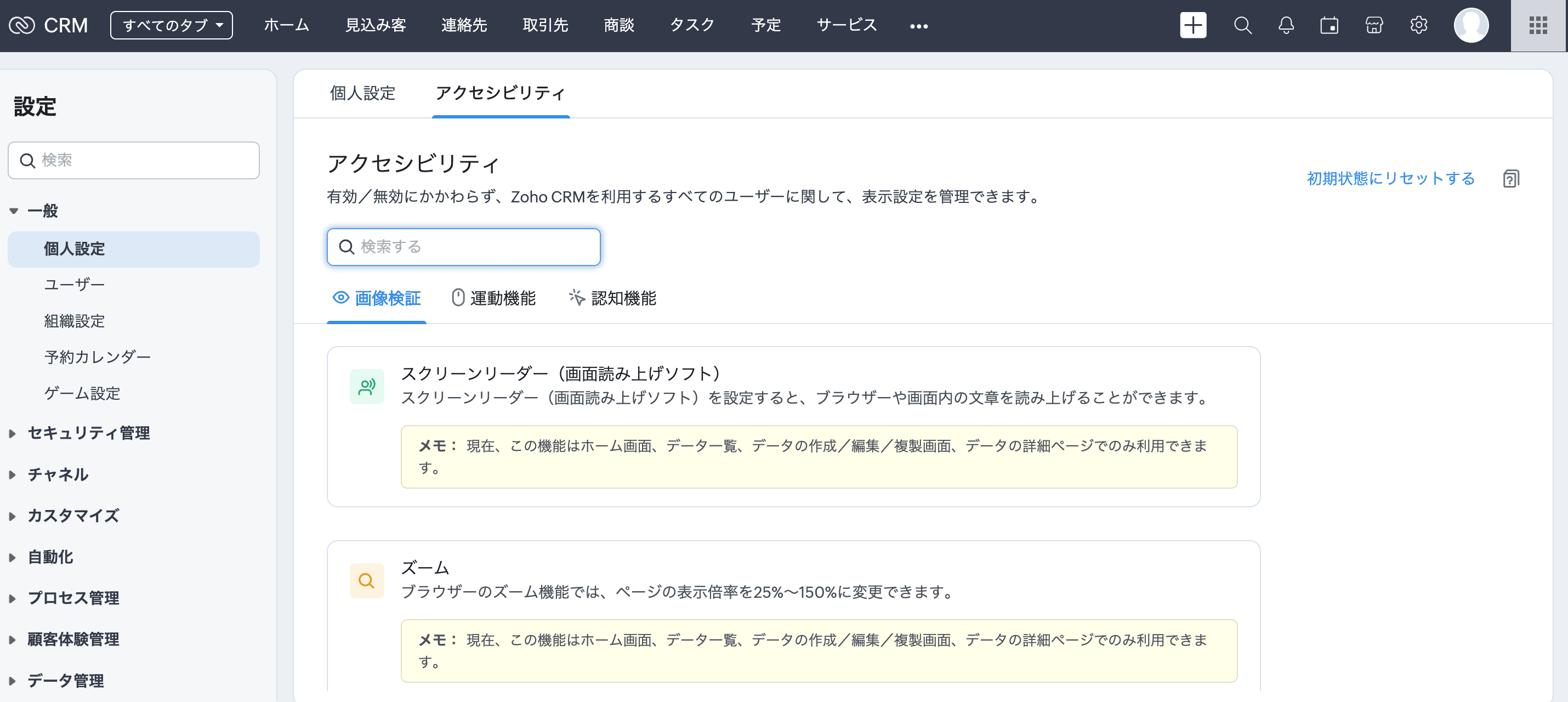
[設定]→[一般]→[個人設定]→[アクセシビリティ]に移動します。
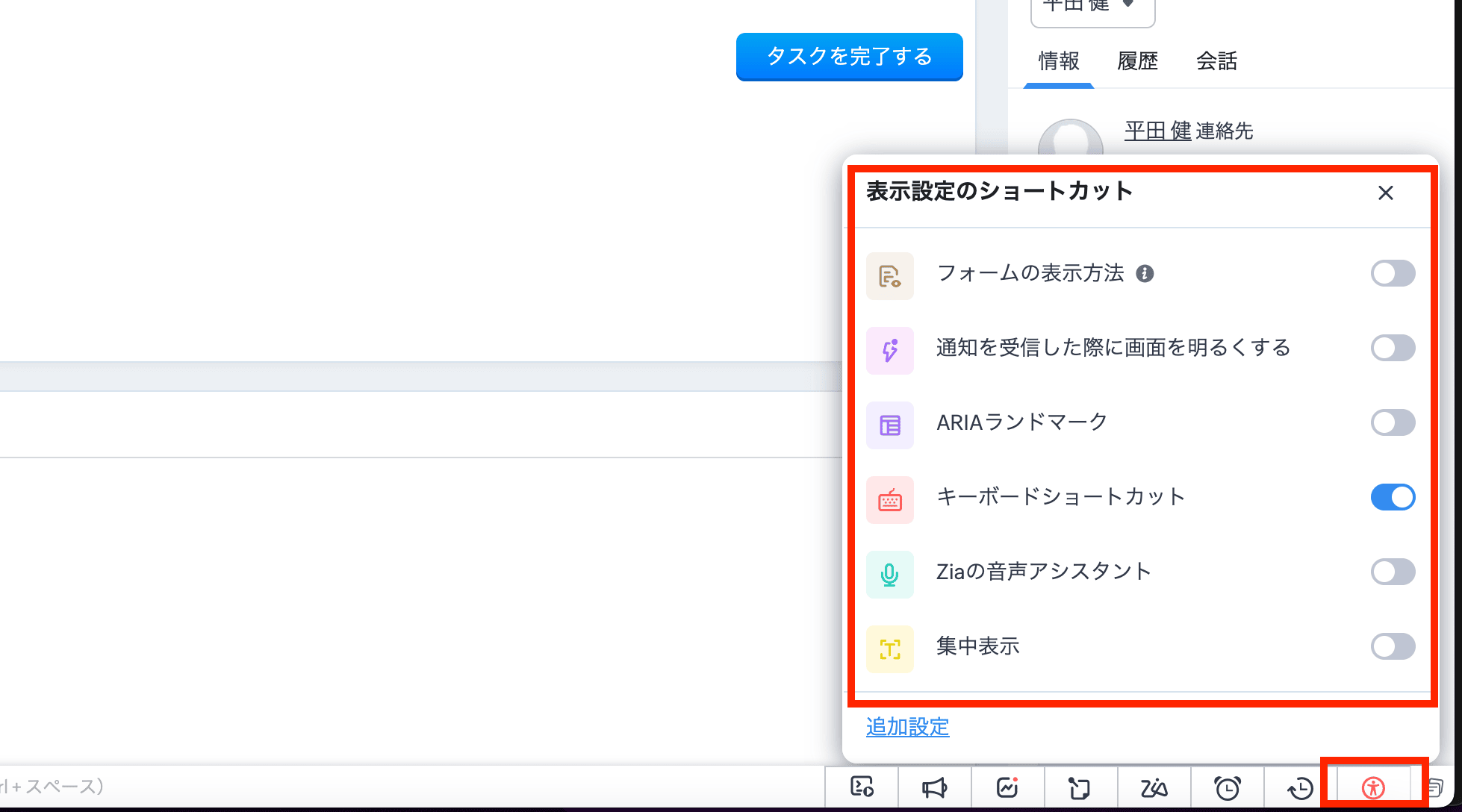
また、画面下部のツールバーにあるアイコンからもアクセスできます。このアイコンをクリックすると、主な機能の有効/無効を切り替えることができます。さらに、[詳細設定]をクリックすると、アクセシビリティ向上機能の設定画面が開きます。
視覚サポートの機能
拡大と縮小
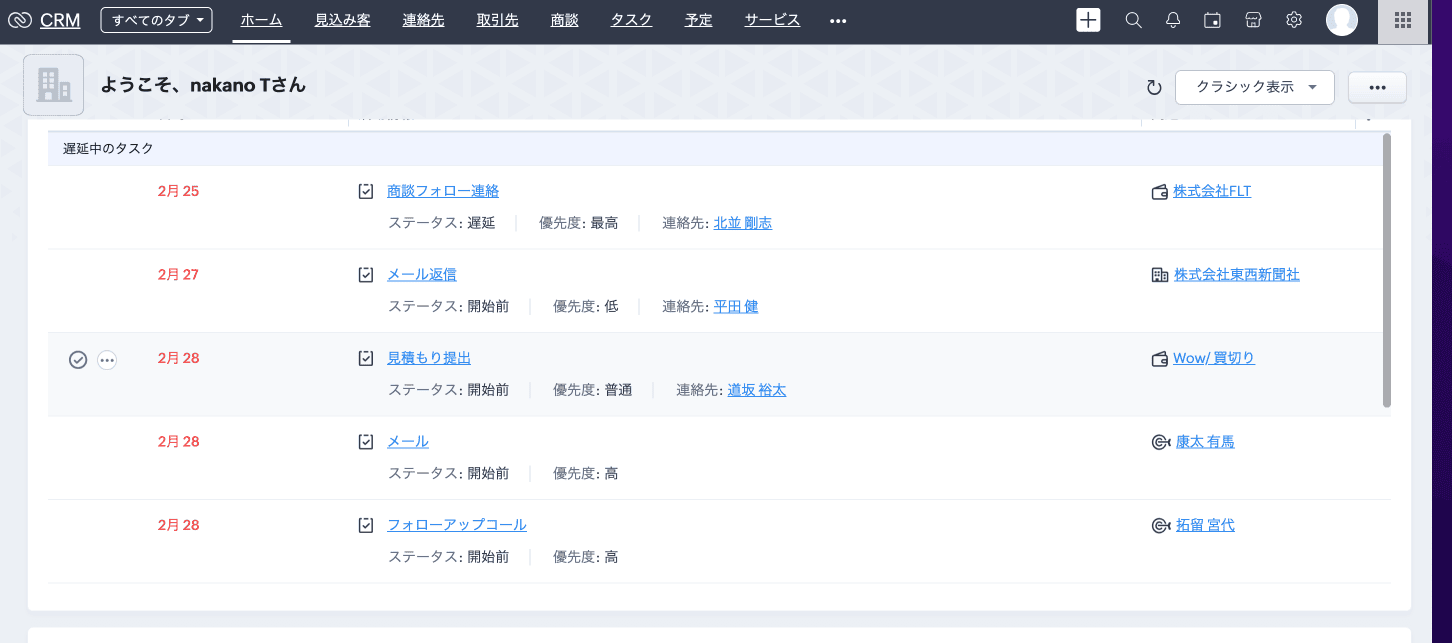
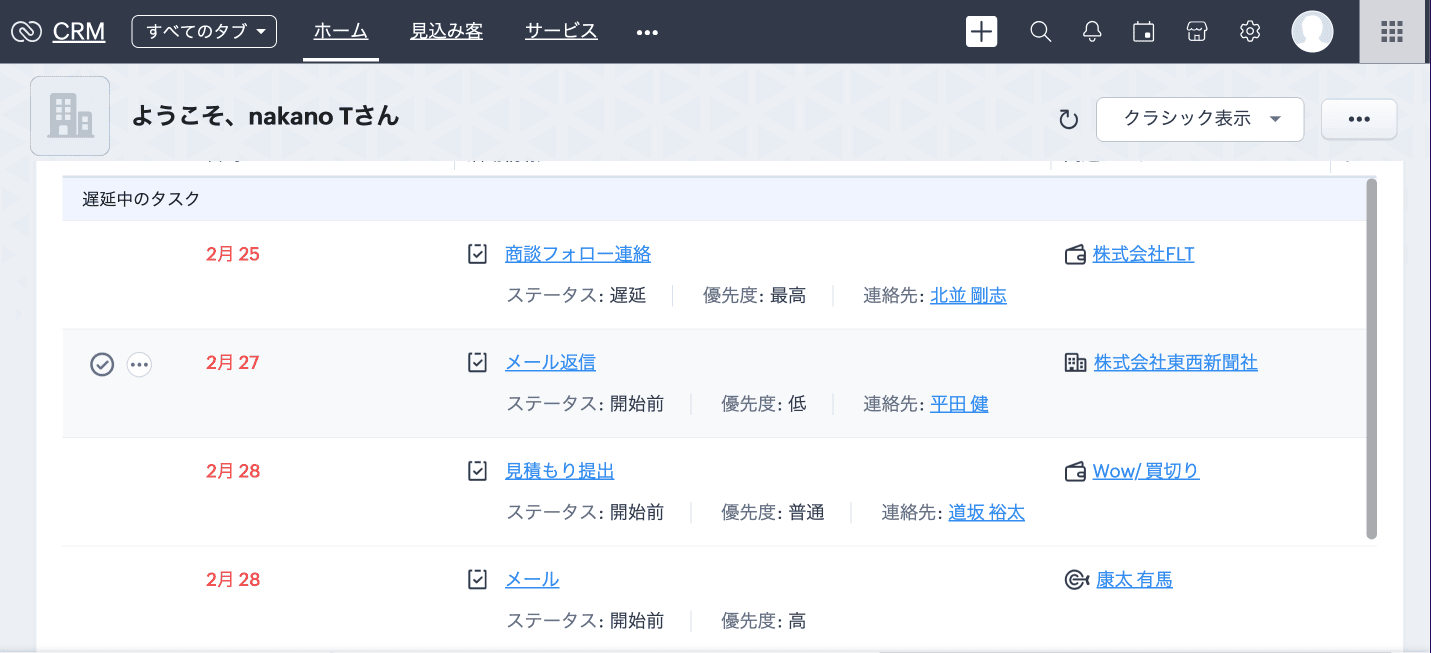
ほとんどのブラウザーは、ページを拡大または縮小して表示する機能を備えています。このため、自分のブラウザーの拡大/縮小率を調整することで、Zoho CRMの画面を見やすくできます。Zoho CRMの画面は、拡大/縮小率が25%~150%の範囲で正常に機能するように作られています。
100%
↓
130%
使用方法
表示を拡大するには、[Ctrl]または[command]キーを押しながら[+](プラス)キーを押します。
表示を縮小するには、[Ctrl]または[command]キーを押しながら[-](マイナス)キーを押します。
拡大/縮小率をリセットするには、[Ctrl]または[command]キーを押しながら[0](ゼロ)を押します。
運動機能をサポートする機能
キーボードショートカット

認知機能をサポートする機能
集中表示
CRMのインターフェイスは、オールインワンでビューを表示するように情報が詰め込まれていることが多いですが、気が散りやすいユーザーにとっては圧倒されることがあります。集中表示は、気が散るものを遮断し、カーソル周辺だけに集中することを可能にします。
「非表示部分の透明度」より、暗く表示するエリアをどの程度暗くするか調整することも可能です。
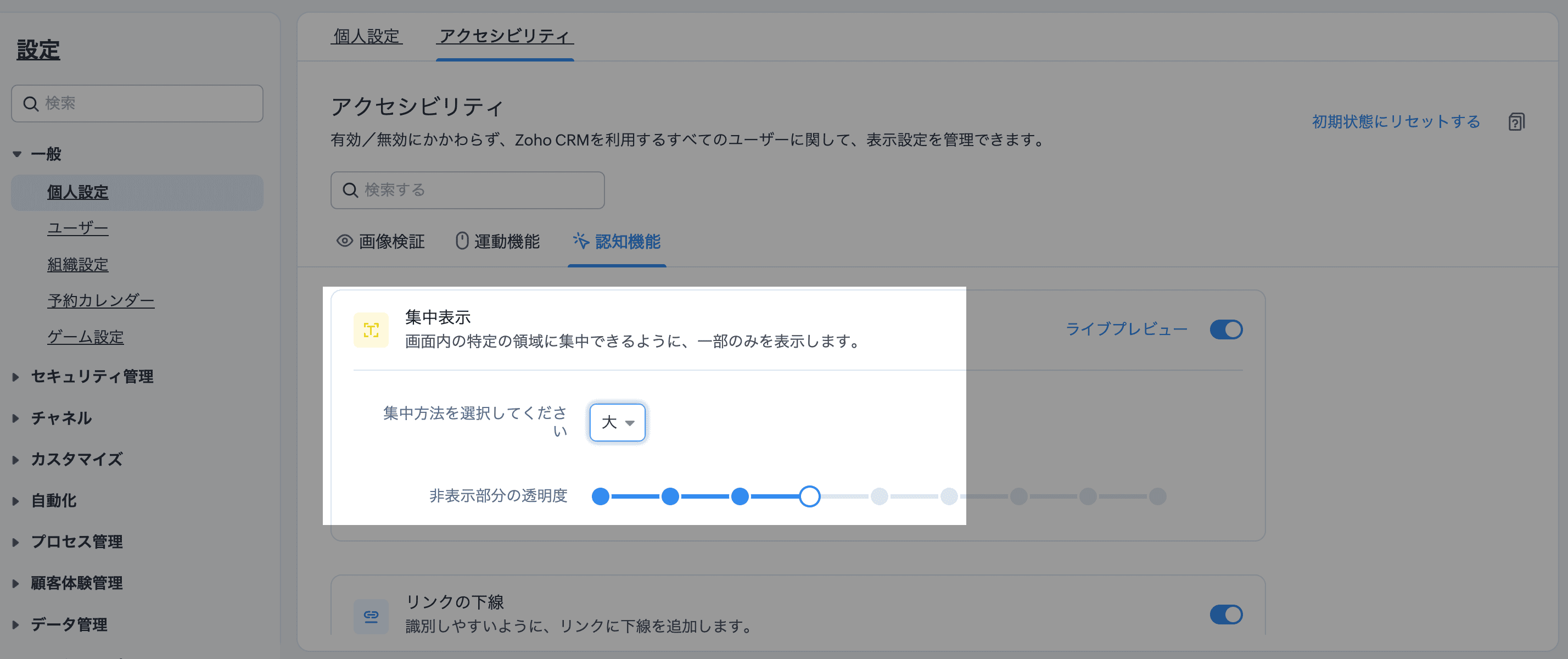


注:以下の機能については、現在、ホーム画面、データ一覧、データの作成/編集/複製画面(標準)、データの詳細ページ(標準)でのみ利用できます。
└スクリーンリーダー / ズーム / 独自のエラーメッセージの表示 / ARIAランドマーク /標準の移動順
また、以下の機能については、現在、データの作成/編集/複製画面(標準)、データの詳細ページ(標準)でのみ利用できます。
└フォームの表示方法 / 必須項目の表示(必須項目のみ/すべての項目)
関連記事:アクセシビリティ向上の設定
アクセシビリティ向上機能について、興味のある方はぜひ試してみてください。
……………………………………………………………………………………………
++Zoho オンラインフォーラムに投稿された情報を、いち早くGETしませんか?++
Zoho Japan Community フォーラムの右側「フォローする」ボタンをクリックいただくと、最新の新着投稿やコメントをメールでお送りします。興味のあるサブフォーラムの投稿のみ通知を受け取ることも可能です。
※フォーラムトップから興味のあるサブフォーラムを選択し、「フォローする」をクリックしてください。
コミュニティのイベント情報も当フォーラムでお知らせ予定ですので、ぜひフォローをお願いします!Topic Participants
Junya Nakano
Recent Topics
Mind mapping in Zoho Projects
Good morning, I would like to congratulate the Zoho team for building such an inovative and responsive application that fits in the daily challenges of so many work groups. I would like suggest you another functionality that helps a lot in project planning and development: mind mapping. Mind mapping would be of great help for brianstorming, knowledge management and other needs in online collaboration. Thanks and wish you all the best! George Maha Empresa Júnior Multidisciplinar do Instituto deRetainer invoice in Zoho Finance modlue
Hello, Is there a way of creating retainer invoices in the Zoho Finance module? If not can I request this is considered for future updates please.Documents don't sync properly
Hello, My team recently moved to Zoho workDrive, some of my team, work remotely so we believed Zoho would be the best way to share and edit files as well as access files withing the team. However we are experiencing sync issues, when a file is uploaded in the file explorer and shows sync complete, same file can be seen on the Zoho web app but other team members can't see the said file because it is not syncing properly. i figured out that if i were to go to preferences in settings and resync theWe are looking for an experienced Zoho Developer
Hi Everyone! We’re on the lookout for a skilled Zoho Developer with hands-on experience in the Zoho Developer Platform (The Vertical CRM Platform) and if you don't know what that is, then you are not the person we are looking for. You would also needInitiate approval workflow after "on edit --> on success"
Dear Community, currently I am working on a initiative tracker which should handle approval workflows based on different initiative status. As far as I understand, an approval workflow can be triggered (only?) when data is entered for the input form to the database. Example: A new initiative is created and submitted. --> Approval Workflow triggered Here comes my question: Is it also possible to trigger an approval workflow if the form was "simply" updated? (on edit --> on success) Imagine the initiativeTax Deductible Donations to a Charity Organisation
For Australia, what's the best/proper method for entering an expense that is a tax deductible donation to a charitable organisation. And thus is appears correctly in Accounts and BAS as a GST payable deduction?Simultaneous use of WhatsApp Account in SalesIQ and ZohoDesk
Hi, We have only one number registered in Meta, it's possible use same account for two apps? All times here we try is stopping in SalesIQ. Regards,External lookup fields to synchronise with Analytics
Hello. I suggest adding external lookup custom fields to the Zoho Analytics integration settings. Currently, these types of fields are not available for synchronisation, so they cannot be used to generate reports with related tables in Analytics. ThankWe should have an option to Toggle Off KB Article Links in AI Answer Bot Replies
Hi everyone, I'm creating this topic to share a feature idea that I think would improve the customer experience when using the AI Answer Bot for self-service. The Current Behavior (The Problem) Currently, when the AI Answer Bot generates a summary orBoot Loop After Removing Service from Client via Admin
We have multiple laptops experiencing a boot loop / unable to login after the Zoho Remote service was removed from their machine remotely via the desktop client. The Windows sign-in screen is not available, and users are unable to login. This seems likeRequest Backend Correction — Domains Mapped to Same Help Center (Multi-Brand Setup Failure)
Hello Zoho Desk Support Team, I need assistance correcting a domain-to-brand mapping issue in our Zoho Desk instance (The Blue Ribbon Project). Both of our verified domains currently point to the same Help Center instead of separate brand portals. Currentis there any option to enable the participants interact - can write on the screen, while the screen is shared by the host?
this is most expected features - for teaching children. is there any option to enable the participants interact - can write on the screen, while the screen is shared by the host?How to disable the Login button in Desk Helpcenter
Hey there, I'm testing out whether the help center within Zoho Desk could replace our existing Customer FAQ. I tried to customize the themes for the public help center frontend, but stumbled across the login button in the navigation bar. Is there anystock movement report by each transaction for each item
Dear Sir we are using zoho inventory for foodstuff and we lack the transaction report which clearly shows movement of an item from Opening balance of the month to Goods received in, Supplier return out, Invoice out, Sales return In, Transfer out and TransferFull Text Customization & Translation in SalesIQ Chat Widget Settings
Dear Zoho SalesIQ Team, Greetings, We would like to request an important enhancement to the chat widget customization options in Zoho SalesIQ. Current Limitation: At the moment, only some of the text shown in the chat widget is editable or translatableBest way to display complex Bookings Consultation Descriptions on Zoho Site?
I am a new user so apologies if this has been asked before. I couldn't find any answers in the forum. We offer 18 complex Consultations to our subscribers. Our current platform lets me put detail on these Consultations thoroughly (200-300 words) duringGmail is ramping up its email sender policy as of November 2025
Hello marketers, As you may be aware, Gmail introduced a guideline for bulk senders starting February 2024. If not, here's a quick refresher straight from Google: After this policy was announced first in 2023 and soft-implemented in February 2024, weModifying iframe data of Zoho booking iframe
Hello, I have integrated a Zoho Bookings embedded iframe into my website. Currently, I am pre-filling the booking form with default values as part of our process flow. However, I want to ensure that if an input field is already populated with a defaultZoho CRM Workflow and Function Backup Options
Hi everyone! I have been able to make several backups of my CRM data and noticed that the Workflows and Functions are not included in these backups. To my knowledge, there is no backup feature for workflows and functions, which is problematic in of itself.Is or will be possible to associate meeting transcription and summary, made by Zia, to meeting/contact/account record in CRM?
Would be useful to keep context and track jobs, better if it will be autoDesk Field Not Showing in Analytics
Hi there, I recently added a field to our Zoho Desk Ticket Information. I went and added the data retrospectively to the tickets. It is also marked as required, so all new tickets cannot be closed off without it being filled in. When I try to run a reportExport data using advanced export options and customizable settings
Hello everyone, The user interface for exporting data has been revamped with updates to make data exports more flexible and efficient for users. These updates not only enhance usability but also bring advanced capabilities to help users extract preciseMoving data from one pipeline to another
Hey all, I've got some complex pipelines to build and I'd like to seperate them into seperate pipelines rather than have one mammoth one. If I create 2 pipelines, is there any easy way to use the output of Pipeline1 to be the input into Pipeline2? OrHow to export/find all deluge code.
Hi, I have a large app wich contains several forms, reports, html views, I need to find thow my application if any contains specific word, I could find it manually by editing app and see on every section(field code, on succes, on load, etc) but I would like to do it faster. Is there a way to at least export it to a file the whole deluge code on my application?Have Some Bugs in Zoho CRM Ask Zia Assistant
Hi Support Team, I have found some bugs in Zoho CRM Ask Zia Feature Please Check below screenshot, insight option is showing twice i think its in early access that's why its have some bugs .COD with Partial payment
Two reasons why we need COD with partial payment option. 1) Since we deal heavy weight products our shipping costs are too high. If shipment is rejected by customer we incur huge loss. 2) Some competitors place fake orders with different names and returnSlicers are now available in Zoho Sheet—filter your data interactively
At Zoho Sheet, we diligently track user requests and feedback. In line with this, based on extensive user requests, we've integrated Slicers to pivot tables and are delighted to announce its release. Slicers are interactive visual filters that have add,Resizing a Record Template Background Inage
Hi everyone, I have an issue which I can't seem to resolve: Basically, I'm designing a record template in certificate form. I've specified A5 landscape. I've set my background image the same dimensions with total pixels at 443,520. Whatever I try, whenUpdated font library: New font styles and custom font options in Zoho Sheet
Zoho Sheet's font library now supports 500+ font styles in 60+ languages! The updated font library is stacked with new font styles, and some of the previously available font styles have been replaced with equivalent options. There are two ways you canIntroducing Data Bars: Graphically represent changes in data within the cells
Conditional formatting has helped millions of spreadsheet users analyze and highlight their data more efficiently. In addition to the classic rules, color scales, and icon sets available in Zoho Sheet, you can now apply Data Bars, a convenient methodDefault Font Size in Desk
How do I set my default font size in Desk? It takes me about 45 minutes to find the place to set it, then, when I sign out of Zoho and log back in, it's back to font 10 again. Seems like this would be simple, but like everything with Zoho, it's buriedTip #19 - Create checkbox tracker in your spreadsheet
Hello Sheet users! We are here with yet another tip to help you get the most out of Zoho Sheet. Spreadsheets can be used to handle a variety of tasks, but ever tried using checkboxes to track the progress of your action items dynamically? Here's a sampleTip #20 - Three things you probably didn't know you can do with picklists
Hello Zoho Sheet users! We’re back with another quick tip to help you make your spreadsheets smarter. Picklists are a great tool to maintain consistency in your spreadsheet. Manually entering data is time-consuming and often leaves typos and irregularPer Level Approval for admins
We need Process admins like Zoho CRM in Zoho Books for per stage approval Currently in books, admins only have the option for Final Approval But for example, in cases like when an employee is on leave, we can't just approval one level we only have optionFeature enhancement: Highlight rows based on a cell value
Hello Sheet users, We're excited to announce a new feature enhacement, shaped directly by your valuable feedback! As you might know, conditional formatting is a great tool for anyone dealing with large data sets. Previously, if you’ve ever wanted to drawUpdating custom fields in Zoho Projects
Hi I am wondering if anyone has experience with custom fields in Zoho Projects. I am struggling to update the field using either deluge or the api endpoint. My code is: //custom_Map = map(); custom_Map = {"UDF_DOUBLE_1":"0.27"}; update_Map = map(); update_Map.put("custom_fields",custom_Map.toList());Markdown for Desk?
Hi, my company wants to use markdown for formatting text in Desk (in all modules there, especially Tickets and Helpcenter). Zoho already offers use of markdown in several products (see https://help.zoho.com/portal/en/kb/backstage/microsite-guide/formatting-with-markdown/articles/formatting-with-markdo)Change Currency symbol
I would like to change the way our currency displays when printed on quotes, invoices and purchase orders. Currently, we have Australian Dollars AUD as our Home Currency. The only two symbol choices available for this currency are "AU $" or "AUD". I wouldCalendar not working
Are we the only ones. On any browser we cannot click on any of our calendar appointments and get them to open. They just make the browser loop. WE have reached out and have been told they are working on it. The office staff are really stuck. The pointWhatsApp Message Template Quick Reply Buttons
Hello, I created my first Message Template to overcome the 24-hr messaging window and it was approved by WhatsApp/Meta. When I go to Meta, I also see that template brought from Zoho Desk, and used it via Zoho Desk IM. However, I notice that when in Meta'sNext Page