Building extensions #2: Creating extensions for Zoho Projects using a CLI
In our previous post, we noted the two ways to create extensions for Zoho Projects— using the cloud editor and using the command line interface (CLI). We also shared how to create an extension using the Sigma cloud editor. In this post, we'll take a closer look at creating an extension using the CLI.
You'll learn how to create an extension project template with the CLI, test it, upload the zipped project while creating an extension, and then edit or change it. Let's go over each of these steps in detail.
Building an extension project using the CLI
- To create an extension project, we must first set up the development environment, which involves:
➤ Downloading Node.js: Node.js acts as the base platform as well as the JavaScript environment in which the JavaScript code is executed.➤ Installing ZET CLI: Zoho offers a command line interface called Zoho Extension Toolkit (ZET) which enables you to build, test, and pack your extension project.Please follow the steps in this link to download Node.js and install ZET CLI.
- Once the development environment is ready, use the basic ZET commands to create, validate, pack, and test your extension project.
➤ zet init: Create a new project and add the necessary folder structure and resources➤ zet validate: Validate the entire project➤ zet pack: Pack the project to get a zipped file that will later be associated as the connected app➤ zet run: Run the internal Zoho server to test the project locally
Now, let's use these commands to create and manage an extension project.
- First, use the zet init command. Select Zoho Projects as the Zoho service from the dropdown list.
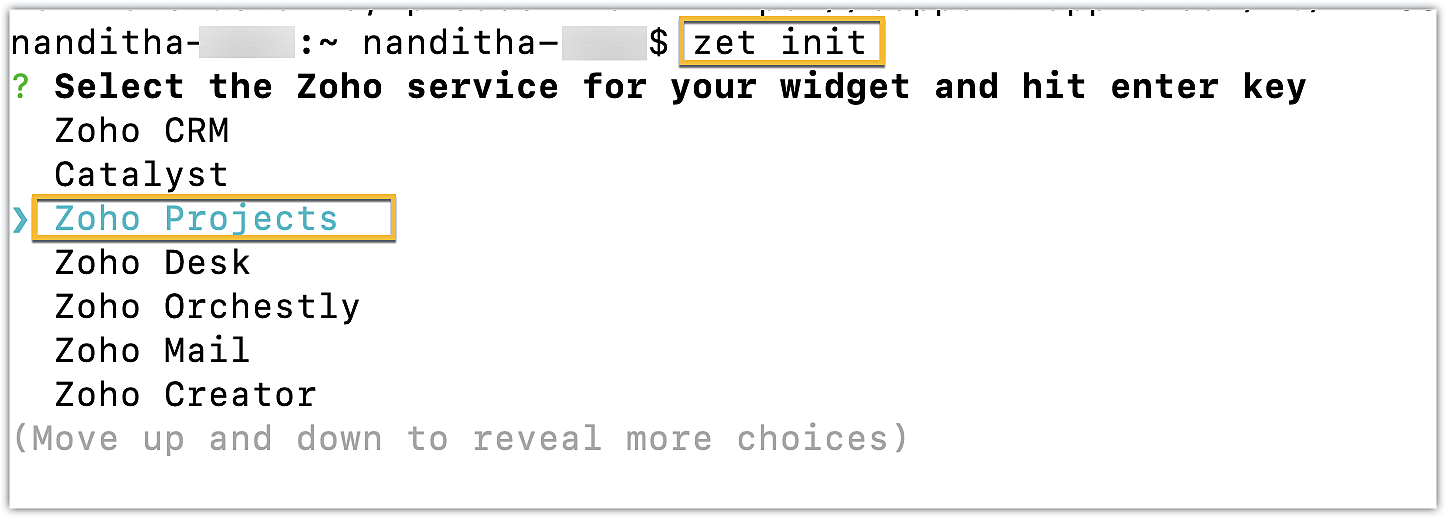
- Enter a name for the extension. An extension with the directory structure required for a sample Zoho Projects extension is created automatically.
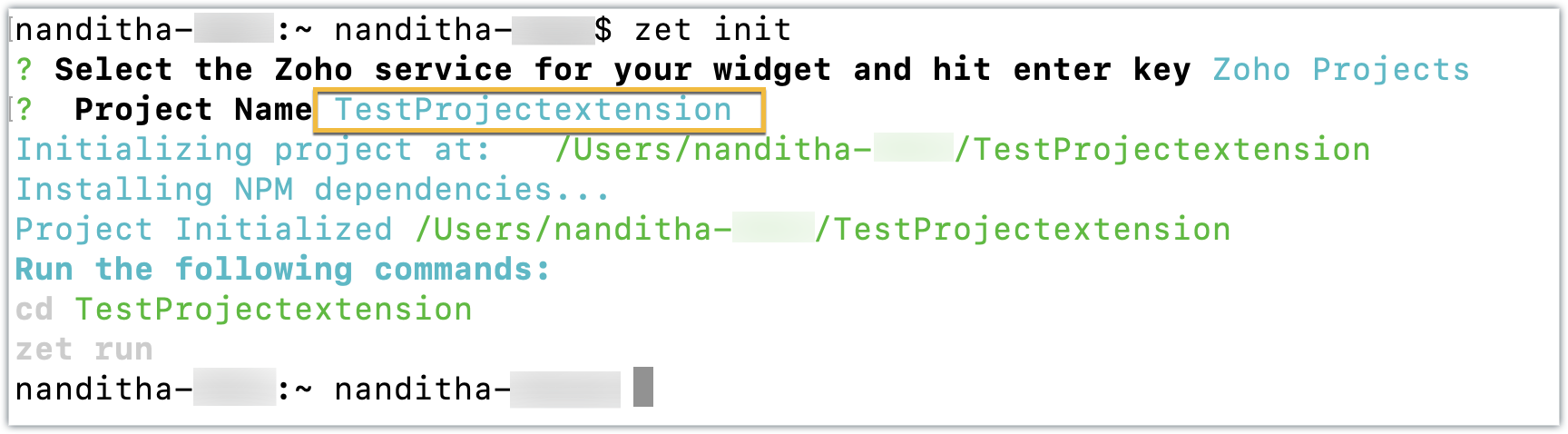
- This directory structure contains an app folder and a plugin-manifest.json file, both of which are similar to those created by the Sigma cloud editor detailed in the last post.
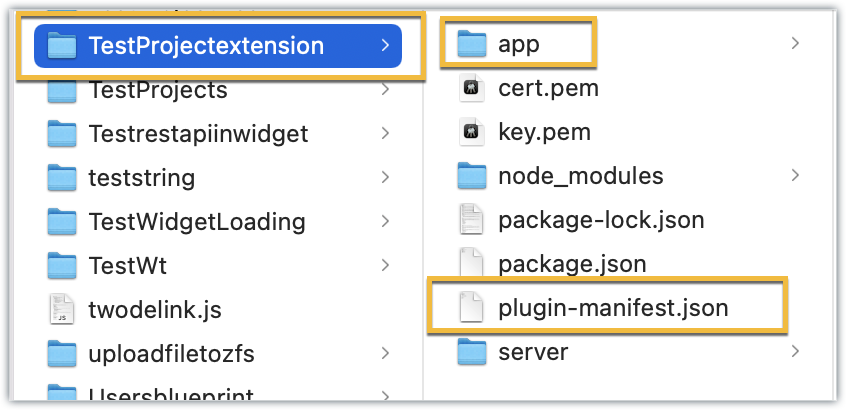
- The app folder can be used to manage all the important resources required for your extension. By default, itincludes an index.html file, which serves as the UI for a sample widget.
- The plugin-manifest.json file helps with extension configuration. It includes a widgets key configured with a default sample widget named, "Projects Extension" in the default location as the task details tab, along with the URL as the location of the index.html file.
Now that the extension project has been created, lets go ahead and test it in the Zoho Projects portal.
Testing an extension project using the CLI
- To test a sample Zoho Projects extension created with the ZET CLI, use the Change Directory command to navigate to the project folder. Then, run the zet run command.
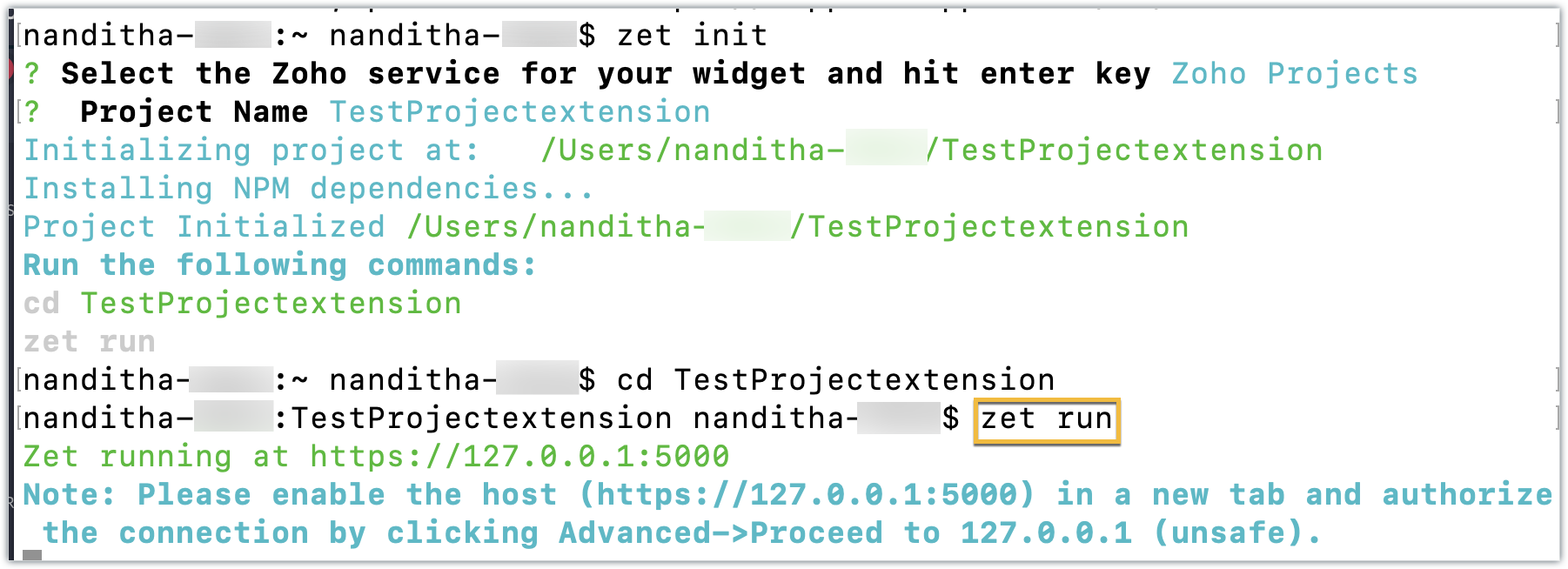
- This command starts a local server and enables you to test your extension locally.
- Now, navigate to your Zoho Projects portal. Click the Setup icon.
- Select Developer Space from the left panel. Click Enable Developer Mode.
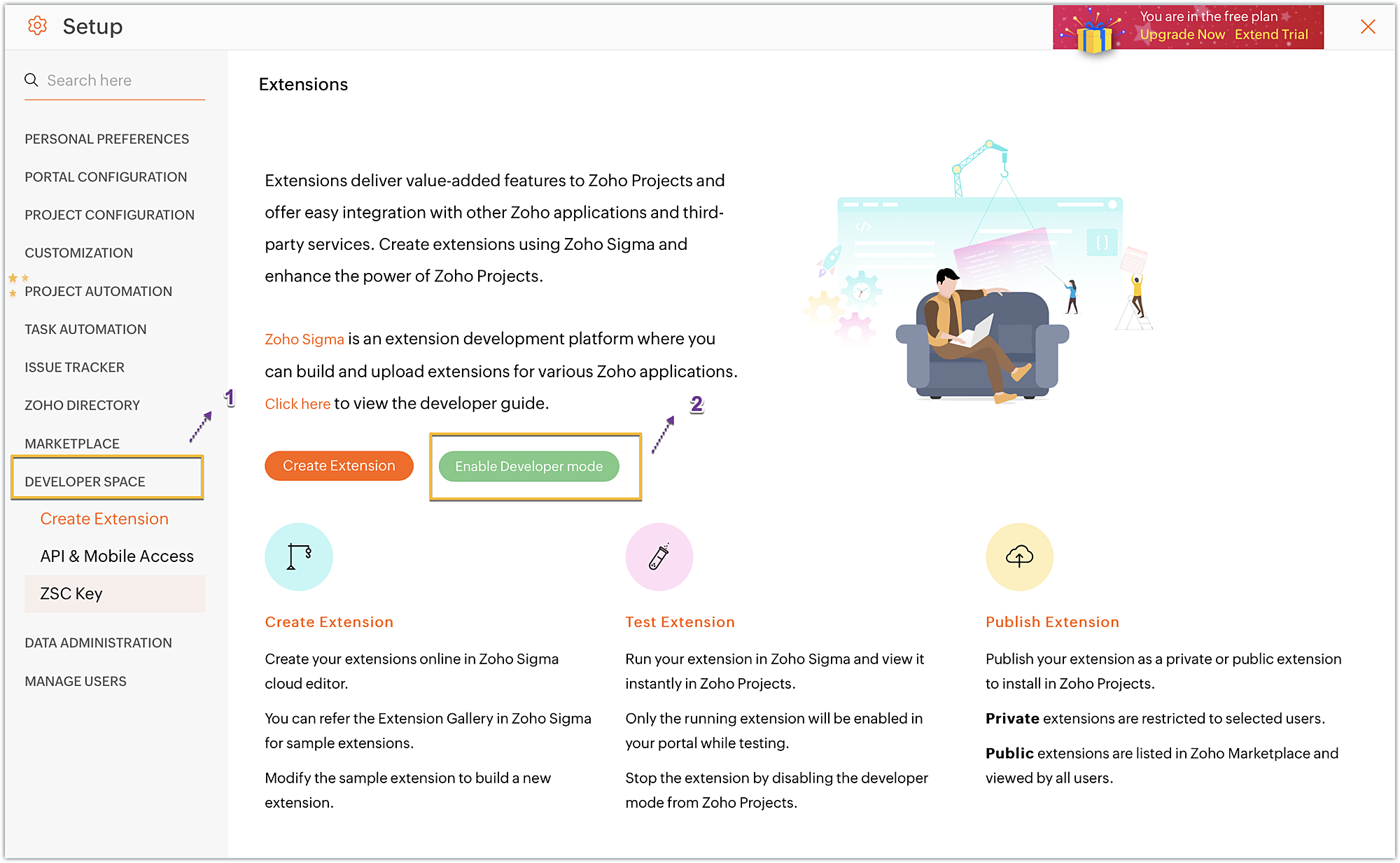
- Developer Mode will be enabled and the page will automatically refresh.
- You may now test your extension functionalities in the Zoho Projects portal.
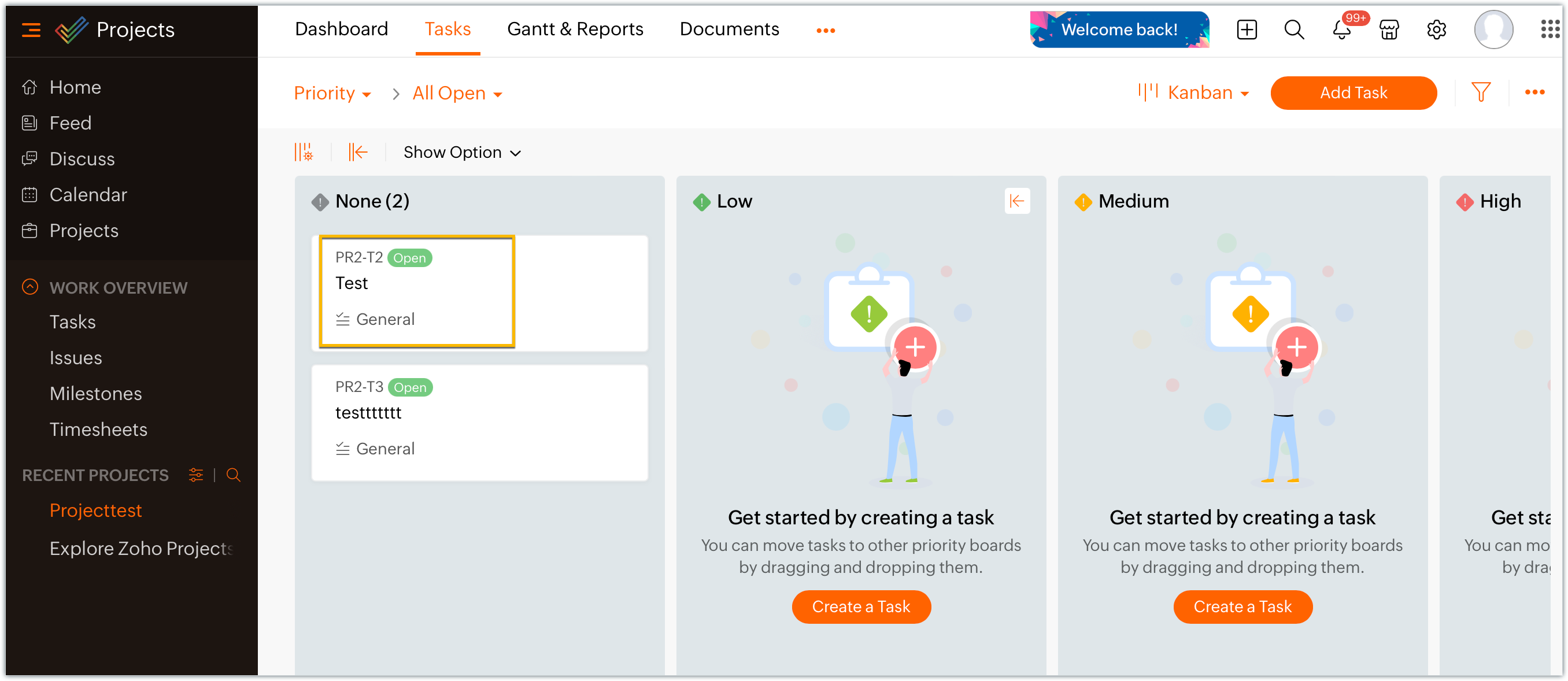
- Since the sample extension had a default widget called, "Projects Extension" configured on the Task Details page, choose and enter a project task in your portal.
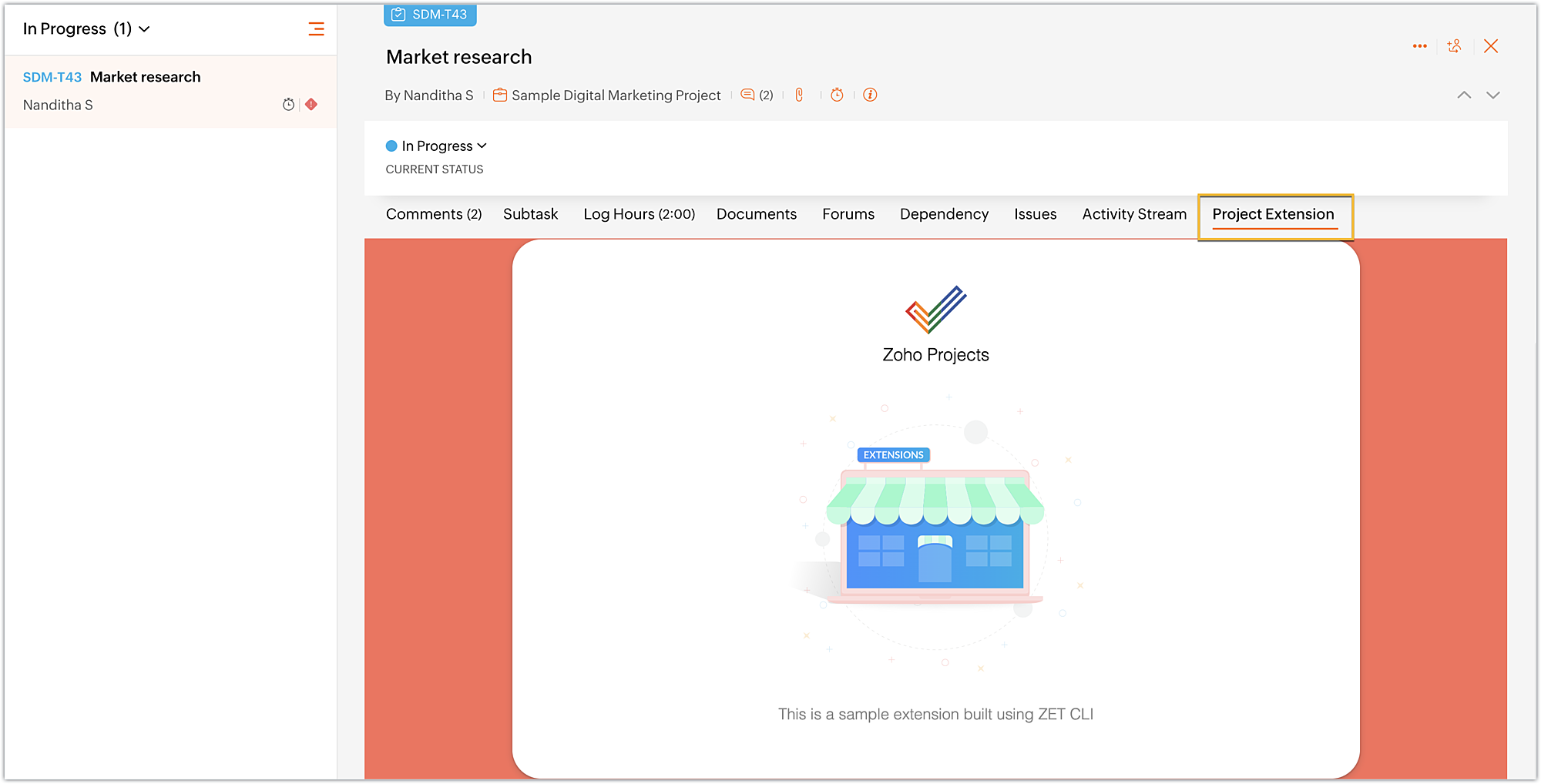
- Click on the Projects Extension tab on the Task Details page, and you will see that the widget has loaded.
- Once you have finished testing your extension's functionality, use the zet pack command. This command adds a dist folder to the directory structure, zips the extension project, and places the zipped file inside the newly created dist folder.
Uploading the zipped file to your Sigma extension
Now that we have created the extension project and tested its functionalities locally, lets go ahead and create an extension in Sigma.
- Log into or sign up for developer.zoho.com. Go to Sigma and access your workspace.
- Once you enter your Sigma workspace, click the New Extension button to build a new extension.
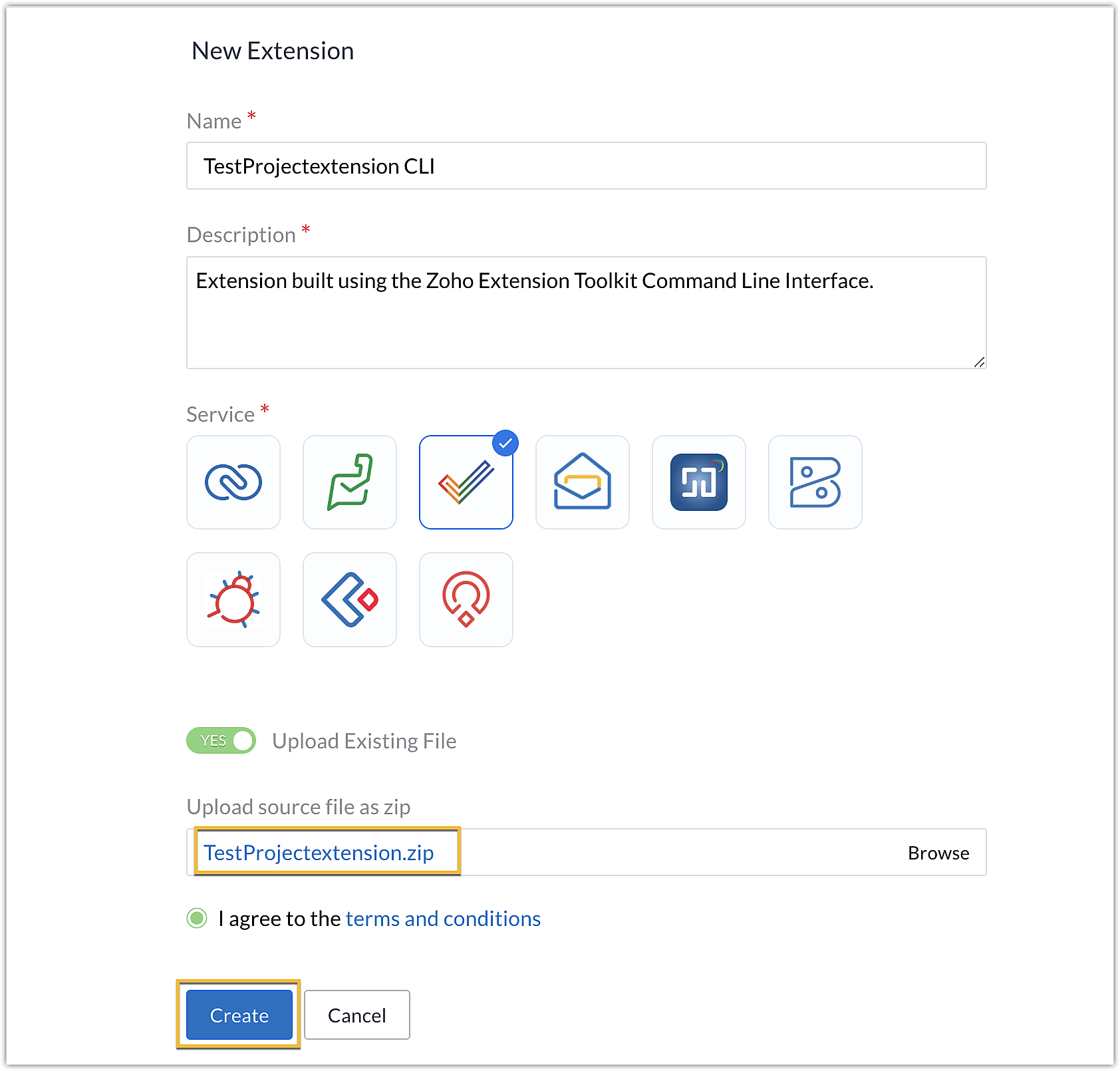
- Enter a name and description for the extension. Choose Zoho Projects for the service.
- Toggle Upload Existing File to Yes.
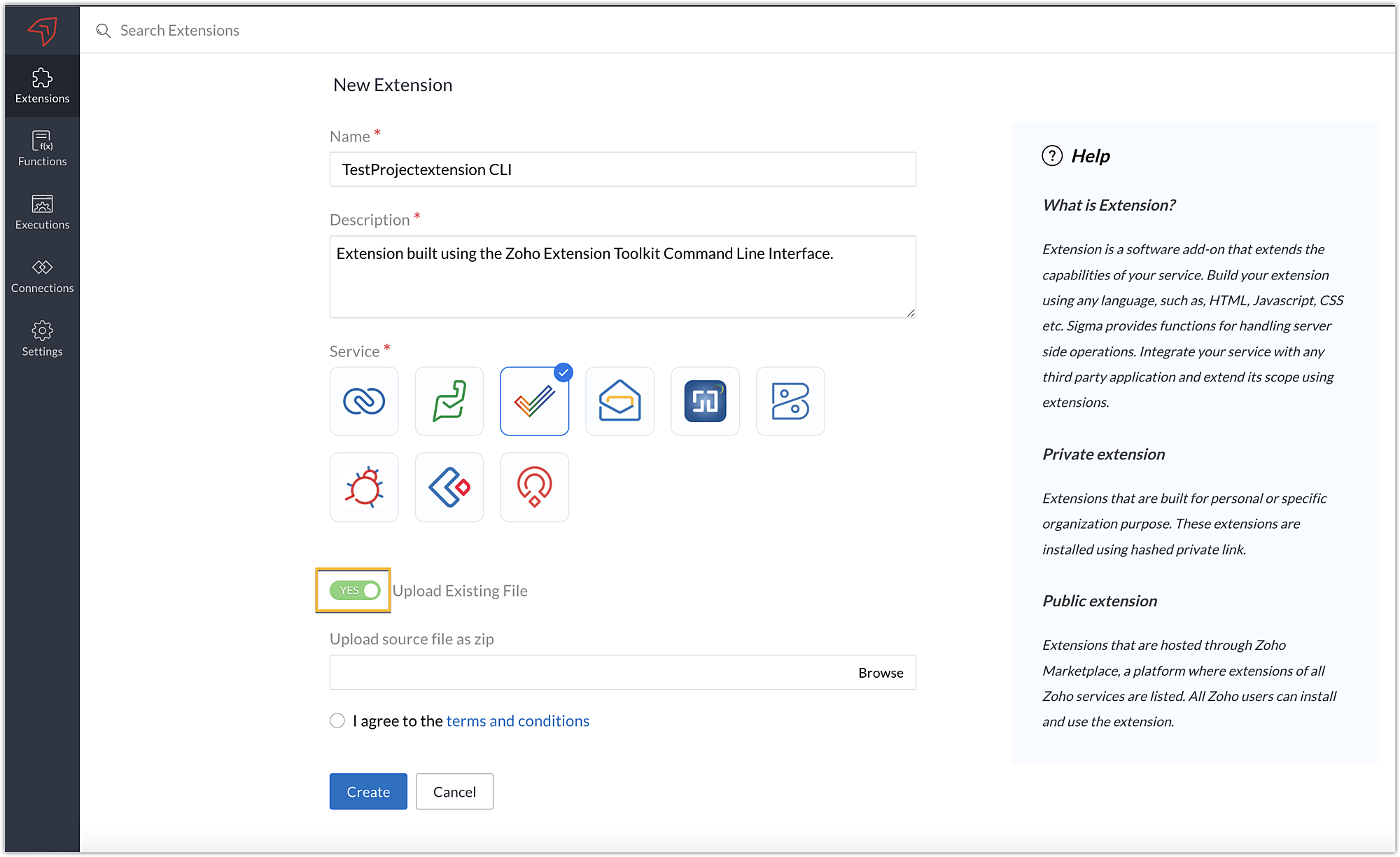
- Click Browse to locate and upload the extension project's zipped file, accept the terms and conditions, and click Create.
- You will be redirected to the cloud editor. The directory structure of your CLI extension project will be automatically populated with the project's contents.
Editing an extension created with the CLI
- You can make edits or changes to your extension code directly from the cloud editor.
- If you wish to make changes to a file or its contents in the directory structure of your CLI extension project, please be sure to pack the extension project again using the zet pack CLI command.
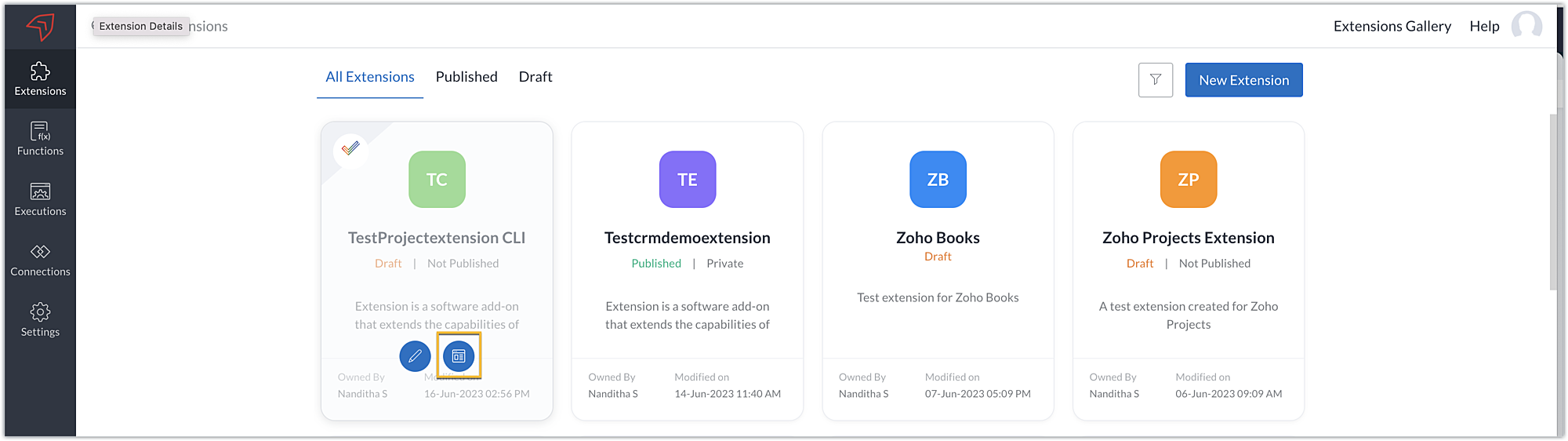
- Go to Sigma. Click the Extension Details icon of the extension you wish to edit.
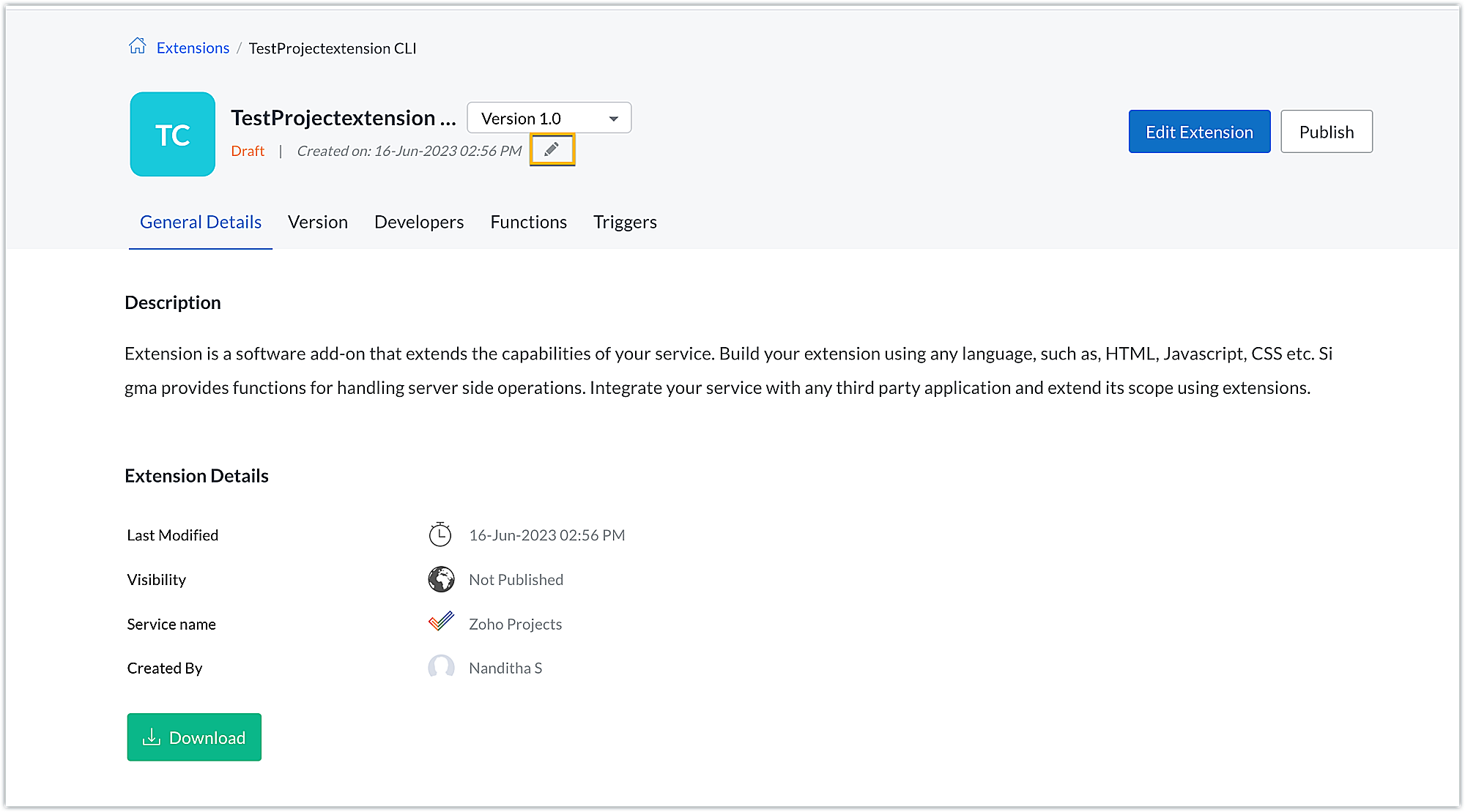
- Click the Edit icon under the extension name.
- Browse for and upload the new zipped file, accept the terms and conditions, and click Update.
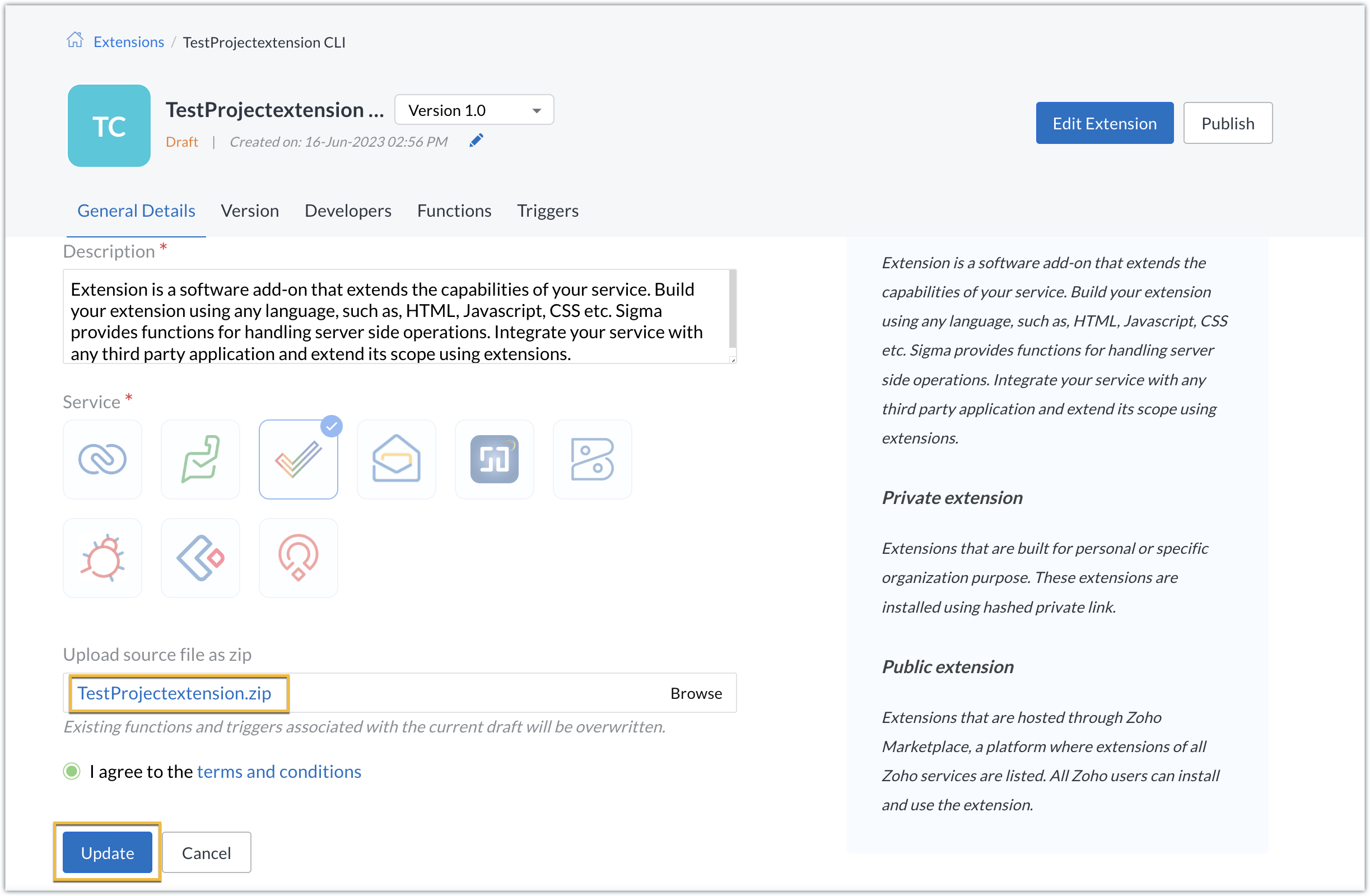
- The extension will be updated to reflect the changes you have made.
In this post, we have covered the process of creating an extension for Zoho Projects through ZET CLI. We hope you found this information useful. Keep following this space for more information!

Sign up for a Zoho Developer account and start developing extensions for Zoho products using Sigma.
SEE ALSO
Topic Participants
Nanditha Somasundaram Somasundaram
Sticky Posts
Building extensions #10: Fetch customized user inputs, store them globally at the app level, and access them across entities
This data storage concept enables you to store data related to your extension for both entity properties and extension properties. In our previous piece, we looked at how to store data for entities using entity properties. In this post, we'll look atBuilding extensions #9: Store, retrieve, and access entity-specific data in widgets using data storage
Data storage - Overview Storing data related to the extension you are working on is essential. It can be saved as key-value pairs for an entity or extension, known as entity and extension properties, respectively. Data can be saved for the following entitiesBuilding extensions #7: Create custom widgets for a simplified end-user experience
Discover the benefits of using widgets! We explored the significance of widgets, prerequisites, and the availability of JS SDK methods as part of our previous post. In this post, let's go over a detailed example of using widgets along with certain ZohoBuilding extensions #6: Custom user interfaces with Widgets
Welcome to our post on Widgets for Zoho Projects! In our last post, we explored the significance of the connections feature, showed how to use it, and provided an example use case. In this article, we'll look at the importance of widgets, another featureBuilding extensions #5: Integrating applications with Zoho Projects through Connections
In our last post, we discussed the essential features that a Zoho Projects extension can provide. Starting with this post andin every subsequent post going forward, we'll go through each of those features in depth, one by one, with an example use case.
Recent Topics
landed cost-need help with different currency under the same bill
I’m having trouble recording landed costs in Zoho Inventory/Books. My purchase order is in CNY, but the landed cost (freight) I pay is in USD. Zoho forces everything under the same bill to use one currency, so I can’t enter the landed cost in its actualPricing Strategies: #1 Nuances in Pricing
When Clara first opened her digital printing shop, pricing was simple. She sold handmade greeting cards, planners, business cards, and other physical items at fixed label prices, individually and in bulk. One SKU, one price, one bill, and that's all it[Free Webinar] Learning Table Series – Education Management in Zoho Creator
Hello Everyone! We’re excited to invite you to another edition of Learning Table Series, where we showcase how Zoho Creator empowers industries with innovative and automated solutions. About the Learning Table Series The Learning Table Series is a free,Move attachments from one module to another with Deluge
I have created a button that works just like the convert button for my custom modules. I would like this custom function to move any attachments in this record to the new module. I can't seem to find any documentation on how this can be accomplished.Help in function code
Hi, could someone look at the code below and tell me what 's wrong with it? After a deal creation or edition the code should find the related Account, than all open Deals for that Account and copy the field Total_Open_Deals from the Account record toAutomation Series: Auto-update Phase Status
Hello Folks! You can auto-update your phase's status based on status of underlying tasks using custom functions. In this series, we will showcase how to create and run custom functions, using Deluge, with ease. Follow the steps below and automate yourhow to add subform over sigma in the CRM
my new module don't have any subform available any way to add this from sigma or from the crmZoho Projects - Project Details on the Project Menu
Hi Project's team, I've helped may businesses setup and use Zoho Project and one thing I see time and time again is confusion on where to find the Project Details information. I would be much more intuitive if Project Details was on the menu before Dashboard.Zoho Projects - Add Feed to Project Tabs
Hi Projects Team, I'm working on a lightweight communications requirement for one of my customers in relation to communicating with their client users via Zoho Projects. I noticed that the Feed is only available in the Collaboration section, but you canFlow - Fetch info from drop down in another module
I am running into a road block which I thought would be a simple task. My goal - The account is assigned to a "route" which can be selected from a drop down menu and adds a tag to the account accordingly (easy enough). Now when I create a task for thisShow unsubscribed contacts ?
Hello, I would like to display the unsubscribed contacts. Unfortunately, I do not have this subscription type as described in the documentation (https://help.zoho.com/portal/en/kb/marketing-automation-2-0/user-guide/contacts/contact-management/articles/subscription-type-24-1-2024#Subscription_Type_field.)Zoho Developer Community Hackathon 2025 is LIVE!
Hey developers! It’s that time of the year again — the Zoho Developer Community Hackathon 2025 is officially open for registrations! If you’ve been waiting for a chance to stretch your skills, try something new, or finally bring that idea to life, thisConverted Leads Not Showing in Lead Reports
Converted leads are not showing in the Lead reports. How can I make converted leads visible in the report,Text widgets in dashboards
Having a text widget in a dashboard would help immensely. It would allow adding links to related documents, relevant CRM views, etc. It would allow adding explanations of the data displayed in the other widgets, about how to interpret them or about filtering.[Webinar] Zoho Writer for content creators and publishing houses
Managing multiple drafts, edits, and client reviews doesn't have to slow you down. Join our upcoming webinar to see how Zoho Writer helps content creators and publishing houses create, edit, and publish seamlessly—all in one place. You'll learn how to:Adding Reports to Portals
Is there a way to add Reports to portals so only the user can see report templates relevant to them?How to assign one Manual to multiple Spaces?
Hello, I have two spaces, one called tech knowledge and the other one called HR knowledge. I have a manual that is called HR tech. I want to assign this manual to HR knowledge and tech knowledge. How should I do that?Introducing VeriFactu Support in Zoho Books
Hello users, Spain has introduced the VeriFactu system under Real Decreto 1007/2023 to ensure integrity, traceability, and anti-fraud compliance in e-invoicing. Starting January 1, 2026, all B2B invoices must be reported to Agencia Estatal de AdministraciónHow can I assign courses to Spaces?
How can I make courses show up here in this space?:When will Zoho Learn be able to support SCORM files on the mobile app?
When I click the SCORM content, I just get a message saying it's not possible yet. Yet implies that it will be coming soon. All I'm asking for is a realistic timeline so I know whether or not to invest my time in using it. If it will be soon, then I willAnnouncing new features in Trident for Windows (v.1.35.6.0)
Hello Community! Trident for Windows just got better with an update that makes working with your emails even more efficient. Let’s dive into what’s new! Work with PST files more efficiently. You can now do more than just view mounted PST files. You canMarketing Tip #9: Track your traffic sources
Not all marketing channels work equally well. Knowing whether your visitors come from Google, Instagram, or email helps you focus on what actually drives sales. Try this today: Check your Zoho Commerce reports or connect Zoho PageSense to see your topGoogle Analytics import data inaccurate (as of October 11, 2025)
We have Zoho Analytics connected to GA4 to import daily event data. This has been running without issue for a couple of years. However, a month ago we started noticing discrepancies. All data until October 10 lines up perfectly - October 11 onward isPrevent accidental duplicate entry of Customer Ordersome
Zoho Support has confirmed that Zoho currently does not have any method (using Deluge, flow or any other method) to alert a user when a sales order has been entered twice using the same customer reference number (i.e. a duplicate). Most ERP platformsZoho Books | Product updates | November 2025
Hello users, We’ve rolled out new features and enhancements in Zoho Books. From translating email notification templates to the new transaction locking restrictions, explore the updates designed to enhance your bookkeeping experience. Making Tax DigitalInsert Image into Notebook page
Prior to today, I could add images to my notebook pages. Today when I tried to do this I got an error message that said something like, "There's been a problem on our end. Try again later." So, I've tried all the ways I know how, but I can't insert an【開催報告】名古屋 ユーザー交流会 Vol.2 2025/11/21 Zoho Analytics / Inventory で実現する在庫の"未来予測"
ユーザーの皆さま、こんにちは。コミュニティチームの中野です。 11/21(金)に名古屋 ユーザー交流会 を開催しました。 本投稿では、当日実施したセッションの様子及び投影資料をお届けします。 会場にて参加できなかった皆さまも、ぜひご参照ください。 (Zoho 社員セッションの登壇資料については、11/28(金)開催の東京回の開催報告で共有いたします) 今年2回目の開催となる名古屋 ユーザー交流会では、株式会社エンツナクリエイト 野末さんによる Zoho Analytics / InventoryIs there a way to automatically add Secondary Contacts (CCs) when creating a new ticket for specific customers?
Some of our customers want multiple contacts to receive all notifications from our support team. Is there a way to automatically add secondary contacts to a ticket when our support team opens a new ticket and associates it with an account? This wouldImproved RingCentral Integration
We’d like to request an enhancement to the current RingCentral integration with Zoho. RingCentral now automatically generates call transcripts and AI-based call summaries (AI Notes) for each call, which are extremely helpful for support and sales teams.Edit Pinned Comments in Zoho Desk
It's great that private comments can now be pinned to the top of the ticket but what would be extremely helpful would be to allow for the pinned comment to be edited vs. having to find the comment in the ticket to edit it.Updating Secondary Contact (CCs)
We use Zoho Forms to capture the user request and integrated with Zoho Desk to raise tickets. Active Microsoft login is captured in our Zoho forms and registered as Primary contact in Zoho desk ticket. We also an have an option to raise ticket on behalfblank page after login
blank page after logging into my email account Thanks youWriterTh
After every space Writer goes to capital letters mode in my Android tablet. The cap mode stays till the second letter is typed in the word then it comes to normal mode.Zoho writer unable to merge documents to PDF with basic fonts in Hebrew or fonts from my computer
I created several forms that will be merged into PDF files through Zoho Writer and I am unable to receive the PDF in the basic fonts of the Hebrew language or in the fonts I have on my computer. The writer exports to PDF an exchange font that looks veryI have already created some Bots, Commands, and Widgets in Cliq, but I am still not seeing the “Create Extension” option in my account. Could you please help me enable or access this option?
Infinite loop of account verification
Hi I can't do anything on my zoho account. I always get this message Hi Sheriffo Ceesay As a security measure, you need to link your phone number with this account and verify it to proceed further. When ever I supply the details, it displays that the number is associated with another account. I don't have any other account on zoho so this is really annoying.How we cut CRM updates from ~20 minutes down to 2, our real workflow
Updating the Zoho CRM after every call used to be one of the biggest time sucks for our team. By the time you write your notes, clean them up, fill in the fields, and log everything properly… you’ve easily lost 15–20 minutes per call. We started experimentingArattai App Features Update
1. Offline Messaging & Sync Enable users to compose messages without internet and deliver them automatically via peer-to-peer methods (Bluetooth/WiFi Direct) when nearby users are available. This would be a game-changer for rural India with unreliableHow to add Product Add-Ons, Mandatory Forms, and Auto-Save Address in Zoho Commerce
Hi all, I need help setting up several behaviors in Zoho Commerce. I can’t find the correct configuration options, so I want to confirm whether these are supported or if there is a workaround. 1. Product-Specific Add-Ons (Example: GWB Subscription) WhenZohomail
Im trying to setup email address zohoNext Page