Kaizen #194 : Trigger Client Script via Custom buttons

Kaizen #194 : Trigger Client Script via Custom buttons


Hello everyone!

Welcome back to another interesting and useful Kaizen post.

We know that Client Scripts can be triggered with Canvas buttons and we discussed this with a use case in Kaizen#180. Today, let us discuss how to trigger Client Script when a Custom Button is clicked. Using this, you can execute Client Script when a custom button is clicked.

In this post,


1. Event Details 
2. Supported Pages
3. Use Case - Export Subform Rows to Zoho Sheet in a Single Click!
4. Solution
5. Summary
6. Related Links


Client Script support for Custom Buttons opens up possibilities for automation, personalization, and enhanced user interactions in Zoho CRM when a custom button is clicked.
Here is a detailed walkthrough to help you understand it better.

1. Event Details 

The Button event triggers the Client Script when a custom button is clicked. Each time this event is invoked, the context argument is passed to the Client Script. The context contains information about the page from which the button was clicked.
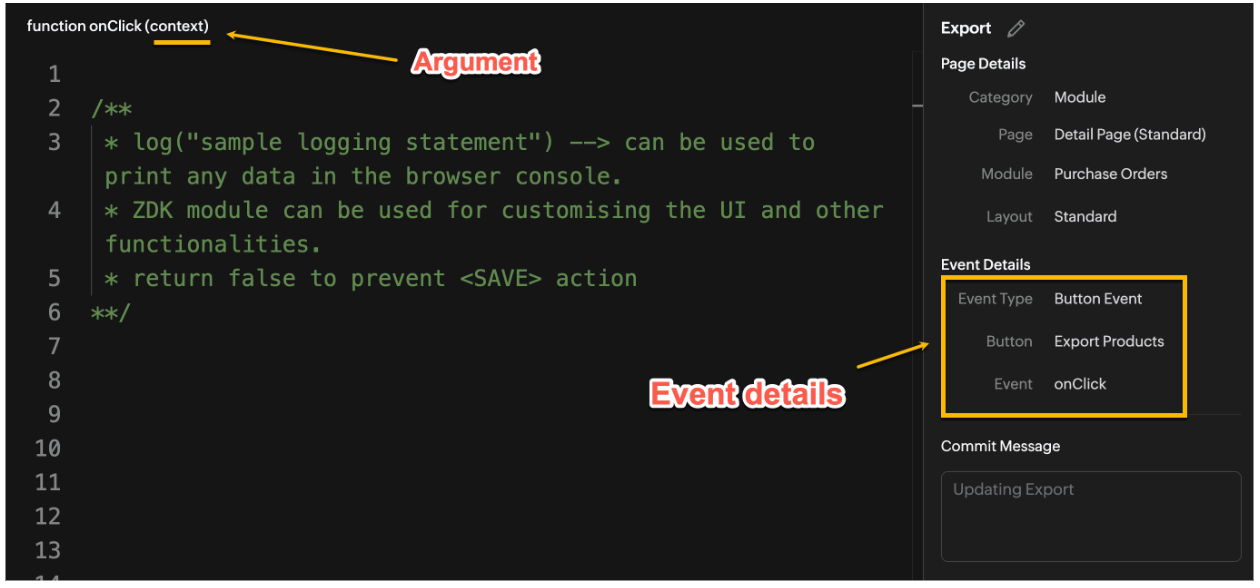

Click here to know more about Client Script Events.

2. Supported Pages

A Custom Button can be placed in different positions based on the Page.
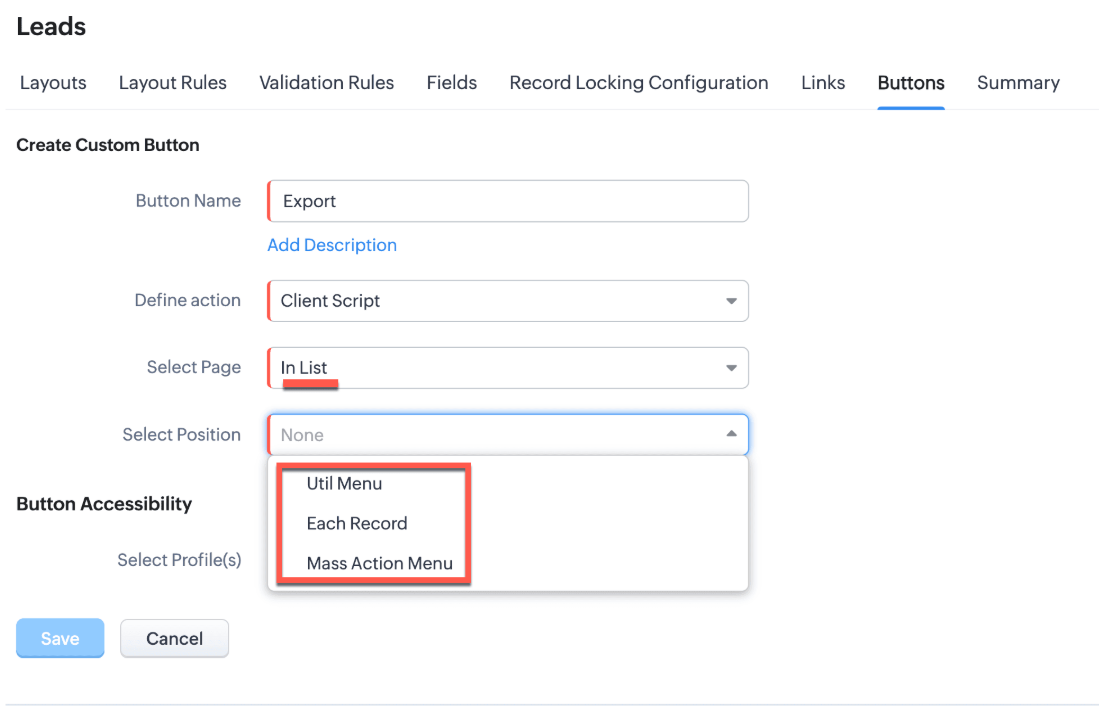

You can add a  custom button in the Util Menu, in Each Record or in the Mass Action Menu of the List Page.
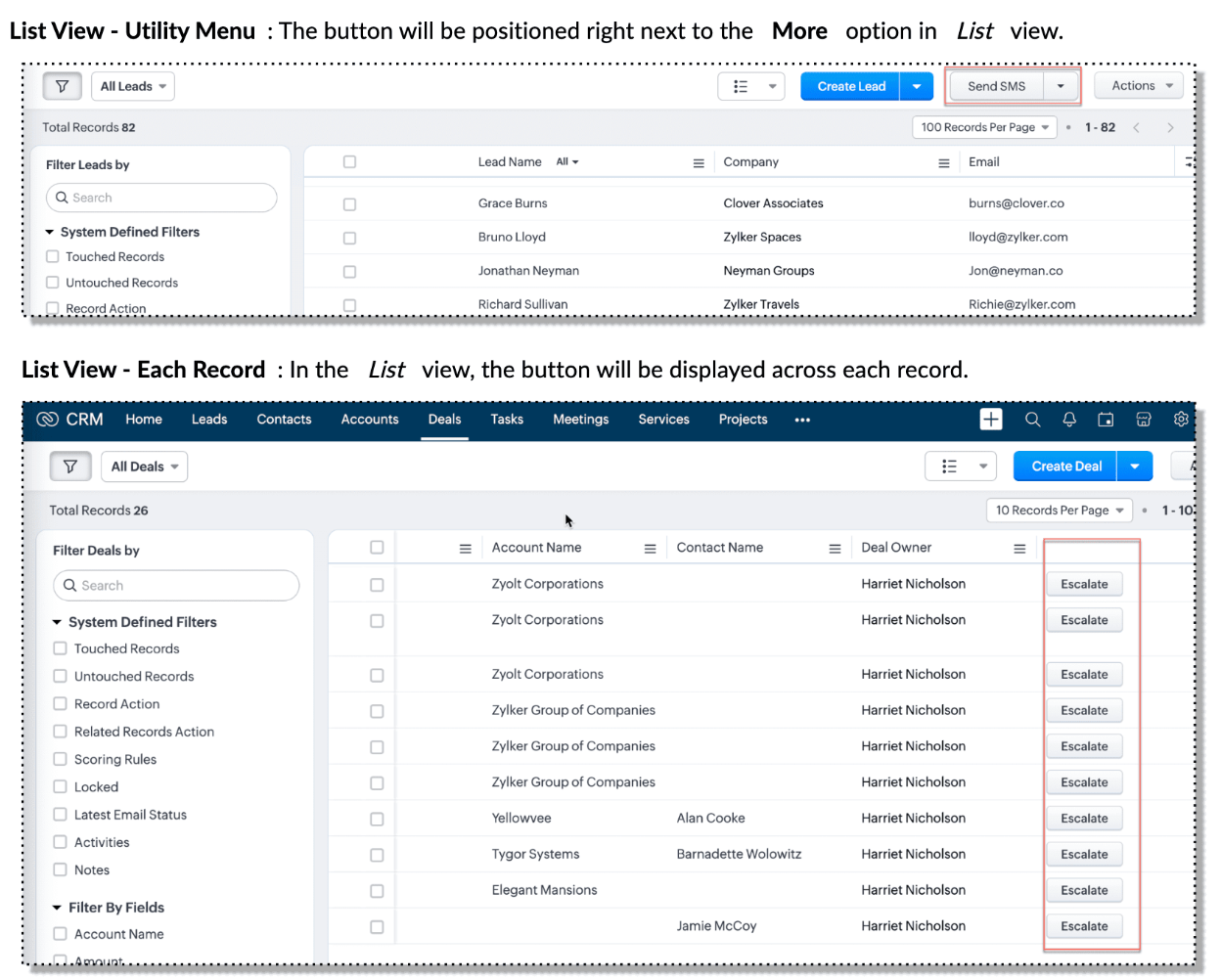

Also, a Detail Page can have a custom button either In Record or in the Related List. Click here for more details about the different possible positions of a custom button.

The following table lists the supported pages and the corresponding context argument, which provides different details based on the page type.


To create a Client Script and make it trigger when a custom button is clicked, first create a Custom button and associate it with a Client Script as shown in the following image.


 Click here to view the steps to create a custom button and configure a Client Script. 

Note:

You can configure the Client Script only from the Buttons page to trigger it when a user clicks a custom button, and not the usual way of Creating Client Script via setup page. Once a script is created, it can be edited and updated from the Client Script setup page

3. Use Case - Export Subform Rows to Zoho Sheet in a Single Click!

Zylker manufactures medical instruments, and its sales representatives frequently need to share bulk order details with distributors and hospital partners using Zoho Sheets. These details such as product names, quantities, and prices are captured in a Subform on the Purchase Order Detail(Standard) Page.
To simplify this, the admin wants to add a custom button called "Export Products" on the Purchase Order Detail Page. When clicked, it should export the Purchase Items from the Subform and move the content to the specified sheet.

4. Solution

To export subform rows to Zoho Sheet with a single click, you can add a custom button to the Detail Page of the record. When clicked, a Client Script will be triggered to fetch the subform data from the Detail Page and pass it to a Function that uses zoho.sheet.createRecords() to insert data into Zoho Sheet.

Here’s how to implement this:

  • Add  “Export Products” custom button on the Detail Page.
  • Add the script to collect subform rows which invokes the Function.
  • Write a Function to create entry in Zoho Sheets  

A. Add “Export Products” custom button on the Detail Page.

  • Go to Setup → Modules and Fields under Customization.
  • Select a Module as Purchase Order.
  • Click on Buttons → Then click + New Button.
  • Enter Button Name and select Action Type as "Client Script"
  • Choose Button Position and Layout details as shown in the following image.
  • Click Create in Configured Client Script, enter the script, and click Add.
  • Select the profiles for which these buttons should be visible.
  • Click Save.


B. Add the Script to collect subform rows and invoke the Function

Use the following Client Script when you configure the custom button.

  1. var casesheetid = ZDK.Client.getInput([{ type: 'text', label: 'Enter the Sheet ID' }], 'Sheet details', 'OK', 'Cancel');
  2. if (casesheetid == null) {
  3.         ZDK.Client.showAlert("Enter the *Case Sheet ID - Import* to import data");
  4.  }
  5. var purchase_items = ZDK.Page.getField('Purchase_items).getValue();
  6. ZDK.Client.showLoader({type: 'page', template:'spinner', message: 'Export in progress, please wait'});
  7. var c=1;
  8. if (sheetid == null) {
  9.     ZDK.Client.hideLoader(); 
  10.     ZDK.Client.showAlert("Enter the *Case Sheet - Export* ID to export data");
  11. }
  12. purchase_items.forEach((r,i) => {
  13.             try {
  14.                resp = ZDK.Apps.CRM.Functions.execute("csvWrite", { "Product_Name": r.Product_Name.name, "List_Price": r.List_Price, "Discount": r.Discount, "Total": r.Total,"Sheetid":casesheetid }); }
  15.             catch (error) {
  16.                 c = 0;
  17.                  ZDK.Client.hideLoader(); 
  18.                 ZDK.Client.showAlert("Unexpected issue occured while adding data in row number "); }
  19.     });
  20.     ZDK.Client.hideLoader(); 
  21.     if (c) {
  22.         ZDK.Client.showMessage("Export completed. Please check the Sheet");
  23.     }
  24.     else
  25.     {
  26.        ZDK.Client.showMessage("Unexpected error "); }}

In this code, several ZDKs are used for various purposes. Click on the ZDK hyperlinks to learn more.


Note

The Client Script you intend to link with the button will be saved only after the custom button is saved.

C. Write a Function to create entry in Zoho Sheets 

  • Go to Setup > Developer Hub > Functions.
  • In the Functions page, click + Create New Function.
  • Choose the category as Button.
  • Click Create.
  • In the Create Function page, enter a name as csvWrite and description for your function.
  • Enter the following function code and click Save.
  1. string standalone.csvWrite(String product,String qty,String up,String amt, String Sheetid){
  2. queryData = Map();
  3. writeData = Map();
  4. header = Map();
  5. writeData.put("Product",product);
  6. writeData.put("Quantity",qty);
  7. writeData.put("Unit_Price",up);
  8. writeData.put("Amount",amt);
  9. SheetData = zoho.sheet.createRecords("Sheetid","Sheet1",writeData,queryData,"sheetconnection");
  10. return SheetData;
  11. }

Click here to know more about zoho.sheet.createRecords().

In the code above:
  • sheetconnection refers to the name of the Zoho Sheet connection, which must have the scopes: ZohoSheet.dataAPI.UPDATE and ZohoSheet.dataAPI.READ.
  • Click here to know how to create a Connection with the required scopes.
  • sheetid is the unique identifier of the Zoho Sheet, available in the sheet’s URL.
  • Sheet1 represents the name of the worksheet (i.e., the tab name shown at the bottom of the Zoho Sheet).
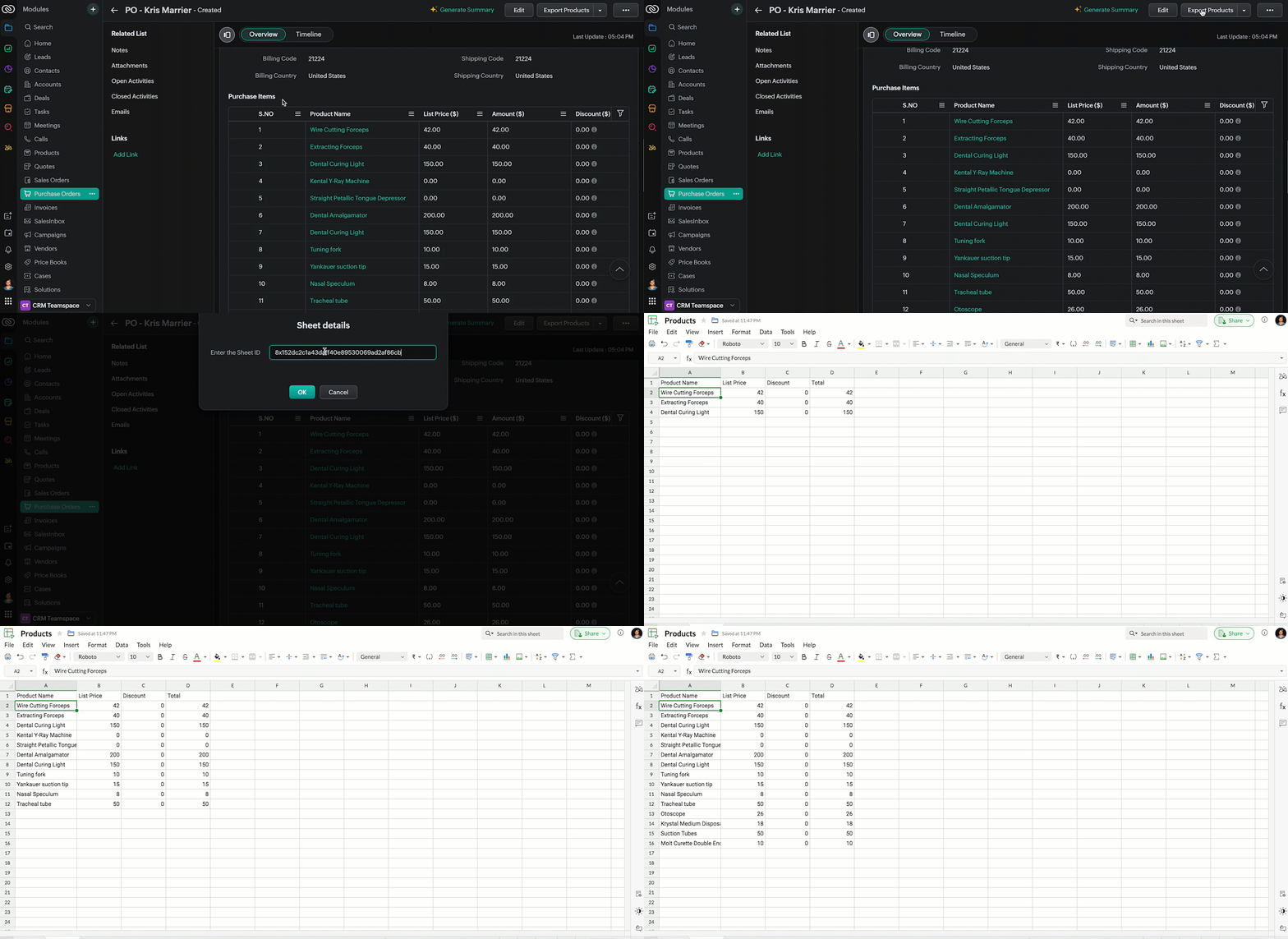
  • Now, when the custom button is clicked, the Client Script is triggered. It prompts for the Sheet ID, fetches the contents of the Purchase Order subform, and invokes a function that writes the content to the Sheet.
Here's how the Client Script works.


5. Summary

In this post we have seen,
  • What is a Button event?
  • How to configure Client Script for a custom button
  • How to write data into Zoho Sheets from Client Script
  • How to create a Function and call it from Client Script

6. Related Links


We are thrilled to be nearing the 200th post in our Kaizen series. As we approach this exciting milestone, we would love to hear from you. Do you have any questions, suggestions, or topics you would like us to cover in future posts? Your input helps us improve and shape the series to serve you better.

Please take a moment to share your thoughts using ✨ this form 

We hope you found this post useful!

Happy Client Scripting! 😊
    • Sticky Posts

    • Kaizen #198: Using Client Script for Custom Validation in Blueprint

      Nearing 200th Kaizen Post – 1 More to the Big Two-Oh-Oh! Do you have any questions, suggestions, or topics you would like us to cover in future posts? Your insights and suggestions help us shape future content and make this series better for everyone.
    • Kaizen #226: Using ZRC in Client Script

      Hello everyone! Welcome to another week of Kaizen. In today's post, lets see what is ZRC (Zoho Request Client) and how we can use ZRC methods in Client Script to get inputs from a Salesperson and update the Lead status with a single button click. In this
    • Kaizen #222 - Client Script Support for Notes Related List

      Hello everyone! Welcome to another week of Kaizen. The final Kaizen post of the year 2025 is here! With the new Client Script support for the Notes Related List, you can validate, enrich, and manage notes across modules. In this post, we’ll explore how
    • Kaizen #217 - Actions APIs : Tasks

      Welcome to another week of Kaizen! In last week's post we discussed Email Notifications APIs which act as the link between your Workflow automations and you. We have discussed how Zylker Cloud Services uses Email Notifications API in their custom dashboard.
    • Kaizen #216 - Actions APIs : Email Notifications

      Welcome to another week of Kaizen! For the last three weeks, we have been discussing Zylker's workflows. We successfully updated a dormant workflow, built a new one from the ground up and more. But our work is not finished—these automated processes are
    • Recent Topics

    • SalesIQ : How to disable "Idle chat handling" ?

      Hello SalesIQ Team. SalesIQ, How to disable "Idle chat handling" ? I would like to disable the option “Automatically close chats that have been idle for a specified amount of time.”
    • Zoho Webinar - Sharing System Audio (NOT AVAILABLE)

      Hi, We are having a serious problem with Zoho Webinar. In the webinars we run, we very often share the audio from a video we are streaming directly from YouTube or other applications. Until recently we were using Zoom, but as we use other Zoho applications
    • Customising Outcome drop down

      Is it possible to customize the drop down list for appointment outcomes?
    • Automate Backups

      This is a feature request. Consider adding an auto backup feature. Where when you turn it on, it will auto backup on the 15-day schedule. For additional consideration, allow for the export of module data via API calls. Thank you for your consideration.
    • Partial payments for retainer invoices

      When a customer does not pay the entire retainer invoice there is no way to apply a partial payment. PLEASE add this function.
    • Custom Display Field for Lookup Dropdowns in Zoho CRM

      Could Zoho CRM support changing the display field in lookup dropdowns, like Zoho Creator does? This would make it much easier to select the right record by showing a more useful field instead of only the default one. It would improve speed, clarity, and
    • Create custom field in multiple modules

      I am trying to create some custom fields that will be in both leads and contacts module without having to create them separately and then mapping them. How is that performed? it is too time-consuming to create 20+ fields and then do the same thing in a different module when they carry the same info. The idea is that when we get a lead from web site, there are items that we capture and once that lead is a client and moved to Contacts, that info should come over. So trying to find an easy way to create
    • Add Specific Identification as an Inventory Costing Method

      --- Business Context We are a security systems distributor handling high-value, serialized products such as IP cameras, NVRs, and RAID storage systems. Each unit is uniquely identified by a serial number and arrives in separate shipments at varying purchase
    • Creator Portal Page Customization Issues

      I have been using Creator to make Portals recently. Yesterday, I created a new portal and noticed that the page customization editor ("Open Builder") was different. Using the new page builder, I was able to customize and add an image to the various sign
    • Zoho Books - Budget Creation and Reporting Tags

      Is there a way to create one budget for multiple reporting tags. For example, if my company has 4 different divisions I would like to be able to enter in what the budgeted revenue for each division is and view that information in 1 budget. I would then
    • Razorpay + Zoho Billing + Zoho Books Integration

      Please help us set up this integration.
    • Why is Approval Hierarchy Not Available for the Expenses Module in Zoho Books?

      Hello, I noticed that Zoho Books allows us to configure approval workflows and approval hierarchies for modules such as Bills, Vendor Credits, and Invoices. However, the same approval hierarchy option does not seem to be available for the Expenses module.
    • Zoho Mail Android app update - Traditional Chinese language and contact nickname support

      Hello everyone! The Zoho Mail Android app now includes support for the Traditional Chinese language. You can change the language to Chinese (Traditional) from the Settings module of the Zoho Mail app. You can also view the nickname of the contacts within
    • Get Cliq Meetings in my O365 calendar

      Hi, we are currently evaluating to replace the Teams Messaging and Meetings with Cliq. We currently still have all our email and calendars in O365. What i want to achieve is, to create a (ZOHO) meeting from Cliq and have this meeting added to my Outlook/O365
    • Latest update in Zoho Meeting | On-demand webinars

      Hello everyone, We’re excited to introduce our new on-demand webinar feature, you can now provide pre-recorded sessions that your audience can access immediately, no need to wait for scheduled sessions. Benefits of On-demand webinars : Scheduling flexibility
    • Replicating Zoho Books "Accounts" and "Accrual Transactions" in Analytics via API: Best Endpoint Strategy?

      Hi everyone, I am working on a custom integration where I need to programmatically replicate two specific tables in Zoho Analytics via API on an hourly schedule: Accounts and Accrual Transactions. Those two tables sync from Zoho Books. (Note: I am aware
    • Terms & Conditions

      I have defined Terms & Conditions in the invoice setting and have set %TermsAndCondition% where I want it to appear but nothing shows up in that area. Is this something we have to define per invoice or can we have a global variable?
    • Subform edits don't appear in parent record timeline?

      Is it possible to have subform edits (like add row/delete row) appear in the Timeline for parent records? A user can edit a record, only edit the subform, and it doesn't appear in the timeline. Is there a workaround or way that we can show when a user
    • On-prem version of Zoho Desk

      Is there an on-prem version of Zoho Desk available for enterprise customers if we have additional aspects of security that aren't covered with current legal and data security terms?
    • SPAM Filter cleanup

      I was under the impression that the SPAM filter would automatically clear itself, however re-reading the message it says: What does this mean? How often does this get emptied automatically?
    • Hyphen in domain names

      I am facing problems while hard-coding an email address with a - in the domain name. I get the error Lexical error at line 4, column 24. Encountered: "@" (64), after : "" I recall that Zoho Domains also had an issue with hyphens and I think the issue with the sendmail api is the same. Could this be fixed?
    • Latest updates in Zoho Meeting | Breakout rooms and End to end encryption

      Hello everyone, We’re excited to share a few updates for Zoho Meeting. Here's what we've been working on lately: Introducing Breakout Rooms for enhanced collaboration in your online meetings and End-to-end encryption to ensure that the data is encrypted
    • Latest updates in Zoho Meeting | New End of session notification to remind everyone about the session end time

      Hello everyone, We’re excited to share a new feature for Zoho Meeting ; End of session notification. With this new setting, you can choose to remind all participants or only the host about the scheduled end time of a meeting. You can also choose when
    • #9 Win the Job First

      For many businesses, the first document that goes out isn't an invoice. It's a document that creates ample space to negotiate, discuss requirements, align expectations, and ultimately win the deal. The whole of the business world calls it a Quote or,
    • Add Video link to interview record

      Hi Team, we are having team members consistently go to the interview record to find the link for their upcoming meeting and have been confused that they have not been able to find them. When the interview is created can you please upload the link to the
    • How Can AI Agents Improve E-commerce Operations Efficiency?

      I’ve been thinking about this question recently: as e-commerce operations become more complex, can we use AI Agents to improve daily efficiency? Many e-commerce teams need to handle product management, order follow-up, inventory checks, customer replies,
    • Is it possible to create a meeting in Zoho Crm which automatically creates a Google Meet link?

      We are using Google's own "Zoho CRM for Google" integration and also Zoho's "Google Apps Sync" tools, but none of them provide us with the ability to create a meeting in Zoho CRM that then adds a Google Meet link into the meeting. Is this something that
    • Export Zoho Books Invoice - PDF API

      How to Download Zoho Books PDF Files Using Zoho Books API -------------------------------------------------------------------------------------- Hello everyone! If you are looking for a way to download Zoho Books PDF files using the Zoho Books API, you've
    • Marketing Automation/Campaigns confusion questions and integrations

      ​I am pulling my hair out yet AGAIN due to the lack of true integration between zoho apps - Why can't we use Campaigns and Marketing Automation at the same time? if they are truely seperate apps, then we should be able to use both for what they were intended,
    • Tip #75- Exploring Technician Console: Power Options- 'Insider Insights'

      Hello Zoho Assist Community! Welcome to the very first community post of June, and we are kicking things off with a feature that gives technicians complete control over a remote machine without ever leaving their session: Power Options. What are Power
    • Windows agent 2026_M07 release notes

      Agent Version: 2026.4.15.0 Release date: 1 June, 2026 Issue fix: Streamlined overall process flow and fixed bugs that delayed or prevented proper functioning of Task Scheduler feature. Enhancements to Multi Monitor view under varying network load scenarios.
    • Show Categories Directly When Clicking the Knowledge Base Button in SalesIQ Chat Widget

      Hi Zoho SalesIQ Team, I would like to submit a feature request regarding the behavior of the Knowledge Base button in the SalesIQ chat widget. Current Behavior: When a visitor clicks the Knowledge Base (KB) button in the chat widget, they are first taken
    • What is MCP and How Does It Connect to Zoho Invoice?

      If you've ever wished you could just tell your invoicing software what to do, without clicking through menus, pulling up reports manually, or switching tabs every five minutes, that's exactly what the Zoho MCP server is built for. MCP stands for Model
    • Facebook won't connect

      Good morning, Whilst I'm sure its something I've done wrong along the line I'm trying to connect a Facebook account to Zoho Social Upon entering the username and password the 'Connect Facebook' button appears to do some work then stops without any connection being established I've checked the business integrations on Facebook and Zoho is not appearing at all Can you help me with this at all? Kind Regards Daniel Evans Home Inventories
    • Empowered Custom Views: Cross-Module Criteria Now Supported in Zoho CRM

      Hello everyone, We’re excited to introduce cross-module criteria support in custom views! Custom views provide personalized perspectives on your data and that you can save for future use. You can share these views with all users or specific individuals
    • How to publish Zoho form

      I have created zoho form with various fields. I now want to publish the same and share the link so that I can start collecting response. Please guide me for the same.
    • Cliq iOS can't see shared screen

      Hello, I had this morning a video call with a colleague. She is using Cliq Desktop MacOS and wanted to share her screen with me. I'm on iPad. I noticed, while she shared her screen, I could only see her video, but not the shared screen... Does Cliq iOS is able to display shared screen, or is it somewhere else to be found ? Regards
    • Tabular View Report | Scale To Fit Screen

      Please add the option to scale Tabular View reports to fit the screen. I constantly have to adjust the column size of Tabular View reports to fit various screen sizes and it just looks messy. You can see in the screenshot below there is a blank gap after
    • What's New in Zoho POS - May 2026

      Hello everyone, Welcome to Zoho POS’s monthly update, where we share our latest feature updates, enhancements, events, and more. Let’s take a look at how May went. Introducing the new Settings page with enhanced search The Settings page has been revamped
    • Mapbox map embed in Zoho webpage

      The mapbox map is not showing in Zoho webpage. the code was running fine other webpage.
    • Next Page