Kaizen #194 : Trigger Client Script via Custom buttons

Kaizen #194 : Trigger Client Script via Custom buttons


Hello everyone!

Welcome back to another interesting and useful Kaizen post.

We know that Client Scripts can be triggered with Canvas buttons and we discussed this with a use case in Kaizen#180. Today, let us discuss how to trigger Client Script when a Custom Button is clicked. Using this, you can execute Client Script when a custom button is clicked.

In this post,


1. Event Details 
2. Supported Pages
3. Use Case - Export Subform Rows to Zoho Sheet in a Single Click!
4. Solution
5. Summary
6. Related Links


Client Script support for Custom Buttons opens up possibilities for automation, personalization, and enhanced user interactions in Zoho CRM when a custom button is clicked.
Here is a detailed walkthrough to help you understand it better.

1. Event Details 

The Button event triggers the Client Script when a custom button is clicked. Each time this event is invoked, the context argument is passed to the Client Script. The context contains information about the page from which the button was clicked.
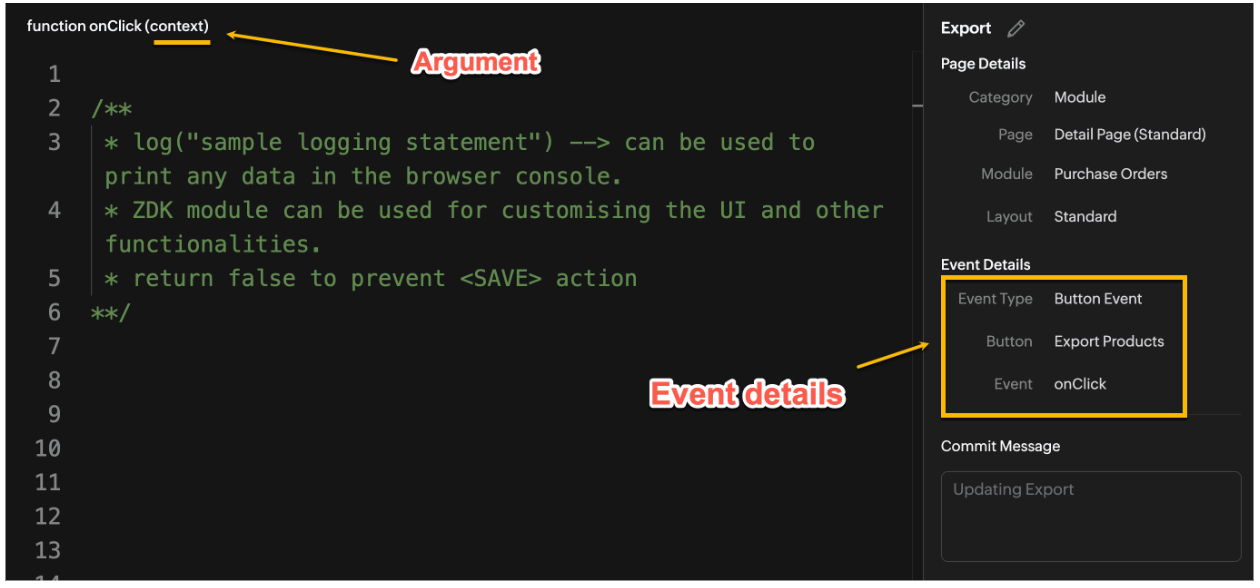

Click here to know more about Client Script Events.

2. Supported Pages

A Custom Button can be placed in different positions based on the Page.
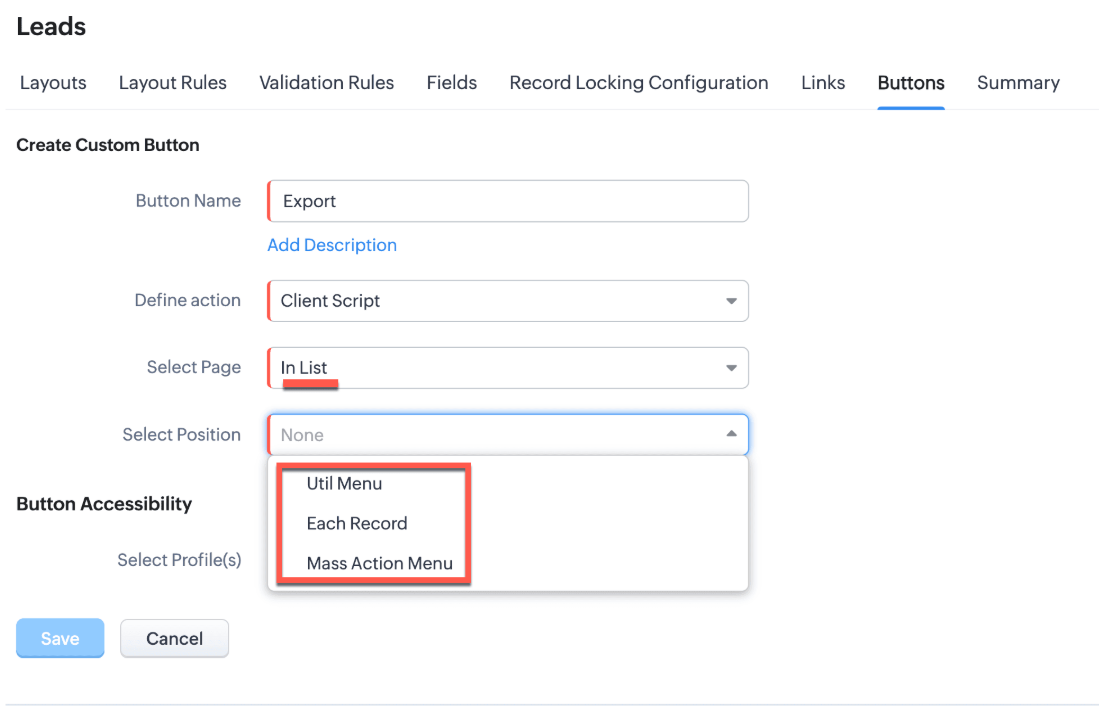

You can add a  custom button in the Util Menu, in Each Record or in the Mass Action Menu of the List Page.
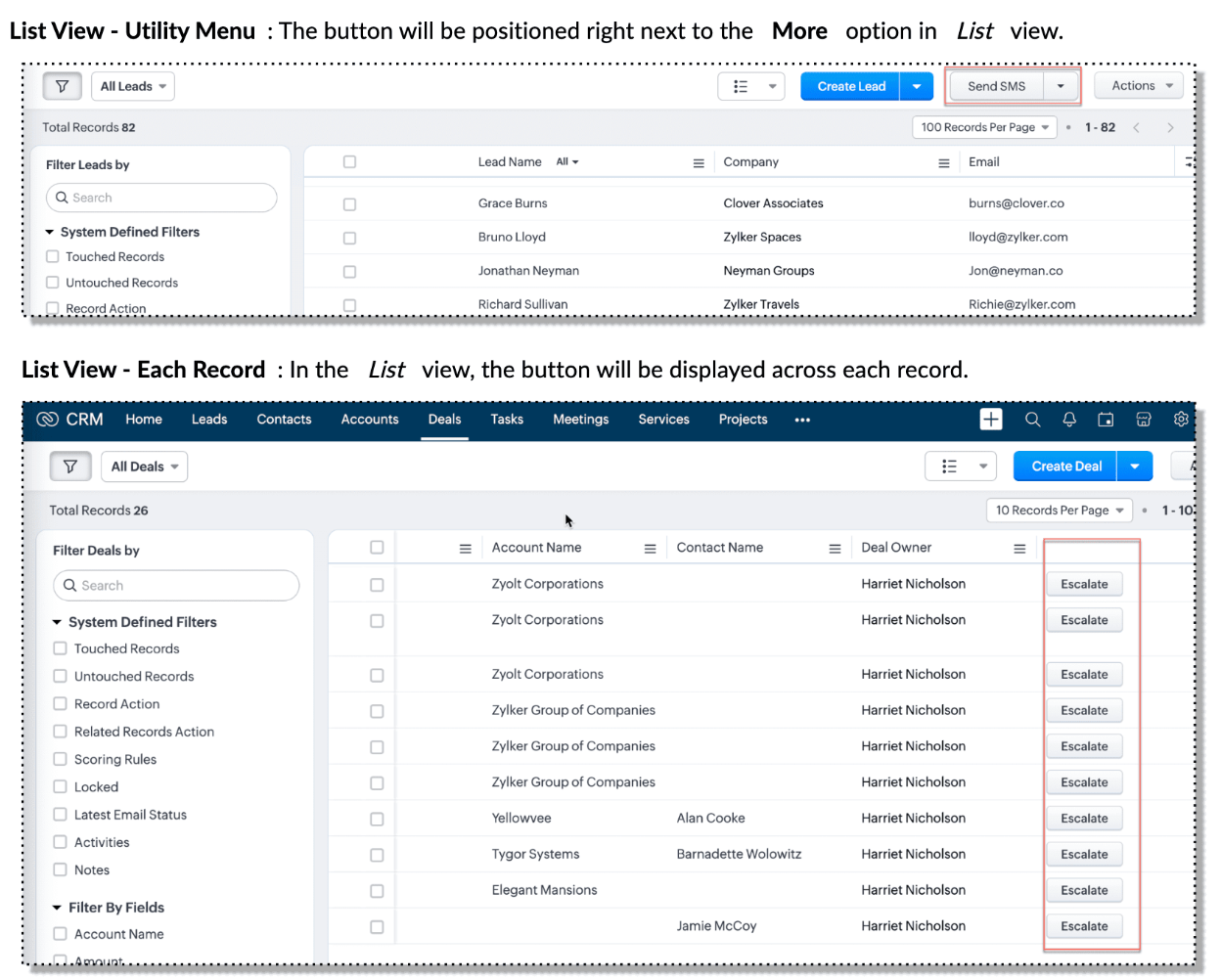

Also, a Detail Page can have a custom button either In Record or in the Related List. Click here for more details about the different possible positions of a custom button.

The following table lists the supported pages and the corresponding context argument, which provides different details based on the page type.


To create a Client Script and make it trigger when a custom button is clicked, first create a Custom button and associate it with a Client Script as shown in the following image.


 Click here to view the steps to create a custom button and configure a Client Script. 

Note:

You can configure the Client Script only from the Buttons page to trigger it when a user clicks a custom button, and not the usual way of Creating Client Script via setup page. Once a script is created, it can be edited and updated from the Client Script setup page

3. Use Case - Export Subform Rows to Zoho Sheet in a Single Click!

Zylker manufactures medical instruments, and its sales representatives frequently need to share bulk order details with distributors and hospital partners using Zoho Sheets. These details such as product names, quantities, and prices are captured in a Subform on the Purchase Order Detail(Standard) Page.
To simplify this, the admin wants to add a custom button called "Export Products" on the Purchase Order Detail Page. When clicked, it should export the Purchase Items from the Subform and move the content to the specified sheet.

4. Solution

To export subform rows to Zoho Sheet with a single click, you can add a custom button to the Detail Page of the record. When clicked, a Client Script will be triggered to fetch the subform data from the Detail Page and pass it to a Function that uses zoho.sheet.createRecords() to insert data into Zoho Sheet.

Here’s how to implement this:

  • Add  “Export Products” custom button on the Detail Page.
  • Add the script to collect subform rows which invokes the Function.
  • Write a Function to create entry in Zoho Sheets  

A. Add “Export Products” custom button on the Detail Page.

  • Go to Setup → Modules and Fields under Customization.
  • Select a Module as Purchase Order.
  • Click on Buttons → Then click + New Button.
  • Enter Button Name and select Action Type as "Client Script"
  • Choose Button Position and Layout details as shown in the following image.
  • Click Create in Configured Client Script, enter the script, and click Add.
  • Select the profiles for which these buttons should be visible.
  • Click Save.


B. Add the Script to collect subform rows and invoke the Function

Use the following Client Script when you configure the custom button.

  1. var casesheetid = ZDK.Client.getInput([{ type: 'text', label: 'Enter the Sheet ID' }], 'Sheet details', 'OK', 'Cancel');
  2. if (casesheetid == null) {
  3.         ZDK.Client.showAlert("Enter the *Case Sheet ID - Import* to import data");
  4.  }
  5. var purchase_items = ZDK.Page.getField('Purchase_items).getValue();
  6. ZDK.Client.showLoader({type: 'page', template:'spinner', message: 'Export in progress, please wait'});
  7. var c=1;
  8. if (sheetid == null) {
  9.     ZDK.Client.hideLoader(); 
  10.     ZDK.Client.showAlert("Enter the *Case Sheet - Export* ID to export data");
  11. }
  12. purchase_items.forEach((r,i) => {
  13.             try {
  14.                resp = ZDK.Apps.CRM.Functions.execute("csvWrite", { "Product_Name": r.Product_Name.name, "List_Price": r.List_Price, "Discount": r.Discount, "Total": r.Total,"Sheetid":casesheetid }); }
  15.             catch (error) {
  16.                 c = 0;
  17.                  ZDK.Client.hideLoader(); 
  18.                 ZDK.Client.showAlert("Unexpected issue occured while adding data in row number "); }
  19.     });
  20.     ZDK.Client.hideLoader(); 
  21.     if (c) {
  22.         ZDK.Client.showMessage("Export completed. Please check the Sheet");
  23.     }
  24.     else
  25.     {
  26.        ZDK.Client.showMessage("Unexpected error "); }}

In this code, several ZDKs are used for various purposes. Click on the ZDK hyperlinks to learn more.


Note

The Client Script you intend to link with the button will be saved only after the custom button is saved.

C. Write a Function to create entry in Zoho Sheets 

  • Go to Setup > Developer Hub > Functions.
  • In the Functions page, click + Create New Function.
  • Choose the category as Button.
  • Click Create.
  • In the Create Function page, enter a name as csvWrite and description for your function.
  • Enter the following function code and click Save.
  1. string standalone.csvWrite(String product,String qty,String up,String amt, String Sheetid){
  2. queryData = Map();
  3. writeData = Map();
  4. header = Map();
  5. writeData.put("Product",product);
  6. writeData.put("Quantity",qty);
  7. writeData.put("Unit_Price",up);
  8. writeData.put("Amount",amt);
  9. SheetData = zoho.sheet.createRecords("Sheetid","Sheet1",writeData,queryData,"sheetconnection");
  10. return SheetData;
  11. }

Click here to know more about zoho.sheet.createRecords().

In the code above:
  • sheetconnection refers to the name of the Zoho Sheet connection, which must have the scopes: ZohoSheet.dataAPI.UPDATE and ZohoSheet.dataAPI.READ.
  • Click here to know how to create a Connection with the required scopes.
  • sheetid is the unique identifier of the Zoho Sheet, available in the sheet’s URL.
  • Sheet1 represents the name of the worksheet (i.e., the tab name shown at the bottom of the Zoho Sheet).
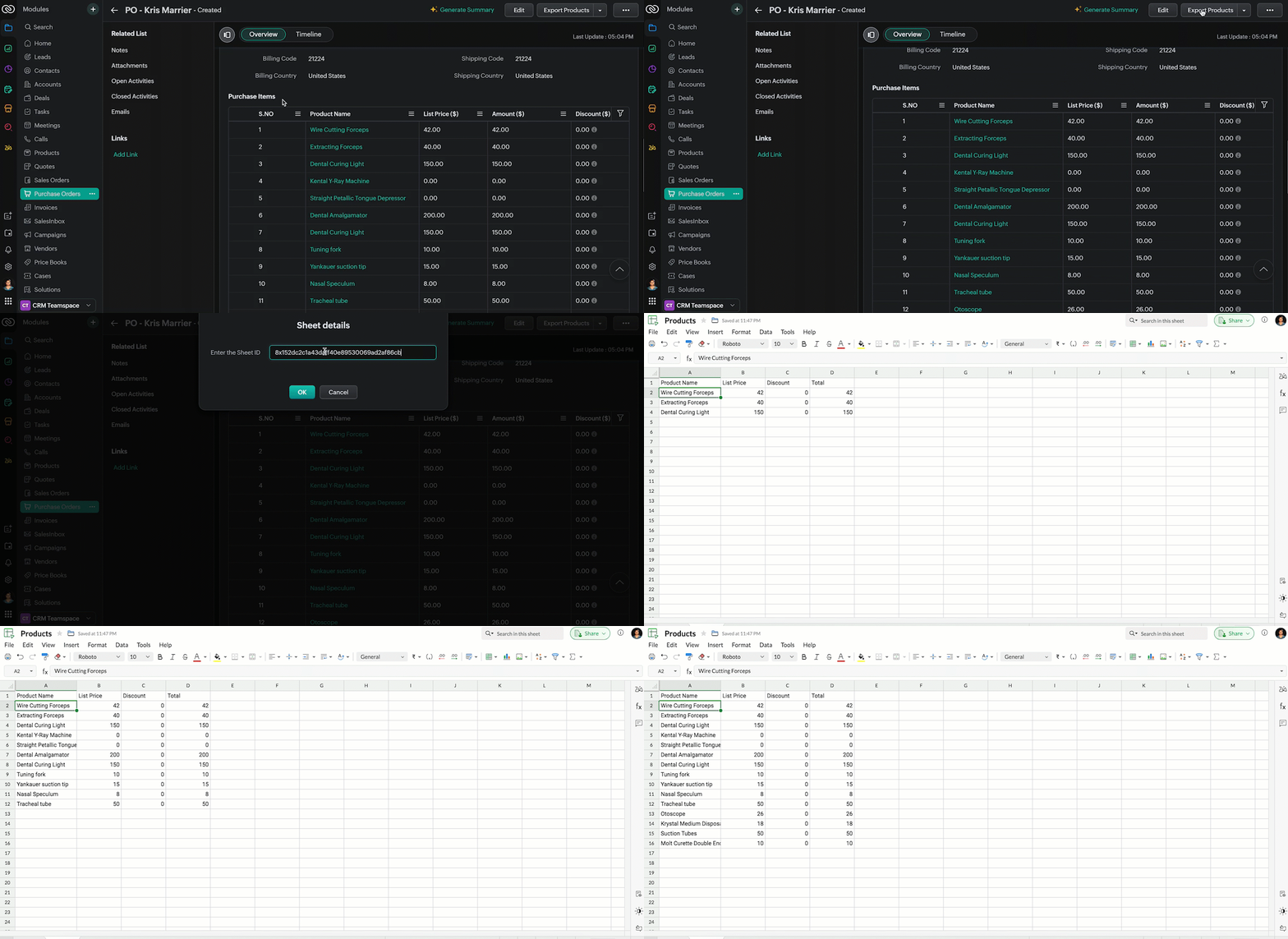
  • Now, when the custom button is clicked, the Client Script is triggered. It prompts for the Sheet ID, fetches the contents of the Purchase Order subform, and invokes a function that writes the content to the Sheet.
Here's how the Client Script works.


5. Summary

In this post we have seen,
  • What is a Button event?
  • How to configure Client Script for a custom button
  • How to write data into Zoho Sheets from Client Script
  • How to create a Function and call it from Client Script

6. Related Links


We are thrilled to be nearing the 200th post in our Kaizen series. As we approach this exciting milestone, we would love to hear from you. Do you have any questions, suggestions, or topics you would like us to cover in future posts? Your input helps us improve and shape the series to serve you better.

Please take a moment to share your thoughts using ✨ this form 

We hope you found this post useful!

Happy Client Scripting! 😊
    • Sticky Posts

    • Kaizen #198: Using Client Script for Custom Validation in Blueprint

      Nearing 200th Kaizen Post – 1 More to the Big Two-Oh-Oh! Do you have any questions, suggestions, or topics you would like us to cover in future posts? Your insights and suggestions help us shape future content and make this series better for everyone.
    • Kaizen #226: Using ZRC in Client Script

      Hello everyone! Welcome to another week of Kaizen. In today's post, lets see what is ZRC (Zoho Request Client) and how we can use ZRC methods in Client Script to get inputs from a Salesperson and update the Lead status with a single button click. In this
    • Kaizen #222 - Client Script Support for Notes Related List

      Hello everyone! Welcome to another week of Kaizen. The final Kaizen post of the year 2025 is here! With the new Client Script support for the Notes Related List, you can validate, enrich, and manage notes across modules. In this post, we’ll explore how
    • Kaizen #217 - Actions APIs : Tasks

      Welcome to another week of Kaizen! In last week's post we discussed Email Notifications APIs which act as the link between your Workflow automations and you. We have discussed how Zylker Cloud Services uses Email Notifications API in their custom dashboard.
    • Kaizen #216 - Actions APIs : Email Notifications

      Welcome to another week of Kaizen! For the last three weeks, we have been discussing Zylker's workflows. We successfully updated a dormant workflow, built a new one from the ground up and more. But our work is not finished—these automated processes are
    • Recent Topics

    • WhatsApp Campaign not appearing in Zoho Marketing Automation data import

      I'm setting up data import from Zoho Marketing Automation into Zoho Analytics, but WhatsApp is missing from the available modules. I can see Journeys, Email Campaigns, SMS Campaigns, Users, Lists, and Leads but no WhatsApp Campaign option.
    • Ticket Status Colors

      Hi everyone, In Zoho Desk, I’m trying to assign colors to my Ticket Status values, but I do not see any option in the admin panel to do this. Right now, they all show as plain black text. Where can I change the color for each Ticket Status? Or is this
    • 【無料/オンライン】7/22開催|Zoho ワークアウト|ユーザー同士で学び合うオンラインもくもく会

      ユーザーの皆さま、こんにちは。 コミュニティグループの中野です。 7月開催の「Zoho ワークアウト」のご案内です。 本イベントは、Zohoユーザー同士で交流しながら、 設定・検証・運用改善を進めるオンラインの「もくもく会」です。 「設定を進めたいけれど、一人だと手が止まってしまう」 「他社がどう活用しているのか知りたい」 「同じ課題を抱える仲間と話したい」 そんな方にぴったりのイベントです。 ▶︎ 参加登録はこちら(無料 ) URL:https://us02web.zoom.us/meeting/register/t7lA28wlQceRW6sZpeFEhQ
    • ScreenPop > Ticket integration?

      I'd like a way for my agents to operate this way: 1) Incoming call activates a ScreenPop. 2) If phone number matches a number in the database and any tickets exist for that company, show those ticket references (links) in the ScreenPop, allowing the agent
    • Deleting unwanted ticket replies

      Hello, In a Zoho Desk Ticket thread, sometimes one of the recipients has auto-reply activated. This creates a new message in the Ticket thread that not only pollutes the thread, but most importantly cannot be replied properly because usually auto-reply e-mails don't do "reply all", so the other recipients are not included. I want to delete such a message in the Ticket thread. I searched the help of Zoho Desk, but only found a way to mark as Spam (https://help.zoho.com/portal/kb/articles/marking-support-tickets-as-spam)
    • Creating packages according to actual shipping processes

      Hi community. I would like to ask a question to see if there's a better method or workflow for the creation of packages in Zoho Inventory. There is a little confusion in some of Zoho's language relating to the use of term Packing Slip when connected to
    • i cant renew my domain bfftube.cloudns.cc

      i cant renew my domain bfftube.cloudns.cc because its a free subdomain from cloudns and you cant renew it its always active can some fix this becasue again there is no way to renew it becasue its free subdomain and again its always active
    • Add conditional statements to insert or not clause or text according to dynamic CRM fields

      Hello, I would like to contsruct my contracts dynamically with conditional statements (IF, ELSE, etc) For example, according to specific CRM dynamic fields, I want to insert or not some clauses or text Would it be possible to add that feature? Best
    • Client Script actions on related list change

      Hey all! We have our calls automatically logging into our deals module through some custom functions. Looks like by default, the calls are related to the contact and not the deal. We have made some workflow rules and functions to have the calls automatically
    • Migrating my Yahoo Mail to Zoho

      Hi.  I'm new to Zoho, having come over from the blighted Yahoo.  I've signed up for the free webmail but I notice there's no web-based migration in this version.   Would I be able to upgrade as an individual, in order to be able to migrate my emails from Yahoo.  There's well over a decade of emails, so I'd probably appreciate the extra space too. TIA
    • Application-Level Save copy of sent emails

      It would be really helpful to be able to turn on/off the Save copy of sent emails at a per application level, so some applications can save in the sent folder and others don't.
    • Cookies Consent Management in Webforms

      Hello Everyone! We are excited to introduce Cookie Consent Management for webforms. Read on to learn more. Webforms are online forms embedded on websites that allow users to submit data and create records in Zoho CRM. These forms utilize cookies to track
    • Urgent Escalation Request - Severe Performance Issues and Errors in Zoho Desk

      Hi, I am experiencing a serious issue with my Zoho Desk account. Since Sunday, we have been encountering error messages such as "Unable to process your request" when attempting to open new tickets or update information in existing tickets. In addition
    • Sortie de Zoho TABLE ??

      Bonjour, Depuis bientôt 2 ans l'application zoho table est sortie en dehors de l'UE ? Depuis un an elle est annoncée en Europe Mais en vrai, c'est pour quand exactement ??
    • Suggestion: A Next-Generation Video Platform for the Zoho Ecosystem

      Dear Zoho Team, I hope you are doing well. I would like to share an idea that I believe could become a major addition to the Zoho ecosystem. Just as Google has YouTube, I believe Zoho could build its own video-sharing platform. It could offer familiar
    • Can't Figure out Books and level 2 payment data

      Hello, I am having trouble figuring out how to collect level 2 payment data as required by my payment gateway. Last month it cost us almost $5000 in fees because of this. We are invoicing our clients with books and they pay through the link in that email
    • Invoice template with sales tax totals

      Hi everyone,  I am trying to edit my invoice template so that only the total sales tax collected for my tax group shows up. Right now, under by sub total, each individual tax shows up and that takes up a lot of unnessary space, so I just want the one
    • Why is the ability Customize Calls module so limited?

      Why can't I add additional sections? why can't I add other field types than the very limited subset that zoho allows? Why can I only add fields to the outbound/inbound call sections and not to the Call Information section?
    • Getting an error when trying to use the Zoho Desk Resources with our Zobot chat

      Hello, When I try to set our Zobot AI Card Training to Zoho Desk resources I get an error when testing it and it bypasses the bot completely. When I try to switch it to the Zoho SalesIQ resources option in there it will list some articles but not give
    • Kaizen 249: Build an AI Room Recommendation Assistant with CRM Widgets, Catalyst, and Zia Agent

      Welcome to another week of Kaizen! This Kaizen post is inspired in part by Zoho CRM’s hospitality use-case article, which presents a broader AI-powered CRM approach for guest personalization and hotel operations. That use case spans additional scenarios
    • Issue with Zoho Assist Unattendend Agents Showing Offline

      Hello! I noticed that a large number of my unattended devices began showing as Offline earlier this morning (around 745am Mountain time). I checked the Zoho Assist status page but it's not showing any outages. The issue seems to be randomly occurring
    • Access millions of Unsplash photos directly from the Theme Builder

      Hello form builders, We're excited to introduce a new enhancement to the Zoho Forms Theme Builder. You can now browse and apply millions of high-quality images from Unsplash without leaving the Theme Builder. There's no need to download images, switch
    • Increase the Field Instructions Character Limit

      Hi, I would like to be able to write longer instructions, today I have to then add a Description field which is then not close to the field like the Instructions are, so doesnt look correct. Thanks Dan
    • Automate agreement workflows with Zoho Sign and Zoho MCP

      Hi everyone, We're excited to announce support for Zoho Sign in Zoho MCP. With Zoho Sign's MCP server, you can connect Zoho Sign to Claude, Cursor, Windsurf, GitHub Copilot, or any MCP client of your choice and handle your entire signing workflow using
    • Microsoft Teams now available as an online meeting provider

      Hello everyone, We're pleased to announce that Zoho CRM now supports Microsoft Teams as an online meeting provider—alongside the other providers already available. Admins can enable Microsoft Teams directly from the Preferences tab under the Meetings
    • Digest Juin - Un résumé de ce qui s'est passé le mois dernier sur Community

      Bonjour chers utilisateurs, Alors que l'été vient d'arriver profitez-en pour découvrir les échanges les plus enrichissants de notre Communauté. Astuces pratiques, nouveautés produits, conseils d'experts et bonnes pratiques : voici un aperçu des sujets
    • Caso de éxito: cómo GarantíaYa redujo un 30% su tiempo operativo gracias al ecosistema Zoho

      "Zoho no solo sostiene nuestros procesos: los define. Cada particularidad de nuestro negocio está modelada dentro del sistema." Nicolás Natiello Mallo, Director de Tecnología en GarantíaYa GarantíaYa, empresa especializada en garantías de alquiler con
    • Text on Zoho Sign confirmation dialouge is very small compared to text used everywhere else on Zoho Sign.

      I've reported multiple times through Zoho's support email that the text on this notification is very small in contrast to all the other text on the Zoho Sign app. I think it's a bug and it just needs the font size to be increased. It's very minor but
    • [idea] when attaching a zoho show presentation to an email, allow choosing format

      There are 2 constraints when trying to attach a zoho show presentation directly into a message in zoho mail as an ATTACHMENT: 1. the file must have download permission 2. it is exported as a PPT However, there are times when it is important for me sending
    • Analysing Zoho Campaigns Automation Workflows in Zoho Analytics

      Hello, We have started to use the Automation - Workflows functionality within Zoho Campaigns to nurture our Zoho CRM Leads. For example: When a new Lead meeting certain criteria is created in Zoho CRM, it is added to a Segment within Zoho Campaigns. Upon
    • Shared Mailbox: Collaborate and manage team emails efficiently in Zoho Mail

      Shared Mailbox: Collaborate and manage team emails efficiently in Zoho Mail When multiple teams share responsibility for a common email address, like support@org.com, info@org.com, or billing@org.com, managing replies individually leads to duplication,
    • Admin unable to view "Seen By" / post viewer list for posts they didn't author

      Hi Connect team, We're trying to measure engagement on Zoho Connect (specifically who is viewing posts) as part of an internal analytics exercise. I've found that the per-post "Seen By" export (via exportStreamUniqueUsers.do) only works for posts I personally
    • Introducing the Employee Portal for internal job posting

      Employee referrals and internal applications are one of the most trusted hiring channels. But in many organizations, employees only hear about openings through messages, word of mouth, or after the role has already been open for a while. When employees
    • What's new in Zoho Social - Q2 recap

      Hello everyone, We’ve rolled out a bunch of updates in Q2, and we’re excited to walk you through them. Here’s a quick look at everything we released in April, May, and June to help you manage your social media presence more effectively. Threads updates
    • Data Discrepancy Between Zoho Chart

      Hi, I am doing the CRM lead analytics using the Standard Funnel chart. I notice the total summary given by the standard funnel chart does not match with my bar chart or line chart using the same criteria. Its even not matching with my data in the leads
    • Announcing new features in Trident for Windows (v.1.42.5.0)

      Hello Community! This release includes a collection of enhancements and feature updates aimed at making your email experience smoother. Let’s dive into what’s new! Forward emails as attachments. Previously, you could forward emails as an attachment only
    • Admin Logging in as another User

      How can a Super Admin login as another user. For example, I have a sales rep that is having issues with their Accounts and I want to view their Zoho Account with out having to do a GTM and sharing screens. Latest Update (27th April 2026): With the early
    • Sending to multiple people but only require one signature

      Does Zoho Sign have the functionality to send a document to multiple people and only requiring one individual to sign? DocuSign has Signing Groups that lets you send documents to a group of people, where any member of that group can open and act on the
    • 【開催報告】東京 Zoho ユーザー交流会 NEXUS vol.2 ~ 顧客満足度を高めるCRM / Survey活用・営業基盤づくり・AI連携による業務改善 ~

      Zoho ユーザーの皆さま、こんにちは。 コミュニティグループの中野です。 6月26日(金)に、東京 Zoho ユーザー交流会 NEXUS vol.2 を開催しました。 今回のテーマは「CRM活用 × AI」。 過去最大規模での開催となった本イベントでは、MIGACTの濵田さん、 デジタル・クリエイティブ・ネットの本間さん、ゾーホージャパンのSasiによるセッションを実施。 顧客情報をどのように整理し、日々の業務や顧客対応、営業活動の改善につなげていくのか。 CRM・Survey活用から、AIとZohoを組み合わせた取り組みまで、それぞれ異なる視点から具体的な事例をご共有いただきました。
    • Updating Zoho Books UI when a field is changed

      I have this script to update Quotes Expiry date. estimateID = estimate.get("estimate_id"); numberDaysTobeExtended = 14; estimatedate = estimate.get("date").toDate(); organizationID = organization.get("organization_id"); estDate = estimate.get("date");
    • Next Page