Kaizen #194 : Trigger Client Script via Custom buttons

Kaizen #194 : Trigger Client Script via Custom buttons


Hello everyone!

Welcome back to another interesting and useful Kaizen post.

We know that Client Scripts can be triggered with Canvas buttons and we discussed this with a use case in Kaizen#180. Today, let us discuss how to trigger Client Script when a Custom Button is clicked. Using this, you can execute Client Script when a custom button is clicked.

In this post,


1. Event Details 
2. Supported Pages
3. Use Case - Export Subform Rows to Zoho Sheet in a Single Click!
4. Solution
5. Summary
6. Related Links


Client Script support for Custom Buttons opens up possibilities for automation, personalization, and enhanced user interactions in Zoho CRM when a custom button is clicked.
Here is a detailed walkthrough to help you understand it better.

1. Event Details 

The Button event triggers the Client Script when a custom button is clicked. Each time this event is invoked, the context argument is passed to the Client Script. The context contains information about the page from which the button was clicked.
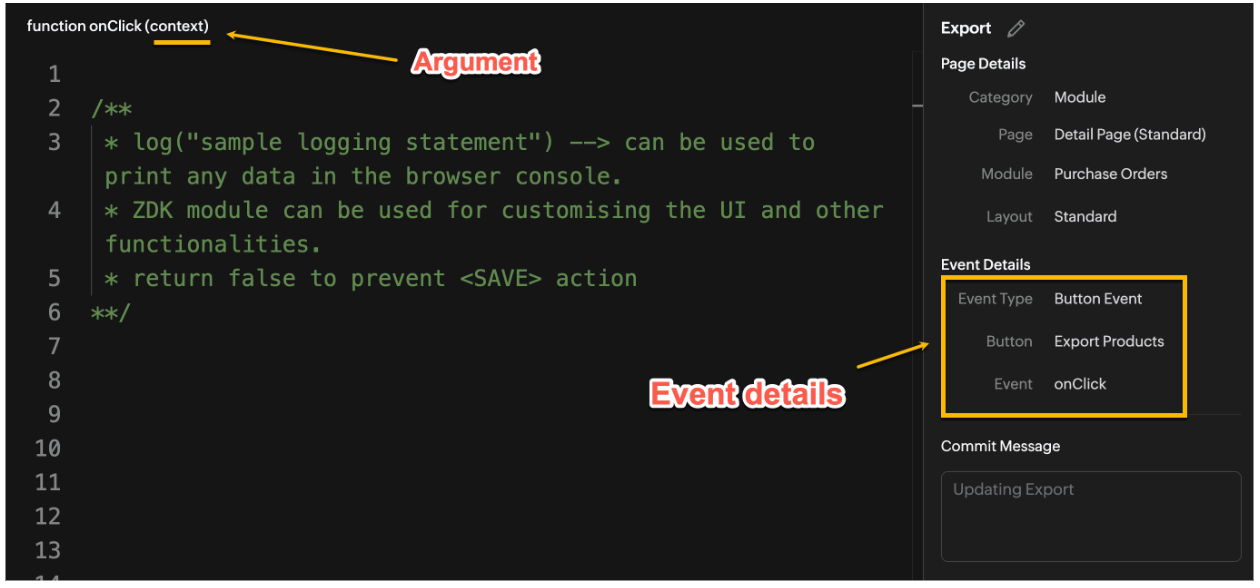

Click here to know more about Client Script Events.

2. Supported Pages

A Custom Button can be placed in different positions based on the Page.
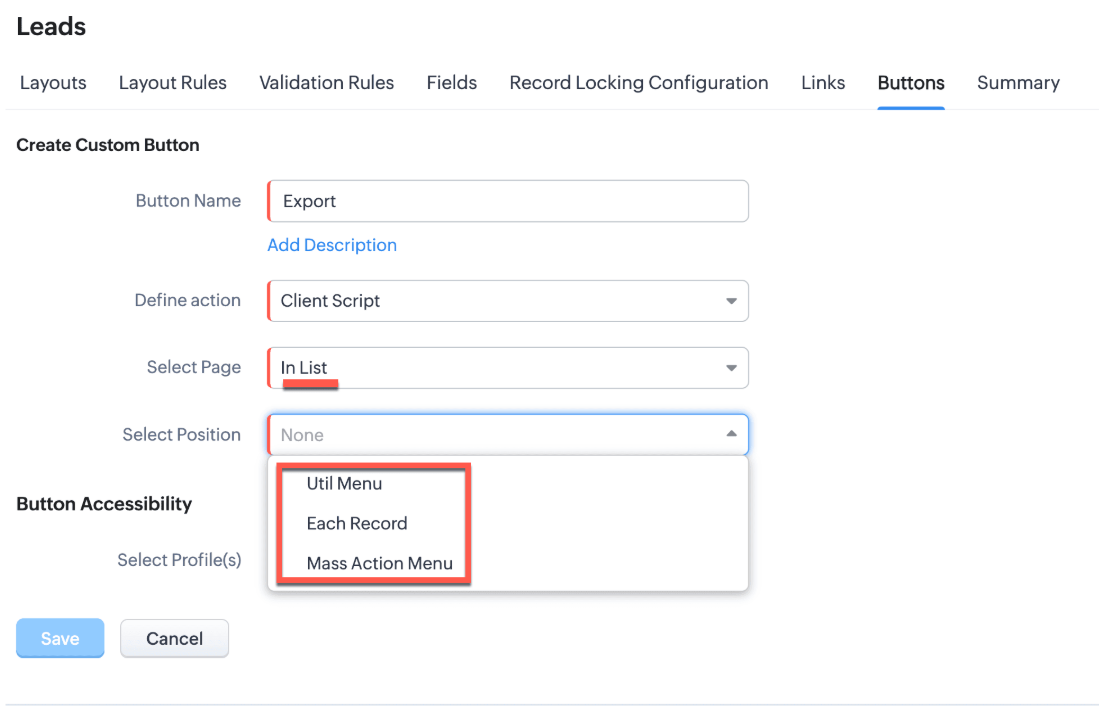

You can add a  custom button in the Util Menu, in Each Record or in the Mass Action Menu of the List Page.
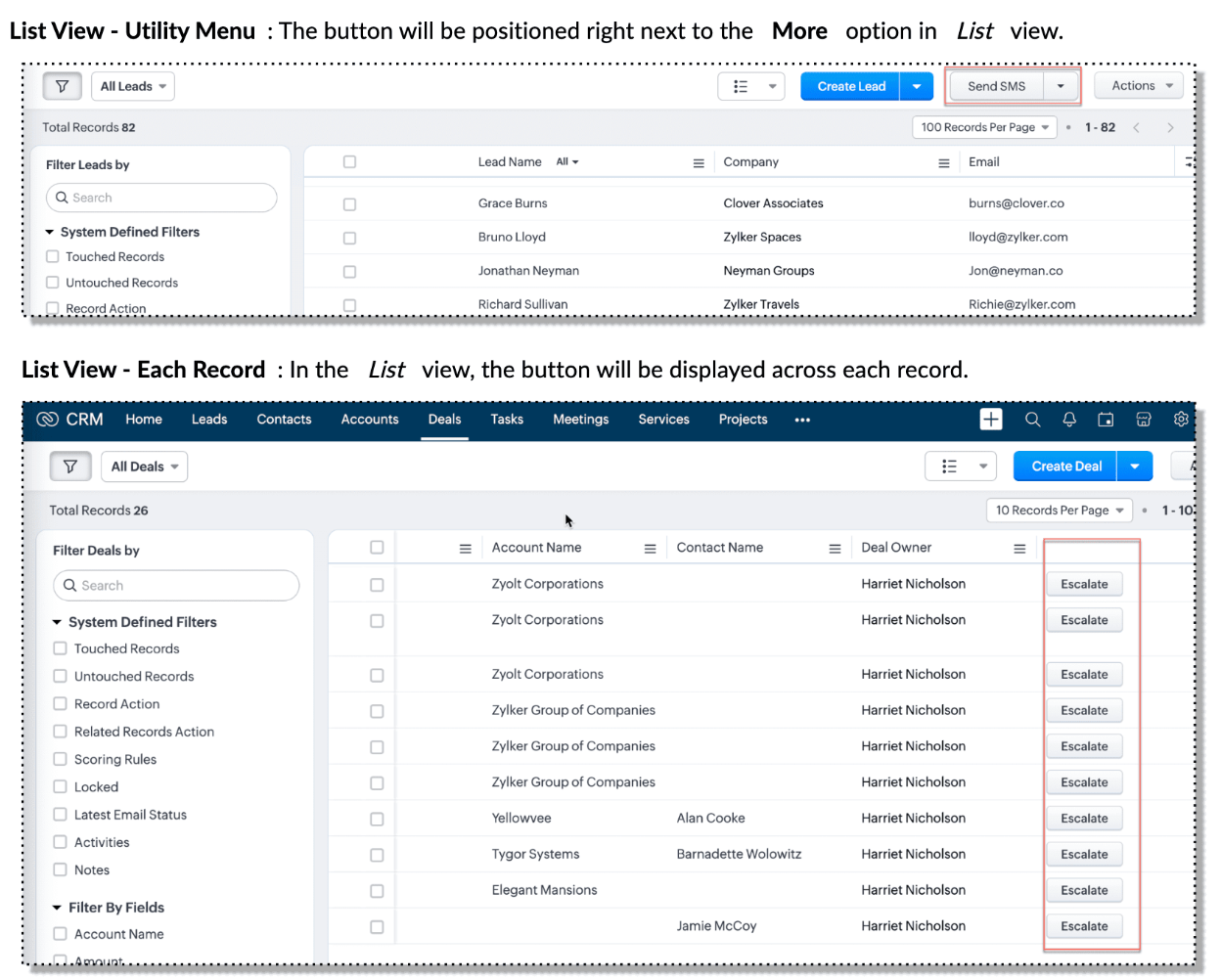

Also, a Detail Page can have a custom button either In Record or in the Related List. Click here for more details about the different possible positions of a custom button.

The following table lists the supported pages and the corresponding context argument, which provides different details based on the page type.


To create a Client Script and make it trigger when a custom button is clicked, first create a Custom button and associate it with a Client Script as shown in the following image.


 Click here to view the steps to create a custom button and configure a Client Script. 

Note:

You can configure the Client Script only from the Buttons page to trigger it when a user clicks a custom button, and not the usual way of Creating Client Script via setup page. Once a script is created, it can be edited and updated from the Client Script setup page

3. Use Case - Export Subform Rows to Zoho Sheet in a Single Click!

Zylker manufactures medical instruments, and its sales representatives frequently need to share bulk order details with distributors and hospital partners using Zoho Sheets. These details such as product names, quantities, and prices are captured in a Subform on the Purchase Order Detail(Standard) Page.
To simplify this, the admin wants to add a custom button called "Export Products" on the Purchase Order Detail Page. When clicked, it should export the Purchase Items from the Subform and move the content to the specified sheet.

4. Solution

To export subform rows to Zoho Sheet with a single click, you can add a custom button to the Detail Page of the record. When clicked, a Client Script will be triggered to fetch the subform data from the Detail Page and pass it to a Function that uses zoho.sheet.createRecords() to insert data into Zoho Sheet.

Here’s how to implement this:

  • Add  “Export Products” custom button on the Detail Page.
  • Add the script to collect subform rows which invokes the Function.
  • Write a Function to create entry in Zoho Sheets  

A. Add “Export Products” custom button on the Detail Page.

  • Go to Setup → Modules and Fields under Customization.
  • Select a Module as Purchase Order.
  • Click on Buttons → Then click + New Button.
  • Enter Button Name and select Action Type as "Client Script"
  • Choose Button Position and Layout details as shown in the following image.
  • Click Create in Configured Client Script, enter the script, and click Add.
  • Select the profiles for which these buttons should be visible.
  • Click Save.


B. Add the Script to collect subform rows and invoke the Function

Use the following Client Script when you configure the custom button.

  1. var casesheetid = ZDK.Client.getInput([{ type: 'text', label: 'Enter the Sheet ID' }], 'Sheet details', 'OK', 'Cancel');
  2. if (casesheetid == null) {
  3.         ZDK.Client.showAlert("Enter the *Case Sheet ID - Import* to import data");
  4.  }
  5. var purchase_items = ZDK.Page.getField('Purchase_items).getValue();
  6. ZDK.Client.showLoader({type: 'page', template:'spinner', message: 'Export in progress, please wait'});
  7. var c=1;
  8. if (sheetid == null) {
  9.     ZDK.Client.hideLoader(); 
  10.     ZDK.Client.showAlert("Enter the *Case Sheet - Export* ID to export data");
  11. }
  12. purchase_items.forEach((r,i) => {
  13.             try {
  14.                resp = ZDK.Apps.CRM.Functions.execute("csvWrite", { "Product_Name": r.Product_Name.name, "List_Price": r.List_Price, "Discount": r.Discount, "Total": r.Total,"Sheetid":casesheetid }); }
  15.             catch (error) {
  16.                 c = 0;
  17.                  ZDK.Client.hideLoader(); 
  18.                 ZDK.Client.showAlert("Unexpected issue occured while adding data in row number "); }
  19.     });
  20.     ZDK.Client.hideLoader(); 
  21.     if (c) {
  22.         ZDK.Client.showMessage("Export completed. Please check the Sheet");
  23.     }
  24.     else
  25.     {
  26.        ZDK.Client.showMessage("Unexpected error "); }}

In this code, several ZDKs are used for various purposes. Click on the ZDK hyperlinks to learn more.


Note

The Client Script you intend to link with the button will be saved only after the custom button is saved.

C. Write a Function to create entry in Zoho Sheets 

  • Go to Setup > Developer Hub > Functions.
  • In the Functions page, click + Create New Function.
  • Choose the category as Button.
  • Click Create.
  • In the Create Function page, enter a name as csvWrite and description for your function.
  • Enter the following function code and click Save.
  1. string standalone.csvWrite(String product,String qty,String up,String amt, String Sheetid){
  2. queryData = Map();
  3. writeData = Map();
  4. header = Map();
  5. writeData.put("Product",product);
  6. writeData.put("Quantity",qty);
  7. writeData.put("Unit_Price",up);
  8. writeData.put("Amount",amt);
  9. SheetData = zoho.sheet.createRecords("Sheetid","Sheet1",writeData,queryData,"sheetconnection");
  10. return SheetData;
  11. }

Click here to know more about zoho.sheet.createRecords().

In the code above:
  • sheetconnection refers to the name of the Zoho Sheet connection, which must have the scopes: ZohoSheet.dataAPI.UPDATE and ZohoSheet.dataAPI.READ.
  • Click here to know how to create a Connection with the required scopes.
  • sheetid is the unique identifier of the Zoho Sheet, available in the sheet’s URL.
  • Sheet1 represents the name of the worksheet (i.e., the tab name shown at the bottom of the Zoho Sheet).
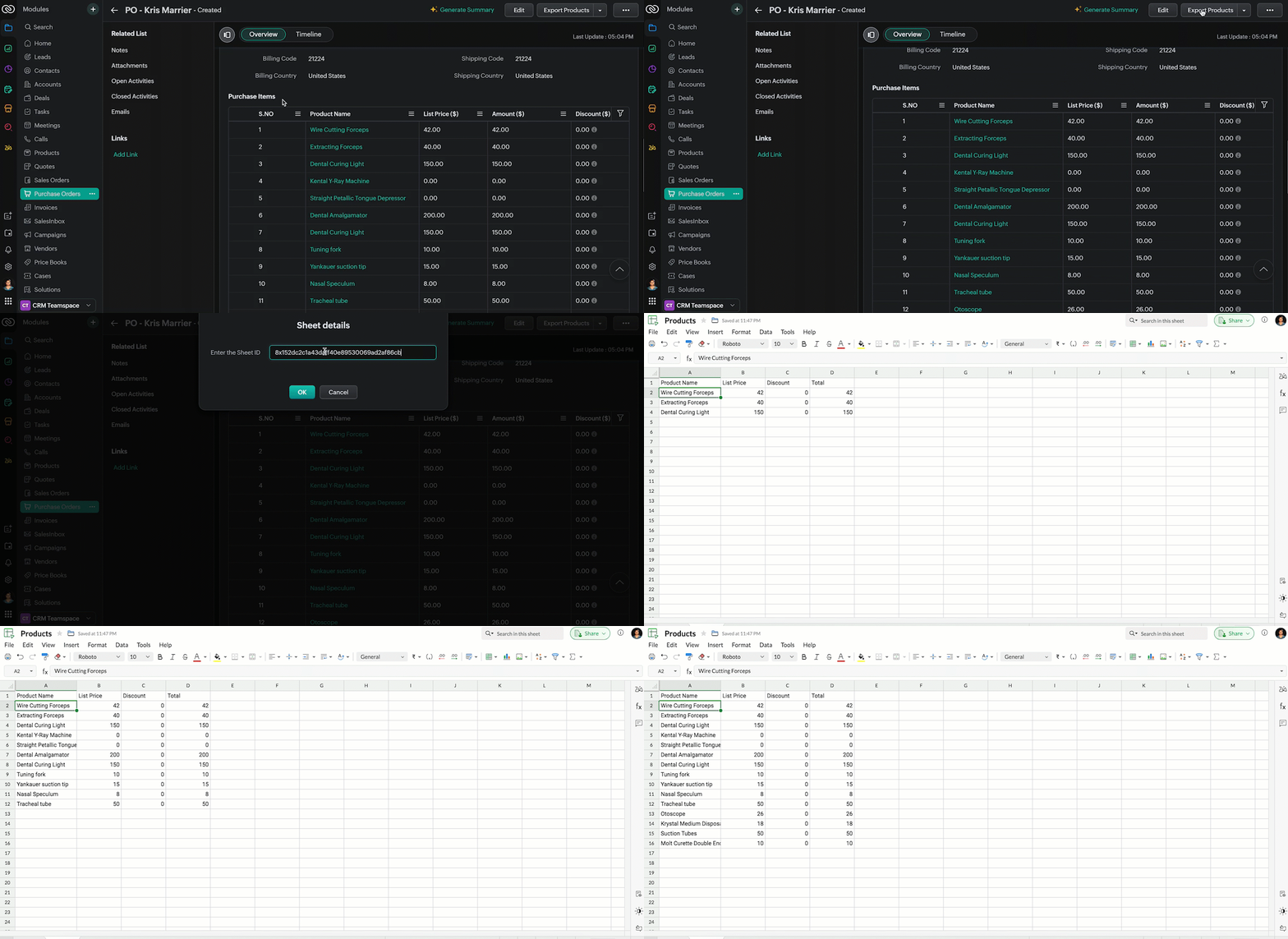
  • Now, when the custom button is clicked, the Client Script is triggered. It prompts for the Sheet ID, fetches the contents of the Purchase Order subform, and invokes a function that writes the content to the Sheet.
Here's how the Client Script works.


5. Summary

In this post we have seen,
  • What is a Button event?
  • How to configure Client Script for a custom button
  • How to write data into Zoho Sheets from Client Script
  • How to create a Function and call it from Client Script

6. Related Links


We are thrilled to be nearing the 200th post in our Kaizen series. As we approach this exciting milestone, we would love to hear from you. Do you have any questions, suggestions, or topics you would like us to cover in future posts? Your input helps us improve and shape the series to serve you better.

Please take a moment to share your thoughts using ✨ this form 

We hope you found this post useful!

Happy Client Scripting! 😊
    • Sticky Posts

    • Kaizen #198: Using Client Script for Custom Validation in Blueprint

      Nearing 200th Kaizen Post – 1 More to the Big Two-Oh-Oh! Do you have any questions, suggestions, or topics you would like us to cover in future posts? Your insights and suggestions help us shape future content and make this series better for everyone.
    • Kaizen #226: Using ZRC in Client Script

      Hello everyone! Welcome to another week of Kaizen. In today's post, lets see what is ZRC (Zoho Request Client) and how we can use ZRC methods in Client Script to get inputs from a Salesperson and update the Lead status with a single button click. In this
    • Kaizen #222 - Client Script Support for Notes Related List

      Hello everyone! Welcome to another week of Kaizen. The final Kaizen post of the year 2025 is here! With the new Client Script support for the Notes Related List, you can validate, enrich, and manage notes across modules. In this post, we’ll explore how
    • Kaizen #217 - Actions APIs : Tasks

      Welcome to another week of Kaizen! In last week's post we discussed Email Notifications APIs which act as the link between your Workflow automations and you. We have discussed how Zylker Cloud Services uses Email Notifications API in their custom dashboard.
    • Kaizen #216 - Actions APIs : Email Notifications

      Welcome to another week of Kaizen! For the last three weeks, we have been discussing Zylker's workflows. We successfully updated a dormant workflow, built a new one from the ground up and more. But our work is not finished—these automated processes are
    • Recent Topics

    • Possibility to modify a standard wedget to create my own customized wedget

      Below is the std wedget available for dashboard which is great to show the the overdue, current, and all tasks as well as issues for each team member. My problem is this; The list of users cannot be edited (there are admin users which are not relavant
    • Tips & Tricks Series - #2 Adding Multimedia to Quiz Questions

      Hello everyone! Welcome back to our Tips & Tricks series, where we share useful features and tips to help you get the most out of Zoho Learn. Today, we’ll look at adding multimedia to quiz questions. While text-based questions often work well, there can
    • UI Layout Issue After Activating New FSM Theme

      Hello Team, I recently activated the new theme in FSM, and after doing so, I noticed some layout issues. The first issue is with the Merge function. When I try to merge records, I am unable to see the Merge button at the browser's default zoom level.
    • email migration from gmail to zoho

      so I want to migrate all my old emails from a gmail account to zoho account. I go to Mail Administration under Control Panel > Migration, set the destination and source. I started the process, but i waited for quite a bit of time already, the status is still showing "in progress", and there's no error displayed what so ever. I don't have a lot of old mails in my gmail account, so it shouldn't take too long. I have no idea if the process is stuck or it's really doing the work.
    • Button or Links order

      Is there a way to re-order the buttons or links that are created? Moderation Update: With our recent enhancement to custom button creation from the layout editor, administrators can now reorder custom buttons directly from the layout editor, and this
    • Automatically calculate and include tax on quotes

      I've recently been VAT registered and now need to include VAT on my quotes. I have been able to set the tax label and amount but still need to click the tax link and select the tax I wish to include before it appears on the quote. Does anyone know of
    • Zoho mail shared inbox filter action add to workdrive

      The shared inbox feature has been really great. Are there any plans when creating a filter for a shared inbox to have the action add to workdrive? This feature would be super helpful. ~Thank you
    • seller productivity: zcalendar + zmeeting + zcrm

      Hello, As many zCRM users, I handle a lot of online meetings - many of them using my zMeeting subscription. Althought you guys say there is an integration between zCRM and zCalendar, the fact is that is poorly designed, built and incomplete. Integration
    • SalesIQ's Summer '26 Release: For The Moments That Matter

      Every customer journey is made up of moments. The moment someone discovers your business. The moment they need help. The moment you decide to reach out. The moment a simple chat turns into something more. And the moments that continue long after the conversation
    • Add Setting Values to the Rules

      Hi, It would be great to use the rules to set values in fields for submission, such as if a Type is X then set the Field Y to 10. Thanks Dan
    • Migrate zoho mail to yahoo mail

      Hi ,  We would like to migrate our zoho mails to yahoo paid mails . There are some questions :  1 . how can we access our zoho mail account after the ourdomain.com record  transferred to the yahoo paid mail ?  2 . any suggested tools or ways to transfer or import the email in zoho to the yahoo paid email account (emls , imap or other tools) ?  Thanks . Jonathan
    • Introducing Workqueue: your all-in-one view to manage daily work

      Hello all, We’re excited to introduce a major productivity boost to your CRM experience: Workqueue, a dynamic, all-in-one workspace that brings every important sales activity, approval, and follow-up right to your fingertips. What is Workqueue? Sales
    • Emails Failing with “Relaying Issues – Mail Sending Blocked” in ZeptoMail

      Hello ZeptoMail Support Team, We are facing an email delivery issue in our ZeptoMail account where emails are failing with the status “Process failed” and the reason “Relaying issues – Mail sending blocked.” Issue Details Agent Name: mail_agent_iwwa From
    • Zoho Cliq not working on airplanes

      Hi, My team and I have been having this constant issue of cliq not working when connected to an airplane's wifi. Is there a reason for this? We have tried on different Airlines and it doesn't work on any of them. We need assistance here since we are constantly
    • Forum Text Formatting

      Hello, I'm not sure where the best place is to post this... It appears that there's some forced formatting that occurs whenever a message is posted in the forums that removes any spaces or tabs at the beginning of each new line. As someone who occasionally
    • Dashboards for Customers

      Is it possible to build dashboards for each customers in the community for their tickets?
    • Export on More options disappear when open personalized report view

      Hello everybody, I have a public report  and I can export my report on More options After I hide some columns on my report, I save changes to create a personalized report view. I saved it with the test view name But, if I open personalized report view  the
    • Arattai App Features Update

      1. Offline Messaging & Sync Enable users to compose messages without internet and deliver them automatically via peer-to-peer methods (Bluetooth/WiFi Direct) when nearby users are available. This would be a game-changer for rural India with unreliable
    • Annoying Social Messaging Auto-Prompts

      Hello! I love the idea of integrating SalesIQ with messaging channels like Facebook Messenger and Instagram. However, the way the SIQ throws the initial prompts feels annoying and too robotic. I'm attaching a few screenshot samples, just the resent ones.
    • Can Timesheets be utilized without Jobs?

      We are looking to streamline timesheets with our technicians and thought that Zoho People's Time Logs/Timesheets would be beneficial. However, it looks like all time entries and timesheets need to be associated with a job. The way we track time is just
    • Introducing Bigin's latest AI features, built for the way you work!

      Hi Biginners! In continuation of our AI journey that began on mobile and grew with the MCP release, we're bringing AI features right inside your Bigin web interface, where it makes the most impact for your business. At Bigin, we believe in building features
    • Introducing Product Catalog in Bigin

      Greetings, I hope all of you are doing well. For many small businesses, sharing products and collecting customer interest often involves multiple tools, manual follow-ups, or even building a full ecommerce website. To address this challenge, we're excited
    • Default Reminder for tasks set to Pop-up instead of email

      Try to save a click every time we create a task we want it to default to pop-up instead of email. Also default is to have reminder unchecked anyway to change so reminder is checked and method is pop-up default instead of email? Attached picture. Thanks,
    • Add Claude in Zoho Cliq

      Let’s add a real AI assistant powered by Claude to your workspace this week, that your team can chat with, ask questions, and act on conversations to run AI actions on. This guide walks you through exactly how to do it, step by step, with all the code
    • Issue with SalesIQ Chats Automatically Closing Due to the 24-Hour Idle Timeout?

      Hello, I am experiencing a significant issue with SalesIQ automatically closing chats due to the Idle Timeout setting. I use SalesIQ through the integration between SalesIQ and Line App. To be honest, this issue has become extremely frustrating. Problems
    • The Autopilot Trap: Why You Might Be Missing Zoho One's Best Updates

      It is well known that we are creatures of habit. Every morning, we get to our workplace, open our laptops, and let muscle memory take over. We click the exact same icons, navigate to the exact same tabs, and do the exact same tasks we have been doing
    • What is Workqueue and how to hide it?

      Hi, My CRM suddenly have this "Workqueue", may I ask how to set the permission of this tab?
    • Customer/Vendor Number In Display Name & Case Sensitivity

      Hello, amongst the 60 + million people in the country, occasionally we end of up with 2 different customers with the same name. This results in staff entering a sale on the wrong customers name because the system will pick up 2 names, if the name is searched,
    • Introducing Notebook Pro Plus: The Best of Notebook Pro and Notebook AI

      Great news, everyone! We’re excited to introduce Notebook Pro Plus, our newest subscription plan that brings together the complete Notebook Pro experience and the power of Notebook AI under one subscription. If you’ve been looking for a plan that offers
    • Calendar Attachments in iOS Mail App

      It appears that viewing or accessing attachments to a calendar event is not possible in the iOS mail app. Is this correct? The ability to view calendar attachments in the mobile app is vital for me. Is this just a setting I'm missing somewhere?
    • What's New in Zoho Analytics - July 2026

      Hello Users, Q3 begins with exciting enhancements in Zoho Analytics, introducing new capabilities across analytics, integrations, and developer tools. Every release is designed to empower you to do more with your data. Explore the latest updates, including
    • Introducing reply template and review automation in Zoho Apptics

      App reviews are public. Every unanswered one-star review, every delayed response, every inconsistent reply is visible to users actively evaluating your product. Most teams already know this, yet review management still happens manually. The same responses
    • Sales orders with back ordered PO

      Hmmmmmm !!!! OK - please tell me how to overcome this ..... Sales order | create back order PO ... Sales order is auto marked "On hold" ... Try edit sales order to change shipping date... Almost there, but... Sales orders that have been shipped or on hold cannot be updated.So is NOT shipped ... back ordered PO Received... Try edit sales order to change shipping date... Almost there, but... Sales orders that have been shipped or on hold cannot be updated.SO is NOT shipped ... PO is received ... Enter
    • Zoho Desk Community Module Reporting

      I can't seem to find any reporting for the community module in Zoho Desk. Am I missing something or are there just no reports available?
    • Zoho HTML editor is removing MSO (Outlook) specific code.

      The ability to add in custom HTML is great. We are using MJML to generate our wonderfully cross platform and responsive email code that works on Act-On, Salesforce, Hubspot, Active Campaign, and lead liaison. The way it supports MSO (Outlook) is it included
    • Any ZOHO builds for the Promotional Product space? Specifically PromoStandards, ESP integrations?

      I know a few companies in the Promotoianl product space using Zoho CRM only.  Is there anyone on here who has experience in this type of unique build dealing with PromoStandards and or ESP APIs. 
    • Building a per-contact activity timeline (form submissions, account rollups, emails/proposals) — best approach?

      Hello, We're a B2B market research/consulting firm that recently migrated our CRM/forms/marketing stack from HubSpot to Zoho One (CRM + Forms + Campaigns + SalesIQ). Current setup: - Zoho Forms integrated with CRM: contact-style forms create Leads. -
    • BCC Drop Box Centralisation

      Hi Team, For the last few years, I have had a question related to the Zoho CRM BCC Dropbox feature. Although BCC Dropbox is very useful for tracking customer email communication, I have always wondered why its configuration is managed at the individual
    • 【受付開始】Zoholics Japan 2026 開催のご案内

      Zoho が年に一度開催するユーザー向けイベント「Zoholics」。 今年は 「AI-Powered DX with Zoho」 をテーマに、2026年9月25日(金)に 東京駅直結の会場とオンラインのハイブリッド形式で開催します。 今すぐ申し込む AIの活用が加速する今、業務効率化やDX推進に取り組む企業にとって、 「どのようにAIを業務へ取り入れ、成果につなげるか」が重要なテーマとなっています。 Zoholicsでは、Zohoの最新AI機能や製品アップデートに加え、実際の活用事例や業務改善のヒントをご紹介します。
    • Fix Spellcheck please!

      Right now, spell check in Notebook is worse than useless. The problem is that it doesn't do spell check only, it also flags what it considers poor grammar and, most idiotically, EVERY SINGLE contraction! This is obviously ridiculous and means that 90%
    • Next Page