Tip #18: Organize a group workshop in a few steps
It's the season for workshops—they're everywhere, catering to diverse interests and needs. Whether for more professional goals like leadership development or creative endeavors like painting, there's an abundance of workshops offered every day.
A scheduler is indispensable for workshop providers, as it handles the nitty-gritty of scheduling and streamlines the registration process. It provides smoother experiences for both attendees and organizers. It also relieves administrative burdens by allowing organizers to track registrations, manage attendee information, send automated confirmations and reminders, collect payments, share video conferencing links, and much more.
If you're a workshop provider seeking an efficient scheduler, then Zoho Bookings is the right place for you. With just a few simple steps, you can set up your workshop, and Zoho Bookings will seamlessly handle the scheduling aspect for you.
Steps to organize a group workshop
Create a group booking service
Share the booking page link
1. Create a group booking service
Add the details of the workshop that you'll be offering by following the below steps.
Navigate to the Services tab, click the Add icon
 , and choose Group Booking.
In the pop-up that appears:
Enter the name of the workshop that you'll be conducting in Name of the Service.
Enter the date and time that the workshop starts in Date & Time.
Specify the duration that the workshop will happen in Duration.
Mention the number of seats that are available for the workshop in No. of Seats.
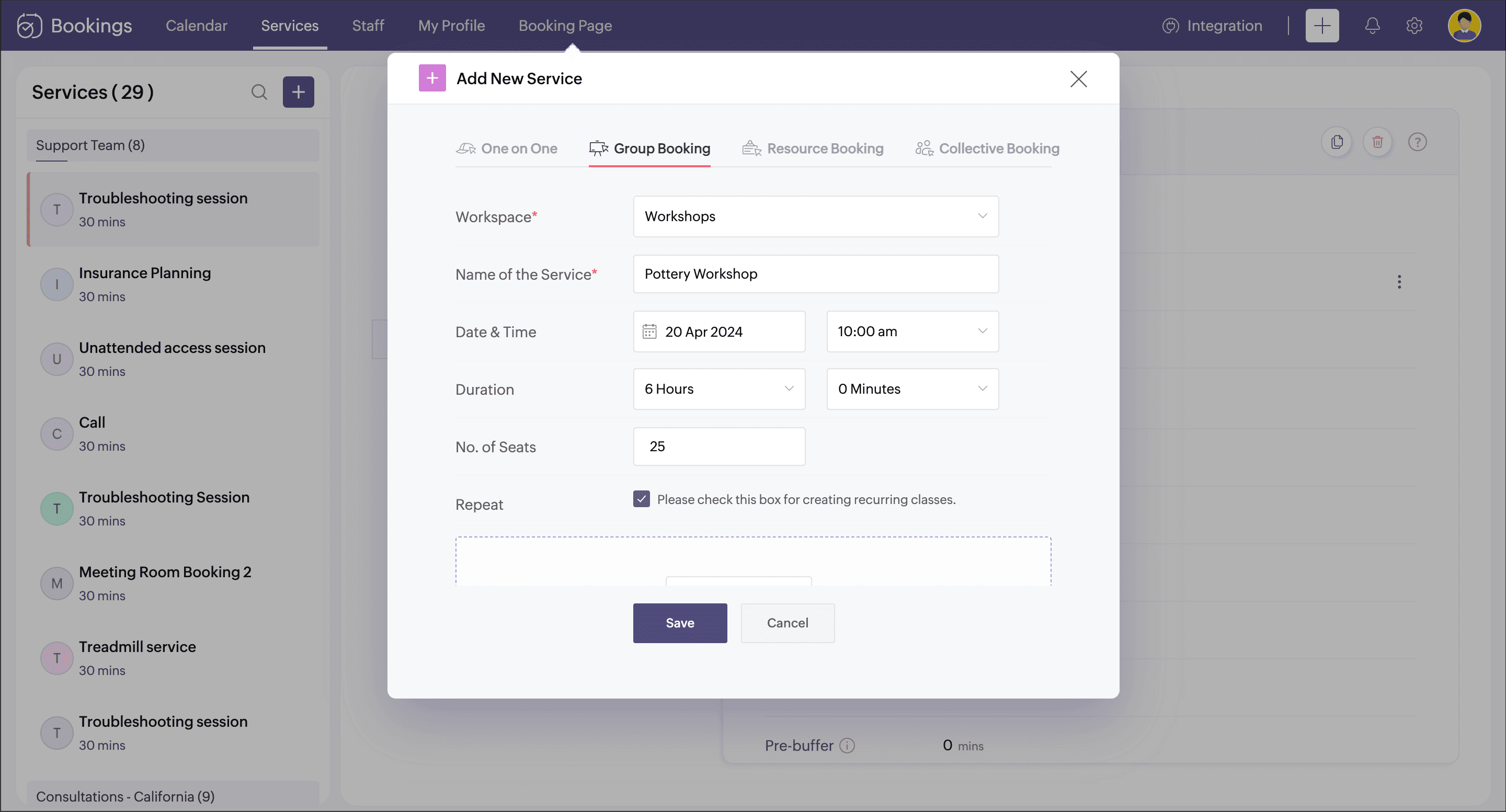
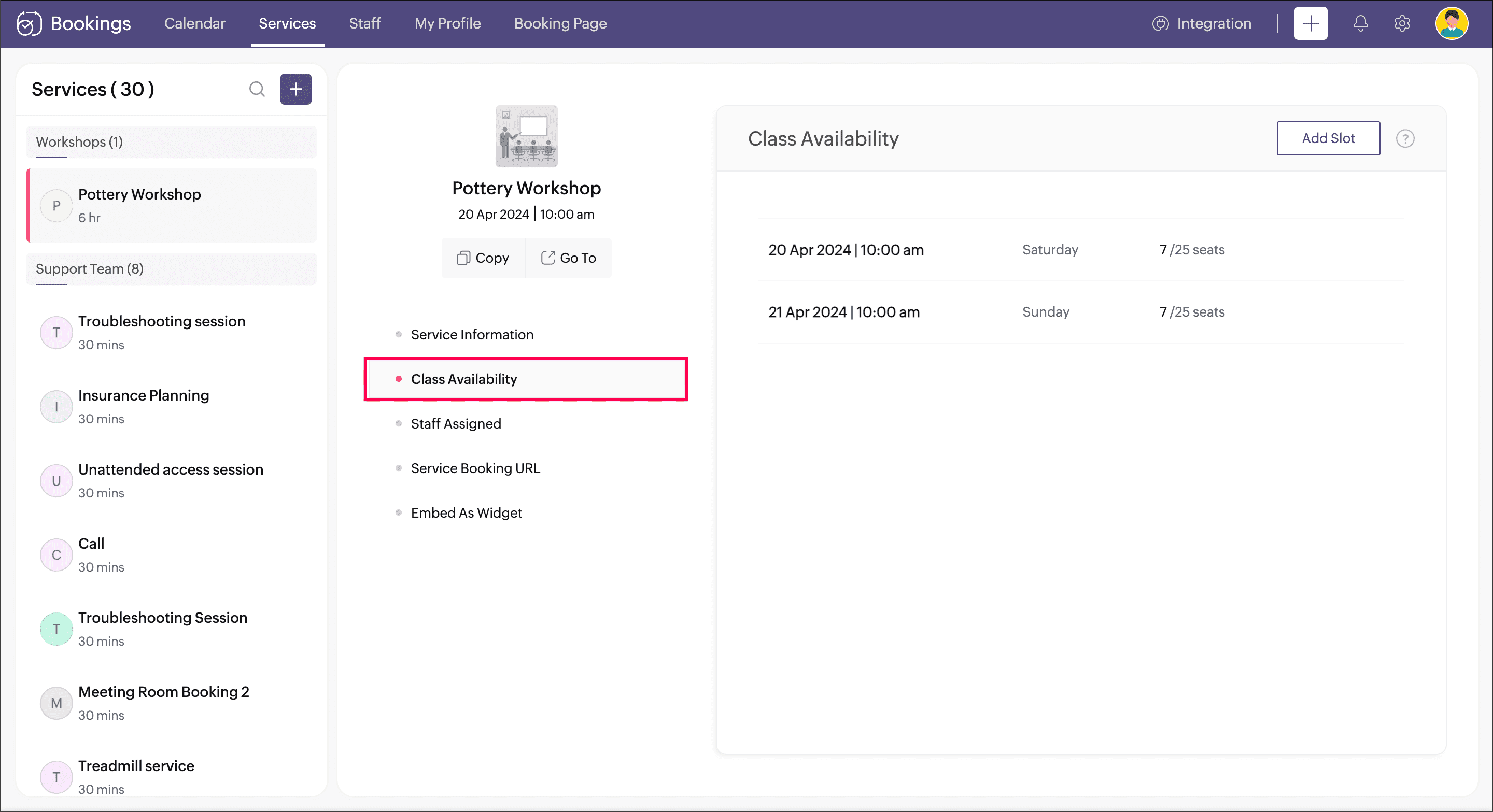
If this workshop happens for a day, you can skip this step. Otherwise, you can select the checkbox for the Repeat option. A pop-up appears to define the days that the workshop will span.
Under Booking Type, choose Series if the workshop is a continuous session that has to be booked as a whole. Or choose Drop-in if the workshop happens for a few days, but each day can be booked separately.
Under Repeat, choose the frequency if it is Daily, Weekly, or Monthly.
Under Repeat Until, you can set any of the two options
Set Date: Specify the last date of the workshop.
No. of Classes: Specify the no.of days the workshop happens.
Click Add.
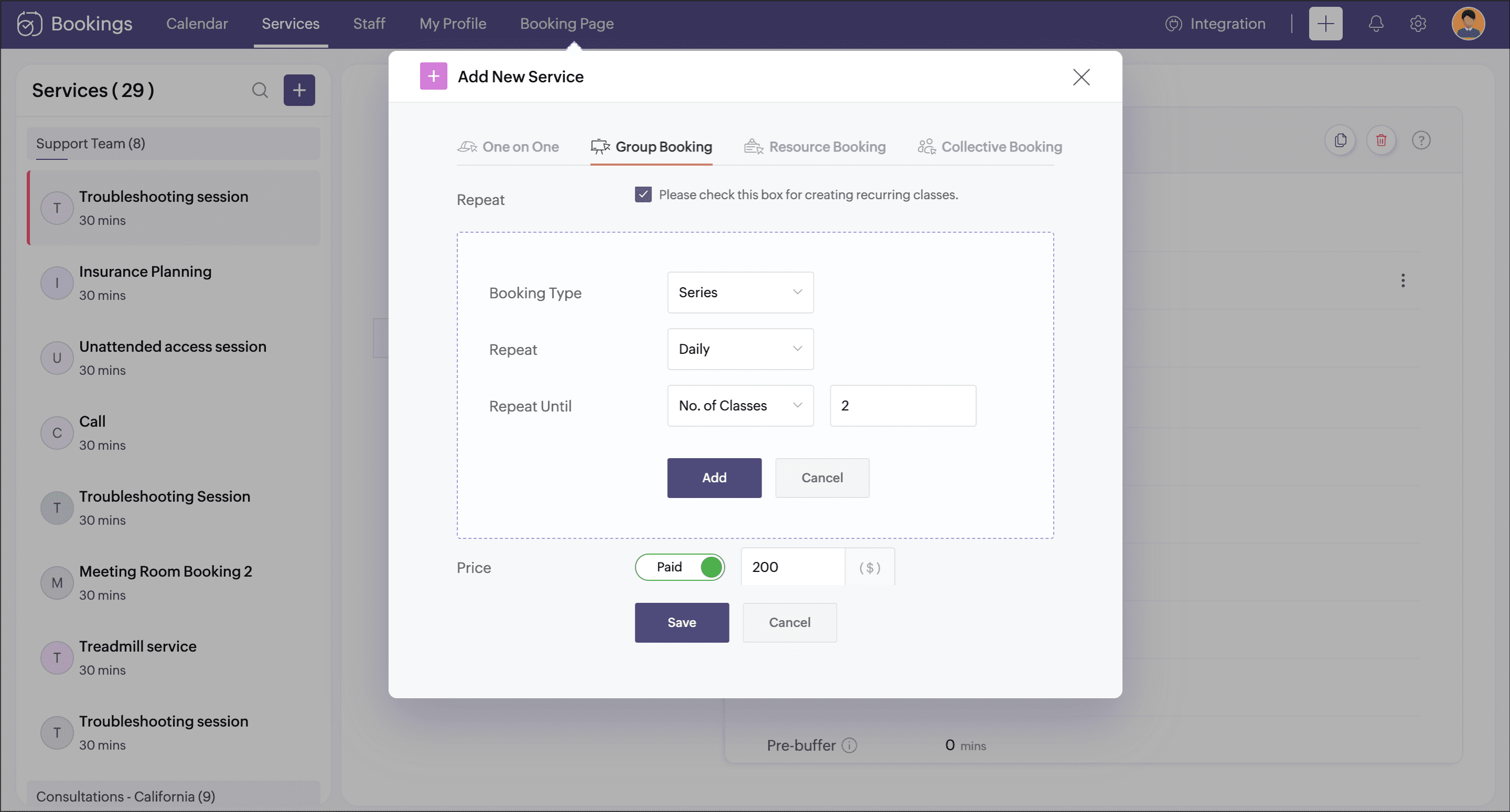
Enter the cost of the workshop under Price.
Add the staff who will be conducting this workshop under Staff Assigned.
Click Save.
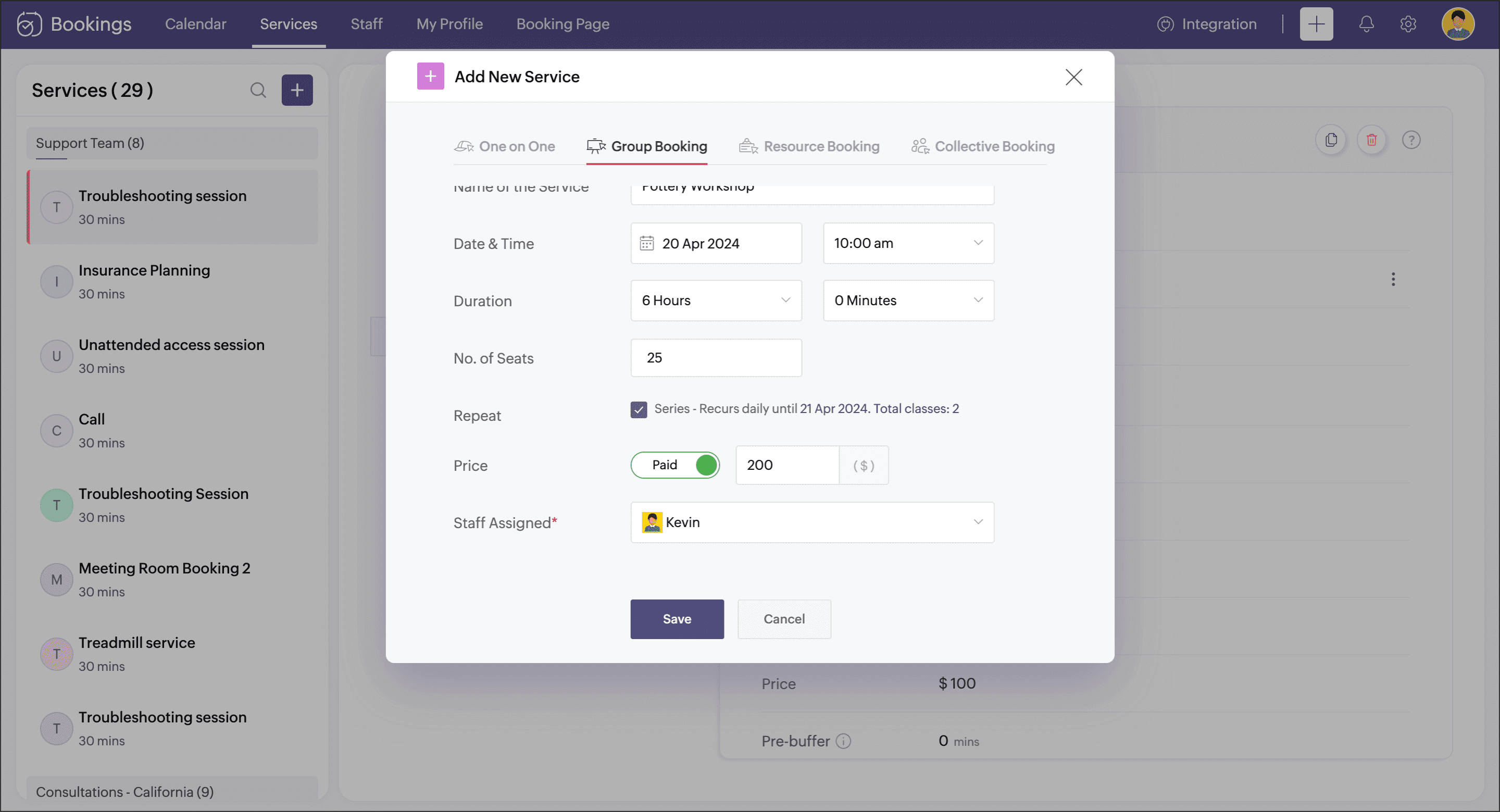
Your group booking workshop is now set up.
2. Share the booking page link
You can now share this workshop's booking page link with your customers. The booking page link can be accessed by navigating to Booking Page in the menu bar and selecting the Service tab, then clicking the Copy option near the respective group booking service.

 Note : Be sure to include this link wherever you promote your workshop across channels like social media, email marketing, referral programs, podcasts, and any other relevant platforms.
Learn how to customize this booking page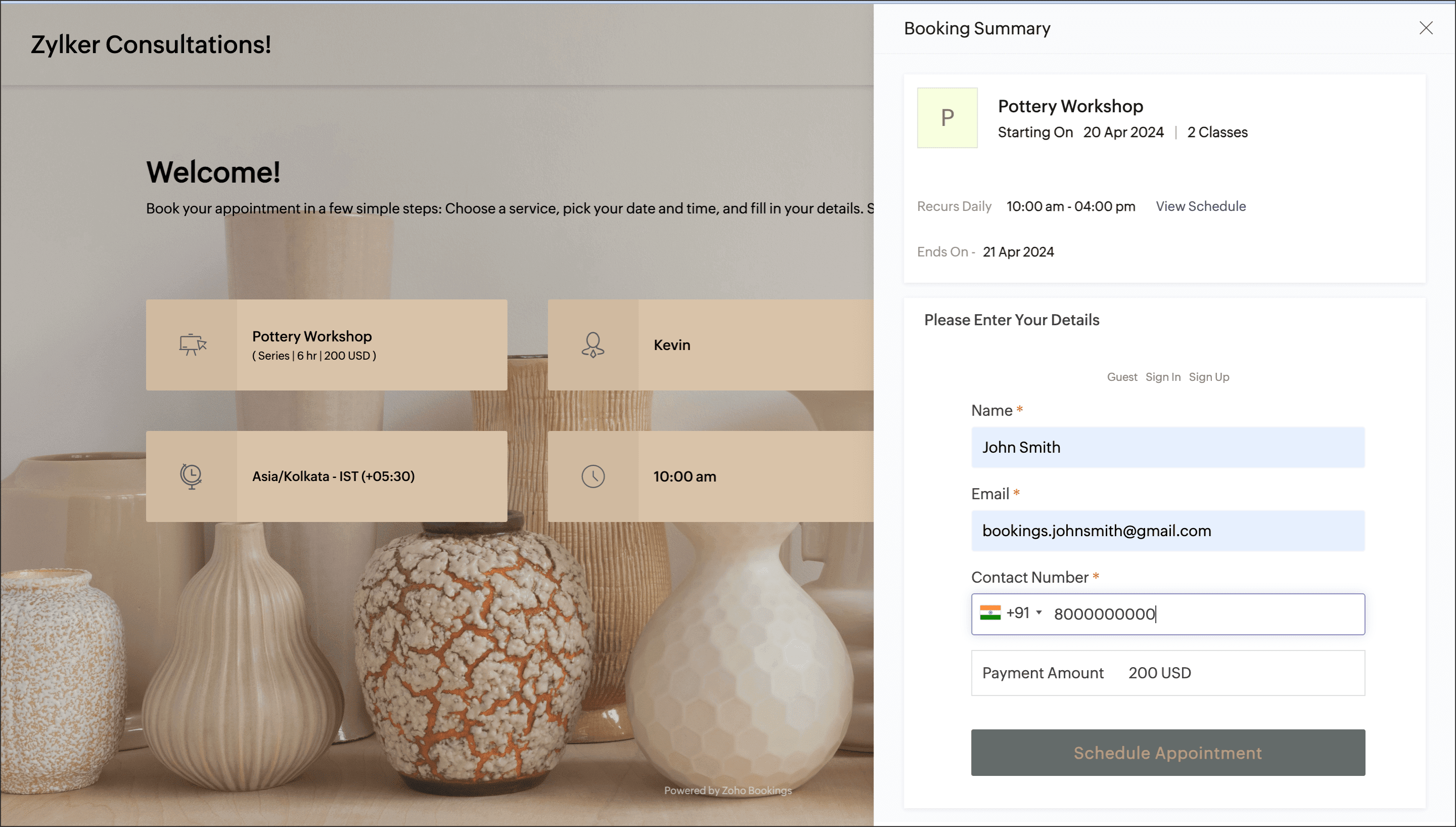
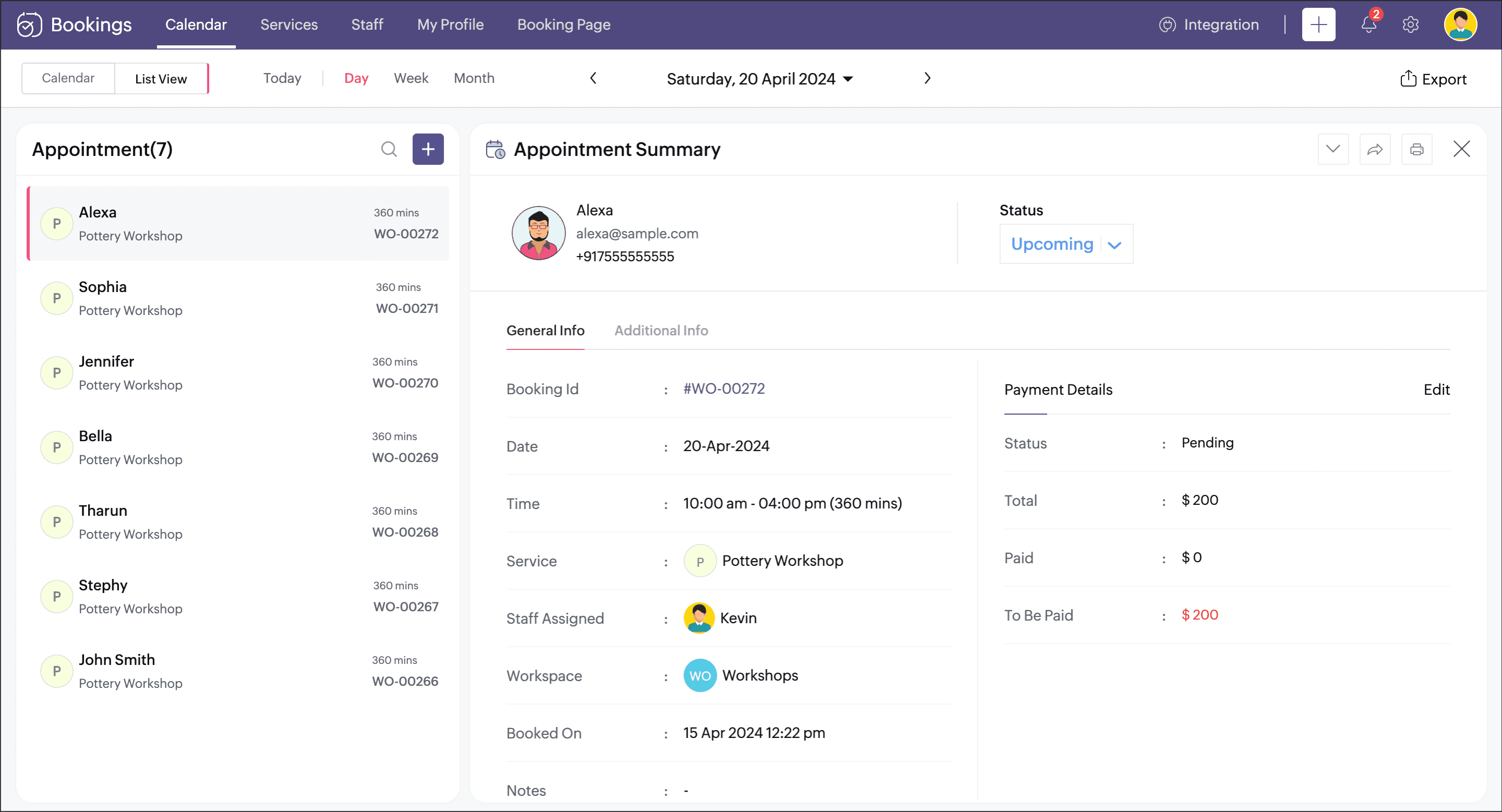
Other options to explore
Configure email and SMS notifications and modify the contents that goes into them.
Collect payment during the booking process. You can set if you want to collect a partial or full amount.
Customize the booking page for a better branding feel.
Thanks for reading this post. Please share your suggestions in comments or write to us at support@zohobookings.com.
Related articles
Topic Participants
Praveena Chandran
Sticky Posts
Tip #13: Identify where your bookings come from with Source Tracking
Source tracking is the practice of identifying where your bookings originated. This is important, because online bookings come from a wide variety of sources like social media platforms, your website, email and ad campaigns, partner websites, organicTip #17: How to mandate partial payment for your appointments
When you require partial payments during the booking process, customers can only schedule with you after paying a certain amount in advance. This deposit acts as a commitment between both parties. Apart from that, it has many more advantages. BenefitsTip #18: Organize a group workshop in a few steps
It's the season for workshops—they're everywhere, catering to diverse interests and needs. Whether for more professional goals like leadership development or creative endeavors like painting, there's an abundance of workshops offered every day. A schedulerTip #16: Custom labels for staff, service, and resources
Every industry uses its own jargon. Take healthcare, for example; when you visit a doctor, it's not just an appointment, it's a consultation. The people who provide consultations are the providers. Similarly, in the tranquil world of a spa, a massageTip #15: Customize service prices for each staff member
It's common practice for a service to be priced differently based on the staff member providing it. For example, an experienced hair stylist may charge more for a haircut compared to the other stylists. This pricing strategy allows businesses to charge
Recent Topics
Changes to the send mail Deluge task in Zoho CRM
Hello everyone, At Zoho, we continuously enhance our security measures to ensure a safer experience for all users. As part of our ongoing security enhancements, we're making an important update on using the send mail Deluge task in Zoho CRM. What's changing?How to Invoice Based on Timesheet Hours Logged on a Zoho FSM Work Order
Hi everyone, We’re working on optimizing our invoicing process in Zoho FSM, and we’ve run into a bit of a roadblock. Here’s our goal: We want to invoice based on the actual number of hours logged by our technicians on a job, specifically using the timesheetsZoho Books | Product updates | January 2026
Hello users, We’ve rolled out new features and enhancements in Zoho Books. From e-filing Form 1099 directly with the IRS to corporation tax support, explore the updates designed to enhance your bookkeeping experience. E-File Form 1099 Directly With theInclusion is the new engagement
When in a very challenging situation, you may have peers or friends around you saying, “Everything will be okay.” They speak to you in a way that they are connected or in a language or tone that feels close. But your inner voice comes to you in a trulyDKIM verification for Squarespace website - Corrections to instructions
Zoho Campaigns DKIM TXT record instructions for Squarespace show that Host field should show: 22111._domainkey.[domain name, e.g. mywebsite.com] However, after 72hrs, I had to reach out to Squarespace tech support, and they confirmed that the domain namePassing the image/file uploaded in form to openai api
I'm trying to use the OpenAI's new vision feature where we can send image through Api. What I want is the user to upload an image in the form and send this image to OpenAI. But I can't access this image properly in deluge script. There are also some constraintsMy client requires me to have custom pdf file names to except payment for invoices, how can I customize this before emailing.
Hello! I love the program so far but there are a few things that are standing in the way. I hope you guys can code them in so I can keep the program for years to come. My client requires I customize the pdf file names I send in for billing. Can you pleaseDisable All
I want to disable all the fields on the form when it loads. I know there is a way to do this by listing all the fields as follows: disable Name; disable Address; disable City; ... I have over 50 fields on my form and i am wondering if there is a single command or way to just disable all fields on load. On load = disable All Thank you for any help.Migrating my email from GMAIL to ZOHO MAIL..........
I am a long time GMAIL user and I really only understand how they operate, but after reviewing your tutorials and forums online, it is quite unbelievable how much more and how much more streamlined ZOHO mail is, not to mention ZOHO's wonderful, more advanced capabilities. I do have several questions about transitioning over to ZOHO. Primarily, where is the best place to start, what do I do first? And how hard is it actually to move all my business and personal accounts over here? When I sign upiOS Zoho Mail App Crashesruni
Whenever I trying to search emails via the Zoho Mail app on my iPhone the app crashes, I am running the latest version of the app and the latest iOS version. I have all set reset the app and deleted the app and still have the same issue. Thank you inAssessment Answered - Automation (Related List)
Hello everyone, We have linked a candidate assessment to our job posting. When someone applies, they are required to answer all the assessment questions. However, some candidates submit their applications without completing the questions. In such cases,Rebrand your CRM with the all-new custom domain mapping setup
UPDATES TO THIS FEATURE! 19th Jan, 2024 — Custom domain mapping has been made available for portal users in Zoho One and CRM Plus. 23rd June, 2023 — Custom domain mapping has been made available for all users, in all DCs. Hello everyone! We are elatedPaid Support Plans with Automated Billing
We (like many others, I'm sure) are designing or have paid support plans. Our design involves a given number of support hours in each plan. Here are my questions: 1) Are there any plans to add time-based plans in the Zoho Desk Support Plans feature? TheHow Does Knowledge Base Search and Article Recommendation Work?
Hello, I would like to understand how the Knowledge Base search engine works. Specifically, does it search based on: The article title only? The full article content? Both, the article and the content? Keywords? Tags? Also, how does the system determineZoho CRM for Everyone's NextGen UI Gets an Upgrade
Hello Everyone We've made improvements to Zoho CRM for Everyone's Nextgen UI. These changes are the result of valuable feedback from you where we’ve focused on improving usability, providing wider screen space, and making navigation smoother so everythingCan't change form's original name in URL
Hi all, I have been duplicating + editing forms for jobs regarding the same department to maintain formatting + styling. The issue I've not run into is because I've duplicated it from an existing form, the URL doesn't seem to want to update with the newCalendar report with order options and more quick view templates
I think many of us regularly work with calendar-style reports. It would be great to be able to customize the quick view with new templates and have options to sort the entries for each day of the calendar by different criteria. I think this is an interestingShared Views
Hello, is there a way to prevent an agent from changing a shared table view? I have no issues with agents being able to create and customize their own view, but when I create a view and share it to my team -- the expectation is that they are viewing itUsing Zoho answer bot across departments (help center articles from another department)
Hi Zoho Community, I’ve run into a major issue and hope someone here has experience with this setup. We currently have a Help Center in the department A where all of our knowledge base articles are maintained. However, we would like to use a Zoho AnswerZoho Desk Partners with Microsoft's M365 Copilot for seamless customer service experiences
Hello Zoho Desk users, We are happy to announce that Zoho Desk has partnered with Microsoft's M365 to empower customer service teams with enhanced capabilities and seamless experiences for agents. Microsoft announced their partnership during their keynotehow to avoid duplicate customer
How can i avoid to create a duplicate customer. I charged a same customer with two different plans and it showed up twice in my customer list and subsequently in Zoho books contacts. It creates confusion to have a same customer appears multiple times in customer or contact list. How can i avoid it.The Social Wall: January 2026
Hello everyone, We’re back with the first edition of The Social Wall of 2026. There’s a lot planned for the year ahead, and we’re starting with a few useful features and improvements released in January to help you get started. Create a GBP in SocialAPI keys not showing in ZeptoMail dashboard
Hi there, I'm hoping someone can provide some assistance as support isn't replying. I am trying to configure my transactional emails, but the dashboard doesn't show any of my API details - the `div` is there but it's emtpy. Every time I click "GeneratePipeline: Copying rulesets from one data source to another
When creating and editing data pipelines, it would be really helpful to be able to copy the ruleset from one data source and 'paste' it to another. This would save time and reduce manual mistakes.Doubt about maximum email reach
Good morning, greetings. This is Bramdon García from EDULABS S.A.S ESP, located in Colombia. I'm writing to inquire about the possibility of sending an email to 35,000 people simultaneously. Our company has a Zoho account, but we'd like to know if there'sZoho calendar not working in browser
Hello, I am new to Zoho. I have two accounts for two separate businesses. In one of them, calendar loads in a browser no problem. However, if I use this account (sairfeetmusic.co.uk) calendar does not load. I also cannot add it to my Thunderbird LighteningAuthentication Failure when adding POP3 accounts
Hi everyone, I am a new user currently migrating from Gmail to Zoho Mail. I decided to make the switch following Google's decision to discontinue POP3 fetching. I previously used Gmail as my primary mail hub, and Zoho seems like the perfect alternativeTrident Application Folder
Hi, How to choose installation folder for Trident, by default it gets installed in C drive. How to change drive?Email disappeared to specific contact
Good afternoon, this morning I emailed somebody. This email isn’t showing up in my sent folder. They sent me a response which I clicked on and it disappeared immediately. Why could this be?How Do Mutliple Sales People Prospect in the "LEADS" module without calling the same leads?
We have 4 sales reps and the Leads module does not have real time intuitive knowlodge to make the sales rteps dont call the same people at the same time. How can we crate a fluent prospecting sytem where the salres reps can go out bound without callingCreate an Eye-Catching Announcement Widget for Your Help Center
Hello Everyone! In this week’s edition, let’s explore how to keep your customers updated with exciting news in the Help Center. See how ZylkerMobile wowed their customers by bringing updates right to their portal. ZylkerMobile, the renowned brand forEnable Free External Collaboration on Notecards in Zoho Notebook
Hi Zoho Notebook Team, I would like to suggest a feature enhancement regarding external collaboration in Zoho Notebook. Currently, we can share notes with external users, and they are able to view the content without any issue. However, when these externalUpdating records through Zoho Sheets View doesn't update timeline or trigger workflow rules
I have noticed that when i update a series of record with the zoho sheets view (see here http://d.pr/i/ahnR) it doesn't update timeline history or trigger workflow rules. I am using it in the Deals module. Looking forward for some more info. DenisHow do I change the account bank charges are charged to?
I want bank charges charged to my Credit Card Fees account. Is there a way to do this?Mail Search should allow grouping by conversation like Gmail.
Having switched from gmail I have found the search function hard to use. Mostly because mail is not grouped by conversation in search. If I search for a word when looking for a conversation had with someone then sometimes 10 emails will come up from theAbility to CC on a mass email
Ability to CC someone on a mass email.Updation of Old Browsers Versions for Zoho CRM
We have upgraded the default browser version for CRM to facilitate features like widgets and scripts that are often implemented aside from advanced functionalities for various business requirements. The latest version is aimed to provide better performanceProject-Based Inventory Consumption and Proforma Invoice in Zoho ERP
While working with customers across different industries, we have identified a few functional questions and gaps that commonly arise—especially for project-based and service-oriented businesses. Many organizations, such as those in shipping, construction,Zoho Desk domain Mapping not Working Showing CNAME Error
I have created the subdomain and created the Cname as well as its instracted on the Zoho website but when i try add the domain on help desk its showing error msg : Make sure you've mapped the CNAME entry and linked it to desk.cs.zohohost.com.au on yourFounders using Zoho — are you leveraging Zoho Campaigns + Zoho Social for thought leadership… or just sending emails?
I’ve noticed something interesting in the Zoho ecosystem. Many founders use Zoho Campaigns and Zoho Social for basic marketing—newsletters, scheduled posts, and announcements. But very few are using these tools strategically to: • Position themselvesNext Page