Zoho Creator | Introducing Augmented Reality
We're delighted to announce augmented reality (AR) in Zoho Creator! Now, you can set up your own immersive 3D experiences—combining a glimpse of the real world with computer-generated graphics. AR technology augments what you see, by superimposing digital data (3D models) on real-life objects, captured by your device camera. This real-time digital interaction provides better data visualization and enhances end-user experiences, providing you with exciting new business opportunities.
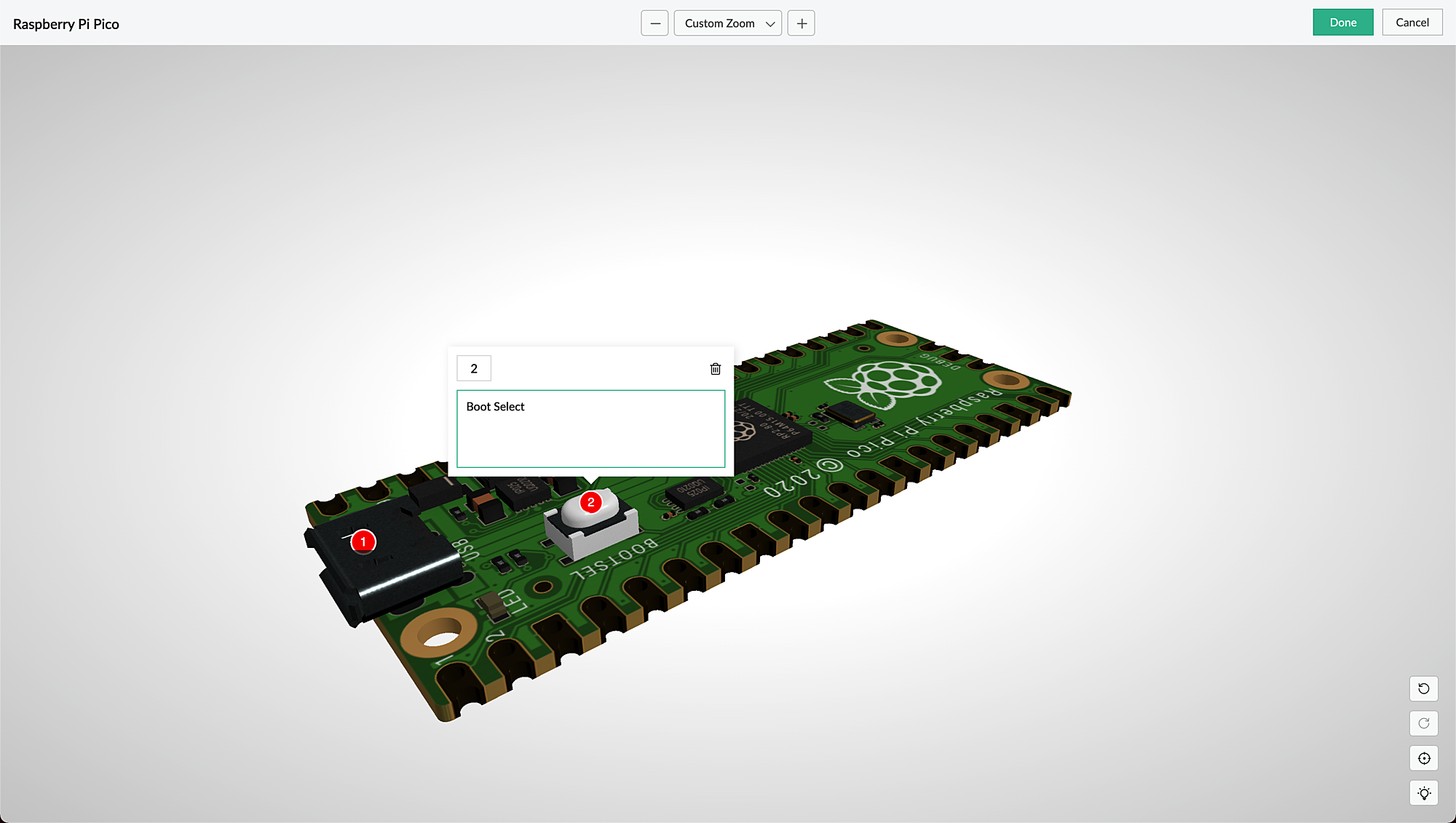
AR is seamlessly accessible via web browsers, smartphones, and tablets, which facilitates the growing interest in multi-experience development platforms (MXDPs). Using AR, your businesses can provide unique approaches to key business challenges in real-world applications.
AR can enhance user experience in many ways:
Organizations can use AR to promote their products or services and launch innovative marketing campaigns.
A rich feedback loop can be created using AR in product customization and quality, where users can select the defective products and also annotate the 3D models by describing the defects.
Users can try out different products virtually, check if a product fits well in their rooms (in the case of furniture products) by either partial or full replacement of the original view of a product with an augmented view of the same product, and make informed choices, all within the comfort of their homes.
AR types in Creator
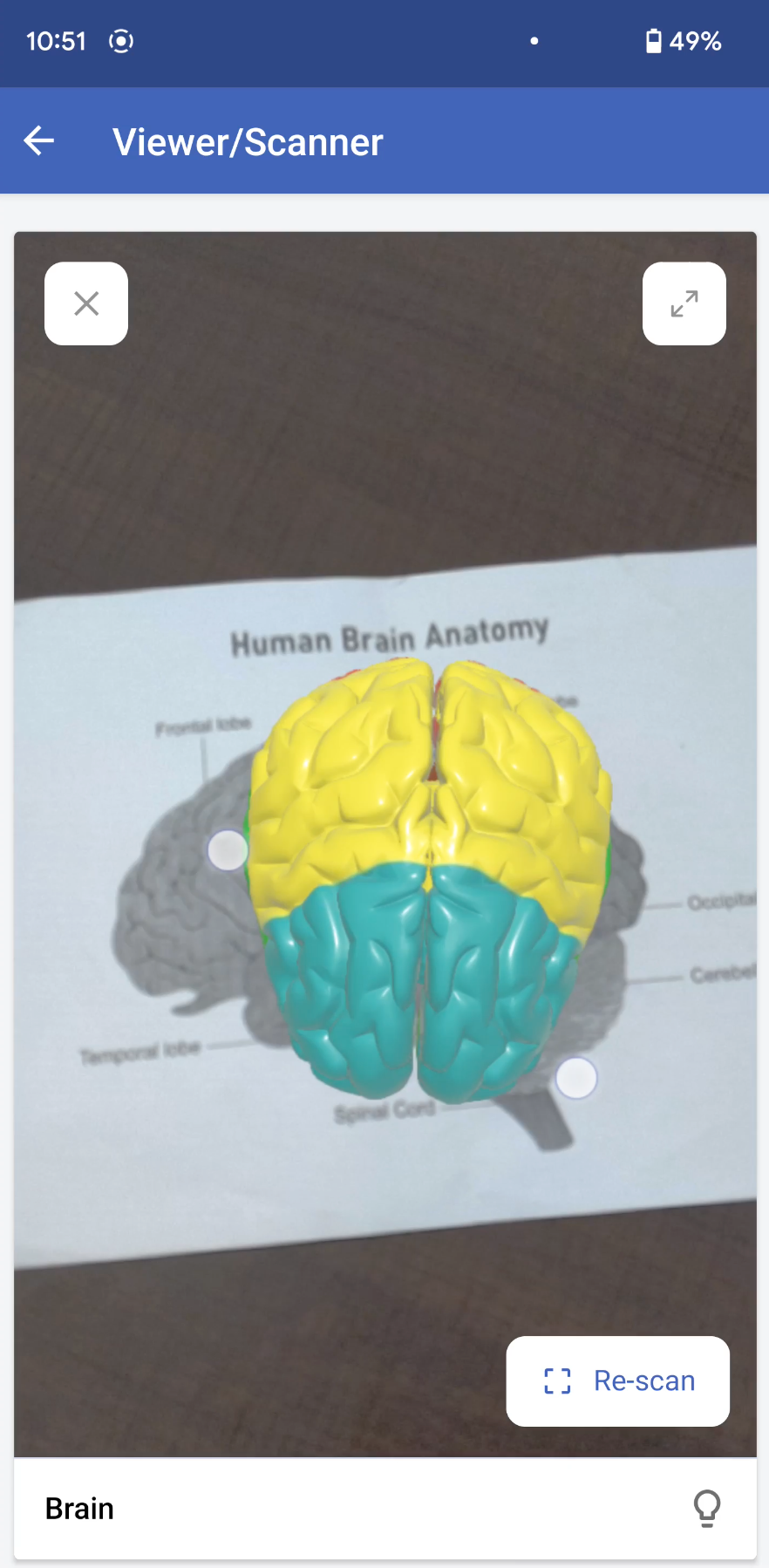
Marker-based AR: This AR-type relies on the recognition of images (referred to as markers). Markers are unique, visual patterns that your device cameras can easily recognize and process. For example, you can point your devices at markers such as scan codes or logos to seamlessly activate the AR experience. Marker-based AR works by scanning a marker, which triggers the content to be overlaid on the camera upon visuals matching the marker image For example, students can scan a diagram in their textbook and view its 3D model (projected on the diagram) through their digital devices.
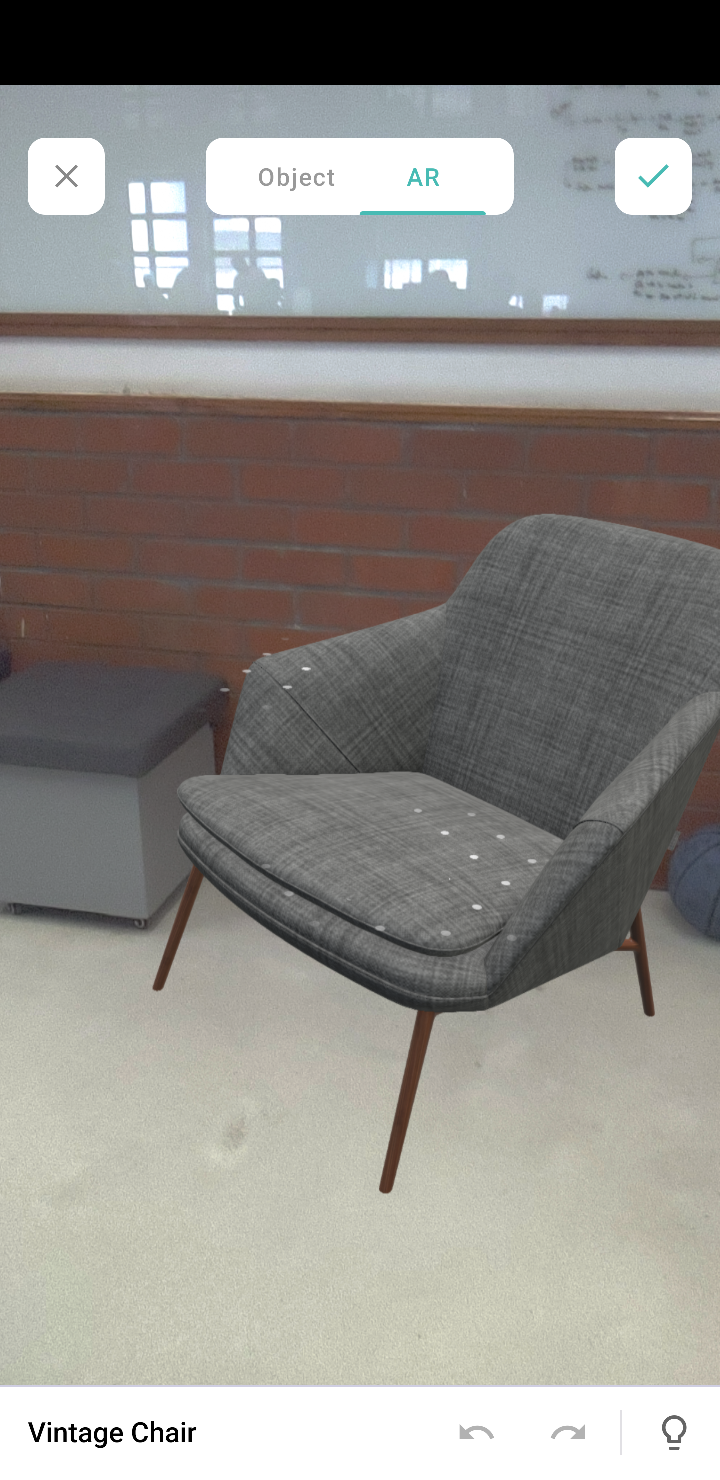
Markerless AR: This AR type does not use a marker. Instead, it allows you to scan the real environment and place digital elements on the recognized (flat) surface. This offers more control to users, as it allows them to choose where they would like to place the virtual object (including real-life placement of virtual augmented objects). For example, furniture companies can enable customers to virtually place their furniture in their homes to check if it would fit well.
In the markerless AR type, users can preview the models in the following two modes:
AR mode: This mode displays the 3D model as superimposed on its environment. Users can rotate/move their devices to view the plotted model.
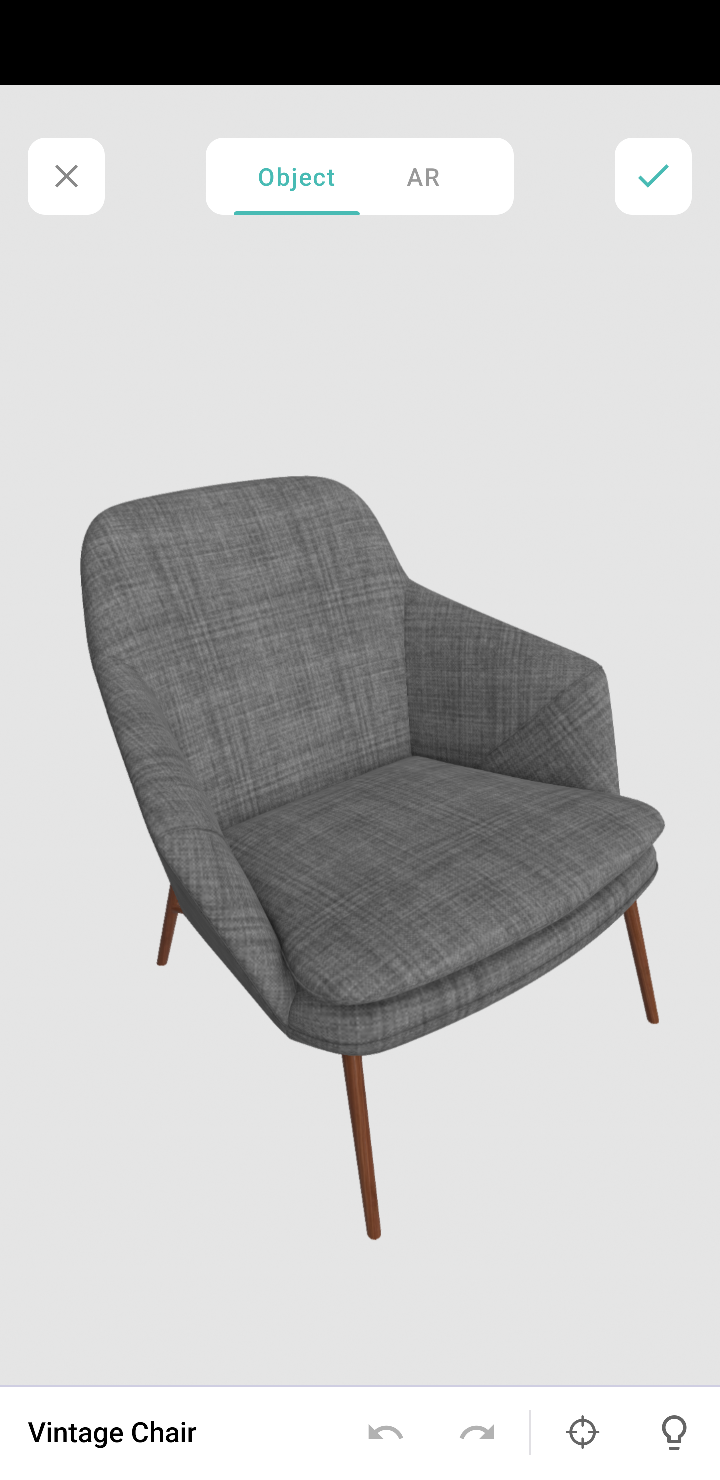
Object mode: This mode displays only the 3D model. It allows you to view the selected/scanned model in a 360˚ rotation. You can also zoom in and zoom out the model, as per your convenience.
Note: These modes are available in the AR field and AR viewer (only for markerless inputs).
AR in Creator
In Creator, AR has been introduced across three modules:
Microservices - AR Library
Form fields - AR field
Pages - AR Viewer
AR Library
AR library stores AR sets of all the apps in your Creator account. You can add and manage AR sets from here. An AR set consists of AR elements such as 3D models and their markers.
AR field
The AR field in a form displays the AR sets (3D models) from the AR library as a dropdown. You can add the AR sets in the AR Inputs field property. When you access your app in live, you can choose a model from either marker-based or markerless AR sets, and you can annotate it.
AR Viewer
The AR Viewer acts as an interface for your device's camera. This interface is used to invoke the camera (only in mobile) to scan a marker for your marker-based AR sets. In your app's page, you can configure the AR Viewer's input in two ways:
Marker-based AR Sets: To scan the marker and plot the respective 3D model.
Passing the 3D model's name through page parameters to load a 3D model directly.
Illustration
1. Imagine you've created an app named Zylker Jewelry. The following flowchart shows how AR is used across this app.
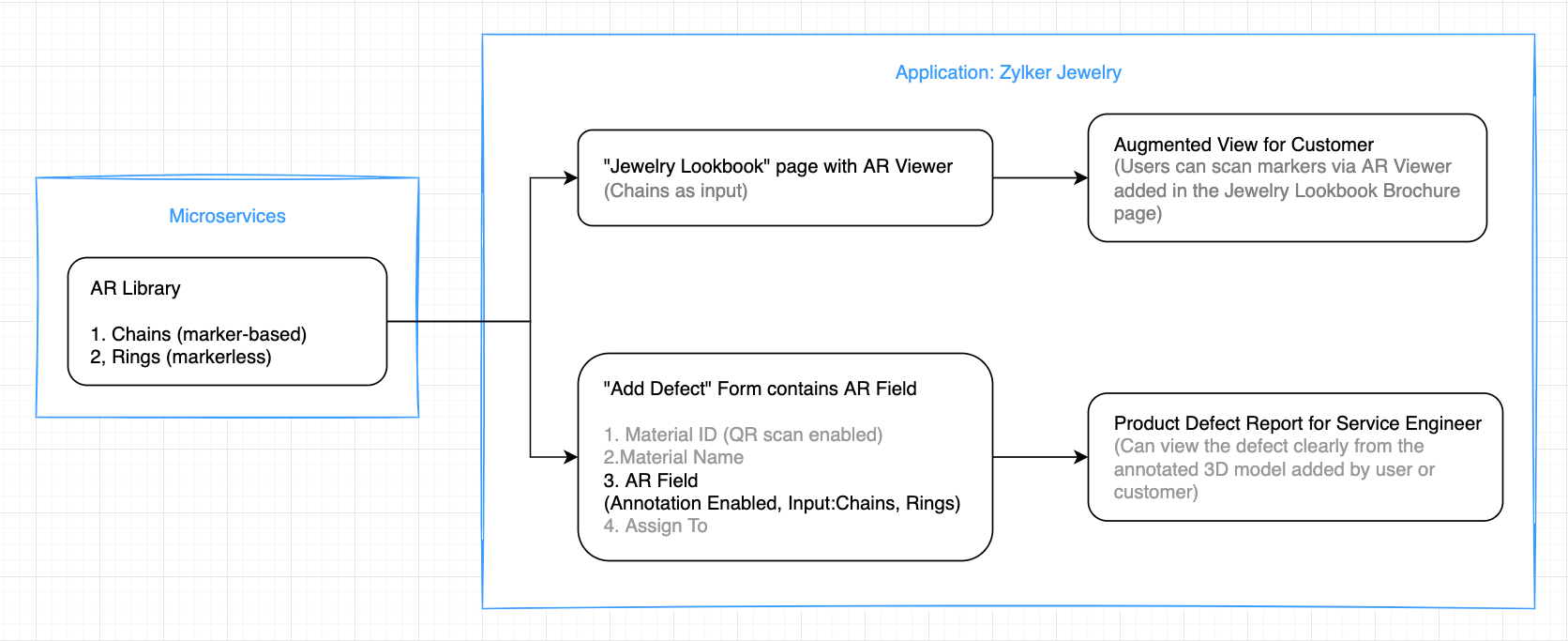
This app enables you to perform the following actions:
(i) Users can use the scanner (AR viewer) on the app's Jewelry Lookbook page to scan the various designs available on your brochure and view them as popup models. They can rotate, zoom in and zoom out, and view the models in full-screen as well.
(ii) Quality assurance engineers can select 3D models of the defective jewels and also annotate them by describing the defects.
Let's take a look at how the above actions can be configured in the Zylker Jewelry app.
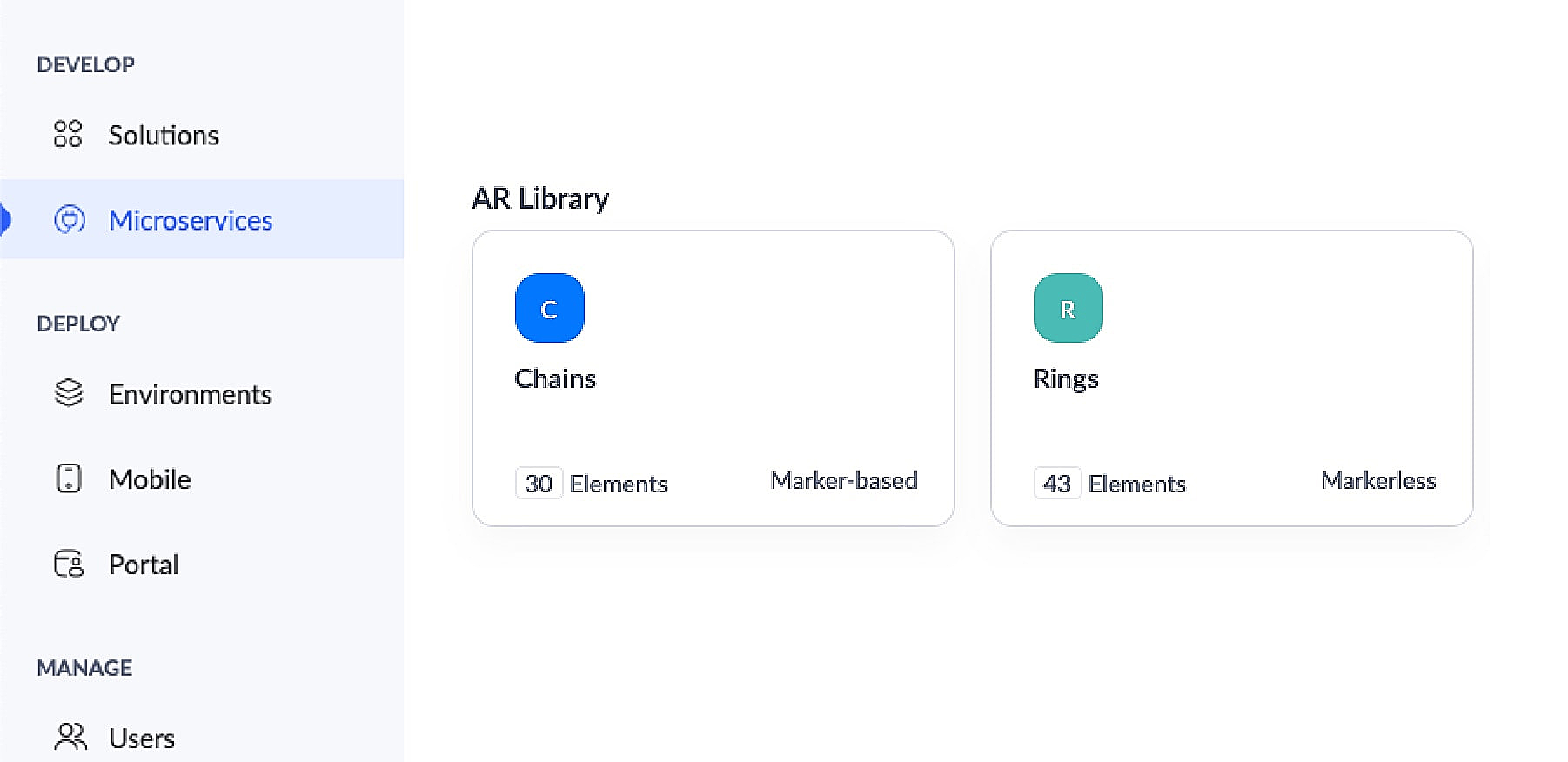
This app has an AR library that contains 3D models of chains (marker-based) and rings (markerless).
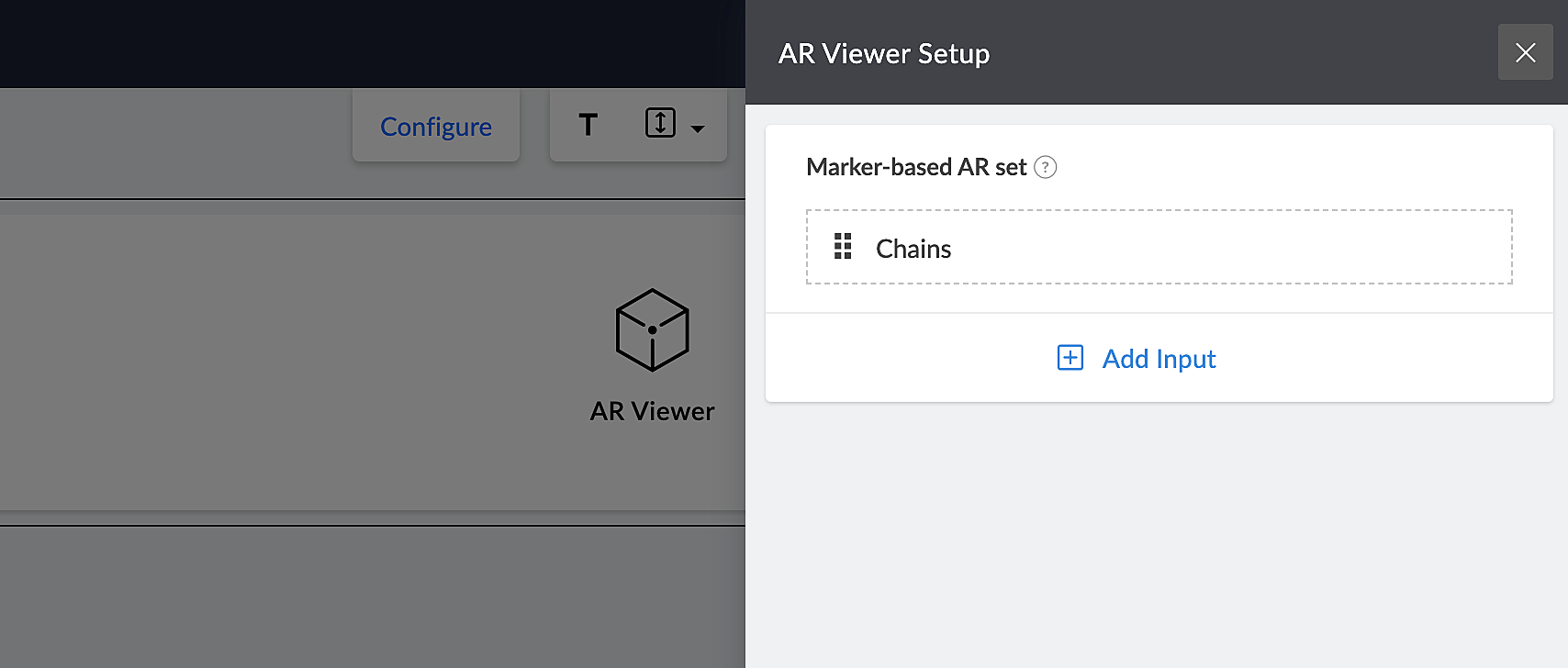
The app's Jewelry Lookbook page has an AR Viewer element with the 3D models of chains as its input. When users access this page, they'll be able to scan the brochure and view the available chain designs on their devices.
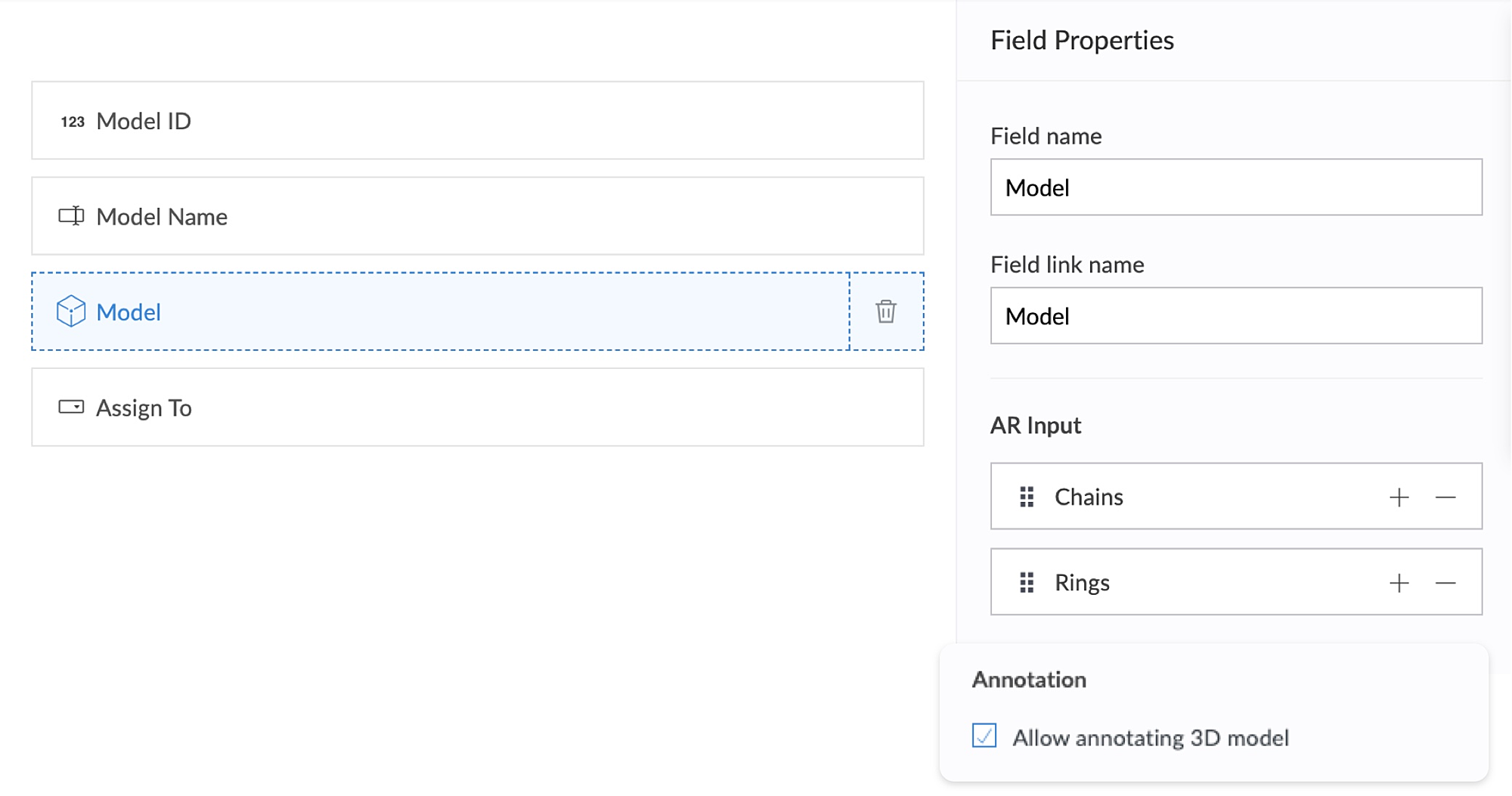
The app's Add Defect form has an AR field containing the 3D models of chains and rings as its AR input. Quality assurance engineers can select the 3D models of defective jewelry from the dropdown and annotate the models by describing the defects. This form also has an Assign To field, that assigns the defect to the designated Service engineer, who can view and take appropriate action.
2. Using AR, classroom education can become all the more intuitive and interactive, as it enables teaching staff to demonstrate virtual examples of textbook concepts. This, in turn, will enable students to engage more actively, learn faster, and memorize information more easily.
Let's take a look at Zylker Schools of Learning, a learning app created for teachers and students. This app facilitates interactive learning through AR technology used across the following components. Apart from these, AR functionality can also be accessed via your mobile applications.
AR Viewer
AR field
AR Viewer:
This app has an AR library that contains textbook diagrams as markers, along with their 3D models. The app's Virtual Book page has an AR Viewer element with the 3D models as its input.
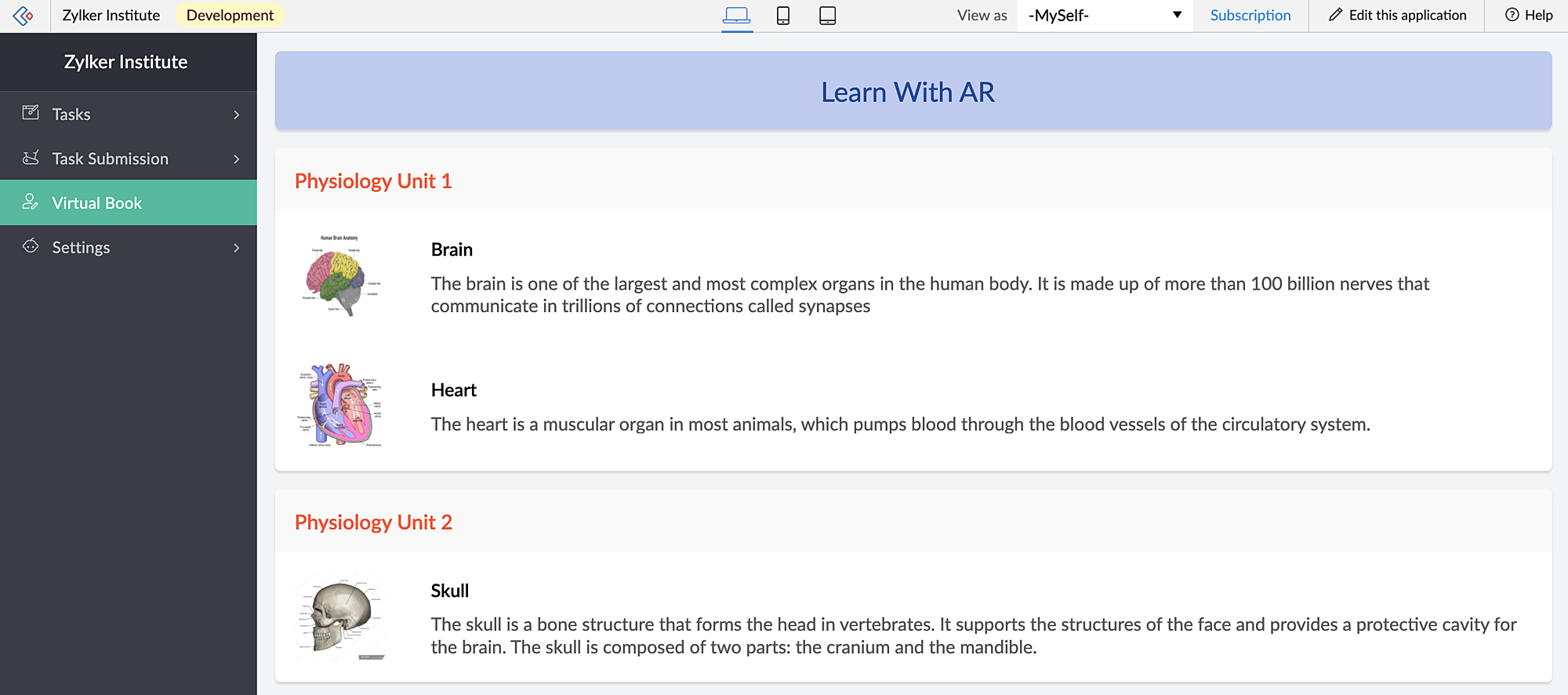
When students access this page, they can click the diagrams and view them in both AR mode and Object mode — rotate, zoom in and zoom out and view in full-screen as well.
When you access the app via mobile, apart from viewing the diagrams in AR Viewer (similar to web), students can also open their device scanner, scan their textbook diagrams and view them as plotted (popup) models on top of their textbook.
AR field:
This app has a New Task form that contains an AR field. This field has 3D diagrams as its input. You can assign tasks to your students, asking them to annotate the 3D models and also view the submitted tasks.
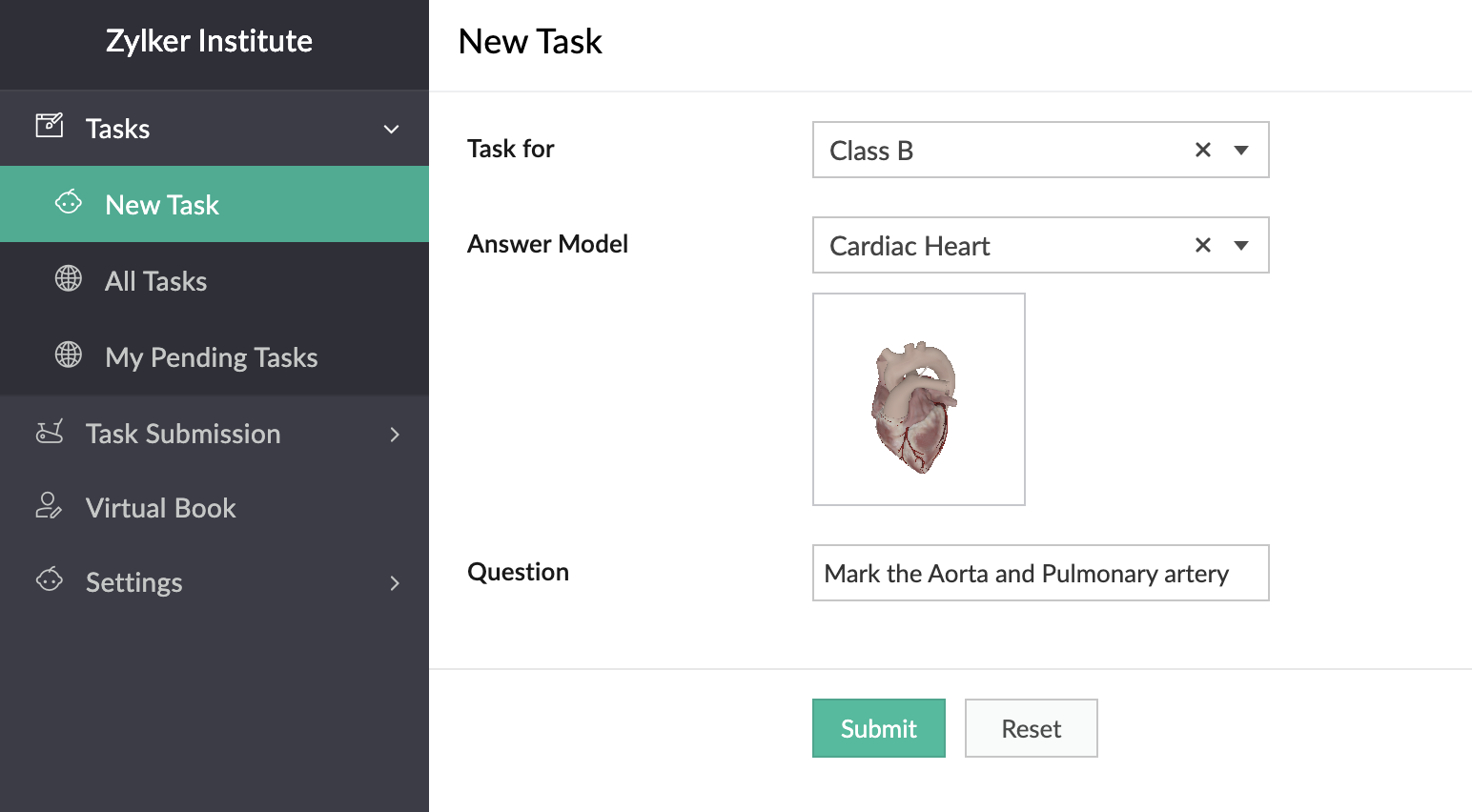
In the below GIF, the demo user Demo 3 is the Teacher profile and Demo 1 is the student profile.
You can also place stickers of the textbook diagrams on your classroom walls, which can be scanned by your students through the provided devices. Upon scanning the sticker, they can view, rotate, and annotate the 3D model of the scanned image which is mapped in the AR Library.
Thus, AR helps in explaining otherwise plain textbook concepts in a visually-appealing manner.
Feature release plan
AR in Creator will be available in C6 for Paid plan users only.
If you have any questions related to AR, please feel free to contact us at support@zohocreator.com.
Regards,
The Zoho Creator Team
Topic Participants
Meghaa Pradyumnan
Catherine
Damien Cregan
PARTHIBAN VALLAVAN
Sriram U
Sticky Posts
Introducing Zoho Creator's 2025 Release Projection 2
Hello Creators! I'm Prakash, from the Creator product management team, and today I'm delighted to unveil our next set of features as part of Release Projection 2 for 2025. With thoughtful analysis and planning, we've curated powerful new capabilitiesZoho Creator - 2023 Release Projection 1
Hello everyone! A very Happy New Year to you and your family. Hope you're all good and having a great time using Zoho Creator to make your lives easier and your businesses prosper. 2022 was an action-packed year for us at Creator, and we hope to continueZoho Creator User Group meetups in a city near you! - Oct - Nov, 2023
Greetings from the Zoho Creator team! We're hosting a series of Zoho Creator meetups in various cities across the globe, and we'd love to meet you there! Our meetups are a great opportunity to network with industry peers, exchange ideas and best practices,Zoho Creator - 2023 Release Projection 2
Hello everyone! Time truly flies when you're having an incredible journey, and today we mark the completion of an eventful and action-packed six months. It feels like just yesterday when we embarked on this adventure together with the launch of our newUpcoming Updates - August 2022
Hi all, Greetings from the Zoho Creator team! Today we've got news for you on some exciting updates. And rest assured— there’s more to come! In this post, we'll be going over the upcoming features and improvements for this month as mentioned below. A
Recent Topics
Smartsheet Integration
Has any in the community been able to integrate Zoho Desk with Smartsheets using Zoho Flow? I am trying to get the Smartsheet Row ID based on ticket data and cannot find documentation on the Get Row function for Smartsheet. It is asking for a Query StringCRM Campaign - how to mass remove contacts?
Does anyone have a solution for removing all contacts from a CRM campaign. Seems that one by one is the only option.Send out follow-up email in the same thread (threaded conversations in individual emails) from Zoho CRM
Hi, I'm new to Zoho. I'm trying to send individual emails to my leads one by one. And I'll send out follow up email if I don't hear back from them later. However, instead of sending a new email, I want to reply in the same email thread so that the recipientsCadence Support in Zoho Vertical Studio
We would like to know whether it is possible to create and configure Cadences in Zoho Vertical Studio, similar to the Cadence feature available in Zoho CRM. Please confirm if Vertical Studio supports creating cadences for modules and users, and whetherRemoving "Products" as mandatory field from Sales Order creation page
Hello, friends According to our workflow, we should: 1) create Sales Order (Stage "New") 2) call and discuss the Products with a customer (Stage "Communication") 3) add the Products to the Sales Order during the call However, "Products" is mandatory toZoho Books says "The customer "Hakimuddin P A Ali" already exists. Please specify a different name.""
One of my transaction is not getting posted from Stripe to Zoho books. I already checked in Zoho books that there is no customer already present in Zoho books with the same name (as the error mentions) I already raised this complaint on Zoho flow portal,Is it possible to automate a file to be directly uploaded to a specific subfolder in Zoho Workdrive?
I am establishing a workflow so that when a new task is marked "complete", the document submitted in the task (under the "Documents" tab) is automatically uploaded to a specific subfolder in the associated WorkDrive for the project. However, the dilemmaSteuerberater der Zoho benutzt in Deutschland
I write in English because the issue is related to German regulations. Wir sind ein Unternehmen, welches aktuell keine Pflicht zur doppelten Buchführung hat. Aktuell bucht unser Steuerberater jeden Beleg, auch unsere Auslagen. Wir würden dies gerne selbstWhy are some folders not showing up as an action trigger in Zoho Flow?
I am currently working on a flow that automates the process of creating a folder in WorkDrive once a Task List is created. When I am selecting a destination for the folder, some projects are not showing up. I intend to create a folder within a specificGetting Date from PostgreSQL error
I am pulling data from PostgreSQL table into a CRM record via FLOW but the field is coming out empty. Need some suggestions: Field Type in CRM: Date/Time Field value in PostgreSQL: 2024-12-05 21:06:32.479 Field value in FLOW "Fetch Row": created : "2024-12-05T21:06:32.479382000",Zoho Flow to SendOwl API error
SendOwl is listed in the apps list of Zoho Flow. When trying to connect through the API with valid key and secret, the error given is: SendOwl says "HTTP Basic: Access denied" It seems Zoho doesn't connect via HTTPS. I've already tried using webhooks,decisions based on content of a ticket
Hi, I need to create a flow that sends automated email based on the content of a ticket in zoho desk. I have certain tickets that are formatted in a particular way, and contain certain keywords. How can I filter (based on decisions) the tickets basedNewline Character "\n" parsing problem in webhooks
Hi there, I am facing an issue in Zoho Flow (maybe a general issue or maybe only in Zoho Flow): I have this function: void sendListWebhook(string url, list array) { for each arrayElement in array { result = invokeurl [ url :url type :POST parameters:arrayElement.toString()One Company, multi branches, multi warehouses and I need to manage this in one organization
Dears, I'm a new user to zoho solutions, however I found a lot of persons giving a nice feedback about it also a lot of good reviews. I though why we try to move to it in our company. I'm not sure if Zoho could give me all what I need or not that's why I'm going to post in this topic most of the things I know about managing our business to let you ,as zoho experts, tell me if Zoho will meet my business requirements or not. First of all we are a flowers and landscaping company we have like 6 toMigration Evernote
Bonjour Apres plus d'une dizaine d'année passer avec evernote j'ai décidé de franchir le pas . J'ai débuté par migrer mes notes vers zoho et depuis la migration est bloquée. Impossible d'avoir un retour du support malgré plusieurs mails et tentative d'appelPushing GCLID info from Gravity Forms to ZohoCRM
We are switching to Gravity Forms from Zoho Forms and I cannot find any good info on how to make sure my GCLID tracking info is pushed through to the CRM through my new forms. There was an article in the documentation about placing something within theOn Zoho Flow, Record deleted trigger from Zoho Creator
On creating flow in Zoho Flow, when we select app Zoho created, it provides 3 trigger options - Record created, Record updated and Record created or updated We need trigger on "Record Delete" as well, We have a use case to fire our system api if recordZoho Flow Switch On Not Working
I have created a flow which is when the mailbox address received the email that meet the condition will auto fetch the contact, account and finally create the ticket by using Zoho Desk. When I do a test and debug on my flow it work well as what I expectMS Teams Flow Integration Question
Where can I find the chat ID for the "Post message to chat" target?Zoho Flow - Access denied to recover recording from call module - OpenAI
Hi, I am trying to build a Flow to recover recoding when a new call is saved in my CRM. I have integrated my CRM with ringcentral and the recordings are saved in the event. Trigger: When new module entry Step 2: Fetch module entry (Zoho CRM says "permissionUnable to send price in big commerce from zoho flow.
I am creating a flow from zoho flow to create a product in zoho inventory and sending this to big commerce. But the problem is like when ever i send the price its getting error. it require decimal format value if i am sending ${trigger.sales_rate} theNot sending mail to new lead in zoho flow
I have created a flow in zoho flow and triggered an action to send email notification when the new lead is created but even after user entering the mail id the email is not going to themAccess query string from incoming webhook URL in Zoho Flow
I have a fairly straightforward use case, but cannot find anything conclusive on this subject. How can I simply access the query string of the incoming webhook request in Zoho Flow? I am attaching the Deal ID to the end of the request like: https://flow.zoho.com/762439902/flow/webhook/incoming?zapikey=1001.0dec2d7dd15080c464a13925275f0129.448c23ee219c545c89f5a178456cfc8b&isdebug=false&dealID=${Deals.DealUnable to access my Zoho forms account
For some days now, I haven't had access to my Zoho Forms account. I keep getting an error that says, "You are an inactive user in your organization" via the mobile app and "You don't have permission to access this organization" via the web. I was removedIdentify Unused Deluge Functions in Zoho CRM
Hello Zoho Support Team, I would like to request a feature that helps administrators identify unused or rarely used Deluge functions in Zoho CRM. Currently, Deluge functions are distributed across different areas, and there is no centralized overviewUser Automation: User based workflow rules & webhooks
User management is an undeniable part of project management and requires adequate monitoring. As teams grow and projects multiply, manual coordination for updating users & permissions becomes difficult and can give way to errors. User automation in ZohoUpdate on V2 API End-of-Life Timeline
Dear Users, Earlier this year, we shared the launch of the V3 APIs and requested users to migrate from the older V2 APIs by December 2025. We have received valuable feedback from our users and partners regarding their migration timelines. We are happyRun a workflow after record merge
Hello, We are wondering if there is a way to trigger a workflow after two records are merged? We have a sms service that use to text back and forth with Prospects and Contacts. To make it easy for our users, we automatically create them in this otherLive webinar | The Evolution of Zoho Show: 2025 Feature Recap
2025 has been a year of exciting updates and features for Zoho Show. From advanced design and formatting tools to smarter presentation delivery, enhanced collaboration, and AI-powered features—along with the launch of our desktop apps, Show has continuedBatch Tracking custom function
Hi fellow zoho users, We have our ecommerce site setup to shopify. I have some products I want to add batch tracking too, my only issue is that it breaks our shopify workflow (create sales order, invoice, payment, package) because it requires us to manuallyIs it possible to setup bin locations WITHOUT mandating batch tracking?
Hi fellow zoho users, I'm wondering if anyone else has a similar issue to me? I only have some products batch tracked (items with shelf life expiry dates) but I am trying to setup bin locations for my entire inventory so we can do stock counting easier.Support “Other” Option with Free Text in Dropdown Fields
Hello Zoho Bookings Team, Greetings, We would like to request an enhancement to the registration form fields in Zoho Bookings, specifically for dropdown fields. Current Limitation: At the moment, dropdown fields do not support an “Other” option that allowsInclude Suggested Articles in New Ticket Email
When someone creates a new ticket, is there any way to include recommended knowledge base articles (like the ones Zia Suggests) in the email notification to the user? When they're waiting for a reply, it would be nice to have sent them some recommendedMapping a new Ticket in Zoho Desk to an Account or Deal in Zoho CRM manually
Is there any way for me to map an existing ticket in Zoho desk to an account or Deal within Zoho CRM? Sometimes people use different email to put in a ticket than the one that we have in the CRM, but it's still the same person. We would like to be ableItem Bulk Edit - Allow for Reorder Level
We're implementing a process for using the Reorder Level field for Items, and I have to go through and add this value to a huge chunk of our Items. It's driving me bonkers that I have to do this individually through the UI rather than bulk updating. ItSharing my portal URL with clients outside the project
Hi I need help making my project public for anyone to check on my task. I'm a freelance artist and I use trello to keep track on my client's projects however I wanted to do an upgrade. Went on here and so far I'm loving it. However, I'm having an issue sharing my url to those to see progress. They said they needed an account to access my project. How do I fix this? Without them needing an account.Zoho Flow + QuickBooks Estimates – Line items not created from CRM subform
Hi everyone, I’m trying to create QuickBooks Estimates from Zoho CRM Quotes using Zoho Flow. I’m aware that Zoho Flow’s native “Create Estimate” action does not support multiple line items, so I followed the community guidance for Invoices using a customSAP S/4 HANA Integration via ZOHO Flow
Hi How do I change the SAP Client ID while creating a new connection ? MY client ID is 421. I believe the client id should be an input field for length 3 numbers rather then a drop down to select from a fixed set of values. ThanksVLOOKUP FUNCTION PROBLEM
Hello, i have a problem with the VLOOKUP function in my sheet http://public.sheet.zoho.com/public/tonimoreno/indicemasacorporal2 in cell D2. This function doesn't work correctly and always returns the last content of the range. Can you help me?Zoho Flow Completely Broken?
Since December 13th, 100% of our flows have stopped working completely. Nothing is working or triggering??? I called support & sat on the line with them for 2 HOURS until they finally concluded it was a back-end problem on their end?? Now i'm callingNext Page