Kaizen #194 : Trigger Client Script via Custom buttons

Kaizen #194 : Trigger Client Script via Custom buttons


Hello everyone!

Welcome back to another interesting and useful Kaizen post.

We know that Client Scripts can be triggered with Canvas buttons and we discussed this with a use case in Kaizen#180. Today, let us discuss how to trigger Client Script when a Custom Button is clicked. Using this, you can execute Client Script when a custom button is clicked.

In this post,


1. Event Details 
2. Supported Pages
3. Use Case - Export Subform Rows to Zoho Sheet in a Single Click!
4. Solution
5. Summary
6. Related Links


Client Script support for Custom Buttons opens up possibilities for automation, personalization, and enhanced user interactions in Zoho CRM when a custom button is clicked.
Here is a detailed walkthrough to help you understand it better.

1. Event Details 

The Button event triggers the Client Script when a custom button is clicked. Each time this event is invoked, the context argument is passed to the Client Script. The context contains information about the page from which the button was clicked.
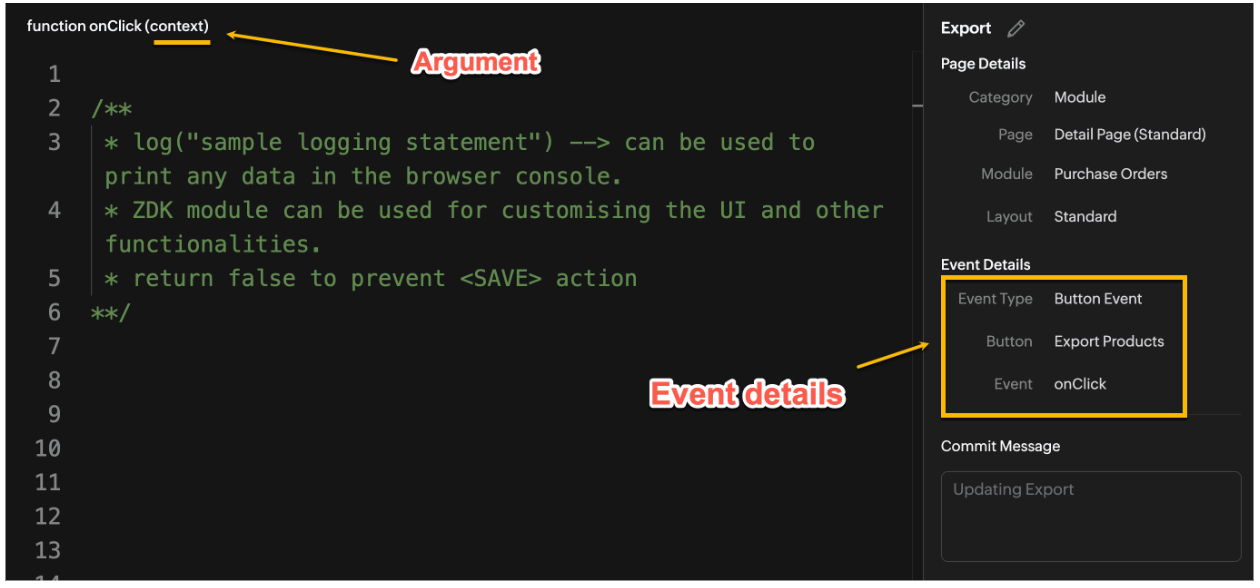

Click here to know more about Client Script Events.

2. Supported Pages

A Custom Button can be placed in different positions based on the Page.
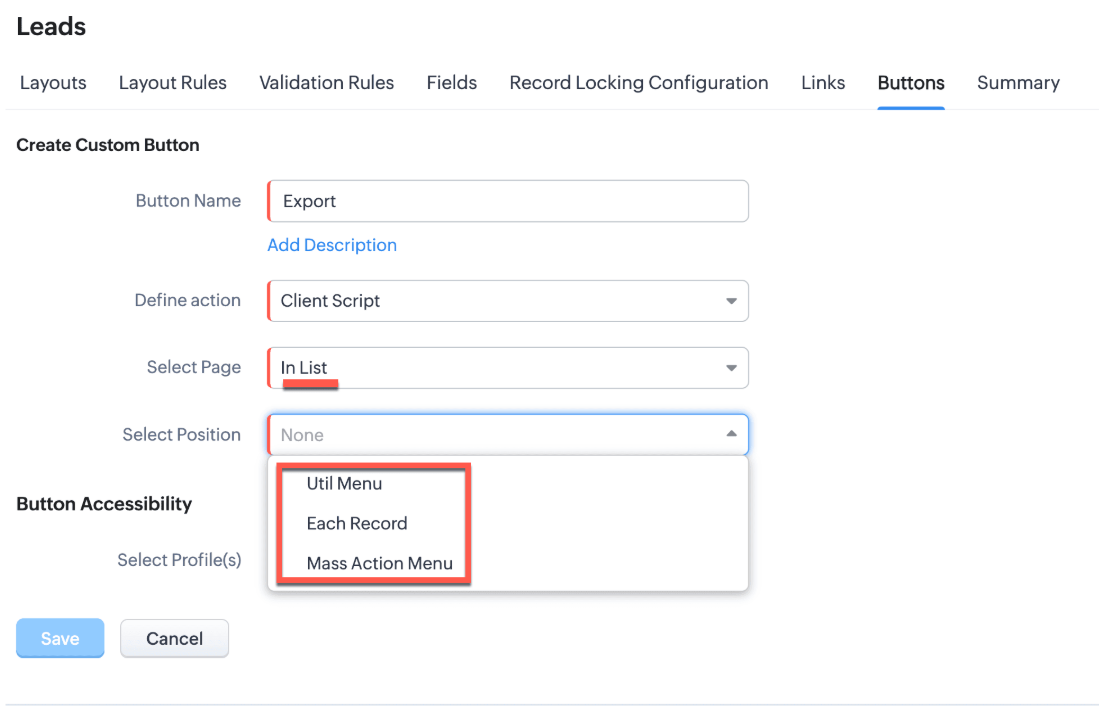

You can add a  custom button in the Util Menu, in Each Record or in the Mass Action Menu of the List Page.
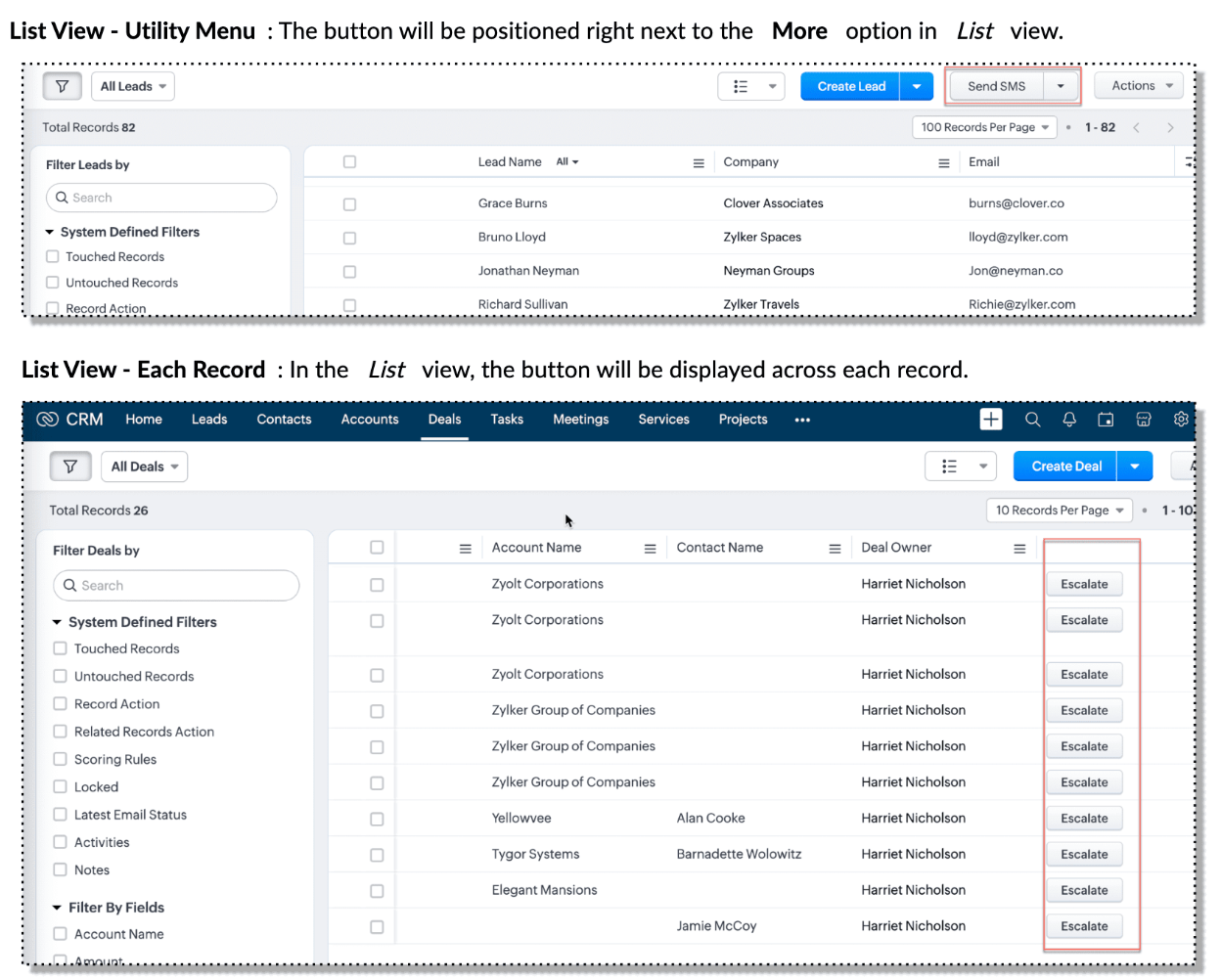

Also, a Detail Page can have a custom button either In Record or in the Related List. Click here for more details about the different possible positions of a custom button.

The following table lists the supported pages and the corresponding context argument, which provides different details based on the page type.


To create a Client Script and make it trigger when a custom button is clicked, first create a Custom button and associate it with a Client Script as shown in the following image.


 Click here to view the steps to create a custom button and configure a Client Script. 

Note:

You can configure the Client Script only from the Buttons page to trigger it when a user clicks a custom button, and not the usual way of Creating Client Script via setup page. Once a script is created, it can be edited and updated from the Client Script setup page

3. Use Case - Export Subform Rows to Zoho Sheet in a Single Click!

Zylker manufactures medical instruments, and its sales representatives frequently need to share bulk order details with distributors and hospital partners using Zoho Sheets. These details such as product names, quantities, and prices are captured in a Subform on the Purchase Order Detail(Standard) Page.
To simplify this, the admin wants to add a custom button called "Export Products" on the Purchase Order Detail Page. When clicked, it should export the Purchase Items from the Subform and move the content to the specified sheet.

4. Solution

To export subform rows to Zoho Sheet with a single click, you can add a custom button to the Detail Page of the record. When clicked, a Client Script will be triggered to fetch the subform data from the Detail Page and pass it to a Function that uses zoho.sheet.createRecords() to insert data into Zoho Sheet.

Here’s how to implement this:

  • Add  “Export Products” custom button on the Detail Page.
  • Add the script to collect subform rows which invokes the Function.
  • Write a Function to create entry in Zoho Sheets  

A. Add “Export Products” custom button on the Detail Page.

  • Go to Setup → Modules and Fields under Customization.
  • Select a Module as Purchase Order.
  • Click on Buttons → Then click + New Button.
  • Enter Button Name and select Action Type as "Client Script"
  • Choose Button Position and Layout details as shown in the following image.
  • Click Create in Configured Client Script, enter the script, and click Add.
  • Select the profiles for which these buttons should be visible.
  • Click Save.


B. Add the Script to collect subform rows and invoke the Function

Use the following Client Script when you configure the custom button.

  1. var casesheetid = ZDK.Client.getInput([{ type: 'text', label: 'Enter the Sheet ID' }], 'Sheet details', 'OK', 'Cancel');
  2. if (casesheetid == null) {
  3.         ZDK.Client.showAlert("Enter the *Case Sheet ID - Import* to import data");
  4.  }
  5. var purchase_items = ZDK.Page.getField('Purchase_items).getValue();
  6. ZDK.Client.showLoader({type: 'page', template:'spinner', message: 'Export in progress, please wait'});
  7. var c=1;
  8. if (sheetid == null) {
  9.     ZDK.Client.hideLoader(); 
  10.     ZDK.Client.showAlert("Enter the *Case Sheet - Export* ID to export data");
  11. }
  12. purchase_items.forEach((r,i) => {
  13.             try {
  14.                resp = ZDK.Apps.CRM.Functions.execute("csvWrite", { "Product_Name": r.Product_Name.name, "List_Price": r.List_Price, "Discount": r.Discount, "Total": r.Total,"Sheetid":casesheetid }); }
  15.             catch (error) {
  16.                 c = 0;
  17.                  ZDK.Client.hideLoader(); 
  18.                 ZDK.Client.showAlert("Unexpected issue occured while adding data in row number "); }
  19.     });
  20.     ZDK.Client.hideLoader(); 
  21.     if (c) {
  22.         ZDK.Client.showMessage("Export completed. Please check the Sheet");
  23.     }
  24.     else
  25.     {
  26.        ZDK.Client.showMessage("Unexpected error "); }}

In this code, several ZDKs are used for various purposes. Click on the ZDK hyperlinks to learn more.


Note

The Client Script you intend to link with the button will be saved only after the custom button is saved.

C. Write a Function to create entry in Zoho Sheets 

  • Go to Setup > Developer Hub > Functions.
  • In the Functions page, click + Create New Function.
  • Choose the category as Button.
  • Click Create.
  • In the Create Function page, enter a name as csvWrite and description for your function.
  • Enter the following function code and click Save.
  1. string standalone.csvWrite(String product,String qty,String up,String amt, String Sheetid){
  2. queryData = Map();
  3. writeData = Map();
  4. header = Map();
  5. writeData.put("Product",product);
  6. writeData.put("Quantity",qty);
  7. writeData.put("Unit_Price",up);
  8. writeData.put("Amount",amt);
  9. SheetData = zoho.sheet.createRecords("Sheetid","Sheet1",writeData,queryData,"sheetconnection");
  10. return SheetData;
  11. }

Click here to know more about zoho.sheet.createRecords().

In the code above:
  • sheetconnection refers to the name of the Zoho Sheet connection, which must have the scopes: ZohoSheet.dataAPI.UPDATE and ZohoSheet.dataAPI.READ.
  • Click here to know how to create a Connection with the required scopes.
  • sheetid is the unique identifier of the Zoho Sheet, available in the sheet’s URL.
  • Sheet1 represents the name of the worksheet (i.e., the tab name shown at the bottom of the Zoho Sheet).
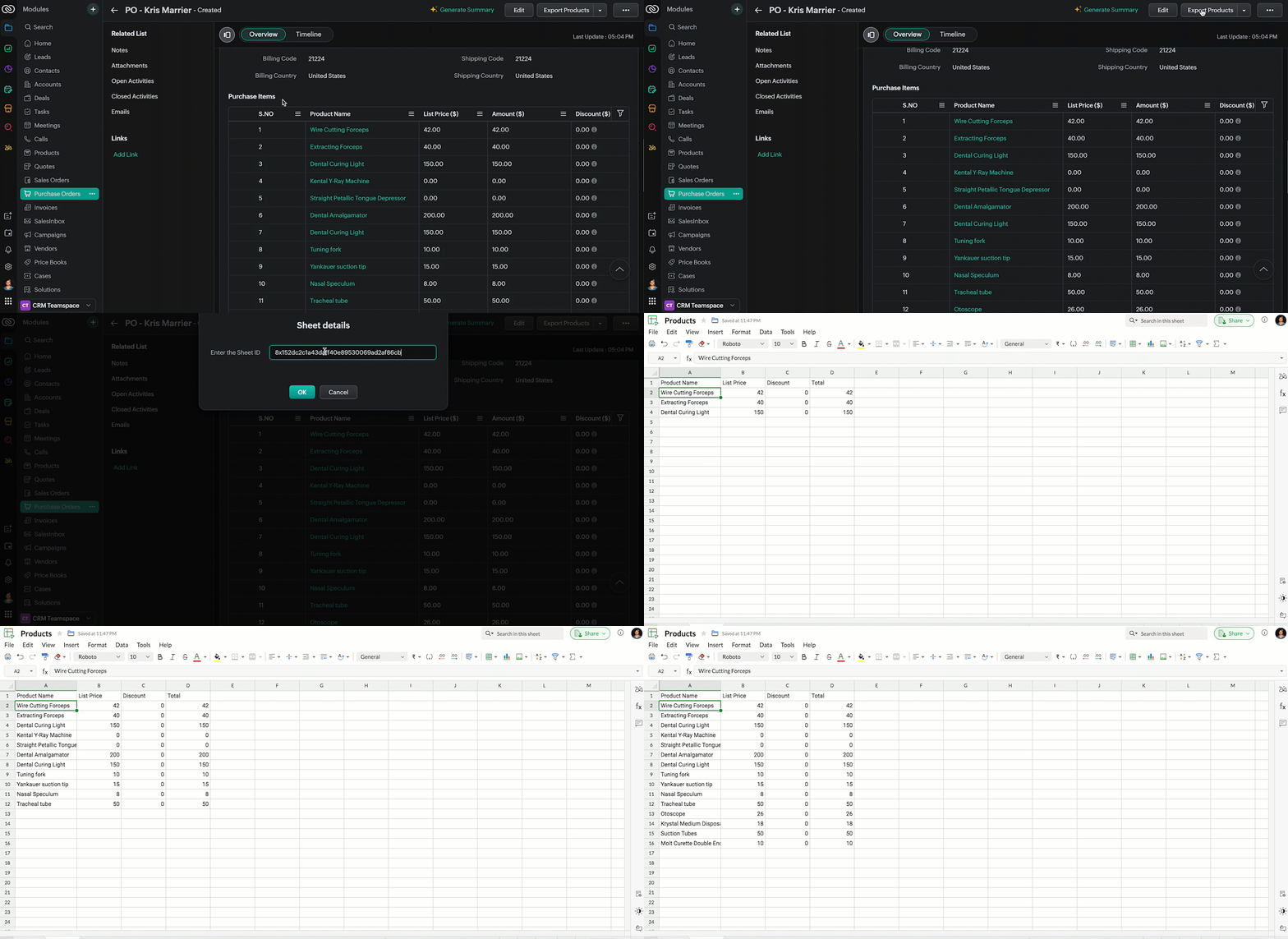
  • Now, when the custom button is clicked, the Client Script is triggered. It prompts for the Sheet ID, fetches the contents of the Purchase Order subform, and invokes a function that writes the content to the Sheet.
Here's how the Client Script works.


5. Summary

In this post we have seen,
  • What is a Button event?
  • How to configure Client Script for a custom button
  • How to write data into Zoho Sheets from Client Script
  • How to create a Function and call it from Client Script

6. Related Links


We are thrilled to be nearing the 200th post in our Kaizen series. As we approach this exciting milestone, we would love to hear from you. Do you have any questions, suggestions, or topics you would like us to cover in future posts? Your input helps us improve and shape the series to serve you better.

Please take a moment to share your thoughts using ✨ this form 

We hope you found this post useful!

Happy Client Scripting! 😊

      Zoho Campaigns Resources


        • Desk Community Learning Series


        • Digest


        • Functions


        • Meetups


        • Kbase


        • Resources


        • Glossary


        • Desk Marketplace


        • MVP Corner


        • Word of the Day


        • Ask the Experts


          • Sticky Posts

          • Kaizen #198: Using Client Script for Custom Validation in Blueprint

            Nearing 200th Kaizen Post – 1 More to the Big Two-Oh-Oh! Do you have any questions, suggestions, or topics you would like us to cover in future posts? Your insights and suggestions help us shape future content and make this series better for everyone.
          • Kaizen #226: Using ZRC in Client Script

            Hello everyone! Welcome to another week of Kaizen. In today's post, lets see what is ZRC (Zoho Request Client) and how we can use ZRC methods in Client Script to get inputs from a Salesperson and update the Lead status with a single button click. In this
          • Kaizen #222 - Client Script Support for Notes Related List

            Hello everyone! Welcome to another week of Kaizen. The final Kaizen post of the year 2025 is here! With the new Client Script support for the Notes Related List, you can validate, enrich, and manage notes across modules. In this post, we’ll explore how
          • Kaizen #217 - Actions APIs : Tasks

            Welcome to another week of Kaizen! In last week's post we discussed Email Notifications APIs which act as the link between your Workflow automations and you. We have discussed how Zylker Cloud Services uses Email Notifications API in their custom dashboard.
          • Kaizen #216 - Actions APIs : Email Notifications

            Welcome to another week of Kaizen! For the last three weeks, we have been discussing Zylker's workflows. We successfully updated a dormant workflow, built a new one from the ground up and more. But our work is not finished—these automated processes are

          Zoho CRM Plus Resources

            Zoho Books Resources


              Zoho Subscriptions Resources

                Zoho Projects Resources


                  Zoho Sprints Resources


                    Zoho Orchestly Resources


                      Zoho Creator Resources


                        Zoho WorkDrive Resources


                          Zoho CRM Resources

                          • CRM Community Learning Series

                            CRM Community Learning Series


                          • Tips

                            Tips

                          • Functions

                            Functions

                          • Meetups

                            Meetups

                          • Kbase

                            Kbase

                          • Resources

                            Resources

                          • Digest

                            Digest

                          • CRM Marketplace

                            CRM Marketplace

                          • MVP Corner

                            MVP Corner


                            Zoho Writer Writer

                            Get Started. Write Away!

                            Writer is a powerful online word processor, designed for collaborative work.

                              Zoho CRM コンテンツ


                                ご検討中の方

                                  • Recent Topics

                                  • All new Address Field in Zoho CRM: maintain structured and accurate address inputs

                                    Availability Update: 29 September 2025: It's currently available for all new sign-ups and for existing Zoho CRM orgs which are in the Professional edition exclusively for IN DC users. 2 March 2026: Available to users in all DCs except US and EU DC. 24
                                  • Zoho Tables - Form default entry

                                    How so I set a form field to be populated with an entry from another table? I created a view on my source table limiting the results to just the one thing I want to see. When adding a Client via my Add Client form, I want the Client Type field to already
                                  • Payment Card or Identity form-fill from Vault?

                                    Hello! I'm working on replacing Bitwarden with Vault and one issue I've run into is that I can't find any option to fill address and payment forms from Payment Card or Identity info that has been saved in Vault. Is there a way to do this? Is it a planned
                                  • Introducing Bin Locations In Zoho Inventory

                                    Hello users, We are excited to let you know that your wait for the Bin Locations feature has now come to an end! Yes, you heard us right! We are here to introduce the much-awaited Bin Locations now in Zoho Inventory. But before we dive into the feature
                                  • Add Actionable “Smart Commits” for GitHub Integration

                                    Hi Zoho Projects Team, I am submitting a feature request to introduce Smart Commits support for the GitHub integration in Zoho Projects. The Current Limitation: Currently, Zoho Projects offers a "passive" integration. Including a Task ID in a commit message
                                  • Item Details Field - New Barcode / Document option?

                                    Is this a new feature??? its in both books and inventory.
                                  • Items attribute questions

                                    Many of my items have attributes, such as size and color. How can I add new fields to the "New Items" screen to capture that in my Purchase Orders, Items, and Sales Order pages? I only see these attribute fields when adding an Item Group. Also, on the
                                  • SEO recommendation of H1 tag for website tittle

                                    The exact words are “ It is good practice to place the page title inside the H1tag.” Now I already have one H1 tag on my website but it is not website tittle. In the SEO recommendation that is clear too that I have h1 tag on my page. Now I don’t know
                                  • Anyone Building AI-Based SEO Dashboards in Zoho Analytics?

                                    Hey everyone, I’m currently working on an SEO reporting dashboard in Zoho Analytics and looking to enhance it with AI-based insights—especially around AI visibility, keyword trends, and traffic sources. The goal is to track not just traditional metrics
                                  • Knowledgebase SEO

                                    We have a custom-domain mapped help center that is not restricted via login. I have some questions: a) will a robots.txt file still allow us to control indexing? b) do we have the ability to edit the sitemap? c) do category URLs get indexed by search
                                  • Marketing Tip #15: Rank better with keyword-rich URLs for product pages

                                    Your product page URL is a small detail that can make a surprisingly big difference. Clean, readable URLs help in two ways: They’re easier for customers to trust and remember (no one likes clicking a link that looks messy or random). They help search
                                  • Marketing Tip #26: Optimize product images for SEO

                                    Product images can do more than make your store look good. They can also help customers discover your products through search. Since search engines can’t "see" images, they rely on text signals to understand what an image is about. Two small actions make
                                  • Zia Agents in Zoho CRM: a better way to set up digital employees

                                    Hello everyone, If you've been using Zia Agents in Zoho CRM, so far using Connections was the only deployment method you're familiar with. You create an agent in Zia Agents (define its objective, write instructions, use tools, add knowledge base) and
                                  • Cross Module Filtering – Use Fields from Lookup modules in Custom Views criteria and Advanced Filters

                                    Hello everyone, Zoho CRM now enables you to achieve deeper filtering of records in a module, using fields of a lookup, thereby enhancing your data management experience manifold. This filtering based on lookup module fields is now available in advanced
                                  • How can we use Loop Structures in Deluge script?

                                    Hi, I am using GetRecords() function to fetch records from a module in Zoho CRM,  the number of records is 800+, but GetRecords() function returns 200 records at one time,  So, I want to use loops to achieve my task, but it gives me error when i use any loop instead of For each loop. How can I perform my task? Please help Zoho community. Thanks 
                                  • Stock Count

                                    The stock count is a nice new feature, but we cannot figure out how to: 1. Use it without assigning to a person, we have a team or one of multiple do stock counts as do most any company. 2. Add any extra fields to what the "counter" sees. The most important
                                  • SalesIQ Operator Activity Reports in Zoho Analytics

                                    I'm busy building a dashboard in Zoho Analytics and I want to include SalesIQ stats in the dashboard, but I'm unable to get the statistics mentioned in the attached image. Any idea where I can get the stats for Operator Activity?
                                  • Multi-Select Field Option Limit Inquiry

                                    Hello FSM Team, We would like to inquire about the limitation of the Multi-Select field in Zoho FSM. Currently, the system allows a maximum of 10 selectable options, and we encountered the message: “Option count more than allowed count of 10.” Issue:
                                  • MS Teams integration

                                    I followed all the steps to configure the bot chanel notifications, for all events. All configuration worked fine, without issues, but I don´t recevie any notification in the Teams chanel. Must I configurate aditional permission set in MS 365 or Zoho
                                  • Zoho Bookings - Feature Request - Services Which Include A Resource and Consultant

                                    Hi Bookings Team, My feature request is to have the ability to add Consultants and Resources to Services. Use case: Your business provides first aid training and there are certain equpment you require to provide the half day training. There are only specific
                                  • Six important date functions every professional should know

                                    You probably use plenty of formulas already, but there are some that are essential for people in business roles, such as date functions. These tools help with scheduling, predicting, and tracking, and they can be useful whether you're dealing with payrolls,
                                  • Inactive Items - Make Less Prominent by Default

                                    Currently, when one marks an Item as "Inactive", it really doesn't do much of anything to hide it or get it out of the way. Search and reporting within Finance should, by default, hide inactive Items from standard reports, searches, etc. If one specifically
                                  • Why Contracts Should Not Be Downloaded And Sent During Negotiation

                                    During contract negotiation, it may seem easy to download a document, send it to the counterparty, have the counterparty make changes, and send it back. But this approach creates serious risks around security, version control, and compliance. ISO 27001:2022
                                  • Add Native “Create GitHub Branch” Action for Tasks and Bugs

                                    Hi Zoho Projects Team, I would like to submit a feature request to enhance the GitHub integration in Zoho Projects by adding the ability to initiate a GitHub branch directly from a Task or Bug. The Current Limitation: Currently, Zoho Projects lacks a
                                  • Super Admin Logging in as another User

                                    How can a Super Admin login as another user. For example, I have a sales rep that is having issues with their Accounts and I want to view their Zoho Account with out having to do a GTM and sharing screens. Moderation Update (8th Aug 2025): We are working
                                  • Solving the bug in Zoho Writer API for styling

                                    So... the Zoho Writer APIs for programatically creating a document do not respect a template's style. The result is that any document you generate via API needs to be manually, paragraph by paragraph, reformatted. That bug alone is sufficient to render
                                  • Is anyone else experiencing downtime on Desk?

                                    Desk is slow/crashing and not stable the last couple of hours. Is anyone else experiencing the same issues?
                                  • Push Notification for New Bookings in Zoho Bookings App

                                    when a someone schedules an appointment through the booking page, is there any option to receive a push notification in the mobile app?
                                  • Data Import into Zoho Forms

                                    Hi everyone, I am migrating several Google Forms into Zoho Forms. I can recreate the forms, but I also need to bring over historical response data currently stored in Google Sheets. I want to keep using that data inside Zoho for analysis, reporting, and
                                  • Add Native GitHub Pull Request Creation & Management from Tasks/Bugs

                                    Hi Zoho Projects Team, I am submitting a feature request to enhance our development lifecycle by enabling native GitHub Pull Request (PR) creation and management directly within Zoho Projects. The Current Limitation: Currently, the GitHub integration
                                  • Zoho Projects API requests limit question

                                    Hello, Regarding the API request limit of 100 requests per 2 minutes, I have implemented a control mechanism which, if the limit is reached, will wait the required amount of time before sending new requests. However, this mechanism seems to be failing,
                                  • What is the esacalation email for Zoho Support/ Zoho One/ Zoho Workplace ?

                                    Hello, My business has been stalled due to Zoho duplicating workdrive with switching on zoho one trial. There are two workdrives - one with my files mapped to workplace and one empty mapped to zoho one.-- integrationg programs are super consfused and
                                  • How to show Assemblies AND component items in a report

                                    Hi Is there any way in Analytics to create a report that shows the Composite Item AND the Component Items with mapped quantity? It seems that the component item is not exposed in any table that I can find. Also, the same question but for Stock on Hand.....this
                                  • How can I use the API to add a drop-shipping address to a sales order for one-time use?

                                    I need to be able to add a drop-shipping address for one-time use to a sales order via the API. Adding every such address to the contact (customer), then feeding the shippingaddress_id into the sales order, is not an acceptable approach; we have some
                                  • Mass Update Option for Changing Work Order Owner

                                    Hello FSM Team/Mr. Abid, We would like to inquire if there is an option to mass update or bulk change the Owner of Work Orders in Zoho FSM. Current Situation: At the moment, the Owner of a Work Order can only be changed individually, which becomes time-consuming
                                  • Make and receive calls from Bigin's Android app

                                    Hello everyone! We're happy to announce that Bigin's Android app (version 2.0.0) now supports built-in telephony, RingCentral, and Zoho Voice, all of which enable users to make and receive calls from the Bigin app. You can only configure the telephony
                                  • Account Watchlist: Order of accounts in the watchlist

                                    Is there a way we can sort the order in which accounts are shown in the accounts watchlist in Zoho Books dashboard?
                                  • GST composition scheme dealer - treatment for client expenses reimbursement

                                    Hello, I am new to GST and need your help. I am registered as a composition dealer and attract 6% gst charges. In bill of supply, there are also expenses done on behalf of client for which I seek reimbursement AT ACTUAL with NO MARKUP. As I understand,
                                  • Zoho Books: tax is not automatically pulled from product-data anymore - why?

                                    Hi, until a short time ago, you could set a default taxrate for each product/item. This taxrate automatically appeared each time the item was chosen in an invoice or quote. Why does this not work anymore? The field is still there at the product record,
                                  • Kaizen #237 - Zoho CRM APIs: GraphQL & COQL- When to use which?

                                    Hello everyone, Welcome to another week of Kaizen. This Kaizen post discusses Zoho CRM GraphQL APIs and COQL APIs and is meant to be a decision guide on selecting between them. It aims to help developers to choose the most efficient approach in different
                                  • Next Page