Automation#34 : Automate Email threading for Ticket notification
Hello Everyone,
It's been a while since we've presented an automation. However, our community has been buzzing with ideas, use cases, and discussions with our community experts and Ask the Experts session.
So, here we are again, presenting an automation focused on threading ticket notification emails.
Let's see how this automation helped our folks at Zylker Techfix.
Zylker Techfix, a gadget service company, has grown significantly and now serves a large customer base. The support team receives tickets from various customers, some of whom send multiple emails regarding servicing multiple gadgets. With their expanding customer base, Zylker Techfix wanted to effectively track notification emails sent to customers for each respective ticket.
Additionally, Zylker Techfix aimed to inform customers about the engineer assigned to support them with their submitted gadget, helping establish a stronger connection with their customers.
In this post, let's explore how we can adopt Zylker Techfix's customization.
Notify Customers when a ticket is created
The notification rule has an option to notify your customers when a ticket is created.
You can add the details of the ticket owner within the Email template so customers will know the support executive who will be handling the ticket.
How to include Ticket Owner details within the Email template?
You could create a New Email template or use the Existing email template.
Create an Email template
You can either create a New Email template or edit an existing Email template.
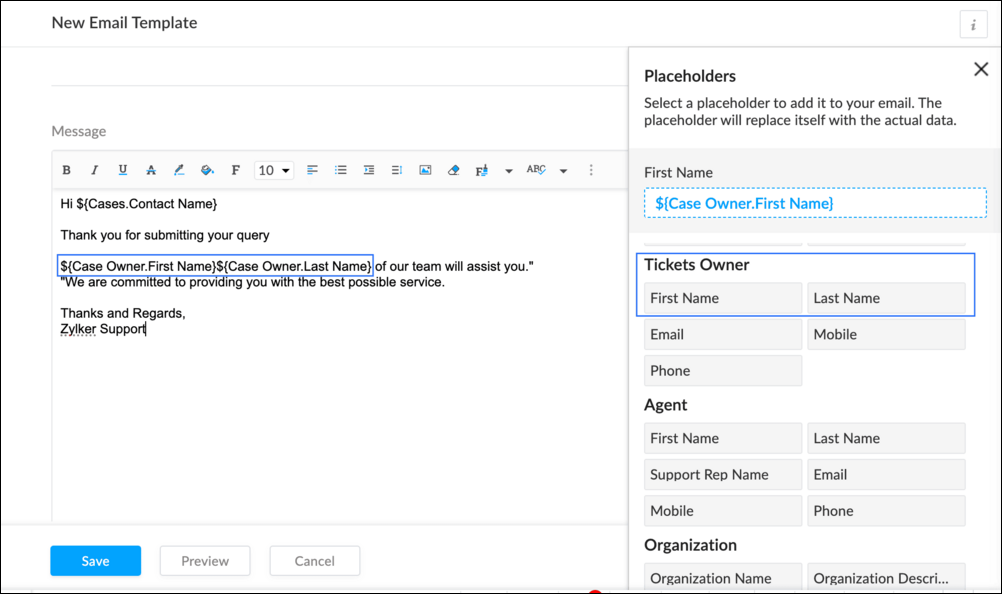
To Add a New Template : Go to Setup (S) >> Customization >> Email Templates >> Select the required Department >> Click on Add >> New Template >> Select the Tickets module >> Enter Name > Select Folder, From Address, Enter Reply to address if required, Add Subject and desired description.
To add Ticket owner's name, insert the placeholders First Name and Last Name (if required) ${Case Owner.First Name}${Case Owner.Last Name}, under Ticket Owner.
To Edit an Existing Email
To edit an existing Email, Go to Setup (S) >> Customization >> Email Templates >> Select the required Department >> Click on the Edit icon for the existing template or select the existing Template >> Edit description. To insert Ticket owner's name, insert the placeholders for first name and last name (if required) ${Case Owner.First Name}${Case Owner.Last Name}, under Ticket Owner.
Create a connection
1.1 Go to Setup(S) and choose Connections under Developer Space.
1.2 Click Create Connection.
1.3 Select Zoho Desk under Default Services.
1.4 Set the connection name as zohodeskconnection.
1.5 Under Choose Scopes, choose the below scope values:
1.5 Under Choose Scopes, choose the below scope values:
Desk.settings.ALLDesk.tickets.UPDATE
1.6 Click Create and Connect.
1.7 Click Connect.
1.8 Choose the Desk's organization to connect with Deluge, and click Submit.
1.9 Click Accept.
Connection is created successfully.
Configure Custom Function within the Workflow Rule
1. Go to Setup, choose Workflows under Automation.
2. Under Workflows, click Create Rule.
3. Under Basic Information, choose Tickets under Module, give a Rule Name and Description.
4. Click on the Active checkbox to activate the rule once created. Click Next.
5. Under Execute on, select Create.
6. Add Criteria, if required.
7. Under Actions, click on the drop-down in the + icon and select Custom Functions >> New.
7.1 Under Basic Information, enter Name and Description. Choose Tickets under Module.
7.2 Under Argument Mapping, give a desired Method Name. Map the arguments as below:
7.2.1 In the Argument Name field, type ticketId and select Ticket Id in the Tickets Section.
7.2.2 In the Argument Name field, type contactEmail and select Email in the Contacts Section.
7.2.3 In the Argument Name field, type fromEmailAddress, click on Specify Custom Value and type the verified From Address of your department.

7.3 In the script window, insert the Custom Function given below:
- //<<<< User Inputs Section >>>>----
- // Replace ".com" with appropriate domain extension based on customer's location/DC
- deskURL = "https://desk.zoho.com";
- templateId = "xxxxxxtemplateIdxxxxx";
- //<<<< Initial Configs >>>>----
- logs = Map();
- template = invokeurl
- [
- url :deskURL + "/api/v1/templates/" + templateId + "/render?entityId=" + ticketId
- type :POST
- connection:"deskconnection"
- ];
- if(template != null && template.containsKey("body"))
- {
- logs.put("template",template);
- emailContent = template.get("body");
- emailReplyParams = {"channel":"EMAIL","to":contactEmail,"fromEmailAddress":fromEmailAddress,"content":emailContent,"contentType":"html"};
- logs.put("emailReplyParams",emailReplyParams);
- sendReply = invokeurl
- [
- url :deskURL + "/api/v1/tickets/" + ticketId + "/sendReply"
- type :POST
- parameters:emailReplyParams + ""
- connection:"deskconnection"
- ];
- logs.put("sendReply",sendReply);
- }
- info logs;

Note
a. In Line 3, replace .com in the address with .in/.eu/.ca based on your DC.
b.In Line 4, enter the template id within " " of the Email template you created or edited.
To fetch Template id, go to Setup (S) >> select Email Templates under Customization >> click on the Email template and on the Address bar, copy the numeric value at the end of the URL.
8. Click Save to save the custom function.
9. Click Save again to save the workflow.
Now, along with your ticket conversations, you can also track the emails sent as notifications within your ticket conversations.
Until the next post,
Lydia | Zoho Desk
Topic Participants
Lydia | Zoho Desk
Sticky Posts
Register for Zoho Desk Beta Community
With the start of the year, we have decided to take a small step in making the life of our customers a little easier. We now have easy access to all our upcoming features and a faster way to request for beta access. We open betas for some of our featuresShare your Zoho Desk story with us!
Tell us how you use Zoho Desk for your business and inspire others with your story. Be it a simple workflow rule that helps you navigate complex processes or a macro that saves your team a lot of time; share it here and help the community learn and grow with shared knowledge.Tip #1: Learn to pick the right channels
Mail, live chat, telephony, social media, web forms—there are so many support channels out there. Trying to pick the right channels to offer your customers can get pretty confusing. Emails are most useful when the customer wants to put things on record. However, escalated or complicated issues should not be resolved over email because it's slow and impersonal. When you need immediate responses, live chat is more suitable. It's also quick and convenient, so it's the go-to channel for small issues.Welcome to Zoho Desk Community - Say hello here!
Hello everyone! Though we have been here for a while, it’s time to formally establish the Zoho Desk Community; we’re really happy to have you all here! This can be the place where you take a moment to introduce yourself to the rest of the community. We’d love to hear all about you, what you do, what company or industry you work for, how you use Zoho Desk and anything else that you will like to share! Here’s a little about me. I am Chinmayee. I have been associated with Zoho since 2014. I joined hereWebinar 1: Blueprint for Customer Service
With the launch of a host of new features in Zoho Desk, we thought it’ll be great to have a few webinars to help our customers make the most of them. We’re starting off with our most talked about feature, Blueprint in Zoho Desk. You can register for the Blueprint webinar here: The webinar will be delivered by our in-house product experts. This is a good opportunity to ask questions to our experts and understand how Blueprint can help you automate your service processes. We look forward to seeing
Nederlandse Hulpbronnen

Recent Topics
Books <-> CRM synchronisation with custom Fields
Hello, We are synchronising Books Customers with CRM Accounts. In CRM Accounts I set up last year a "segments" multiselect field shown below In Books, I set up a custom multi-select field with the same value as in the CRM And set up the synchronisation inside Books. Want to synchronise the Books Segments with the CRM Segments, but the later doesn't exist, and another non-existing is there ?! First, I don't understand where the field Segmentation is coming from. Second, I set CRM Segmentation to syncEdit Reconciled Transactions
I realize transaction amounts and certain accounts cannot be edited easily once reconciled, but when I audit my operational transactions quarterly and at the end of the year sometimes I need to change the expense account for a few transactions. To doRequest to Customize Module Bar Placement in New Zoho CRM UI
Hello Support and Zoho Community, I've been exploring the new UI of Zoho CRM "For Everyone" and have noticed a potential concern for my users. We are accustomed to having the module names displayed across the top, which made navigation more intuitiveSending campaigns from other server
Hi, Is it possible to send campaigns from another server so customers can see mail direct from our company (Corrata) and not from ZCSend.net? Thanks, TimEdit a previous reconciliation
I realized that during my March bank reconciliation, I chose the wrong check to reconcile (they were for the same amount on the same date, I just chose the wrong check to reconcile). So now, the incorrect check is showing as un-reconciled. Is there any way I can edit a previous reconciliation (this is 7 months ago) so I can adjust the check that was reconciled? The amounts are exactly the same and it won't change my ending balance.Admin and Dispatcher Users show as Field Technicians in Dispatch Module?
Hi Zoho, Our Admin and Dispatch user both show up as Fied Technicians / Field Agents in the Dispatch module, but they most certainly should not be assigned to any of the work orders and service appointments. These users are NOT service resources. HowZoho Payroll: Product Updates - June 2025
This June, we’re taking a giant step forward. One that reflects what we’ve heard from you, the businesses that power economies. For our customers using the latest version of Zoho Payroll (organizations created after Dec 12, 2024) in the United States,View Products (items) in Contact and Company
Hi, I would like to know if there is an option to view all the products /(items) that were inserted in the pipeline deal stage for exemple "Win Pipeline" within the company and contacts module section? For instance, view with the option filter for theUpdate subform dropdown field choices - on load workflow
Hi, I have a "Check In" form that has "Contacts" subform and a "Tickets" subform. When the form is loaded, I want to populate one contact and the number of tickets. I want the "Contact" field in the "Tickets" subform to have the choice of "Contacts."Upload Zoho Inventory Item Image by API
itemID = item.get("item_id"); organizationID = organization.get("organization_id"); resvp = zoho.inventory.getRecordsByID("items",organizationID,itemID,"zoho_inventory_conn"); info resvp; image_file = invokeurl [ url: "https://t4.ftcdn.net/jpg/03/13/59/81/360_F_313598127_M2n9aSAYVsfYuSSVytPuYpLAwSEp5lxH.jpg"Salesforce to Zoho One Migration
HI, I am about to start a migration from Salesforce to Zoho One I would like to know the best practise for this, my current thoughts to the approach is 1) Create fields, modules as required for migrating data 2) migrate Data 3) go live Will this approachZoho Expense Integration with Zoho Books
I want to know what flexibility do i have in selecting the chart of accounts which get a hit whenever we are posting any expense or advance in zoho expense?Custom Function to Update Ticket based on Subject of Ticket
This may be pretty simple but I'm having issues with getting a custom function to fill out custom fields based on the subject of a ticket and not the body of a ticket. Basically we need to fill in the PO number and Item ID custom fields, both of thisIncoming 'Message' data via WhatsApp appears empty
the Incoming 'Message' data via WhatsApp appears empty; instead of customer messages, I only see CRM system notification messages are being displayed. I have seen 3 messages like this since yesterday it seems that in 'All Message' the message snippetHandling Automatic Replies in Desk
We send out email campaigns (currently via Klaviyo) and naturally we receive "Automatic Replies" to these mass email campaigns. These responses are all being routed to Zoho Desk. We get two types of "Automatic Replies" Type 1) Customer is out of the office/holidayZoho Mail API Error EXTRA_KEY_FOUND_IN_JSON
I have a workflow set up in Pipedream that uses the Zoho Mail API to send emails from my account. It's worked without issue for months but today I'm getting the following 404 error for every email I try to send: { "data": { "errorCode": "EXTRA_KEY_FOUND_IN_JSON"How to search (web API) for a Calls record by phone number?
Using v8 /Calls/search web api I'm unable to to complete a search request no matter how I use the api: When I try using "criteria=" I get: response: <Response [400]> response_json: { "code": "INVALID_QUERY", "details": { "reason": "the field is not available[Free Webinar] Product Release Updates - Creator Tech Connect
Hello Everyone! We welcome you all to the upcoming free webinar on the Creator Tech Connect Series. The Creator Tech Connect series is a free monthly webinar that runs for around 45 minutes. It comprises technical sessions in which we delve deep intoZoho GenAI API Error Not a valid response from zia.
Zoho GenAI API Error Not a valid response from zia.Help me to retreive my Document
Please help me to retrieve my documents from any date between 1st February, 2025 to 20th,March 2025 .it got mistakenly deleted on the 21 of March 2025 due to phone screen malfunction I earnestly await your positive response .thank youLook Up Field Type not available for events and tasks?
Look Up Field Type not available for events and tasks?Digest Juin - Un résumé de ce qui s'est passé le mois dernier sur Community
Bonjour à toutes et à tous, Ce mois-ci encore, tout s’est enchaîné à toute vitesse ! On vous fait un petit récap de ce qui a marqué ces dernières semaines. Zoho RPA est une solution robuste d’automatisation des processus, conçue pour s’intégrer aux systèmesDifferent Transaction Series for Different Types of Sales
Is there any way I can create multiple transaction series for different type of Sales? Say B2B-001 and B2C -001 for respective type of Sales.?Unable to charge GST on shipping/packing & Forwarding charges in INDIA
Currently, tax rates only apply to items. It does not apply tax to any shipping or packing & forwarding charges that may be on the order as well. However, these charges are taxable under GST in India. Please add the ability to apply tax to these charges.Customer Advance Zoho Book API
All I could find was Customer Payment API, it does not have facility to add customer advances, where those are not linked to any invoice as such. How to do it?Even though the received amount+tax is equal to or lesser than the invoice value, zoho doesnt allow to record
Even though the received amount+tax is equal to or lesser than the invoice value, Zoho mentioned the error- you've recorded more payment than the actual invoice balance. please check again. screenshot also attached. You've recorded more payment thanMultiple deductions in invoice
I issue invoices to a customer that include multiple deductions that I would like to track in different expense accounts. But that is not possible in Zoho Books as there is only one Deduction field and even that I don't have control over to assign it#BiginnersTips | How to bulk update closing dates for multiple deals in Bigin
Hello Biginners! Keeping your CRM data accurate is crucial for any business- big or small. One key aspect is ensuring that closing dates for deals are always up to date. Why? Because if a deal is closed but not updated, your dashboards and reports would采购里出现付款通知 的错误
采购里面出现付款通知错误,怎么调整,我找不到路径,好像是ZOHO 自动生成的,请问怎么调整{"code":1002,"message":"Statement of Accounts does not exist."}
Hello Zoho team, I faced an issue while trying to POST a sales order from sap to zoho books, using the below data packet: { "customer_id": "4322967000027451968", "line_items": [ { "item_id": "2154170000010847685", "rate": "752.00",Add Custom Fields only in Customer module and not on supplier module!? Is not there a way to do that!?
I am trying to create custom fields on clients module but it also gets created on suppliers module; which of course does not make sense at all as a lot of custom fields are client or supplier specific but never both. I am missing something? This seemsLogging website service fees
Hello, I do a lot of freelance work on sites like Upwork and Wyzant and others and those companies take a small cut from what I pay or what I earn and I am wondering what is the correct way to log this in my books. For example if I charge $55 per hourHow do i clear a liability account without making a payment?
I have a liability account with a provision for an expected bill from previous years. However the bill never arrived and the provision/liability account with Cr balance has been carried forward for many years now. How do i know clear the provision made2 Transactions for single Expense
I have make 2 payments and have 1 Invoice containing both the items. My Bank Feeds show 2 Transactions, How can i associate them with Single Expense? I tried adding them to Advance Payment, but advance payment I can only apply to Bills It seems. Why cantEverything AI in Zoho Recruit – Webinar Recording Available!
AI is transforming the way recruiters find, engage, and hire top talent. In our latest webinar, we explored how Zoho Recruit’s AI-powered features can help streamline hiring, automate workflows, and improve decision-making. Missed the session? No worriesIntroducing the FTP task in Deluge
Hello everyone, We're excited to announce the launch of the FTP task, a powerful addition to Deluge that enables you to effortlessly transfer files between various Zoho apps and your own servers. Unlike the invokeUrl task, which supports various HTTPAnyone Building AI-Based SEO Dashboards in Zoho Analytics?
Hey everyone, I’m currently working on an SEO reporting dashboard in Zoho Analytics and looking to enhance it with AI-based insights—especially around AI visibility, keyword trends, and traffic sources. The goal is to track not just traditional metricsCustom widgets on Zoho one dashboard
Is it possible to create custom widgets on the Zoho One dashboard? I see there is a widget name My Open Tickets to display open tickets in my view, but I would also like to have a widget to display unassigned tickets. A widget to display unfinished projectsData privacy concerns
Does Zoho team have access to my data in the database e.g. Balance Sheet, Bank account transactions, Profit & Loss statement etc.Ability to Remove/Change Zoho Creator Admins via Zoho One Interface
Dear Zoho One Team, Greetings, We would like to request a feature enhancement in Zoho One. Currently, it is not possible to remove or downgrade a user with the Admin role in Zoho Creator from the Zoho One admin interface. Unlike other Zoho apps whereNext Page