Automation#34 : Automate Email threading for Ticket notification

Hello Everyone,
It's been a while since we've presented an automation. However, our community has been buzzing with ideas, use cases, and discussions with our community experts and Ask the Experts session.
So, here we are again, presenting an automation focused on threading ticket notification emails.
Let's see how this automation helped our folks at Zylker Techfix.
Zylker Techfix, a gadget service company, has grown significantly and now serves a large customer base. The support team receives tickets from various customers, some of whom send multiple emails regarding servicing multiple gadgets. With their expanding customer base, Zylker Techfix wanted to effectively track notification emails sent to customers for each respective ticket.
Additionally, Zylker Techfix aimed to inform customers about the engineer assigned to support them with their submitted gadget, helping establish a stronger connection with their customers.
In this post, let's explore how we can adopt Zylker Techfix's customization.
Notify Customers when a ticket is created
The notification rule has an option to notify your customers when a ticket is created.
You can add the details of the ticket owner within the Email template so customers will know the support executive who will be handling the ticket.
How to include Ticket Owner details within the Email template?
You could create a New Email template or use the Existing email template.
Create an Email template
You can either create a New Email template or edit an existing Email template.
To Add a New Template : Go to Setup (S) >> Customization >> Email Templates >> Select the required Department >> Click on Add >> New Template >> Select the Tickets module >> Enter Name > Select Folder, From Address, Enter Reply to address if required, Add Subject and desired description.
To add Ticket owner's name, insert the placeholders First Name and Last Name (if required) ${Case Owner.First Name}${Case Owner.Last Name}, under Ticket Owner.
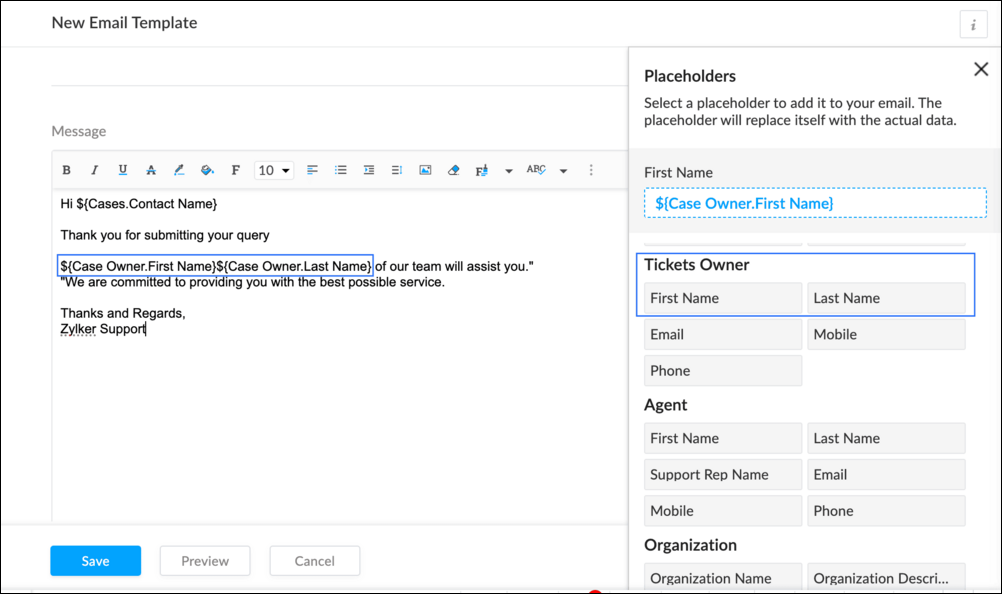
To Edit an Existing Email
To edit an existing Email, Go to Setup (S) >> Customization >> Email Templates >> Select the required Department >> Click on the Edit icon for the existing template or select the existing Template >> Edit description. To insert Ticket owner's name, insert the placeholders for first name and last name (if required) ${Case Owner.First Name}${Case Owner.Last Name}, under Ticket Owner.
Create a connection
1.1 Go to Setup(S) and choose Connections under Developer Space.
1.2 Click Create Connection.
1.3 Select Zoho Desk under Default Services.
1.4 Set the connection name as zohodeskconnection.
1.5 Under Choose Scopes, choose the below scope values:
1.5 Under Choose Scopes, choose the below scope values:
Desk.settings.ALLDesk.tickets.UPDATE
1.6 Click Create and Connect.
1.7 Click Connect.
1.8 Choose the Desk's organization to connect with Deluge, and click Submit.
1.9 Click Accept.
Connection is created successfully.
Configure Custom Function within the Workflow Rule
1. Go to Setup, choose Workflows under Automation.
2. Under Workflows, click Create Rule.
3. Under Basic Information, choose Tickets under Module, give a Rule Name and Description.
4. Click on the Active checkbox to activate the rule once created. Click Next.
5. Under Execute on, select Create.
6. Add Criteria, if required.
7. Under Actions, click on the drop-down in the + icon and select Custom Functions >> New.
7.1 Under Basic Information, enter Name and Description. Choose Tickets under Module.
7.2 Under Argument Mapping, give a desired Method Name. Map the arguments as below:
7.2.1 In the Argument Name field, type ticketId and select Ticket Id in the Tickets Section.
7.2.2 In the Argument Name field, type contactEmail and select Email in the Contacts Section.
7.2.3 In the Argument Name field, type fromEmailAddress, click on Specify Custom Value and type the verified From Address of your department.

7.3 In the script window, insert the Custom Function given below:
- //<<<< User Inputs Section >>>>----
- // Replace ".com" with appropriate domain extension based on customer's location/DC
- deskURL = "https://desk.zoho.com";
- templateId = "xxxxxxtemplateIdxxxxx";
- //<<<< Initial Configs >>>>----
- logs = Map();
- template = invokeurl
- [
- url :deskURL + "/api/v1/templates/" + templateId + "/render?entityId=" + ticketId
- type :POST
- connection:"deskconnection"
- ];
- if(template != null && template.containsKey("body"))
- {
- logs.put("template",template);
- emailContent = template.get("body");
- emailReplyParams = {"channel":"EMAIL","to":contactEmail,"fromEmailAddress":fromEmailAddress,"content":emailContent,"contentType":"html"};
- logs.put("emailReplyParams",emailReplyParams);
- sendReply = invokeurl
- [
- url :deskURL + "/api/v1/tickets/" + ticketId + "/sendReply"
- type :POST
- parameters:emailReplyParams + ""
- connection:"deskconnection"
- ];
- logs.put("sendReply",sendReply);
- }
- info logs;

Note
a. In Line 3, replace .com in the address with .in/.eu/.ca based on your DC.
b.In Line 4, enter the template id within " " of the Email template you created or edited.
To fetch Template id, go to Setup (S) >> select Email Templates under Customization >> click on the Email template and on the Address bar, copy the numeric value at the end of the URL.
8. Click Save to save the custom function.
9. Click Save again to save the workflow.
Now, along with your ticket conversations, you can also track the emails sent as notifications within your ticket conversations.
Until the next post,
Lydia | Zoho Desk
Topic Participants
Lydia | Zoho Desk
Sticky Posts
Register for Zoho Desk Beta Community
With the start of the year, we have decided to take a small step in making the life of our customers a little easier. We now have easy access to all our upcoming features and a faster way to request for beta access. We open betas for some of our featuresShare your Zoho Desk story with us!
Tell us how you use Zoho Desk for your business and inspire others with your story. Be it a simple workflow rule that helps you navigate complex processes or a macro that saves your team a lot of time; share it here and help the community learn and grow with shared knowledge.Tip #1: Learn to pick the right channels
Mail, live chat, telephony, social media, web forms—there are so many support channels out there. Trying to pick the right channels to offer your customers can get pretty confusing. Emails are most useful when the customer wants to put things on record. However, escalated or complicated issues should not be resolved over email because it's slow and impersonal. When you need immediate responses, live chat is more suitable. It's also quick and convenient, so it's the go-to channel for small issues.Welcome to Zoho Desk Community - Say hello here!
Hello everyone! Though we have been here for a while, it’s time to formally establish the Zoho Desk Community; we’re really happy to have you all here! This can be the place where you take a moment to introduce yourself to the rest of the community. We’d love to hear all about you, what you do, what company or industry you work for, how you use Zoho Desk and anything else that you will like to share! Here’s a little about me. I am Chinmayee. I have been associated with Zoho since 2014. I joined hereWebinar 1: Blueprint for Customer Service
With the launch of a host of new features in Zoho Desk, we thought it’ll be great to have a few webinars to help our customers make the most of them. We’re starting off with our most talked about feature, Blueprint in Zoho Desk. You can register for the Blueprint webinar here: The webinar will be delivered by our in-house product experts. This is a good opportunity to ask questions to our experts and understand how Blueprint can help you automate your service processes. We look forward to seeing
Nederlandse Hulpbronnen

Recent Topics
Ability to Remove/Change Zoho Creator Admins via Zoho One Interface
Dear Zoho One Team, Greetings, We would like to request a feature enhancement in Zoho One. Currently, it is not possible to remove or downgrade a user with the Admin role in Zoho Creator from the Zoho One admin interface. Unlike other Zoho apps whereZoho Sheets
Are they ever going to set up the feature "where I left off" just as you can do in Microsoft Excel online ? For me that is the only feature missing from Zoho sheets other than that I think they are terrific and use them every day. I only occasionallyMass Update in Zoho CRM
Hello, I want to update my past update records by using deluge on some conditions. anyone can please tell me how can I do it.Action requested: Retain your sales journey configuration in Path Finder
Dear Customers, We hope you're well! As you might know, we're completely overhauling our journey management suite, CommandCenter, and are in the last leg of it. As a means of getting ready to go live, we will be announcing a series of requests and updatessearch layout in new version
Hello where is the menu for customizing search fields (module search layout) in the new zoho version (2016) ?? thanks nonoZoho Marketplace Analytcis
Hi Team, Our Zoho Marketplace Dashboard is not showing any data. What do you think we could do?if i have zoho one can i upgrade some of my staff from crm to crm plus within my organisation?
if i have zoho one can i upgrade some of my staff from crm to crm plus within my organisation? Or because I have many licenses of ZOHO ONE , IF I upgrade some staff to ZOGO CRUM PLUS. they will not be on the same organisatThe problem with Commerce ownership changing
Hi, I am changing the ownership of the company and trying to delete the previous user-owner. I changed the owner of the company from user Tatiana to user Eugene. Eugene is the owner of the organization. It's OK. I am now trying to remove the user Tatiana.Secondary Emails
I am having issues deleting a secondary email address from a couple of our users and need help. When in Directory, manage email addresses, I click the trash icon by the email address and confirm I am trying to delete the email. I click continue and IZoho Books | Product updates | June 2025
Hello Users, We’ve rolled out new features and enhancements in Zoho Books, from the option to record advances for purchase orders to dynamic lookup fields, all designed to help you stay on top of your finances with ease. Introducing Change ComparatorsWidget Upload to CRM Fails with “Page Not Found” – Even with Correct Index Path
I'm building a simple widget to export Contact data to CSV in Zoho CRM, triggered via a custom button. The widget uploads cleanly, appears in the widget list, and is successfully assigned to a Contact detail view via a custom button. But when clicked,How can we manage the tags in ticket
Allowing agents to use Tags indiscriminately can cause havoc. We could not find tag management where 1. The admin can create Tags beforehand for use by Agents 2. Permission can be allocated which roles/profiles can use existing tags or add new tags 3.Feed Notifications filter?
I'd like to have filter settings for Feed Notifications just like we have for Personal Email. If someone dumps a bunch of files into a project, we get a notification for every file!Custom fields and filters for Timesheet
HI Zoho Projects team. IT would be great and useful if we can add custom fields to the Timesheet design And is needed more options for filtering the timesheet dashboard, like "Milestones" and task list asociated to the record. Thank youHow do I rename the dropdown that contains a form and a report?
I want to rename this, but I can't find howFiltering two fields
Hoping somone can assist, i am trying to create a report to show values from two different fields. e.g I have Field 1 Field 2 In some records, fields 1 and 2 are both "yes"; in other records, only one of the fields has the value "yes". Can we generateUnable to Convert Quote to Invoice – Integration Active but User Not Recognized
I’m having trouble converting a Quote into an Invoice inside Zoho CRM, even though the Zoho Finance Suite integration is enabled (Invoices, Quotes, Products, and Customers are all checked), and my user is an Admin in both Zoho CRM and Zoho Books, usingOwner drawings
I entered an owner’s drawing transaction in 2023 but it’s still appearing on 2024 books. Is that supposed to happen? Or should Is there an additional step? I prefer for this transaction not to appear.Running Balance in Account Statement.
Running balance should come by default in the accounting statements but in ZOHO we need to customize every time to get the running balance in accounting statement. I did not understand, when the bank account statement opened from Bank Menu can show theImporting Invoices
Dear Team I used the enclosed csv file to import some invoices and it worked fine. I had to delete the file and when I am trying to re-upload it, I am getting the error for invoice number and branch "Resource does not exit." I tried a number of differentEnhance "Send Cliq Notification" Action in Zoho Desk Workflows (and also add Happiness Rating Support)
ello Zoho Desk Team, We hope you're doing well. We’d like to submit a feature request regarding the “Send Cliq Notification” action available in Zoho Desk workflows — specifically in workflows triggered by Happiness Ratings, but also relevant to all workflowsTreatment of Non-Refundable Income after cancelling an Invoice
A customer made part payments of 30,000 for an invoice 0f 100,000, and then he is unable to pay up the remaining and has asked for a refund. As per company policy, he can only get 75% of the amount paid, which is 22,500. The remaining 7,500 is non-refundableI need refund
I have purchased the Zoho Book standard plan; I had the impression that I would get the purchase > Bill feature. After purchasing, I found that billing is not included in the Zoho standard plan. I immediately canceled the subscription. I love the product,Handling identifiers during an import
Importing your data When importing data into an application, it is crucial to prevent data loss or duplication. These types of errors can hinder the development of a clean and well-organised database, which is essential for effective data management andCreating Deposit Invoices
Hi, we are a company that does project based work with a request at the begining of each project for a deposit payment. At the moment we are creating invoices for the deposit and an invoice for the completion of the project, however they are completelyMarketer’s Space - WhatsApp Pricing Update: What Marketers Need to Know and Do
Hello Marketers, Welcome back to Marketer’s Space! WhatsApp made changes to their pricing model on July 1, 2025, moving from conversation-based pricing to a per-message pricing model. This week’s post focuses on what these changes mean for your WhatsAppIt's time to say goodbye to Zoho Recruit for me.
Hello, I have been a Zoho Recruit user since 2013. The tool has evolved, with a better UI, new features and so on. The pricing is still a great asset too. BUT, that being said, important features are not coming fast enough. I tried to share my point ofchange subscription within customer portal
Would be great for the customer to be able to change their own subscription (or restart existing one) within the customer portal. Also, would like to be able to have early termination fee on subscriptions if canceled early.How to make the add-on optional at the time of subscription?
The scenario is this, we have a service which has optional add-ons. Like the customer who purchased the subscription may or may not want to get the add-on. In our case if the customer choose the addon we have monetary benefit. In case the user does notUnable to add attachments to knowledge base anymore
I have been adding articles to knowledge base in Zoho Desk (as part of Zoho One). Today suddenly i found that I am unable to upload and attachments to the articles. I get the following error: "Attachment couldn't be added." I have uploaded the screenshotAdvanced factors for multiple scoring rules: Now with Zia scoring automations for all modules
Greetings all, We're happy to offer improved scoring features by adding extra scoring factors, including Zia Scores, in our multiple scoring rules (MSR) feature. These new factors—which empower existing traditional scoring factors—include criteria forRestrict Agents from Editing Shared Custom Views in Zoho Desk
Hello Zoho Desk Team, We hope you're doing well. We’d like to submit a feature request regarding the custom views functionality in Zoho Desk. 🎯 Background We’re actively using custom views to filter and display tickets for different teams based on specificIntroduction Dario Schiraldi Deutsche Bank Executive
Hello Everyone, Dario Schiraldi serves as a key leader at Deutsche Bank, where he plays a crucial role in shaping the bank's strategic direction and driving operational success. With a solid foundation in finance and leadership, Dario is committed toFeature Request: API Access for Managing Deluge Functions (with OAuth & Change Tracking)
Hi everyone, I wanted to share a thoughtful request that came in from one of our Zoho clients this week. I believe many of us as partners and developers might relate to it. “One quick item to flag: we’d love an official way to manage Deluge functionsMoving Subscriptions from one Customer to another
We frequently need to move subscriptions from one Customer to another Customer in Zoho Billing and the only way we have figured out to do this is to cancel it in the old owner's profile and manually recreate in in the new owner's profile. In doing this,how to add new line in Deluge?
I want to make string with line separation like this: this is the first line second line third line I have tried to use \n <br> or </br> inside the string but I can't achieve the result like the example above. I want to create a task by using custom functionHow to pause a subscription/recurring order ?
Hello, I'm evaluating Zoho Subscriptions for a food co-op where members order a box of produce every week. The software that we're currently using allows members to set up a recurring order. Members can pause the recurring order when they don't want a box for a while and then resume it later. Is it possible to pause/resume a subscription ? Thanks JohnHosted Payment Pages - how to update the address in zoho billing
I"m playing around with the muti-page hosted payment pages which have places for customers to enter their addresses when paying. Why does this not update their address in Zoho Billing after payment? What can I do to make this happen?Tracking training certification expirations
Hi Zoho Community! I'm looking for some input on the best and most efficient ways to track training expirations in Zoho CRM. I have a very specific workflow that I am looking for - my company offers trainings, and the certification expires every 2 toKaizen #164 : Client Credentials
Hello everyone, Welcome back to Kaizen. In this post, we will discuss Client Credentials Flow and when it can be used. What is Client Credentials Flow? According to RFC6749, the official specification for the OAuth 2.0 authorization framework, "The clientNext Page