BI & Analytics in Zoho Creator 6.0
An online database called Zoho Creator was first proposed 15 years ago. Its most recent version, Zoho Creator Platform, Zoho Creator 6.0, released on March 3, 2022, seeks to allow everyone to develop application solutions on a unified platform swiftly.
IT is overworked and has less time to codify new processes and update current ones, especially in SMB and midmarket companies. However, most firms seek flexibility and lack clearly defined business procedures. Although low-code has been available for a while, IT has only started using it as a strategy. With IT playing a more significant part, Zoho creator 6.0 has added additional capabilities:
- BI & analytics, integration, and blueprinting are added to the low-code builder, enabling developers to create unique solutions utilizing one or more platform features without using an external application.
- Support solution building development, implementation, and management phases from a single dashboard.
- Scaling low-code adoption throughout the enterprise through onboarding assistance, boot camps, priority support, structured and unstructured learning interventions, and implementation support services
The low-code platform also offers sophisticated features like conversational analytics, predictive analytics, data alarms, what-if analysis, and accessible data blending. You can quickly slice and dice your application data with Zoho Analytics Advanced Analytics for Zoho Creator to produce perceptive reports and dashboards. Then, utilize these analytics from Zoho Analytics to provide your creative applications access to richer analytical capabilities.
With the most recent Zoho Creator 6.0, Zoho Creator app development, you may get application development that specifically meets your business goals while providing more amazing benefits. The new Zoho Creator 6.0 is based on machine learning and artificial intelligence to provide a more creative and straightforward experience.
You'll notice it across various platform features, including the updated intelligent search, intelligent reminders, and intelligent help. The company must continually improve its operations if it wants to stay a competitive player in the industry.
Thanks to business process management software, each process is optimized to achieve optimum performance while preventing increased expenses, unmotivated staff, decreased revenues, and fewer delighted consumers. BPM software is widely available on the market. Because of its distinctive functions and features, Zoho Creator stands out among them as the best BPM tool.
Embedded BI and Analytics Engine in Zoho Creator 6.0
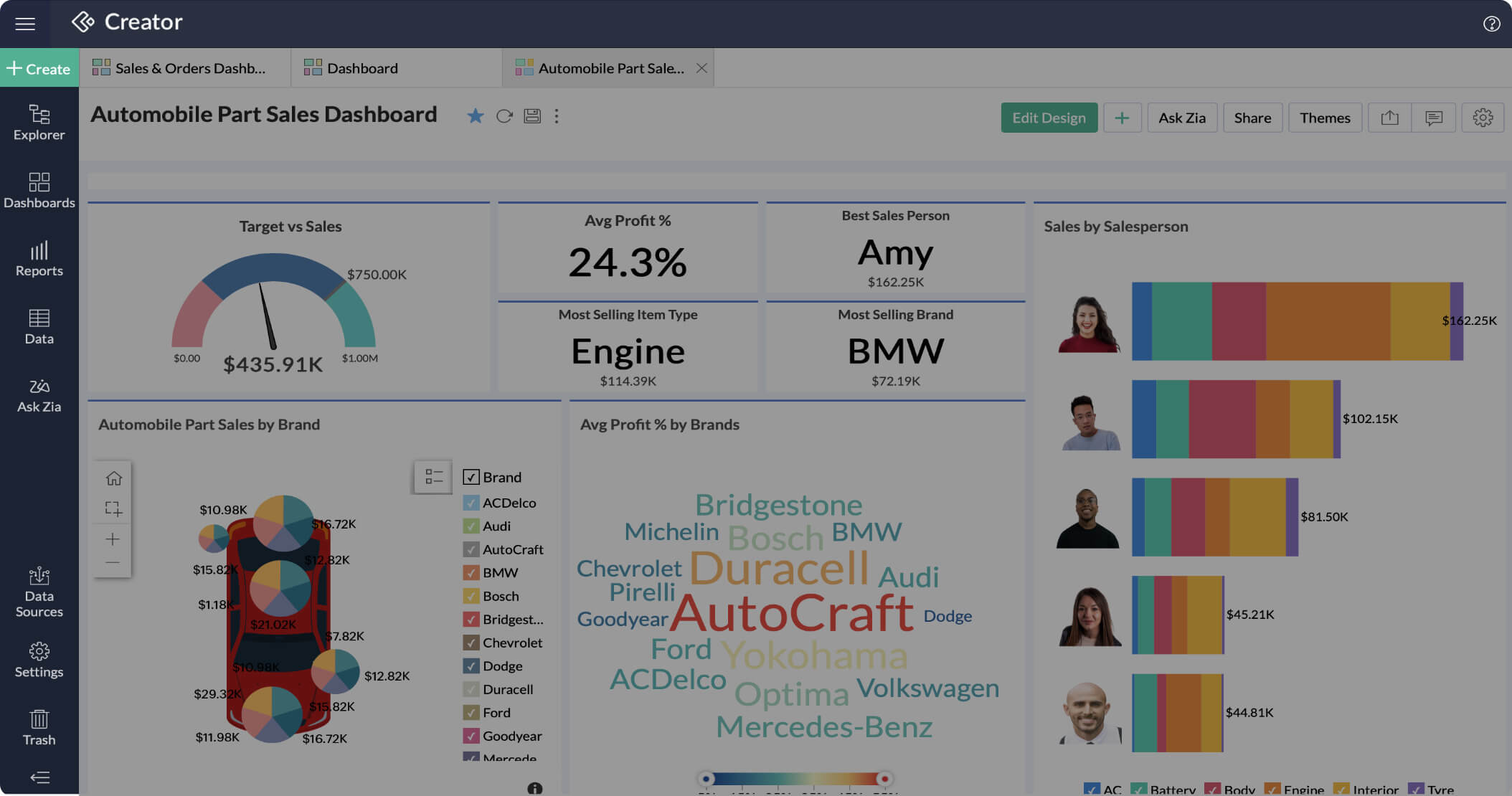
Business intelligence and analytics engine that is a first for the industry is now a part of the Creator, according to Zoho, allowing users to gain business insights from the data stored in their applications without having to bother about adding a new subscription to the mix. In addition, the low-code platform now supports advanced BI features, including predictive analytics, data alerts, what-if analysis, data blending, and conversational analytics.
Using Zoho Creator 6, artificial intelligence (AI) can assist you in creating intelligent and reliable commercial applications. You may import data from anywhere, create data modules on behalf of users, and examine data linkages using AI-based import capabilities. Keyword extraction, sentiment analysis, and predictive analysis are some of the brand-new Zoho Creator capabilities that are ready to use and built-in.
BI and Analytics in Zoho Creator 6.0 offers you the following-
Data visualization
In Zoho Creator, integrations adhere to the reusability principle much as apps and functions do. Once correctly installed, you'll have access to it when travelling. Using Zoho Creator 6.0, you can quickly link every business app.
Integration
You may connect to any data source with Zoho BI & Analytics. APIs can retrieve databases and upload data from spreadsheets or online storage services. As a result, you can consolidate disconnected data spread across several platforms if you have a lot of it.
Faster Decisions
Zoho's conversational AI assistant, Zia, enhances the user experience by automatically providing quick answers to queries and creating images.
Additionally, it helps to enable staff members to analyze data using detailed images and make wise business decisions. The chatbot may also help you create essential indicators with charts and reports.
Collaboration
With fine-grained access controls and specific choices like read-only, report authoring, export, and read-write, collaborative analytics gives you total control over your data. Any report or dashboard can be the subject of discussions with colleagues using the commenting function.
Self-service portals
Integrating the reports into your website may give suppliers, consultants, and clients access to context-specific information through their own websites and reporting portals.
Each customer's or seller's brand identification can be complemented on the portals with the addition of corporate logos and other elements.
Mobile BI
You can allow your personnel to use their mobile phones to access reports, debate important information, and take action. They use reports even when not linked to the internet since they are convenient and they appreciate them.
Conclusion
The most recent version of Zoho Creator 6.0 allows companies to efficiently provide end-to-end business solutions by combining the intense power of application development, business data & analytics, smart integrations, and process automation into one unified platform. By extending low-code capabilities to all phases of software development, C6 also gives you a more direct development experience.
This Zoho Creator feature will enable your teams to create comprehensive business solutions that deliver insightful real-time information and automate processes while in motion.
The Zoho Creator Platform Zoho Creator 6.0 includes Zoho's intelligence and analytics engine, allowing customers to gain business insights from the data in their apps without worrying about adding a new subscription to the mix.
Topic Participants
Abhishek - Zoho Partner
Jmadrid
Sticky Posts
ANZ In-Person Zoho User Group Meetups: Focusing on Zoho Creator & Zoho Flow (September 2024)
Hello, Zoho Community! Calling all Zoho users in Australia! We're thrilled to announce the next series of Zoho User Group (ZUG) Meetups, continuing the success of our previous sessions. These meetups are a great opportunity to learn, network, and engage[SESSION ENDED] Ask the Experts #07| Live Q&A: Building workflows with Blueprint in Zoho Creator |
Hello, Post the release of Zoho Creator Blueprint last month, we're happy to tell you that we'll be launching a new 'Ask the Experts' session on 16th September (Thursday) this month focussing on creating blueprints in Zoho Creator. The session will beZoho Creator Community Webinars | October - November 2020 [Completed]
Hello everyone, I’m happy to announce that Zoho Creator is hosting a new Community Webinar Series starting this October. This series is a learning initiative aimed at our developer community, where every session will take spotlight use cases focused onCommunity Learning Webinar - Zoho Creator Blueprint & other release updates | July 29, 2021
Dear developers, This June, the Creator team unveiled a slew of updates including UI enhancements to the Detail View of reports, an new capabilities in Data Import and Connections, and most important of all, the release of Blueprint in Creator. CustomizeCommunity Learning Webinar: Delve deep into the core concepts of Zoho Creator | 17th June, 2021
Dear developers, Every customer has unique business needs and unique problems to solve. To be able to give solutions to these problems, to get over any stumbling blocks and to be able to build applications expeditiously that tailor to specific needs,
Nederlandse Hulpbronnen

Recent Topics
Unlocking New Levels: Zoho Payroll's Journey in 2025
Every year brings its own set of challenges and opportunities to rethink how payroll works across regulations and teams. In 2025, Zoho Payroll continued to evolve with one clear focus: giving businesses more flexibility, clarity, and control as they grow.CRM project association via deluge
I have created a workflow in my Zoho CRM for closing a deal. Part of this workflow leverages a deluge script to create a project for our delivery team. Creating the project works great however, after or during the project creation, I would like to associateZoho Browser??
hai guys, this sounds awkward but can v get a ZOHO BROWSER same as zoho writer, etc. where i can browse websites @ home and continue browsing the same websites @ my office, as v have the option in Firefox, once i save and close the browser and again when i open it i will be getting the same sites. If u people r not clear with my explanation, plz let me know. Thanks, SandeepSync desktop folders instantly with WorkDrive TrueSync (Beta)
Keeping your important files backed up and accessible has never been easier! With WorkDrive desktop app (TrueSync), you can now automatically sync specific desktop folders to WorkDrive Web, ensuring seamless, real-time updates across devices. Important:MCP no longer works with Claude
Anyone else notice Zoho MCP no longer works with Claude? I'm unable to turn this on in the claude chat. When I try to toggle it on, it just does nothing at all. I've tried in incognito, new browsers, etc. - nothing seems to work.Enable History Tracking for Picklist Values Not Available
When I create a custom picklist field in Deals, the "Enable History Tracking for Picklist Values" option is not available in the Edit Properties area of the picklist. When I create a picklist in any other Module, that option is available. Is there a specific reason why this isn't available for fields in the Deals Module?The reason I switched away from Zoho Notebook
My main reason for switching to Zoho was driven by three core principles: moving away from US-based products, keeping my data within India as much as possible, and supporting Indian companies. With that intent, I’ve been actively de-Googling my digitalAdd RTL and Hebrew Support for Candidate Portal (and Other Zoho Recruit Portals)
Dear Zoho Recruit Team, I hope you're doing well. We would like to request the ability to set the Candidate Portal to be Right-to-Left (RTL) and in Hebrew, similar to the existing functionality for the Career Site. Currently, when we set the Career SiteAbility to Edit YouTube Video Title, Description & Thumbnail After Publishing
Hi Zoho Social Team, How are you? We would like to request an enhancement to Zoho Social that enables users to edit YouTube video details after the video has already been published. Your team confirmed that while Zoho Social currently allows editing theFree Webinar : Unlock AI driven business insights with Zoho Inventory + Zoho Analytics
Are you tired of switching between apps and exporting data to build customized reports? Say hello to smarter & streamlined insights! Join us for this exclusive webinar where we explore the power of the Zoho Inventory–Zoho Analytics integration. LearnCritical Issue: Tickets Opened for Zoho Support via the Zoho Help Portal Were Not Processed
Hi everyone, We want to bring to your attention a serious issue we’ve experienced with the Zoho support Help Portal. For more than a week, tickets submitted directly via the Help Portal were not being handled at all. At the same time no alert was postedHide/Show Subform Fields On User Input
Hello, Are there any future updates in Hide/Show Subform Fields "On User Input"?Cloning Item With Images Or The Option With Images
Hello, when I clone an item, I expect the images to carry over to the cloned item, however this is not the case in Inventory. Please make it possible for the images to get cloned or at least can we get a pop up asking if we want to clone the images asArchiving Contacts
How do I archive a list of contacts, or individual contacts?Custom validation in CRM schema
Validation rules in CRM layouts work nicely, good docs by @Kiran Karthik P https://help.zoho.com/portal/en/kb/crm/customize-crm-account/validation-rules/articles/create-validation-rules I'd prefer validating data input 'closer to the schema'Adding Default Module Image into mail merge field
As with most people finding their way to these forums i have a specific requirement that doesn't seem to be supported by Zoho I have created 2 custom modules to suit my purpose 1 is an inventory type module that lists aluminium extrusions, and all relevantSync Data from MA to CRM
Currently, it's a one-way sync of data from the CRM to MA. I believe we should have the ability to select fields to sync from MA to the CRM. The lead score is a perfect example of this. In an ideal world we would be able to impact the lead score of aIs it possible to roll up all Contact emails to the Account view?
Is there a way to track all emails associated with an Account in one single view? Currently, email history is visible when opening an individual Contact record. However, since multiple Contacts are often associated with a single Account, it would be beneficialUpdate CRM record action
Currently, MA only offers a "Push Data" action to push data to a CRM module. This action is built to cover the need to both create a new record and update an existing record. Because it has been implemented this way all required fields on the CRM moduleNotes badge as a quick action in the list view
Hello all, We are introducing the Notes badge in the list view of all modules as a quick action you can perform for each record, in addition to the existing Activity badge. With this enhancement, users will have quick visibility into the notes associatedFree Training - Explore What’s New in Zoho One 2025
Greetings! We hope you have all had a chance by now to get hands-on with the new features and updates released as part of ZO25. Yes, we understand that you may have questions and feedback. To ensure you gain a comprehensive understanding of these updates,Good news! Calendar in Zoho CRM gets a face lift
Dear Customers, We are delighted to unveil the revamped calendar UI in Zoho CRM. With a complete visual overhaul aligned with CRM for Everyone, the calendar now offers a more intuitive and flexible scheduling experience. What’s new? Distinguish activitiesEdit default "We are here to help you" text in chat SalesIQ widget
Does anyone know how this text can be edited? I can't find it anywhere in settings. Thanks!Quick way to add a field in Chat Window
I want to add Company Field in chat window to lessen the irrelevant users in sending chat and set them in mind that we are dealing with companies. I request that it will be as easy as possible like just ticking it then typing the label then connectingHow to create a two way Sync with CRM Contacts Module?
Newbie creator here (but not to Zoho CRM). I want to create an app that operates on a sub-set of CRM Contacts - only those with a specific tag. I want the app records to mirror the tagged contacts in CRM. I would like it to update when the Creator appZoho Sheet for Desktop
Does Zoho plans to develop a Desktop version of Sheet that installs on the computer like was done with Writer?Where is the settings option in zoho writer?
hi, my zoho writer on windows has menu fonts too large. where do i find the settings to change this option? my screen resolution is correct and other apps/softwares in windows have no issues. regardsHow to set page defaults in zoho writer?
hi, everytime i open the zoho writer i have to change the default page settings to - A4 from letter, margins to narrow and header and footer to 0. I cannot set this as default as that option is grayed out! so I am unable to click it. I saved the documentDevelop and publish a Zoho Recruit extension on the marketplace
Hi, I'd like to develop a new extension for Zoho Recruit. I've started to use Zoho Developers creating a Zoho CRM extension. But when I try to create a new extension here https://sigma.zoho.com/workspace/testtesttestest/apps/new I d'ont see the option of Zoho Recruit (only CRM, Desk, Projects...). I do see extensions for Zoho Recruit in the marketplace. How would I go about to create one if the option is not available in sigma ? Cheers, Rémi.How to import data from PDF into Zoho Sheet
I am looking to import Consolidated Account Statement (https://www.camsonline.com/Investors/Statements/Consolidated-Account-Statement) into zoho sheet. Any help is appreciated. The pdf is received as attachment in the email, this document is passwordZoho Projects Android app: Integration with Microsoft Intune
Hello everyone! We’re excited to announce that Zoho Projects now integrates with Microsoft Intune, enabling enhanced security and enterprise app management. We have now added support for Microsoft Intune Mobile Application Management (MAM) policies throughCant't update custom field when custom field is external lookup in Zoho Books
Hello I use that : po = zoho.books.updateRecord("purchaseorders",XXXX,purchaseorder_id,updateCustomFieldseMap,"el_books_connection"); c_f_Map2 = Map(); c_f_Map2.put("label","EL ORDER ID"); c_f_Map2.put("value",el_order_id); c_f_List.add(c_f_Map2); updateCustomFieldseMapAbout Zoneminder (CCTV) and Zoho People
Hi team I would like to implement a CCTV service for our branches, with the aim of passively detecting both the entry and exit of personnel enrolled in Zoho Peeple, but my question is: It is possible to integrate Zoho People with Zoneminder, I understandIntroducing the Zoho Projects Learning Space
Every product has its learning curve, and sometimes having a guided path makes the learning experience smoother. With that goal, we introduce a dedicated learning space for Zoho Projects, a platform where you can explore lessons, learn at your own pace,Create CRM Deal from Books Quote and Auto Update Deal Stage
I want to set up an automation where, whenever a Quote is created in Zoho Books, a Deal is automatically created in Zoho CRM with the Quote amount, customer details, and some custom fields from Zoho Books. Additionally, when the Sales Order is convertedHow to show branch instead of org name on invoice template?
Not sure why invoices are showing the org name not the branch name? I can insert the branch name using the ${ORGANIZATION.BRANCHNAME} placeholder, but then it isn't bold text anymore. Any other ideas?Admin asked me for Backend Details when I wanted to verify my ZeptoMail Account
Please provide the backend details where you will be adding the SMTP/API information of ZeptoMail Who knows what this means?Kaizen #223 - File Manager in CRM Widget Using ZRC Methods
Hello, CRM Wizards! Here is what we are improving this week with Kaizen. we will explore the new ZRC (Zoho Request Client) introduced in Widget SDK v1.5, and learn how to use it to build a Related List Widget that integrates with Zoho WorkDrive. It helpsSet connection link name from variable in invokeurl
Hi, guys. How to set in parameter "connection" a variable, instead of a string. connectionLinkName = manager.get('connectionLinkName').toString(); response = invokeurl [ url :"https://www.googleapis.com/calendar/v3/freeBusy" type :POST parameters:requestParams.toString()Possible to connect Zoho CRM's Sandbox with Zoho Creator's Sandbox?
We are making some big changes on our CRM so we are testing it out in CRM's Sandbox. We also have a Zoho Creator app that we need to test. Is it possible to connect Zoho CRM's Sandbox to Zoho Creator's Sandbox so that I can perform those tests?Next Page