De 10 beste redenen om Zoho CRM te gebruiken
Zoho CRM biedt alles wat je nodig hebt om meer leads te krijgen, sales te vergroten en salesprestaties te meten. Hieronder lees je 10 punten waarom Zoho CRM een krachtige en efficiënte oplossing voor klantbeheer is en hoe je het meeste uit Zoho CRM kan halen.
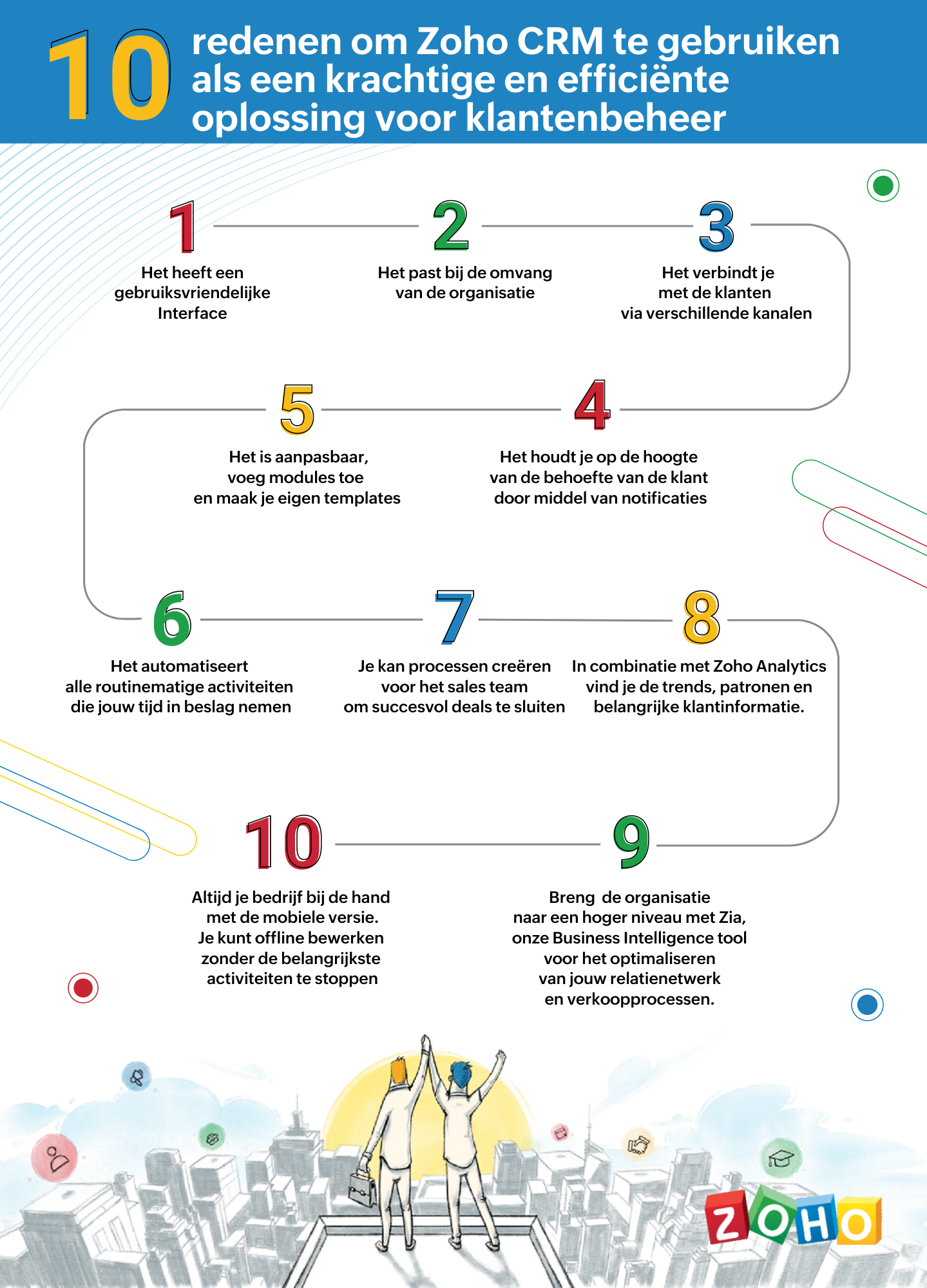
1. Gebruiksvriendelijke interface
Zoho CRM heeft een eenvoudige, gebruikersinterface waarvoor een minimaal leercurve nodig is. Breid de gebruikersinterface van jouw Zoho CRM-account uit, door naadloos in realtime widgetapps te koppelen die werken met Zoho CRM-gegevens en workflows.
2. Passend bij de omvang van uw organisatie
Of je nu een klein bedrijf of een grote onderneming hebt, één ding blijft hetzelfde. Jouw succes hangt af van de relaties die je met je klanten ontwikkelt. Naarmate je bedrijf groeit, groeien je eisen ook en worden deze complexer. Je CRM moet een groeiende groep gebruikers kunnen ondersteunen, je salesproces kunnen opschalen, complexere bedrijfsprocessen kunnen implementeren en kunnen worden geïntegreerd met meer applicaties van derden. Met Zoho CRM beschik je over een robuuste, veilige en schaalbare CRM-oplossing voor bedrijven.
3. Verbind met je klanten via meerdere kanalen
Met Zoho CRM kan je via meerdere kanalen connecten met je klanten. Voer gesprekken in realtime met klanten en prospects. Ontvang een melding wanneer iemand communiceert met jouw merk, of ze nu je website bekijken, een e-mail lezen of over je merk praten via social media.
4. Blijf op de hoogte door middel van notificaties
Ontvang alerts, reminders en suggesties voor de beste contactmomenten met je leads op basis van eerdere succesvolle interacties.
5. Pas je CRM aan naar jouw wensen
Weergeef gegevens die jij wilt zien binnen het CRM. Pas modules aan en creëer maatwerk velden die van belang zijn voor jouw bedrijf. Tevens kan je je CRM opnieuw vormgeven met onze nieuwste Canvas-functie. Middels een eenvoudige drag-and-drop editor kan je je eigen sjablonen maken. Klik hier voor onze meest recente webinar of Canvas.
6. Routinematige activiteiten automatiseren
Automatiseer routinematige verkoop-, marketing- en supportfuncties die waardevolle werktijd in beslag nemen, zodat je meer tijd hebt om te concentreren op je klanten. Creëer workflows waarmee je handmatige gegevensinvoer kunt verminderen en je proces kunt versnellen.
7. Creëer processen voor het sales team voor het sluiten van deals
Maak regels in je CRM op basis van echte salesprocessen. Wijs leads toe aan de juiste verkoper, keur kortingen goed en valideer salesgegevens op basis van jouw criteria. Je kan tevens een goedkeuringsproces invoeren om binnenkomende informatie te beoordelen en deze met de juiste opmerkingen goed te keuren of af te wijzen op basis van de kwaliteit.
8. Analyseer CRM-gegevens met Zoho Analytics
Maak een visuele analyse van je CRM-gegevens. Maak inzichtelijke rapporten en dashboards om je CRM sales-KPI's te volgen. Deel rapporten en werk samen met je collega's tijdens het maken en analyseren van rapporten. Analyseer en volg je bedrijfsstatistieken. Klik hier voor meer informatie over Zoho Analytics.
9. Zia ons BI tool voor het optimaliseren van jouw verkoopprocessen
Zia is de AI-assistent binnen Zoho CRM die je helpt je CRM op intelligente wijze te beheren. Zia kan de gewenste informatie ophalen, aantekeningen maken wanneer je dicteert, de uitkomst van slalesactiviteiten voorspellen, afwijkingen detecteren, alledaagse taken automatiseren en nog heel veel meer!
10. Zoho CRM Mobiele App
Met de mobiele apps van Zoho CRM kan je salesteam onderweg contact houden met hun leads, belangrijke prospectinformatie registreren en openen, hun KPI's bijhouden en onderweg doordachte beslissingen op basis van gegevens maken. Klik hier voor meer informatie over de Zoho CRM mobiele app.
Topic Participants
Yannick de Vries
Sticky Posts
Virtual Community Meetup over Canvas voor Zoho CRM
Beste Community leden, Wij nodigen jullie graag uit voor de Virtuele Community Meetup over Canvas voor Zoho CRM! Met Canvas kun je de gebruikersinterface van Zoho CRM herontwerpen tot een gebruiksvriendelijke en dynamische tool. Deze oplossing vereenvoudigtTips & Tricks #01 Top 10 Zoho CRM Integraties
Wij helpen jou graag om het beste uit je CRM te halen. Zoho CRM ondersteunt verschillende Apps en Add-ons die jouw efficiëntie kunnen verbeteren wanneer je met sales leads, prospects en klanten werkt. Integratie is mogelijk met een uitgebreide set aanWebinar - Nieuwe Canvas Functie voor Zoho CRM
Wij nodigen jou graag uit voor de Webinar over de nieuwe Canvas-functie van Zoho CRM! Tegenwoordig zien alle CRM-softwares er hetzelfde uit: rijen met data op een witte achtergrond met een contrasterende kleur bovenaan en aan de randen. Dat is NU verledenAsk the Experts #1 Online Forum Q&A over Canvas voor Zoho CRM
Beste Community leden, Zoals jullie weten lanceerde Zoho CRM deze maand Canvas, de eerste CRM Designstudio in de branche! Met Canvas is het mogelijk om creatieve en praktische ontwerpen te creëren zonder enige kennis van programmeren te hebben. Het isOntdek onze nieuwe Canvas functie voor CRM
Het gehele Zoho team is verheugd om onze nieuwe Canvas functie te introduceren, de enige functie binnen de branche die u in staat stelt om het ontwerp van uw CRM aan te passen! Canvas is een ingebouwde designstudio in Zoho CRM, waarmee u uw gebruikersinterface
Nederlandse Hulpbronnen

Recent Topics
Converted Leads Not Showing in Lead Reports
Converted leads are not showing in the Lead reports. How can I make converted leads visible in the report,Text widgets in dashboards
Having a text widget in a dashboard would help immensely. It would allow adding links to related documents, relevant CRM views, etc. It would allow adding explanations of the data displayed in the other widgets, about how to interpret them or about filtering.[Webinar] Zoho Writer for content creators and publishing houses
Managing multiple drafts, edits, and client reviews doesn't have to slow you down. Join our upcoming webinar to see how Zoho Writer helps content creators and publishing houses create, edit, and publish seamlessly—all in one place. You'll learn how to:Adding Reports to Portals
Is there a way to add Reports to portals so only the user can see report templates relevant to them?How to assign one Manual to multiple Spaces?
Hello, I have two spaces, one called tech knowledge and the other one called HR knowledge. I have a manual that is called HR tech. I want to assign this manual to HR knowledge and tech knowledge. How should I do that?Introducing VeriFactu Support in Zoho Books
Hello users, Spain has introduced the VeriFactu system under Real Decreto 1007/2023 to ensure integrity, traceability, and anti-fraud compliance in e-invoicing. Starting January 1, 2026, all B2B invoices must be reported to Agencia Estatal de AdministraciónHow can I assign courses to Spaces?
How can I make courses show up here in this space?:When will Zoho Learn be able to support SCORM files on the mobile app?
When I click the SCORM content, I just get a message saying it's not possible yet. Yet implies that it will be coming soon. All I'm asking for is a realistic timeline so I know whether or not to invest my time in using it. If it will be soon, then I willAnnouncing new features in Trident for Windows (v.1.35.6.0)
Hello Community! Trident for Windows just got better with an update that makes working with your emails even more efficient. Let’s dive into what’s new! Work with PST files more efficiently. You can now do more than just view mounted PST files. You canMarketing Tip #9: Track your traffic sources
Not all marketing channels work equally well. Knowing whether your visitors come from Google, Instagram, or email helps you focus on what actually drives sales. Try this today: Check your Zoho Commerce reports or connect Zoho PageSense to see your topGoogle Analytics import data inaccurate (as of October 11, 2025)
We have Zoho Analytics connected to GA4 to import daily event data. This has been running without issue for a couple of years. However, a month ago we started noticing discrepancies. All data until October 10 lines up perfectly - October 11 onward isPrevent accidental duplicate entry of Customer Ordersome
Zoho Support has confirmed that Zoho currently does not have any method (using Deluge, flow or any other method) to alert a user when a sales order has been entered twice using the same customer reference number (i.e. a duplicate). Most ERP platformsZoho Books | Product updates | November 2025
Hello users, We’ve rolled out new features and enhancements in Zoho Books. From translating email notification templates to the new transaction locking restrictions, explore the updates designed to enhance your bookkeeping experience. Making Tax DigitalInsert Image into Notebook page
Prior to today, I could add images to my notebook pages. Today when I tried to do this I got an error message that said something like, "There's been a problem on our end. Try again later." So, I've tried all the ways I know how, but I can't insert an【開催報告】名古屋 ユーザー交流会 Vol.2 2025/11/21 Zoho Analytics / Inventory で実現する在庫の"未来予測"
ユーザーの皆さま、こんにちは。コミュニティチームの中野です。 11/21(金)に名古屋 ユーザー交流会 を開催しました。 本投稿では、当日実施したセッションの様子及び投影資料をお届けします。 会場にて参加できなかった皆さまも、ぜひご参照ください。 (Zoho 社員セッションの登壇資料については、11/28(金)開催の東京回の開催報告で共有いたします) 今年2回目の開催となる名古屋 ユーザー交流会では、株式会社エンツナクリエイト 野末さんによる Zoho Analytics / InventoryIs there a way to automatically add Secondary Contacts (CCs) when creating a new ticket for specific customers?
Some of our customers want multiple contacts to receive all notifications from our support team. Is there a way to automatically add secondary contacts to a ticket when our support team opens a new ticket and associates it with an account? This wouldImproved RingCentral Integration
We’d like to request an enhancement to the current RingCentral integration with Zoho. RingCentral now automatically generates call transcripts and AI-based call summaries (AI Notes) for each call, which are extremely helpful for support and sales teams.Edit Pinned Comments in Zoho Desk
It's great that private comments can now be pinned to the top of the ticket but what would be extremely helpful would be to allow for the pinned comment to be edited vs. having to find the comment in the ticket to edit it.Updating Secondary Contact (CCs)
We use Zoho Forms to capture the user request and integrated with Zoho Desk to raise tickets. Active Microsoft login is captured in our Zoho forms and registered as Primary contact in Zoho desk ticket. We also an have an option to raise ticket on behalfblank page after login
blank page after logging into my email account Thanks youWriterTh
After every space Writer goes to capital letters mode in my Android tablet. The cap mode stays till the second letter is typed in the word then it comes to normal mode.Zoho writer unable to merge documents to PDF with basic fonts in Hebrew or fonts from my computer
I created several forms that will be merged into PDF files through Zoho Writer and I am unable to receive the PDF in the basic fonts of the Hebrew language or in the fonts I have on my computer. The writer exports to PDF an exchange font that looks veryI have already created some Bots, Commands, and Widgets in Cliq, but I am still not seeing the “Create Extension” option in my account. Could you please help me enable or access this option?
Infinite loop of account verification
Hi I can't do anything on my zoho account. I always get this message Hi Sheriffo Ceesay As a security measure, you need to link your phone number with this account and verify it to proceed further. When ever I supply the details, it displays that the number is associated with another account. I don't have any other account on zoho so this is really annoying.How we cut CRM updates from ~20 minutes down to 2, our real workflow
Updating the Zoho CRM after every call used to be one of the biggest time sucks for our team. By the time you write your notes, clean them up, fill in the fields, and log everything properly… you’ve easily lost 15–20 minutes per call. We started experimentingArattai App Features Update
1. Offline Messaging & Sync Enable users to compose messages without internet and deliver them automatically via peer-to-peer methods (Bluetooth/WiFi Direct) when nearby users are available. This would be a game-changer for rural India with unreliableHow to add Product Add-Ons, Mandatory Forms, and Auto-Save Address in Zoho Commerce
Hi all, I need help setting up several behaviors in Zoho Commerce. I can’t find the correct configuration options, so I want to confirm whether these are supported or if there is a workaround. 1. Product-Specific Add-Ons (Example: GWB Subscription) WhenZohomail
Im trying to setup email address zohoPROBLEMA
Salve, non riesco a inviare email, e mi esce una tabela errore temporaneo. come posso risolvere il problema ?Forever FREE Business Email with Zoho Mail
Forever FREE Business Email with Zoho Mail: is it available?Weekly Tips : Make collaboration effortless with Whiteboard in Zoho Mail
Working with your team often means switching between emails, notes, and other applications just to explain an idea. Maybe you are trying to sketch a layout, plan a workflow, or quickly brainstorm ideas—with text alone, things can get confusing. So howFormula field number of days between 2 dates
Hi, I want to have a formula field which calculates the following: IF EndDate < TODAY and Oproep is true (this is a checkbox field) than EndDate - StartDate, otherwise TODAY - StartDate It should calculate the number of days How can I write this for'email address already exists'
I deleted a user from my organization and want to use the same email address that user had, but the email address seems to still exist somewhere as I get 'email address already exists' when I try and create it. I have deleted the entire organization andZOHO reporting DKIM entries are not configured, when they have been configured and verified by 3rd parties
Why is ZOHO reporting to my organisation users the following: "The DKIM entries in your domain's DNS records are not configured. Please contact your administrator for configuring DKIM to ensure optimal RSVP invite delivery." When I have configured theManage Bookings directly from Zoho Mail
Greetings from the Zoho Bookings team! We’re introducing the new Zoho Bookings extension for Zoho Mail, designed to help you view appointments, copy time slots and share booking links without leaving your inbox. This integration brings scheduling rightMy notes from the past 2 months have disappeared
Hola, necesito ayuda urgente. Hoy, al iniciar sesión en mi Zoho Notebook como todos los días, me llevé una gran sorpresa al descubrir que todas mis notas de los últimos dos meses habían desaparecido. Estas notas son muy importantes para mí, ya que usoHow can I load a network into the cliq desktop app?
I have both the standard cliq log in for my org and I am part of a cliq network. In the browser I can choose which I log in to. However, in teh desktop app if I log in it will alwasy load my org's cliq. Can I switch this to the network I have createAbility to modify what displays in calendar invite?
I am a long time calendly user and want to make the switch to bookings. I understand that there is not currently a meets/hangouts integration, is one on the roadmap? Is there anyway I can modify the calendar invite to include the meet link? I can add it to the emails no problem, but I would also like it to display on their calendar. Is there some work around I can do to get it on the calendar? Also am I able to modify the calendar event title?Issue with Booking Confirmation Page Not Displaying, Leading to Customer Anxiety and Unnecessary Support Calls
I am writing to express my growing concern regarding the confirmation process in Zoho Bookings, particularly the inconsistent display of the confirmation page after a successful payment. As a mobile service provider, I rely on Zoho Bookings platform forIs it possible to turn off all capabilities for a customer to schedule, reschedule or cancel an appointment?
Is it possible to turn off all capabilities for a customer to schedule, reschedule or cancel an appointment? I would like to set it up so only staff can schedule appointments. Is this possible?Next Page