Introducing Schedules for smarter availability management

Introducing Schedules for smarter availability management

Greetings from the Zoho Bookings team!

We’re excited to introduce Schedules, a powerful enhancement to manage availability across your workspace. Schedules are reusable working-hour templates that help you define and maintain consistent availability across multiple event types, while still giving you the flexibility to handle exceptions such as holidays or any extended working hours.

With Schedules, admins can define available hours once and reuse them across multiple event types, making availability management simpler, consistent, and scalable.

What’s new?  

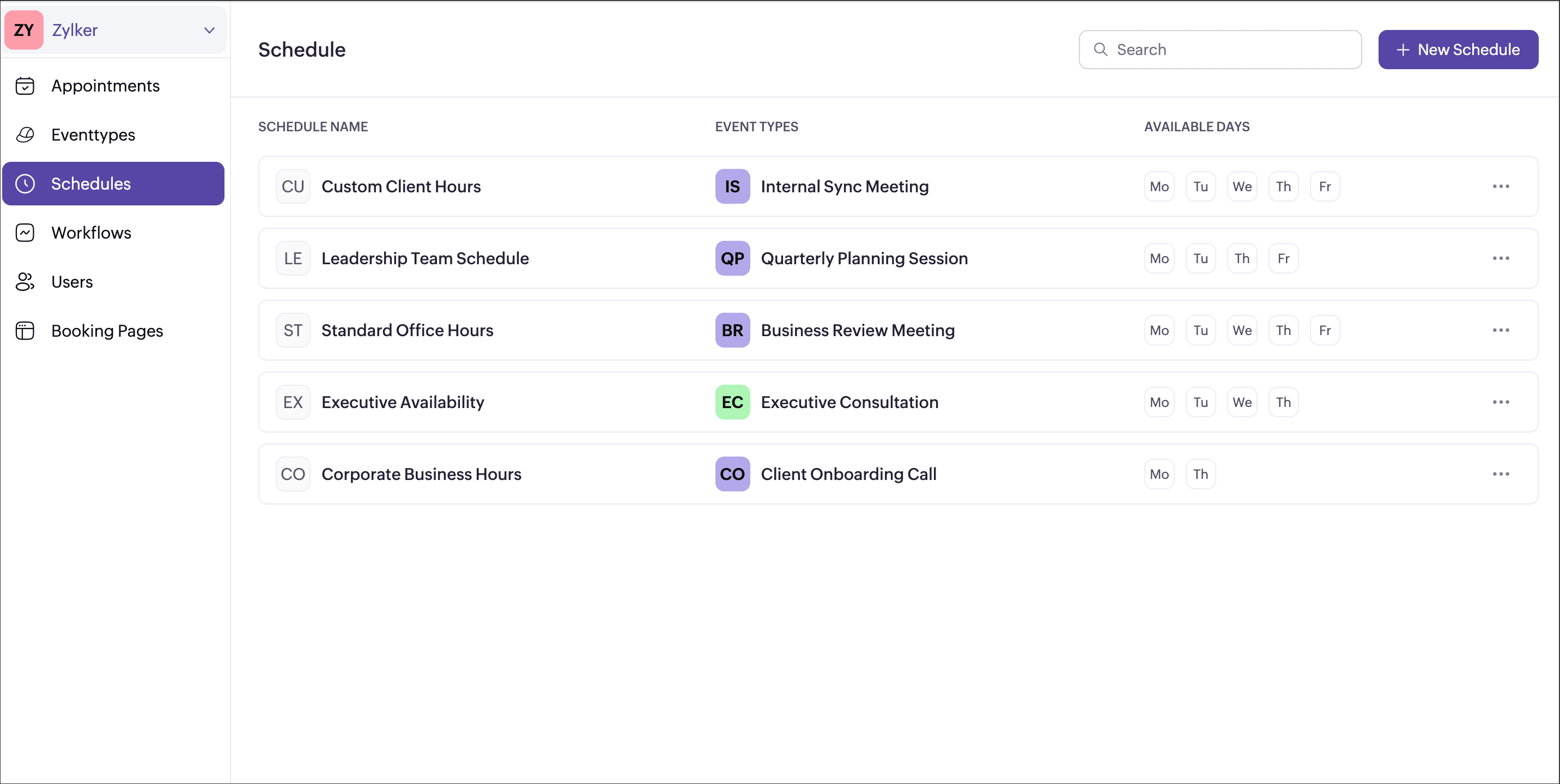
Schedule  

  • Create a common working hour template at the workspace level.

  • Assign it to multiple or all event types in one go.

  • Any updates to the schedule automatically reflect across assigned event types.

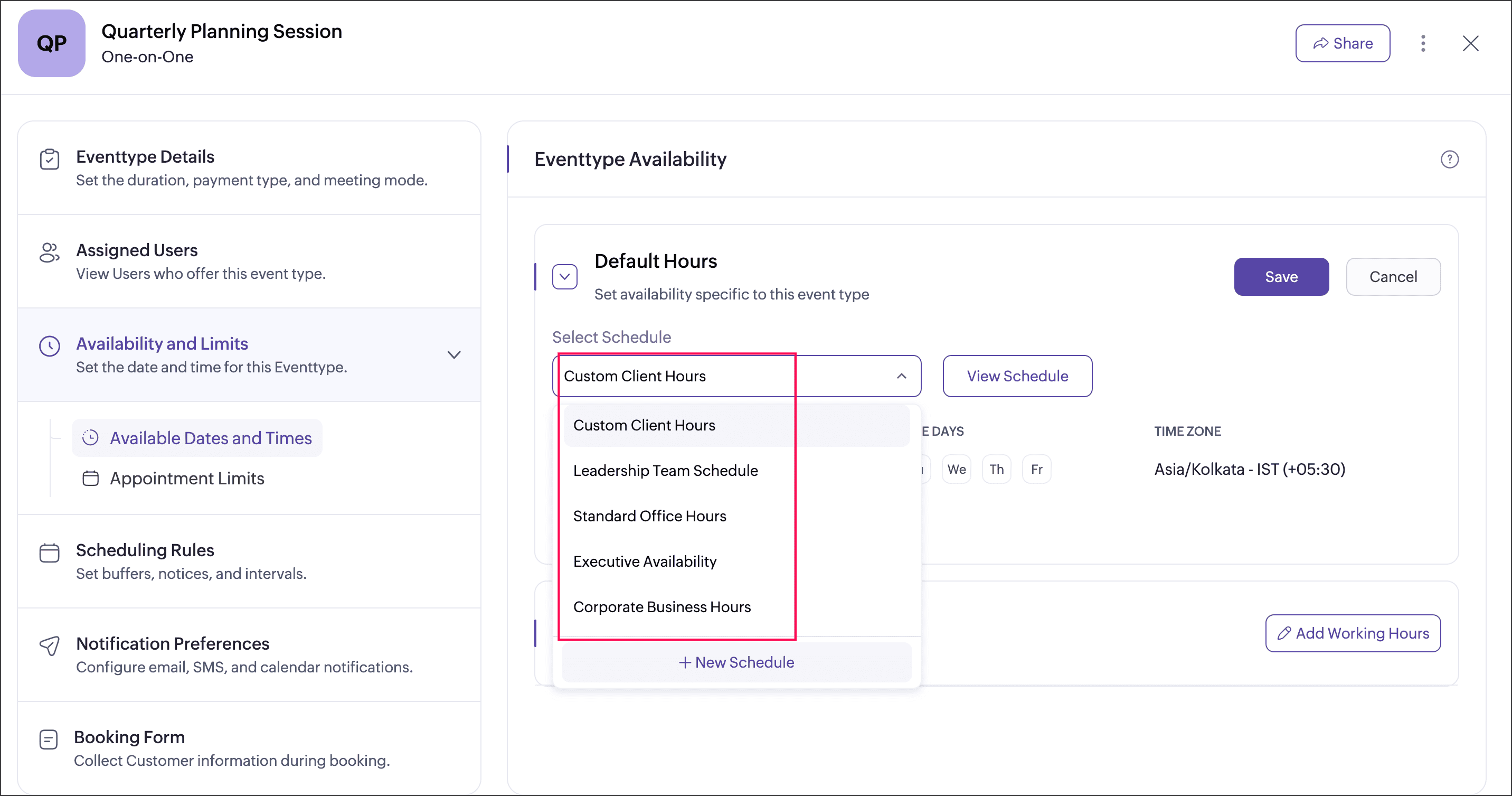
Event type availability

  • Event type can be assigned with the schedule that has been created at the workspace level, or the event type can be set to follow user working hours.

  • User-specific hours let you define custom availability for multiple users within an event type, and you can choose whether to apply or ignore these hours by enabling or disabling the Override user-specific hours option.

  • Each event type can be associated with a single schedule at a time.

Date Overrides

Date overrides let you make temporary exceptions to a regular schedule without changing the defined working hours. You can use them to add additional availability or mark unavailability for specific dates or date ranges. For more precise control, you can choose a custom range to define specific chunks of hours on a particular day. For example, making an event type available from 10 AM to 12 PM and again from 4 PM to 6 PM on the same day for special sessions.

Why this matters  

  • Maintain consistent availability across your workspace
  • Reduce repetitive schedule setup
  • Support complex real-world scenarios like team-based bookings and shared resources
  • Keep control centralized while allowing necessary flexibility
Availability  

This feature is available to all users on paid plansAdmins can create schedule for every workspace, while users can view their assigned schedules under My Space → Availability.

We believe schedule will make managing availability simpler, cleaner, and more scalable especially for growing teams. Have questions or feedback? Drop a comment below or write to us at
support@zohobookings.com. We’d love to hear from you!

Regards,
The Zoho Bookings Team

    • Sticky Posts

    • New feature: Invite additional guests for your bookings

      Hello everyone, Greetings from Zoho Bookings! We are happy to announce the much-awaited feature Guest Invite, which enhances your booking experience like never before. This feature allows additional participants to be invited for the bookings to make
    • 📣📣 Zoho Bookings Schedulathon 2025 is here!

      Hey Zoho Bookings fam, We're excited to invite you to our first-ever hackathon: Yes, Zoho Bookings Schedulathon 2025 is live now. This is a virtual event and you can participate anywhere from the world. Businesses should be able to set up meetings from
    • 📣 [Webinar] Spikra shows how businesses leverage Zoho Bookings to increase revenue

      [Webinar] Spikra shows how businesses leverage Zoho Bookings to increase revenue Hi all, Service-based businesses need to be on top of their client experience game to stay ahead. Spikra, one of our Advanced Zoho Partners, has been helping businesses deliver
    • 📣📣 Zoho Bookings - Feature Roadmap 2024

      Hi Everyone, Thank you for all the support you have been showing Zoho Bookings. We had a fabulous 2023, with a bunch of new features and over 60K new users. In 2024, our prime focus will be on user experience, and we have a few vital features coming in
    • Attention: Important updates to the payment gateway integrations

      Greetings from the Zoho Bookings team! We have a few important updates to the payment gateway integrations that allow you to collect online payments for your appointments. The following payment gateways will be updated, and we encourage you to make the

    Nederlandse Hulpbronnen


      • Recent Topics

      • Warehouse -> Locations Transition Causing Errors

        After saying "okay" to the transition from 'warehouses' to 'locations', I've now got shipped Sales Orders that I cannot invoice. How does one proceed?
      • Problem with the blueprint flow.

        Scenario: 3 departments in a single environment: A-B-C agents from department 1 D-E-F agents from department 2 G-H agents from department 3 Since we've been using Zohodesk (2023), agents can assign tickets to the correct department using the blueprint
      • Announcing new features in Trident for Windows (v.1.41.5.0)

        Hello Community! Trident for Windows just received an exciting update with new ways to collaborate and stay organized without leaving your workspace. Let’s take a look at what’s new! Integrate Zoho Meeting with Trident. You can now schedule, start, and
      • Introducing the new Zoho Announcements Hub

        Hello, Enterprise Support Community! We are excited to announce a new way to keep up to date with recent product releases and announcements for the Zoho apps you use on a regular basis. Introducing our new centralized location to bring together all Zoho
      • Ability to run report over 180 days

        Is there a reason Zoho limits the ability to run reports for records older than 180 days? In my view, the only reason I can think of is that it forces us to pay for Advanced Analytics (which I do).
      • Cloning a View

        When I clone a View, it doesn't make a copy; it only creates a new copy with the same default fields as if I were creating a new view. What is the purpose of cloning if it doesn't bring in the same fields? Thanks Rudy
      • New tickets with empty image contents

        Dear Support. From the end of last week onwards customers send messages for new tickets through microsoft graph (by email to support at procert.ch using the procert portal). We have an issue with the emails because well packed images are no longer visible.
      • Zoho CRM Kiosk question – Passing Screen Fields to a Function

        I am building a Kiosk in Zoho CRM to create new Supplier (Vendors) records. Current setup: Screen 1 contains user input fields: Supplier Name (Vendor_Name) First Name (First_Name) I created a Deluge function: createSupplier(vendor_name, first_name) The
      • Images not showing up in Desk tickets

        Customers are trying to send us screenshots to diagnose their issues. But Desk seems to be stopping the images/breaking the link when the ticket comes in. (We can see them in an email box getting cc'd on all tickets...so it's not our mail system). Help!
      • Introducing Databridge for Zoho Creator

        Hello, Enterprise Support Community! We'd like to highlight a recent utility that was released for Zoho Creator, that will allow you to connect external, private datasources with your Creator apps, Databridge. Databridge is an application that will need
      • Zoho HTML editor is removing MSO (Outlook) specific code.

        The ability to add in custom HTML is great. We are using MJML to generate our wonderfully cross platform and responsive email code that works on Act-On, Salesforce, Hubspot, Active Campaign, and lead liaison. The way it supports MSO (Outlook) is it included
      • Retail Payment Receipt

        Hi, So "payment receipts" have a "Retail" template for thermal printers, but the template is configured at A4 paper size!!! How is this retail guys? On the other hand, Invoices have 3 Retail templates which have 3 and 4 inch paper size, perfectly fitting
      • Custom Portal URL causing SAMEORIGIN error with embedded Page snippet

        In my app, I have a page that embeds another page. The URL that I have for the embedded page starts with https://creatorapp.zoho.com but the custom domain I have set up is https://kors.kerndell.com. Because the user logged into the app at https://kors.kerndell.com,
      • Pasting images is a mess

        I’m trying to paste images into my tickets, in the comments field. But when I paste images, they end up in the wrong order or behind the text.
      • Zoho Contracts Just Got Better! CRM 2.0, Regional Settings & 6 New Reports

        Zoho Contracts is evolving to bring you a more efficient and customizable contract management experience. In this update, we are introducing powerful enhancements to our Zoho CRM integration, regional settings, and reports. Let us explore what’s new:
      • Writer is horrible

        Form filling is about unusable for complex forms! I am so tired of it.
      • Zoho Finance Limitations 2.0 #5: Can't select "Account Id" if creating Custom Links in Related Panel (but it's available for Custom Buttons)

        When creating a custom link within the Zoho Finance module there is no option to select the "Account Id". If creating a Custom Button, it's available. Any plans to make this available within a reasonable timeframe? ======== Perspective: using Zoho finance
      • Team Module Issues?

        We are testing Team Licenses for use by our Customer Service staff. I created a Teamspace called CSR and only assigned two users to this space: Administrator (me) and “Team License Test.” Team License Test is assigned to the Team User profile, with a
      • Zoho Cliq not working on airplanes

        Hi, My team and I have been having this constant issue of cliq not working when connected to an airplane's wifi. Is there a reason for this? We have tried on different Airlines and it doesn't work on any of them. We need assistance here since we are constantly
      • Mirror Component in Zoho CRM: Access real-time related data without leaving your record

        Hi everyone, This feature is now available for the JP, CA, SA, UAE, and AU DCs. We're excited to bring to you Zoho CRM's mirror component, which presents relevant data on a record's details page and keeps everything users need in one place without having
      • [Free Webinar] New portal page customization in Zoho Creator - Creator Tech Connect

        Hello everyone, We’re excited to invite you to another edition of the Creator Tech Connect webinar. About Creator Tech Connect The Creator Tech Connect series is a free monthly webinar featuring in-depth technical sessions designed for developers, administrators,
      • Canvases Auto-Skewing/Adding Scroll Bars When They Were Not There Prior

        Is anyone else noticing rendering issues in their canvases today? It seems to be mainly icons which now have scroll bars added which makes them all look off, though some fields seemed to revert to squished length as well. Were the icons replaced with
      • #11 Stop Absorbing Cost That Client Should Pay

        One of the easiest ways of losing profit in a business isn't losing a customer. It's forgetting to include the expenses that are incurred for half of your customers. A taxi ride to a client location A software subscription purchased for a project. Domain
      • Related products & AI product recommendations through commerce API.

        Hello Zoho team I’m looking to add related products and AI product recommendations to my Zoho Commerce webshop with custom storefront. Is this supported through the API? And if not, is this on your roadmap? Thanks in advance David
      • Can you sell Subscriptions using Zoho Commerce?

        In addition to physical products and the apparently coming soon 'Digital Products', it is possible to sell Subscriptions using Zoho Commerce?
      • Zoho Commerce B2B

        Hello, I have signed up for a Zoho Commerce B2B product demo but it's not clear to me how the B2B experience would look for my customers, in a couple of ways. 1) Some of my customers are on terms and some pay upfront with credit card. How do I hide/show
      • A method for renaming tab titles in Creator to display more relevant information

        Hi Zoho Devs, Updates: Rules Export File attached; you can now import this into Tab Modifier instead of manually entering the rules yourself) 2022-06-08: Updated rules so that crm.zoho.com tabs are not affected; uploaded new .json import file 2022-06-09:
      • Bulk upload images and specifications to products

        Hi, Many users have asked this over the years and I am also asking the same. Is there any way in which we can bulk upload product (variant) images and product specifications. The current way to upload/select image for every variant is too cumbersome.
      • Billing Status Update

        Hello Latha, I’m working on a new automation (deluge) to fulfill one of our requirements. In this automation, there is a step to update the Work Order billing status from “Not Yet Invoiced” to “Non-Billable.” I tried to find the API information relevant
      • Problem with CRM Connection not Refreshing Token

        I've setup a connection with Zoom in the CRM. I'm using this connection to automate some registrations, so my team doesn't have to manually create them in both the CRM and Zoom. Connection works great in my function until the token expires. It does not refresh and I have to manually revoke the connection and connect it again. I've chatted with Zoho about this and after emailing me that it couldn't be done I asked for specifics on why and they responded. "The connection is CRM is not a feature to
      • Getting Project Template List using the REST API

        I am trying to confirm that I can use the REST API to create a project using a project template. The API documentation indicates this is possible by providing the Template ID, but it is not clear at all how to get a list of available Project Templates
      • Can't delete shared mailbox emails from mobile app

        I have the mobile app on iOS and cannot seem to find a way to delete an email from a shared mailbox. Is there something I'm missing here? Michael
      • From Zoho CRM to Paper : Design & Print Data Directly using Canvas Print View

        Hello Everyone, We are excited to announce a new addition to your Canvas in Zoho CRM - Print View. Canvas print view helps you transform your custom CRM layouts into print-ready documents, so you can bring your digital data to the physical world with
      • Introducing Custom Columns in Forecasts in Zoho CRM

        Release Plan: Enabling in Phased Manner, Enabled for JP DC Hello all, Forecasts in Zoho CRM help sales representatives, managers, and business stakeholders evaluate performance and plan future sales activities. While standard metrics such as Target, Achieved
      • Boost your CRM communication with new font types, sizes, and default reply-to options while composing emails

        Hello Everyone, We’re excited to introduce a series of impactful enhancements to the email composer settings in Zoho CRM. These updates enable you to personalize and optimize your customer interactions with greater efficiency. So what's new? Add custom
      • Associate records via the Multi-select lookup RELATED LIST via API

        In the REST API, is there a way to associate records for a multi-select lookup related list other than via the linking module? There are two methods for the lookup: 1. via insert records API 2. via the linking module ...as described in https://help.zoho.com/portal/en/community/topic/kaizen-125-manipulating-multi-select-lookup-fields-mxn-using-zoho-crm-apis
      • OAuth integration issues

        I'm experiencing persistent OAuth errors when trying to connect Make with Zoho API. I've tried multiple approaches but keep encountering the following issues: First error: 'Invalid Redirect Uri - Redirect URI passed does not match with the one configured'
      • Zoho Books Placeholder: Inventory Counts

        I was hoping to figure out how to find the placeholders for inventory counts by item. We use Location based inventory tracking, so I dont know if that affects things. I want my PDF and Printed PICK LISTS to show the Quantity Available to Pick. I have
      • Blueprint Not Triggering When Lead Status Is Updated by Workflow (IndiaMART Integration)

        I have set up a blueprint that triggers when a lead’s status is “New Lead.” Our CRM is integrated with IndiaMART, and when leads are created from IndiaMART, their Lead Status is initially set to None. To handle this, I created a workflow that automatically
      • Le cauchemar de PEPPOL avec Zoho Books

        Après de longues hésitations — car je défends toujours les produits Zoho malgré leurs imperfections —, je me suis décidé à poster cet avis sur ce forum. En effet, depuis plus de 5 mois, les nombreux soucis relatifs à la facturation par PEPPOL semblent
      • Next Page