Kaizen #187 - Building a Timer and Worklog Widget (Part 1)

Howdy Tech Wizards!
Welcome back to a fresh week of Kaizen!
This time, we are diving into a two-part series where you will learn how to build a Timer and Worklog Widget for Zoho CRM. This widget helps track active work time and log multitasking sessions using Zoho CRM APIs, Client Script, Functions, and Workflows.
Why It Matters?
Zoho CRM effectively captures stage/status transitions, like tracking when a case moves from Open to In Progress or On Hold. However, in dynamic work environments, employees juggle multiple work items and engage in impromptu tasks or conversations.
Let’s take the On Hold status as an example.
While it can be used to indicate pauses in progress, it does not always align with real-world workflows. Consider these scenarios:
Not all interruptions justify a status change
Moving the case to On Hold for every minor detour (to clarify something with a colleague or respond to another emergency work item) would be impractical and could lead to under reporting actual work hours. Over time, this untracked effort adds up, creating a gap in visibility.
Frequent status changes may dilute their meaning
In many teams, On Hold signifies a legitimate blocker like waiting on customer input or an external dependency. Using it frequently to reflect quick shifts in attention could compromise that clarity.
A timer widget solves this by:
- Capturing hands-on work items.
- Logging context switches (unrelated tasks) with descriptive entries.
- Feeding structured entries into a custom module for reporting and subform sync.
Business Scenario: IT Service Desk & Ticket Resolution
A tech support team uses the Cases module to resolve customer issues. Some tickets are straightforward; others require follow-ups, escalations, or cross-team coordination. While CRM timestamps (like stage transitions or picklist tracking) track when changes happen, they do not reflect how long someone actively worked on a case.
This Timer Widget can be the ultimate solution to track down the active time spent on each case through out the day.
What are we Building?
By the end of this two-part guide, you will know how to:
- Build a timer widget to track time per task or any CRM record.
- Log work sessions into a custom module every time the timer is started/stopped.
- Automatically populate a subform in the corresponding record module using workflows and Deluge functions.
- Leverage the Reports module to analyze work patterns, SLA adherence, and productivity trends.
In Part I, we will focus on:
-> Building and configuring the Timer Widget.
-> Capturing each timed session as a record in a custom module.
Prerequisites
1. Create a Custom Module
Create a custom module named Timer Entries to log work details and generate reports from the Reports module. A new record will be added to this module each time a timer is started.
Set up the following custom fields in the Timer Entries module:
Custom Fields | Data Type |
Start Time | DateTime |
End Time | DateTime |
Total Duration (in mins.) | Formula DateBetween(${Timer Entries.Start Time},${Timer Entries.End Time},'Minutes') |
Related to Case | Lookup to Cases module |
Work Description | Multi Line |

2. Add a custom picklist option
Add a custom picklist option called In Progress to the Status picklist field in the Cases module for precisely identifying the status of the cases.
Follow this Add/Remove Picklist Values help section for more details.

3. Setup Custom Views for Contextual Filtering
To streamline the widget experience and ensure users only see relevant records to associate while tracking time, set up two smart custom views—one in the Cases module and another in the Timer Entries module.
Active Cases View (Cases Module)
Create a custom view in the Cases module to list only the active tickets the logged-in user is working on. Use the following criteria tips:
- Use the Status field to filter records with values like In Progress, On Hold, or Escalated.
- Use the Case Owner field to show records that are assigned only to the currently logged-in user.
This view powers the drop-down inside the widget where users select the case they want to start the timer for.
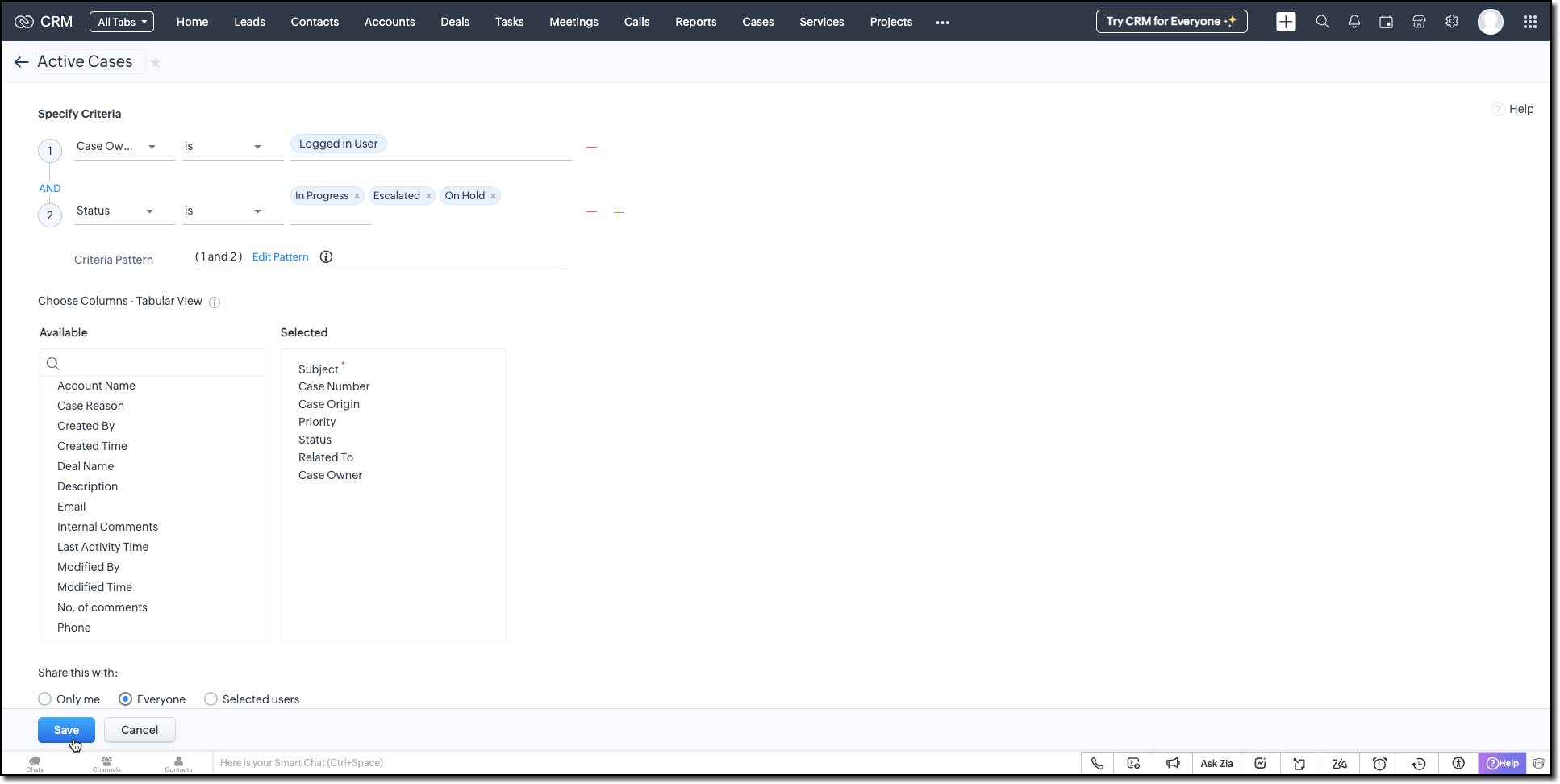
Active Timers View (Timer Entries Module)
Set up a second custom view in the Timer Entries module to track entries where the timer has been started but not yet stopped. These represent active timers. Use the following logic for criteria:
- The End Time field is empty (i.e., timer still running).
- Timer Entry owner field matches the logged-in user.
This view is used internally by the widget to detect if a timer is already running and update the same entry once the timer is stopped.
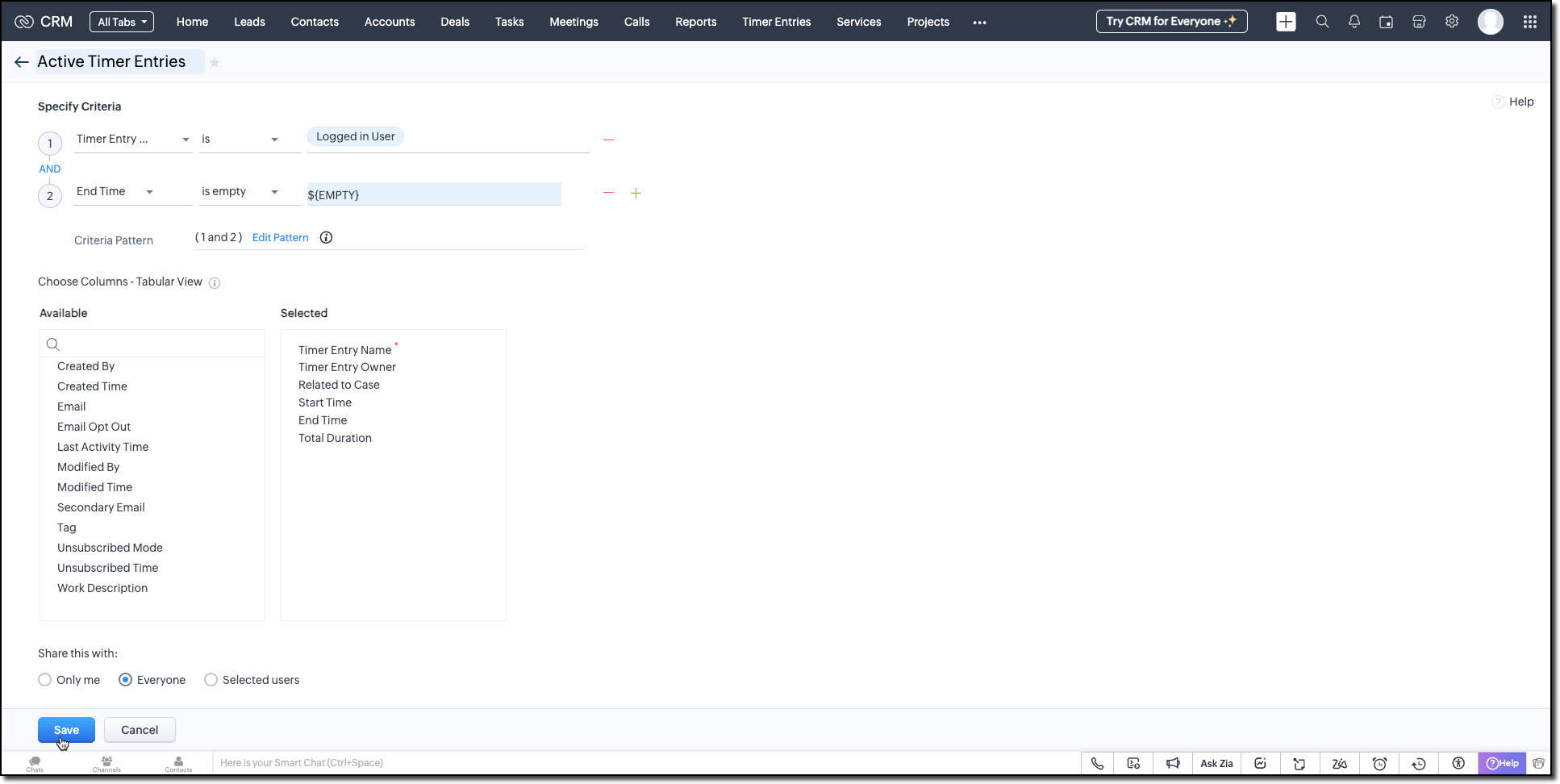
Follow the Managing List View help page and use the specifications shown in the following image.
Building the Timer Widget
Step -1: Review Basics
Refer to our earlier Kaizen on CLI Installation, Creating a Widget Project, and Internal hosting of the same.
Step 2 - Develop the Widget
After initializing your widget project using CLI, implement the timer logic:
Fetching Active Cases
On page load, the populateRecordsDropdown function initiates a Get Records API call to the Cases module, using the Active Cases custom view ID. This fetches all active case records assigned to the logged-in user.
These records are then listed in a dropdown, allowing users to quickly select the relevant case they are about to work on.
async function populateRecordsDropdown() { const recordsDropdown = document.getElementById("moduleRecords"); recordsDropdown.innerHTML = ""; try { const recordsResponse = await ZOHO.CRM.API.getAllRecords({ Entity: casesModule, cvid: casesCVID, per_page: 10 }); if (recordsResponse.data && recordsResponse.data.length > 0) { recordsResponse.data.forEach(record => { const option = document.createElement("option"); option.value = record.id; option.textContent = record.Subject || "Unnamed Record"; recordsDropdown.appendChild(option); }); } else { const placeholderOption = document.createElement("option"); placeholderOption.value = ""; placeholderOption.textContent = "No records found"; placeholderOption.disabled = true; placeholderOption.selected = true; recordsDropdown.appendChild(placeholderOption); } } catch (error) { console.error("Error fetching records:", error); } } |
Starting the Timer and Creating an Entry
Once the user starts the timer, The createRecord function triggers a Create Record API call to log the session in the Timer Entries custom module. The record captures the start time and the related case and description (if provided).
Even if no details are entered or case is selected, a timer entry is still created with the start time. This ensures that spontaneous work sessions are tracked and not lost.
async function createRecord(startTime) { try { const workDescription = document.getElementById("workDescription").value; const selectedRecordId = document.getElementById("moduleRecords").value; const selectedRecordText = document.getElementById("moduleRecords").options[ document.getElementById("moduleRecords").selectedIndex ].text; const data = { Start_Time: startTime, Owner: currentUserId, Work_Description: workDescription, Related_to_Case: selectedRecordId, Name: selectedRecordText }; const response = await ZOHO.CRM.API.insertRecord({ Entity: timerModule, APIData: data }); console.log("Start time recorded successfully"); } catch (error) { console.error("Error creating record:", error); } } |
Stopping the Timer and Updating the Entry
When the timer is stopped, the widget uses the Active Timer Entry custom view to locate the most recent Timer Entry record created by the logged-in user that does not have an end time.
The updateRecord is then triggered to update that active entry using the Update Record API call. It updates the End time of the session and the related case, descriptions, if it was not already provided when the timer was started.
async function updateRecord(endTime) { try { const workDescription = document.getElementById("workDescription").value; const selectedRecordId = document.getElementById("moduleRecords").value; const response = await ZOHO.CRM.API.getAllRecords({ Entity: timerModule, cvid: timerEntriesCVID, per_page: 1 }); const latestRecord = response.data[0]; if (latestRecord) { const recordId = latestRecord.id; const data = { id: recordId, End_Time: endTime, Work_Description: workDescription, Related_to_Case: selectedRecordId }; await ZOHO.CRM.API.updateRecord({ Entity: timerModule, APIData: data, RecordID: recordId }); console.log("End time updated successfully"); } } catch (error) { console.error("Error updating record:", error); } } |
Step 3 - Validate and Pack the Widget
- Follow the steps given in the Widget help page to validate and package the widget.
- Go to Zoho CRM > Setup > Developer Hub > Widgets and click Create New Widget.
- Fill in the required details as shown in this image and ensure to select Button as the widget type.

Step 4 - Associate it with Flyout
- Go to Setup > Developer Space > Client Script. Click New Script.
- Enter a name and description for the script. Choose Command type in Category.

- Create a Flyout and render a widget within it using its details like the API name of the widget, title, size, and animation type. You can get the Widget API name from the widget's detail page.
let allowedUserEmails = []; allowedUserEmails.push('user1_email_address'); allowedUserEmails.push('user2_email_address'); allowedUserEmails.push('user3_email_address'); let currentUserEmail = $Crm.user.email; if (allowedUserEmails.indexOf(currentUserEmail) == -1) { ZDK.Client.showMessage('Command access resticted', { type: 'error' }); return false; } ZDK.Client.createFlyout('myFlyout', {header: 'Timer', animation_type: 4, height: '600px', width: '500px', top: '10px', left: '10px', bottom: '10px', right: '10px' }); ZDK.Client.getFlyout('myFlyout').open({ api_name: 'Timer', type: 'widget' }); return true; |
Refer to Creating a Client Script help page for more details.
Try It Out!
A complete working code sample of this widget is attached to this post.
Now, let us see how this Timer widget works:
1. Start the Timer
Open the widget and select an active case from the dropdown. As soon as you start the timer, a new record will be automatically created in the Timer Entries module to capture the session.

2. Stop the Timer
When the task is complete, provide a description of the work you have done and stop the timer. The same Timer Entry record (created when the timer was started) will be updated automatically with the end time and your work description.
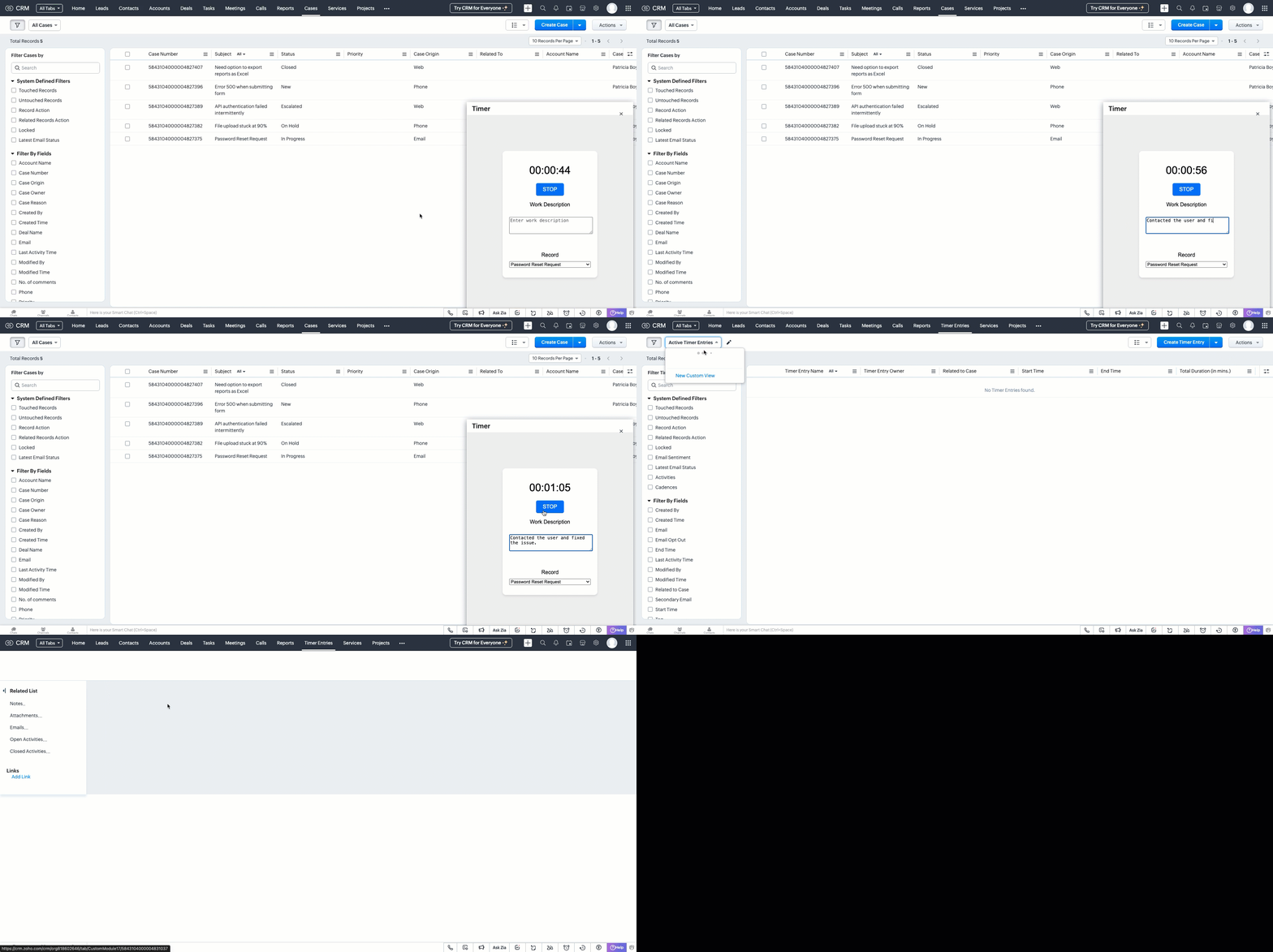
This forms the foundation for accurate time tracking at the record level.
In Part 2, we will show how to:
-> Use a workflow and Deluge function to transfer these entries into the Work Log subform inside the relevant Cases record.
-> Use CRM Reports to slice and dice work time for better SLA and productivity insights.
In the meantime, would you like us to address any of your pain-points or have a topic to discuss? Let us know in the comments or reach out to us via support@zohocrm.com.
Until next time, Happy Coding!
-----------------------------------------------------------------------------------------------------------------
Related Reading
- Custom Fields - Working with Custom Fields and Working with Picklist Field
- Widget - An Overview, CLI Installation, Working with Widgets, JS SDKs, Mobile Compatibility of Widgets and Kaizens
- Core APIs - GET Records, POST Records and UPDATE Records
- Client Script - An Overview, Creating a Client Script, Best Practices and Troubleshooting
-----------------------------------------------------------------------------------------------------------------

Previous Kaizen: Client Script Support for Subforms | Kaizen Collection: Directory
Topic Participants
Kiruthiga G
Sticky Posts
Kaizen #217 - Actions APIs : Tasks
Welcome to another week of Kaizen! In last week's post we discussed Email Notifications APIs which act as the link between your Workflow automations and you. We have discussed how Zylker Cloud Services uses Email Notifications API in their custom dashboard.Kaizen #216 - Actions APIs : Email Notifications
Welcome to another week of Kaizen! For the last three weeks, we have been discussing Zylker's workflows. We successfully updated a dormant workflow, built a new one from the ground up and more. But our work is not finished—these automated processes areKaizen #152 - Client Script Support for the new Canvas Record Forms
Hello everyone! Have you ever wanted to trigger actions on click of a canvas button, icon, or text mandatory forms in Create/Edit and Clone Pages? Have you ever wanted to control how elements behave on the new Canvas Record Forms? This can be achievedKaizen #142: How to Navigate to Another Page in Zoho CRM using Client Script
Hello everyone! Welcome back to another exciting Kaizen post. In this post, let us see how you can you navigate to different Pages using Client Script. In this Kaizen post, Need to Navigate to different Pages Client Script ZDKs related to navigation A.Kaizen #210 - Answering your Questions | Event Management System using ZDK CLI
Hello Everyone, Welcome back to yet another post in the Kaizen Series! As you already may know, for the Kaizen #200 milestone, we asked for your feedback and many of you suggested topics for us to discuss. We have been writing on these topics over the
Nederlandse Hulpbronnen

Recent Topics
Kaizen #215 - Workflow APIs - Part 3 - Create and Update Workflow Rules
Welcome back to another week of Kaizen! Over the last couple of weeks, we’ve joined Zylker Cloud Services as they review and improve their workflows. In Part 1, we discovered and audited their sprawling workflow landscape. In Part 2, we learned how toDataPrep Bigquery Connection failed
Hello everybody, I want to create a connnection beetwen Bigquery and Dataprep but when I try to connect my project I got this error Loading tables has failed. Table list fetched from the data source expired.Utilisation de Zoho en conformité avec l’article 286 du Code général des impôts (CGI)
Cher(e) client(e), Conformément à l’article 286 du Code général des impôts (CGI) impose aux entreprises assujetties à la TVA d’utiliser des systèmes de caisse ou de gestion commerciale certifiés lorsqu’elles enregistrent des ventes à des particuliers.Issue in Zoho People Regularization – Incorrect Hour Calculation
I have noticed that when applying attendance regularization in Zoho People for previous dates, the total working hours are not calculated correctly. For example, even if the check-in is 10:00 AM and check-out is 6:00 PM, the system shows an incorrectFree Webinar : Unlock AI driven business insights with Zoho Inventory + Zoho Analytics
Are you tired of switching between apps and exporting data to build customized reports? Say hello to smarter & streamlined insights! Join us for this exclusive webinar where we explore the power of the Zoho Inventory–Zoho Analytics integration. LearnAllow Multiple usage units to items while adding them to sales/purchase transactions
The usage unit of items added in zoho books are static right now and can not be changed. But certain items are received or sold in multiple usage units. One example is fabric. It can be bought in Meters, inches, kgs or other units. Another example wouldPO receive quantities
At last, Zoho has finally got around to allowing us to receive a larger qty than recorded in the PO :-) Saves us all from editing the PO's before receiving larger quantities ( usual for us ) ! It's still in "beta" but available upon request, I've testedAnalytics : How to share to an external client ?
We have a use case where a client wants a portal so that several of his users can view dashboards that we have created for them in Zoho Analytics. They are not part of our company or Zoho One account. The clients want the ability to have user specific,Reference Deal Categories in Deluge
Hello, Is there a way to reference Deal Category in deluge functions? So for our Deals, we have several different WON stages in a pipeline. Rather than type each stage into our functions, we'd like to be able to reference the Deal Category. SimilarUsers Name & Email in Reports
Hi, I would like to show the Users Name from their Zoho Acount in All Entries/Reports as well as the current Account Email. Thanks DanWorkflow Creation with Zia gets stuck
It gets stuck here:Unable to Add Asset to Work Order Due to Different Contact and Company
Hello Zoho Team, I’m facing an issue in our environment related to asset linking in Work Orders. Here’s the situation: When our engineers go for field activities, they initially create the Work Order using the salesperson’s contact details. After completingI NEED MORE CUSTOM FIELDS!!!
Why can I only have 60 custom fields! It's not enough. I want another 100 extra custom fields to do what's necessary for my business! I'm sure I can't be the only one with this problem!!! How hard would it be to fix this? Just fix it for me please atZoho Webinar et Zapier : de la prise de rendez-vous aux relances — une automatisation performante
Organiser un webinaire réussi et gérer efficacement les participants peut être un véritable défi. Avec Zoho Webinar et Zapier, vous pouvez rendre vos processus plus simples. Vous gagnez du temps en automatisant les tâches répétitives. Résultat : une expérienceTicket Stages Report
From data to decisions: A deep dive into ticketing system reports Ticket stages refer to the series of transitions from the moment a support ticket is created until it is closed. It moves through various stages based on the actions taken at each preceding【参加無料】今年最後のZoho ユーザー交流会|東京・大阪・名古屋で開催! 活用事例&ユーザー同士の情報交換
ユーザーの皆さま、こんにちは。コミュニティチームの中野です。 11月に東京、大阪、名古屋の3都市でZoho ユーザー交流会を開催します! 毎回ご好評いただいている本イベントでは、実際の Zohoユーザーによるリアルな活用事例の共有や 参加者同士でノウハウを交換し合うグループワークを予定しています。 「他社の活用を参考にしたい」「Zoho をもっと使いこなしたい」方にぴったりの場です。 初参加の方もぜひお気軽にご参加ください! ーーーーーーーーーーーーーーーーーーーーーーーーーーーーーーーーーーーーーSlow Performance on desk.zoho.com. 11/3/2025
I’m not seeing any active service alerts for desk.zoho.com, but everyone on our account is currently experiencing very slow load times when opening or navigating tickets. We’ve already tried the standard troubleshooting steps — clearing cache and cookies,Create View to See Tickets Closed within the last 3 days
I'm trying to create a view in Zoho Desk that shows me "recently closed ticket," which I will define as tickets closed in the last 3 days. I want this view to update so that whenever I click to view it is recalculates and shows me tickets closed withinRecurring Events Not Appearing in "My Events" and therefore not syncing with Google Apps
We use the Google Sync functionality for our events, and it appears to have been working fine except: I've created a set of recurring events that I noticed were missing from my Google Apps calendar. Upon further research, it appears this is occurringDissociate account from contact
Hello, When I make the call through the API to "Dissociate account from contact" using, /api/v1/contacts/**integer**/accounts/**integer**/dissociate I get this response back, 422Unprocessable Entity (WebDAV) (RFC 4918) { "errorCode": "INVALID_DATA", "message":Zoho Desk and Zoho People Integration - is it possible in order to alert whether an agent is available
Hi, We use Zoho People for our employees to log absence (Paid Time Off etc). I was wondering if it was possible that this information can be shared in to Zoho Desk, so that when allocating a ticket to an agent, if they are on leave there is an onscreenAdd Save button to Expense form
A save button would be very helpful on the expense form. Currently there is a Save and Close button. When we want to itemize an expense, this option would be very helpful. For example, if we have a hotel expense that also has room service, which is aCall transcrition working for ringcentral?
I don't see anything about what telephony providers can be used. The Zoho support person A said that RingCentral isn't supported. Zoho support person B said that it works, just make sure the call recording link works. Excellent instructions here: CallHow to Send Email from within a custom module (with or without an email template)
It is possible to send an email from the Deals module. However, I can't find a way to send an email from any of our custom modules. I have tried adding an email field to the modules (even though we don't really want one or need it there). That doesn'tZoho Inventory - Managing Items With Multiple Suppliers
Hi community, I'm working on a project at the moment for a car parts wholesale business. Each Item (part) has its own original manufacturer part number (sometimes more than one part number for the same item). When purchasing parts from 3rd party suppliers,How do I see the total leads during a certain period?
I understand I can get the count of leads and potentials but the total number of leads in a certain period should be equal to Leads+potentials because when we convert a lead it gets moved to potentials and no longer exists there. is there a way i couldWhere is the Global Search field?
I am looking for an alternative to SF.com. Zoho CRM seems to be work fine, and be customizable in terms of the fields and reports. But there's one big thing missing and it's going to prevent us from using it: there's no global search box at the top ofKeeping start and end time logged, when using the timer
As it seems to be now: I sometimes forget to stop and restart the timer, when switching projects. And switching between projects happens upto 10 times a day. Since there's no indication to when a timer was started or stopped, I have to guess how many hours I have to remove from one project and add it to another.API 500 Error
Hello amazing ZOHO Projects Community, I get this message. How can we solve this? { "error": { "status_code": "500", "method": "GET", "instance": "/api/v3/portal/2010147XXXX/projects/2679160000003XXXX/timesheet", "title": "INTERNAL_SERVER_ERROR", "error_type":In place field editing for candidates
Wondering about any insight/best practices for efficiently updating candidate records while reviewing them in a Job Opening pipeline. We can do in-field editing (e.g. update job title or City) only when we have the full candidate record open, howeverDefault tax type for mileage?
Where we are, mileage includes a government tax. Is there any way to set a default tax for the Personal Car Mileage category of expense? (Or any other way?)Show price book list price
When using price books, once you add products to the price book in the Products related list you can display the Unit price which is the default list price; however, there is no option to show the price book list price. To see the price book list priceCliq File Upload
While uploading large file like 500MB, it takes time, that fines. But if you resize window or move window in other screen, that uploading disappears. After upload complete & sent it will be visibleConstant color of a legend value
It would be nice if we can set a constant color/pattern to a value when creating a chart. We would often use the same value in different graph options and I always have to copy the color that we've set to a certain value from a previous graph to makeWhat's New in Zoho POS - October 2025
Hello everyone, Welcome to Zoho POS's monthly updates, where we share our latest feature updates, releases, changes, and more. Let’s take a look at how October went. Process returns for refunds, exchanges, or offer store credit Returns and exchanges canLoan and purchase
My husband is lending me mobey to buy a vehicle intersst free ... I need to know how to record the cash receipt and how I pay it back... the money is for a vehicle do I just post the invoice for that as I normally would usung the loan money to pay forZoho Connect Module in Zoho Trident
Hi I really like where Zoho Trident is going. Having Mail and Cliq in one place is especially powerful. However, Zoho Connect really needs to be included to make this a true communication and collaboration hub. I would like to request that Zoho ConnectZoho FSM API Delete Record
Hi FSM Team, It would be great if you could delete a record via API. Thank you,File Field Validation
Hello all, We are tracking our customer NDA agreements in our CRM and have created 2 fields to do so, an execution date field and a file upload field. I want to create a validation rule to ensure that when the execution date field is populated that the100 record view limitation
I have just migrated from another CRM and am starting in ZOHOcrm with over 5000 contacts. It seems that my searches and sorts are limited to 100 live records....or am I missing something. This seems to be very limiting...in a lot of scenarios (mass email,Next Page