Actions API - Webhooks APIs - Part 1

Webhooks in Zoho CRM
Use case
Configuring Webhooks for Zylker’s Use Case - UI Method
- Go to Setup
- Navigate to Automation
- Choose Actions -> Webhooks
- Click Configure Webhook
 Webhook - UI view
- Basic fields to configure Webhook.
- Configuring Headers
- Configuring Body
Filling the basic Webhook details via UI
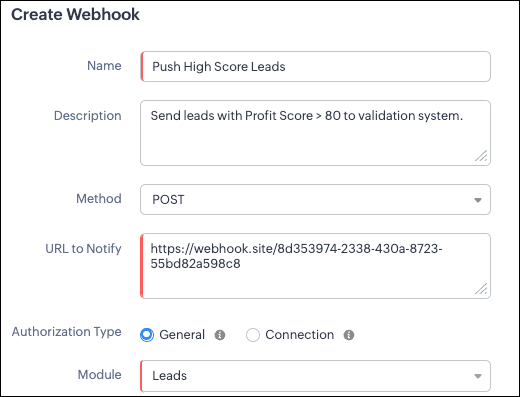
Filling the basic Webhook details via Create Webhook API
{ "webhooks": [ { "name": "Push High Score Leads", "description": "Send leads with Profit Score > 80 to validation system.", "module": { "api_name": "Leads", "id": "5725767000000002175" }, "authentication": { "type": "general" }, "http_method": "POST" } ] } |
Keys explanation
- name (mandatory): Name of your webhook.
- description: Add a short note about what this webhook does.
- module (mandatory): Select the module from where the external application listens the changes. In our case, select Leads module to push high-score leads.
- url (mandatory): Specify the external endpoint where CRM will send the data. This lets the external application see what CRM sends.
- Note: In this post, we have used an endpoint from Webhook.site
- authentication (mandatory): Specify authentication type for the webhook endpoint.
- Possible types:
- general: The receiving system does not require OAuth. You can pass OAuth tokens manually in headers.
- connections:
- OAuth-based integrations: Systems that use Zoho’s Connections.
- For our Zylker use case, we select General.
- http_method (mandatory): Select a HTTP method that allows you to send structured data.
HTTP Method | Headers | Body | URL Parameters |
POST |
| Type: form-data | Not Supported |
PUT |
| Type: form-data | Not Supported |
GET | Not Supported | Not Supported |
|
DELETE | Not Supported | Not Supported |
|
Creating a Webhook with Headers, Body, and URL Parameters
- Headers
- Body (Form-Data or Raw)
- URL Parameters
Configuring Headers
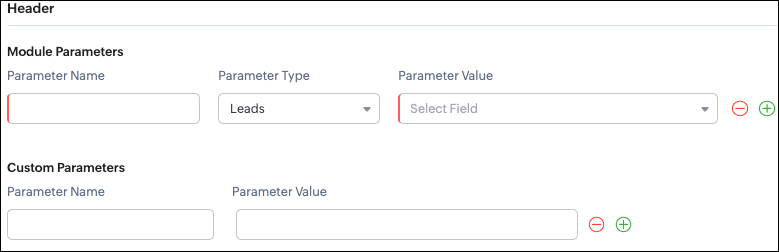
Headers allow you to send extra information along with your webhook request. These help when the external app needs extra data like auth tokens or CRM field values.
- Module Parameters - Dynamic values from CRM fields
- Custom Parameters - Static values you define
- Parameter Name - A unique header key that you define. It does not have to match the CRM field API name.
- Parameter Type - Defines the source of the data you are mapping. It can come from the selected CRM module such as Leads and Contacts, lookup fields, User fields such as Lead Owner, or Organization fields.
- Parameter Value - The merge field value. Example, ${!Leads.Created_By.id}
Parameter Name | Parameter Type | Parameter Value |
Lead_Email | Leads | |
Annual_Revenue | Leads | Annual Revenue |
Profit_Score | Leads | Profit Score |
Created_By | Created By | User Id |
- API version
- Tags like “zylker-crm”
Name | Value |
source | zylker-crm |
version | v1
|
Configuring Headers via Create Webhook API
{ "webhooks": [ { . . . "http_method": "POST", "headers": { "module_parameters": [ { "name": "Lead_Email", "value": "${!Leads.Email}" }, { "name": "Annual_Revenue", "value": "${!Leads.Annual_Revenue}" }, { "name": "Profit_Score", "value": "${!Leads.Profit_Score}" }, { "name": "Created_By", "value": "${!Leads.Created_By.id}" } ], "custom_parameters": [ { "name": "source", "value": "zylker-crm" }, { "name": "version", "value": "v1" } ] } } ] } |
Configuring the Body of a Webhook - form-data & raw formats
- Form-Data:
- Module parameter
- Custom parameter
- User-defined format.
- Raw:
- Text - plain messages
- JSON - structured API payload
- HTML - formatted messages
- XML - traditional enterprise systems
Form-Data Body: key-value
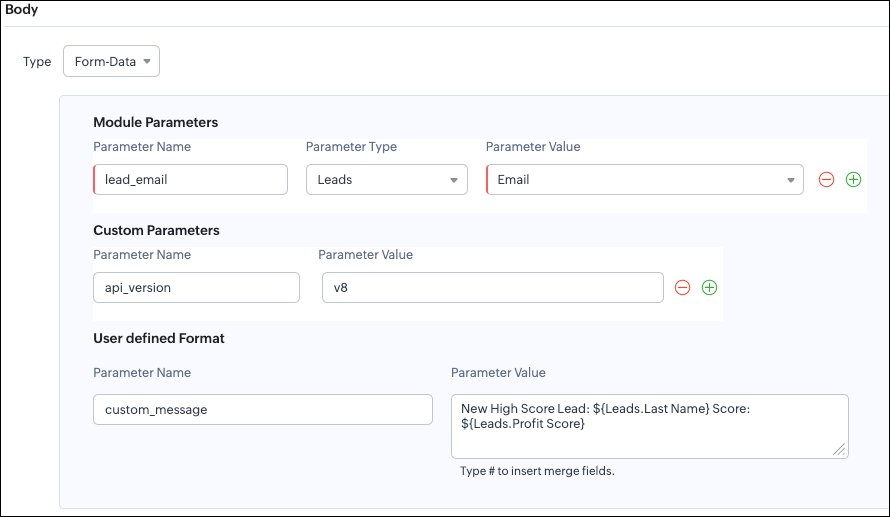
- Module Parameters
- Custom Parameters
- User Defined Parameters
- Headers are for sending supporting information that helps the external system understand the request - this can include auth details, source identifiers, or key CRM fields like email or score that help with quick categorization or filtering.
- Headers - Provide supporting details such as identifiers or quick-check values. For example, Lead ID, or source tags that help the external system check and route the request.
- Body - Contains the complete lead information that the external validation system needs to process.
Where parameters are used | Purpose | Example |
Headers | Metadata - OAuth,tags, and context | source: zylker-crm |
Form-Data (Body) | Main record data - actual lead details sent to the app.
| lead_email=patricia@zylker.com |
Parameter Name | Parameter Value |
custom_message | New high-score lead: ${Leads.First Name}${Leads.Last Name} (Score: ${Leads.Profit Score}) |
Configuring the Body of a Webhook - form-data via Create Webhook API
{ "webhooks": [ { . . . "body": { "form_data_content": { "module_parameters": [ { "name": "Lead_Email", "value": "${!Leads.Email}" }, { "name": "Annual_Revenue", "value": "${!Leads.Annual_Revenue}" }, { "name": "Profit_Score", "value": "${!Leads.Profit_Score}" }, { "name": "Created_By", "value": "${!Leads.Created_By.id}" } ], "custom_parameters": [ { "name": "source", "value": "zylker-crm" }, { "name": "version", "value": "v1" } ], "user_defined_parameters": { "name": "custom_message", "value": "New high-score lead: ${!Leads.First_Name}${!Leads.Last_Name} (Score: ${!Leads.Profit_Score})" } }, "type": "form_data" }, . . . } ] } |
Raw Body - JSON / XML / HTML / Text
- Raw + Text
- Raw + JSON
- Raw + HTML
- Raw + XML
Raw + Text:

- When sending a simple message.
- When the external app only expects plain text.
Configuring the Body of a Webhook - Raw - "Text" via Create Webhook API
{ "webhooks": [ { . . . "body": { "raw_data_content": "New high score lead: ${!Leads.First_Name} ${!Leads.Last_Name}, ${!Leads.Email}, ${!Leads.Annual_Revenue}, ${!Leads.Phone}, ${!Leads.Industry}, ${!Leads.Owner}", "format": "Text", "type": "raw" }, . . . } ] } |
Raw + JSON:
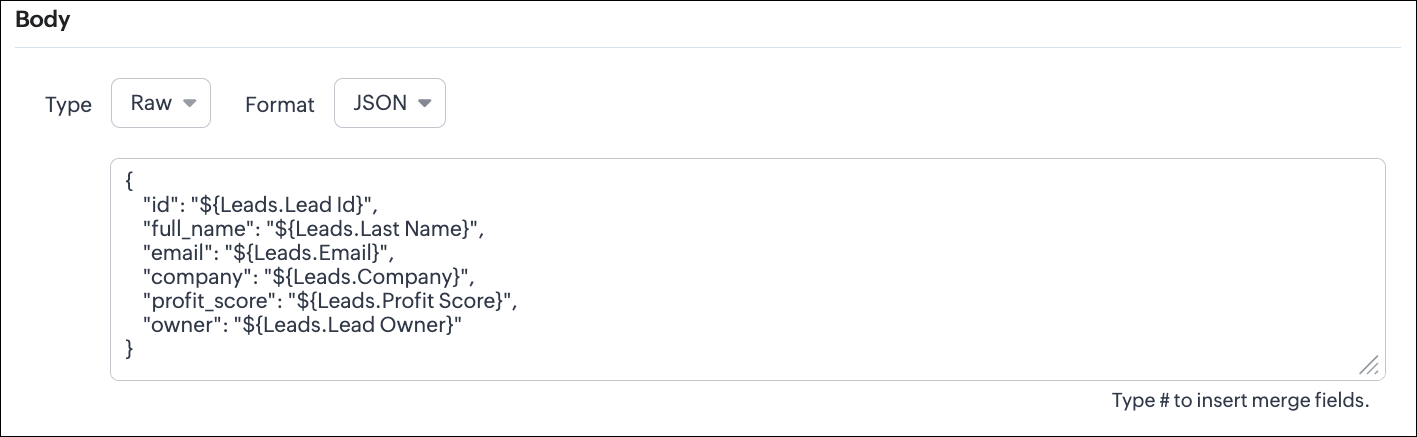
Configuring the Body of a Webhook - Raw - "JSON" via Create Webhook API
{ "webhooks": [ { . . . "body": { "raw_data_content": "{\n \"id\": \"${!Leads.id}\",\n \"full_name\": \"${!Leads.Last_Name}\",\n \"email\": \"${!Leads.Email}\",\n \"company\": \"${!Leads.Company}\",\n \"profit_score\": \"${!Leads.Profit_Score}\",\n \"owner\": \"${!Leads.Owner}\"\n}", "format": "JSON", "type": "raw" }, . . . } ] } |
- When the external system expects structured data
- Easier validation
Raw + HTML:
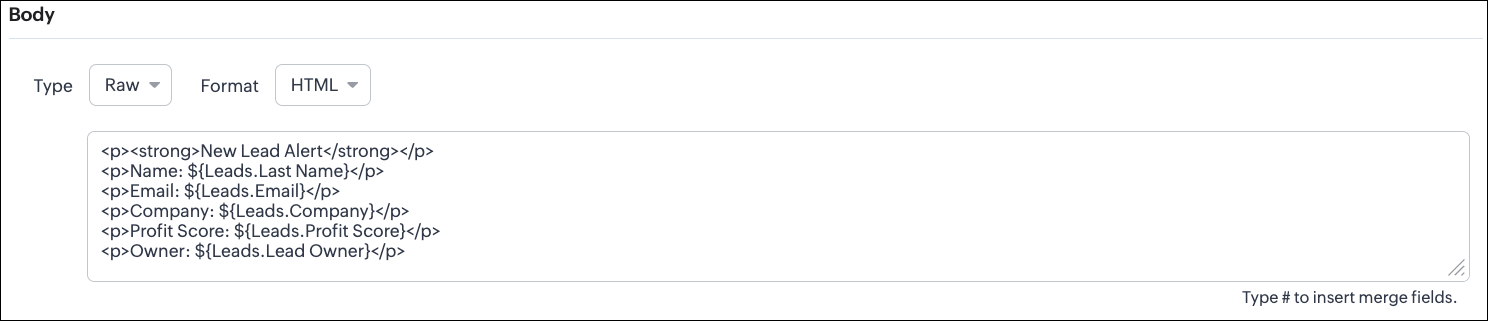
Configuring the Body of a Webhook - Raw - "HTML" via Create Webhook API
{ "webhooks": [ { . . . "body": { "raw_data_content": "<p><strong>New Lead Alert</strong></p>\n<p>Name: ${!Leads.Last_Name}</p>\n<p>Email: ${!Leads.Email}</p>\n<p>Company: ${!Leads.Company}</p>\n<p>Profit Score: ${!Leads.Profit_Score}</p>\n<p>Owner: ${!Leads.Owner}</p>", "format": "HTML", "type": "raw" }, . . . } ] } |
- If the external system displays formatted output
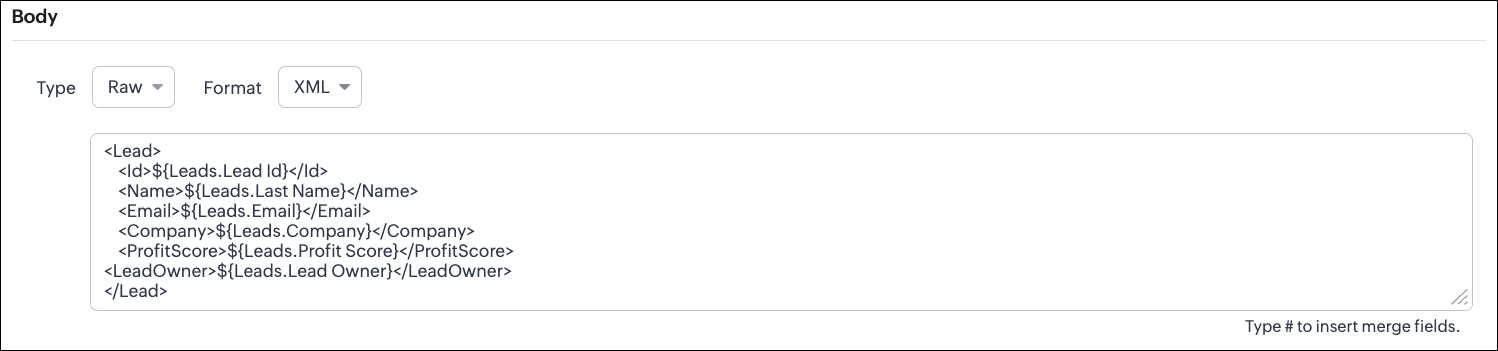
Configuring the Body of a Webhook - Raw - "XML" via Create Webhook API
{ "webhooks": [ { . . . "raw_data_content": "<Lead>\n <Id>${!Leads.id}</Id>\n <Name>${!Leads.Last_Name}</Name>\n <Email>${!Leads.Email}</Email>\n <Company>${!Leads.Company}</Company>\n <ProfitScore>${!Leads.Profit_Score}</ProfitScore>\n<LeadOwner>${!Leads.Owner}</LeadOwner>\n</Lead>", "format": "XML", "type": "raw" }, . . . } ] } |
- With older systems
- When the receiving system only supports XML
- When you switch the webhook method in the UI, Zoho CRM changes the options you can configure:
- Only URL Parameters are available
- Headers are hidden
- Body is hidden
- Because GET requests always send data through the URL and cannot carry a body.
- Headers are available
- URL Parameters are available
- Body is still not supported
- DELETE requests can include headers, but Zoho CRM does not allow sending a body for DELETE webhooks.
- Date-time format:
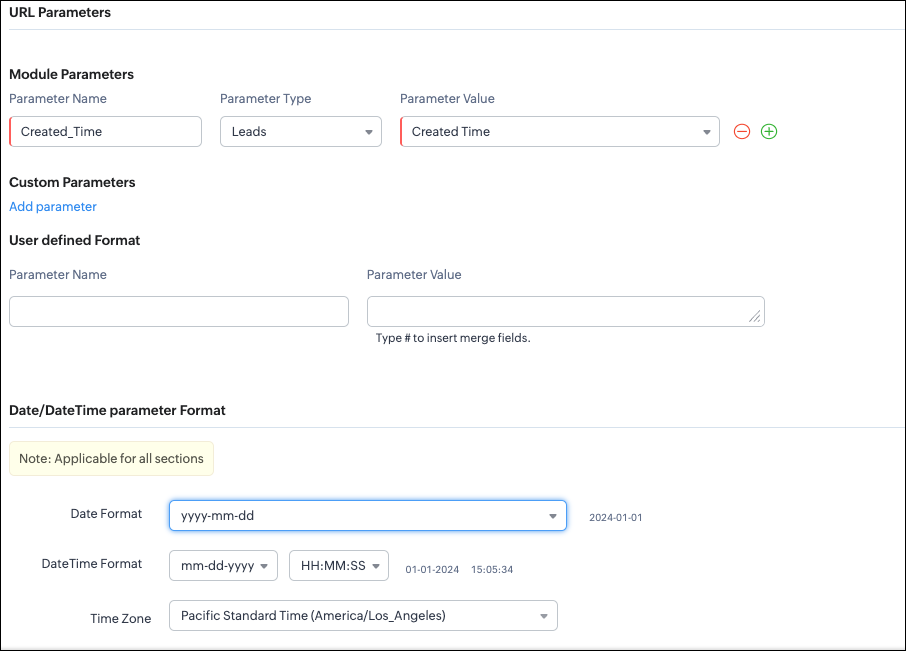
{ "webhooks": [ { "module": { "api_name": "Leads", "id": "5725767000000002175" }, "url_parameters": { "module_parameters": [ { "name": "Created_Time", "value": "${!Leads.Created_Time}" } ] }, "description": "Send leads with Profit Score > 80 to validation system.", "http_method": "GET", "name": "Push High Score Leads", "date_time_format": { "datetime_format": "mm-dd-yyyy HH:MM:SS", "date_format": "yyyy-mm-dd", "time_zone": "America/Los_Angeles" }, "authentication": { "connection_name": null, "type": "general" } } ] } |
- How to manage Webhooks using the GET, PUT, and DELETE Webhook APIs
- How to associate a Webhook with a Workflow
- How to perform real-time testing by creating records
- How an external application receives data from Zoho CRM via Webhook.
- Kaizen #213 - Workflow APIs - Part 1
- Kaizen #214 - Workflow APIs - Part 2
- Kaizen #215 - Workflow APIs - Part 3 - Create and Update Workflow Rules
- Kaizen #216 - Actions APIs : Email Notifications
- Kaizen #217 - Actions APIs : Tasks
- Kaizen #218 - Actions APIs: Field Update
Topic Participants
Subramanian K
Sticky Posts
Kaizen #222 - Client Script Support for Notes Related List
Hello everyone! Welcome to another week of Kaizen. The final Kaizen post of the year 2025 is here! With the new Client Script support for the Notes Related List, you can validate, enrich, and manage notes across modules. In this post, we’ll explore howKaizen #217 - Actions APIs : Tasks
Welcome to another week of Kaizen! In last week's post we discussed Email Notifications APIs which act as the link between your Workflow automations and you. We have discussed how Zylker Cloud Services uses Email Notifications API in their custom dashboard.Kaizen #216 - Actions APIs : Email Notifications
Welcome to another week of Kaizen! For the last three weeks, we have been discussing Zylker's workflows. We successfully updated a dormant workflow, built a new one from the ground up and more. But our work is not finished—these automated processes areKaizen #152 - Client Script Support for the new Canvas Record Forms
Hello everyone! Have you ever wanted to trigger actions on click of a canvas button, icon, or text mandatory forms in Create/Edit and Clone Pages? Have you ever wanted to control how elements behave on the new Canvas Record Forms? This can be achievedKaizen #142: How to Navigate to Another Page in Zoho CRM using Client Script
Hello everyone! Welcome back to another exciting Kaizen post. In this post, let us see how you can you navigate to different Pages using Client Script. In this Kaizen post, Need to Navigate to different Pages Client Script ZDKs related to navigation A.
Nederlandse Hulpbronnen

Recent Topics
WIDGET in related record list ZOHO CRM; how to get and put data to subform custom fields?
he need: Read and write two custom subform line-item fields on Quotes: Segment_wyceny (picklist/text) and W_pakiecie (number). Write works; read does not return these fields via SDK. Environment Zoho CRM Widget Zoho Embedded App SDK v1.2 Module: QuotesOutgoing emails to btinternet blocked.
ERROR_CODE :421, ERROR_CODE :Too many messages (1.5.6.1) from 74.201.84.163I have been having problems sending to btinternet.com and btopenworld.com for the past week. First 'email delayed' message, and then 'delivery failed', as above. Looks as though someone is spamming from the ZOHO email server 'sender163-mail.zoho.com' Surely this is abuse of your system, and you should be able to trace who it is (if it is a registered user of Zoho mail?) and block their account. An email system is really noIntroducing Assemblies and Kits in Zoho Inventory
Hello customers, We’re excited to share a major revamp to Zoho Inventory that brings both clarity and flexibility to your inventory management experience! Presenting Assemblies and Kits We’re thrilled to introduce Assemblies and Kits, which replaces theWay to update CRM records in quik view
I have custom module in zoho crm and that module have 500 records. I want a quick way or UI so that user can easily update the record information in quick view without going to record detail view or edit view. I tried zoho sheet option but in zoho sheetWhere to integrate Price Book and Product List Price
Hello, We sync zoho crm all modules with all data to zoho analytics. In zoho crm, we have "Price Books" and "Products" modules, where each product is assigned to a few price books with different list prices. From zoho crm, I am able to export a datasetForm / CRM Integration Not entering into workflow
I have a simple form setup with company name, first name, last name and lead source. Each of the fields are mapped to CRM Leads module. When the form is submitted, the lead is populated properly. I also have a workflow created that when the lead sourceZoho Slowness - Workarounds
Hi all, We've been having intermittent slowness and Zoho just asks for same stuff each time but never fix it. It usually just goes away on it's own after a couple weeks. Given that speed is a very important thing for companies to be able to keep up withDon't understand why Forms Mobile Scan and Fill not working
I have configure enabled mobile scan and fill, I have enabled QR and Bar code on two fields name and position, I have mapped seq 1 to Name and seq 2 to position, I have created a 2d QR code with the person names and position, seperated by a comma. WhenRecurring Supervisor Rule Reminders for Open/In-Progress Tickets
Hello Zoho Support Team, I would like to suggest a potential improvement regarding reminders for tickets and activities in Zoho Desk. Currently, it is possible to set reminders only once. In the Supervisor Rules section, it is possible to configure remindersTemplate usage
Hi, We are using some templates as a response to customer questions. Is it possible to analyze the usage of these templates? We want to know if the use of our templates has increased over timeTicket Status Colors
Can i change the colors of Ticket Status in the admin panel? Or even change the background of the entire cell of a Critical ticket? This way its easy for my agents to see a urgent ticket when it comes in. Right now everything is black text. Here RightSync Lookup Fields from Zoho CRM
HI Team, I have synced a lookup field from my CRM data to Campaigns. When I view the synced data the field appears to display a Zoho CRM record ID rather than the text value. Is it possible to get the sync to import the text value rather than the CRMNew From Address cannot verify
I have created a new From Address, which is the support@ address for my domain, that forwards to the default support mailbox. Presumably then, the verification email that is sent, should turn up as a ticket, but it does not. How can I verify my from address so that I can use my own domain?issue with image thumbnails not showing in Image Selector
We have been using Zoho Campaigns for over a year, maybe close to two years, and this issue just started happening in the last month. I wanted to wait to see if it would resolve on it's own, and it doesn't seem to be. The thumbnail images for all newDeluge Script for adding tag
Trying to create a custom function where a tag is added to a record - but for the life of me, I cannot figure out how. Help please! Moderation Update: Adding the help doc and sample to add Tags to records via deluge here for everyone's benefit. tag1 =Unlock your Zoho Vault with OneAuth, Windows Hello, TouchID, YubiKey, and many more!
Hello everyone, We are thrilled to introduce one of the most highly requested features – the ability to unlock your Zoho Vault using various authenticators. The primary purpose of a password manager is to remember just one master password and securelyCreator roadmap for the rest of 2022
Hi everyone, Hope you're all good! Thanks for continuing to make this community engaging and informative. Today we'd like to share with you our plans for the near future of Creator. We always strive to strike a good balance of features and enhancementsHow can I get base64 string from filecontent in widget
Hi, I have a react js widget which has the signature pad. Now, I am saving the signature in signature field in zoho creator form. If I open the edit report record in widget then I want to display the Signature back in signature field. I am using readFileAdd Setting Values to the Rules
Hi, It would be great to use the rules to set values in fields for submission, such as if a Type is X then set the Field Y to 10. Thanks DanSo we ran with it for the week
In our company i bit the bullet and ran with FSM for a whole week. Service calls, deliveries and surveys. Covering about 30-120 miles a day to domestic properties. Loved the appointment list and satnav integration. Loved the timer to measure the appointments.Is there a way to set Document Owner/Sender via the API
When sending requests for zoho sign, it would seem zoho uses the id of the person that created the zoho api cred to determine the owner_id, is there a way to set a default for this?What's New - September 2025 | Zoho Backstage
September has been a different month for Zoho Backstage. Instead of rolling out a long list of new features, we focused on something just as important: Performance, reliability, and stability The event season is in full swing, and organizers are runningPrevent stripping of custom CSS when creating an email template?
Anyone have a workaround for this? Zoho really needs to hire new designers - templates are terrible. A custom template has been created, but every time we try to use it, it strips out all the CSS from the head. IE, we'll define the styles right in the <head> (simple example below) and everything gets stripped (initially, it saves fine, but when you browse away and come back to the template, all the custom css is removed). <style type="text/css"> .footerContent a{display:block !important;} </style>Stock Quotes/Spreadsheet
It would be nice if we could download security and mutual fund prices from Yahoo Finance (or?) in order to maintain an up to date investment portfolio on Zoho. Any chance?link to any Belgian bookkeeping software?
Hello, Does anyone on this Forum can help me with the question whether the ZOHO CRM (Invoices) or ZOHO Book can be linked to software that is used for Belgian Bookkeeping/accountancy? By linking, I mean either with the help of a middleware program or either by the ability to export the custom made reports as CSV-files... If someone has an experience with online CRM-Accountancy in Belgium, with ZOHO (or other), it would be great to read it... Thank youmarketing automation
wants to know about the zoho marketing automationProblems with email templates (HTML - Outlook)
Hi there, I've been trying to create a newsletter from the template "Business 4". Everything looks great in the preview, but when I send it to my Outlook inbox, the layout doesn't seems to stick. More particularly: - The line-height is way more reduced, even though I used the line-height tool from the template - Columns but they are sometimes misaligned - Font size is not always the one I've selected. Could you help? Thanks!How to create a drop down menu in Zoho Sheets
I am trying to find out, how do I create a drop down option in Zoho sheet. I tried Data--> Data Validation --> Criteria --> Text --> Contains. But that is not working, is there any other way to do it. Thanks in Advance.Introducing Keyboard Shortcuts for Zoho CRM
Dear Customers, We're happy to introduce keyboard shortcuts for Zoho CRM features! Until now, you might have been navigating to modules manually using the mouse, and at times, it could be tedious, especially when you had to search for specific modulesZoho CRM's custom views are now deployable from sandboxes
This feature is now available for users in the AU, JP, and CN DCs. This feature is now available for users in CA and SA DCs. New update: This feature is now available for users in all DCs. Hello everyone, We're excited to announce that you can now deployZoho One - Syncing Merchants and Vendors Between Zoho Expense and Zoho Books
Hi, I'm exploring the features of Zoho One under the trial subscription and have encountered an issue with syncing Merchant information between Zoho Expense and Zoho Books. While utilizing Zoho Expense to capture receipts, I noticed that when I submitLimit in number of records for subforms and multi-select lookup fields
It is my understanding that a maximum of 100 items can be selected in a multi-select lookup field, and that a total of 200 items can be selected in total between both subforms in a given module. Are there any ways to work around this limitation if weKaizen #136 - Zoho CRM Widgets using ReactJS
Hey there! Welcome back to yet another insightful post in our Kaizen series! In this post, let's explore how to use ReactJS for Zoho CRM widgets. We will utilize the sample widget from one of our previous posts - Geocoding Leads' Addresses in ZOHO CRMGetting Permission denied to access this portal.
We have one user that can't login to projects even though access has been granted. This user can login to accounts.zoho.com but when login to https://projects.zoho.com/portals.do we get this error: Unauthorized login to this portal Permission denied to access this portal. Check your portal URL again. Sometimes we also get "server too busy". We have tried killing sessions (in accounts.zoho.com) and we have deleted cookies; and tried different computers and still the same problem. All others use canDoes Zoho Docs have a Line Number function ?
Hi, when collaborating with coding tasks, I need an online real time share document that shows line numbers. Does Zoho's docs offer this feature ? If yes, how can I show them ? Regards, FrankSetting Default Views for Custom, List and Detail Views
Hey, Is it possible to set a default custom view, list view and detail view for a module for every user? We are onboarding a lot of non technical people that struggle with these things. Setting the views as default would really help. Btw: also settingFilter Based API request in Zoho Books using POSTMAN
How do I GET only specified CONTACTS based on created time or modified time in Zoho Books using POSTMAN. In the api documentation, it is written we can apply filters but I need a sample request.URL validation
We use an internal intranet site which has a short DNS name which Zoho CRM will not accept. When attempting to update the field it says "Please enter a valid URL". The URL I am trying to set is http://intranet/pm/ Our intranet is not currently setup with a full DNS name and given the amount of links using the shortname probably isn't a feasible change for us.Has anyone been experiencing slow issues?
Dear all, I just want to ask if anyone has been experiencing slow issues with Zoho Creator in the past two weeks? I worked with the ISP to improve network quality by changing routes and upgrading bandwidth, but nothing changed. I am in Vietnam.Zoho Projects Roadshows 2025 - USA
Dear Users, After an amazing response to our roadshows in 2024, we are excited to be back for the second year in a row! Join our team of experts as they walk you through the most-used features in Zoho Projects, explore powerful automation capabilities,Next Page