Comment gérer vos colis et expéditions dans Zoho Inventory
La logistique a évolué afin de permettre l'optimisation des commandes à travers la planification et l'exécution - de la réception de la commande à la livraison.
Un système de gestion des colis présente plusieurs avantages.
- Livraison dans les délais prévus
- Des possibilités de tarification compétitive en fonction de critères tels que l'origine-destination, les services du transporteur et les modes de transport.
- Intégration aux systèmes de l'entreprise pour exécuter de manière transparente, les expéditions à partir de n'importe quelle opération, qu'elle soit automatisée, manuelle ou quelque part entre les deux.
- Une meilleure expérience client.
Dans Zoho Inventory le module "Colis" vous permet de créer et d'attribuer des codes d'emballage aux articles de vos commandes et de suivre vos expéditions.
Workflow des colis

Créer un colis
Il y a deux façons de créer un colis dans Zoho Inventory.
Méthode - 1
- Passez à l'onglet "Colis" depuis le panneau à gauche.
- Zoho Inventory vous fournit deux vues, la vue liste et la vue fiche.
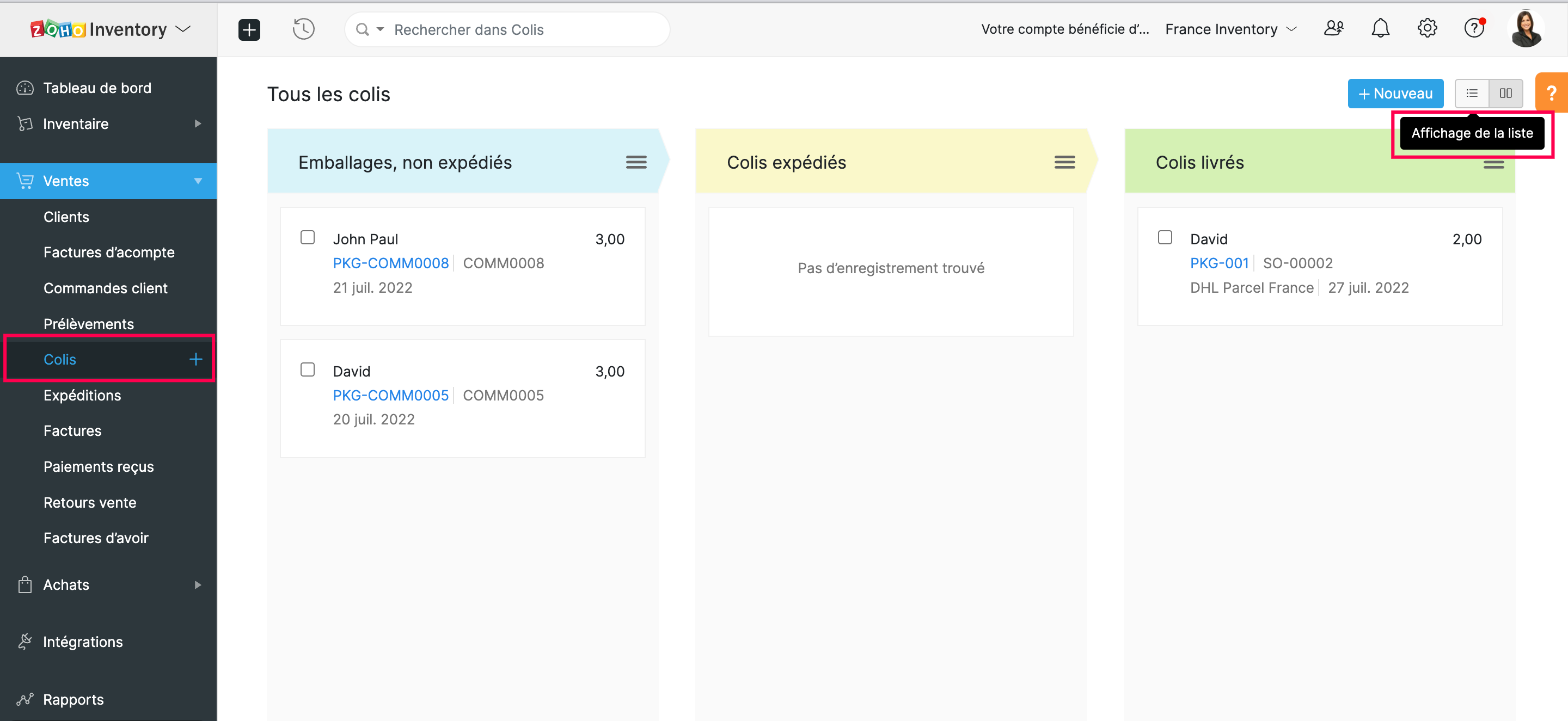
- Pour créer un nouveau colis, sélectionnez "+ nouveau".
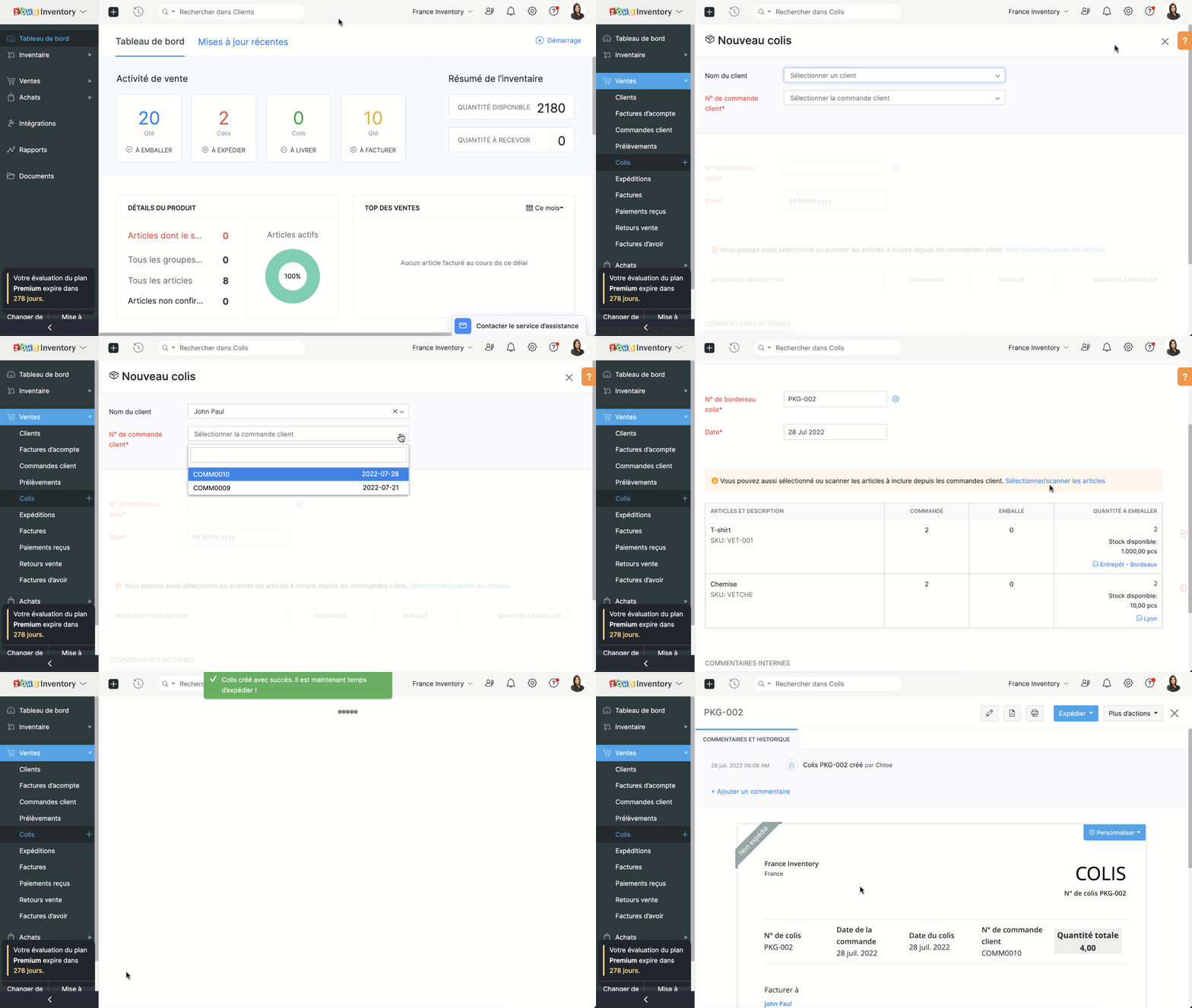
- Saisissez le nom client depuis la liste déroulante.
- Vous pouvez choisir le commende client attribué à partir de la liste déroulante. Sélectionnez pour laquelle vous souhaitez créer un package. Ainsi, tous les articles de la commande client seront automatiquement intégrés dans le nouveau colis.
- Remarque : Il est impossible de créer un colis sans établir une commande client. Seuls ceux qui sont confirmés seront affichés dans la liste déroulante. Si la commande client est en version brouillon, convertissez-la en commande confirmée avant de créer un colis.
- Saisissez le numéro du colis et sélectionnez la date. Par défaut, le numéro de colis est généré automatiquement. Pour personnaliser, cliquez sur "Paramètres" à côté de ce champs et sélectionnez l'option "Je les ajouterai manuellement à chaque fois".
- Saisissez des remarques internes pour référence et enregistrez.
Méthode - 2
- Créer un colis à partir d'une commande client
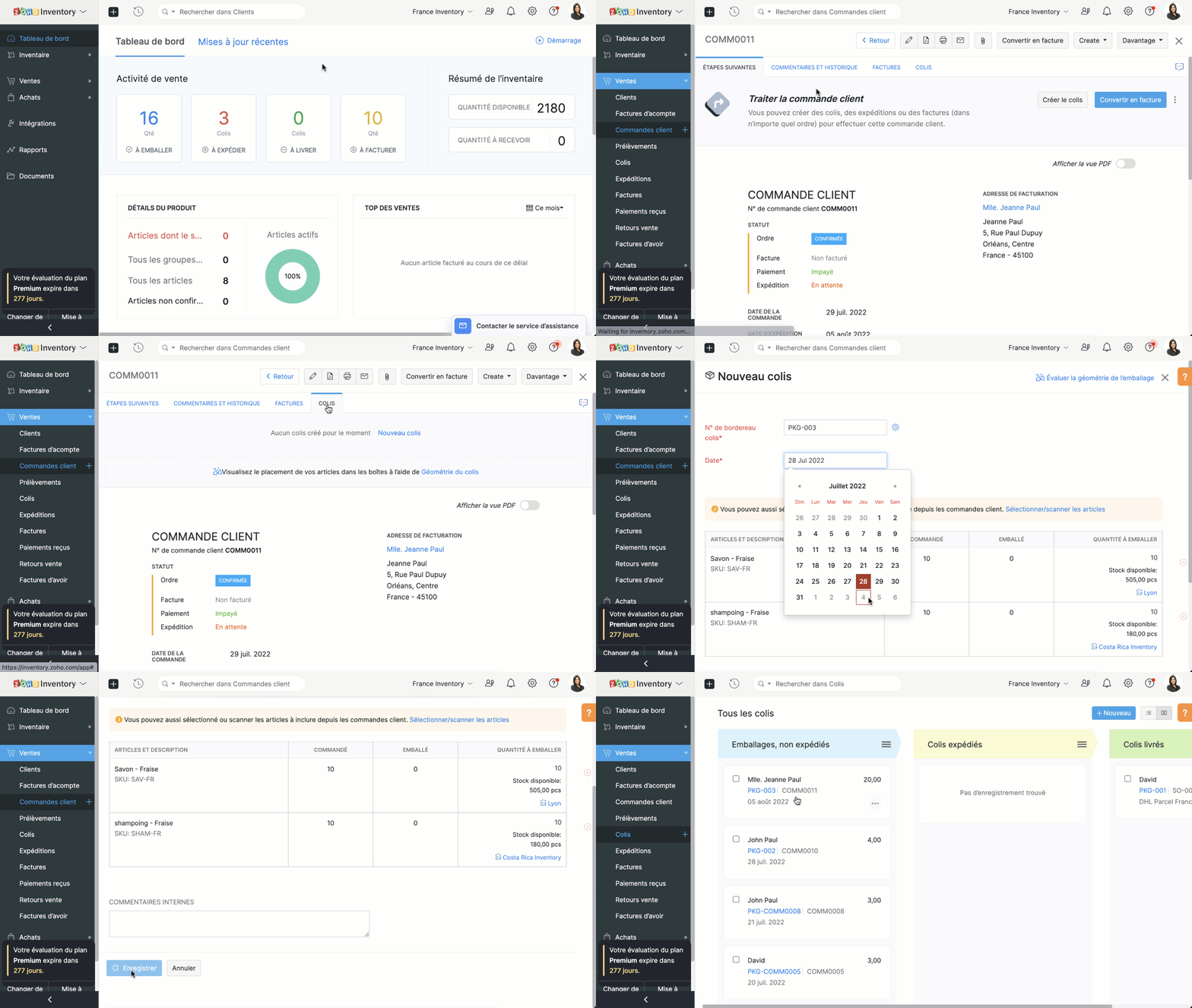
- Passez à l'onglet "Commandes client" et sélectionnez pour une commande qui a des articles à emballer.
- Sélectionnez "Nouveau Colis/ Colis".
- Saisissez le numéro du bordereau de colis et la date d'emballage.
- Si vous avez activé le suivi avancé des stocks, vous pouvez sélectionner les numéros de série/de lot pour les articles.
- Passez à "Sélectionner les numéros de série / de lot sous la quantité.
- Sélectionnez les numéros de série/ de lot des articles à emballer et enregistrez.
Expédition
La fonctionnalité d'expédition peut intégrer votre organisation avec une multitude de fournisseurs de services d'expédition, vous permettant d'obtenir des tarifs d'expédition, d'expédier vos marchandises emballées à votre client, de suivre vos expéditions et de gérer vos livraisons à partir de Zoho Inventory.
Conditions préalables
- Pour les envois manuels, il suffit d'avoir un compte Zoho Inventory.
- Pour les expéditions via un transporteur, vous devez disposer d'un compte d'expédition valide auprès du fournisseur de services d'expédition avant de configurer votre intégration avec Zoho Inventory.
- Vous pouvez créer l'expédition uniquement pour les commandes clients mises en colis.
Créer des expéditions
- Accéder à l'onglet "colis".
- Sélectionnez le colis à livrer. Sous l'onglet "Expédier, choisissez parmi les différentes méthodes d'expédition - "Expédier manuellement" et "Expédier par transporteur".
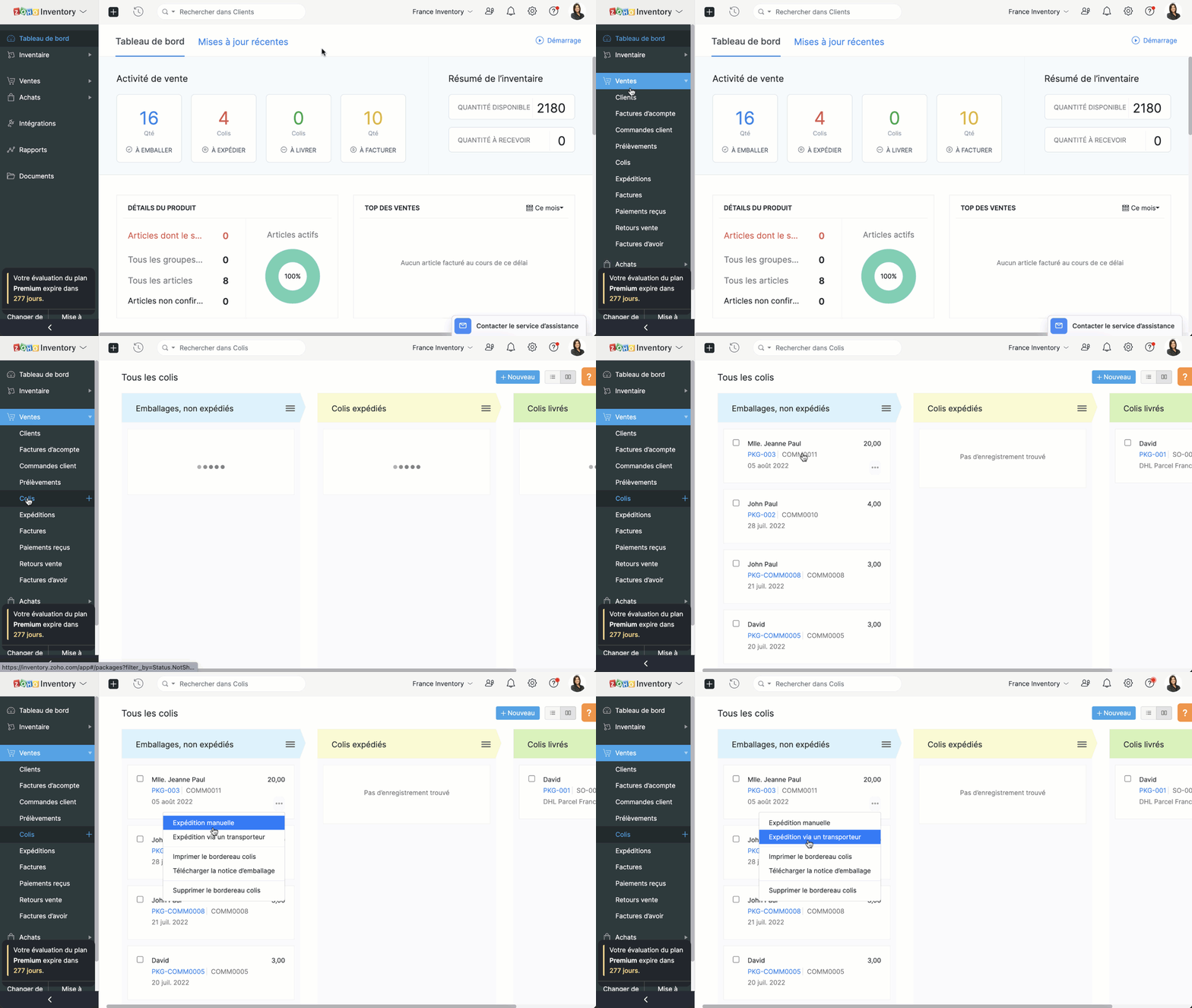
Expédier manuellement
- Cette méthode d'expédition est utilisée souvent pour réaliser des commandes hors ligne.
- Comme le nom indique, la plupart des informations sont saisies manuellement.
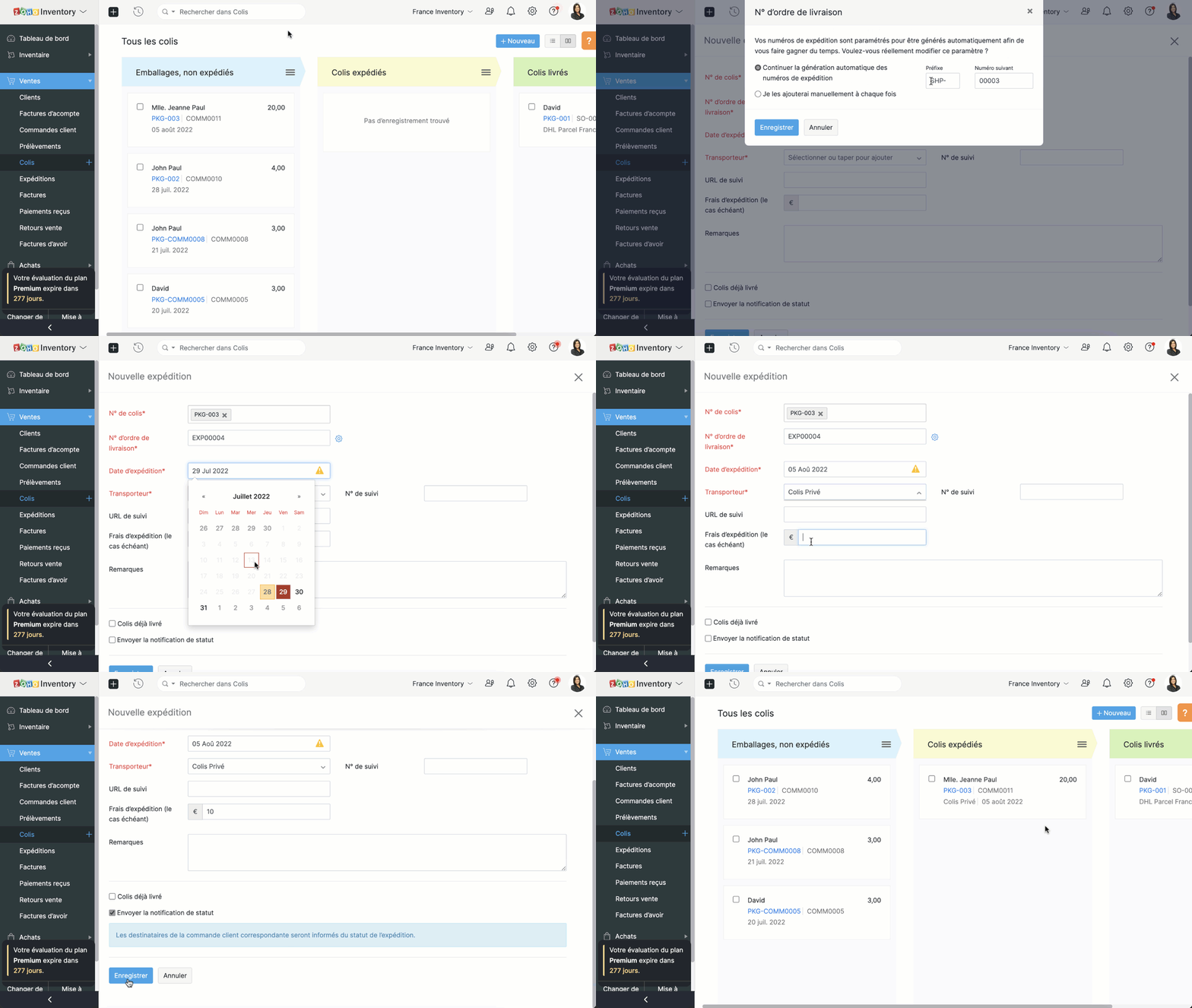
Expédier par transporteur
Lorsque vous choisissez cette méthode d'expédition;
- Choisissez le transporteur.
- Par défaut, l'adresse de départ sera l'adresse de votre organisation et l'adresse d'arrivée sera celle de client que vous avez enregistré dans vos contacts.
- Enregistrez et vous passerez à la page des détails d'expéditions.
- Dans cette section, des informations telles que la date/le jour de la livraison, les frais d'expédition de votre transporteur, la taille du colis sont ajoutées.
- Enregistré ces informations et voici un ordre d'expédition et une étiquette d'expédition sont créés.
N'hésitez pas à poser toutes vos questions et suggestions en commentaire.
L'équipe Zoho France.
Topic Participants
Kinjal Lodaya
GUILLIN
Sticky Posts
Collaboration sans faille avec Zoho One
Bonjour à tous, Dans cet article nous allons voir comment Zoho One permet une collaboration à différents niveaux . La façon dont nous travaillons évolue. À mesure que les entreprises se mondialisent, la plupart des activités sont menées en équipe.
Recent Topics
Custom Related List Inside Zoho Books
Hello, We can create the Related list inside the zoho books by the deluge code, I am sharing the reference code Please have a look may be it will help you. //..........Get Org Details organizationID = organization.get("organization_id"); Recordid = cm_g_a_data.get("module_record_id");Zoho Meeting - Feature Request - Introduce an option to use local date and time formating
Hi Zoho Meeting Team, My feature request is to add an option for dates to be displayed in the users local format. This is common practice across Zoho applications and particularly relevant to an application like Zoho Meeting which revolves around dateCannot give public access to Html Snippet in Zoho Creator Page
Hi, I created a form in Zoho Creator and published it. The permalink works but I want to override the css of the form. (style based URL parameters is not good enough) So I created a page and added an Html snippet. I can now override the css, which isHow can Outlook 365 link back into Zoho Projects so meetings and events in Outlook calendar show in Zoho?
We use Outlook 365 for our emails and diaries and have integrated Zoho Projects with Office 365. One challenge we face is getting Zoho Projects to recognise when we have meetings and events in Outlook and not allow project managers to assign tasks over that period. Is there a way to resolve this? ThanksOn Edit Validation Blueprint
Hello, I have a notes field and a signature field. When the Approve button is clicked, the Signature field will appear and must be filled in. When the Reject button is clicked, the Notes field will appear and must be filled in. Question: Blueprint willZoho Invoice en Navarra (Spain)
Hola, ¿Alguien usa Zoho Invoice en la Comunidad Foral de Navarra? En Navarra tenemos un sistema tributario diferente y no aplica Verifactu (la Hacienda Foral de Navarra ha anunciado su alternativa, NaTicket, pero no ha informado cuándo entrará en vigor).Emails from Zoho are getting blocked due to Zoho IP address being blacklisted
This is the info I got from my hosting provider – please address this issue immediately. I don’t expect this from such a big household name. Every single invoice I have sernt it not being received by my clients, all being blocked. All of a sudden. Asagentid : Where to find?
I've been looking around for this agenId to check for the total ticket assigned on a specific agent url :"https://desk.zoho.com/api/v1/ticketsCountByFieldValues?departmentId=351081000000155331&agentId=35108xxxxxx132009&field=statusType,status" type :GETZoho DataPrep integration with OpenAI (beta)
We are thrilled to announce Zoho DataPrep's integration with OpenAI. The public beta roll-out opens up three features. Users who configure their OpenAI Organizational ID and ChatGPT API key (Find out how) will be able access the features. The featuresAI Bot and Advanced Automation for WhatsApp
Most small businesses "live" on WhatsApp, and while Bigin’s current integration is helpful, users need more automation to keep up with volume. We are requesting features based on our customer Feedbacks AI Bot: For auto-replying to FAQs. Keyword Triggers:Setting total budget hours for a specific project
Hi there, I work on a lot of projects that have fixed budget hours. Is there a way to enter the total budgeted hours so i can track progress and identify when hours have been exceeded. I see in the projects dashboard there is a greyed out text sayingClone entire dashboards
If users want to customize a dashboard that is used by other team members, they can't clone it in order to customize the copy. Instead they have to create the same dashboard again manually from scratch. Suggestion: Let users copy the entire dashboardIntroducing Formula Fields for performing dynamic calculations
Greetings, With the Formula Field, you can generate numerical calculations using provided functions and available fields, enabling you to derive dynamic data. You can utilize mathematical formulas to populate results based on the provided inputs. ThisGetting started with Zoho PDF Editor
Hello users, If you are new to Zoho PDF Editor or aren't sure of its full potential, then this article is for you. Zoho PDF Editor is a free online PDF editing tool, that allows you to upload and edit PDFs, insert text and images, add fillable and e-signatureZoho Projects - Cloning a task does not trigger task workflow when created
Hello! I have a Project where my team uses a set of tasks from a tasklist as templates, so we could simply clone it and drag it to another list in kanban view to avoid creating a new one from scratch. The process works well, but after cloning it the newPurchase Orders not in sequence
I am unable to sort by Purchase Order Numbers. I can only sort by date; however, the PO numbers aren't in the order they were entered. This was not the case prior to today.Internal Fillable Contract with Zoho Writer (Before Sending to Client)
Hi everyone, I’m trying to automate the following process in Zoho CRM and would appreciate some guidance. Process: When a Deal moves to a specific stage, CRM triggers an automation. CRM sends a contract template to an internal team member so they canDate/time displayed in ZohoCRM does not match date/time of entries in ZohoForm
Hello there, we use a ZohoForm as a worksheet, i.e. users use it to track start time, break and stop time for every working day. The ZohoCRM org time zone is set on GM -4, so is the Time Zone in the Date&Time section in ZohoForm (see attachment). DespiteUpdate Existing Records greyed out in Free Version
Trying to update records from an Excel sheet, and not getting the option to update. Only option is to add as new accounts. All documentation I can see says update should be an option! Accounts, Leads, Contacts, all the same.Dynamically Populate Picklist Values from Another Module Using Client Script
I am working in Zoho CRM and trying to dynamically populate a picklist field in the Partners module using values stored in another custom module. I have two modules: 1. Partners Module Field: Partner_Type_Pick Field Type: Picklist 2. Partners_Type ModuleAdd zoho calendar to google calendar
Hi I keep seeing instructions on how to sync Zoho CRM calendar with google calendar but no instructions on how to view Zoho calendar in my google calendar.Zoho Community Digest : Jan 2026 | Part 1
Hello Everyone! Staying in the loop with Zoho's latest product updates and features across the vast Zoho Community Forums can be a real challenge. We get it. With over 50+ applications, each with its dedicated forum, it's easy to miss out on importantWorld date & time format
Hello, Is there a timeline to get the worldwide used date and time format ? I mean not the american one... I mean day month year, and 24 hours clock. RegardsNimble enhancements to WhatsApp for Business integration in Zoho CRM: Enjoy context and clarity in business messaging
Dear Customers, We hope you're well! WhatsApp for business is a renowned business messaging platform that takes your business closer to your customers; it gives your business the power of personalized outreach. Using the WhatsApp for Business integrationConditional layouts - support for multi-select picklists
Hi, The documentation for conditional layouts says the following: "Layout Rules cannot be used on the following field types: Auto Number Lookup Multi Select Lookup User Lookup Formula File Upload Multi Line" I have a custom module with a multi-pick listDont want to list inactive items.
If an item is made inactive, there is no point in showing it in the item list. Please provide an option to hide all inactive items in 'Preferences'.Actual vs Minimum
Hi all, I am sure I am not the only one having this need. We are implementing billing on a 30-minute increment, with a minimum of 30 minutes per ticket. My question is, is there a way to create a formula or function to track both the minimum bill vs theClient Script Not Working When Field is Set by Workflow
Problem Context: I have implemented a client script in the Cases module that automatically assigns commands based on the value of the Priority field. The script functions correctly when the Priority field is manually set by a user through the form. ObservedIntegration of CRM and Recruit
hi team, Is it possible to sync deals <> job openings from only 1 pipeline? My configuration of CRM has pipeline for each business unit, so I will have all data in the CRM system. body leasing and recruitment is one BU (hence 1 pipeline) - can I sync{Action Required} Re-authenticate your Google Accounts to Continue Data Sync
Hello Users! To align with Google’s latest updates on how apps access files in Google Drive, we’ve enhanced our integration to comply with the updated security and privacy standards, ensuring safer and more reliable access to your data. With this update,integrating Zoho CRM vendors with Zoho projects
In most of our projects we collaborate with our Vendors. Being able to integrate only Accounts and not Vendors from CRM, is a huge limitation for our perspective and needs. We would really love to see this feature in the CRM-Projects integration.Zoho Creator Workshops 2026—Europe & UK | Coming to a city near you!
Hello everyone! We're excited to announce the Zoho Creator Workshop Series 2026, coming to cities across Europe and the United Kingdom this year! Whether you're looking to explore the intermediate-to-advanced capabilities of Creator or you're a seasonedValidation rule for Date field
The condition settings for a Date field are are absolutlly usless. Conditions can only be set for a specific date, which is logically ineffective in most cases. When setting a condition for a Date field, users usually need to compare the value relativeNumber 9 envelopes for invoice printing
I email and print invoices. Being new to Zoho and coming from QB, we did both as we have a more traditional So in Zoho i want to do the same using Number 9 envelopes. These have both a return window and mail to windoow see attached image. Im just looking for best suggestions on how to get a ZOHO invoice to work, so I can mail my invoices...Zoho Books/Square integration, using 2 Square 'locations' with new Books 'locations'?
Hello! I saw some old threads about this but wasn't sure if there were any updates. Is there a way to integrate the Square locations feature with the Books locations feature? As in, transactions from separate Books locations go to separate Square locationsOpen Sans Font in Zoho Books is not Open Sans.
Font choice in customising PDF Templates is very limited, we cannot upload custom fonts, and to make things worse, the font names are not accurate. I selected Open Sans, and thought the system was bugging, but no, Open Sans is not Open Sans. The realSuper Admin Logging in as another User
How can a Super Admin login as another user. For example, I have a sales rep that is having issues with their Accounts and I want to view their Zoho Account with out having to do a GTM and sharing screens. Moderation Update (8th Aug 2025): We are workingAdd Reporting feature to display variance/change columns when comparing periods
When running reports to compare periods (for example, Profit and Loss comparing current year to previous), I would like to be able to display variance columns in both (a) amount or (b) percentage.Payroll and BAS ( Australian tax report format )
Hello , I am evaluating Zoho Books and I find the interface very intuitive and straight forward. My company is currently using Quickbooks Premier the Australian version. Before we can consider moving the service we would need to have the following addressed : 1.Payroll 2.BAS ( business activity statement ) for tax purposes 3.Some form of local backup and possible export of data to a widely accepted format. Regards Codrin MitinInvalid scope choice: Workdrive integration in CRM
Bug: There is an invalid option in the permission choices for Workdrive integration in CRM. If the entry "WorkDrive.teamfolder.CREATE" is selected, it will return a message indicating invalid OAuth scope scope does not exist.Next Page