Enhancements to the formula field in Zoho CRM: Auto-refresh formulas with the "Now" function, stop formula executions based on criteria, and include formulas within formulas
Dear Customers,
We hope you're well!
By their nature, modern businesses rely every day on computations, whether it's to calculate the price of a product, assess ROI, evaluate the lifetime value of a customer, or even determine the age of a record.
With Zoho CRM, you can include such calculations within records using the formula field. Today, we're introducing some new enhancements that aim to improve the accuracy and usability of formulas in your business processes.
Let's look at them!
Enhancement 1: Auto-refresh time-based formulas to view real-time values.
Businesses rely on time-based computations to conduct various analyses. Some computations measure time like a stopwatch. For example:
- To ascertain the possibility a customer might churn, you would compute the age of their deals.
- To validate an applicant's eligibility for an insurance policy, you would calculate the age of the applicant as of the current date.
The above examples are ongoing calculations that show the age of the record or of the customers. For these types of computations, you might expect that the formula is constantly ticking and rendering an accurate time measurement whenever you view the record. However, formula fields in fact compute and render the latest result only when the record is edited manually or updated via automation. By simply viewing a record, an agent may not be seeing accurate results. This enhancement addresses this.
Though formulas that provide the latest values include a "now" function in their syntax, computing all of these formulas continually and concurrently across all records poses a significant technical constraint. To address this constraint, we've introduced a checkbox to the formula field property labeled, Automatically refresh formula fields containing the Now function in real time.
If checked, the auto-refresh checkbox makes the relevant formula run every time the user visits or edits the record. This means users will always see the correct time measurements.

Limitation:
- You can apply the auto-refresh only for two fields with the Now function per module.
- Formulas with date/ date time return types cannot be used in workflows that are based on date/time -based triggers.
- Fields enabled with auto-refresh will have updated values every time you view them. But, this doesn't qualify for record edit. If you have automations based on edit of a record, this record will not be used unless the record is really "edited".
- Also, creating custom views and filters using these fields cannot be done.
Enhancement 2: Stop formula executions based on criteria
In contrast to the case above—where you'd expect the formula to run constantly—there are scenarios wherein you may want to stop a computation from executing. Let's say a customer has churned, and you want to calculate the time it took them to churn. In that case, you might want the formula to stop computing under certain conditions.
Accordingly, you can use this new function to:
- Calculate the number of days the deal was under negotiation
- Calculate the number of days spent in trial before conversion
- Calculate the number of days taken to ship a product
You may want to stop ongoing computations whenever there are events acting upon a given record. By doing so, you can determine the amount of time the record spent in a particular stage.
Previously, there hasn't been any functionality in Zoho CRM that effectively stops a formula from computing. Even when a cutoff date has passed, formulas continued to compute durations. With this enhancement, you can stop computations or freeze values based on specific criteria.
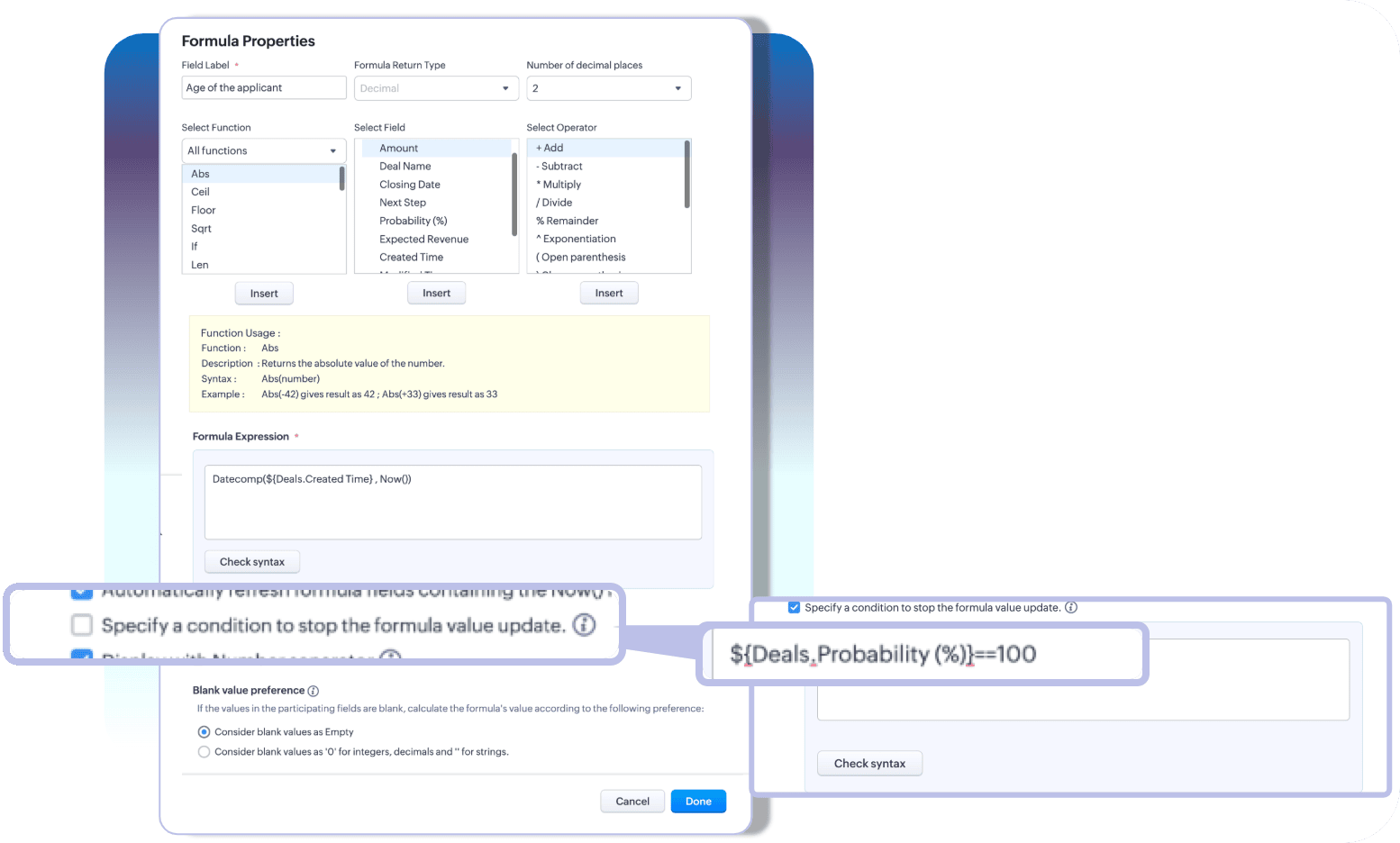
With these two enhancements, you can choose how you want your time-based formulas to be computed—to keep them running or to stop at a given time.
Limitation:
A formula field that has auto-refresh and stop criteria enabled, then those fields cannot have multiline fields, picklists, and lookup fields as participating fields.
Enhancement 3: Include an existing formula as part of another formula's component
A formula is only as powerful as its components. Zoho CRM enables you to construct various complex formulas, but one missing piece has been the inability to include an existing formula field to construct a new one.
Thus far, you could do this by building a long and linear syntax.
For example, let's say you want to determine the discounted value and overall discount percentage for your finalized quotes. Firstly, to determine the discount value, you'd write a formula.

Next, to find the discount percentage, you'd write another formula that looks something like this:

As you can see, the structure of the formula involves an existing computation. In Zoho CRM, to achieve this, you'd first formulate the discount value, and then—to find the percentage—you have to repeat the discount formula to get the percentage.

For a simple formula like this, the syntax is fairly easy to understand. But imagine calculating commissions, which would involve several smaller formulas—in which case, you have to repeat the entire formula structure even if you already have them computed in your record layout.
This is complex, redundant, and time-consuming—problems that this latest enhancement addresses.
A formula field looks like any other field in Zoho CRM. Thus, in addition to the list of fields available under the fields part of the formula configuration, all the existing formula fields will also be listed. Admins can construct new formulas using the existing formulas without having to repeat syntax.

That's all for the updates. If you have any feedback or questions, please drop them in the comments section. Let's connect!
Help document: Creating Formula fields in Zoho CRM
 Release plan: These enhancements are lined up for release DC by DC, gradually. We will keep you posted on the comments accordingly.
Thanks and have a good one!
Kind regards,
Saranya Balasubramanian
Topic Participants
Saranya Balasubramanian
Zohoboy
Haiku Technical Support
Toca Travel
Sravani
Sticky Posts
Good news! Calendar in Zoho CRM gets a face lift
Dear Customers, We are delighted to unveil the revamped calendar UI in Zoho CRM. With a complete visual overhaul aligned with CRM for Everyone, the calendar now offers a more intuitive and flexible scheduling experience. What’s new? Distinguish activitiesVoC in Zoho CRM is now data savvy: Explore response drilldown, summary components and participation in CRM criteria
VoC has all the goods when it comes to customer intelligence—which is why we're constantly enhancing it. We recently added the following: A customer drilldown component that shows you the list of prospects and customers behind a chart's attribute ExpandedWrapping up 2025 on a high note: CRM Release Highlights of the year
Dear Customers, 2025 was an eventful year for us at Zoho CRM. We’ve had releases of all sizes and impact, and we are excited to look back, break it down, and rediscover them with you! Before we rewind—we’d like to take a minute and sincerely thank youPresenting ABM for Zoho CRM: Expand and retain your customers with precision
Picture this scenario: You're a growing SaaS company ready to launch a powerful business suite, and are looking to gain traction and momentum. But as a business with a tight budget, you know acquiring new customers is slow, expensive, and often deliversCreate and populate a record in an instant: Introducing zero-shot field prompting to Zia's ICR
A couple of months ago, we upgraded our in-house AI image detection and validation tool, Zia Vision, with intelligent character recognition (ICR). By training Zia with sample images, you could create and enrich CRM records with data extracted from standard
Recent Topics
How do I remove a data source from Zoho Analytics?
I am unable to find a delte option on a datasource that i put in the system as an error. On teh web it refers to a setup icon but I do not see that on my interface?Add Employee Availability Functionality to Zoho People Shift Module
Hello Zoho People Product Team, Greetings and hope you are doing well. We would like to submit a feature request to enhance the Zoho People Shift module by adding employee availability management, similar to the functionality available in Zoho Shifts.Bigin, more powerful than ever on iOS 26, iPadOS 26, macOS Tahoe, and watchOS 26.
Hot on the heels of Apple’s latest OS updates, we’ve rolled out several enhancements and features designed to help you get the most from your Apple devices. Enjoy a refined user experience with smoother navigation and a more content-focused Liquid GlassDelay in rendering Zoho Recruit - Careers in the ZappyWorks
I click on the Careers link (https://zappyworks.zohorecruit.com/jobs/Careers) on the ZappyWorks website expecting to see the job openings. The site redirects me to Zoho Recruit, but after the redirect, the page just stays blank for several seconds. I'mIs Desk Down?
Across department - always an error. [Status Mode] - error [Table View and the rest] - workingZoho Mail 505 error I can not send email
Hi, I’m having issues sending emails from my custom domain email address. When I send emails to Outlook addresses, I receive an “Undeliverable 505” error. However, emails send and receive correctly when I use Gmail. This is important for my business,How do I change the wording of the tile of SignForm?
When my user opens a SignForm url, the title that is presented is always "SignForm signer Information" and a form is displayed asking for the username and email address. This can be confusing to the end user. How can I change the title at least (Or atHow to link tickets to a Vendor/Vendor Contact (not Customer) for Accounting Department?
Hi all, We’re configuring our Accounting department to handle tickets from both customers and vendors (our independent contractors). Right now, ticket association seems to be built around linking a ticket to a Customer / Customer Contact, but for vendor-originatedProblem with CRM Connection not Refreshing Token
I've setup a connection with Zoom in the CRM. I'm using this connection to automate some registrations, so my team doesn't have to manually create them in both the CRM and Zoom. Connection works great in my function until the token expires. It does not refresh and I have to manually revoke the connection and connect it again. I've chatted with Zoho about this and after emailing me that it couldn't be done I asked for specifics on why and they responded. "The connection is CRM is not a feature toAutomatic Matching from Bank Statements / Feeds
Is it possible to have transactions from a feed or bank statement automatically match when certain criteria are met? My use case, which is pretty broadly applicable, is e-commerce transactions for merchant services accounts (clearing accounts). In theseUnify Overlapping Functionalities Across Zoho Products
Hi Zoho One Team, We would like to raise a concern about the current overlap of core functionalities across various Zoho applications. While Zoho offers a rich suite of tools, many applications include similar or identical features—such as shift management,Automation #7 - Auto-update Email Content to a Ticket
This is a monthly series where we pick some common use cases that have been either discussed or most asked about in our community and explain how they can be achieved using one of the automation capabilities in Zoho Desk. Email is one of the most commonlyTicket to article and Ticket to template
Hello! I would like to know if it is possible (and how) to do the following actions: 1. To generate an article from a ticket (reply + original message) 2. Easy convert an answer to an email templateIs there API Doc for Zoho Survey?
Hi everyone, Is there API doc for Zoho Survey? Currently evaluating a solution - use case to automate survey administration especially for internal use. But after a brief search, I couldn't find API doc for this. So I thought I should ask here. ThanKaizen #225 - Making Query-based Custom Related Lists Actionable with Lookups and Links
Hello everyone! Welcome back to another post in the Kaizen series! This week, we will discuss an exciting enhancement in Queries in Zoho CRM. In Kaizen #190, we discussed how Queries bridge gaps where native related lists fall short and power custom relatedWebDAV / FTP / SFTP protocols for syncing
I believe the Zoho for Desktop app is built using a proprietary protocol. For the growing number of people using services such as odrive to sync multiple accounts from various providers (Google, Dropbox, Box, OneDrive, etc.) it would be really helpfulChange the "from" field
Hello, I used some random word to create the account ID to later host the domain based emails. That username shows up in the "from" field on test emails. How do I change that to a custom one, like first name/last name or business name? I tried to create second user and "named" it the way I want and it worked to a degree, although the "from" field shows all lower case letters, while original had some capital letters. So the "all-low-case" is another issue I am having... Thank you[Free Webinar] Learning Table Series - AI-Enhanced Logistics Management in Zoho Creator
Hello Everyone! We’re excited to invite you to another edition of Learning Table Series, where we showcase how Zoho Creator empowers industries with innovative and automated solutions. About Learning Table Series Learning Table Series is a free, 45-60How to use Rollup Summary in a Formula Field?
I created a Rollup Summary (Decimal) field in my module, and it shows values correctly. When I try to reference it in a Formula Field (e.g. ${Deals.Partners_Requested} - ${Deals.Partners_Paid}), I get the error that the field can’t be found. Is it possibleZoho Creator to Zoho CRM Images
Right now, I am trying to setup a Notes form within Zoho Creator. This Notes will note the Note section under Accounts > Selected Account. Right now, I use Zoho Flow to push the notes and it works just fine, with text only. Images do not get sent (thereError Logs / Failure logs for Client Scripts Functions
Hi Team, While we are implementing client scripts for the automation, it is working fine in few accounts but not working for others. So, it would be great if we can have error Logs for client scripts also just like custom functions. Is there any way thatZoho Books blocks invoicing without VeriFactu even though it is not mandatory until 2027
I would like to highlight a very serious issue in Zoho Books for Spain. 1. The Spanish government has postponed the mandatory start of VeriFactu to January 1st, 2027. This means that during all of 2026 businesses are NOT required to transmit invoicesProblem : Auto redirect from zoho flow to zoho creator
Hi there, I've been waiting for zoho team to get back on this for last couple of days. Anyone else have the problem to access zoho flow? everytime I click on zoho flow it redirects me to zoho creator. I tried incognito mode but it still direct me to zohoWhy am I seeing deleted records in Zoho Analytics syncing with Zoho CRM?
I have done a data sync between Zoho CRM and Zoho Analytics, and the recycle bin is empty. Why do I see deleted leads/deals/contacts in Zoho Analytics if it doesn't exist in Zoho CRM? How can I solve this problem? ThanksPeppol: Accept Bill (Belgium)
Hi, This topic might help you if you're facing the same in Belgium. We are facing an issue while accepting a supplier bill received by Peppol in Zoho Books. There is a popup with an error message: This bill acceptance could not be completed, so it wasbouncing emails
My recurring invoices have bounced backZoho Books is now integrated with Zoho Checkout
Hello everyone, We're glad to be announcing that Zoho Books is now integrated with Zoho Checkout. With this integration, you can now handle taxes and accounting on your payment pages with ease. An organization you create in Zoho Checkout can be added to Zoho Books and vice-versa. Some of the key features and benefits you will receive are: Seamless sync of customer and invoice data With the end-to-end integration, the customer and invoice details recorded via the payment pages from Zoho CheckoutSync Issue
My Current plan only allows me with 10,000 rows and it is getting sync failure how to control it without upgrading my planAdd Zoho PDF to Zoho One Tool Applications
It should be easy to add from here without the hassle of creating a web tab:JOB WISE INVOICE PROCESS
I WANT TO ENABLE JOB WISE TRACKING OF ALL SALES AND PURCHASEPDF Template have QTY as first column
I want to have the QTY of an item on the sales orders and invoices to be the first column, then description, then pricing. Is there a way to change the order? I went to the Items tab in settings but don't see how to change the order of the columns onRAG (Retrieval Augmented Generation) Type Q+A Environment with Zoho Learn
Hi All, Given the ability of Zoho Learn to function as a knowledge base / document repository type solution and given the rapid advancements that Zoho is making with Zia LLM, agentic capabilities etc. (not to mention the rapid progress in the broaderIn App Auto Refresh/Update Features
Hi, I am trying to use Zoho Creator for Restaurant management. While using the android apps, I reliased the apps would not auto refresh if there is new entries i.e new kitchen order ticket (KOT) from other users. The apps does received notification but would not auto refresh, users required to refresh the apps manually in order to see the new KOT in the apps. I am wondering why this features is not implemented? Or is this feature being considered to be implemented in the future? With theConsolidated report for multi-organisation
I'm hoping to see this feature to be available but couldn't locate in anywhere in the trial version. Is this supported? The main aim to go to ERP is to have visibility of the multi-organisation in once place. I'm hopeful for this.IMAP mail after specify date
Hi My customer's mail server is on premise and mail storage is very huge. So It never finish sync. and finally stop sync. Cloud CRM have a option like zoho mail sync mail after some date.Claude + MCP Server + Zoho CRM Integration – AI-Powered Sales Automation
Hello Zoho Community 👋 I’m excited to share a recent integration we’ve worked on at OfficehubTech: ✅ Claude + MCP Server + Zoho CRM This integration connects Zoho CRM with Claude AI through our custom MCP Server, enabling intelligent AI-driven responsesSearch Bar positioning
Why is the Search bar on the far right when everything is oriented towards the left?Import Error: Empty values for mandatory fields - Closing Date
Hello, I've tried multiple times to import a CVS Potential list from another Zoho account. But the error message I get is: Empty values for mandatory fields - Closing Date There are valid dates in this field, so I don't understand why this error messagesFeature Requests - Contact Coloured Picklist Visibility & Field Visibility During Ticket Creation
Hi Desk Team, I have 2 feature requests for you. Since Coloured Picklists are now available in Desk, It would be great if the colours were visible on the Related Details (Contact Information) when creating a ticket. In the screenshot below, I have 2 fieldsAccounts Receivable Balances Differs in Balance Sheet, Customer Balance Report, AR Ageing Summary, and AR Ageing Details.
Hello Zoho Accounts Receivable Balances Differs in Balance Sheet, Customer Balance Report, AR Ageing Summary, and AR Ageing Details. Please clarify and fix the issues here. ThanksNext Page